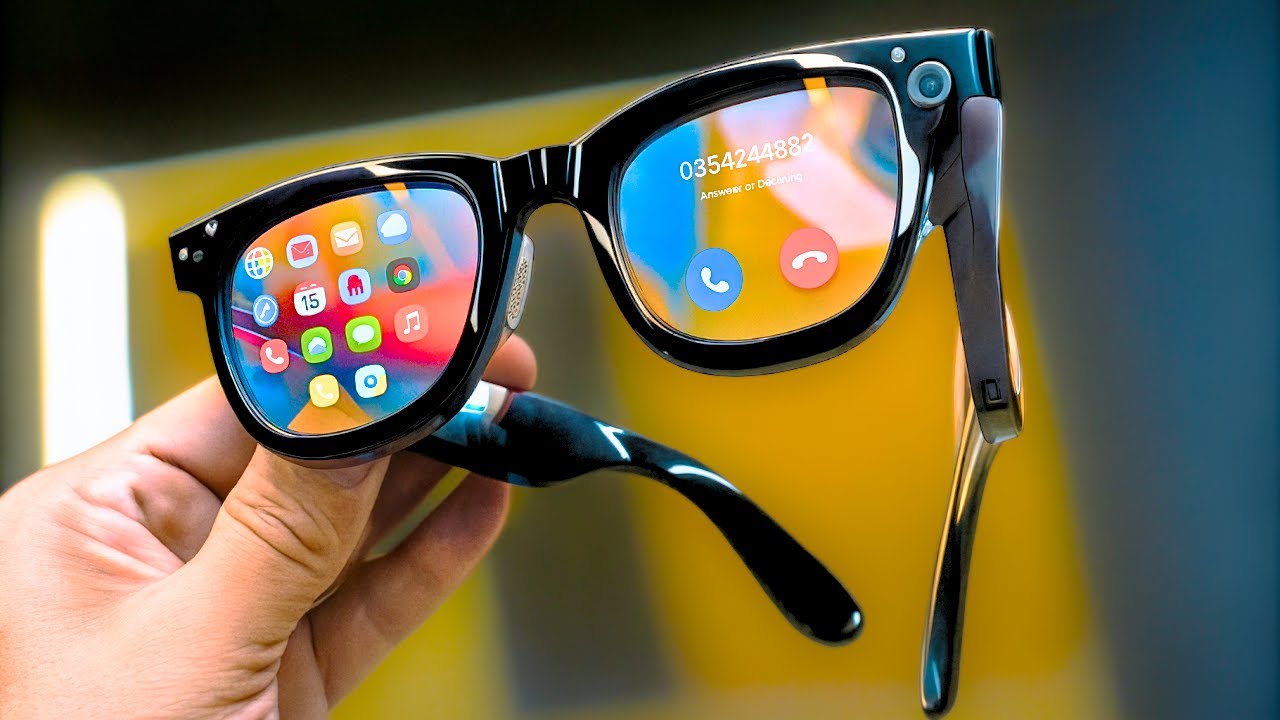

A small screen becomes frustrating the moment you try to use it for a long movie, a detailed game, or a laptop workspace. AR glasses solve that problem by putting a large private display in front of your eyes, but the experience varies sharply between models. Screen size alone does not tell you how stable, bright, comfortable, or useful a pair will feel.
Our Best ar glasses picks range from simple USB-C video glasses to models with native 3DoF tracking, 6DoF support, electrochromic dimming, 2D-to-3D conversion, and multi-screen software. The RayNeo Air 4 Pro 3D is the one we'd buy first for most people, while the list also includes lighter glasses, more advanced spatial displays, and a Batman collector edition.
Comparison table
| # | Product | Award | Display | Tracking | Best for |
|---|---|---|---|---|---|
| 1 | RayNeo Air 4 Pro 3D | Best overall | 201-inch, HDR10, 120Hz | Not specified | Movies, gaming, and simple USB-C setup |
| 2 | XREAL One Pro M | Best spatial display | 171-inch, FHD, 120Hz | Native 3DoF | Anchored screens and gaming |
| 3 | RayNeo Air 3S | Best color accuracy | 201-inch, FHD, 120Hz | Not specified | Long movie sessions |
| 4 | VITURE Beast | Best premium immersion | 174-inch, 1200p, 120Hz | Built-in 3DoF | Bright rooms and spatial work |
| 5 | RayNeo Air 4 Pro Batman | Best collector edition | 201-inch, HDR10 | Not specified | Batman fans |
| 6 | XREAL a01+ | Best lightweight option | 147-inch, FHD, HDR10 | Stabilized follow mode | Travel and relaxed viewing |
| 7 | XREAL 1S | Best screen flexibility | Up to 500-inch, 120Hz | Native 3DoF | Wide virtual screens and 3D |
| 8 | XREAL One Pro L | Best for larger IPD | 171-inch, FHD, 120Hz | Native 3DoF | Larger face shapes |
| 9 | VITURE Luma Ultra | Best for prescription flexibility | 152-inch, 1200p, 120Hz | 6DoF cameras | Spatial computing and myopia adjustment |
| 10 | RayNeo Air 4 Pro HDR | Best private theater | 201-inch, HDR10, 120Hz | Not specified | Console and handheld gaming |
1. RayNeo Air 4 Pro 3D: Best Overall

Pros
- 201-inch HDR10 virtual display
- 120Hz motion for games and video
- AI SDR-to-HDR processing
- Native 3D and 2D-to-3D conversion
- Lightweight 0.18-pound design
Cons
- No battery inside, so the connected device supplies power
- Requires a USB-C video-output connection
- Sound Tube accessory is optional
Best for: someone who wants a large private display with minimal setup.
The RayNeo Air 4 Pro 3D gets the fundamentals right. It is a straightforward pair of video glasses that connects by USB-C, produces a huge private image, and does not ask you to install an app before watching something. That simplicity matters when the goal is to connect a phone, handheld, MacBook, iPad, or console and start viewing.
The display is rated at 201 inches and supports HDR10, with the Vision 4000 chip handling AI SDR-to-HDR upscaling. In practical terms, compatible HDR content should have brighter highlights and deeper blacks, while ordinary video can receive processing for added color, sharpness, and motion clarity. The 120Hz refresh rate is the more immediately useful feature for games, since camera pans and fast movement should appear smoother than they would on a lower-refresh display.
This model also supports native 3D films and AI depth enhancement that converts 2D content into 3D. That gives it a more flexible entertainment role than the simpler XREAL a01+, which is designed primarily as a large stabilized display. Four speakers tuned by Bang & Olufsen provide spatial sound, and a whisper mode is intended to keep listening more private in shared spaces. The glasses weigh 0.18 pounds, so they are light enough to make travel viewing practical.
The catch is the same one that comes with many USB-C display glasses: there is no battery inside. The host device powers the glasses, which keeps the frame light but can drain a phone or handheld faster. Compatibility also depends on the device supporting video output over USB-C, and PlayStation connections may require the appropriate setup. The open-ear speakers will not isolate you from a noisy cabin, either.
Choose the RayNeo Air 4 Pro 3D if you want the cleanest mix of large-screen viewing, 120Hz gaming, 3D features, and broad USB-C compatibility. It is less spatially sophisticated than the XREAL One Pro models, but it is easier to understand and easier to use.
2. XREAL One Pro M: Best Spatial Display

Pros
- Native 3DoF through the X1 chip
- 171-inch 120Hz FHD display
- Wide 57-degree field of view
- Adjustable screen size, distance, and display mode
- M fit covers a 57 to 66mm IPD range
Cons
- Full 6DoF requires the optional XREAL Eye
- HDMI devices may need an adapter or Beam
- Screen size is smaller than the RayNeo Air 4 Pro
Best for: users who want the screen to stay stable as they move their head.
The XREAL One Pro M feels more like a spatial display than a simple wearable monitor. Its X1 chip provides native 3DoF tracking with claimed 3ms motion-to-photon latency, so the virtual screen can remain stable instead of simply following every head movement. That distinction is noticeable when reading, playing a game, or looking away from the center of the image.
Its 171-inch virtual display uses Sony 0.55-inch Micro-OLED panels at 120Hz, and the 57-degree field of view gives the image a broad, theater-like presence. The display is FHD, so it does not have the 1200p detail claimed by the VITURE Beast or VITURE Luma Ultra. Still, the combination of refresh rate, wide view, and stabilization makes it a strong fit for games and desktop work. The glasses can also turn ordinary content into 3D with the built-in REAL 3D mode.
The M version is intended for an IPD between 57 and 66mm. Its three-stage adjustable arms, spring hinge, and multiple nose-pad sizes give it more physical adjustment than the uncomplicated RayNeo designs. Up to 700 nits of brightness and electrochromic dimming help it remain usable in brighter surroundings. One-tap controls let you change brightness, display mode, screen size, or viewing distance without reaching for another device.
The limitation is that its most ambitious spatial feature is not included in the glasses alone. Full 6DoF anchoring requires the optional XREAL Eye, while HDMI sources may require another accessory. The glasses are also a little heavier than the XREAL a01+, at 0.1918 pounds. Audio tuned by Bose engineers is convenient and open, but it is not a replacement for sealed headphones in a loud environment.
Compared with the RayNeo Air 4 Pro 3D, the XREAL One Pro M gives you better control over where the screen sits and how it behaves. The RayNeo has the larger advertised image and more direct 3D entertainment focus. Pick XREAL if spatial stability matters more than maximum screen size.
3. RayNeo Air 3S: Best Color Accuracy

Pros
- 201-inch FHD virtual display
- 120Hz refresh rate
- 98 percent DCI-P3 coverage
- Delta E below 2 color accuracy
- Flicker reduction and low-blue-light certification
Cons
- No stated spatial tracking mode
- Requires regular viewing breaks
- Audio and display setup are less advanced than the premium picks
Best for: viewers who care about color and comfortable long-form video.
The RayNeo Air 3S is the display-focused pick in this group. It does not try to compete with the most advanced spatial systems. Instead, it puts its effort into the image, with a 201-inch FHD HueView display designed for movies, television, and games. The result should appeal to anyone who wants a private cinema screen without needing a large room or a separate display.
RayNeo lists 98 percent DCI-P3 coverage, Delta E below 2, 200, 000:1 contrast, and 145 percent sRGB color. Those figures point toward a wide, vivid color range and accurate rendering rather than a washed-out portable panel. The 120Hz refresh rate helps fast game movement look fluid, although the product information does not specify a spatial tracking system like the XREAL One Pro's native 3DoF.
Eye comfort receives more attention here than on many basic display glasses. The Air 3S uses 3840Hz DC dimming alongside PWM dimming, stepless brightness control, low-blue-light support, and flicker-free certification. These features address the kind of flicker and brightness instability that can make a wearable screen tiring. RayNeo still recommends a 10-minute break after every 30 minutes of use, so the comfort claims should not be read as permission to stare indefinitely.
The dual opposing acoustic chamber design is intended to improve bass, mids, and treble without separate earbuds. That is useful for a movie in bed or on a flight, but the audio system is not described with the same spatial processing or named audio tuning as the Air 4 Pro models. At 0.18 pounds, the frame remains light, though the available information does not mention prescription adjustment or electrochromic lenses.
The RayNeo Air 3S makes more sense than the XREAL One Pro M for a viewer who values color accuracy and simple entertainment. XREAL is the better tool for a screen that needs to stay fixed in space. Choose RayNeo if movies, color, and reduced flicker matter more than spatial computing.
4. VITURE Beast: Best Premium Immersion

Pros
- 174-inch display with 58-degree field of view
- 1200p resolution and 120Hz refresh rate
- Built-in VisionPair 3DoF
- Up to 1250 nits of brightness
- Nine or more electrochromic dimming levels
Cons
- Heavier 88-gram frame
- Some software features depend on the VITURE ecosystem
- The largest features can be excessive for simple video viewing
Best for: people who want a bright, wide display with built-in spatial controls.
The VITURE Beast is built around a more expansive interpretation of AR glasses. Its display reaches 174 inches with a 58-degree field of view, and its 1200p resolution should make text and game interfaces cleaner than the FHD image on the RayNeo Air 3S or XREAL One Pro. That wider view is the feature you notice first. It makes the virtual image feel less like a small panel floating in front of you and more like a screen occupying your visual space.
VisionPair 3DoF is built into the glasses, allowing you to pin, resize, and lock the screen without separate software or a dongle. Modes include Anchor, Smooth Follow, 32:9 UltraWide, and Side Mode. Smart re-centering is useful when the screen drifts away from the position you want, while Auto Transparency can switch between a more immersive view and greater awareness of the surroundings.
Brightness is another major advantage. VITURE specifies up to 1250 nits, a 120Hz refresh rate, and nine or more electrochromic dimming levels. That combination gives the glasses more room to handle a bright office, a plane window, or a dim bedroom. HARMAN AudioEFX handles the sound, with the product promising stronger bass, a wider soundstage, and clearer highs.
The trade-off is weight. The frame is listed at 88 grams, which is far more substantial than the 62-gram XREAL a01+. Its aircraft-grade aluminum-magnesium construction may feel more solid, and tilt-adjustable arms plus magnetic nose pads help with fit, but users sensitive to nose pressure should take the weight seriously. The glasses also sit inside a broader VITURE ecosystem, with multi-screen SpaceWalker support and device-specific accessories adding capability but also complexity.
The VITURE Beast is the pick when screen width, brightness, and built-in spatial control outrank lightness. For a simpler plug-and-play theater, the RayNeo Air 4 Pro 3D is easier to live with. For a serious spatial workstation or bright-room gaming setup, Beast has the more ambitious hardware.
5. RayNeo Air 4 Pro Batman: Best Collector Edition

Pros
- Collector-grade Batman design
- 201-inch HDR10 display
- AI-powered 1200-nit brightness
- Vision 4000 processing
- Bang & Olufsen tuned quad-speaker system
Cons
- The special edition does not add spatial tracking
- Batman styling is not for every buyer
- No battery inside
Best for: Batman fans who want the Air 4 Pro experience with a distinctive collector design.
The RayNeo Air 4 Pro Batman is not a separate technical platform so much as a themed version of the Air 4 Pro concept. Its reason for existing is clear: it adds a collector-grade presentation, a special lens shade, and Batman styling to a pair of glasses that already targets private movie and gaming display use. Fans will care about the identity and finish in a way that a general buyer may not.
The core viewing hardware is serious. HDR10, a 201-inch virtual display, and AI-powered brightness rated at 1200 nits are intended to produce strong highlights and deep blacks. The Vision 4000 chip adds AI SDR-to-HDR conversion, which can give standard content a more processed, cinematic appearance. RayNeo also supports converting 2D content into 3D, so the glasses are more than a plain mirrored display.
Audio comes from four speakers co-tuned by Bang & Olufsen experts, with a claimed 360-degree soundstage. That should make movie dialogue and game effects more engaging without requiring earbuds. As with the standard Air 4 Pro, this design is intended to connect directly to compatible USB-C devices, and the supplied information does not list an internal battery.
The Batman edition's weakness is that its special design does not change the underlying limitations. It has no stated 3DoF or 6DoF system, and its lens shade may be less versatile than the adjustable electrochromic dimming on the VITURE Beast or VITURE Luma Ultra. It is also a narrowly targeted purchase. Someone who does not care about Batman memorabilia should choose the standard RayNeo Air 4 Pro 3D instead.
For the right buyer, though, the appeal is straightforward. The RayNeo Air 4 Pro Batman combines the Air 4 Pro display and audio features with a visual identity that feels like a genuine special edition rather than a generic black frame.
6. XREAL a01+: Best Lightweight Option

Pros
- 62-gram glasses
- 147-inch Full HD Micro-OLED display
- HDR10 and SDR-to-HDR processing
- Stabilized screen-following mode
- Prescription-ready design
Cons
- Nintendo Switch and older iPhones need an adapter
- No stated native 3DoF anchor mode
- The 147-inch image is smaller than several competitors
Best for: travelers who want a light, simple wearable display.
The XREAL a01+ is the easiest pair here to imagine wearing for an entire flight. At 62 grams, it is dramatically lighter than the VITURE Beast and still includes flexible temples and three nose-pad sizes. The frame looks more like sunglasses than a technical headset, which makes it less conspicuous in public.
Its 147-inch virtual display uses dual Full HD 1080p-per-eye Micro-OLED panels, HDR10, and a Pixelworks processor with real-time SDR-to-HDR processing. The image is smaller than the 201-inch displays on the RayNeo models, but the difference may be welcome for someone who wants a large screen without feeling swallowed by it. Four audio modes, including Surround, Whisper, Cinema, and Standard, give the open-ear speakers some flexibility.
The screen uses smooth stabilized tracking that keeps the image centered as you look around. That is useful when reclining, walking around a cabin, or shifting position on a sofa. It is not the same as the native 3DoF anchoring on the XREAL 1S or XREAL One Pro M, so it is better understood as a comfortable follow mode than a fully spatial display.
Connection is through a single USB-C DisplayPort cable, with support for iPhone 15, 16, and 17, compatible Android phones, iPad, Steam Deck, ROG Ally, Mac, and PC. Nintendo Switch, Switch 2, and older Lightning iPhones need an adapter. The glasses also have a 4-meter focal distance, flicker-free 3840Hz dimming, low-blue-light support, and TÜV Eye Comfort 5.0 certification.
The weak point is ambition. The a01+ is not the right pick for someone who wants anchored multi-screen work, full 6DoF, or the biggest field of view. It is the right tool for watching a film, playing a handheld game, or creating a private laptop display while keeping the hardware light. If you are also comparing wearable displays with more camera and spatial features, how camera-based glasses handle privacy and recording is a useful separate question.
7. XREAL 1S: Best Screen Flexibility

Pros
- Virtual screen up to 500 inches
- Native 3DoF through the X1 chip
- 120Hz refresh in 3DoF mode
- 0DoF, anchor, ultrawide, side-view, and 3D modes
- IPD range of 59.5 to 70.5mm
Cons
- The 500-inch figure depends on the selected viewing mode
- 6DoF requires XREAL Eye
- USB-C DP output is required
Best for: users who want one pair of glasses for movies, games, work, and different spatial layouts.
The XREAL 1S is the most configurable display in the group. Its headline feature is a virtual screen up to 500 inches, but the more meaningful advantage is the variety of ways to use that screen. You can switch between 0DoF follow mode, native 3DoF anchor mode, 32:9 or 21:9 ultrawide layouts, Real 3D, and side-view mode.
The X1 chip provides native 3DoF with claimed 3ms motion-to-photon latency. In 3DoF mode, the display runs at 120Hz, while global refresh is listed at 90Hz. That gives game movement a smoother feel in the mode where spatial stability matters most. The optical engine is also claimed to improve clarity by 9 percent, and each unit is individually color-tuned.
Real 3D conversion is performed on the glasses, with support for games, films, apps, and photos at up to 30 frames per second. The product lists 90 to 100ms latency for this mode, so it is better suited to cinematic depth than to timing-sensitive competitive play. Pairing with XREAL Eye can unlock 6DoF anchoring, but that accessory is not part of the basic native 3DoF experience.
Comfort features include low-blue-light and flicker-free viewing, 100 percent UV protection, and an IPD range of 59.5 to 70.5mm. Sound tuned with Bose is intended to provide deeper lows and clear vocals through open-ear speakers. The glasses weigh about 0.176 pounds, placing them between the light a01+ and the heavier premium VITURE frame.
The XREAL 1S is more flexible than the XREAL a01+, but it also asks the buyer to learn more modes and settings. For straightforward movies, the a01+ is simpler. For someone who wants to alternate between a giant theater, an ultrawide workspace, anchored gaming, and 3D viewing, the 1S is the more capable choice. Buyers considering these for a desk should also think about how much room a virtual second screen really needs, since a larger image does not automatically mean a better workstation.
8. XREAL One Pro L: Best for Larger IPD
Pros
- Native 3DoF and 3ms claimed latency
- 171-inch 120Hz FHD display
- 57-degree field of view
- L fit supports a 66 to 75mm IPD
- Adjustable arms and multiple nose pads
Cons
- Full 6DoF needs XREAL Eye
- Same accessory considerations as the M version
- The larger fit is not appropriate for every face
Best for: users who need the larger XREAL One Pro fit.
The XREAL One Pro L has the same core display and spatial feature set as the M version, but its fit is designed for a larger IPD. That distinction deserves its own place in this roundup because alignment is not a minor comfort issue with glasses that project an image directly into each eye. The L model is specified for 66 to 75mm, while the M model covers 57 to 66mm.
Its 171-inch FHD display runs at 120Hz and uses a 57-degree field of view. The X1 chip supplies native 3DoF with claimed 3ms motion-to-photon latency, keeping the virtual image more stable during head movement. REAL 3D can convert games, movies, apps, and photos into a depth effect, while the screen can be adjusted for size and distance using quick controls on the frame.
Bright environments are handled through up to 700 nits of brightness and electrochromic dimming. That gives the One Pro L more control than the basic RayNeo Air 3S, which emphasizes brightness adjustment and flicker control but does not list a spatial anchor mode. Bose-tuned open-ear audio keeps the setup self-contained, although a loud room may still call for separate headphones.
The product supports USB-C devices that output video, including compatible phones, Steam Deck, ROG Ally, MacBook, and Windows PCs. An optional XREAL Eye adds 6DoF spatial anchoring, and some HDMI devices require an adapter or Beam. Those requirements make the system less immediate than the USB-C-only simplicity of the RayNeo Air 4 Pro HDR.
The reason to choose this model over the M version is fit, not image quality. If your IPD is nearer the upper end of the supported range, the L version should be the more sensible starting point. If your measurements fall inside 57 to 66mm, the M version is the better match.
9. VITURE Luma Ultra: Best for Prescription Flexibility

Pros
- 1200p display with up to 1500 nits
- 6DoF tracking from front RGB and depth cameras
- Built-in myopia adjustment up to -4.0D
- 52-degree field of view
- Electrochromic film and 2D-to-3D conversion
Cons
- Some 6DoF features require the VITURE Pro Neckband
- The XR USB-C Adapter Pro is currently intended for charging only
- IPD fit must be considered carefully
Best for: users who want advanced tracking and built-in nearsightedness adjustment.
The VITURE Luma Ultra is the most technically ambitious pair in this list. It combines a 152-inch 1200p display with a 52-degree field of view, 120Hz refresh, and peak brightness rated at 1500 nits. The higher resolution should make text and interface elements sharper than on FHD models, while the wider view helps games and films feel more substantial.
Its tracking hardware is the standout difference. A front RGB camera and dual depth cameras support 6DoF spatial computing, with zero-drift tracking and hand gesture support when paired with the VITURE Pro Neckband. SpaceWalker supports multi-screen work modes on macOS and Windows, though mobile compatibility for the full 6DoF experience is still listed as coming soon.
The Luma Ultra also addresses a problem that can make display glasses awkward for nearsighted users. Built-in adjustment supports myopia correction up to -4.0D, and the glasses support an IPD range of 58 to 70mm. Electrochromic film darkens the lenses with a tap, while an optional anti-reflective lens shade can help with glare. Three pairs of swappable nose pads and flexible arms provide some control over fit.
HARMAN audio handles the sound, and VITURE's software can convert 2D content into 3D. The glasses support up to three virtual screens through SpaceWalker on Mac or PC. There is an important compatibility caveat, however. The XR USB-C Adapter Pro is currently described as intended for charging only, with expanded XR features not supported at this time.
Compared with the VITURE Beast, the Luma Ultra has a smaller virtual screen but more advanced camera-based tracking and a useful built-in myopia adjustment. Compared with the XREAL One Pro L, it offers a more complete 6DoF path but depends more heavily on accessories and software. Choose it when spatial computing and optical flexibility matter more than simplicity.
10. RayNeo Air 4 Pro HDR: Best Private Theater

Pros
- 201-inch HDR10 virtual display
- Vision 4000 chip with SDR-to-HDR processing
- 120Hz refresh rate
- Bang & Olufsen audio tuning
- Direct USB-C connection with no internal battery
Cons
- No stated 3DoF or 6DoF tracking
- Host device supplies power
- Optional Sound Tube is sold separately
Best for: console and handheld owners who want a large private screen without extra software.
The RayNeo Air 4 Pro HDR is the most direct private-theater option in this roundup. Its 201-inch virtual display, HDR10 support, and 120Hz refresh rate are aimed at movies, console games, and handheld play rather than full spatial computing. Connect a compatible USB-C device and the glasses are designed to show the content without Wi-Fi or an app.
The Vision 4000 chip, co-developed with Pixelworks, performs AI SDR-to-HDR upscaling and processing for color, sharpness, and motion clarity. That is useful because much of the content people watch is not native HDR. The glasses also support native 3D films and AI depth enhancement for 2D-to-3D conversion, including supported content from compatible iPhones.
Audio is tuned by Bang & Olufsen and comes through four precision speakers in an open-ear design. The approach keeps you aware of your surroundings and avoids the need for earbuds, while an optional Sound Tube can direct more sound toward the ears. That accessory is not included, so buyers who need stronger isolation should plan around the built-in speakers' limits.
The Air 4 Pro HDR weighs about 0.17 pounds and has no battery inside. That keeps the glasses relatively light and makes the connection immediate, but the phone, handheld, laptop, or other source has to provide power. The product lists compatibility with USB-C iPhones, Android phones, MacBook, iPad, Steam Deck, and PlayStation consoles, although exact connection requirements can vary by device.
This model is close to the RayNeo Air 4 Pro 3D, so the choice comes down to the listing's specific configuration and intended setup. The first Air 4 Pro is the stronger all-around pick in this group, while the HDR version remains a solid choice for a dedicated private screen. Skip both if you need a screen anchored in a room. The XREAL One Pro M or VITURE Luma Ultra is better suited to that job.

How to choose best ar glasses
The right pair depends less on the largest virtual screen claim than on how you plan to connect, view, and move while wearing it.
Display quality and field of view
Resolution, refresh rate, brightness, contrast, and field of view all shape the image. FHD panels can look clean for films and games, while 1200p models such as the VITURE Beast and Luma Ultra have more room for small text and detailed interfaces. A 120Hz refresh rate is useful for fast games and smooth scrolling.
Field of view affects immersion. The 52-degree VITURE Luma Ultra and 57-degree XREAL One Pro models present a broader image than simpler designs, while a larger advertised screen does not necessarily mean more of the image fills your view. Brightness matters when you cannot control the room, and electrochromic dimming helps balance visibility with awareness.
A 201-inch virtual screen is only useful if the image stays sharp, aligned, and comfortable in your field of view.
Tracking and screen stability
Basic video glasses mirror or follow the source image. Native 3DoF adds rotation-aware spatial stability, so the display can remain in a more consistent position as you turn your head. XREAL's One Pro and 1S use the X1 chip for native 3DoF, while VITURE Beast includes built-in VisionPair 3DoF.
6DoF goes further by tracking movement through space. The screen can stay attached to a point in a room as you lean or walk. The XREAL One Pro needs the optional XREAL Eye for full 6DoF, while VITURE Luma Ultra uses front and depth cameras, with some features dependent on the Pro Neckband. If you only want a private movie display, 6DoF may add complexity without improving your routine.
USB-C compatibility
Most glasses in this roundup are powered and fed video through USB-C. The source must support DisplayPort video output, which is not guaranteed on every phone or tablet. The RayNeo Air 4 Pro models list direct compatibility with USB-C iPhones, Android devices, MacBook, iPad, Steam Deck, and consoles.
Adapters may be needed for HDMI sources, older Lightning iPhones, or Nintendo Switch systems. Check the specific device before choosing glasses, especially if your main source is a console. A headset can be excellent and still be inconvenient if the connection chain requires several extra components.
Comfort and fit
Weight is only one part of comfort. Nose-pad shape, temple flexibility, arm adjustment, IPD range, lens alignment, and focal distance all affect whether text remains clear and whether pressure builds during a film. The XREAL a01+ is listed at 62 grams, while the VITURE Beast is listed at 88 grams and uses a metal frame.
The XREAL One Pro is offered in M and L fits, covering different IPD ranges. VITURE Luma Ultra supports 58 to 70mm and includes myopia adjustment up to -4.0D. Prescription users should check whether they need inserts, built-in adjustment, or a different optical solution before buying.
Audio and light control
Open-ear speakers keep you aware of the room, but they do not provide the isolation of earbuds or headphones. Named audio tuning from Bang & Olufsen, Bose, or HARMAN can improve the built-in experience, yet loud travel environments remain challenging.
Electrochromic dimming helps manage glare and lets you shift between transparency and immersion. The XREAL One Pro, VITURE Beast, and VITURE Luma Ultra offer this kind of control. Simpler glasses may rely on a supplied or optional shade instead.
Frequently asked questions
Are AR glasses the same as VR headsets?
No. These glasses are designed primarily as wearable displays that let you see a virtual screen while remaining aware of the real world. Some models add 3DoF or 6DoF spatial tracking, but they are generally lighter and less enclosing than VR headsets.
Do AR glasses need a phone or computer?
Most products here need a compatible video source, such as a USB-C phone, handheld, Mac, PC, or game console. The source usually supplies both video and power. Compatibility depends on DisplayPort video output, so USB-C alone does not guarantee that a device will work.
Can these glasses play 3D movies?
Several models support 3D viewing or conversion. The RayNeo Air 4 Pro models support native 3D and AI-assisted 2D-to-3D conversion, while XREAL 1S and XREAL One Pro include REAL 3D modes. The available effect depends on the content and the connected device.
Which AR glasses are easiest to use?
The RayNeo Air 4 Pro 3D and RayNeo Air 4 Pro HDR are among the simplest because they focus on direct USB-C display use and do not require a spatial software setup for ordinary viewing. The XREAL a01+ is also straightforward, with a stabilized screen-following mode. Models with 3DoF, 6DoF, or multi-screen software offer more control but require more setup.
Do AR glasses work with prescription lenses?
Some models support prescription inserts or built-in adjustment. The XREAL a01+ is prescription-ready, the XREAL One Pro includes adjustable fit options, and VITURE Luma Ultra has built-in myopia adjustment up to -4.0D. Check the supported range and the exact optical requirements before ordering.
Are AR glasses useful for gaming?
Yes, especially with handhelds, phones, and consoles that support video output. A 120Hz display can make movement feel smoother, while 3DoF helps keep a screen stable during play. Console compatibility may require an adapter, and glasses with open-ear audio may be less suitable in noisy rooms.
What is the difference between 3DoF and 6DoF?
3DoF tracks rotational head movement, helping the screen remain stable as you turn your head. 6DoF also tracks movement through space, so a screen can stay anchored to a position in the room as you lean or walk. The latter requires more sensors or an accessory and is most useful for spatial work or anchored displays.
The bottom line
The RayNeo Air 4 Pro 3D is our leading pick among the Best ar glasses because it combines a 201-inch HDR10 display, 120Hz video, 3D support, AI processing, and simple USB-C compatibility. It does not offer the spatial anchoring of the XREAL One Pro or VITURE Luma Ultra, but it is the easiest recommendation for private movies and gaming.
Choose the XREAL One Pro M or XREAL One Pro L if a stable 3DoF screen matters more than maximum size, using the fit that matches your IPD. The VITURE Beast is the more immersive premium option for a wide, bright display, while the XREAL a01+ remains the lightest and least demanding choice for travel.
If you are undecided, choose the RayNeo Air 4 Pro 3D for simple entertainment, or the XREAL One Pro version that fits your face for spatial viewing.
As an Amazon Associate we earn from qualifying purchases.