

A keyboard can make a desk feel frustratingly slow when the keys are noisy, the layout is cramped, or the receiver keeps getting in the way. The right wireless model should make typing feel natural, keep the number pad or media controls you actually use, and fit the way you work.
Our Best wireless keyboards guide covers everything from simple full-size office boards to a split ergonomic design, a TV keyboard with a built-in touchpad, and a gaming combo with RGB lighting. Logitech MX Keys S is the best overall pick, while the rest cover focused needs such as comfort, gaming, media control, and a keyboard-and-mouse setup.
Comparison table
| # | Product | Award | Layout | Connection | Best for |
|---|---|---|---|---|---|
| 1 | Logitech MX Keys S | Best overall | Full size, low profile | Bluetooth or Logi Bolt receiver | Frequent typing across several devices |
| 2 | Logitech Ergo K860 | Best ergonomic | Split full size | Bluetooth or USB receiver | Reducing wrist and forearm strain |
| 3 | Logitech Signature Slim K950 | Best for quiet multitasking | Full size, slim | Bluetooth or Logi Bolt | Switching between three devices |
| 4 | Redragon S101M-KS | Best for wireless gaming | Full size | Wired, Bluetooth, or 2.4 GHz receiver | RGB gaming and programmable controls |
| 5 | Logitech K400 Plus | Best for TV control | Compact keyboard with touchpad | 2.4 GHz receiver | Navigating a PC connected to a TV |
| 6 | Logitech MK345 | Best full-size combo | Full size with palm rest | 2.4 GHz receiver | A straightforward desktop setup |
| 7 | Logitech MK270 | Best long-battery combo | Full size with number pad | 2.4 GHz receiver | Everyday typing with a mouse included |
| 8 | ULSOU Wave Keyboard Combo | Best wave-shaped combo | Ergonomic full size | 2.4 GHz receiver | A shaped keyboard and right-handed mouse |
| 9 | Logitech K270 | Best simple keyboard | Full size with number pad | 2.4 GHz receiver | Basic Windows desktop typing |
1. Logitech MX Keys S: Best Overall

Pros
- Precise low-profile keys with fingertip-shaped dishes
- Backlighting reacts to approaching hands
- Connects to up to three devices
- USB C rechargeable design
- Smart Actions support through Logi Options+
Cons
- Backlighting reduces battery life
- More software features than some users need
- No mouse is included
Best for: people who type throughout the day and move between several computers or mobile devices.
The Logitech MX Keys S is the keyboard we'd put in front of someone who wants one polished board for work, writing, and general desktop use. Its low-profile keys feel closer to a good laptop keyboard than to a tall traditional desktop board, but the full-size layout still gives you a number pad and familiar navigation keys. The solid build and restrained shape make it feel deliberate rather than flimsy, and the optimum keyboard angle keeps the board from feeling completely flat on a desk.
The key design is the main reason to choose it. Logitech uses spherical dishes shaped for fingertips, which helps each press feel centered and controlled. The keys are designed for a quieter, fluid typing experience, so they suit a shared office better than a loud mechanical board. Backlighting turns on as your hands approach and adjusts to the environment, a useful touch when you are working in a dim room. The tradeoff is that lighting changes how often you need to recharge. Logitech says the keyboard can run for up to 10 days with a full charge when backlighting is in use, or up to five months with the lighting off.
Connectivity is unusually flexible. You can pair the MX Keys S with up to three devices using Bluetooth Low Energy or the included Logi Bolt USB receiver, and it works with Windows, macOS, and Linux. Switching between devices makes it more practical than the Logitech Signature Slim K950 for someone who regularly moves between operating systems, while the K950 has a similarly quiet, laptop-like approach. The Logi Options+ app adds Smart Actions that can trigger several actions from one keystroke, along with expanded lighting controls.
This is not the keyboard for someone who wants a bundled mouse, a built-in touchpad, or a purely no-software setup. It also is not the most ergonomic shape here. The Logitech Ergo K860 offers a more dramatic change to wrist position, while the MX Keys S stays conventional. If you are trying to make a laptop and desktop share one input device, our guide to moving between several computers without duplicating your keyboard covers the same practical issue from another angle.
Choose the MX Keys S if typing feel, multi-device control, and a refined low-profile design matter more than getting a mouse in the box. It is the most complete keyboard in this group, with the weakness that its best features depend on charging and optional software.
2. Logitech Ergo K860: Best Ergonomic

Pros
- Curved split design encourages a more natural wrist position
- Thick memory foam wrist rest
- Adjustable palm lift with three settings
- Bluetooth and USB receiver support
- Full-size layout with quiet keys
Cons
- Takes time to adapt to the split layout
- Larger and heavier than conventional boards
- No backlighting
Best for: desk workers who want a substantial ergonomic change rather than a slightly softer palm rest.
The Logitech Ergo K860 looks different because it is trying to solve a different problem. Its curved, split keyframe separates the two hand positions and raises the center of the keyboard, encouraging your wrists and forearms to sit in a more natural posture. That shape is not an aesthetic flourish. It changes how you approach the board, and it can be a welcome break from forcing both hands onto one flat rectangle.
The wrist support is equally important. The curved wrist rest has a memory foam layer, and Logitech says it provides 54 percent more wrist support and 25 percent less wrist bending than a standard keyboard without a palm rest. Those figures describe the design comparison, not a guarantee for every body shape, but they explain why this board feels more supportive than a conventional keyboard. The three palm-lift settings, 0, negative 4, and negative 7 degrees, let you adjust the angle for seated or standing work.
Typing uses Logitech's scooped Perfect Stroke keys, which match the shape of your fingertips and keep the familiar full-size arrangement. The keys are quiet, and a Caps Lock indicator remains visible. It connects through Bluetooth or a USB receiver, and Logitech Options can customize function keys, create shortcuts, and show battery notifications. There is no backlighting, so it is less suitable than the Logitech MX Keys S for a dim workspace, but it avoids the charging routine that comes with illuminated keys.
The K860 needs a period of adjustment, especially if you have spent years on a flat board. Its 2.5575-pound weight and roughly 18 by 9 inch footprint also require a desk with room to spare. Someone who wants a compact keyboard, a gaming layout, or quick switching between three devices should look at another pick. For anyone comparing comfort designs, the wrist and shoulder changes that make a split keyboard useful are more important than simply choosing a board with a padded rest.
The K860 is the right choice when posture and sustained typing outrank compactness. It has a clearer ergonomic purpose than the wave-shaped ULSOU, but that purpose comes with a more distinctive layout and a larger learning curve.
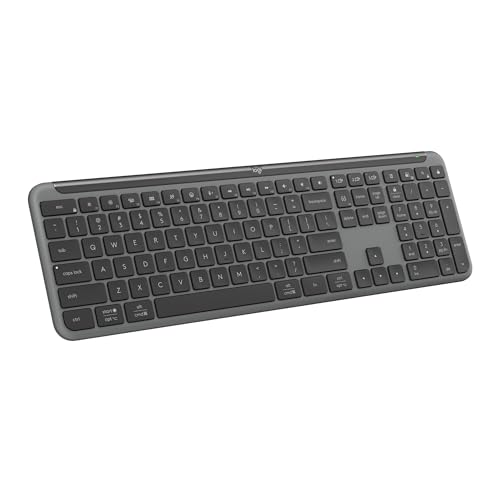
3. Logitech Signature Slim K950: Best for Quiet Multitasking
Pros
- Quiet laptop-style typing
- Switches among three devices
- Works across Windows, macOS, Chrome OS, Linux, iPadOS, iOS, and Android
- Customizable keys through Logi Options+
- Full-size layout in a slim design
Cons
- Does not offer the MX Keys S backlighting
- No wrist rest
- Some customization requires Windows or macOS software
Best for: people who want one quiet, familiar keyboard for a computer, tablet, and phone.
The Logitech Signature Slim K950 is the least fussy way to get a full-size keyboard that can follow you between devices. Its laptop-style keys are quiet and familiar, and the board keeps the number pad, arrows, and function row that disappear from many slim wireless designs. It feels suited to a shared room or office where every keystroke does not need to announce itself.
The standout feature is device switching. A single tap moves typing among three paired devices, which could mean a desktop, tablet, and phone or several computers. It supports Bluetooth and Logi Bolt, and Logitech lists compatibility with Windows, macOS, Chrome OS, Linux, iPadOS, iOS, and Android. The Logitech MX Keys S offers the same broad multi-device idea with more sophisticated lighting and a more sculpted key surface, but the K950 has a simpler personality.
Shortcut keys are ready for common tasks such as playback, mute, volume, and the snipping tool. Through Logi Options+, compatible Windows and macOS users can customize keys for their own routines. That makes the board more useful than its clean exterior suggests, although people who never customize shortcuts will not gain much from the software. The keyboard includes at least 48 percent certified post-consumer recycled plastic in its plastic parts, according to the product information.
The K950 is not aimed at people who want a dramatic ergonomic design. It has no integrated wrist rest, no mention of backlighting, and no split frame. The Logitech Ergo K860 is much better for someone actively trying to change wrist posture, while the K950 is better for someone who wants the transition between devices to be effortless. It also is not a keyboard-and-mouse combo, so a complete desk setup requires a separate pointing device.
Pick the K950 when quiet typing and broad device compatibility are the priorities. It is a particularly sensible fit for a mixed-device home office, provided you do not need illuminated keys or deep ergonomic support.
4. Redragon S101M-KS: Best for Wireless Gaming

Pros
- Wired, Bluetooth, and 2.4 GHz wireless modes
- RGB keyboard and mouse lighting
- Ten independent multimedia keys
- Mouse offers five DPI levels up to 4800 DPI
- Seven programmable mouse buttons
Cons
- Gaming features add bulk and complexity
- Software is required for deeper customization
- RGB battery life is shorter than with lighting off
Best for: PC gamers who want wireless flexibility, programmable controls, and a matching RGB mouse.
The Redragon S101M-KS is the specialist in this group. It is a keyboard and mouse combo built around gaming controls rather than quiet office minimalism. RGB lighting, a Win Lock function, dedicated media keys, and a detachable USB C cable give it a more active desktop presence than the Logitech office boards.
Tri-mode connection is the feature that makes this set unusually flexible. You can use the keyboard and mouse wired, over Bluetooth, or through a 2.4 GHz receiver. The receiver controls both devices, leaving one USB connection for the pair. That makes it easier to move between a gaming PC and another compatible device, while wired mode remains available when you want a direct connection. Redragon says the keyboard can run for up to 300 hours with RGB lighting turned off.
The mouse is more configurable than the bundled mice in the Logitech MK270 and MK345. It has five selectable DPI levels, 800, 1200, 1600, 3200, and 4800, and its polling rate can be adjusted from 125 to 1000 Hz through the software. Seven mouse buttons can be remapped, while the keyboard adds ten independent multimedia keys and twelve key combinations for media control. Those controls make sense for games and shortcuts, but they also create a busier layout than a standard office keyboard.
There are practical compromises. The product information lists the combined keyboard and mouse set at about 2.34 pounds, and the RGB hardware is not designed around the quiet, low-profile feel of the MX Keys S. The customization software must be downloaded from Redragon's site for remapping and deeper lighting control. People who want a basic work keyboard should skip this one, while gamers who want an understated board may prefer a simpler design. For a more focused look at the layout and control tradeoffs, how wireless gaming controls affect a desk setup is useful context.
The S101M-KS is the clear pick for a gaming desk among these nine. It gives up office restraint in exchange for three connection modes, RGB lighting, and a mouse with controls the standard combos do not approach.
5. Logitech K400 Plus: Best for TV Control

Pros
- Built-in touchpad eliminates the need for a separate mouse
- Compact 0.86-pound design
- Quiet keys and large touchpad
- Up to 33 feet of wireless range
- Spill-resistant construction
Cons
- Compact layout is not ideal for long writing sessions
- Touchpad is less precise than a dedicated mouse
- Uses a USB receiver rather than Bluetooth
Best for: controlling a computer, streaming setup, or home theater PC from the sofa.
The Logitech K400 Plus makes sense the moment a computer is connected to a television. A conventional keyboard still leaves you reaching for a mouse, but this board puts a touchpad beside the keys so you can navigate menus, type searches, and control a PC without balancing two separate devices on your lap.
Its 13.95-inch length and 0.86-pound weight are much easier to handle away from a desk than the full-size MK345 or MK270. The keys are quiet, and the large touchpad gives you a practical cursor control surface for browsing and media apps. A 2.4 GHz Unifying receiver provides up to 33 feet of range, while an on and off switch helps preserve the stated battery life of up to 18 months.
This is a keyboard for navigation, not a replacement for a serious writing board. The compact design leaves less room for the full-size arrangement, and the touchpad cannot match the accuracy or comfort of a separate mouse for detailed work. Logitech lists compatibility with Windows 7, Windows 8, Windows 10 and later, Android 7 or later, and Chrome OS. Logitech Options software can adjust controls, but the basic plug-and-play setup does not require complicated configuration.
The K400 Plus is also the obvious exception to the usual keyboard comparison because its touchpad changes the entire use case. The Logitech K270 gives you a more conventional number pad and eight hotkeys, but it is awkward for sofa use without a mouse. If your setup includes a laptop, a useful checklist of which keyboard features matter when the screen is not on a desk can help separate portable control from desktop typing.
Choose the K400 Plus for media control, casual browsing, and a PC connected to a TV. Skip it if you spend hours writing at a desk or need a full numeric keypad.
6. Logitech MK345: Best Full-Size Combo

Pros
- Full-size layout with palm rest and media keys
- Quiet typing
- Spill-resistant keyboard
- Contoured right-handed mouse
- Works with Windows, macOS, and ChromeOS
Cons
- Mouse is designed for right-handed use
- Larger footprint than compact keyboards
- Uses a single 2.4 GHz receiver
Best for: a conventional home or office desktop that needs both a keyboard and a mouse.
The Logitech MK345 is a traditional desktop combo with few surprises, and that is its strength. The keyboard gives you a familiar full-size layout, a palm rest, quiet keys, and easy-access media controls. It feels more like a complete workstation input set than a compact keyboard intended to move around the house.
The 2.4 GHz connection reaches up to 10 meters, according to Logitech, and the combo works with Windows, macOS, and ChromeOS. The keyboard is spill-resistant, which is a useful safeguard in a busy office, while the included mouse has a contoured shape and smooth tracking. The mouse is specifically designed for right-handed use, so left-handed users should pay attention to that limitation.
Battery life is one of the MK345's defining traits. Logitech lists up to three years for the keyboard and 18 months for the mouse, with batteries included. That is a different ownership experience from the rechargeable MX Keys S, whose backlighting and USB C charging make it feel more modern. The MK345 is better for someone who wants to put the set on a desk and avoid thinking about charging for a long time.
Its dimensions are substantial, at 20 inches long and 7.52 inches wide for the keyboard, so it needs a proper work surface. The Logitech MK270 offers a similar full-size combo concept, but the MK345 adds a palm rest and a larger right-handed mouse. The ULSOU Wave Keyboard Combo goes further toward shaped ergonomics, though the MK345's conventional layout should be easier to learn immediately.
The MK345 is the uncomplicated choice for a desktop that needs both input devices. Choose it for long battery intervals and a standard full-size layout, but look elsewhere if you need Bluetooth, compact portability, or left-handed mouse support.
7. Logitech MK270: Best Long-Battery Combo

Pros
- Full-size layout with number pad
- Keyboard battery life up to 36 months
- Mouse battery life up to 12 months
- Eight multimedia hotkeys
- Spill-resistant keyboard and adjustable tilt legs
Cons
- Mouse is compact
- Less supportive than the MK345
- No Bluetooth or rechargeable battery
Best for: everyday Windows desktop use when a keyboard and mouse are needed together.
The Logitech MK270 is the classic no-drama combo in this lineup. It gives you a full-size keyboard, number pad, arrow keys, function keys, and a compact mouse, all connected through one USB receiver. The low-profile, quiet keys make it comfortable enough for ordinary office work, while the standard layout avoids the adjustment period that comes with the Ergo K860 or ULSOU wave design.
Logitech rates the wireless connection for up to 33 feet, and the receiver is designed for plug-and-play use. Eight multimedia hotkeys provide direct access to tasks such as internet, email, playback, and volume. The keyboard is spill-resistant, and its tilt legs let you change the height slightly. Its 17.25-inch length and 5.75-inch width also make it a little less imposing than the MK345.
Battery life is the reason this model earns its place instead of simply being an older-looking alternative. Logitech lists up to 36 months for the keyboard and 12 months for the mouse, with on and off switches on both devices. The mouse is compact and ambidextrous in concept, though it does not have the larger contoured shape of the MK345 mouse. If you want a keyboard and mouse that can sit in a workstation for long stretches without charging, this arrangement is straightforward.
The compromises are equally clear. It uses a 2.4 GHz USB receiver rather than Bluetooth, the keyboard has less wrist support than the MK345, and there is no multi-device switching. It is also less useful for a TV than the K400 Plus because it still needs a separate mouse for cursor control. Readers comparing a complete desktop set should consider how a bundled pointing device changes everyday desk use before choosing between a keyboard-only model and a combo.
The MK270 is the practical pick for a Windows desktop that values familiar keys and long battery intervals. Choose the MK345 instead for its palm rest and more comfortable mouse, or choose the MX Keys S if typing feel and device switching matter more than the included mouse.
8. ULSOU Wave Keyboard Combo: Best Wave-Shaped Combo

Pros
- Wave-shaped keys and integrated wrist rest
- Adjustable keyboard stand
- Contoured right-handed mouse with forward and back buttons
- One receiver handles both devices
- Automatic sleep after inactivity
Cons
- Requires separate AA batteries for keyboard and mouse
- Large 17.6 by 8.7 inch footprint
- Shape may not suit every typing style
Best for: users who want an ergonomic wave layout and a matching mouse without moving to a split keyboard.
The ULSOU Wave Keyboard Combo takes a middle path between a standard full-size keyboard and the more committed Ergo K860. Its wave-shaped keys and wrist rest are intended to follow the hands more naturally, while the adjustable stand lets you change the keyboard height. That makes it more shaped and supportive than the MK270 without asking you to learn a split layout.
The keyboard and mouse share one 2.4 GHz receiver, and the listed wireless range is up to 33 feet. No software download is needed for the basic plug-and-play connection, and the receiver is stored on the back of the mouse. The keyboard supports Windows and macOS layouts through an Fn shortcut, and the product information lists compatibility with Windows XP through Windows 11, Mac, and other operating systems.
The mouse is specifically contoured for the right hand, with forward and back buttons placed for web navigation. Both devices use one AA battery, and neither battery is included. Automatic sleep activates after 30 seconds of keyboard inactivity and 15 minutes of mouse inactivity, then a button press wakes the devices. That behavior should help conserve batteries, but it also means users who dislike sleep timers may find the design less predictable.
The keyboard measures 17.6 by 8.7 inches and is listed as a large model, so the wrist rest and wave shape take up meaningful desk space. It also lacks the multi-device options of the K950 and MX Keys S. Compared with the Ergo K860, it is less radical and likely easier to approach, but it offers less information about posture certification and has a more basic connection system.
This is the right pick for someone who wants a shaped keyboard and a right-handed mouse in one set. Skip it if you prefer a flat laptop-style board, need Bluetooth device switching, or want a compact desk accessory.
9. Logitech K270: Best Simple Keyboard

Pros
- Familiar full-size Windows layout
- Number pad and eight hotkeys
- Spill-resistant keys
- UV-coated key surfaces
- Up to 33 feet of 2.4 GHz wireless range
Cons
- Keyboard only, with no mouse
- No Bluetooth or rechargeable battery
- Less quiet and refined than the MX Keys S
Best for: a basic Windows desktop that needs a full-size wireless keyboard and nothing more.
The Logitech K270 is the simplest keyboard here, but it is not stripped of the details that make a basic office board useful. It has a full-size layout with a numeric pad, eight hotkeys, arrow keys, and a familiar Windows arrangement. If you are replacing a wired keyboard and want the same general shape without a mouse or extra software, it gets directly to the point.
Its 2.4 GHz wireless connection is rated for up to 33 feet, and the Unifying receiver can connect additional compatible devices. That gives it more expansion potential than a basic one-device receiver, although this keyboard does not include a mouse. The board measures 17.25 inches long and 5.75 inches wide, making it narrower than the MK270 combo.
Durability features are modest but useful. The keys are spill-resistant and UV-coated, which should help them remain legible through regular use. The keyboard weighs 1.1 pounds, so it is light enough to move between desks without feeling like a portable travel keyboard. There is no listed rechargeable battery system, Bluetooth support, or multi-device switching, so the K270 stays firmly in the conventional desktop category.
The Logitech MK270 is the more complete purchase for anyone who also needs a mouse, while the K270 makes more sense if you already have a pointing device. The MX Keys S feels quieter and more precise, and the K950 handles modern multi-device work better, but both add features that a straightforward Windows user may not want. This keyboard is also less suitable for a living-room PC than the K400 Plus because it has no integrated touchpad.
Choose the K270 when a full-size number pad and uncomplicated wireless typing are all you need. It is not the most advanced board in this roundup, but it avoids unnecessary complexity and keeps the layout familiar.

How to choose best wireless keyboards
The best wireless keyboards are separated less by their wireless label than by layout, typing feel, power design, and the way they fit your desk.
Layout and key shape
A full-size layout includes a number pad, dedicated arrow keys, and a familiar function row. That is useful for spreadsheets, data entry, and office software, but it takes more desk space than a compact board. Low-profile keys, such as those on the MX Keys S and K950, feel closer to a laptop, while traditional full-size keys can feel more spacious and familiar.
Wave and split layouts change the position of your hands. The ULSOU uses a gentler wave, while the Ergo K860 creates a much more obvious separation. A shaped layout can improve comfort for some users, but it should not be chosen casually if you switch between several keyboards.
Wireless connection
A 2.4 GHz USB receiver is usually the simplest choice for a desktop because it pairs at startup and does not require a Bluetooth menu. The K270, MK270, MK345, K400 Plus, and ULSOU all use this kind of connection. Check whether the receiver controls both devices in a combo and whether your computer has a free USB port.
Bluetooth is more convenient for tablets, phones, and computers where you want to avoid a receiver. The MX Keys S, K950, and Ergo K860 support Bluetooth, while the MX Keys S and K950 also support Logitech's receiver systems. Multi-device pairing matters only if you actually switch between devices, but it can save considerable desk clutter.
Choose the connection that fits your devices first. Extra wireless modes do not help if your main computer has nowhere to put the receiver or never leaves Bluetooth.
Typing feel and noise
Low-profile, laptop-style keys are generally a good fit for quiet offices and people who prefer short key travel. The MX Keys S adds fingertip-shaped key dishes, while the K950 keeps its typing style simpler. The K270, MK270, and MK345 use more conventional desktop layouts, and the Redragon adds gaming controls and lighting rather than a quiet office focus.
There is no universally correct key shape. A person who types long documents may prefer the controlled feel of the MX Keys S, while someone replacing a standard wired board may adapt faster to the K270 or MK345. Look for quiet keys if the keyboard will share a room with other people.
Power and battery design
Rechargeable keyboards avoid disposable batteries but require a charging habit. The MX Keys S runs for up to 10 days with backlighting on and up to five months with it off. Battery-powered models can last much longer between changes. Logitech lists up to three years for the MK345 keyboard, up to 36 months for the MK270 keyboard, and up to 18 months for the K400 Plus.
Lighting changes the equation. The Redragon S101M-KS is listed for up to 300 hours with RGB lighting off, so the lighting setting has a direct effect on how often it needs power. Automatic sleep, such as the ULSOU's 30-second keyboard and 15-minute mouse timers, can also extend battery intervals.
Desk size and use position
Measure the desk before choosing a full-size or ergonomic keyboard. The MK345 is 20 inches long, the ULSOU is 17.6 inches long and 8.7 inches wide, and the Ergo K860 is close to 18 inches wide with its split frame. These boards can crowd a small desk, especially when a mouse needs room beside them.
For sofa use, weight and integrated control matter more than a number pad. The K400 Plus weighs 0.86 pounds and combines the keyboard with a touchpad, making it much easier to use away from a desk than a standard full-size board.
Frequently asked questions
Which wireless keyboard is best for everyday office typing?
The Logitech MX Keys S is the strongest general-purpose choice because it combines a full-size layout, low-profile keys, backlighting, and multi-device support. The Logitech K270 is a better fit if you want a simpler keyboard with a number pad and no premium features.
Which keyboard is best for wrist comfort?
The Logitech Ergo K860 is the most purpose-built option. Its curved split keyframe, memory foam wrist rest, and adjustable palm lift are designed to encourage a more natural wrist and forearm position.
Do these keyboards work with more than one device?
The MX Keys S, Signature Slim K950, and Ergo K860 support multi-device use. The MX Keys S and K950 can pair with up to three devices, while the other models are primarily designed around one USB receiver and one computer at a time.
Which model is best for a TV-connected computer?
The Logitech K400 Plus is the clear choice because it includes a built-in touchpad. You can navigate a computer or media setup without keeping a separate mouse on the sofa.
Which keyboard and mouse combo is easiest to set up?
The Logitech MK270 and MK345 both use a simple USB receiver for the keyboard and mouse. The Redragon S101M-KS is also flexible, but its RGB lighting and software controls make it better suited to users who want gaming customization.
Is a wireless keyboard good for gaming?
It can be, especially when it supports a dedicated 2.4 GHz mode or a wired connection. The Redragon S101M-KS is the gaming-focused pick here because it combines tri-mode connectivity, RGB lighting, programmable controls, and a mouse with adjustable DPI.
Do wireless keyboards need batteries?
Some use replaceable AA batteries, while others use rechargeable batteries. The MX Keys S is rechargeable through USB C, the ULSOU combo uses one AA battery in each device, and Logitech lists long battery intervals for the MK270, MK345, and K400 Plus.
The bottom line
The Best wireless keyboards pick is the Logitech MX Keys S. Its low-profile typing feel, backlighting, USB C charging, and support for up to three devices make it the most versatile board for a modern desk. The Logitech Ergo K860 is the better choice when wrist posture and a supported split layout matter more than a conventional shape.
For more focused needs, the Redragon S101M-KS is the gaming specialist, the Logitech K400 Plus is the right TV controller, and the Logitech MK345 is the sensible full-size combo. If you are undecided, choose the MX Keys S for typing and device switching, or the Ergo K860 if comfort is the problem you are trying to solve.
As an Amazon Associate we earn from qualifying purchases.