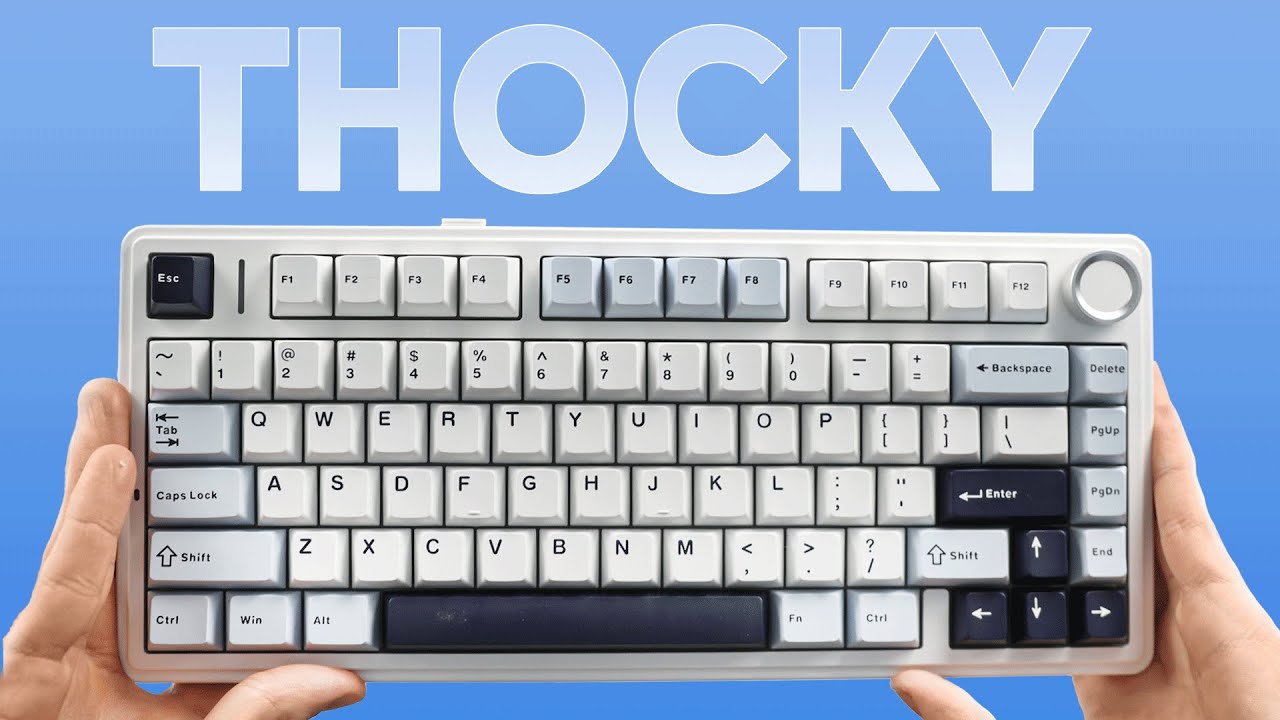

A keyboard can have all the right features and still sound hollow, sharp, or rattly. The satisfying low-pitched sound people call thock depends on more than the switch. Case structure, foam, keycaps, stabilizers, and the way the board flexes all shape the result.
Our Best thocky mechanical keyboard picks include compact 75% boards, space-saving layouts with number pads, and a few wireless models with genuinely useful extras. Two entries are membrane keyboards rather than mechanical models, so we identify that limitation plainly rather than pretend they belong in the same class.
The AULA F75 Pro is our top pick, with the RK R98 Pro, AULA F99, and SOLAKAKA A99 Pro covering larger layouts, longer battery life, and feature-heavy wireless setups.
Comparison table
| # | Product | Award | Layout | Connection | Best for |
|---|---|---|---|---|---|
| 1 | AULA F75 Pro | Best overall | 75%, 81 keys | Bluetooth 5.0, 2.4GHz, USB-C | Most people |
| 2 | AULA F75 | Best compact wireless | 75%, 81 keys | Bluetooth 5.0, 2.4GHz, USB | Compact setups |
| 3 | HUO JI E-Yooso | Best wired 96% layout | 96%, 99 keys | USB-C | Wired workstations |
| 4 | AULA F99 | Best long-battery option | 96%, 99 keys | Bluetooth 5.0, 2.4GHz, USB-C | Work and gaming |
| 5 | AULA 99 Key Purple | Best membrane alternative | 96%, 99 keys | Bluetooth 5.0, 2.4GHz, USB-C | Quiet office use |
| 6 | RK R98 Pro | Best wired number pad | 96%, 98 keys | USB | Customizers |
| 7 | RK S98 | Best display-equipped board | 98% layout | Bluetooth 5.0, 2.4GHz, USB-C | Feature seekers |
| 8 | Kisnt KN85 | Best compact customization | 75%, 85 keys | Bluetooth 5.0, 2.4GHz, USB-C | Small desks |
| 9 | AULA 99 Key Pink | Best colorful membrane board | 96%, 99 keys | Bluetooth 5.0, 2.4GHz, USB | Casual users |
| 10 | SOLAKAKA A99 Pro | Best smart-display keyboard | 96%, 97 keys | Bluetooth 5.0, 2.4GHz, USB-C | Wireless enthusiasts |
1. AULA F75 Pro: Best Overall

Pros
- Soft, controlled sound from five layers of filling
- Tri-mode wireless connection with five-device support
- Hot-swappable 3-pin and 5-pin switch support
- Useful knob with separate gaming and office functions
Cons
- No number pad
- The compact layout takes adjustment for full-size keyboard users
- The included linear switches may feel too smooth for tactile-switch fans
Best for: someone who wants a compact wireless keyboard with a deeper, more controlled sound.
The AULA F75 Pro is the board we would keep on the desk. Its 75% layout removes the number pad while retaining the arrow keys and the usual function row, so it feels compact without becoming cramped. The combination of pre-lubricated Reaper switches, lubricated stabilizers, and a padded internal structure gives each press a soft landing rather than the sharp ping that makes many budget boards sound thin.
The construction is unusually ambitious for this class. AULA uses an integrated silicone pad, PCB single-key slotting, and five layers of filling between the PCB, plate, and switches. Those layers are intended to reduce cavity noise, and the result should appeal to anyone moving from a clacky board toward a lower, creamier sound. The side-printed PBT keycaps also give the board a different visual character while keeping the legends away from the brightest part of the keycap surface.
Wireless flexibility is a major reason to choose it. Bluetooth 5.0, 2.4GHz, and USB-C wired modes are all available, and the board can connect with up to five devices. Its 4, 000mAh battery supports the portable setup, while the knob handles volume or lighting depending on whether the board is in office or gaming mode. RGB includes 16 preset effects, 10 music-reactive effects through the driver, and a stated 16.8 million color range.
Compared with the standard AULA F75, the Pro has the more distinctive keycaps and a more refined control setup. The AULA F99 offers a number pad and an 8, 000mAh battery, but it occupies considerably more desk space. The weakness here is the missing number pad, and users who enter figures all day should skip it. For everyone else, this is the most balanced route to a thocky wireless setup.
2. AULA F75: Best Compact Wireless

Pros
- 75% layout preserves arrow keys and function row
- Five-device tri-mode connectivity
- Hot-swappable 3-pin and 5-pin PCB
- Five-layer sound-dampening structure
Cons
- No number pad
- Less distinctive keycap treatment than the Pro
- Software is needed for some lighting and macro controls
Best for: a compact desk setup that needs wireless flexibility and a soft typing sound.
The AULA F75 gets the fundamentals right. Its 81-key 75% arrangement keeps the navigation essentials while leaving more room for a mouse than a 96% board. It is a comfortable middle ground for gaming and general typing, especially if you rarely touch a number pad and prefer a cleaner desk.
The sound comes from a familiar enthusiast-minded recipe: pre-lubricated Reaper switches, pre-lubricated stabilizers, an integrated silicone pad, PCB single-key slotting, and five layers of sound-absorbing filling. Those details matter because a deeper sound is easier to achieve when the case does not amplify the impact of every press. The linear switch design also gives the keys a smooth, uninterrupted travel pattern, though users who like a noticeable bump should plan a switch change.
This version has the same broad connection choices as the Pro. Bluetooth 5.0, 2.4GHz wireless, and USB wired modes can serve up to five devices, and the internal battery is rated at 4, 000mAh. The knob can change volume, lighting brightness, or effects, and a long press switches between office and gaming behavior. RGB provides 16 lighting effects, with additional music-reactive modes available through the driver.
The AULA F75 Pro is the better pick if its side-printed PBT keycaps and extra refinements appeal to you. The standard F75 remains the simpler choice for someone who wants the same compact format without those additions. Its main limitation is also its defining trade-off: no number pad. If you work with spreadsheets, move to the AULA F99 or RK R98 Pro instead.
If you are comparing layouts before choosing, the trade-off between compact keys and full desktop control is more important than a decorative lighting mode.
3. HUO JI E-Yooso: Best Wired 96% Layout
Pros
- 99-key 96% layout includes a number pad
- Gasket structure and five layers of foam
- Hot-swappable 3-pin and 5-pin switches
- PBT keycaps and full anti-ghosting
Cons
- Wired only
- No wireless battery or Bluetooth mode
- Sound and feel depend heavily on the included linear switches
Best for: a desktop user who wants a compact number pad and does not need wireless operation.
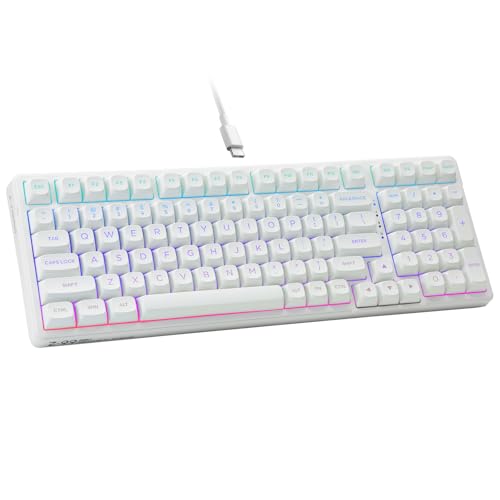
The HUO JI E-Yooso takes a practical approach to the thocky keyboard brief. Its 99-key 96% layout keeps the number pad, arrow keys, and most of the familiar full-size controls while measuring about 15.5 inches long. That is still a substantial keyboard, but it avoids the larger gaps and extra width of a conventional full-size design.
This board uses a gasket structure, a silicone dampener, and five layers of sound-absorbing foam. The product description claims those materials reduce noise and hollow sound, and the design is aimed directly at a creamy, clearer response. The included pre-lubricated linear switches should feel smooth, while the hot-swap PCB accepts both 3-pin and 5-pin replacements. That makes this a more useful starting point for customization than a fixed-switch office keyboard.
The keycaps are double-shot PBT, a sensible choice for frequent typing because the legends are designed to resist fading and the surface should stay less glossy than thin ABS plastic. Full anti-ghosting and N-key rollover support multiple simultaneous presses, which matters for games and fast shortcut-heavy work. The connection is less flexible than the wireless AULA boards because this keyboard uses a detachable USB-C to USB-A cable and does not offer Bluetooth or 2.4GHz.
The RK R98 Pro is the stronger alternative for users who want a metal knob, MDA-profile keycaps, and more elaborate RGB control. The HUO JI E-Yooso is easier to recommend when the number pad and wired simplicity matter more than wireless freedom. Skip it if you move between a laptop, tablet, and desktop. For a fixed workstation, it is a straightforward way to get a padded 96% mechanical board.
4. AULA F99: Best Long-Battery Option

Pros
- 8, 000mAh battery
- Number pad in a 96% layout
- Tri-mode connection and five-device support
- Hot-swappable switches and double-shot PBT keycaps
Cons
- Larger and heavier than the F75 boards
- Fewer display features than the SOLAKAKA A99 Pro
- Number pad layout is not ideal for very small desks
Best for: someone who wants wireless operation, a number pad, and long stretches between charges.
The AULA F99 is the sensible choice for a person who likes the F75 formula but cannot give up the number pad. Its 99-key 96% layout keeps the arrow cluster and numeric section while trimming some of the wasted width found on a full-size board. The result still needs a large area, but it is more efficient for work and gaming than a traditional 104-key design.
The internal build is aimed at a softer sound. A gasket structure, silicone padding, PCB single-key slotting, and five layers of filling work together to reduce the hollow resonance common in larger cases. The pre-lubricated linear switches should give it a smooth feel, while the double-shot PBT keycaps are made to keep their characters clear over extended use. Hot-swap support covers both 3-pin and 5-pin switches, leaving room to tune the sound later.
Its standout specification is the 8, 000mAh rechargeable battery. The board also supports Bluetooth 5.0, 2.4GHz wireless, and USB-C wired operation, with up to five devices available for switching. Macro customization, N-key rollover, and 16 RGB effects make it suitable for gaming, while the wired connection keeps it practical when the battery needs charging.
The AULA F75 Pro is smaller and has the more convenient knob-centered control scheme, but it lacks this board's number pad and larger battery. The SOLAKAKA A99 Pro adds an LCD screen and a more advanced control knob, though its display may be unnecessary for a cleaner desk. The F99's weakness is its footprint. Choose it only if the extra keys will get regular use.
5. AULA 99 Key Purple: Best Membrane Alternative

Pros
- 96% layout with integrated number pad
- Bluetooth, 2.4GHz, and USB-C connectivity
- Rotary knob and programmable M1, M2, and M3 keys
- Foldable two-stage stand
Cons
- Membrane, not mechanical
- No hot-swappable switches
- It will not produce a genuine mechanical thock
Best for: someone who wants the look and wireless layout of a thocky board without mechanical switches.
The AULA 99 Key Purple needs a clear qualification: it is a membrane keyboard, not a mechanical keyboard. That places it outside the main purpose of this roundup, but it remains relevant for shoppers who are drawn to the compact retro shape, wireless connectivity, and low-maintenance typing experience rather than switch customization.
The 96% layout retains an integrated number pad while using less space than a traditional full-size board. A foldable two-stage kickstand lets you change the typing angle, and the rotary knob handles volume, audio, or lighting functions. Three M keys can be remapped or used to combine multiple actions, which gives it more control flexibility than a basic office membrane board.
It supports Bluetooth 5.0, 2.4GHz wireless, and USB-C wired modes, so it can move between a desktop and portable devices. The product information also lists compatibility with Windows, Mac, Android, and iOS, with system-specific shortcuts for switching modes. That makes it a practical multi-device accessory, but the connection versatility should not be confused with mechanical performance.
The AULA F99 is the obvious step up when sound, key feel, and switch replacement matter. The purple board's real advantage is its membrane mechanism and colorful presentation, which may suit people who prefer a softer, quieter action. Skip it if the phrase Best thocky mechanical keyboard describes the sound you are actually chasing.
6. RK R98 Pro: Best Wired Number Pad

Pros
- Gasket-mounted 98-key layout
- MDA-profile double-shot PBT keycaps
- Detachable aluminum volume knob
- Hot-swappable pre-lubricated linear switches
Cons
- Wired only
- No wireless device switching
- The taller MDA keycap shape is not for every typist
Best for: a desktop user who wants a customizable wired board with a number pad and a firm, cushioned feel.
The RK R98 Pro is built around the part of a keyboard that matters most for a deep sound: the internal structure. Its 98-key layout retains the number pad and arrow keys while keeping the arrangement relatively compact. This is a board for a permanent desk rather than a flexible laptop setup, but the layout makes good use of the available space.
A gasket mount and five layers of sound-absorbing foam are designed to soften the impact of each keystroke and reduce hollow resonance. The pre-lubricated cream linear switches add to that smooth, low-friction character. If the included switches do not suit you, the hot-swap PCB accepts 3-pin and 5-pin replacements without soldering. That is a meaningful advantage for anyone who wants to experiment with a deeper switch, a tactile bump, or a quieter configuration later.
The MDA-profile PBT keycaps are taller and more rounded than many standard OEM sets. They are intended to wrap around the fingertips and provide a more substantial surface, while the double-shot construction helps keep the legends durable. A detachable aluminum CNC volume knob offers a satisfying physical control, and four indicator lights show Num Lock, Caps Lock, Win Lock, and Mac mode.
The HUO JI E-Yooso is a simpler 99-key alternative, while the AULA F99 adds wireless modes and a much larger battery. The R98 Pro's limitation is decisive for some users: there is no wireless connection. Choose it when the board will stay connected to one Windows or Mac workstation and you care more about the typing platform than portability.
For people building a broader setup, how wired and wireless layouts change a desk setup can help clarify whether a cable-free board is genuinely useful.
7. RK S98: Best Display-Equipped Board

Pros
- Built-in display for status information and custom images
- Tri-mode wireless connection
- Hot-swappable 3-pin and 5-pin PCB
- Sound-dampening layers and double-shot PBT keycaps
Cons
- Larger 98% layout
- Display adds visual complexity
- Battery capacity is not specified in the product information
Best for: someone who wants a wireless thocky keyboard with a small information display.
The RK S98 is aimed at the enthusiast who wants the keyboard to show more than the time. Its smart display can show a custom GIF, date, connection mode, Windows or Mac layout, and battery status. That information is useful when it saves a trip into software, though the screen is also the feature that makes this board feel less restrained than the AULA models.
The 98% layout keeps the number pad and navigation controls in a relatively compact frame. Its linear cream switches are paired with a top-mount design, an IXPE switch dampener, two layers of thicker foam, and a silicone dampener. Those materials are intended to reduce noise and hollow resonance, producing a creamy or thocky response with a firmer feel than a very soft gasket board.
Connectivity is properly flexible. Bluetooth 5.0, 2.4GHz wireless, and USB-C wired modes cover desktop, laptop, and mobile use. The knob can change volume, connection mode, backlight brightness and speed, RGB mode, or color. Hot-swap support accepts 3-pin and 5-pin switches, while double-shot PBT keycaps provide a durable surface and clear legends.
The SOLAKAKA A99 Pro offers a similar display-centered idea with a 97-key layout, side lighting, an 8, 000mAh battery, and a metal knob. The S98 has the less complicated control set and remains a good fit for someone who wants status information without turning the keyboard into a full control panel. Skip it if you want the smallest possible board or do not care about a screen.
8. Kisnt KN85: Best Compact Customization

Pros
- Compact 85-key 75% layout
- Stated 45 to 50gf linear actuation
- Five layers of sound-dampening foam
- Three connection modes and Windows software
Cons
- Not silent
- Wrist rest may be useful because of the front height
- Driver support is limited to Windows in wired or 2.4GHz mode
Best for: a small-desk user who wants to tune both the sound and switch feel later.
The Kisnt KN85 is the compact enthusiast option. Its 85-key layout keeps the F1 to F12 row, arrow keys, and common shortcuts while removing the number pad. At about 13.68 inches long according to the feature description, it leaves more room for a mouse than any of the 96% or 98% entries here.
Kisnt pairs pre-lubricated Bsun linear switches with a stated 45 to 50gf actuation range. That gives the board a lighter, smooth response instead of the deliberate bump of a tactile switch. The gasket-mounted structure includes a base dampener, silicone pad, and five layers of sound-dampening foam. The keyboard is not silent, but the design is intended to sound creamier and less clacky than a conventional mechanical board.
This is also one of the more informative wireless boards in the group. It supports USB-C, 2.4GHz, and Bluetooth 5.0, with stated latency figures of 2ms over USB, 5ms over 2.4GHz, and 11ms over Bluetooth. Its 4, 000mAh battery can keep the board running wirelessly, and the keyboard can continue working in wired mode while charging. RGB has 20 preset effects, while Windows software supports remapping and macros in wired or 2.4GHz mode.
The AULA F75 feels like the safer all-purpose compact pick, while the KN85 gives more explicit control over actuation feel and wireless behavior. The front height is listed at 0.79 inches, and the manufacturer recommends a wrist rest, so users who prefer low-profile boards should be cautious. Choose it for the small footprint and switch-tuning potential, not for silent operation.
9. AULA 99 Key Pink: Best Colorful Membrane Board

Pros
- 99-key layout with number pad
- Tri-mode connectivity
- RGB lighting with 16 preset effects
- Rotary knob and foldable two-stage stand
Cons
- Membrane mechanism, not mechanical
- No hot-swap capability
- Not a true thocky keyboard
Best for: casual users who prioritize a colorful wireless board and a familiar number pad.
The AULA 99 Key Pink is the pink counterpart to the purple membrane model, and the distinction is mostly visual. It uses a 99-key layout with an integrated number pad, a foldable two-stage kickstand, and a rotary knob for volume, connection mode, brightness, RGB mode, or color. That combination makes it more flexible than a basic membrane keyboard.
It supports Bluetooth 5.0, 2.4GHz wireless, and USB wired operation. RGB includes a stated 16.8 million color range and 16 preset effects, with brightness and speed adjustment through the knob or keyboard shortcuts. The M1, M2, and M3 keys can be remapped, and the feature list says all keys support macro customization through the software.
The important limitation is the mechanism. AULA explicitly identifies the S99 as a membrane keyboard, says it does not support hot-swapping, and says the switches cannot be changed. That means it cannot offer the switch travel, stabilizer tuning, or mechanical resonance that define the rest of this roundup. Its sound may be softer than a sharp mechanical board, but it should not be selected for an authentic thock.
The AULA 99 Key Purple has nearly the same role and feature set, so the choice between them is primarily about color. The HUO JI E-Yooso is the right move if mechanical switches and hot-swap customization matter. Pick the pink AULA only if a wireless membrane board meets your needs and the mechanical label is not essential.
10. SOLAKAKA A99 Pro: Best Smart-Display Keyboard

Pros
- LCD screen shows time, connection, system, and battery information
- 8, 000mAh battery
- Gasket structure with five cushioning layers
- Hot-swappable 3-pin and 5-pin switches
Cons
- Larger 96% layout
- Display and control system may be unnecessary
- Web driver requires a wired connection
Best for: a wireless enthusiast who wants a number pad, long battery life, and an information screen.
The SOLAKAKA A99 Pro is the most feature-packed board in this group. Its 97-key 96% layout retains the number pad, arrow keys, and essential function controls, while the LCD screen displays the date, time, battery status, connected system, and connection mode. It is a lot of information for a keyboard, but it is useful for anyone who likes seeing wireless status without opening an app.
The screen is paired with a multifunction metal knob. Rotation, short presses, and long presses can control time settings, system switching, lighting modes, lighting colors, brightness, and volume. The board supports Windows, iOS, Mac, and Android, saves up to five devices, and offers Bluetooth 5.0, 2.4GHz, and USB-C modes. Full N-key rollover and a Windows key lock keep the gaming basics covered.
The sound design is more serious than the display might suggest. The gasket structure uses five cushioning layers, PCB single-key slotting, and noise-dampening cotton to reduce internal cavity noise. Pre-lubricated stabilizers and LEOBOG Star Vector switches are included, while the full hot-swap PCB accepts both 3-pin and 5-pin switches. Double-shot PBT keycaps, south-facing LEDs, 16 main lighting modes, and five side-light modes round out the hardware.
The AULA F99 is the cleaner choice if you want the same broad layout and battery emphasis without a screen. The RK S98 is another display-equipped alternative, with a top-mount design and a less elaborate lighting system. The A99 Pro's main weakness is complexity: its web driver must be accessed through a wired connection, and many buyers will never use every control. Choose it when the screen and large battery are genuine priorities.

How to choose best thocky mechanical keyboard
A convincing thock comes from the interaction between switches, keycaps, mounting style, and internal damping, not from a single marketing label.
Switch feel and sound
Linear switches usually produce the smoothest path from press to bottom-out, which is why many of these boards pair them with creamy or thocky sound claims. Pre-lubricated switches can reduce scratchiness, but they do not guarantee a deep tone by themselves. Hot-swap support matters because it lets you replace the included switches without soldering when your preferred sound or resistance differs.
Internal damping
Foam, silicone, and other dampening layers reduce the hollow resonance created inside a keyboard case. Gasket structures can add a softer landing, while top-mount designs tend to provide a firmer and more consistent feel. Look for a board that names its internal materials, not one that only repeats the word “thocky.”
A deep keyboard sound is usually a case-control problem before it is a lighting problem.
Layout and number pad
A 75% board such as the AULA F75 Pro keeps the arrow keys and function row while opening more mouse space. A 96% or 98% board keeps the number pad, which is far more useful for spreadsheets, finance, and repeated data entry. Do not choose a compact layout if removing the number pad will make you reach for a separate accessory every day.
Wireless modes and battery
Bluetooth is convenient for tablets and phones, while 2.4GHz is generally the more suitable wireless mode for fast desktop work and gaming. USB-C remains important when charging or when the lowest possible connection delay matters. Battery capacity is only one part of the experience, since backlighting and display features can affect how long a board runs between charges.
Keycaps and stabilizers
PBT keycaps resist the slick surface that can develop from heavy use, and double-shot legends are designed to remain legible. Stabilizers on the space bar, enter key, and shift keys have an outsized effect on perceived quality because rattling there is easy to hear. Pre-lubricated stabilizers are a useful starting point, though enthusiasts may still tune them later.

Frequently asked questions
What makes a mechanical keyboard thocky?
A thocky sound usually comes from a combination of linear switches, dampening foam or silicone, a controlled case, and keycaps that do not amplify high frequencies. Gasket or top-mount construction can change the feel and resonance, but no single mounting style guarantees the result. Room acoustics and desk material also affect what you hear.
Are all the keyboards in this roundup mechanical?
No. The AULA 99 Key Purple and AULA 99 Key Pink are explicitly membrane keyboards. They offer wireless connectivity, RGB, knobs, and compact number-pad layouts, but they do not support mechanical switch replacement and should not be chosen for a genuine mechanical thock.
Is a 75% keyboard large enough for work?
A 75% keyboard keeps the function row, arrow keys, and many navigation controls, so it works well for most writing, coding, and general office tasks. The major omission is the number pad. If you enter numbers frequently, a 96% or 98% keyboard will be more practical.
Does hot-swapping improve sound?
Hot-swapping does not automatically make a keyboard deeper or quieter. Its benefit is flexibility, since you can replace the switches with a model that has the feel and sound you prefer. The case, stabilizers, keycaps, and dampening still have a major effect.
Is wireless suitable for gaming?
2.4GHz wireless is generally the most suitable wireless option in this group for gaming, while Bluetooth is better suited to general portable use. USB-C wired mode is available on most of the wireless mechanical models and can be used when charging or when you want a direct connection.
Which layout is best for a number pad?
A 96% or 98% layout retains the number pad while using less space than a conventional full-size board. The AULA F99, HUO JI E-Yooso, RK R98 Pro, RK S98, and SOLAKAKA A99 Pro all fit that general use case. The exact placement of navigation keys differs, so users switching from a full-size board may need a short adjustment period.

The bottom line
The Best thocky mechanical keyboard for most people is the AULA F75 Pro. Its 75% layout, five-device wireless support, hot-swap PCB, pre-lubricated switches, padded structure, and useful knob make it the most complete option without taking over the desk.
Choose the AULA F99 if you need a number pad and want an 8, 000mAh battery, or the RK R98 Pro if the keyboard will stay wired and you want MDA-profile PBT keycaps with a metal volume knob. The SOLAKAKA A99 Pro is the more entertaining choice for anyone who specifically wants an LCD screen and extensive wireless controls.
If you are undecided, start with the AULA F75 Pro unless a number pad is essential.
As an Amazon Associate we earn from qualifying purchases.