
A first 3D printer should make the first successful print feel routine, not turn bed leveling, nozzle changes, and slicer settings into a second hobby. The Best 3D printer for beginners needs dependable calibration, sensible software, and enough room for the projects you actually want to make.
These nine models cover a wide spread of beginner needs. Some are compact and quiet, some are enclosed for more demanding materials, and others add multi-color systems or child-focused creative tools. Our top pick is the FLASHFORGE Adventurer 5M, with the Bambu Lab P1S Combo close behind for enclosed multi-color printing.
Comparison
| # | Product | Award | Build volume | Key feature | Best for |
|---|---|---|---|---|---|
| 1 | FLASHFORGE Adventurer 5M | Best overall | 220 x 220 x 220mm | 600mm/s, auto leveling | First-time makers |
| 2 | Bambu Lab P1S Combo | Best enclosed multi-color | Not provided | Up to 16 colors, enclosed body | Multi-color projects |
| 3 | FLASHFORGE Adventurer 5M Pro | Best for materials | 220 x 220 x 220mm | 280°C extruder, 600mm/s | Beginners who want room to grow |
| 4 | FLASHFORGE AD5X | Best Flashforge multi-color | 220 x 220 x 220mm | Four colors, 300°C extruder | Colorful functional models |
| 5 | Bambu Lab A1 mini | Best compact starter | Not provided | Automatic calibration | Small spaces |
| 6 | Bambu Lab A1 Combo | Best quiet multi-color starter | Not provided | AMS lite, 10, 000mm/s² acceleration | Home creativity |
| 7 | Anycubic Kobra X Combo | Best large-volume color printer | 260 x 260 x 260mm | Native seven-color printing | Larger family projects |
| 8 | FLASHFORGE AD5M | Best easy-maintenance printer | 220 x 220 x 220mm | Three-second nozzle swap | Hands-off maintenance |
| 9 | AOSEED AI 3D Printer | Best for children | Not provided | Enclosed, app-guided printing | Supervised family use |
1. FLASHFORGE Adventurer 5M: Best Overall

Pros
- Automatic bed leveling removes a major beginner hurdle
- CoreXY structure supports fast printing
- Flexible nozzle sizes and dual-sided PEI platform
- Remote monitoring through the Flash Maker app
Cons
- Open design is less suitable for temperature-sensitive materials
- Larger than a compact mini printer
- Requires routine nozzle and platform cleaning
Best for: a first-time maker who wants fast, automatic printing without jumping straight to a multi-color system.
The Adventurer 5M is the printer we would hand to someone who wants to start making rather than spend a weekend learning calibration. Its one-click automatic leveling measures the nozzle-to-platform relationship for you, and that matters because a poor first layer is one of the fastest ways to make a new owner distrust the entire hobby. The dual-sided PEI platform also makes finished parts easier to release once the plate cools.
Its CoreXY structure is the other reason it leads this group. Flashforge lists travel speeds up to 600mm/s and acceleration of 20, 000mm/s², though the practical benefit is less about every print reaching the headline number and more about reducing movement overhead on suitable models. The 220 x 220 x 220mm build volume is a useful middle ground. It handles household parts, figures, organizers, and many practical projects without taking over the desk.
The direct extruder reaches 280°C, while the included nozzle choices range from 0.25mm to 0.8mm. A 0.4mm nozzle is the sensible starting point, but the range gives beginners a path into fine miniature details or quicker, thicker prints. The printer can heat to 200°C in 35 seconds, and the high-flow nozzle is rated at 32mm³/s. Those details matter when you move from occasional toys to repeated prototypes.
Compared with the FLASHFORGE AD5M, the Adventurer 5M has the stronger beginner position because its listing emphasizes the same automatic setup while presenting a more complete, polished package. The Adventurer 5M Pro adds broader material support and a more enclosed approach, but the standard 5M is simpler for ordinary PLA and PETG work. Remote status checks through the Flash Maker app are useful when a print runs longer than expected.
The weakness is the open frame. It is not the model to choose if your priority is routinely printing enclosed-material projects or keeping curious hands away from a moving machine. It also needs the usual cleaning of the nozzle and platform. For a first printer focused on everyday PLA projects, though, the Adventurer 5M offers the clearest balance of automatic setup, speed, maintenance access, and build size.
2. Bambu Lab P1S Combo: Best Enclosed Multi-Color

Pros
- Enclosed body supports a wider material range
- AMS system enables multi-color and multi-material work
- Automatic bed leveling
- Claimed setup time of 15 minutes
Cons
- Heavy and physically larger than compact options
- Carbon and glass fiber reinforced polymers are not recommended
- Multi-color printing requires the AMS connection
Best for: beginners who want an enclosed printer and expect to explore multi-color designs.
The P1S Combo is the most convincing choice here for a beginner who already knows that single-color printing will not be enough. The printer and AMS arrive as one combined setup, so the appeal is not merely theoretical. You can move from simple PLA models into multi-color or multi-material projects without replacing the printer later.
The enclosure gives the P1S a different character from the open-frame FLASHFORGE models. It improves print performance with advanced filaments and makes the machine feel more contained in a home workspace. Bambu Lab lists PLA, PETG, TPU, PVA, PET, ABS, and ASA as ideal supported materials, with PA and PC listed as capable. Carbon and glass fiber reinforced polymers are not recommended, so the material flexibility has a clear boundary.
The printer reaches up to 500mm/s with 20, 000mm² acceleration, and automatic bed leveling reduces the calibration work beginners usually dread. Bambu Lab says setup takes 15 minutes, which makes this less intimidating than a traditional kit that expects you to tune everything by hand. The AMS can support up to 16 colors, although that figure depends on how the system is configured and how much filament swapping a particular design requires.
The P1S Combo is heavier at 47.52 pounds and measures about 18.03 inches wide by 15.31 inches deep and high. That is worth planning around before ordering. The Bambu Lab A1 Combo is quieter and easier to approach for basic home creativity, while the P1S Combo is the better fit for an owner who wants an enclosure and broader material ambitions.
Its main drawback is complexity. An AMS system introduces more filament paths and more opportunities for a beginner to wonder which part of the setup needs attention. The printer also takes up considerably more room than the A1 mini. Choose it when the enclosure and color capability are central to your plans, not simply because a larger feature list looks attractive.
3. FLASHFORGE Adventurer 5M Pro: Best for Materials
Pros
- Full-metal CoreXY structure
- Supports PLA, ABS, PETG, ASA, TPU, PC, and composite-listed materials
- Automatic pressure-based leveling
- Remote control and live video monitoring
- Quick setup and removable PEI platform
Cons
- Build volume is no larger than the standard 5M
- More machine than a basic PLA beginner needs
- Routine cleaning remains necessary
Best for: a beginner who wants to learn with PLA but expects to try more demanding materials later.
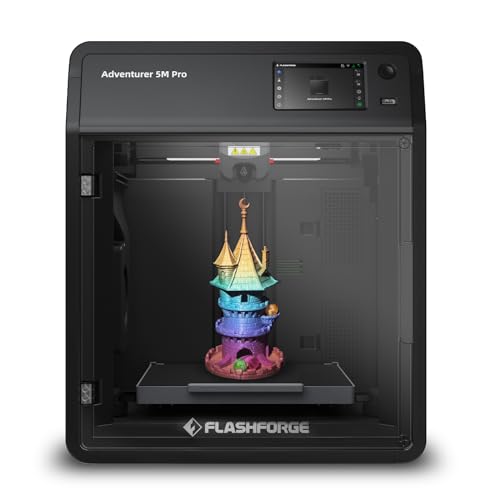
The Adventurer 5M Pro is the sensible step up from the standard Adventurer 5M when material choice matters more than simplicity. It keeps the same useful 220 x 220 x 220mm build volume and fast CoreXY concept, but the Pro version is aimed more directly at an owner who wants to move beyond routine starter prints.
Its 280°C all-metal direct extruder supports PLA, ABS, PETG, ASA, TPU, PC, PLA-CF, and PETG-CF according to the product listing. That does not make every material equally easy, but it gives a beginner more room to experiment. The printer also supports 0.25mm, 0.4mm, 0.6mm, and 0.8mm nozzles. Fine nozzles help with small details, while larger ones can make sturdy, less delicate parts more practical.
Setup is designed to be quick, with the listing claiming a first print in 10 minutes from unboxing. Pressure-based automatic leveling removes manual Z-axis calibration, and the dual-sided PEI platform helps with both adhesion and removal. The printer can reach 600mm/s and 20, 000mm/s² acceleration, while its nozzle heats to 200°C in 35 seconds. Those figures are useful when you print repeatedly, but beginners should still favor a quality-oriented profile over blindly selecting the fastest mode.
The Bambu Lab P1S Combo is the stronger choice if color printing and an enclosure are your first priorities. The standard FLASHFORGE Adventurer 5M is easier to justify for uncomplicated PLA work. The Pro earns its place between them by combining automatic setup with a broader material list and remote video monitoring through the Flash Maker app.
There is no larger build area here, so someone planning oversized models should look at the Anycubic Kobra X Combo instead. The Pro also asks more from the owner than a small plug-and-play machine because advanced materials need thoughtful settings and storage. It is best for the curious beginner who wants to learn gradually and does not want to replace the printer after mastering basic filament.
4. FLASHFORGE AD5X: Best Flashforge Multi-Color

Pros
- Supports up to four colors simultaneously
- 300°C direct-drive extruder
- Automatic leveling and filament handling
- Four nozzle sizes for detail or speed
- Print resume after power loss
Cons
- Four-color capability is less extensive than the P1S Combo
- Same 220 x 220 x 220mm build volume as several smaller models
- Color printing adds setup and filament management
Best for: beginners who want multi-color printing with a familiar 220mm class build area.
The AD5X makes the Flashforge line more interesting for beginners who want color without stepping into the larger P1S Combo. It supports up to four colors at once, automatically feeds and retracts filament, and includes the kind of one-click leveling that keeps the first few projects approachable.
The 300°C direct-drive extruder is the standout hardware change. It gives the AD5X more headroom than the 280°C extruders in the Adventurer 5M models, while the CoreXY frame is designed for speeds up to 600mm/s and acceleration of 20, 000mm/s². The practical benefit is flexibility: a 0.25mm nozzle can favor miniature detail, the pre-installed 0.4mm nozzle handles general work, and 0.6mm or 0.8mm nozzles can speed up larger, tougher parts.
The 220 x 220 x 220mm build volume is familiar and useful. It suits toys, desk accessories, replacement pieces, and many decorative models, but it will not accommodate the larger one-piece projects possible on the Kobra X Combo. Dual-channel cooling, vibration compensation, and a built-in resume function are sensible features for a beginner who may not yet have a reliable printing routine.
Compared with the Bambu Lab A1 Combo, the AD5X has a hotter extruder and a more speed-focused CoreXY design. The A1 Combo is the easier recommendation for a quiet, uncomplicated start, while the AD5X makes more sense when a user specifically wants four-color prints and a wider nozzle choice. The Flash Maker app also supports remote monitoring and control.
Its weakness is that multi-color printing is never as simple as loading one spool and pressing go. Filament changes create extra handling and can extend a job, even when the printer automates the process. The AD5X is a strong fit for a creative beginner who understands that color adds capability along with maintenance.
5. Bambu Lab A1 mini: Best Compact Starter

Pros
- Automatic calibration and simple setup
- Compact, quiet design
- Connected app and ready-to-print model ecosystem
- Includes an LED lamp kit
- Light enough to move around easily
Cons
- Smaller format than the 220mm class printers
- Single-printer bundle does not provide the A1 Combo's multi-color system
- Open design offers less containment
Best for: a first printer for a small desk, apartment, classroom, or creative workspace.
The A1 mini is the least intimidating printer in this group. It is compact, quiet, and designed around automatic calibration, so a new owner can focus on choosing a model instead of learning what every adjustment does. The included LED lamp kit gives the bundle a more immediate project than a box of generic accessories. Print a compatible lamp design, assemble it, and there is a clear result to work toward.
Bambu Lab also places the A1 mini inside a connected ecosystem. The MakerWorld library supplies ready-to-print designs, while the Bambu Handy app manages the printer. That combination matters to beginners who do not yet know how to create a model or tune a slicer profile. It is also a helpful way to learn gradually, since successful existing designs can teach the basics of supports, orientation, and material use.
The compact design is its defining trade-off. The listing does not provide a build-volume figure, but the mini designation clearly points to smaller projects than the 220 x 220 x 220mm Flashforge machines. It is better suited to toys, decorations, gifts, and small household objects than large organizers or functional parts that need to be printed in one piece. Its weight is about 12.13 pounds, making it easier to relocate than the 47.52-pound P1S Combo.
The Bambu Lab A1 Combo is the logical alternative if multi-color printing is part of the plan. The AOSEED AI 3D Printer is more enclosed and child-focused, but the A1 mini offers a more open-ended maker experience. Its quiet operation also makes it more comfortable in a bedroom, office, or shared living space.
The A1 mini is not the choice for someone who already expects to print large mechanical parts or explore demanding materials. Its strength is removing friction at the start. For a first-time owner who wants a small, approachable machine and a guided path into 3D printing, it is one of the easiest recommendations here.
6. Bambu Lab A1 Combo: Best Quiet Multi-Color Starter

Pros
- AMS lite enables multi-color printing
- Full automatic calibration
- Quiet operation with motor noise canceling
- Active flow rate compensation
- Quick-swap nozzle design
Cons
- Open-frame construction
- Large footprint with the included accessories
- Not intended as an enclosed advanced-material machine
Best for: beginners who want accessible multi-color printing in a quiet home workspace.
The A1 Combo is the friendly multi-color option. It takes the straightforward character of the A1 platform and adds the AMS lite, so a new owner can make colorful models without starting with a more imposing enclosed printer. The included LED lamp kit also gives the system a practical creative project rather than leaving the buyer to find a first idea.
Automatic calibration handles Z-offset, bed leveling, and other setup tasks. Active flow rate compensation adjusts extrusion based on readings, which is the kind of background assistance that helps a beginner get consistent surfaces without immediately learning every slicer setting. The one-clip quick-swap nozzle is another welcome touch when maintenance or nozzle experimentation becomes necessary.
Bambu Lab lists acceleration of 10, 000mm/s², and the A1 is designed for high-speed precision rather than the more aggressive speed claims of the Flashforge CoreXY models. That distinction is not a problem for most first projects. Quiet operation and active motor noise canceling are more meaningful when the printer shares a room with people. The overall package is easier to live with than a machine that is technically faster but intrusive.
The A1 mini is better when desk space is the main concern, while the FLASHFORGE AD5X is the more interesting alternative for a hotter extruder and four-color Flashforge setup. The A1 Combo sits between those options with a polished, beginner-friendly interface and the AMS lite included. It is also a natural choice for anyone who likes the Bambu app and model ecosystem.
The open frame limits the A1 Combo's suitability for materials that benefit from a controlled enclosure. Its footprint is also substantial, measuring about 23.01 inches long and 21.06 inches wide in the supplied product information. Pick it for quiet, colorful home printing, not as a universal machine for every filament type.
7. Anycubic Kobra X Combo: Best Large-Volume Color Printer

Pros
- Native seven-color printing
- 260 x 260 x 260mm build volume
- AI camera and automatic leveling
- Dual-band Wi-Fi, LAN, and app support
- Listed operating noise below 48dB
Cons
- Larger and heavier than compact beginner models
- More color capability than a single-color learner may need
- Claims about automatic success should not replace supervision
Best for: families and makers who want larger colorful models with remote monitoring.
The Kobra X Combo is the ambitious pick. Its 260 x 260 x 260mm build volume gives beginners more freedom than the 220mm class machines, while native seven-color printing makes it suited to character models, decorations, and larger gifts that would otherwise need painting or assembly.
Anycubic includes LeviQ 3.0 automatic leveling and an AI camera intended to watch for errors. The printer supports remote monitoring through the Anycubic app, dual-band 2.4G and 5G Wi-Fi, and LAN connectivity. Those controls are useful for a family printer because you can check progress without standing beside the machine, though no camera or detection system makes unattended printing risk-free.
The listed print speeds reach 600mm/s, with recommended speeds of 300mm/s and acceleration of 20, 000mm/s². That gives the Kobra X plenty of movement capability, but the most important beginner advantage is the extra build space. A 260mm cube can accommodate larger single-piece models and multi-part projects with fewer compromises. The machine is also listed at under 48dB, which should make it less disruptive in a home workspace.
Compared with the FLASHFORGE AD5X, the Kobra X offers a larger build area and native seven-color printing, while the AD5X has the more clearly specified 300°C direct-drive extruder and broader nozzle options. The Bambu Lab P1S Combo offers a more enclosed design and up to 16 colors, but the Kobra X is the more spacious choice for colorful larger models.
The Kobra X is not small. It weighs about 29.1 pounds and measures roughly 18.11 inches high, 18.11 inches long, and 17.72 inches wide. It also brings more systems for a beginner to understand. Choose it when the larger volume and seven-color capability will be used often, not simply because they sound impressive.
8. FLASHFORGE AD5M: Best Easy-Maintenance Printer

Pros
- One-click automatic leveling
- Three-second quick-release nozzle
- CoreXY all-metal motion structure
- Double-sided PEI steel plate
- Print resume after power outages
Cons
- Single-color printing
- Open design
- No larger than the standard 220mm class build area
Best for: beginners who want a fast, straightforward single-color printer with unusually easy nozzle maintenance.
The AD5M is the stripped-back alternative to the more feature-heavy Flashforge models. It keeps the useful parts of the formula, including a CoreXY all-metal structure, automatic calibration, and a 220 x 220 x 220mm print size, while making maintenance especially approachable.
The patent quick-release nozzle is rated for a three-second tool-free swap. Beginners often overlook nozzle maintenance until a clog stops a print, so this is more than a headline feature. The available diameters are 0.25mm, 0.4mm, 0.6mm, and 0.8mm. Start with 0.4mm for general work, then use the smaller option for detail or a larger option when speed and strength matter more than fine surfaces.
The AD5M reaches up to 600mm/s, and its automatic leveling system measures the distance between the nozzle and build plate to set accurate offsets. The double-sided PEI steel plate can be bent to release a finished part, with the reverse side specifically described for PETG. A power-loss resume function saves the ongoing layer and continues after electricity returns, a practical safeguard for long projects.
The Adventurer 5M is the better first choice if you want a more complete beginner package and remote monitoring features. The AD5M is more appealing if the ability to swap nozzles quickly is central to your workflow. It also supports Orca-Flashforge for one-click batch file transmission and network monitoring, plus the Flash Maker app for remote status checks.
Its limitations are straightforward. It is a single-color, open-frame printer, and its build volume does not exceed the common 220mm format. The machine still needs a clean platform and nozzle. For a beginner who prefers a focused printer with fewer specialized systems, that simplicity can be exactly the point.
9. AOSEED AI 3D Printer: Best for Children

Pros
- Fully enclosed, pinch-resistant design
- App includes more than 8, 000 models
- AI tools support voice, text, and image prompts
- Filament runout detection
- Includes eight rolls of PLA filament
Cons
- Single-color printing only
- Kid-focused ecosystem may feel limiting to advanced makers
- Adult supervision is still necessary
Best for: supervised family projects where ease, enclosure, and guided creativity matter most.
The AOSEED is less a traditional hobbyist printer than a guided creative station for children. Its enclosed, pinch-resistant design, one-tap app printing, and library of more than 8, 000 human-reviewed and print-tested models are aimed at removing the intimidating parts of 3D printing. A child can choose a themed project and see a result without first learning CAD software.
The AI tools are the unusual feature. AI Doodle can create models from voice, text, or image prompts, while AI MiniMe turns photos into cartoon-style figures. A built-in assistant is intended to provide guidance. Those tools make the printer engaging for families who want the creative process to begin with an idea rather than a lesson in modeling.
The printer's listed peak speed is 400mm/s, with typical speeds of 220 to 250mm/s and precision up to 0.05mm. Small toy projects can be completed in as little as 20 minutes according to the listing. Filament runout detection pauses a print when material is exhausted, and the quick-release nozzle simplifies filament changes. The built-in camera provides live monitoring and can create time-lapse videos.
The important limitation is color. This printer supports single-color printing only, so multi-color designs require separate pieces that are assembled afterward. The Bambu Lab A1 mini is a better long-term platform for a child who may grow into broader maker projects, while the AOSEED is more immediately approachable. Families comparing creative hardware may also want to think about how beginners learn through guided camera projects when deciding how much app assistance is genuinely useful.
The supplied kit includes eight rolls of PLA filament, tools, a magnetic build plate, and stickers, which makes the first project easier to start. Still, an enclosure does not remove the need for adult supervision, especially around heat and moving parts. Choose the AOSEED for its guided, family-friendly experience rather than expecting it to replace a full hobbyist printer.
How to choose best 3d printer for beginners
The right Best 3D printer for beginners is the one that removes the specific obstacle most likely to stop you printing. Focus on calibration, build space, material handling, color systems, and the software experience before chasing headline speed.
Automatic calibration
Automatic bed leveling measures the relationship between the nozzle and print surface, helping the first layer adhere consistently. It is one of the most useful beginner features because small manual adjustments can otherwise ruin an otherwise good print.
All of the Flashforge and Bambu Lab picks here emphasize automatic calibration, while the Anycubic Kobra X uses LeviQ 3.0. Look for a system that handles both leveling and nozzle offset rather than one that only claims a partially automated setup.
Build volume
Build volume determines the maximum size of a single print. A 220 x 220 x 220mm space is versatile for toys, organizers, decorative objects, and many replacement parts. The Anycubic Kobra X expands that to 260 x 260 x 260mm, which is useful for larger models and multi-piece projects.
A compact printer can be easier to place, but a small build area may force you to split models. Measure the printer's footprint as well as its build volume. The P1S Combo, A1 Combo, and Kobra X all need meaningful desk space.
Extruder and nozzle options
The extruder controls how filament is heated and pushed through the nozzle. Higher maximum temperatures can support a wider material range, though the filament, ventilation, enclosure, and print profile still matter. The AD5X reaches 300°C, while the Adventurer 5M, 5M Pro, and AD5M list 280°C.
Nozzle diameter changes the balance between detail and speed. Smaller nozzles suit fine miniatures, while 0.6mm and 0.8mm options can make thick functional parts faster. A quick-swap nozzle, such as the AD5M's three-second system, also makes maintenance less intimidating.
Color and material handling
Single-color printing is the simplest place to start. Multi-color systems such as the AMS, AMS lite, and AD5X's four-color setup add visual impact but also introduce filament changes, extra hardware, and longer jobs. The P1S Combo supports up to 16 colors, while the Kobra X Combo supports native seven-color printing.
Choose multi-color because you will use it, not because it makes the specification sheet more exciting.
For filament variety, the enclosed P1S Combo and higher-temperature Flashforge models offer more room to grow. The AOSEED is intentionally single-color, which keeps its child-focused workflow simpler.
Software and monitoring
A good app can turn the first print into a guided process. Bambu Lab's MakerWorld and Bambu Handy ecosystem, Flashforge's Flash Maker app, Anycubic's app, and AOSEED's model library each approach that differently.
Remote monitoring is useful for longer prints, while a built-in camera can help identify a failure before it continues for hours. It should be treated as assistance, not a substitute for placing the printer safely and checking on it. If you are comparing creative equipment for a wider maker setup, the skills that make a first camera easier to use follow a similar principle: guided controls help, but the user still benefits from understanding the basics.
Frequently asked questions
What is the Best 3D printer for beginners?
The FLASHFORGE Adventurer 5M is our top choice because automatic leveling, a 220 x 220 x 220mm build volume, fast CoreXY movement, and a 280°C direct extruder cover the needs of most new makers. It is less suitable if you specifically need an enclosure or multi-color printing.
Is an enclosed 3D printer better for a beginner?
An enclosure can make the printer feel more contained and can support materials that benefit from a more controlled printing environment. The Bambu Lab P1S Combo is the strongest enclosed option here. An open printer may be simpler for ordinary PLA projects and easier to access for maintenance.
Should a beginner buy a multi-color printer?
Buy one if colorful models are a major reason you want a printer. The Bambu Lab A1 Combo, P1S Combo, FLASHFORGE AD5X, and Anycubic Kobra X Combo all add color systems, but they also involve more filament handling than a single-color printer.
Is 600mm/s useful for first-time printing?
High movement speed can shorten suitable jobs, but it does not mean every model should be printed at the maximum setting. Layer adhesion, detail, filament type, and the chosen profile still affect results. Automatic setup and reliable first layers are more important than headline speed for most beginners.
What filament should a beginner use?
PLA is the simplest starting point among the materials named in these listings. It is widely used for toys, decorations, models, and household projects. PETG can be a useful next step, while ABS, ASA, TPU, PC, and composite materials need more careful settings and, in some cases, an enclosure.
Is the AOSEED printer safe for children?
The AOSEED has an enclosed, pinch-resistant design, quiet operation, and app-guided printing intended for children. Those features make it more approachable for family use, but adult supervision remains necessary around heat, electricity, moving parts, and filament.
The bottom line
The Best 3D printer for beginners is the FLASHFORGE Adventurer 5M for most first-time makers. Its automatic leveling, practical 220mm build volume, quick nozzle heating, CoreXY structure, and broad nozzle range make it easy to start with and useful after the novelty wears off.
Choose the Bambu Lab P1S Combo instead when an enclosed body and multi-color printing are central to your plans. The Bambu Lab A1 mini is the better answer for a small desk, while the AOSEED AI 3D Printer makes the most sense for supervised family projects and children who need a guided creative experience.
If you are undecided, choose the Adventurer 5M for straightforward single-color printing, or the P1S Combo if you already know you want color and an enclosure.
As an Amazon Associate we earn from qualifying purchases.