

A wired phone connection works well until you have to find the right cable, plug in before pulling away, and keep it from slipping between the seats. The better setup is one that starts CarPlay or Android Auto as soon as the engine does. Our Best wireless carplay android auto picks include tiny adapters for factory systems and portable screens for cars without built-in support.
The important split is compatibility. Most dongles only convert a factory wired CarPlay or Android Auto system, while the GTVFS and YREVTM screens add the display and audio hardware themselves. The right choice depends less on a long feature list than on what your dashboard already supports.
Teeran 2 in 1 Wireless CarPlay and Android Auto Adapter is our top pick for mixed-phone households. The lineup also includes a fast single-platform option, multi-user adapters, a media-focused model, and two portable screens.
| # | Product | Award | Compatibility | Connection | Best for |
|---|---|---|---|---|---|
| 1 | Teeran 2 in 1 Adapter | Best overall | Wired CarPlay and Android Auto | 2.4GHz and 5GHz | Mixed-phone households |
| 2 | Aswoema Wireless Adapter | Best for Android Auto | Wired Android Auto, wired CarPlay | Bluetooth | Android users |
| 3 | YESTRYS 3 in 1 Adapter | Best media expansion | Wired CarPlay and Android Auto | Dual WiFi | HDMI media devices |
| 4 | SPIRITIME 2 in 1 Adapter | Best for phone switching | Wired CarPlay and Android Auto | Dual-band WiFi | Two-phone families |
| 5 | Spedal 2 in 1 Adapter | Best ultracompact adapter | Wired CarPlay and Android Auto | WiFi 6 and Bluetooth 5.4 | Minimal dashboards |
| 6 | Shrandi 2 in 1 Adapter | Best simple setup | Wired CarPlay and Android Auto | Wireless auto-connect | Straightforward upgrades |
| 7 | GTVFS 9-inch CarPlay Screen | Best large portable screen | Standalone display | Bluetooth, FM, AUX | Larger navigation views |
| 8 | Visoud A7 Mini Adapter | Best fast-connecting adapter | Wired CarPlay and Android Auto | 5.8GHz WiFi and Bluetooth 6.0 | Quick starts |
| 9 | YREVTM 7-inch CarPlay Screen | Best adjustable screen | Standalone display | Bluetooth, FM, AUX | Flexible mounting |
| 10 | Visoud Multi-User Adapter | Best flexible installation | Wired CarPlay and Android Auto | 5.8GHz WiFi | Shared cars with tight consoles |
1. Teeran 2 in 1 Adapter: Best Overall

Pros
- Supports both CarPlay and Android Auto
- Reconnects in under 3 seconds
- Includes USB-A and USB-C extension cables
- Keeps factory touchscreen and steering controls
- Compact flush-fit design
Cons
- Requires a factory wired system
- Android support starts at Android 11
- No built-in display for cars without a compatible head unit
Best for: mixed-phone households that want one unobtrusive adapter for daily driving.
The first thing to know about the Teeran 2 in 1 Adapter is that it solves the annoying part of CarPlay and Android Auto without trying to replace the car's screen. It sits close to the USB port, pairs once, and is designed to reconnect in under 3 seconds. That makes it a natural fit for a family car where one driver uses an iPhone and another uses an Android phone.
Its compatibility is broad, but the requirement is strict. The vehicle must already have factory wired CarPlay or factory wired Android Auto. The adapter supports iPhone 6 and later devices and Android 11 or later, with the product describing support across more than 1, 000 vehicle models. Those figures matter mainly as a reminder to check the car's existing wired system first. This is an upgrade to an existing interface, not a way to add CarPlay to a car that never had it.
Teeran uses dual-band 2.4GHz and 5GHz connectivity, and it retains the controls people already know from the original system. Touchscreens, steering wheel buttons, rotary knobs, Siri, Google Maps, Apple Maps, Spotify, and voice commands remain part of the normal interface. The included USB-A and USB-C extension cables are useful when the port is hidden in a console or sits at an awkward angle. At about 1 by 1 by 0.4 inches, the adapter is small enough to avoid adding another object to the dashboard.
The small size is one of its clearest advantages over the Aswoema Wireless Adapter, which is still compact but has a larger listed body. Teeran also makes a stronger case for mixed-device homes than the single-platform Aswoema. The weakness is that the compact body and conversion-only design do nothing for an older car without a compatible factory system. Buyers who need a new screen should look at the GTVFS or YREVTM instead.
Heat dissipation vents, protection against overheating, short circuits, and voltage surges, plus an operating range of -20°C to 70°C, give it useful signs of everyday durability. Teeran also lists 18 months of product protection, lifetime technical support, and firmware updates through 2026. Those support details do not remove the need for a compatibility check, but they make this the adapter we'd choose for a household switching between iPhone and Android.
2. Aswoema Wireless Adapter: Best for Android Auto
Pros
- Focused Android Auto support
- Also converts wired CarPlay
- Compact aluminum construction
- Includes a USB-to-USB-C adapter
- 365-day warranty and lifetime support
Cons
- Not intended for iOS as a wireless Android Auto device
- Requires factory wired CarPlay or Android Auto
- Larger than the smallest adapters here
Best for: Android users who want a focused wireless upgrade for a compatible factory system.
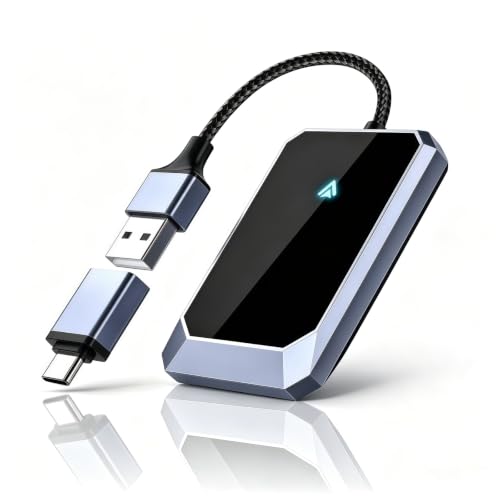
The Aswoema Wireless Adapter is the clearest pick for someone who primarily uses Android Auto and does not need a complicated multi-device feature set. Its setup is the familiar plug, pair, and drive process. Once paired, the adapter is designed to connect automatically to an Android 10 or later phone, bringing maps, music, calls, messages, and voice assistance to the car's original interface.
Aswoema says the adapter works with more than 800 car models and supports phones from Google, Samsung, OnePlus, and other Android brands. The important qualification is that the car must already support wired Android Auto. The listing also describes a wired CarPlay conversion mode, but it specifically frames the device around Android use and says it is not for iOS in that context. That makes it less versatile than the Teeran for households where phone platforms change from driver to driver.
The listed body measures 2.64 by 1.65 by 0.35 inches and weighs 0.1 pounds. It is not a bulky device, and the lightweight aluminum construction should sit neatly near a USB port without obstructing the cabin. An included USB-to-USB-C adapter broadens the physical fit, which is useful because a vehicle may have a modern USB-C socket while an older cable arrangement expects USB-A.
The A7S chip is described as supporting a stable connection, while the adapter preserves the car's existing audio system and control logic. That means the value of this model is its simplicity rather than extra hardware. Compared with the Spedal 2 in 1 Adapter, Aswoema has a less ambitious wireless specification, but its Android-first positioning may be exactly what a single Android user needs.
Its limitations are easy to define. It cannot create Android Auto in a vehicle that lacks wired support, and iPhone households should choose Teeran, Spedal, or one of the dual-platform Visoud options instead. A 365-day warranty and lifetime technical support help it make sense for an Android driver who wants a small, conventional adapter and has already confirmed compatibility.
3. YESTRYS 3 in 1 Adapter: Best Media Expansion

Pros
- Supports wireless CarPlay and Android Auto
- HDMI input for external streaming devices
- USB port can power connected accessories
- Supports iPhone 6 and later
- V851S chip and dual WiFi design
Cons
- Requires a factory wired CarPlay system and touchscreen
- USB port does not play media from flash drives
- More involved than a standard wireless adapter
Best for: drivers who want wireless phone integration plus an HDMI path to a compatible car display.
The YESTRYS 3 in 1 Adapter is not just another small dongle. Its distinguishing feature is the HDMI input, which lets a compatible external device send video to the car's display. That makes it interesting for passengers and parked-car entertainment, although it also adds another layer of setup that a basic CarPlay adapter does not need.
The core conversion still follows the usual rules. The vehicle needs factory wired CarPlay and a touchscreen, and it cannot already use built-in wireless CarPlay. The adapter supports wireless CarPlay and Android Auto, with iPhone support from model 6 and iOS 10 or later, plus Android 11 or later with the Auto protocol. Those requirements should be checked before purchase because the HDMI feature cannot compensate for an incompatible head unit.
YESTRYS uses a V851S chipset and dual WiFi connectivity, which the product describes as handling navigation, high-quality audio, and voice commands without noticeable delay. The adapter automatically reconnects after the initial setup. Its HDMI-IN port can accept a streaming stick such as a Google TV or Fire Stick, while the USB port provides power for such accessories. The USB connection does not play files from a flash drive, so it is better understood as a power and accessory connection than as a built-in media player.
That makes this product a specialist choice rather than a direct rival to the SPIRITIME 2 in 1 Adapter. SPIRITIME is designed around switching between phones, while YESTRYS is the better fit when the car's screen needs to serve more than navigation and calls. If the goal is simply to remove a cable, the Shrandi 2 in 1 Adapter is less involved.
The main weakness is complexity. More ports and more possible sources mean more compatibility questions, and the requirement for a factory touchscreen narrows the audience. Drivers should also keep video use to appropriate stationary situations and let the phone interface handle normal navigation while moving. For a compatible car with passengers who want a flexible display setup, YESTRYS is the most distinctive model in the group.
4. SPIRITIME 2 in 1 Adapter: Best for Phone Switching

Pros
- Supports both wireless CarPlay and Android Auto
- One-click switching between two iPhones
- LED control can reduce dashboard distraction
- USB-A and USB-C compatibility
- Dual-band wireless connection
Cons
- The quick-switch feature is described for two iPhones
- Requires a factory wired system
- Connection time is listed at up to 5 seconds
Best for: couples or families who regularly change between two iPhones in one vehicle.
The SPIRITIME 2 in 1 Adapter addresses a very specific nuisance: the second driver getting into the car and finding the first driver's phone still attached. Its Quick-Swap Button is designed to switch between two connected iPhones with one press. That is more convenient than opening Bluetooth or CarPlay settings, particularly in a shared vehicle where both phones are used often.
It also supports Android Auto, but the phone-switching claim is specifically about two iPhones. The adapter is intended for factory CarPlay vehicles from 2016 and newer, and the product also lists compatibility with iOS 10 or later and Android 11 or later. The car must have a wired system already. This is a useful distinction from a portable CarPlay screen, which supplies its own display and can be installed in a car that lacks factory integration.
SPIRITIME lists a 5-second automatic connection after the initial setup. Its Bluetooth 5.8 and dual-band WiFi design are intended to keep music, maps, calls, and voice controls responsive. It supports both USB-A and USB-C connections, and a long press can turn off the adapter's LEDs. That last feature is small, but a bright light near a screen can become irritating during night driving.
Compared with the Visoud A7 Mini Adapter, SPIRITIME has a slower listed connection time but a clearer physical control for switching phones. The Visoud is more attractive to someone who wants the quickest startup, while SPIRITIME is the more useful design for two regular iPhone drivers. For broader mixed-phone use without the iPhone emphasis, Teeran remains the safer pick.
The limitation is that its best feature does not apply equally to every phone combination. Android users can use the adapter, but they should not assume the same one-button workflow described for two iPhones. The product also does not help cars without factory wired CarPlay or Android Auto. It is a focused choice for shared cars where quick handoff between iPhones matters more than adding media ports or a new display.
5. Spedal 2 in 1 Adapter: Best Ultracompact Adapter

Pros
- Supports wireless CarPlay and Android Auto
- Very small stick-style body
- WiFi 6 and Bluetooth 5.4
- USB-A to USB-C adapter included
- Heat-resistant design
Cons
- Connection can take 5 to 15 seconds
- Not compatible with BMW, Tesla, or cars without a wired system
- Android Auto requires Android 11 or later
Best for: drivers who want a nearly invisible adapter with modern wireless hardware.
The Spedal 2 in 1 Adapter is built around the idea that the best adapter is the one you stop noticing. Its ultramini stick design plugs directly into the car's USB port, with no loose box hanging from a cable. The listed dimensions are about 1.06 by 0.98 by 0.98 inches, and the listed weight is a fraction of an ounce, so it should be easy to tuck behind a console edge or leave in place.
Spedal supports both wireless CarPlay and Android Auto, making it suitable for cars shared by iPhone and Android users. The compatibility boundary is familiar: the vehicle needs factory wired CarPlay or Android Auto, and the product specifically excludes BMW, Tesla, and vehicles without a wired system. Android users need Android 11 or later with wireless Android Auto enabled. Checking that requirement matters more here than the wireless branding on the box.
The hardware uses WiFi 6 and Bluetooth 5.4. WiFi 6 can help with connection efficiency and resistance to interference, while Bluetooth handles the initial pairing process. Spedal says the adapter reconnects in 5 to 15 seconds after the first pairing. That is not the fastest claim in this roundup, but it is still short enough for most daily starts and gives the product a practical advantage over plugging in a cable every time.
The compact dimensions make Spedal a stronger fit for tight consoles than the Aswoema Wireless Adapter. It is also less feature-heavy than the YESTRYS, which is a benefit if the car is used mainly for maps, music, calls, and voice control. Drivers who want a one-button phone switch should look at SPIRITIME or the Visoud A7 model instead.
The weakness is that the smallest design does not guarantee the fastest start. A 5 to 15 second connection window is wider than the three-second claim from Teeran or Visoud's A7 adapter. Spedal also cannot add a display to a car that lacks one. Choose it for a clean installation and modern wireless connectivity, not for HDMI, a touchscreen, or the quickest published reconnect time.
6. Shrandi 2 in 1 Adapter: Best Simple Setup

Pros
- Plug-and-play pairing
- Supports CarPlay and Android Auto
- USB-A to USB-C converter included
- Small thumb-sized design
- Automatic reconnection
Cons
- Requires built-in wired CarPlay or Android Auto
- The broad compatibility claim still needs vehicle verification
- No phone-switch button or extra media input
Best for: anyone who wants a basic wireless conversion without extra functions.
The Shrandi 2 in 1 Adapter keeps its pitch straightforward. Plug it into the vehicle, pair the phone, and drive. There are no apps or downloads, and the adapter is designed to reconnect whenever the car starts. That simplicity is useful for drivers who do not need a physical phone-switch control, HDMI input, or a display mounted on the dashboard.
It supports wireless CarPlay and Android Auto and lists compatibility with iPhones on iOS 10 or later and Android phones on Android 11 or later. The vehicle must have CarPlay or Android Auto built in through a wired connection. Shrandi describes support across 98 percent of factory-wired CarPlay vehicles, but that broad figure should not replace checking the specific car and head-unit arrangement.
The body is listed at about 1.18 inches high, 1.18 inches long, and 1.1 inches wide. That thumb-sized shape helps keep the adapter out of sight, while the included USB-to-USB-C converter makes it easier to use with different car ports. Its purpose is to preserve the car's navigation, music, calls, and voice command functions while removing the cable between phone and dashboard.
This is a more stripped-down alternative to the Teeran 2 in 1 Adapter. Teeran adds more explicit environmental protection, support details, and a smaller listed width, while Shrandi focuses on the basic connection. It also lacks the phone handoff feature found on SPIRITIME and Visoud's A7 model. If you are comparing the trade-offs of what changes when a wired phone connection becomes wireless, Shrandi represents the uncomplicated end of that decision.
Its weakness is the absence of a differentiating feature beyond compactness and automatic reconnection. A shared vehicle may be better served by a one-click switching model, and a car without factory integration needs the GTVFS or YREVTM screen. For a compatible car and a driver who wants fewer setup steps, Shrandi is a sensible basic adapter.
7. GTVFS 9-inch CarPlay Screen: Best Large Portable Screen

Pros
- Large 9-inch full HD touchscreen
- Works with wireless CarPlay and Android Auto
- Four audio output options
- Mirror Link support
- Suction-cup installation
Cons
- Takes up more dashboard space than a dongle
- Uses a cigarette-lighter connection
- Requires a separate mounting position and audio choice
Best for: older cars that need their own large wireless CarPlay and Android Auto display.
The GTVFS 9-inch CarPlay Screen changes the installation question entirely. Instead of converting an existing factory system, it supplies a portable display that can sit on the dashboard. The 9-inch full HD touchscreen is the main attraction, giving maps, calls, and music controls more room than a small factory display or phone screen.
The unit supports wireless CarPlay and Android Auto, plus voice control through Siri or Google Assistant. It also offers phone mirroring and four ways to send sound to the car: FM transmission, AUX, Bluetooth, or the built-in speaker. That flexibility matters in older vehicles because not every cabin has the same stereo inputs. FM is convenient when there is no AUX connection, while AUX can avoid the interference that can affect an FM signal.
Installation is designed to be simple. The screen plugs into the cigarette lighter and attaches with a suction-cup base. There is no need to remove the factory stereo or run permanent wiring. That makes it a strong solution for a vehicle that lacks CarPlay entirely, though it also means accepting a second screen and another object on the dashboard.
The YREVTM 7-inch CarPlay Screen is easier to position and rotate, but GTVFS wins when screen size is the priority. Its 9-inch panel should make route lines and touch targets easier to see, while the YREVTM offers more mounting flexibility and portrait orientation. If you are unsure where a portable display should sit, guidance on choosing a safe viewing position for a dashboard screen can help keep visibility and distraction in check.
The drawback is physical presence. A dongle disappears into a USB port, while this screen needs a mount, power cable, and audio connection. The suction base may also be less appealing to drivers who want a factory-looking interior. Pick GTVFS when the existing car has no suitable screen or when a large navigation view matters more than an integrated appearance.
8. Visoud A7 Mini Adapter: Best Fast-Connecting Adapter

Pros
- Three-second automatic connection claim
- One-click switching between two iPhones
- 5.8GHz WiFi and Bluetooth 6.0
- Eight ventilation ports
- USB-A and USB-C extension support
Cons
- Requires a factory wired CarPlay system
- Phone-switching feature is described for two iPhones
- No display or media input
Best for: drivers who care about fast starts and regularly share a car with another iPhone user.
The Visoud A7 Mini Adapter makes speed its defining trait. The product claims an automatic connection in 3 seconds after the car starts, which is among the quickest published times in this group. That can make a noticeable difference on short trips when waiting for the interface to appear feels longer than the drive itself.
Its one-click device switch is intended for two iPhones. One press changes the active phone without forcing users to remove and pair devices again. The adapter also supports Android 11 or later, while iPhone compatibility starts at iOS 12. As with the other conversion dongles, the car must have a factory wired CarPlay system. Visoud says it supports more than 1, 300 car models from 2016 onward, but individual vehicle verification remains essential.
The wireless system combines 5.8GHz WiFi with Bluetooth 6.0. The product positions that combination as a way to reduce latency during navigation, Waze use, music streaming, and hands-free calls. Its ventilation design includes eight ports, and the stated operating range is -20°C to 70°C. USB-A and USB-C extensions help with different port layouts and make it easier to keep the small adapter away from a cramped compartment.
Visoud's A7 model is more specialized than the Spedal 2 in 1 Adapter. Spedal emphasizes WiFi 6, a very small stick body, and heat-resistant operation, while Visoud emphasizes the three-second start and phone switching. Teeran remains the more balanced choice for a household using both iPhone and Android, but A7 has the sharper advantage for two iPhone drivers who dislike waiting.
The weakness is that the fastest claim does not change the basic compatibility rule. It cannot add CarPlay to a vehicle without factory wired support, and it does not provide a screen for an older dashboard. A 365-day warranty, lifetime technical support, and firmware updates add reassurance, but the right buyer is still someone with a compatible factory system who values quick reconnection above extra ports.
9. YREVTM 7-inch CarPlay Screen: Best Adjustable Screen

Pros
- 7-inch HD touchscreen
- Landscape and portrait orientation
- Four audio output methods
- Wireless mirror link
- 360-degree adjustable mount
Cons
- Requires dashboard space and cigarette-lighter power
- Heavier than a small adapter
- Portable screen is less integrated than a factory display
Best for: drivers who want a flexible portable screen that can be removed when not needed.
The YREVTM 7-inch CarPlay Screen is the more adaptable portable-display option in this roundup. Its 7-inch HD touchscreen can rotate between landscape and portrait, allowing a driver to choose a wider map view or a taller layout. That flexibility is useful when the dashboard shape, steering wheel position, or preferred navigation app makes one orientation more practical than the other.
It supports wireless CarPlay and Android Auto, with voice control for calls, texts, music, and navigation. Wireless mirroring through AirPlay or Miracast gives passengers another way to display content, though drivers should keep attention on navigation and hands-free functions while moving. The screen can send audio through its built-in speaker, Bluetooth, AUX, or FM transmitter, so it can work with a range of factory stereo setups.
The mounting system is a major part of the design. A vacuum suction mount and 360-degree adjustable arm let the screen be positioned and then removed with a quick-release lever. The listed body measures 6.7 inches wide, 4.4 inches high, and 1 inch long, with a listed weight of about 1.52 pounds. Those dimensions make it substantial enough to see clearly, but they also mean the mounting surface must be stable and the cable needs to be routed neatly.
Compared with the GTVFS 9-inch CarPlay Screen, YREVTM gives up display size but gains orientation changes and a more adjustable mounting arrangement. GTVFS is the better fit for a large fixed landscape view, while YREVTM suits drivers who want to tune the screen position or remove it between trips. Neither is as visually clean as a small adapter in a car that already has a compatible factory system.
The main weakness is the same one shared by all portable screens: it adds hardware to the cabin. It needs cigarette-lighter power, a clear mounting location, and a choice of audio output. Drivers who want an uncluttered dashboard should choose Teeran or Spedal. Drivers with an older car and no useful built-in display should consider YREVTM for its adjustability and removable setup.
10. Visoud Multi-User Adapter: Best Flexible Installation

Pros
- Supports CarPlay and Android Auto
- Designed for multi-user vehicles
- 5.8GHz WiFi connection
- USB-A extension cable included
- Aluminum alloy body
Cons
- Requires factory wired support
- The listing does not specify a connection time
- Extension hardware adds another piece to manage
Best for: shared cars where flexible cable placement matters more than a built-in screen.
The Visoud Multi-User Adapter is aimed at the shared vehicle, but it takes a different approach from the A7 Mini. Rather than highlighting a physical phone-switch button, it focuses on dual-platform support, automatic reconnection, and installation flexibility. The included USB-A extension cable can move the adapter away from a blocked port or tuck it into a console, which is helpful in cars where a direct plug would interfere with storage.
It supports iPhones on iOS 10 or later and Android phones on Android 11 or later. Visoud says it works with 98 percent of OEM wired systems, but the vehicle must already have factory wired CarPlay or Android Auto. The adapter cannot help a car that has neither system, and it is not a substitute for the portable displays in this list.
The wireless connection uses 5.8GHz WiFi, and the product describes low-latency navigation, hands-free calling, and music streaming. The aluminum alloy body is intended to improve heat dissipation while keeping the unit lightweight. Its listed dimensions are approximately 4.33 by 3.15 by 0.59 inches and its listed weight is about 0.11 pounds, although the included extension arrangement means the installed footprint can vary more than the adapter body alone suggests.
This model is a practical alternative to the SPIRITIME 2 in 1 Adapter. SPIRITIME is the better pick when two iPhone users want a dedicated one-click switch, while Visoud is more appealing when the USB port location is the real problem. Teeran has a more compact listed body and clearer support package, so it remains the stronger all-rounder.
The weakness is that the listing gives less specific information about connection timing than Teeran, SPIRITIME, Spedal, or the A7 Mini. It also lacks the HDMI input of YESTRYS and cannot supply a display. Choose it for the aluminum construction, dual-platform operation, and extension cable, especially when a shared car has a cramped or awkwardly placed USB port.
How to choose the best wireless carplay android auto
Start by identifying whether the car already has factory wired CarPlay or Android Auto. That single detail determines whether you need a small conversion adapter or a portable screen.
Factory system compatibility
Wireless adapters are converters, not universal stereo upgrades. Teeran, Aswoema, YESTRYS, SPIRITIME, Spedal, Shrandi, and both Visoud adapters require an existing wired system. Portable screens such as GTVFS and YREVTM are the better route for cars that lack a compatible factory interface.
Check the exact vehicle and head-unit configuration rather than relying only on the model year. Android phone requirements also vary, with several adapters requiring Android 11 or later. iPhone operating system requirements range from iOS 10 to iOS 12 depending on the model.
Phone platform support
A dual-platform adapter is useful when drivers switch between iPhone and Android. Teeran and Spedal make this central to their designs, while Aswoema is more clearly focused on Android Auto use.
Shared iPhone households should look at the physical switching controls on SPIRITIME and Visoud A7. Those features are described specifically for two iPhones, so Android users should not assume they will get the same one-button workflow.
Connection speed
A short reconnection time makes wireless integration feel close to factory equipment. Teeran claims under 3 seconds, Visoud A7 claims 3 seconds, SPIRITIME lists 5 seconds, and Spedal gives a broader 5 to 15 second window.
Connection speed is only one part of the experience. Port placement, phone distance, wireless interference, and the car's own startup sequence can affect how quickly the interface appears.
Port placement and size
A tiny adapter is easiest to leave installed, but a direct plug may block a storage compartment or put stress on an awkwardly placed port. Teeran includes USB-A and USB-C extension cables, while Visoud's Multi-User Adapter includes a USB-A extension cable for more flexible placement.
The right adapter should disappear into the car, not turn the center console into another charging station.
Portable screens have a different space requirement. GTVFS uses a suction-cup mount and cigarette-lighter power, while YREVTM adds a 360-degree adjustable arm and quick-release lever. Measure the dashboard area and check that the screen will not obstruct the driver's view.
Audio and display options
Conversion adapters use the vehicle's existing screen and audio system. That usually creates the cleanest installation, but it cannot improve an old display that is difficult to read.
Portable screens bring their own touchscreen and offer more audio choices. GTVFS and YREVTM support combinations of Bluetooth, AUX, FM transmission, and built-in speaker output. AUX is often the most direct option when available, while FM and the built-in speaker can help in cars with fewer audio inputs.

Frequently asked questions
Do wireless adapters work in every car?
No. Most small adapters require factory wired CarPlay or factory wired Android Auto. They generally cannot add either system to a car that lacks the necessary built-in hardware.
Can one adapter support both iPhone and Android phones?
Several models here can support both platforms, including Teeran, YESTRYS, SPIRITIME, Spedal, Shrandi, and the two Visoud adapters. Phone operating system requirements still apply, and the car must have a compatible wired system.
Are portable CarPlay screens different from wireless adapters?
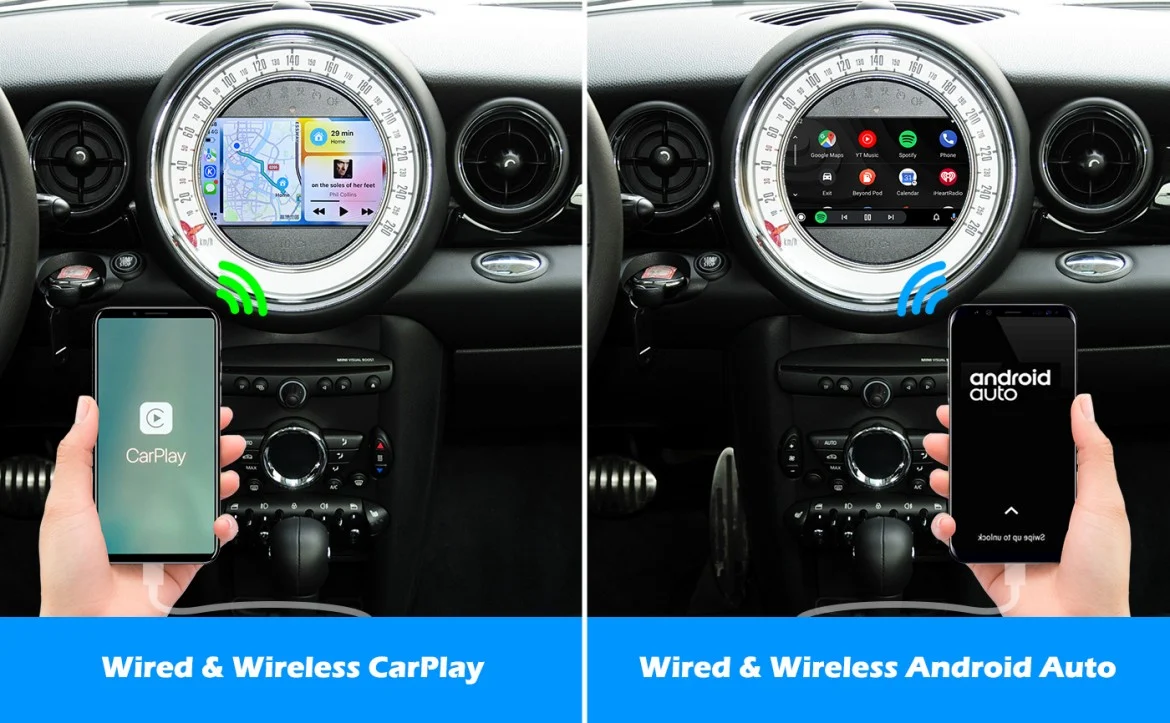
Yes. A wireless adapter uses the car's existing display and converts the wired connection to wireless. A portable screen supplies its own display and is useful when the vehicle does not have a suitable factory screen.
Can these adapters play video?
YESTRYS has an HDMI input for external media devices, but it is not the same as a built-in streaming player. The GTVFS and YREVTM screens support mirror link, while normal CarPlay and Android Auto functions are intended for navigation, calls, messages, and audio.
Do I need a USB-A or USB-C port?
The answer depends on the car. Many adapters include a converter or extension cable to support both USB-A and USB-C layouts. Check the vehicle's port type and whether that port carries data, since a power-only socket will not run CarPlay or Android Auto.
Can two phones connect to one adapter?
Some adapters can remember or switch between multiple phones, but the specific workflow varies. SPIRITIME and Visoud A7 describe one-click switching between two iPhones, while other models rely on automatic reconnection and phone selection.
The bottom line
The Best wireless carplay android auto choice for most compatible cars is the Teeran 2 in 1 Adapter. It supports both phone platforms, reconnects quickly, includes flexible USB cables, and keeps the factory controls intact. The Spedal 2 in 1 Adapter is the better alternative when an ultracompact body and modern wireless hardware matter most.
For cars without a useful factory system, choose the GTVFS 9-inch CarPlay Screen for the largest view or the YREVTM 7-inch CarPlay Screen for a more adjustable, removable installation. Drivers with two iPhones should give SPIRITIME or Visoud A7 a closer look for their dedicated switching controls.
If you are undecided, first confirm that your car has wired CarPlay or Android Auto, then choose an adapter for an integrated cabin or a portable screen for a larger standalone display.
As an Amazon Associate we earn from qualifying purchases.