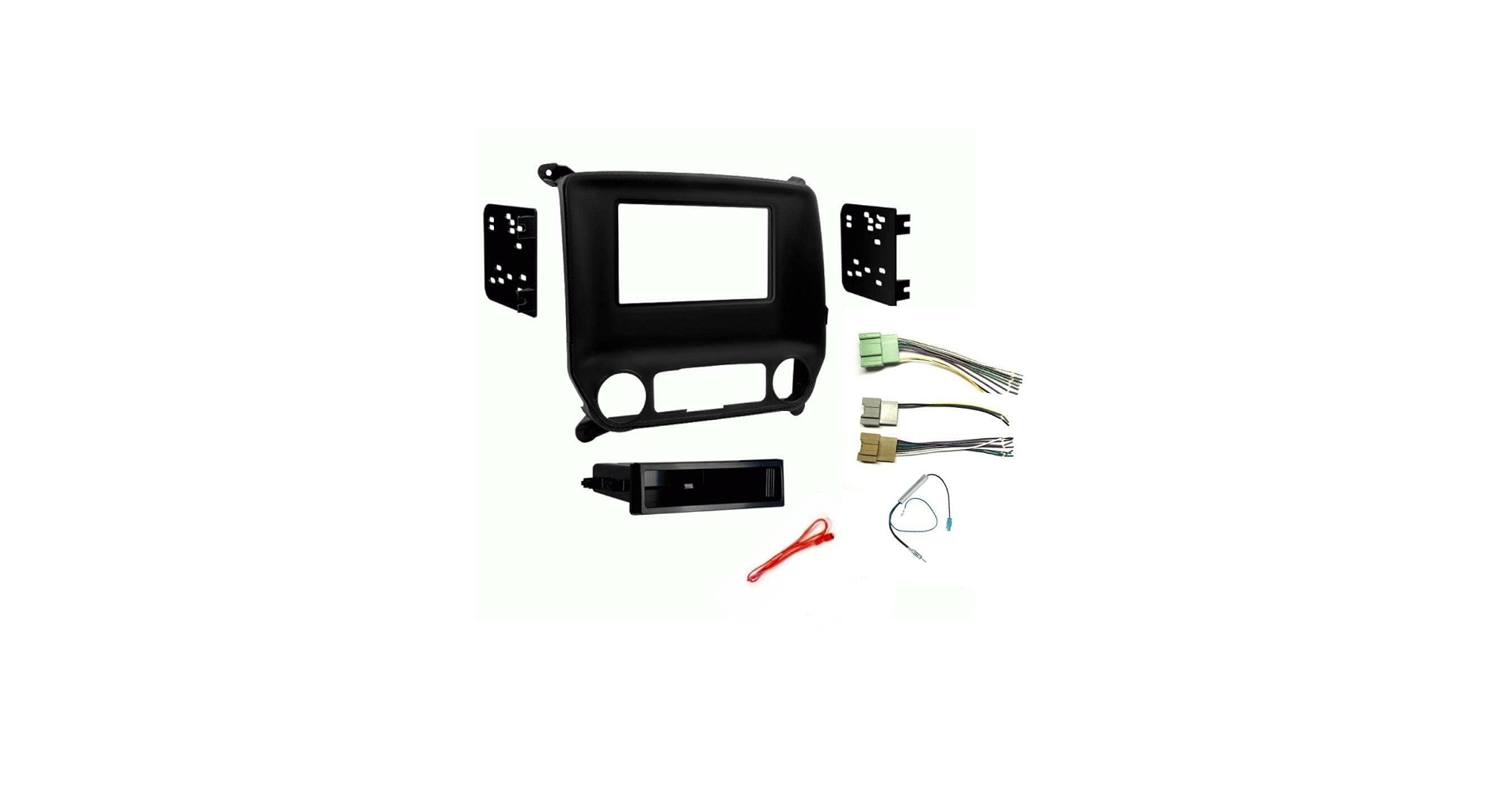

If you own a Chevy Silverado and want to replace the factory radio with an aftermarket unit, you need a stereo installation kit. This kit is not a single product but a combination of a dash kit, wiring harness, and antenna adapter that lets a new head unit physically mount and electrically connect in your truck. The exact parts you need depend almost entirely on the Silverado's model year and sometimes the trim level. Our advice: identify your truck's generation first, then buy a kit that bundles the right pieces for that year range.
What a Stereo Installation Kit Actually Is
A factory radio is designed specifically for the dashboard shape, electrical connectors, and antenna plug of one vehicle. Aftermarket radios are built to a universal size standard (single DIN or double DIN) but the gaps around them and the wiring behind them are different in every car. An installation kit bridges that gap.
The kit usually contains three parts:
- A plastic dash panel (or faceplate) that fills the opening around the new radio so it looks factory.
- A metal or plastic mounting bracket (or cage) that holds the radio securely in the dashboard.
- A wire harness adapter that plugs into the truck's factory connector on one side and has bare wires or a standardized connector on the other side, so you can splice or plug into the radio without cutting the car's original wiring.
Some kits also include an antenna adapter because GM trucks historically use a unique antenna plug. Steering wheel control modules and backup camera adapters may be sold separately or bundled in higher end kits.
The point is simple: you cannot just shove a new radio into the Silverado's dash and have it work. The alignment tabs, screw holes, and electrical connectors are different. The kit makes the installation clean, reversible, and safe.
How Model Year and Trim Affect Your Choice
Chevy has built the Silverado across several distinct generations since the late 1990s. The dashboard layout, wiring color codes, and radio connectors changed at certain model year breaks. Your first step is to know which generation you have.
GMT400 (1999-2002)
The oldest common Silverado for aftermarket upgrades. These trucks usually use a single DIN or shallow double DIN opening. The dash kit is a simple ISO mount plastic frame. The wiring harness uses a standard GM connector that is well documented.
GMT800 (2003-2007 classic)
The dashboard is wider. Most factory radios are double DIN. The aftermarket dash kit comes with a pocket if you install a single DIN radio, or a full faceplate for double DIN. Wiring harness changes slightly at 2005. Pay attention to whether your truck has the premium Bose system, which uses a different speaker impedance and may require a special harness or bypass module.
GMT900 (2007.5-2013)
The dash shape changed again. These trucks can be tricky because some have a separate radio and HVAC control unit, while others have a single integrated panel. Many GMT900 trucks require a dash kit that also relocates the HVAC controls downward to fit a double DIN radio. The wiring harness includes data signals for OnStar and chimes, so you need a harness that retains those functions or an adapter module.
K2XX / GMT K2 (2014-2018)
Fully redesigned interior. The radio is often part of a larger center stack with touchscreen controls. Replacing the radio here is more involved. You may need a module that decodes the CAN bus data to keep steering wheel controls, backup camera, and USB ports working. The installation kit is more expensive because it includes a digital interface.
T1XX (2019-present)
Current generation. The infotainment system is deeply integrated. Replacing the radio is possible but requires a high end kit with a programmable interface module. Many of these kits emulate the factory screen and require you to keep the factory amplifier or bypass it correctly. Steering wheel control retention is standard.
Trim level matters most when your Silverado has factory options like a Bose amplifier, a backup camera, or heated seats controlled through the radio screen. In those cases, a basic wire harness will not work. You need a data interface module that tells the truck's computer the new radio is present and translates commands. This is where kit prices jump from around $30 for a plain dash kit to over $200 for a full interface and harness package.
The Three Main Components: Dash Kit, Wiring Harness, Antenna Adapter
Understanding each part helps you avoid ordering the wrong kit.
Dash Kit
This is the plastic bezel that surrounds the radio. It fills the gap between a standard single or double DIN radio and the irregularly shaped factory opening. Some dash kits are just a trim ring with mounting brackets. Others are full replacement panels that also hold the HVAC controls. If you install a double DIN radio, verify that the dash kit allows enough depth behind the dash. Deeper radios may hit the air duct or the back of the dash.
Wiring Harness
The harness is the critical piece. A direct plug in harness connects to the truck's factory radio connector and provides labeled pigtails for power, ground, speakers, and sometimes illumination. For Silverados, you must choose a harness that matches your truck's connector type. The most common part numbers cover 1999-2002, 2003-2005, 2005-2007, 2008-2013, and then 2014 onward. If your truck has the Bose system, look for a harness that says Bose compatible or that includes a bypass module. Without that, you may get no sound or very quiet audio.
Antenna Adapter
GM used a specific antenna plug from the 1990s through about 2007, then switched to a standard ISO plug around 2008. But even newer trucks may need an adapter if the aftermarket radio uses a universal antenna connector. A typical antenna adapter costs a few dollars. If your kit does not include one, buy it separately. Without it, you will have no radio reception.
Do You Need Steering Wheel Control Retention?
Many Silverado owners want to keep the volume and track skip buttons on the steering wheel. A standard wiring harness does not pass those signals through. You need a steering wheel control interface module that reads the factory data wire and outputs analog or wired remote signals compatible with the aftermarket radio.
For 1999-2007 trucks, a simple wired remote interface works. For 2008 and newer, you need a CAN bus interface that plugs between the truck and the radio. These modules are made by companies like PAC, iDatalink, and Axxess. Some installation kits bundle them. If you want to keep the controls, confirm the kit description mentions steering wheel control retention or a module that supports it.
If you do not care about the steering wheel buttons, you can skip this part and save money.
Installation Tips and Common Gotchas
The physical install is straightforward for most Silverados. Remove the factory radio by prying off the trim bezel (usually held by clips), unbolt the radio, unplug the harness, and reverse the steps. But a few things trip people up.
Check for a factory amplifier. Many Silverados with the premium Bose system feed the speakers through an external amplifier under the center console or behind the glove box. The wiring harness to the radio carries line level signals, not speaker level. If you use a standard harness, you will get very low volume. You need a harness that either connects to the amplifier's output or includes a line output converter. Some kits specifically include a Bose bypass module.
Retention of chimes. On newer Silverados (2014+), the turn signal clicks, door chimes, and backup warning sounds are generated by the radio module. If you remove the factory radio, those sounds disappear. A good interface module can regenerate them through the aftermarket radio. Without it, you will have silence where chimes used to be. That is not a safety issue but is a common annoyance.
Double check the antenna location. The antenna base is on the roof or integrated into the rear window glass. Some aftermarket radios need a power antenna output to extend a mast antenna. Most Silverados use a fixed mast, so you can ignore that wire.
Test before you button everything up. Connect the harness, plug in the radio, and verify that power, sound, and steering wheel controls work before you push the dash kit back into place. It is much easier to troubleshoot with everything hanging loose.
If your radio does not power on, double check that you connected the constant 12V and switched 12V wires. Silverado harnesses often have an orange wire for illumination dimming that is easy to confuse with the accessory wire.
FAQ
Do I need a different installation kit for a single DIN versus double DIN radio?
Yes, but most kits are designed to work with both. They include a mounting cage for a single DIN radio and a filler pocket or trim piece to cover the gap. Double DIN radios fill the entire opening, so you just need the faceplate without the pocket. Check the kit description for DIN compatibility.
Will a stereo installation kit from a 2002 Silverado fit a 2006 model?
No. The dashboard changed dramatically between the GMT400 and GMT800 generations. A kit for 1999-2002 will not match the shape or clip locations of a 2003-2007 truck. Always buy a kit specifically for your model year range.
Can I install an aftermarket radio without a wiring harness?
Technically yes, by cutting the factory connector and splicing wires directly. But that is a bad idea. It damages the truck's wiring, makes future replacements harder, and increases the chance of shorts or incorrect connections. A plug in harness costs very little and keeps everything reversible.
What if my Silverado has the factory navigation or touchscreen?
Those trucks often have a larger radio opening and additional wiring for GPS and satellite radio. The installation kit will be different from the base radio kit. You may need a specific dash panel that accommodates the wider cavity, and the harness must handle the extra connectors. Look for a kit that says "for vehicles with factory navigation" or "with 8 inch screen."
Do I need to disconnect the battery before installation?
Yes. Disconnect the negative battery terminal to prevent shorting power wires or triggering the airbag system when you remove the dash panel. Wait a few minutes after disconnecting before working near the radio area to let any capacitors discharge.