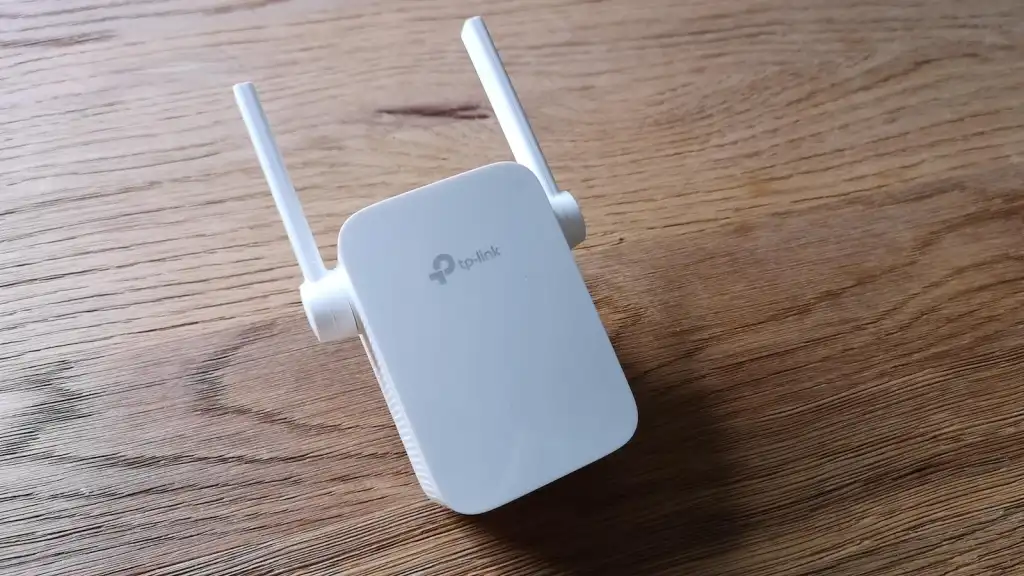

A dead zone is rarely confined to one device. It is the bedroom video call that drops, the television that buffers through a film, or the laptop that keeps switching between a weak signal and no connection at all. The right extender can fix that, but only if it is placed where the router still has a usable connection.
Our Best TP-Link WiFi Extenders list includes straightforward dual-band repeaters, newer WiFi 6 and WiFi 7 models, and a full mesh system for homes where one plug-in unit is not enough. The differences are substantial: some have fast Ethernet, some support EasyMesh, and one does not use the 6 GHz band despite being a WiFi 7 model.
For most homes, TP-Link RE715X is the single best pick. The list ranges from compact coverage fixes to a three-unit mesh system built for large spaces.
Comparison table
| # | Product | Award | Wireless class | Coverage and capacity | Wired networking | Best for |
|---|---|---|---|---|---|---|
| 1 | TP-Link RE715X | Best overall | AX3000, dual-band WiFi 6 | Up to 2, 400 sq. ft., 64 devices | Gigabit Ethernet | Most homes with a WiFi 6 router |
| 2 | TP-Link RE315 | Best compact pick | AC1200, dual-band WiFi 5 | Up to 1, 600 sq. ft., 32 devices | Fast Ethernet | Simple dead-zone fixes |
| 3 | TP-Link RE550 | Best WiFi 5 coverage | AC1900, dual-band WiFi 5 | Up to 2, 200 sq. ft., 32 devices | Gigabit Ethernet | Older routers and broad coverage |
| 4 | TP-Link RE653BE | Best WiFi 7 performance | BE10000, tri-band WiFi 7 | Up to 2, 800 sq. ft., 128 devices | 2.5 Gigabit Ethernet | WiFi 7 homes and multi-gig connections |
| 5 | TP-Link RE615X | Best WiFi 6 range | AX1800, dual-band WiFi 6 | Up to 2, 100 sq. ft., 64 devices | Gigabit Ethernet | Larger homes with WiFi 6 |
| 6 | TP-Link RE220 | Best basic extender | AC750, dual-band WiFi 5 | Up to 1, 200 sq. ft., 30 devices | Ethernet port | Small, lightly connected spaces |
| 7 | TP-Link RE223BE | Best dual-band WiFi 7 | BE3200, dual-band WiFi 7 | Up to 2, 400 sq. ft., 64 devices | Ethernet port | WiFi 7 routers without 6 GHz needs |
| 8 | TP-Link RE500X | Best OneMesh option | AX1500, dual-band WiFi 6 | Up to 1, 500 sq. ft., 25 devices | Gigabit Ethernet | OneMesh router owners |
| 9 | TP-Link RE515X | Best mid-size WiFi 6 pick | AX1500, dual-band WiFi 6 | Up to 1, 800 sq. ft., 64 devices | Gigabit Ethernet | Moderate coverage expansion |
| 10 | TP-Link Deco X55 | Best whole-home system | AX3000, WiFi 6 mesh | Up to 6, 500 sq. ft., 150 devices | Three Gigabit ports per unit | Large homes and new networks |
1. TP-Link RE715X: Best Overall

Pros
- WiFi 6 performance with a strong 5 GHz capacity
- Covers up to 2, 400 square feet
- Supports up to 64 connected devices
- Gigabit Ethernet and access point mode
- EasyMesh support with compatible routers
Cons
- Not compatible with Deco mesh systems
- Wireless extender throughput can be substantially below the router's connection
- Larger than the compact models
Best for: most homes that need a capable WiFi 6 extender with wired flexibility.
The TP-Link RE715X is the easiest model here to recommend because it balances reach, modern wireless support, and useful network options without trying to replace an entire home network. It is a dual-band WiFi 6 extender with up to 2, 404 Mbps on 5 GHz and 574 Mbps on 2.4 GHz, for a stated total bandwidth of 3 Gbps. Those figures describe the wireless links under ideal conditions, not a guaranteed internet speed, but the extra capacity gives it more room for several active devices than the older AC models.
Coverage is rated up to 2, 400 square feet for as many as 64 devices. Two high-gain directional antennas and Beamforming are intended to focus the signal toward connected devices, while Smart Adaptive Roaming helps compatible setups move devices toward the stronger signal. The practical benefit is less about making a distant connection magically fast and more about giving weak devices a stronger, more reliable path back to the router.
The Gigabit Ethernet port makes this more versatile than an extender that only repeats wirelessly. It can connect a television, desktop, or game console by cable, and AP mode lets it create WiFi from an existing wired connection. Setup runs through the TP-Link Tether app, which includes an intelligent signal indicator to help find a sensible placement. It supports EasyMesh routers, but TP-Link specifically says it is not compatible with Deco mesh systems.
Compared with the TP-Link RE615X, the RE715X has a higher wireless class and a larger stated coverage area. The TP-Link RE653BE is the more ambitious choice for a WiFi 7 network, but its tri-band hardware is unnecessary for many homes. The RE715X's weakness is the normal limitation of a wireless repeater: TP-Link says actual speeds can be 50% or less of the current connection, depending on conditions. Skip it if the real problem is a large multi-floor layout that needs several coordinated nodes rather than one improved signal.
For a typical home with a dead bedroom or weak upstairs office, this is the model we would keep. It has enough headroom for newer WiFi 6 devices, enough coverage for a broad area, and a wired fallback when a room needs a more dependable connection.
2. TP-Link RE315: Best Compact Pick

Pros
- Small, simple design
- Dual-band operation
- EasyMesh support
- Tether app setup and signal guidance
- One Ethernet port
Cons
- Fast Ethernet port is slower than the Gigabit ports on higher-ranked models
- WiFi 5 rather than WiFi 6
- Capacity is limited to 32 devices
Best for: a smaller home or apartment with one obvious dead zone.
The TP-Link RE315 is the uncomplicated option. Its two adjustable external antennas and compact body make sense when the goal is to improve one room rather than redesign the network. The dual-band AC1200 hardware reaches up to 867 Mbps on 5 GHz and 300 Mbps on 2.4 GHz, and TP-Link rates it for up to 1, 600 square feet and 32 devices.
That is enough wireless capacity for ordinary browsing, video calls, smart home devices, and streaming in a modest space. It is not the right tool for a crowded household with many simultaneous high-bandwidth connections. The older WiFi 5 standard also means it does not have the efficiency advantages of the WiFi 6 models such as the TP-Link RE715X or TP-Link RE500X.
The Ethernet port is useful, but it is a fast Ethernet connection rather than Gigabit Ethernet. That distinction matters if a wired television, desktop, or access point needs to move large files. For basic wired connectivity, it remains practical. Adaptive Path Selection is designed to choose a stronger route, and the Tether app handles setup while showing an indicator for finding the better location.
The RE315 supports EasyMesh with a compatible router, which gives it a more coherent role than a basic repeater. It is not compatible with Deco mesh systems. Its real weakness is limited scale: 32 devices and 1, 600 square feet put it behind the TP-Link RE550 and WiFi 6 options when a home has several rooms to cover. Buyers with a newer router should also consider whether this older wireless class will hold back the devices at the edge.
If the problem is a single weak corner and the connected devices are not demanding, the RE315 is pleasantly direct. It is smaller and less complicated than the higher-capacity models, and the app-based setup keeps the installation from becoming a networking project.
3. TP-Link RE550: Best WiFi 5 Coverage

Pros
- Broad stated coverage up to 2, 200 square feet
- Three adjustable external antennas
- Gigabit Ethernet port
- Access point mode
- EasyMesh compatibility
Cons
- Uses WiFi 5
- Supports up to 32 devices
- Wireless repeaters can reduce available throughput
Best for: extending an older dual-band router across a wider area.
The TP-Link RE550 is an older design with a clear purpose: spread a conventional dual-band network farther without requiring a new router. Its AC1900 rating combines up to 1, 300 Mbps on 5 GHz with up to 600 Mbps on 2.4 GHz. Those are link-rate ceilings, but the extra 2.4 GHz capacity can help devices that are farther from the extender or separated by walls.
Three adjustable external antennas give the RE550 a more traditional range-extender profile than the smaller plug-in units. TP-Link rates it for up to 2, 200 square feet and 32 devices. That coverage figure puts it close to the RE715X, though the newer WiFi 6 model is better suited to a busy network with newer phones, laptops, and streaming hardware.
A Gigabit Ethernet port allows a wired device to connect at a much higher ceiling than the RE315's fast Ethernet port. The RE550 also supports AP mode, so it can turn a wired connection into a wireless hotspot rather than relying on a wireless hop from the main router. The Tether app provides setup, firmware management, and an intelligent signal indicator. EasyMesh compatibility can help it work as part of a compatible router arrangement, but it is not compatible with Deco mesh systems.
The trade-off is age. The RE550 uses WiFi 5, and TP-Link says an extender may provide actual speeds at 50% or less of the existing connection. That is not a flaw unique to this model, but it is especially important when comparing it with the WiFi 6 TP-Link RE615X. The RE550 makes more sense when the router is also WiFi 5, while a WiFi 6 router should usually be paired with a WiFi 6 extender.
This is the pick for a reader who wants broad coverage from an existing older network and needs a Gigabit port. It is less compelling as the centerpiece of a brand-new network, where the RE715X or a coordinated Deco system is a better long-term fit. Readers comparing different forms of wireless coverage can also see how a repeater differs from a broader home coverage setup before choosing.
4. TP-Link RE653BE: Best WiFi 7 Performance

Pros
- Tri-band WiFi 7 design with 6 GHz
- Up to 10 Gbps total bandwidth
- 2.5 Gigabit Ethernet
- Supports up to 128 devices
- MLO support with a WiFi 7 router
Cons
- Its advanced features depend on a WiFi 7 router and compatible devices
- Larger than most plug-in extenders
- Wireless repeating still does not guarantee the full advertised link rates
Best for: extending a modern WiFi 7 network with multi-gig wired equipment.
The TP-Link RE653BE is not simply a faster version of a conventional extender. It is a tri-band WiFi 7 model with a 6 GHz band, and that extra band gives it a cleaner lane for newer devices and for communication with a compatible WiFi 7 router. The advertised totals reach 10 Gbps, divided into up to 5, 188 Mbps on 6 GHz, 4, 320 Mbps on 5 GHz, and 688 Mbps on 2.4 GHz.
The 6 GHz band is the important distinction. It offers more available spectrum and supports channels up to 320 MHz, while Multi-Link Operation can combine bands when the extender is paired with suitable WiFi 7 equipment. Multi-RU and 4K-QAM are also listed features. None of these turns a weak internet service into a faster one, but they can reduce congestion and improve the wireless path for compatible devices.
Four high-gain directional antennas with Beamforming support a stated coverage area of up to 2, 800 square feet and up to 128 devices. The 2.5 Gigabit Ethernet port is equally significant. It is the right kind of port for a multi-gig modem or a wired client that would outgrow Gigabit Ethernet. Setup and network management use the Tether app, and EasyMesh support allows it to pair with compatible routers.
The main limitation is compatibility. A WiFi 7 extender with 6 GHz makes little sense if the router cannot use the newer standard, and older clients will not receive the full benefit. The TP-Link RE223BE is a more focused alternative for WiFi 7 owners who do not need 6 GHz, while the TP-Link RE715X is a better match for most WiFi 6 homes. The RE653BE is also physically substantial, measuring 7.95 inches long, 5.63 inches wide, and 4.69 inches high.
Choose it when the network already has a clear WiFi 7 and multi-gig direction. It is the strongest extender here for that environment, but it is not a sensible way to future-proof a network whose router and clients are still several generations behind. For broader planning, the network layout that works across a whole home matters as much as the extender's wireless class.
5. TP-Link RE615X: Best WiFi 6 Range

Pros
- WiFi 6 performance
- Coverage up to 2, 100 square feet
- Supports up to 64 devices
- Gigabit Ethernet and AP mode
- EasyMesh compatibility
Cons
- No 6 GHz band
- Not compatible with Deco systems
- Lower wireless capacity than the RE715X
Best for: a larger home using a WiFi 6 router that needs one strong extension point.
The TP-Link RE615X is a sensible middle ground between the smaller AX1500 models and the flagship-like RE715X. It uses dual-band WiFi 6 with up to 1, 201 Mbps on 5 GHz and 574 Mbps on 2.4 GHz, producing a stated total of 1.8 Gbps. That gives compatible phones, laptops, and streaming devices a newer wireless foundation without moving into WiFi 7 hardware.
Coverage reaches up to 2, 100 square feet, and TP-Link lists support for up to 64 devices. Two high-gain directional antennas and Beamforming are intended to improve range and signal reliability. Smart Adaptive Roaming can help devices connect to the stronger signal as they move around a compatible network, though the result depends on the router and the layout of the home.
The Gigabit Ethernet port is useful for a wired client at the edge of coverage, and AP mode lets the RE615X operate from a wired connection. The Tether app handles setup and includes a signal indicator for placement. EasyMesh support expands it with compatible routers, but the device does not work with Deco systems. The lack of 6 GHz is not a surprise for a dual-band WiFi 6 extender, but it does rule out the newer band offered by the RE653BE.
Compared with the TP-Link RE515X, the RE615X offers a stronger AX1800 class and a larger stated coverage area. The RE715X is still the more capable choice when the wireless network is busy, while the RE615X is easier to justify when the main need is reach. Its weakness is that the same wireless repeating limitation applies here: TP-Link warns that actual speeds may be 50% or less of the current connection.
This is a good fit for an upstairs office, rear bedroom, or detached section of a home where one extender can realistically reach the weak area. It is not the right answer for a layout with several disconnected dead zones. In that situation, the Deco X55's three-node design is more coherent.
6. TP-Link RE220: Best Basic Extender

Pros
- Very compact
- Dual-band operation
- Covers up to 1, 200 square feet
- Supports up to 30 devices
- Ethernet port
Cons
- Lower wireless capacity than every other dual-band model here
- Feature information is limited
- Not suitable for a heavily connected home
Best for: a small apartment or a single lightly used room.
The TP-Link RE220 is the simplest product in this roundup. Its job is to add coverage to a small area without introducing the capacity or physical size of the newer models. It uses dual-band AC750 wireless, with up to 300 Mbps on 2.4 GHz and 433 Mbps on 5 GHz. TP-Link rates it for up to 1, 200 square feet and 30 devices.
Those limits make the intended use clear. The RE220 can help with a phone, a smart television, a few smart home devices, and ordinary browsing in a weak room. It is not a strong match for several simultaneous streams, large downloads, or a household where many devices are active at once. The dual-band design is still preferable to a single-band extender because it gives the network more flexibility.
An Ethernet port allows a wired device to connect near the extender, but the available data does not identify it as Gigabit. The product information also does not list the app setup, roaming, AP mode, or EasyMesh features that distinguish several higher-ranked TP-Link models. That narrower feature set is part of the appeal for someone who only needs a basic signal extension, but it limits how well the RE220 can grow with a network.
The RE220 is also the oldest-feeling choice in this group. The TP-Link RE315 provides a larger coverage rating and AC1200 wireless, while the TP-Link RE500X moves to WiFi 6 and includes a Gigabit port. Those models are better choices when the extender will serve a work computer or a busy media room. The RE220 should be skipped if the router already has a fast connection that needs to be carried into a demanding area.
For a small, simple dead zone, the RE220 remains easy to understand. It is best treated as a narrow fix rather than a general home networking upgrade. Place it where the router's signal is still healthy, not in the room where the signal has already disappeared.
7. TP-Link RE223BE: Best Dual-Band WiFi 7

Pros
- WiFi 7 support with MLO
- Up to 3.2 Gbps total bandwidth
- Coverage up to 2, 400 square feet
- Supports up to 64 devices
- EasyMesh compatibility
Cons
- Does not support the 6 GHz band
- WiFi 7 benefits need a compatible router and clients
- Ethernet port speed is not specified in the provided data
Best for: extending a WiFi 7 network when 6 GHz is not required.
The TP-Link RE223BE occupies an unusual spot. It carries the WiFi 7 label and supports Multi-Link Operation, but it is dual-band and does not support 6 GHz. That makes it less expansive than the RE653BE, yet it can still be useful for a WiFi 7 router whose main devices operate on 2.4 GHz and 5 GHz.
Its four-stream design is rated at up to 2, 594 Mbps on 5 GHz and 688 Mbps on 2.4 GHz, for a stated total of 3.2 Gbps. TP-Link also lists support for 160 MHz and 4K-QAM. These features can improve the wireless link for compatible WiFi 7 equipment, but they do not change the fact that there is no 6 GHz path. Buyers should not choose it expecting the full tri-band behavior of the RE653BE.
Coverage is rated up to 2, 400 square feet, with support for up to 64 devices. Four optimally positioned antennas and Beamforming are intended to improve reliability and range. MLO can combine frequency bands when used with a compatible WiFi 7 router, while Smart Adaptive Roaming helps keep devices connected to the stronger signal in a suitable network arrangement.
The product includes an Ethernet port and EasyMesh support, and the Tether app handles setup and placement guidance. The supplied data does not specify the Ethernet port's speed, so we would not choose this model specifically for multi-gig wired equipment. The TP-Link RE653BE is the more complete WiFi 7 extender because it includes 6 GHz and a specified 2.5 Gigabit port. The TP-Link RE715X is the safer choice for a WiFi 6 network.
The RE223BE makes sense when the router and clients are already moving to WiFi 7 but the home does not need 6 GHz coverage at the extender's location. Its central weakness is easy to miss in a long product title, so buyers should treat the missing band as a design decision, not a minor omission.
8. TP-Link RE500X: Best OneMesh Option

Pros
- WiFi 6 wireless
- Gigabit Ethernet port
- AP mode
- OneMesh compatibility
- Tether app setup
Cons
- Coverage is limited to 1, 500 square feet
- Supports up to 25 devices
- OneMesh is not the same as Deco compatibility
Best for: owners of a compatible OneMesh router who want one consistent network name.
The TP-Link RE500X is the focused WiFi 6 choice for a OneMesh setup. Its dual-band AX1500 hardware reaches up to 1, 201 Mbps on 5 GHz and 300 Mbps on 2.4 GHz. That combination is well suited to a modest coverage extension where the router and client devices already use WiFi 6.
TP-Link rates it for up to 1, 500 square feet and 25 devices. That is notably less capacity than the RE515X, which supports up to 64 devices, and less reach than the RE615X. The RE500X is therefore best viewed as a targeted extender for a smaller network, not as the universal choice for a large family home.
The Gigabit Ethernet port gives it a useful wired role, and AP mode allows it to create WiFi from a wired connection. Its most important software feature is OneMesh support. With a compatible OneMesh router, range extender, or wireless powerline adapter, it can help create one network name and reduce the awkward switching that can happen with separate wireless networks. The Tether app provides setup and an intelligent signal indicator.
OneMesh compatibility is also the main thing to check before buying. The RE500X is not compatible with Deco mesh systems, and it should not be confused with EasyMesh models simply because both are designed to coordinate devices. The TP-Link RE515X provides a larger stated coverage area and device capacity, while the TP-Link RE715X supplies more wireless headroom.
Choose the RE500X when the existing router is part of the OneMesh ecosystem and the weak area is reasonably close to the main network. Skip it when the home needs coverage across several floors or when more than 25 devices may connect in the extended area. For those situations, a stronger WiFi 6 extender or a multi-node system makes more sense.
9. TP-Link RE515X: Best Mid-Size WiFi 6 Pick

Pros
- WiFi 6 with up to 1.5 Gbps total bandwidth
- Supports up to 64 devices
- Coverage up to 1, 800 square feet
- Gigabit Ethernet and AP mode
- EasyMesh compatibility
Cons
- Lower wireless class than the RE615X and RE715X
- No 6 GHz band
- Not compatible with Deco systems
Best for: a medium-size home that needs more device capacity than the RE500X.
The TP-Link RE515X is a practical middle option in a lineup crowded with similar model numbers. It uses dual-band WiFi 6 with up to 1, 201 Mbps on 5 GHz and 300 Mbps on 2.4 GHz, for a stated total of 1.5 Gbps. That is not as fast on paper as the RE615X, but the RE515X supports up to 64 devices, which is a meaningful advantage over the RE500X's 25-device rating.
Coverage reaches up to 1, 800 square feet. Two high-gain directional antennas and Beamforming are designed to improve signal strength and reliability, and Smart Adaptive Roaming can help compatible devices move toward the stronger signal. As always, placement matters more than the headline area figure. A repeater placed deep inside the dead zone will simply repeat a poor connection.
The Gigabit Ethernet port supports a wired television, desktop, or console, and AP mode lets the device work from a wired network connection. EasyMesh compatibility gives it a route into a compatible whole-home arrangement. Setup uses the Tether app, including a signal indicator for choosing a better position. The RE515X supports the 2.4 GHz and 5 GHz bands only.
The TP-Link RE500X is smaller in scope, with a 1, 500-square-foot coverage rating and 25-device limit, while the RE515X is better suited to a busier household. The RE615X offers a higher AX1800 class and broader stated coverage, so it is the stronger choice when range or wireless headroom is the priority. The RE515X's weakness is that it can be outgrown by a home with a fast router and demanding clients.
This is the model to choose when the network has moved to WiFi 6 but the coverage problem is moderate rather than extreme. It gives the extended area enough device capacity to remain useful without jumping to the largest extender in the range.
10. TP-Link Deco X55: Best Whole-Home System

Pros
- Covers up to 6, 500 square feet
- Three coordinated WiFi 6 units
- Supports up to 150 devices
- Three Gigabit ports per unit
- Ethernet backhaul support
Cons
- Replaces the router rather than simply extending it
- Requires a modem for most internet providers
- More involved than adding one plug-in extender
Best for: large homes with several dead zones or a network that needs a complete replacement.
The TP-Link Deco X55 is the outlier here because it is not a conventional plug-in range extender. It is a three-unit AX3000 WiFi 6 mesh system that replaces a wireless router and extender arrangement. For a home with several weak areas, that difference is more important than comparing one repeater's coverage figure with another.
The three-pack is rated to cover up to 6, 500 square feet and support up to 150 devices. Each unit combines up to 2, 402 Mbps on 5 GHz with 574 Mbps on 2.4 GHz. The units work together as a mesh network, and TP-Link says the system uses AI-driven mesh technology to learn the network environment and optimize the connection for the home.
Wired networking is a major strength. Each Deco X55 unit has three Gigabit Ethernet ports, and the system supports Ethernet backhaul. A wired backhaul can avoid asking the wireless connection to carry traffic between mesh nodes, which is especially useful in homes with existing Ethernet runs. The Deco app handles setup and management, while HomeShield includes basic network security, quality of service, and parental controls at no added service level according to the supplied product information.
The catch is that the Deco X55 changes the network rather than adding one more signal point. A modem is required for most internet providers, and the Deco system is not the right purchase for someone who only needs to reach one distant room. It also should not be mixed into the EasyMesh or OneMesh expectations of the plug-in models. The TP-Link RE715X is simpler when the existing router works well everywhere else.
Choose the Deco X55 when the problem is the shape of the entire home, not one corner. It is the most convincing solution here for multiple dead zones, several floors, or a fresh network build. If you are deciding between adding a node and replacing the router, the connection trade-offs of a complete home network are worth considering first.
How to choose best tp link wifi extenders
The right extender depends on the router, the size of the weak area, the number of devices, and whether a cable can reach the new position.
Wireless standard
WiFi 5 remains adequate for basic browsing and older routers, but WiFi 6 is the more sensible match for newer phones, laptops, and streaming devices. WiFi 7 adds features such as MLO and 4K-QAM, but those features need a compatible router and client devices to matter.
Do not choose by the AX, AC, or BE label alone. Look at the individual band speeds and whether the model is dual-band or tri-band. The RE653BE is the only extender here with 6 GHz, while the RE223BE is WiFi 7 but remains limited to 2.4 GHz and 5 GHz.
Coverage and placement
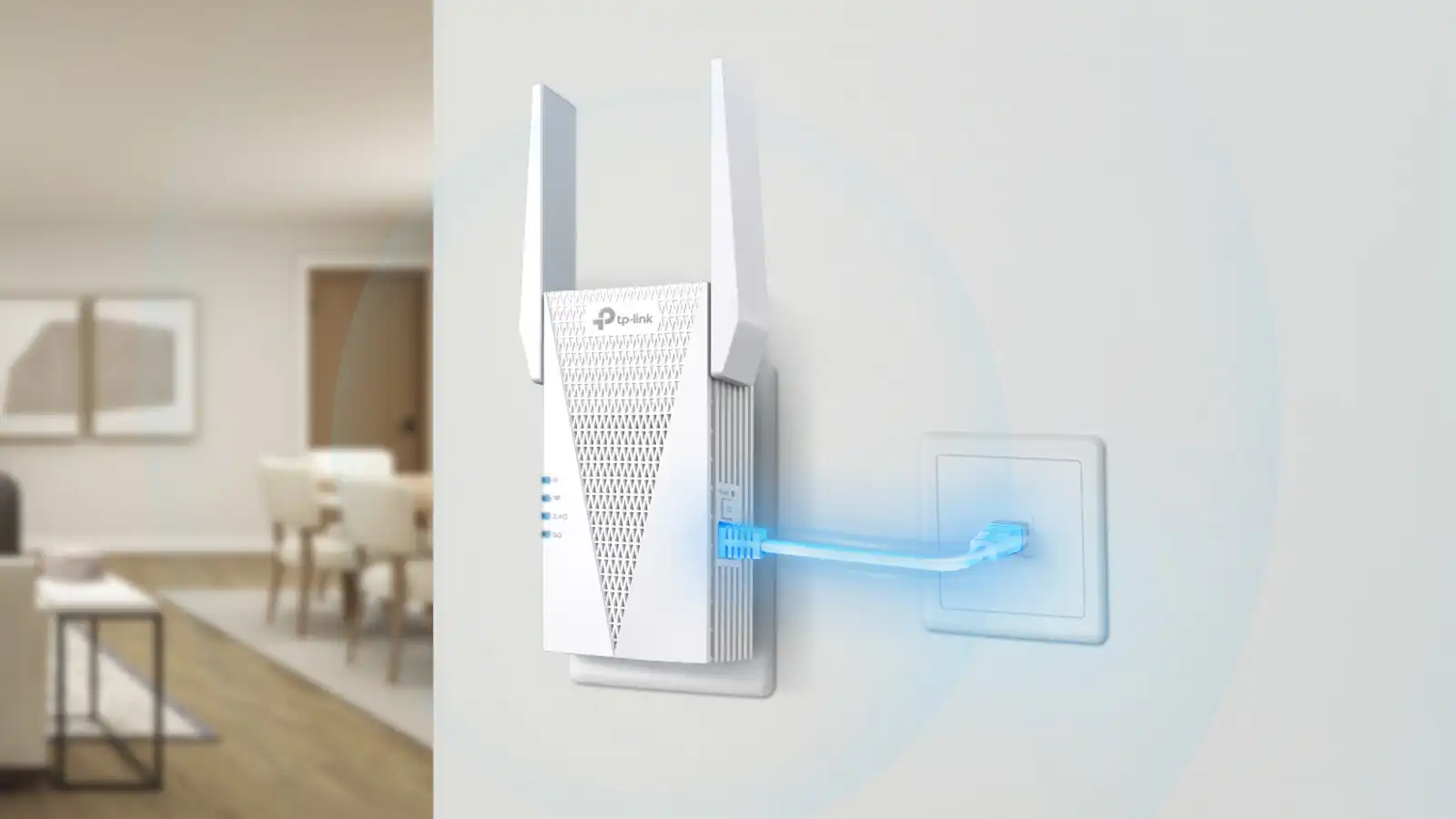
Coverage figures are useful for comparing models, but walls, floors, appliances, and router placement can change the result. An extender needs a reasonably strong connection to the main router, so placing it at the very edge of the dead zone is usually too late.
Use the signal indicator in the Tether app where available. Start between the router and the weak room, then move the unit toward the problem area only if the link remains stable.
An extender cannot repair a weak connection that it receives, so place it before the dead zone, not inside it.
Device capacity
A home with a few phones and one television has different needs from a home with cameras, speakers, laptops, consoles, and smart appliances. The listed capacity ranges from 25 devices on the RE500X to 128 on the RE653BE and 150 on the Deco X55 system.
Capacity is not a guarantee that every device will receive maximum speed. It is a useful indication of how much simultaneous activity the hardware is designed to handle. Choose more headroom when several people stream, work, or play online at the same time.
Ethernet port
A Gigabit Ethernet port is useful for a wired television, desktop, console, or access point. It also gives you the option of using a wired connection between network points, which can be more stable than repeating wirelessly.
The RE653BE goes further with a 2.5 Gigabit port. The RE315 has a fast Ethernet port, so it is better for basic wired connectivity than for high-throughput file transfers. The RE223BE includes Ethernet, but its speed is not specified in the supplied data.
Mesh compatibility
EasyMesh, OneMesh, and Deco are different ecosystems. EasyMesh models such as the RE715X, RE615X, RE515X, and RE223BE can work with compatible EasyMesh routers. The RE500X is built around OneMesh. Deco X55 is a separate mesh system and is not compatible with the plug-in extenders listed as incompatible with Deco.
Check the router's compatibility before buying. A matching system can provide a more consistent network name and better roaming, while a mismatched extender may operate as a separate network.
Frequently asked questions
Do TP-Link extenders increase internet speed?
No. An extender improves coverage and signal reliability rather than increasing the speed delivered by the internet service. TP-Link notes that actual wireless extender speeds can be 50% or less of the current connection, depending on distance, obstacles, and other conditions.
Should an extender use 2.4 GHz or 5 GHz?
Both bands are useful. The 2.4 GHz band generally travels farther and handles obstacles better, while 5 GHz can provide higher link rates over a shorter distance. Dual-band models can use both, which is why they are more versatile than single-band designs.
Is WiFi 7 worth choosing for an extender?
WiFi 7 makes the most sense when the router and important client devices also support WiFi 7. The RE653BE adds 6 GHz and MLO, while the RE223BE supports WiFi 7 features without 6 GHz. A WiFi 6 router will usually be better matched with a WiFi 6 extender such as the RE715X.
Can these extenders work with a Deco mesh system?
The listed plug-in models that mention incompatibility with Deco should not be used as Deco nodes. The Deco X55 is itself a separate three-unit mesh system. Choose the Deco system when you want to replace the router and build a coordinated mesh network.
What is the difference between EasyMesh and OneMesh?
They are different compatibility systems. EasyMesh models need an EasyMesh-compatible router, while the RE500X is designed for OneMesh-compatible TP-Link equipment. A product supporting one system should not be assumed to support the other.
Can I connect a wired device to a TP-Link extender?
Yes, the models in this roundup with Ethernet ports can connect a wired device. The useful speed depends on the port, the wireless link to the router, and the network connection itself. AP mode on selected models also allows the extender to create WiFi from a wired network connection.
Is a mesh system better than one extender?
A mesh system is usually better for several dead zones, multiple floors, or a large home that needs coordinated coverage. One extender is simpler when the router works well in most rooms and only one area needs help. The Deco X55 is designed for the former situation, while the RE715X and RE615X suit the latter.
The bottom line
The Best TP-Link WiFi Extenders choice for most homes is the TP-Link RE715X. Its WiFi 6 dual-band hardware, 2, 400-square-foot coverage rating, support for 64 devices, Gigabit Ethernet, AP mode, and EasyMesh compatibility give it the broadest mix of useful capabilities. The TP-Link RE615X is the close alternative when the home needs strong WiFi 6 coverage but does not need the RE715X's higher wireless class.
For a large home with several dead zones, choose the TP-Link Deco X55 instead. Its three coordinated units, 6, 500-square-foot coverage rating, 150-device capacity, Ethernet backhaul, and three Gigabit ports per unit address a different problem from a single repeater. For a WiFi 7 network, the TP-Link RE653BE is the specialist pick because it adds tri-band operation, 6 GHz, MLO, and a 2.5 Gigabit port.
If you are undecided, match the extender to your router first, then place it where the existing signal is still strong.
As an Amazon Associate we earn from qualifying purchases.