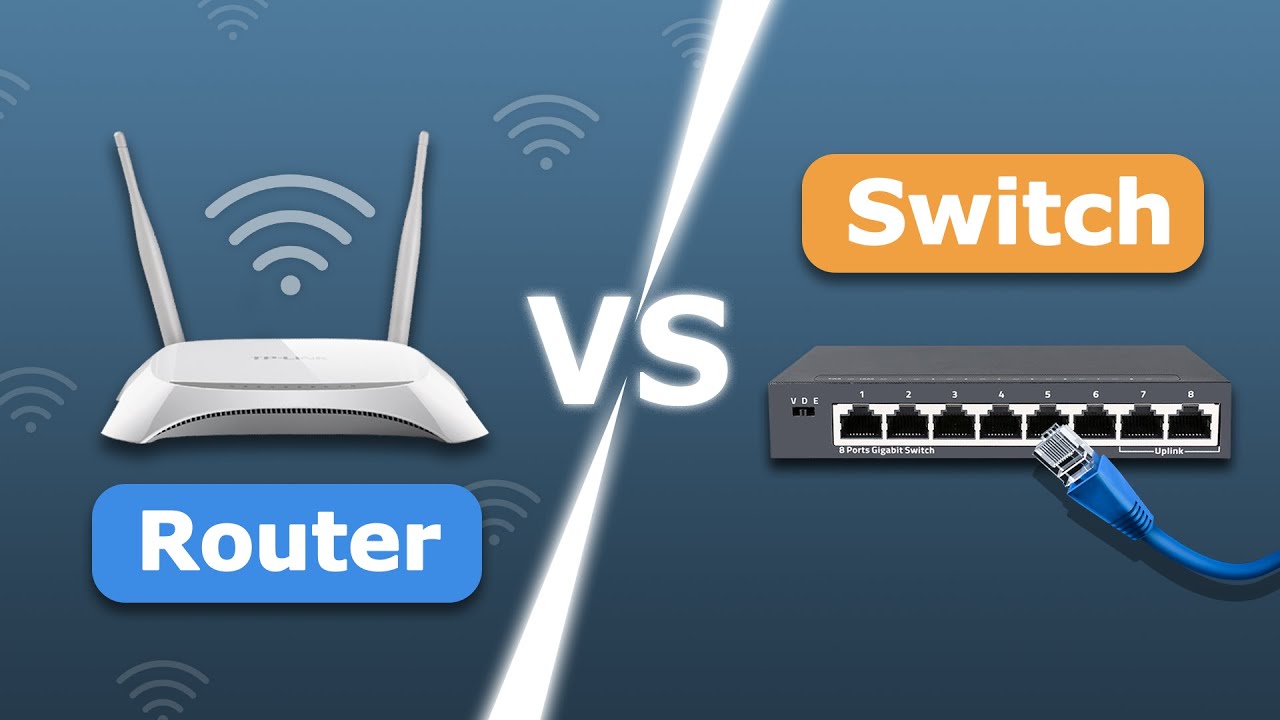

A router can give you a single wired connection in the wrong place, while a switch turns one open Ethernet port into several. That distinction matters when a desk has a computer, console, printer, NAS, access point, and streaming box all competing for a connection. The Best ethernet switches and routers are not interchangeable, but the right switch can make an ordinary router far more useful.
This list covers simple five-port models, roomier eight-port options, a managed switch for VLANs and traffic controls, and two multi-gig choices for newer Wi-Fi access points, NAS devices, and workstations. Most are fanless, so they can sit beside a desk or entertainment center without adding another source of noise.
For most homes, the TP-Link TL-SG105 is the strongest all-around pick. The range below runs from tiny basic switches to a 10-port 2.5G model with SFP+ uplinks.
Comparison table
| # | Product | Award | Ports | Link speed | Best for |
|---|---|---|---|---|---|
| 1 | TP-Link TL-SG105 | Best overall | 5 | 10/100/1000Mbps | Homes needing simple expansion and traffic controls |
| 2 | NETGEAR GS305 | Best simple five-port switch | 5 | 1Gbps | Quiet desktop or wall-mounted setups |
| 3 | TP-Link TL-SG108 | Best eight-port switch | 8 | Gigabit | Offices and media centers with many wired devices |
| 4 | NETGEAR GS308 | Best eight-port alternative | 8 | 1Gbps | Quiet, flexible placement |
| 5 | TP-Link TL-SG105S-M2 | Best five-port multi-gig switch | 5 | 100Mbps/1Gbps/2.5Gbps | Multi-gig NAS and Wi-Fi 6 networks |
| 6 | NETGEAR GS305E | Best managed option | 5 | 1Gbps | VLANs, QoS, and port monitoring |
| 7 | NICGIGA 10-Port 2.5G | Best high-capacity multi-gig switch | 10 | 100Mbps/1Gbps/2.5Gbps, 10G SFP+ | NAS, workstations, and multi-gig backbones |
| 8 | TP-Link LS1005G | Best compact switch | 5 | 10/100/1000Mbps | Small desks and hidden installations |
| 9 | UGREEN 5-Port Switch | Best lightweight switch | 5 | 10/100/1000Mbps | Basic home and office connections |
| 10 | NETGEAR GS105NA | Best established design | 5 | 1Gbps | Straightforward wired expansion |
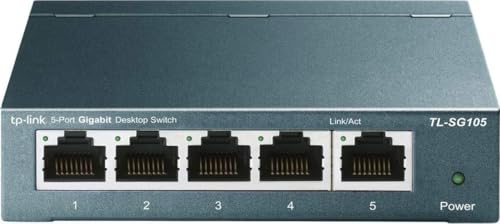
1. TP-Link TL-SG105: Best Overall
Pros
- Five auto-negotiating Gigabit ports
- Metal case with desktop or wall mounting
- QoS and IGMP Snooping support
- Fanless operation
- Auto MDI/MDIX simplifies cabling
Cons
- Unmanaged setup limits deeper network control
- Only five ports
- No multi-gig connectivity
Best for: households that want a quiet five-port switch with useful traffic features.
The TP-Link TL-SG105 is the one we would put in most homes because it adds useful network behavior without asking the owner to become a network administrator. Its five RJ45 ports negotiate between 10, 100, and 1000Mbps, so it works with older equipment while giving Gigabit devices the bandwidth they can use. Plugging it into a router and connecting several wired devices requires no software or configuration.
The metal enclosure feels more substantial than the smallest plastic switches, and the fanless design keeps it quiet in a bedroom, office, or living room. Desktop and wall-mounting options make it easier to place near a cable run rather than leaving it dangling behind a router. IEEE 802.3x flow control helps with reliable data transfer, while the energy-efficient design reduces activity when connected devices are not moving data.
This is also more capable than the basic NETGEAR GS305 and the compact TP-Link LS1005G. Port-based 802.1p and DSCP QoS can prioritize voice or video traffic, and IGMP Snooping is useful on networks carrying multicast traffic. Those features do not turn it into a fully managed switch, but they give the TL-SG105 a practical edge for a busy home network.
The limitation is its fixed Gigabit ceiling. A 2.5G NAS or Wi-Fi 6 access point cannot use its faster link, which makes the TP-Link TL-SG105S-M2 a better match for newer multi-gig hardware. For a conventional router, desktop, television, console, and printer, though, this is the cleanest fit.
If you are still sorting out the cable side of a wired network, the cable features that affect reliable home networking are worth considering before installing the switch. Choose the TL-SG105 when you want simple expansion with a few sensible traffic tools.
2. NETGEAR GS305: Best Simple Five-Port Switch

Pros
- Five 1.0Gbps Ethernet ports
- Auto-negotiation works with Cat5e and Cat6 cables
- Fanless and energy-efficient
- Compact metal design
- Desktop or wall mounting
Cons
- No VLAN or QoS configuration
- Gigabit is the maximum link speed
- Regional compatibility is listed for U.S. and Canada
Best for: anyone who wants to add four or five wired connections without touching network settings.
The NETGEAR GS305 is deliberately uneventful. Connect one port to the router, connect the remaining ports to devices, and the switch handles the link negotiation automatically. Its five 1.0Gbps ports are enough for a typical work area with a computer, printer, game console, and access point, provided the router connection is in the right place.
It accepts existing Cat5e or Cat6 Ethernet cables and uses auto-negotiation to detect the appropriate speed. That matters in mixed networks, where an older device should not prevent newer equipment from connecting. The fanless design is a good match for a quiet office, and IEEE 802.3az Energy Efficient Ethernet is intended to reduce power use without removing Gigabit operation.
Compared with the TP-Link TL-SG105, the GS305 is less feature-rich. It does not offer the TP-Link's listed QoS or IGMP Snooping tools, so it is better suited to a network that simply needs more sockets. The advantage is clarity: there is no management interface to learn and no traffic policy to maintain.
The GS305 is not the right pick for a growing network that already needs VLAN separation, and the NETGEAR GS305E is the obvious step up when port monitoring or traffic controls matter. It also cannot compete with the TP-Link TL-SG105S-M2 on link speed. For a basic Gigabit connection, its weakness is simply that it has no ambitions beyond the job.
Keep the GS305 in mind when the switch will live behind a television or under a desk and should disappear into the setup. It is a sensible fit for someone who wants a quiet, uncomplicated wired expansion point.
3. TP-Link TL-SG108: Best Eight-Port Switch

Pros
- Eight Gigabit ports
- Fanless operation
- Metal enclosure
- Live technical support
- Useful capacity for offices and media centers
Cons
- No multi-gig ports
- No detailed feature information is provided in the listing
- Unmanaged design offers no VLAN controls
Best for: homes and small offices that need many wired connections from one router port.
The TP-Link TL-SG108 makes more sense than a five-port switch when the cable count is already close to the limit. Eight ports leave room for a desktop, printer, television, console, access point, storage device, and a couple of future additions without immediately requiring another switch. Its listed size is an eight-port, 1Gig model, so every connected device remains within the familiar Gigabit Ethernet class.
The case is a compact metal design measuring about 6.22 inches long, 3.94 inches wide, and just under an inch high. It weighs 0.86 pounds, enough to stay put on a desk while remaining easy to mount or move. Fanless operation keeps it appropriate for a media cabinet or workspace where a small fan would be distracting.
The TL-SG108 is a better capacity choice than the NETGEAR GS308 when the TP-Link ecosystem or support arrangement appeals to you, but the two occupy much the same role. It is also a more sensible starting point than stacking several five-port switches, which adds cable clutter and more points of failure. The trade-off is that this is not a multi-gig upgrade path.
The supplied listing offers little detail about advanced traffic handling, so we would treat it as a straightforward unmanaged switch rather than assume features that are not documented. That makes the NETGEAR GS305E a better option for someone who needs VLANs or port monitoring. The TL-SG108 suits buyers who can describe the need in one sentence: more Gigabit ports, no configuration.
For a home office or entertainment area with several permanent wired devices, eight ports provide welcome breathing room. Pick it when capacity matters more than advanced controls or faster-than-Gigabit links.
4. NETGEAR GS308: Best Eight-Port Alternative

Pros
- Eight 1.0Gbps ports
- Auto-negotiation for Cat5e and Cat6 cabling
- Fanless design
- Metal body with flexible mounting
- Energy-efficient operation
Cons
- No managed features
- Gigabit-only ports
- Larger and heavier than five-port options
Best for: users who want extra Gigabit ports in a quiet, mountable enclosure.
The NETGEAR GS308 is the eight-port version of the uncomplicated switch formula. Its eight 1.0Gbps Ethernet ports give a router or wall jack enough reach for a crowded desk, family room, or small office. Auto-negotiation detects the appropriate speed for each device, and the ports work with existing Cat5e and Cat6 cables.
At roughly 6.22 inches long, 4.02 inches wide, and 1.02 inches high, it takes more shelf space than the GS305. That is a reasonable exchange for three extra ports. The 0.86-pound metal enclosure supports desktop or wall-mounted placement, while fanless operation avoids adding mechanical noise to a work or entertainment space.
The GS308 and TP-Link TL-SG108 are close competitors. The NETGEAR is the clearer pick for someone already using NETGEAR networking hardware and wanting the same straightforward setup, while the TP-Link is an attractive alternative for buyers who want that brand's support options. Neither is a match for the 2.5G models when fast storage or a multi-gig access point is central to the network.
The absence of management tools is the main weakness. There is no listed VLAN interface, port monitoring, or configurable QoS, so it cannot separate traffic or give an administrator the same visibility as the GS305E. That simplicity is also why it works well for people who do not want a second network configuration screen.
Choose the GS308 when eight quiet Gigabit ports are the requirement and the switch may need to mount near a cable entry point. It is a dependable expansion box, not a platform for advanced network design.
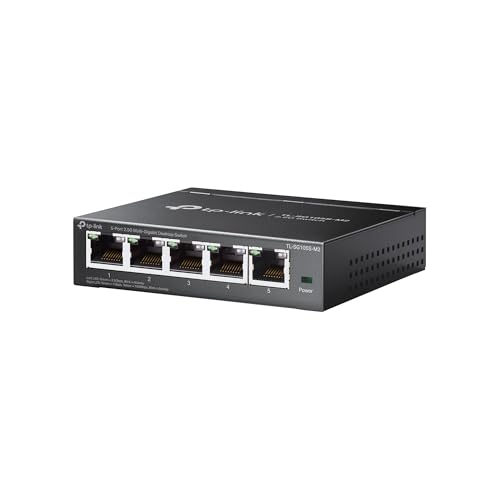
5. TP-Link TL-SG105S-M2: Best Five-Port Multi-Gig Switch
Pros
- Five 2.5Gbps ports
- Auto-negotiates at 100Mbps, 1Gbps, or 2.5Gbps
- Up to 25Gbps switching capacity
- Fanless metal case
- Works with existing Cat6 wiring according to the listing
Cons
- Only five ports
- No management features
- Larger and heavier than basic five-port switches
Best for: homes with 2.5G NAS devices, Wi-Fi 6 access points, or multi-gig computers.
The TP-Link TL-SG105S-M2 is the first switch here that can make a visible difference to a modern multi-gig network. All five ports support 2.5Gbps, rather than reserving the faster connection for one uplink. That lets a 2.5G NAS, workstation, access point, and other compatible devices exchange data at their higher link rates.
Its ports auto-negotiate between 100Mbps, 1Gbps, and 2.5Gbps. The mixed-speed support means older equipment can remain connected while newer hardware takes advantage of the faster links. The listed switching capacity is up to 25Gbps, which fits the five-port, 2.5G design and gives the switch room to handle simultaneous traffic.
The metal case measures 5.45 by 4.96 by 3.98 inches and weighs 1.04 pounds. That is notably bulkier than the TL-SG105, but the fanless design keeps it silent. TP-Link also says the switch can reach 2.5Gbps without requiring a Cat6 wiring upgrade, which may simplify an installation that already has suitable Ethernet cable in place.
Compared with the NICGIGA 10-Port 2.5G, this model has fewer connections and no 10G SFP+ uplinks. It is also unmanaged, so it cannot match the NETGEAR GS305E for VLAN or QoS configuration. Those are real limitations, but they are less important when the goal is simply to move files quickly between a few compatible devices.
The TL-SG105S-M2 is wasted on a network whose router, computers, and access point all stop at 1Gbps. It becomes compelling when at least two or three devices can use 2.5Gbps and the owner wants a quiet, uncomplicated switch that will not become the bottleneck.
6. NETGEAR GS305E: Best Managed Option

Pros
- Five Gigabit ports
- VLAN configuration
- QoS traffic prioritization
- Port monitoring and network security controls
- Fanless metal design
Cons
- Management adds setup complexity
- No multi-gig ports
- Only five ports
Best for: small businesses and advanced home networks that need control over wired traffic.
The NETGEAR GS305E looks like a simple five-port switch, but its reason for being here is the management layer. The five 1.0Gbps ports auto-negotiate connections like the unmanaged GS305, yet the Easy Smart interface adds tools for configuring VLANs, prioritizing traffic with QoS, monitoring ports, and managing network security.
That distinction matters in a home lab, small office, or shared workspace. VLANs can help separate devices or traffic groups, while port monitoring can make it easier to see where a connection problem starts. QoS gives an administrator a way to prioritize selected traffic instead of leaving every device on equal footing.
The hardware remains easy to live with. It has a compact metal enclosure, supports desktop or wall placement, and uses a fanless design. IEEE 802.3az Energy Efficient Ethernet is listed as part of its power-conscious operation. In physical terms it is close to the GS305, but the software capabilities change what the switch can do.
The weakness is not hardware speed. It is the extra responsibility that comes with management. Someone has to decide how VLANs and QoS should work, and a poorly planned configuration can be more confusing than a plug-and-play switch. The TL-SG105 is the better choice for a network that only needs more ports, while the TL-SG105S-M2 is better for multi-gig devices.
If you need wired network segmentation or visibility into individual ports, the GS305E is the most suitable five-port model here. Skip it if you do not have a clear use for its management tools.
7. NICGIGA 10-Port 2.5G: Best High-Capacity Multi-Gig Switch

Pros
- Eight 2.5G Base-T ports
- Two 10G SFP+ ports
- 80Gbps switching capacity
- Fanless metal design
- Automatic speed negotiation
Cons
- Larger than every five-port option
- Unmanaged operation
- SFP+ ports require compatible connections
Best for: demanding home networks with multi-gig storage, workstations, and high-speed uplinks.
The NICGIGA 10-Port 2.5G is aimed at a different network from the small Gigabit switches above. It provides eight 100Mbps, 1Gbps, or 2.5Gbps RJ45 ports plus two 10G SFP+ ports. That combination creates room for several fast clients while preserving a path to faster network infrastructure.
The listed switching capacity is 80Gbps, and the switch supports automatic negotiation across the three RJ45 speeds. A 2.5G NAS, Wi-Fi 6 access point, gaming PC, server, and other compatible devices can share the copper ports without being forced down to Gigabit. The SFP+ ports are especially useful for a fast backbone or uplink, assuming the rest of the network has compatible SFP+ hardware and cabling.
The metal case is 8.58 inches long, 4.17 inches wide, and about 1.14 inches high. That footprint is a real installation consideration, but the fanless design avoids the whine that can make larger network equipment unpleasant in a living space. Double-sided cooling holes, LED indicators, and a listed operating range from -10 to 50 degrees Celsius round out the hardware details.
This switch beats the TP-Link TL-SG105S-M2 on capacity and uplink flexibility, but it gives up the smaller footprint and simpler five-port layout. It is also unmanaged, unlike the NETGEAR GS305E, and the listing does not provide VLAN or QoS controls. The 10G SFP+ ports can be unnecessary if every device uses ordinary RJ45 cabling.
NICGIGA lists 6KV lightning protection, a one-year warranty, and lifetime technical support. Those details do not replace careful network planning, but they add context for a switch intended to sit at the center of a larger wired setup. Buy it for a real multi-gig backbone, not merely because ten ports sound appealing.
8. TP-Link LS1005G: Best Compact Switch

Pros
- Five 10/100/1000Mbps ports
- Very small enclosure
- Fanless and energy-efficient
- Desktop or wall placement
- Plug-and-play setup
Cons
- No advanced traffic controls
- Gigabit-only
- Lightweight body may need careful cable placement
Best for: small desks, compact entertainment centers, and hidden cable installations.
The TP-Link LS1005G is the switch to choose when physical size matters as much as port count. Its five RJ45 ports support 10/100/1000Mbps, with auto-negotiation and auto MDI/MDIX handling the connection details. TP-Link describes one port as the uplink and the remaining four as outputs, which matches the common home use of connecting the switch to a router and distributing the connection to several devices.
At about 3.54 inches long, 2.83 inches wide, and 0.91 inches high, it can tuck behind a monitor or entertainment unit more easily than the metal TP-Link TL-SG105. The listed weight is about 2.8 ounces. That makes it easy to hide, though heavy cables can move a very light switch around unless it is secured or wall-mounted.
The LS1005G has the same core convenience as the larger unmanaged models: no software installation, no configuration, and no fan. IEEE 802.3x flow control supports data transfer, while the energy-efficient design is intended to reduce power use. It is a tidy answer to the specific problem of too few wired connections near a router.
The small body also signals what it does not offer. There are no listed VLAN, QoS, or monitoring features, and there is no multi-gig support. The UGREEN 5-Port Switch occupies a similar basic role, while the TL-SG105 has a sturdier metal enclosure and more documented traffic features.
Use the LS1005G when the switch needs to disappear into a cramped installation. For a wall-mounted network closet or a desk with several heavy cables, a more substantial metal model may be easier to keep in place.
9. UGREEN 5-Port Switch: Best Lightweight Switch

Pros
- Five 10/100/1000Mbps ports
- Automatic speed adjustment
- Full-duplex and half-duplex support
- Wall-mounting holes
- Fanless design with status lights
Cons
- PoE is not supported
- No management features
- Dimensions are not listed
Best for: basic wired expansion in homes, small offices, and monitoring installations.
The UGREEN 5-Port Switch covers the everyday job without trying to be a network control center. Its five RJ45 ports automatically adjust between 10, 100, and 1000Mbps, and the switch supports both full-duplex and half-duplex modes. Indicator lights provide a quick visual check that a link is active.
Setup is straightforward: connect the switch to the router, connect the wired devices, and leave the device to handle the connection. UGREEN lists compatibility with Windows, macOS, Linux, Android, and iOS environments, though the switch itself remains a network appliance rather than an operating-system accessory. It can sit on a desk or hang from the wall using the mounting holes on its back.
The fanless design is appropriate for an office, home, or security-monitoring location where silence matters. UGREEN also lists support for IEEE 802.3, 802.3u, 802.3x, and 802.3ab standards. The switch supports ordinary wired networking, but it does not support PoE, so it cannot power a compatible access point or camera over the Ethernet cable.
The TP-Link LS1005G is smaller on the listed dimensions, and the TL-SG105 offers a metal case plus QoS and IGMP Snooping. The UGREEN's strength is its simple, lightweight approach, not advanced capability. Anyone needing VLANs, traffic monitoring, or faster-than-Gigabit links should move up to the GS305E or a multi-gig model.
For a few computers, printers, or other Ethernet devices, this is a clean fit. Choose it when silent plug-and-play operation matters and PoE is not part of the plan.
10. NETGEAR GS105NA: Best Established Design

Pros
- Five 1.0Gbps ports
- Auto-negotiation with Cat5e and Cat6 cables
- Fanless operation
- Metal construction
- Desktop or wall mounting
Cons
- No managed controls
- Gigabit-only
- Dimensions are presented in an unusual orientation
Best for: buyers who want a conventional five-port NETGEAR switch with simple operation.
The NETGEAR GS105NA is a traditional five-port Gigabit switch with the same basic brief as the GS305. Its five 1.0Gbps ports use auto-negotiation to detect the appropriate link speed and work with Cat5e or Cat6 Ethernet cables. It is a natural fit for adding wired connections to a router without introducing a management layer.
The fanless design makes it suitable for quiet spaces, and the metal enclosure supports desktop or wall-mounted installation. The listed weight is about 0.44 pounds. NETGEAR also lists IEEE 802.3az Energy Efficient Ethernet, so the switch is designed to reduce power consumption while maintaining its high-speed wired connection.
The GS105NA is less compelling than the NETGEAR GS305 when the newer model's compact layout and clearly documented dimensions are more useful. It also trails the TP-Link TL-SG105 on listed traffic features, and it cannot approach the speed of the TP-Link TL-SG105S-M2. Its role is narrower: a simple, established Gigabit expansion point.
There are no listed VLAN, QoS, port-monitoring, or multi-gig functions. That is the real reason to skip it if the network is growing beyond basic connectivity. The GS305E gives administrators more control, while the eight-port models provide more room for permanent devices.
The GS105NA remains appropriate for someone who wants a standard five-port switch and has no need for advanced settings. It is uncomplicated, quiet, and best used as a fixed part of a conventional Gigabit network.
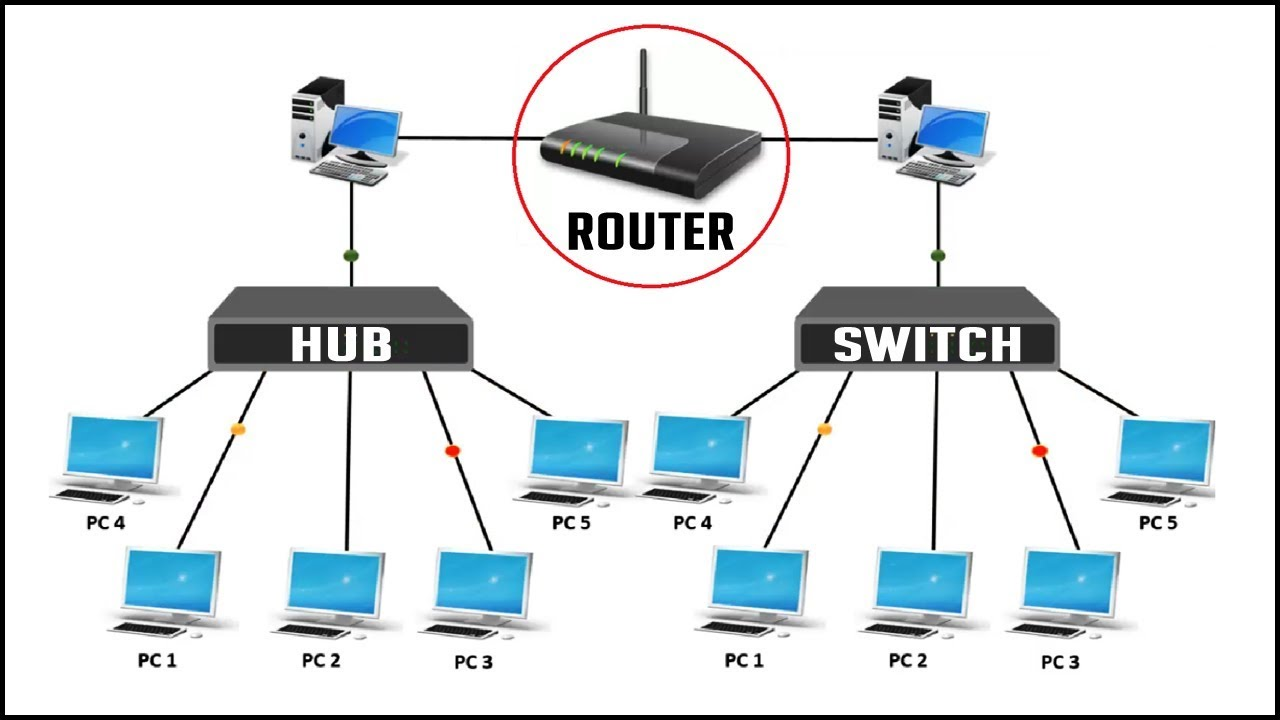
How to choose best ethernet switches and routers
The right wired network starts with the devices you plan to connect, the speed they can actually use, and whether you need configuration beyond plugging in cables.
Port count
Five ports are enough for a router connection plus several nearby devices, but one port is normally consumed by the connection back to the router. That leaves four usable connections in a typical layout. Eight ports make more sense for an office, media center, or network closet with several permanent devices.
Ten ports are useful when the switch will sit at the center of a larger wired network. Count current devices and leave room for additions, but do not assume a larger switch is automatically better if the installation has only a few cables.
Link speed
Gigabit Ethernet remains suitable for most computers, televisions, consoles, printers, and ordinary access points. A 2.5G switch becomes useful when the NAS, workstation, router, or access point supports 2.5Gbps. Every device along the path must support the faster link for the connection to benefit.
The NICGIGA adds 10G SFP+ ports for faster uplinks, while the TP-Link TL-SG105S-M2 keeps all five ports at 2.5G. A Gigabit switch cannot create multi-gig performance from hardware that does not support it.
Buy multi-gig only where the router, clients, storage, and cabling can use the extra bandwidth together.
Managed and unmanaged operation
An unmanaged switch handles link negotiation and forwards traffic without requiring a setup screen. That is ideal for a basic home expansion. A managed or Easy Smart model adds tools such as VLAN configuration, QoS, port monitoring, and security controls.
Those tools matter in a small business, home lab, or network with separate device groups. They also introduce decisions and troubleshooting that a plug-and-play switch avoids. The NETGEAR GS305E is the managed pick here, while the other conventional Gigabit models are built for simpler installations.
Cooling and enclosure
Fanless switches are quiet, which matters when the device sits in a bedroom, office, or media cabinet. Metal cases generally provide a more substantial enclosure and are often easier to mount securely, while lightweight compact designs are easier to hide.
Check the physical dimensions before choosing a location. The NICGIGA needs considerably more room than the TP-Link LS1005G, and a small switch can be moved by stiff Ethernet cables unless it is secured.
Traffic features and compatibility
QoS can help prioritize selected voice or video traffic, while IGMP Snooping can be useful on networks using multicast traffic. These features are not present on every unmanaged model, so they should be treated as selection criteria rather than assumed benefits.
Check whether the switch supports PoE if you intend to power an access point, camera, or other device through Ethernet. The UGREEN 5-Port Switch explicitly does not support PoE. If the wired connection will feed a wireless network, the placement decisions that shape whole-home wireless coverage can matter just as much as the switch.
Frequently asked questions
Do ethernet switches replace routers?
No. A router directs traffic between your local network and the internet, while a switch connects multiple wired devices within the network. A switch normally connects to a router or gateway and expands the number of available wired connections.
How many ports do I need?
Start with the devices that need wired connections and account for the port used to connect the switch to the router. A five-port model usually handles a small desk or entertainment area, while an eight-port model gives an office more room to grow.
Is Gigabit Ethernet enough for a home network?
Gigabit is enough for many computers, consoles, televisions, printers, and ordinary access points. Multi-gig makes more sense when several devices support 2.5Gbps or when a fast NAS and workstation regularly exchange large files.
What is the difference between managed and unmanaged switches?
An unmanaged switch is designed to work without configuration. A managed switch provides tools such as VLANs, QoS, port monitoring, and security controls, but those features require someone to configure and maintain them.
Can an ethernet switch improve Wi-Fi?
A switch does not increase a wireless signal by itself. It can provide a wired connection to a wireless access point, letting that access point connect to the router through Ethernet rather than relying on a wireless link between network devices.
Do ethernet switches support PoE?
Not all switches support Power over Ethernet. The UGREEN 5-Port Switch specifically lists PoE as unsupported, and the supplied details for the other models do not establish PoE support. Check the product documentation when the connected device needs power through its network cable.
Can I connect two ethernet switches together?
Yes. One port on the second switch can connect to an open port on the first switch. The total network speed will still depend on the link between the switches and the capabilities of the connected devices.
The bottom line
The TP-Link TL-SG105 is the strongest all-purpose recommendation in this group because it combines five Gigabit ports, quiet operation, a metal enclosure, and useful QoS and IGMP Snooping features without turning a simple installation into a project. The NETGEAR GS305 is the better choice when you want the most straightforward possible five-port connection, while the TP-Link TL-SG108 and NETGEAR GS308 provide more room for a crowded wired setup.
For newer equipment, the TP-Link TL-SG105S-M2 is the sensible five-port multi-gig choice, and the NICGIGA 10-Port 2.5G is the one to consider for a larger network with 2.5G clients and 10G SFP+ uplinks. The NETGEAR GS305E earns its place when VLANs, QoS, or port monitoring matter more than plug-and-play simplicity.
If you are undecided, choose the Best ethernet switches and routers setup by matching port speed and count to the devices you already own, not to the features you may never use.
As an Amazon Associate we earn from qualifying purchases.