
A wireless gamepad should make PC gaming feel immediate, not introduce pairing problems, drifting sticks, or a battery warning halfway through a campaign. The Best wireless gamepads for gaming also need to fit the platform you actually use, since Xbox support, Switch compatibility, Android pairing, and PC software vary sharply between models.
We compared nine controllers spanning multi-mode wireless designs, traditional 2.4 GHz pads, wired Xbox specialists, and older plug-and-play options. The EasySMX X15 is our top pick for most PC and Steam players, while the range includes a more advanced Xbox option, compact cross-platform pads, and dependable wired alternatives.
Comparison table
| # | Product | Award | Connection | Compatibility | Sticks and triggers | Best for |
|---|---|---|---|---|---|---|
| 1 | EasySMX X15 | Best overall | 2.4G, Bluetooth, USB-C | PC, Steam, Switch, Android | Hall Effect joysticks | PC and multi-platform play |
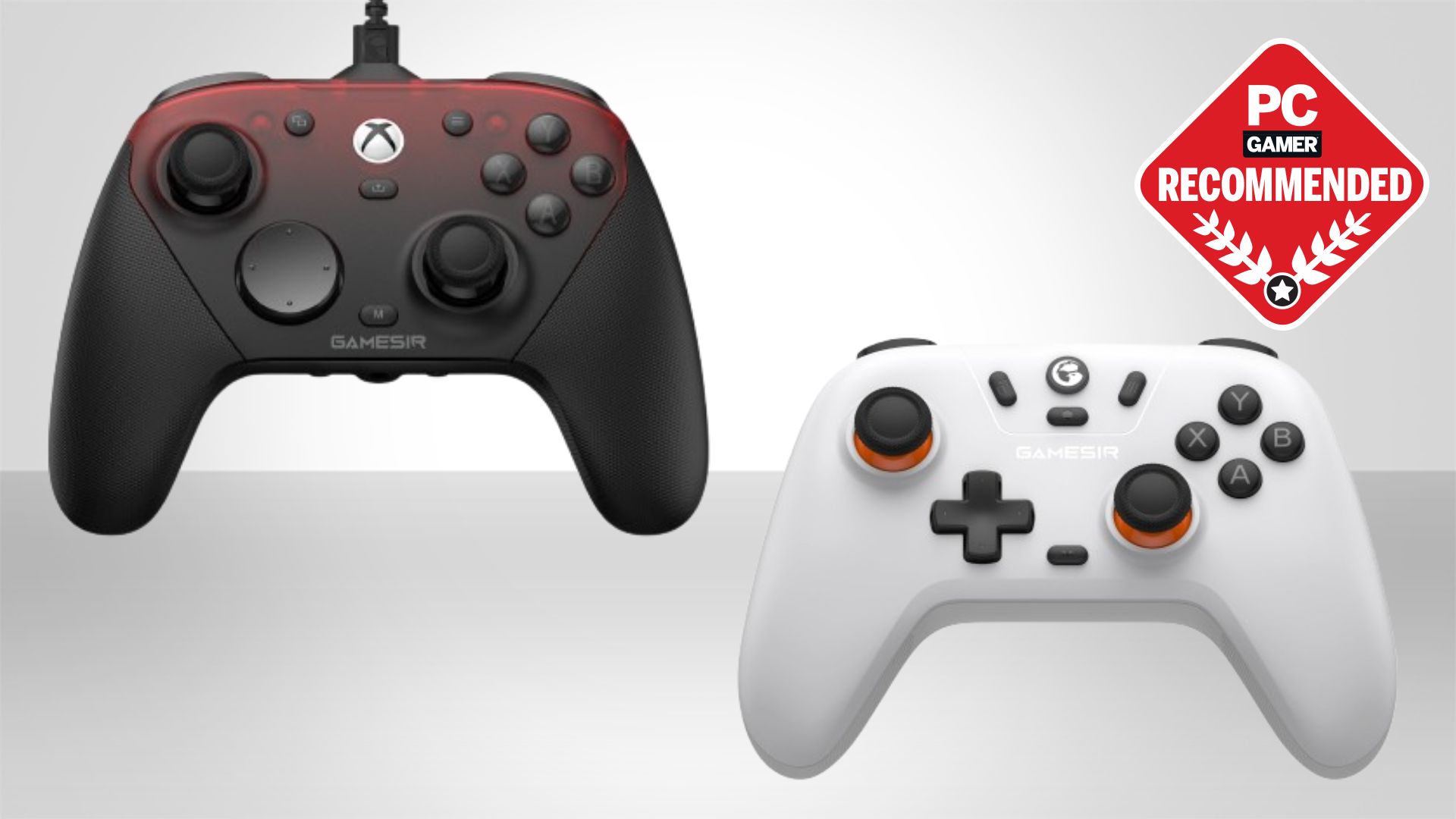
| 2 | GameSir G7 SE | Best wired Xbox pad | USB | Xbox Series X/S, Xbox One, Windows 10 and newer | Hall Effect joysticks and triggers | Xbox and PC players |
| 3 | Logitech F310 | Best for legacy PC games | USB, 6-foot cable | Windows XP through 11, PC | Floating D-pad | Older PC libraries |
| 4 | GameSir G7 Pro | Best for competitive control | Wired, 2.4G, Bluetooth | Xbox, PC, Android | TMR sticks, Hall Effect triggers | Competitive PC and Xbox play |
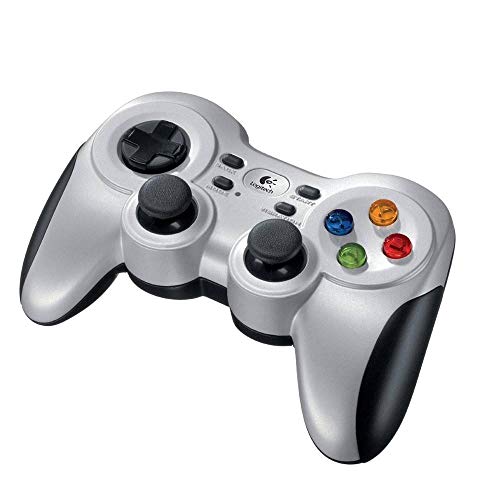
| 5 | Logitech F710 | Best traditional wireless pad | 2.4 GHz USB receiver | Windows XP through 11 | Standard sticks, dual vibration | Familiar couch gaming |
| 6 | EasySMX X05 | Best for mobile and Switch | Wireless, charging cable | PC, Steam, iPhone, Android, Switch | Hall Effect joysticks and triggers | Cross-device gaming |
| 7 | ZD-V+ | Best simple wired option | USB | PC, PS3, Android, Steam | Standard controls | Basic PC and PS3 use |
| 8 | AXYBCOOL Wireless Controller | Best feature-heavy alternative | 2.4G, Bluetooth, USB | PC, Switch, iOS, Android | Hall Effect sticks and triggers | Custom layouts and dock charging |
| 9 | MSI Force GC30V2 | Best interchangeable D-pad | Wireless and wired | PC, Android | Standard controls | Adjustable directional control |
1. EasySMX X15: Best Overall

Pros
- Three connection modes
- Hall Effect joysticks
- Up to 20 hours of wireless play
- Programmable back buttons
- Switchable ABXY layout
Cons
- Not compatible with Xbox or PlayStation
- RGB lighting adds another feature to manage
- No built-in support for consoles beyond Switch
Best for: PC and Steam players who want one flexible controller for several platforms.
The EasySMX X15 gets the important things right without forcing you into one connection method. Use 2.4G wireless when you want a responsive PC setup, Bluetooth when convenience matters, or the USB-C connection when you want a wired link. That flexibility is more useful than decorative extras because it lets the same pad move from a desktop to a Switch or Android device with little fuss.
Its Hall Effect joysticks are the key piece for players tired of conventional stick wear. The technology senses movement without the same physical contact used by traditional joystick designs, and the practical result is precise input with a design intended to resist drift. The X15 also includes dual vibration, textured anti-slip grips, and programmable back buttons. Those rear controls are especially useful for actions such as jumping, crouching, or changing equipment without lifting a thumb from the right stick.
Battery capacity is unusually generous here. EasySMX specifies a 1000mAh rechargeable battery and up to 20 hours of wireless play, with the option to turn off the RGB lighting to extend that figure. Battery estimates naturally change with vibration, lighting, and connection mode, but the capacity gives the X15 a comfortable margin for long sessions. The controller can also swap its ABXY layout between PC and Switch modes by pressing the stated button combination, which avoids the familiar problem of seeing one set of labels while a game expects another.
The limitation is platform support. The X15 works with Windows PC, Steam, Switch, and Android, but not Xbox, Luna, PS4, or PS5. That makes the difference between a flexible PC controller and an Xbox-ready gamepad important before you buy. The GameSir G7 SE is a better fit for Xbox owners, and the GameSir G7 Pro goes further for competitive players, but neither matches the X15's combination of wireless modes and long stated battery life.
Choose the X15 if your gaming moves between PC and other compatible platforms. It is the easiest recommendation for a mixed-device setup, provided Xbox and PlayStation support are not requirements.
2. GameSir G7 SE: Best Wired Xbox Pad

Pros
- Hall Effect joysticks and triggers
- Works with Xbox Series X/S and Xbox One
- Two customizable back buttons
- 3.5mm headset jack
- Strong tactile feedback
Cons
- USB connection limits room to move
- Not a wireless controller
- Xbox and PC focused rather than broadly cross-platform
Best for: Xbox owners and PC players who prefer a direct wired connection.
The GameSir G7 SE is the clearest choice when wireless operation is not actually the priority. Its removable USB connection is simple, immediate, and free from battery management. On Xbox Series X/S, Xbox One, and Windows 10 or newer, it is designed as a plug-and-play controller, so it makes sense for a desk or console setup where the cable can stay connected.
Hall Effect sensing appears in both the joysticks and triggers. That matters because the triggers receive just as much repeated use as the sticks in racing games, shooters, and action titles. The analog triggers are intended to provide smooth input, while the controller's vibration setup combines pulsating trigger feedback with an asymmetric grip motor. That gives supported games more physical detail than a basic rumble system.
There are two customizable back buttons, and the handles use an ultra-fine laser-engraved texture for grip. The 3.5mm audio jack is another practical advantage for Xbox players who want to connect a headset directly to the pad. At approximately 0.55 pounds, the G7 SE is not an especially heavy controller, and its listed dimensions give it the familiar broad shape most Xbox players expect.
The cable is the unavoidable weakness. You cannot play from across a room without arranging a long enough connection, and there is no Bluetooth or 2.4G fallback. The EasySMX X15 is more adaptable for PC, Switch, and Android, while the GameSir G7 Pro adds wireless PC and Android modes plus deeper configuration. Still, for a player who wants Xbox support and does not want charging interruptions, the G7 SE is the more straightforward tool.
Skip it if a cable will constantly get in your way. For anchored desk play, Xbox gaming, and users who care about Hall Effect sensing across both sticks and triggers, it remains one of the most convincing wired options here.
3. Logitech F310: Best for Legacy PC Games

Pros
- Familiar console-style layout
- Six-foot cable
- Programmable controls through Profiler software
- Floating D-pad design
- Supports older Windows systems
Cons
- Wired only
- No Hall Effect sensors
- Software is required for keyboard and mouse mapping
Best for: PC players with older games or a preference for a simple wired layout.
The Logitech F310 is an old-fashioned PC gamepad in the best sense. It has a familiar console-style arrangement, a six-foot cable, and a plug-and-play USB connection. If your library includes older Windows games that can be fussy about controllers, the F310's broad stated support from Windows XP through Windows 11 is more relevant than modern wireless features.
Its unusual floating D-pad rests on four switches rather than a single pivot. That design is meant to make quick directional changes feel more responsive, which can help in platformers, menu navigation, and games that rely heavily on diagonals. Logitech also lists 10 programmable buttons and an eight-way programmable D-pad, although keyboard and mouse command mapping requires the company's Profiler software.
The controller's strength is familiarity. There is no battery to charge, receiver to misplace, or pairing menu to troubleshoot. The six-foot lead gives enough slack to sit away from a desktop monitor, and the layout follows the button arrangement many PC games already expect. It is a better match for broad legacy support than the newer EasySMX models, whose platform lists focus on current PC, mobile, and Switch use.
That simplicity comes with clear omissions. The F310 has no wireless mode, no Hall Effect joystick technology, and no listed vibration feature in the supplied details. The ZD-V+ is another wired alternative with PC, PS3, Android, and Steam support, but its compatibility notes are more restrictive and it uses a PS-style architecture. The F310 is the safer pick for someone who wants a conventional PC layout and older Windows coverage.
Do not choose it if wireless play or long-term stick resistance is your main concern. For a spare controller, a retro PC library, or a desktop where a cable is acceptable, the F310 remains a sensible, uncomplicated choice.
4. GameSir G7 Pro: Best for Competitive Control

Pros
- Wired, 2.4G, and Bluetooth modes
- TMR sticks
- 1000Hz polling on PC
- Hall Effect triggers with trigger stops
- Four extra customizable buttons
- Charging station included
Cons
- Bluetooth mode is for Android
- Advanced features require app setup
- More controller than casual players need
Best for: competitive PC players who want fast input and extensive customization.
The GameSir G7 Pro is the most technically ambitious controller in this group. It supports wired use on Xbox, wired and 2.4G connections on PC, and Bluetooth on Android. A physical mode switch makes those transitions less awkward than navigating software, although the platform-specific connection rules matter. This is not a universal wireless Xbox controller, despite its broad compatibility description.
Its TMR sticks combine magnetic sensing with a design intended to keep power consumption lower than some alternatives. The Hall Effect analog triggers add smooth, linear control, and clicky micro-switch trigger stops let you choose between a longer analog pull and a shorter action. On PC, the 1000Hz polling rate is available in both wired and 2.4G modes. That means the controller reports inputs frequently, a feature aimed at reducing the delay between a physical movement and its registration.
There is a lot to configure. The GameSir Nexus app supports gyro settings, stick curves, and button-to-mouse mapping. The built-in gyro works on PC and can map to sticks, buttons, or mouse input. Four extra controls include L5 and R5 bumpers plus lockable back buttons, giving players room to move actions away from the face buttons. A built-in 1200mAh battery and smart charging station round out the wireless setup. Place the pad on the station to charge, then lift it to play.
This depth is also the reason to skip it if you want a controller that works without learning a control system. The X15 is easier to recommend for ordinary cross-platform PC play, and the G7 SE is a cleaner Xbox choice if you plan to stay wired. The G7 Pro is the one to choose when adjustable stick curves, gyro aiming, trigger stops, extra buttons, and high polling matter more than simplicity.
It suits competitive shooters, racing games, and players who enjoy tuning their controls. Casual users may never use half its features, but those who do will find a level of control the other picks cannot match.
5. Logitech F710: Best Traditional Wireless Pad
Pros
- Simple 2.4 GHz wireless connection
- Compact USB nano receiver
- Dual vibration motors
- Familiar console-style layout
- Profiler software support
Cons
- Older design
- Requires replaceable batteries
- No Hall Effect sticks
- Receiver can be easy to misplace
Best for: PC players who want traditional wireless control without Bluetooth pairing.
The Logitech F710 takes the F310 formula and removes the cable. Its 2.4 GHz connection uses a small USB nano receiver designed to stay in a laptop or desktop port. That approach avoids Bluetooth menus and gives the F710 a direct relationship with the computer, which is useful for couch gaming or a PC connected to a television.
The control layout is conventional, with familiar face buttons and a D-pad. Dual vibration motors add feedback for games that support it, making impacts, crashes, and explosions more noticeable than they would be on a basic non-vibrating pad. Logitech also includes Profiler software support for assigning keyboard and mouse commands to the controller, though that requires installation and is most useful for games without native gamepad support.
The F710's broad stated Windows coverage includes Windows 7, 8, 8.1, 10, and 11, with older listings also naming XP, Vista, and 7. That legacy reach is one reason it still has a place beside newer designs. It is not trying to compete with the X15's 20-hour rechargeable battery or the G7 Pro's TMR sticks and 1000Hz PC polling. Instead, it offers a familiar route to wireless play with minimal setup.
The older architecture has consequences. The supplied information does not list a rechargeable battery, so users should expect to manage the controller's power separately. There are also no Hall Effect sensors, and the nano receiver must remain available. The MSI Force GC30V2 offers dual connection modes and interchangeable D-pads, while the F710 has the more established PC-focused software and layout.
Pick the F710 when the receiver-based setup suits your room and you value vibration plus a familiar shape. Skip it if you want a rechargeable battery, modern stick sensing, or wireless support for Switch and mobile devices.
6. EasySMX X05: Best for Mobile and Switch

Pros
- Works with PC, Steam, iPhone, Android, and Switch
- Hall Effect joysticks and triggers
- RGB lighting
- Up to 10 hours of play
- Includes thumb grips
Cons
- Shorter stated battery life than the X15
- Compatibility depends on device mode
- Charging cable is part of the setup
Best for: players who move between a PC, Switch, and mobile devices.
The EasySMX X05 is built around variety. Its platform list covers PC, Steam, iPhone, Android, and Switch, and a mode switch is intended to make changing configurations easier. That makes it a useful shared controller in a household where the gaming device changes often, especially when a single pad needs to serve a phone one day and a computer the next.
EasySMX equips the X05 with four Hall Effect sensors for its joysticks and triggers. As with the X15, the main benefit is precise input and a design aimed at resisting the drift associated with conventional contact-based sticks. The included thumb grips can change the feel of the analog controls, while RGB lighting lets the controller add some visual presence to a desk setup.
The 750mAh NMC lithium-ion battery is specified for up to 10 hours of continuous play. That is a reasonable session length, though it falls well short of the X15's stated 20 hours. The supplied ceramic charging cable is described as helping maintain a stable connection and low power consumption. Battery life depends on lighting and vibration behavior, so the practical gap between the two EasySMX models can vary, but the X15 is the stronger pick for extended wireless use.
The X05 does not offer the same clear three-mode description as the X15, and the platform mode matters more when moving between phones, Switch, and PC. The AXYBCOOL controller also spans PC, Switch, iOS, and Android while adding a charging dock, gyro control, and back buttons. Readers comparing devices should also consider how one controller can handle several gaming platforms before settling on a layout.
Choose the X05 for broad mobile and Switch coverage with Hall Effect sensing. Choose the X15 instead if PC is your main home and you want longer stated battery life plus more explicit connection options.
7. ZD-V+: Best Simple Wired Option

Pros
- Plug-and-play USB connection
- PC, PS3, Android, and Steam support
- XInput and DirectInput modes
- Vibration feedback
- D-pad and left-stick function switch
Cons
- Not wireless
- Does not support Xbox or Mac
- Android use requires OTG support and an adapter
- Limited modern customization
Best for: users who need a basic wired pad for PC, PS3, or compatible Android devices.
The ZD-V+ is the least complicated controller here, but its compatibility is narrower than the product title suggests. It supports Windows XP, 7, 8, 10, and 11, along with PS3 and Steam. Android devices need OTG support, and an OTG adapter is not included. The controller also does not support Xbox 360, Xbox One, or Mac OS.
Its most useful feature is the choice between XInput and DirectInput. XInput is the mode most modern Windows games expect, while DirectInput can help with older software and different controller implementations. The D-pad and left-stick function switch adds another small layer of flexibility, and vibration feedback is available when the game supports it.
The USB cable keeps operation straightforward. There is no pairing, receiver, battery, or wireless interference to consider, and the listed weight is approximately 0.48 pounds. That makes the ZD-V+ lighter than the Logitech F310 and MSI Force GC30V2 based on their supplied product information, though those measurements do not tell the whole story about grip or button feel.
This controller is not a serious competitor to the EasySMX X15 or GameSir G7 Pro for wireless PC gaming. The GameSir G7 SE is a stronger wired option for Xbox and brings Hall Effect sensors, customizable back buttons, and a headset jack. The ZD-V+ makes sense only when its PS3 support, DirectInput mode, or basic USB behavior solves a specific problem.
Buy it for a secondary machine, an older PC library, or PS3 use. Skip it if you want current Xbox support, wireless freedom, or a modern approach to stick durability.
8. AXYBCOOL Wireless Controller: Best Feature-Heavy Alternative

Pros
- 2.4G, Bluetooth, and wired modes
- Hall Effect sticks and triggers
- 1000Hz polling in 2.4G and wired modes
- Charging dock included
- Two programmable back buttons
- Gyro control on Switch
Cons
- Not compatible with Xbox
- Gyro support is limited to Switch
- Vibration has mobile limitations
- Brand and model naming are less clear
Best for: PC, Switch, iOS, and Android players who want many controls in one pad.
The AXYBCOOL Wireless Controller packs an unusually long feature list into a cross-platform pad. It connects through 2.4G, Bluetooth, or a wired mode, and the 1000Hz polling claim applies to 2.4G and wired use. That gives PC players a fast connection option while preserving Bluetooth for compatible mobile and Switch setups.
Hall Effect sensing covers both sticks and triggers. The triggers can switch between a fast mode for quick shots and a linear mode for throttle control, so the same hardware can suit an action game and a racing game. Two rear buttons can map up to 16 functions, including face buttons, triggers, and the D-pad. That is useful for players who want extra actions close to their fingers without relying on an app.
The included charging dock is one of the controller's most convenient details. The pad can reconnect to the last device when lifted, show charge status through LEDs, and sleep after five minutes of inactivity. Its 1000mAh battery is specified for up to 16 hours after a three-hour charge. Four vibration levels are available, although vibration excludes Android and iOS according to the supplied feature information. Six-axis gyro control is limited to Switch.
The feature list is impressive, but the limitations are important. This controller does not work with Xbox, and the platform behavior differs considerably between PC, Switch, and mobile. The EasySMX X15 is a safer all-purpose recommendation with a clearer PC focus, while the GameSir G7 Pro offers a more established customization path for competitive PC and Xbox users. Readers who spend time in shooters may also want to consider how input devices affect fast competitive play before prioritizing a dock or RGB lighting.
Choose the AXYBCOOL if you will actually use its back buttons, trigger modes, gyro, and charging dock. It is a strong feature-heavy alternative, but not the sensible choice for someone who wants a simple controller with predictable support everywhere.
9. MSI Force GC30V2: Best Interchangeable D-pad

Pros
- Wireless and wired connection modes
- Interchangeable D-pads
- Dual vibration motors
- Durable switches
- PC and Android support
Cons
- No Switch or iPhone support listed
- No Hall Effect controls
- Heavier than several alternatives
- Product details provide limited connection information
Best for: PC and Android players who want to change the feel of the D-pad.
The MSI Force GC30V2 takes a more focused approach than the newer multi-platform pads. It supports PC and Android, offers wireless and wired connection modes, and includes interchangeable D-pads. That last feature is the reason to consider it. Players who move between fighting games, platformers, and ordinary action games may prefer different directional shapes or textures rather than accepting one fixed pad.
Dual vibration motors add physical feedback, and MSI lists durable switches with an emphasis on feel. The controller weighs approximately 0.93 pounds in the supplied product information, making it notably heavier than the GameSir G7 SE, GameSir G7 Pro, and the ZD-V+. Some players will appreciate that solidity, while others will find it tiring during long sessions.
The two connection modes give it more flexibility than a purely wired controller. Still, the supplied details do not specify the wireless standard, battery capacity, polling behavior, or a companion configuration app. That makes the GC30V2 less informative for players who care about latency, battery planning, or custom mappings. The Logitech F710 offers a more clearly described 2.4 GHz receiver setup, while the AXYBCOOL provides a much broader set of modern control features.
Compatibility is the main reason it lands last in this group. PC and Android support are useful, but the listing does not include Switch, iPhone, or Xbox. There are also no Hall Effect sticks or triggers listed, so it cannot make the same durability case as the X15, X05, G7 SE, G7 Pro, or AXYBCOOL. It is best treated as a specific D-pad choice rather than a universal wireless controller.
Pick the GC30V2 when interchangeable directional controls and dual vibration matter more than broad platform support. Everyone else should first look at the X15 or F710 for PC wireless use.
How to choose best wireless gamepads for gaming
The right controller depends less on a long feature list than on the connection, platform, controls, and battery behavior that match your setup.
Connection modes
Wireless controllers in this group use 2.4G, Bluetooth, or both, while several products also support wired play. A 2.4G receiver generally suits a desktop or television PC setup because it creates a direct link without Bluetooth pairing, while Bluetooth is more convenient for phones, tablets, and some handheld devices. Wired mode remains useful for charging, troubleshooting, and situations where the lowest possible connection delay matters.
Check the exact platform for each mode. The GameSir G7 Pro uses wired and 2.4G connections on PC but Bluetooth for Android, while the EasySMX X15 lists 2.4G, Bluetooth, and USB-C for PC, Steam, Switch, and Android. Xbox support is especially important because many otherwise capable wireless controllers do not support it.
Stick and trigger sensing
Hall Effect sticks use magnetic sensing and are designed to reduce the drift associated with traditional contact-based joystick mechanisms. TMR sticks, used by the GameSir G7 Pro, take a related magnetic approach with a different sensor design. These features matter most to players who use one controller heavily or play games that require steady aim.
Triggers also deserve attention. Hall Effect triggers can provide smooth analog control for racing and throttle inputs, while trigger stops shorten the pull for faster actions. The GameSir G7 SE and G7 Pro include Hall Effect triggers, and the AXYBCOOL offers fast and linear trigger modes.
A wireless label means little if the controller cannot connect to the platform where you actually play.
Battery and charging
Rechargeable battery capacity gives a rough indication of how long a controller can run, but lighting, vibration, wireless mode, and sleep behavior all affect real use. The EasySMX X15 lists a 1000mAh battery with up to 20 hours of play, the AXYBCOOL lists up to 16 hours, and the EasySMX X05 lists up to 10 hours.
A charging dock changes the routine more than a cable alone. The GameSir G7 Pro and AXYBCOOL both include docks, and each is designed to make returning the controller to charge less of a chore. The Logitech F710 uses a receiver-based wireless design, but its supplied details do not identify a rechargeable battery, so it is a different kind of convenience.
Platform compatibility
Start with the device, not the controller. The G7 SE is a strong Xbox and Windows option, but it is wired. The X15 covers PC, Steam, Switch, and Android but explicitly excludes Xbox and PlayStation. The X05 adds iPhone support, while the AXYBCOOL includes iOS but limits gyro and vibration features by platform.
Older computers and game libraries need special care. The Logitech F310 and F710 list wide Windows support and offer Profiler software, while the ZD-V+ provides XInput and DirectInput modes plus PS3 support. Those details can matter more than wireless capability when a controller is intended for older games.
Custom buttons and feedback
Back buttons, trigger stops, gyro aiming, remapping, and vibration can change how a controller feels in play. Extra buttons help when a game demands frequent stick movement and face-button actions at the same time. Gyro aiming is useful only on compatible platforms, and vibration support can vary by game and device.
The GameSir G7 Pro has the deepest configuration options, with four extra buttons and PC gyro mapping. The X15 and AXYBCOOL provide rear controls as well, while the MSI Force GC30V2 focuses on interchangeable D-pads and dual vibration motors. Choose the feature you will use rather than treating every extra as equally important.
Frequently asked questions
Are all of these controllers wireless?
No. The EasySMX X15, EasySMX X05, Logitech F710, AXYBCOOL controller, and MSI Force GC30V2 provide wireless operation. The GameSir G7 SE, Logitech F310, and ZD-V+ are wired, while the GameSir G7 Pro supports wired and wireless modes depending on the platform.
Which controller works with Xbox?
The GameSir G7 SE and GameSir G7 Pro support Xbox Series X/S and Xbox One. The EasySMX X15, EasySMX X05, AXYBCOOL controller, and ZD-V+ do not support Xbox according to their supplied compatibility details.
Which controller is suitable for Switch?
The EasySMX X15, EasySMX X05, and AXYBCOOL controller list Switch support. The AXYBCOOL also lists six-axis gyro control on Switch, while the other products do not provide that same gyro detail in the supplied information.
What are Hall Effect joysticks?
Hall Effect joysticks use magnetic sensing to detect stick movement rather than relying on the same contact-based mechanism found in many traditional sticks. They are intended to improve input consistency and reduce the likelihood of drift over time. The EasySMX X15, EasySMX X05, GameSir G7 SE, and AXYBCOOL controller list Hall Effect joystick technology.
Does a wired controller have an advantage for PC gaming?
A wired controller does not need a battery, wireless receiver, or pairing process. It can also provide a direct connection for players who want a fixed desktop setup. The trade-off is less freedom to sit away from the computer, which is why a wireless 2.4G mode can be more convenient for couch play.
Which controller has the longest stated battery life?
The EasySMX X15 lists up to 20 hours of wireless play from its 1000mAh rechargeable battery. The AXYBCOOL lists up to 16 hours, while the EasySMX X05 lists up to 10 hours. Actual use can change with lighting, vibration, and connection mode.
Can these controllers connect to phones?
The EasySMX X05 lists PC, Steam, iPhone, Android, and Switch support. The EasySMX X15 supports Android, and the GameSir G7 Pro supports Android through Bluetooth. The AXYBCOOL controller lists iOS and Android, but its vibration and gyro features vary by platform.
The bottom line
The Best wireless gamepads for gaming start with the EasySMX X15 because it balances 2.4G, Bluetooth, and wired connections with Hall Effect joysticks, programmable back buttons, Switch layout switching, and up to 20 hours of stated battery life. It is the controller we would choose for a PC or Steam player who also uses Switch or Android, as long as Xbox and PlayStation support are not needed.
The GameSir G7 Pro is the specialist pick for competitive PC and Xbox players who want TMR sticks, Hall Effect triggers, 1000Hz PC polling, gyro mapping, extra buttons, and a charging station. For Xbox players who prefer a simpler wired pad, the GameSir G7 SE is the cleaner alternative.
If you are undecided, choose the EasySMX X15 for flexible wireless PC play, or choose the GameSir G7 SE when Xbox compatibility matters more than cutting the cable.
As an Amazon Associate we earn from qualifying purchases.