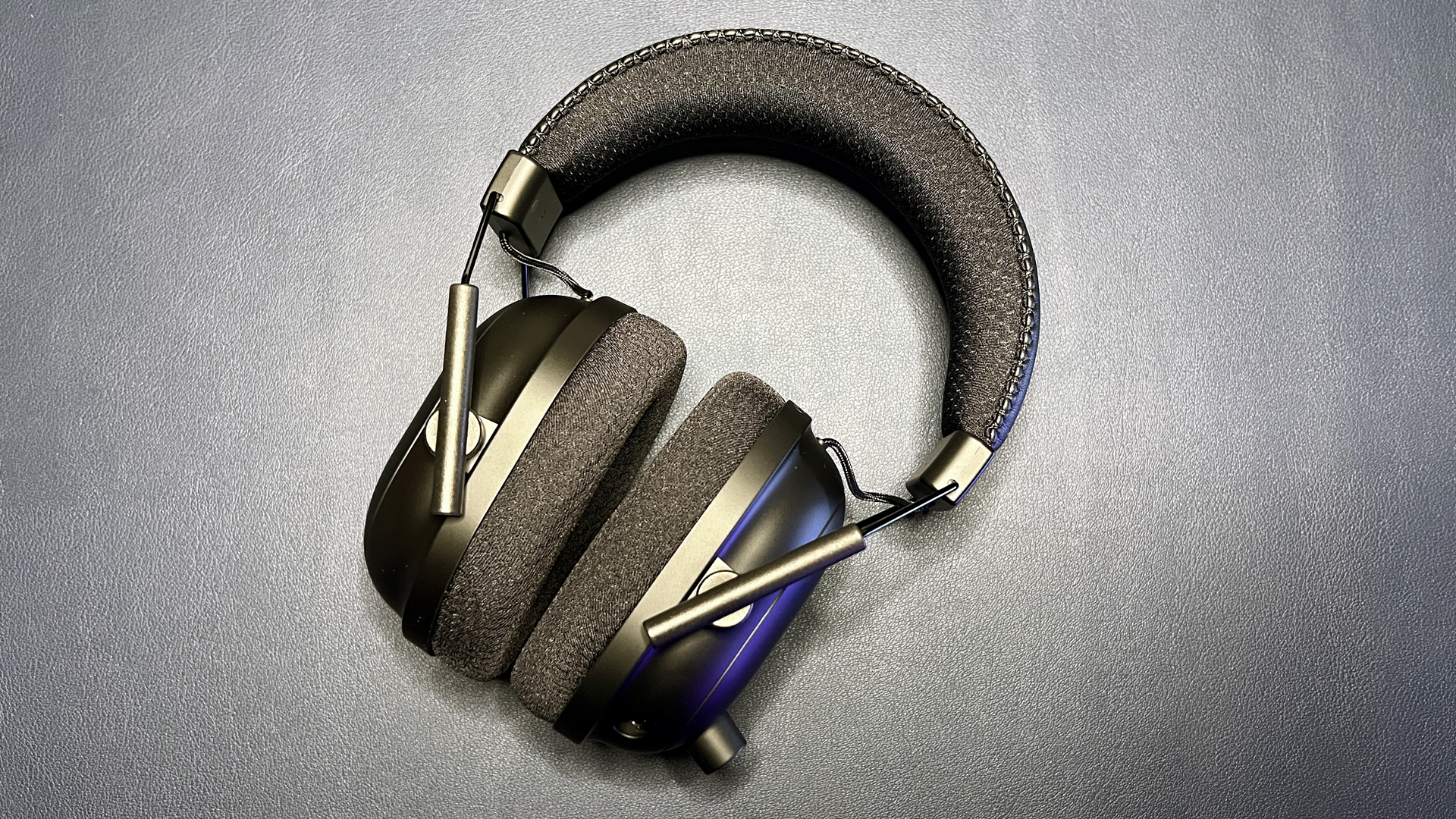

A bad gaming headset makes every match harder. Footsteps blur into gunfire, teammates ask you to repeat yourself, and a cable or weak connection becomes one more thing to manage. The Best gaming headphones for pc should make positional audio clear without making long sessions uncomfortable.
This list spans simple 3.5mm headsets, USB models, low-latency wireless options, and premium multi-platform systems. The Razer BlackShark V2 X is our top pick for most PC players, while the other nine make stronger cases for wireless freedom, console switching, microphone quality, or a lighter design.
Comparison table
| # | Product | Award | Connection | Driver or battery detail | Best for |
|---|---|---|---|---|---|
| 1 | Razer BlackShark V2 X | Best overall | 3.5mm wired | 50mm drivers | Most PC gamers |
| 2 | Razer BlackShark V3 | Best wireless performance | 2.4GHz, Bluetooth 5.3, USB | Up to 70 hours | Competitive wireless play |
| 3 | HyperX Cloud Alpha | Best wired comfort | 3.5mm wired | Dual chamber drivers | Long wired sessions |
| 4 | Logitech G522 Lightspeed | Best for voice chat | Lightspeed, Bluetooth, USB | Up to 60 hours with lighting off | Streaming and team chat |
| 5 | Logitech G432 | Best surround-sound wired set | USB DAC, 3.5mm | 50mm drivers | Cinematic PC gaming |
| 6 | Razer Kraken V3 X | Best lightweight USB headset | USB-A wired | 40mm drivers | Windows PC desks |
| 7 | Logitech G Astro A50 | Best multi-platform system | Lightspeed, Bluetooth, USB-C | Up to 24 hours | Multiple gaming systems |
| 8 | Razer BlackShark V3 X HyperSpeed | Best lightweight wireless set | 2.4GHz, Bluetooth, USB | 50mm drivers | Wireless PC gaming |
| 9 | Ozeino Gaming Headset | Best simple cross-platform pick | Wired | 7.1 surround sound | Basic multi-console use |
| 10 | Ozeino Wireless Headset | Best flexible budget wireless | 2.4GHz, Bluetooth, 3.5mm | Up to 40 hours | Casual wireless play |
1. Razer BlackShark V2 X: Best Overall

Pros
- Clear separation from the tuned 50mm drivers
- Very light 240g design
- Comfortable breathable foam cushions
- Effective directional microphone
- Works with several platforms through 3.5mm
Cons
- No wireless connection
- Surround sound requires 64-bit Windows 10
- Xbox One may need a separate stereo adapter
Best for: PC players who want clear game audio, a light fit, and uncomplicated wired compatibility.
The Razer BlackShark V2 X is the headset we would hand to most PC gamers first. It is light enough to fade into the background during a long session, yet its closed earcups create a useful seal that keeps outside noise from competing with game audio. The fit is straightforward, the cable setup is uncomplicated, and there is no battery to remember before a late-night match.
Its custom-tuned 50mm Triforce Titanium drivers divide the highs, mids, and lows for cleaner separation. That matters in a crowded shooter, where a footstep or reload cue can disappear beneath bass-heavy effects. Software-enabled 7.1 surround sound is available on 64-bit Windows 10, giving compatible PC games a wider positional presentation. The 3.5mm connection also makes it useful beyond a single computer, with support for Mac, PlayStation, Xbox One, and Nintendo Switch listed by Razer.
The HyperClear cardioid microphone focuses pickup toward the front, so your voice should take priority over sound arriving from the sides and rear. It is not detachable, which makes the headset less tidy for music or travel, but the bendable boom is easy to position. The 240g weight and breathable foam cushions are more meaningful here than flashy extras. They reduce the sense that the headset is pressing down on your head after several hours.
The clear limitation is the cable. The Razer BlackShark V3 and BlackShark V3 X HyperSpeed remove that restriction, and the Logitech G522 offers a similarly flexible wireless setup. They also add more connection options and software control. Choose this model instead when reliability, low fuss, and a light wired fit matter more than wireless freedom. Skip it if your PC is far from your chair or you regularly switch between devices without a headphone jack.
2. Razer BlackShark V3: Best Wireless Performance

Pros
- Very low latency through HyperSpeed Gen-2
- Up to 70 hours of battery life
- 2.4GHz and Bluetooth can mix audio
- Detachable wideband microphone
- THX spatial audio and custom EQ profiles
Cons
- Not compatible with Xbox consoles
- Heavier than the BlackShark V2 X
- Feature set takes time to configure
Best for: PC competitors who want wireless speed, detailed positional audio, and broad device support outside Xbox.
The Razer BlackShark V3 is the most capable wireless PC headset in this group. Its HyperSpeed Gen-2 connection is specified for latency as low as 10ms, which is the sort of detail that matters when a sound cue needs to line up with an on-screen event. It feels designed around competitive play rather than simply removing a cable.
The Gen-2 50mm titanium drivers are tuned for clarity and positional performance. Razer also includes THX spatial audio with a 7.1.4 presentation and game-specific FPS profiles. Those profiles are not essential for every player, but the ability to save custom EQ settings to the headset makes it easier to move between games without rebuilding your preferred sound each time.
This is also one of the most versatile communication headsets here. Its detachable 9.9mm HyperClear Super Wideband microphone covers a wider frequency range than a basic boom mic, and the headset can mix 2.4GHz and Bluetooth audio across two devices. USB provides a wired fallback. Bluetooth 5.3 broadens mobile compatibility, while the stated support includes PC, Mac, PlayStation, Nintendo Switch, and mobile devices.
The important catch is platform support. Xbox Series X, Series S, and Xbox One are specifically excluded, so the Logitech G Astro A50 is the more sensible choice for a household built around several consoles. The BlackShark V2 X is lighter and simpler, while the BlackShark V3 X HyperSpeed is the better fit for shoppers who want similar wireless convenience without as many advanced controls. Pick the V3 if PC competitive play is the priority and you will use its connection and EQ features.
For readers comparing wireless designs beyond gaming headsets, the question of what changes when you remove the cable from PC audio is useful context.
3. HyperX Cloud Alpha: Best Wired Comfort

Pros
- Dual chamber drivers reduce distortion
- Durable aluminum frame
- Detachable braided cable
- Detachable noise-cancelling microphone
- Comfortable expanded headband
Cons
- No USB connection or wireless mode
- Older 3.5mm-only design
- Surround processing is not included
Best for: players who prefer a durable analog headset with a relaxed fit and easy multi-platform use.
The HyperX Cloud Alpha remains an easy headset to live with because it gets the physical basics right. The expanded headband spreads pressure across the top of the head, the over-ear construction keeps the earcups from sitting directly on the ears, and the aluminum frame gives it a sturdier feel than many entry-level wired models.
Its dual chamber driver design separates bass from the midrange and treble. The point is not a larger number on a box. It is cleaner layering when explosions, dialogue, and environmental detail happen at once. HyperX lists a 15Hz to 25, 000Hz frequency response, though the more useful trait for PC gaming is the reduced muddiness that comes from the separated chambers.
The detachable braided cable has an in-line audio control, and the microphone detaches as well. That makes the Cloud Alpha less awkward when you use it for ordinary listening. Its 3.5mm connection works with PC, Mac, PlayStation, Xbox, Nintendo Switch, mobile devices, and VR equipment that accepts the plug. The Razer BlackShark V2 X has a similarly broad analog approach, but the Cloud Alpha feels more substantial and has the advantage of a removable boom.
There is no USB processing, surround mode, Bluetooth, or 2.4GHz wireless option. The Logitech G432 is more interesting if software-based DTS Headphone:X 2.0 is a priority, while the Razer BlackShark V3 X HyperSpeed is a better match for cable-free PC play. Choose the Cloud Alpha when comfort and a durable frame matter more than modern connectivity. It is a poor fit for anyone who wants one headset to move between a desktop and a phone without adapters.
4. Logitech G522 Lightspeed: Best for Voice Chat

Pros
- Full-bandwidth 48kHz/16-bit microphone
- Lightspeed, Bluetooth, and USB modes
- Up to 60 hours with lighting off
- Washable suspension band
- Blue VO!CE and G HUB controls
Cons
- RGB lighting reduces battery endurance
- 280g weight is not the lightest here
- Software is needed for deeper customization
Best for: streamers and team players who care about voice clarity as much as game sound.
The Logitech G522 Lightspeed makes its microphone a central feature rather than an afterthought. The full-bandwidth 48kHz/16-bit mic is intended for clear in-game communication and streaming, and Blue VO!CE adds voice processing through Logitech software. If your regular complaint is that teammates cannot hear you cleanly, this is the Logitech model to examine first.
Game audio comes from PRO-G drivers with 48kHz/24-bit wireless audio and low distortion. The headset supports Lightspeed wireless on PC, Bluetooth for mobile devices, and wired USB-A to USB-C play. That combination covers the common desk setup without forcing you to use an analog jack. A wireless range of up to 30 meters is listed, though walls and other signals can affect any wireless connection.
The comfort design is thoughtful. The 280g build uses a washable suspension band and rounded cushion earcups, while side-facing LIGHTSYNC RGB lighting can be customized across up to 16.8 million colors. Lighting is fun for a visible setup, but the listed battery figure of up to 60 hours applies with lighting off. That makes the lighting a real choice rather than a free feature.
The Razer BlackShark V3 offers longer stated battery life and more aggressive spatial tools, while the Astro A50 is the superior system for frequent switching among three platforms. The Logitech G522 is the more sensible choice for PC users who want polished voice controls and a comfortable wireless routine. Skip it if you dislike companion software or have no interest in microphone processing.
5. Logitech G432: Best Surround-Sound Wired Set

Pros
- Large 50mm audio drivers
- DTS Headphone:X 2.0 surround support
- Flip-to-mute 6mm boom microphone
- USB DAC and 3.5mm connections
- Rotating earcups and padded headband
Cons
- Heavier than the lightest wired picks
- DTS mode requires Logitech G HUB
- USB features are less universal than analog
Best for: PC players who want a wired headset with wide cinematic sound and software surround processing.
The Logitech G432 has a more dramatic presentation than the Razer BlackShark V2 X. Its 50mm drivers give game sound plenty of scale, which suits single-player adventures, racing games, and shooters where environmental impact matters. The large earcups and leatherette padding also help create an immersive seal around the ears.
DTS Headphone:X 2.0 is the headline feature. Through Logitech G HUB, it creates a three-dimensional surround presentation that can make rear and side cues easier to place. The software requirement matters, because the effect is not simply available from the analog cable. On a PC where G HUB is already part of the setup, the USB DAC gives this headset more processing flexibility than the Cloud Alpha.
The 6mm boom microphone flips up to mute, a small control that is more useful than it sounds during a busy voice chat. You can use the headset with PC or Mac through USB or 3.5mm, and the 3.5mm route extends compatibility to mobile devices. Listed console support includes PlayStation 4 and 5, as well as Nintendo Switch when docked. The earcups rotate up to 90 degrees for storage or a quick break from the fit.
Its 1.2-pound listed weight makes it less effortless than the 240g BlackShark V2 X or 285g Kraken V3 X. The HyperX Cloud Alpha has a more understated sound and a sturdier-feeling aluminum frame, while the G432 wins when surround processing and a big presentation are the priority. Choose it for PC gaming with G HUB installed. Skip it if you want the lightest fit or a headset that works identically without software.
6. Razer Kraken V3 X: Best Lightweight USB Headset

Pros
- Lightweight 285g construction
- 40mm Triforce drivers
- Breathable fabric and memory foam cushions
- Bendable cardioid microphone
- Chroma RGB lighting
Cons
- USB-A PC-only connection
- Not compatible with consoles or Mac
- Surround sound is limited to 64-bit Windows 10
Best for: Windows PC players who want a light USB headset with software surround and RGB.
The Razer Kraken V3 X is built around low weight and a direct PC setup. At 285g, it is lighter than the Logitech G432 and only modestly heavier than the BlackShark V2 X. The hybrid fabric and memory foam cushions combine a breathable surface with a snug seal, making the headset a reasonable companion for extended desktop sessions.
Its 40mm Triforce drivers are divided into separate sections for highs, mids, and lows. That design aims for brighter detail and stronger bass without letting the whole mix collapse into one thick block of sound. Razer also includes software-enabled 7.1 surround sound for 64-bit Windows 10, which can help with directional cues in supported PC games.
The HyperClear cardioid mic is bendable, so it is easy to place near the mouth. Chroma RGB adds customizable earcup lighting with up to 16.8 million colors and a range of effects. These are desktop features rather than travel features, since the headset uses a wired USB-A connection and cannot serve devices that need 3.5mm or USB-C audio.
The BlackShark V2 X is more versatile because its 3.5mm plug works across more platforms, and the BlackShark V3 X HyperSpeed adds wireless modes while retaining a light design. The Kraken V3 X makes sense when the headset will stay attached to a Windows PC and RGB matters. Skip it for Mac, console, mobile, or mixed-device use.
7. Logitech G Astro A50: Best Multi-Platform System

Pros
- Connects to three platforms at once
- Magnetic charging dock included
- 24-bit Lightspeed wireless audio
- Bluetooth dual-device mixing
- 48kHz full-bandwidth boom microphone
Cons
- Shorter battery figure than several wireless rivals
- Larger system with a dedicated base station
- Advanced controls take setup time
Best for: players who move between PC, PlayStation, Xbox, and Switch and want one control center.
The Logitech G Astro A50 is less a simple headset purchase than a complete desk system. Its Playsync feature connects three systems at once through USB-C, allowing you to switch among Xbox, PlayStation, PC or Mac, and Nintendo Switch or Switch 2 from on-ear controls. That is a compelling arrangement for anyone tired of moving a USB receiver from one machine to another.
The headset uses 24-bit Lightspeed wireless audio and 40mm PRO-G Graphene drivers with live edge technology. Logitech positions those drivers around separation, location, and timing accuracy, the qualities that matter when an audio cue needs to occupy a precise place in a busy game mix. A seven-core DSP and 10-band parametric EQ provide deeper shaping through G HUB and the G app.
Communication is equally well specified. The 48kHz full-bandwidth boom microphone is aimed at broadcast-quality articulation, and Bluetooth dual-device mixing lets you bring a phone call, Discord conversation, or music into the game audio. The magnetic charging dock keeps the headset visible and ready on the desk instead of leaving a charging cable loose beside the computer.
The listed playtime is up to 24 hours at 78dB, which is shorter than the Razer BlackShark V3 and Logitech G522. The dock reduces the practical inconvenience, but the Astro A50 still needs a permanent place near the systems it serves. The Razer BlackShark V3 is better for a PC-first setup, while this is the stronger choice when switching between several gaming systems without rewiring is the main problem. Skip it if you only play on one PC and do not need simultaneous platform connections.
8. Razer BlackShark V3 X HyperSpeed: Best Lightweight Wireless Set

Pros
- Low-latency 2.4GHz wireless
- 270g lightweight design
- 50mm Gen-2 drivers
- Detachable 9.9mm microphone
- 2.4GHz, Bluetooth, and USB modes
Cons
- No stated battery figure in the available details
- Surround sound is aimed at Windows use
- Xbox compatibility is not listed
Best for: PC players who want wireless freedom and a lighter headset than many full-featured alternatives.
The Razer BlackShark V3 X HyperSpeed is the middle ground between a basic wired headset and the more elaborate BlackShark V3. It keeps the important wireless tools, including a fast 2.4GHz connection, Bluetooth, and USB play, but its 270g design is easier to carry through long sessions than many wireless headsets.
The 50mm Triforce Gen-2 drivers are tuned for stronger positional performance and a wider soundstage. Razer also includes 7.1 surround sound, intended to make the game environment feel more enveloping and directional. On PC, the low-latency wireless connection is the feature to focus on, since it should keep audio closely synchronized with competitive action.
The detachable 9.9mm HyperClear cardioid microphone is practical for players who sometimes use the headset for ordinary listening. Its unidirectional pattern is designed to favor your voice over sound behind and beside you. SmartSwitch Dual Wireless allows movement between 2.4GHz and Bluetooth, while USB gives you a wired fallback when needed.
The available product details do not state a battery-life figure, so buyers who want a clearly published endurance claim should look at the BlackShark V3, G522, or Ozeino Wireless Headset. The V3 has more advanced spatial processing and EQ profiles, but it is heavier. Compared with the Kraken V3 X, this model gives up USB-only simplicity for mobility. Choose it when the light wireless design is the priority, and verify the connection needs of every console before buying.
9. Ozeino Gaming Headset: Best Simple Cross-Platform Pick
Pros
- 7.1 surround sound feature
- Over-ear protein leather cushions
- Adjustable headband
- Listed support for PC and consoles
- Straightforward wired design
Cons
- Available feature details are limited
- No listed driver size
- No specific connection detail in the features
Best for: casual players who want a basic over-ear headset for PC and several consoles.
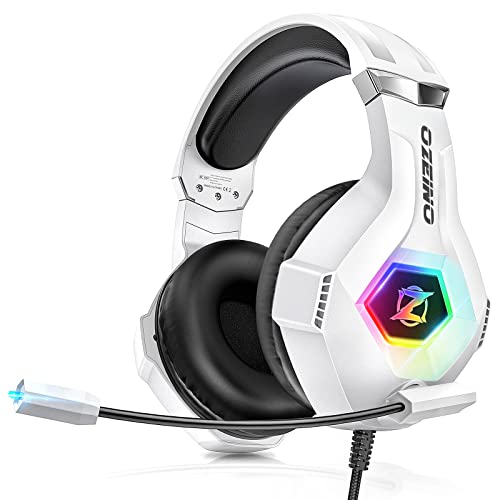
The Ozeino Gaming Headset is the least complicated choice in this roundup. Its available details focus on the basics: over-ear cushions, an adjustable headband, and surround sound for game audio. That makes it easier to understand than a headset built around multiple wireless modes and several companion apps.
Ozeino describes the 7.1 feature as delivering crisp highs, deep bass, and directional cues for both fast shooters and open-world games. There is no driver diameter listed in the supplied information, so it would be misleading to compare its hardware directly with the 40mm and 50mm drivers used elsewhere in this list. The useful takeaway is that its sound design is aimed at spatial gaming rather than neutral music playback.
The protein over-ear pads are described as breathable, and the adjustable headband is intended to distribute pressure evenly. The listed weight is about 0.66 pounds, placing it near the lighter wired models here. Ozeino lists compatibility with PC, PS4, PS5, Xbox, Nintendo Switch, laptops, and mobile devices, which gives it a broader stated platform range than the PC-only Kraken V3 X.
The missing connection details and limited technical information are its biggest weaknesses. The Razer BlackShark V2 X explains its 3.5mm approach clearly and adds more substantial driver and microphone information. The Logitech G432 is the better choice when DTS processing and a USB DAC matter. Choose Ozeino for a simple cross-platform setup, but skip it if you need detailed controls, a known driver design, or a premium microphone.
10. Ozeino Wireless Headset: Best Flexible Wireless

Pros
- 2.4GHz wireless connection with less than 30ms delay
- 50mm drivers
- Up to 40 hours of battery life
- Bluetooth and 3.5mm modes
- USB transmitter supports several platforms
Cons
- Bluetooth does not directly work with PC or PlayStation
- Not compatible with Xbox consoles
- 3.5mm mode supports music and calls only
Best for: casual PC and console players who want several connection modes and a long stated battery life.
The Ozeino Wireless Headset offers more connection flexibility than its simple presentation suggests. Its 2.4GHz USB and USB-C transmitter is the primary gaming route, with a stated delay of less than 30ms. That is the mode to use for PC, PlayStation, Switch, Mac, and laptop gaming, rather than treating Bluetooth as a universal replacement.
A 50mm driver handles the game audio, with the product details calling out footsteps, reloads, voices, bass, and directional accuracy. The headset also provides buttons for volume, mute, calls, music, and lighting. Up to 40 hours of battery life is listed, giving it a useful endurance advantage over a headset that needs daily charging.
Bluetooth works with phones, laptops, and Switch, but the supplied details specifically say it cannot directly connect to Mac, PC, PS5, or PS4 without an extra USB Bluetooth adapter. The 3.5mm wired mode supports music and calls only. Xbox consoles are not compatible. Those restrictions are easy to overlook, so the connection plan matters more here than the number of modes on the box.
The Razer BlackShark V3 X HyperSpeed is a more assured wireless PC pick, with a detachable microphone and a clearer gaming-focused feature set. The Ozeino is more appealing when you want 2.4GHz, Bluetooth, and analog options in one headset and are comfortable using the supplied transmitter. For broader microphone advice, choosing a mic that keeps team chat intelligible is a useful separate consideration.
How to choose best gaming headphones for pc
The right headset depends on how you play, where your PC sits, and how much control you want over sound and voice chat.
Connection type
A 3.5mm wired headset such as the Razer BlackShark V2 X or HyperX Cloud Alpha is simple and does not need charging. USB models can provide software surround processing, while 2.4GHz wireless is usually the better gaming connection because it is designed for low delay. Bluetooth is convenient for mobile audio, but it is not always suitable for competitive play or direct PC connection.
Positional audio
Good positional audio separates footsteps, reloads, dialogue, and effects instead of turning them into one loud mix. Driver size alone does not guarantee accurate placement. Look for a clearly described driver design, a useful soundstage, and surround software that works with your operating system. Razer lists 7.1 support for several models, while Logitech uses DTS Headphone:X 2.0 or more advanced spatial processing on its higher-end sets.
For competitive games, clean separation is more useful than simply making every explosion louder.
Microphone design
A cardioid or unidirectional microphone is intended to focus on your voice and reject more sound from behind and beside you. Detachable microphones are convenient if you also listen to music, while flip-to-mute booms are quick during team chat. The Logitech G522 and Astro A50 emphasize full-bandwidth voice capture, whereas the simpler Ozeino models provide less microphone detail in the available specifications.
Comfort and weight
A headset that sounds good but creates pressure after an hour will spend more time on your desk than your head. Compare listed weight, earcup padding, headband construction, and whether the material is breathable. The BlackShark V2 X is listed at 240g, the BlackShark V3 X HyperSpeed at 270g, and the Logitech G522 at 280g. Those differences are modest on paper but noticeable during long sessions.
Platform support
Check compatibility before choosing a connection style. The Kraken V3 X is explicitly for Windows PCs through USB-A, while the BlackShark V2 X uses a 3.5mm connection across several platforms. The BlackShark V3 excludes Xbox, and the Ozeino Wireless Headset has specific limits around Bluetooth and Xbox. If you switch systems often, the Astro A50 is built for that use case through Playsync.
Frequently asked questions
Are wired or wireless headphones better for PC gaming?
Wired models avoid charging and connection pairing, and 3.5mm headsets work with a wide range of devices. Wireless models provide a cleaner desk and easier movement, especially when they use a dedicated 2.4GHz receiver. The better choice depends on whether convenience or a direct plug-in setup matters more to you.
Do gaming headphones need surround sound?
No. Stereo headphones can still provide excellent positional cues when the drivers are well tuned and the game mix is good. Surround processing can widen the presentation, but it may not sound better in every game and can require Windows software.
Which headset is easiest to use with multiple platforms?
The Razer BlackShark V2 X is straightforward because its 3.5mm connection works with many listed platforms. The Logitech G Astro A50 is the more advanced option for switching among three systems, while the Ozeino Wireless Headset supports several platforms through its 2.4GHz transmitter with important compatibility limits.
Does a larger driver mean better gaming audio?
Not automatically. Driver tuning, separation, earcup design, and software processing all affect what you hear. The HyperX Cloud Alpha uses dual chamber drivers, while several Razer models use designs that divide highs, mids, and lows for clearer layering.
What should a good gaming microphone do?
It should keep your voice distinct from keyboard noise, room noise, and game audio. A cardioid or unidirectional pattern helps, and a detachable or flip-to-mute boom adds convenience. The Logitech G522 and Astro A50 are the strongest microphone-focused options in this group.
Can I use a PC gaming headset for music?
Yes, though gaming headsets often emphasize positional detail, bass, or voice clarity rather than a neutral music presentation. A detachable microphone and removable cable make the HyperX Cloud Alpha, Razer BlackShark V3, and BlackShark V3 X HyperSpeed easier to use outside games.
How much battery life is enough for a wireless headset?
That depends on how often you charge. The Razer BlackShark V3 lists up to 70 hours, the Logitech G522 lists up to 60 hours with lighting off, and the Ozeino Wireless Headset lists up to 40 hours. The Astro A50 lists up to 24 hours but includes a magnetic charging dock that reduces the need to manage a separate charging cable.
The bottom line
The Razer BlackShark V2 X is the safest recommendation for most PC players because it is light, clear, comfortable, and uncomplicated. Its 3.5mm connection works across multiple platforms, and its 50mm drivers and cardioid microphone cover the core needs without forcing you into a software ecosystem.
For wireless play, the Razer BlackShark V3 is the stronger choice when low latency, long battery life, spatial audio, and dual-device mixing matter. The Logitech G Astro A50 earns its place for households that move between several gaming systems, while the HyperX Cloud Alpha remains a comfortable wired alternative.
If you are still undecided, choose the Razer BlackShark V2 X for a direct PC setup, or the Razer BlackShark V3 when cutting the cable is the main reason you are shopping for the Best gaming headphones for pc.
As an Amazon Associate we earn from qualifying purchases.