

A weak microphone can make a sharp video feel amateurish. Viewers forgive an imperfect background or basic lighting, but muffled speech, keyboard clatter, and room echo make them leave quickly. The Best YouTube Microphones for your setup depend on where you record, how close the mic sits, and whether you need a desktop USB model or a wireless lavalier.
We compared desktop condensers, a dynamic USB/XLR mic, phone lavaliers, and gaming-focused models. Our top pick is the FIFINE AmpliGame AM8, while the ZealSound K66, Blue Yeti, and Mini Mic Pro cover very different recording styles.
Comparison table
| # | Product | Award | Pickup and connection | Monitoring | Best for |
|---|---|---|---|---|---|
| 1 | FIFINE AmpliGame AM8 | Best overall | Cardioid dynamic, USB/XLR | Headphone jack | Streaming and growing creators |
| 2 | ZealSound K66 | Best USB controls | Cardioid condenser, USB | 3.5mm jack | Podcasting and desk recording |
| 3 | Mini Mic Pro | Best mobile lavalier | Wireless, omnidirectional | Device monitoring | Phone-based videos |
| 4 | MAONO A04 | Best complete kit | 16mm condenser, USB | Not specified | New desktop studios |
| 5 | Labstandard Wireless Lavalier | Best dual-mic kit | Wireless, omnidirectional | Not specified | Interviews with two speakers |
| 6 | FIFINE K669B | Best simple desktop mic | Cardioid condenser, USB | Not specified | Straightforward voice recording |
| 7 | MAYBESTA Wireless Lavalier | Best for two-person mobile videos | Wireless, omnidirectional | Not specified | Vlogging and interviews |
| 8 | Blue Yeti | Best pickup flexibility | Three-capsule condenser, USB | Zero-latency | Podcasts and multi-person recording |
| 9 | MRSDY RGB Mic | Best gaming features | Condenser, USB | 3.5mm jack | Gaming and casual streaming |
1. FIFINE AmpliGame AM8: Best Overall

Pros
- Dynamic capsule helps reject off-axis noise
- USB setup is simple for first-time creators
- XLR connection leaves room for a later audio upgrade
- Gain, mute, and headphone controls are built in
Cons
- XLR cable is not included
- RGB and function controls stop working over XLR
- Best results require close positioning
Best for: creators who want a clean USB setup now and an XLR upgrade path later.
The AM8 is the one we would put in front of most new YouTube creators. Its dynamic design is less eager than a condenser to hear every fan, keyboard tap, and room reflection, so it suits a desk where acoustic treatment is limited. The end-addressing design means you speak toward the top, ideally from roughly 2 to 6 inches away, rather than talking across the side.
Its 50Hz to 16kHz frequency response is focused on the range that matters for spoken voice. The cardioid pattern keeps attention on the person in front of the mic and reduces sound arriving from the sides. USB makes it immediately usable, while XLR connects it to an audio interface later. That split is unusual at this level and gives the AM8 more staying power than the USB-only FIFINE K669B.
The front controls are useful during a live recording. USB mode provides a tap-to-mute button with an LED reminder, a gain knob, and a headphone output with monitoring volume control. Its RGB ring has three modes and more than 10 colors, though the lighting is unavailable when the mic is connected through XLR. Built-in 3/8-inch and 5/8-inch threads also make it compatible with many mic stands without an extra adapter.
The limitation is that it is not a set-and-forget mic for someone who sits far away. Dynamic microphones generally reward close, consistent placement, and the AM8 is no exception. It also needs a separate XLR cable for its upgrade route. Choose the AM8 if your channel mixes gaming, streaming, commentary, or podcasting and you want an honest path from USB to a more advanced setup.
2. ZealSound K66: Best USB Controls

Pros
- Dedicated mic, monitor, and echo controls
- Noise reduction mode can tame common desk sounds
- USB-C and Lightning adapters support mobile devices
- Zero-latency headphone monitoring
Cons
- Condenser capsule hears more of the room
- Echo control can encourage overprocessed vocals
- Top-addressed design needs correct positioning
Best for: desktop podcasters who want hands-on control without software.
The ZealSound K66 is built around the controls creators tend to reach for while recording. Instead of opening a software mixer, you can adjust microphone volume, headphone volume, and echo from the body. A physical mute button with a red indicator is equally useful for live streams, meetings, and any recording where an interruption can happen without warning.
This is a cardioid condenser with a 40Hz to 18kHz response and a 46kHz sampling rate. Those figures describe a broad voice range, but the more meaningful point is its intended use: speak directly into the top of the mic and keep a consistent distance. The solid metal construction and weighted base help keep it steady, while the body rotates through 360 degrees for easier desk positioning.
The K66 also has a noise reduction mode. Holding the mute button activates it, with a blue indicator showing the mode is active. It is designed to reduce keyboard clicks, computer fans, air conditioning, and nearby chatter. That makes it more adaptable than the simpler FIFINE K669B, although the AM8 remains the safer pick when the room itself is noisy because its dynamic capsule is less sensitive to distant sound.
The strongest feature here may be its compatibility. The package includes a USB cable measuring 70.87 inches, a USB-C adapter, a Lightning adapter, and a foam windscreen. The 3.5mm headphone jack provides zero-latency monitoring, so you can hear problems before they reach the finished video. The weakness is that a condenser still rewards a quiet room, and the echo knob is better kept low for natural speech. Pick the K66 for a creator who values immediate physical control and records on both a computer and a phone.
3. Mini Mic Pro: Best Mobile Lavalier

Pros
- USB-C and Lightning adapters are included
- Small wireless design clips to clothing
- Foam and dead cat wind protection are included
- Up to 6 hours of operation per charge
Cons
- One microphone is less useful for interviews
- Wireless operation adds another battery to manage
- Lavalier placement affects clothing noise
Best for: solo creators who shoot YouTube videos directly on a phone.
The Mini Mic Pro solves a different problem from the desktop microphones here. It lets you move away from the phone while keeping the microphone close to your mouth, which is exactly what handheld vlogs, walking videos, and quick interviews need. The transmitter is small enough to clip to a shirt or slip into a pocket, and its listed weight is under an ounce.
Setup is deliberately simple. The receiver supports USB-C and Lightning devices, and the microphone connects without an app or Bluetooth pairing. That removes several steps that can derail a quick shoot. A creator who records mostly on an iPhone or Android phone will find it far easier to carry than the ZealSound K66 and far more natural for a moving presentation.
The mic includes high-density foam and a dead cat cover for wind protection. Its noise-cancelling design is intended to keep speech clear in outdoor environments, though no tiny lavalier can erase heavy traffic or strong wind completely. The rechargeable battery is rated for up to 6 hours per charge, and the setup supports charging the device while the microphone is in use.
The trade-off is control and flexibility. There is no desktop-style gain knob, headphone output, or XLR route, and the single transmitter is aimed at one speaker. For a two-person shoot, the Labstandard Wireless Lavalier and MAYBESTA Wireless Lavalier are more practical. For solo phone videos where portability matters more than studio control, the Mini Mic Pro is the most natural fit. Creators comparing mobile options may also want to consider the trade-offs that matter in wireless phone recording.
4. MAONO A04: Best Complete Kit
Pros
- 16mm condenser capsule emphasizes voice presence
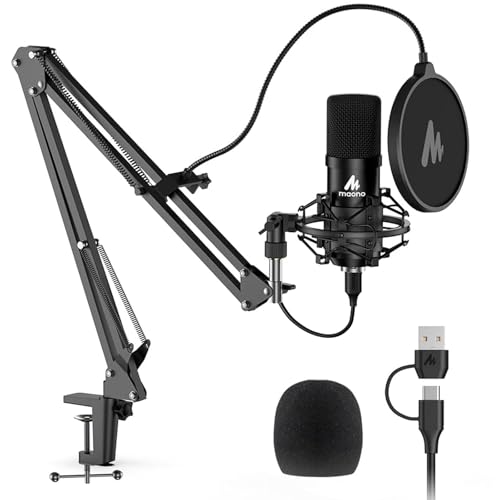
- Arm, shock mount, pop filter, and windscreen included
- 192kHz/24-bit chipset supports high-resolution recording
- USB plug-and-play setup
Cons
- Not compatible with Xbox
- Does not work with Maono Link software
- Condenser design needs sensible room placement
Best for: a first desktop studio built around a boom arm.
The MAONO A04 is less about unusual controls and more about giving a new creator the physical pieces needed to get started. Its kit includes a USB condenser mic, adjustable scissor arm, metal shock mount, pop filter, foam windscreen, boom arm base, and USB-A/USB-C to USB-B cable. That makes the transition from an empty desk to a recognizable recording setup straightforward.
Inside is a 16mm electret condenser transducer. The design is intended to capture a strong bass response and clear speech when the speaker stays around 2 to 6 inches away. Its stated 192kHz/24-bit chipset supports high-resolution audio, but placement and room sound still matter more than the headline numbers for YouTube speech. The included pop filter is useful for reducing plosive bursts on words with strong P and B sounds.
The A04 connects by USB without driver software or an external sound card. It works with most laptops, PCs, PS4, PS5, and mobile phones, and it can serve podcasts, voiceovers, livestreams, calls, and video narration. The desk clamp is designed for surfaces under 2.1 inches thick. That practical limitation is easy to overlook if your desk is unusually substantial.
Compared with the ZealSound K66, the A04 gives you a more complete arm-based setup but fewer controls on the microphone itself. The AM8 is a better long-term choice for someone who expects to move to XLR, while the A04 makes more sense for a creator who wants a mounted condenser immediately. It is not compatible with Xbox and does not work with Maono Link, so skip it if either requirement is central to your setup.
5. Labstandard Wireless Lavalier: Best Dual-Mic Kit

Pros
- Two wireless microphones suit interviews
- Lightning and Type-C support
- Noise reduction chip and automatic syncing
- About 6 hours of battery life
Cons
- Fewer controls than desktop microphones
- Phone compatibility depends on using the correct adapter
- Omnidirectional pickup needs careful placement
Best for: phone-based interviews, conversations, and two-person videos.
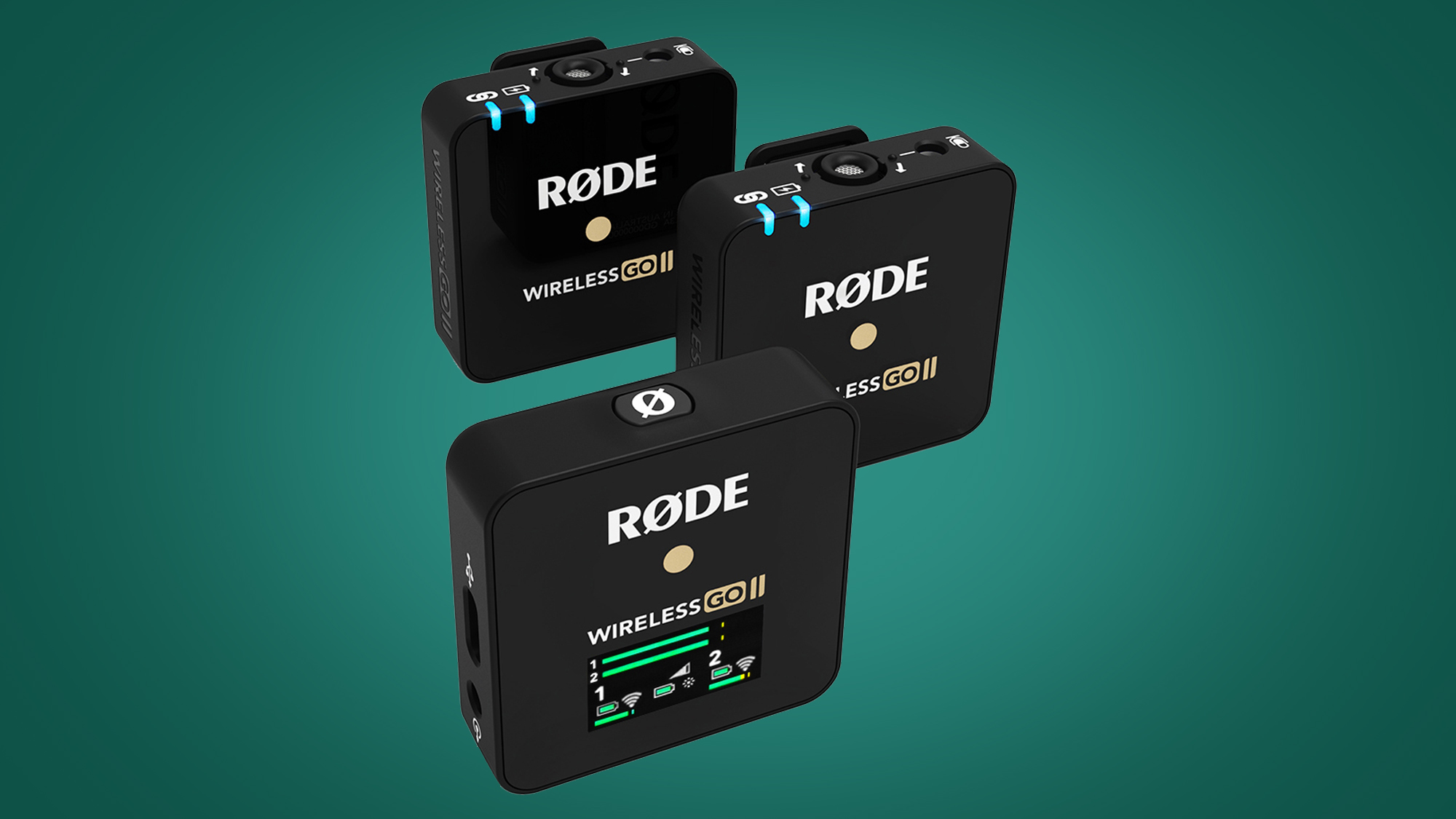
The Labstandard kit earns its place by including two wireless lavalier microphones. That immediately makes it more useful for a host and guest than the single-transmitter Mini Mic Pro. Each person can clip a microphone close to their voice, avoiding the distant, hollow sound that often comes from placing one phone between two speakers.
Its 2.4G transmission system is designed with low latency, listed at 0.008 seconds, so the sound should stay closely aligned with the picture. The built-in noise reduction chip targets interference and background noise, while real-time auto-sync reduces the need to line up audio manually later. It also supports multi-channel real-time mixing for phone audio, background music, and speech.
The system works with Type-C devices and includes a rechargeable Lightning adapter for iPhones and iPads. The microphones use omnidirectional condenser pickup, which makes positioning less fussy than aiming a front-address desktop mic, but it also means the units can hear more of the surrounding environment. Battery life is listed at about 6 hours, and a USB-C charging cable is included.
This is a more interview-ready choice than the Mini Mic Pro, but it lacks the direct gain, mute, and headphone controls found on the AM8 or K66. The kit is also physically more involved than a wired lavalier. Choose it when the shot includes two people and the camera is a phone. If you mainly film solo, the smaller Mini Mic Pro is easier to carry.
6. FIFINE K669B: Best Simple Desktop Mic

Pros
- Plug-and-play USB setup
- Cardioid condenser focuses on the main speaker
- Metal construction and tripod stand
- Built-in volume knob
Cons
- USB-A connection limits newer devices
- Not compatible with Xbox or phones
- No headphone monitoring output is listed
Best for: beginners who want a compact computer microphone with few setup steps.
The K669B is the uncomplicated option in this group. Connect its included 5.9-foot USB cable to a computer, place the mic on its tripod, and start recording. There is no interface, phantom power supply, or software installation to think about. That simplicity is valuable for voiceovers, online lessons, meetings, and a first YouTube channel.
Its cardioid condenser design focuses on the sound in front of the microphone and aims to reduce background noise. The built-in volume knob lets you raise or lower the output and can be turned to zero for privacy. The solid metal construction gives the small tripod more stability than a flimsy plastic desktop stand.
The K669B works with desktop computers, laptops, PS4, and PS5, and the USB-B to USB-A/C cable supports many computer setups. It is not compatible with Xbox or phones, which makes it much less flexible than the ZealSound K66. There is also no listed headphone jack for direct monitoring, so you have less immediate feedback while recording.
Compared with the MRSDY RGB Mic, the K669B is quieter visually and more focused on basic recording. The MRSDY adds RGB, mute, and headphone monitoring, while the K669B keeps the controls and footprint simple. It is a good choice for someone who wants clear spoken audio from a computer and does not need mobile recording or advanced monitoring.
7. MAYBESTA Wireless Lavalier: Best for Two-Person Mobile Videos

Pros
- Two microphones are included
- Up to 70 feet of stated audio reception
- Up to 16 hours of total recording time
- Receiver is designed to work with many phone cases
Cons
- Omnidirectional pickup hears surrounding sound
- Wireless range varies with obstacles and interference
- No desktop monitoring or XLR connection
Best for: mobile creators recording interviews, vlogs, and conversations.
The MAYBESTA kit is designed for the creator who wants to film with a phone but does not want the phone itself to be the main microphone. It includes two clip-on lavaliers, making it a natural fit for interviews, teaching, street content, and conversations between a host and guest. The receiver is longer than some competing designs and is intended to work with most phone cases without removing them.
Automatic connection keeps setup short. Choose the appropriate connector, plug the receiver into the phone, turn on the microphones, and look for the solid green connection lights. The system supports iPhone, iPad, Android devices, laptops, and tablets, so it can follow a creator across several recording devices.
The microphones use omnidirectional pickup and include windscreens plus a noise reduction chip. The advertised wireless reception reaches up to 70 feet, while the two microphones are rated for up to 16 hours of total recording time after charging. Those figures make the MAYBESTA more suitable for longer shoots than the Mini Mic Pro, whose single microphone is rated for up to 6 hours.
The main weakness is that the kit does not offer the hands-on control of a desktop microphone. There is no stated headphone output, gain knob, or XLR route, and the microphones can still hear nearby traffic, clothing movement, or room noise. For phone-first creators who regularly record with a second person, it is more practical than a single wireless mic. For a fixed desk, the K669B or AM8 is the better shape of tool.
8. Blue Yeti: Best Pickup Flexibility

Pros
- Four pickup patterns cover different recording layouts
- Three-capsule array supports clear spoken audio
- Onboard gain, mute, pattern, and headphone controls
- Zero-latency monitoring and adjustable desktop stand
Cons
- Heavy desktop design
- Condenser capsule can expose room noise
- USB connection does not offer XLR expansion
Best for: creators who record solo voice, instruments, podcasts, and group conversations.
The Blue Yeti remains unusually adaptable because it is not locked to one recording arrangement. Its three-capsule array and four pickup patterns let it work in cardioid for a solo presenter, omnidirectional for a room, bidirectional for a face-to-face conversation, or stereo for a wider sound field. That range is more useful than decorative features when a channel changes format often.
Onboard controls cover headphone volume, pattern selection, instant mute, and microphone gain. The adjustable desktop stand lets you position the mic in relation to the speaker, and the headphone output supports real-time monitoring without noticeable delay. It can also attach directly to a mic stand or boom arm, so the included desktop footprint is not the only way to use it.
The Blue VO!CE software adds broadcast-style vocal effects, modulation, and high-definition audio samples. Those tools can help a creator shape a consistent voice, though they are not a substitute for good placement. The Yeti is a condenser, so a hard, reflective room can still show up in the recording more clearly than it would with the dynamic AM8.
At 3.51 pounds, the microphone and stand are substantially heavier than the K669B or the compact wireless options. It also remains USB-only, while the AM8 can move to XLR. The Yeti is the better pick for a creator who needs multiple pickup patterns and onboard control, not for someone who only wants a small mic for a single talking-head setup. For creators also choosing their camera, the distance and framing questions that shape a YouTube setup deserve attention alongside the microphone.
9. MRSDY RGB Mic: Best Gaming Features

Pros
- RGB lighting can be turned on or off
- Noise cancellation targets typing and clicks
- Headphone output provides latency-free monitoring
- Quick mute button and gain control
Cons
- USB connection only
- Condenser design remains sensitive to room sound
- RGB is aimed at gaming setups rather than restrained studios
Best for: gamers and casual streamers who want visible desk controls.
The MRSDY is a compact gaming microphone with the controls that matter during a live session. Its quick-mute button sits on the bottom, and the RGB changes to solid green when muted before returning to a gradient effect when the mic is active. That visual feedback is helpful when a game or conversation gets busy.
The mic uses a USB connection and includes a 78-inch, or 2-meter, cable. Plug-and-play operation means no driver or extra software is needed for YouTube, Zoom, Skype, online lessons, livestreams, and recording. A gain knob on the microphone adjusts output, while the 3.5mm stereo headphone output supports direct monitoring with both three-pole TRS and four-pole TRRS headphones.
Its noise cancellation function is intended to reduce typing, clicking, and outdoor noise. That makes it more purpose-built for gaming than the plain K669B. The included stand keeps the unit on the desk, and the microphone weighs 0.55 pounds, so it is easy to reposition.
The MRSDY does not have the AM8's dynamic capsule or XLR upgrade route, and it does not offer the Blue Yeti's pattern selection. RGB can also look out of place in a quiet podcast studio. Choose it when gaming presentation, quick mute access, and headphone monitoring matter more than future expansion or multi-person recording.

How to choose best youtube microphones
The right microphone is determined by the space, camera, speakers, and recording distance, not by a single headline specification.
Pickup pattern
Cardioid microphones focus on sound in front of the capsule and are usually the most forgiving choice for a solo YouTube presenter. Dynamic cardioid models such as the FIFINE AM8 can reduce room spill, while condenser models such as the ZealSound K66 and Blue Yeti tend to capture more detail and more of the surrounding space.
Omnidirectional lavaliers hear sound from around the capsule, which helps when the mic shifts on clothing but also makes placement and background noise more important. Multiple pickup patterns are useful when one microphone must handle solo speech, interviews, and room sound.
A quiet microphone placement close to the speaker usually beats a more sensitive microphone placed across the desk.
USB and XLR connections
USB microphones connect directly to a computer and are the easiest option for a new channel. They keep the setup compact and avoid the need for an audio interface. The K669B, K66, Blue Yeti, and MRSDY all follow that straightforward route.
XLR adds equipment and setup, but it also gives a creator more control over preamps, interfaces, and future microphones. The AM8 is the only model here with both USB and XLR, making it the strongest choice for someone whose channel may become a more serious audio setup.
Monitoring and controls
A headphone output lets you hear the microphone directly and catch clipping, hum, or clothing noise before recording. The K66, AM8, Blue Yeti, and MRSDY include direct monitoring features, while the simpler K669B does not list a headphone output.
Physical gain and mute controls are especially useful for livestreams. An echo knob can be creative, but clean spoken YouTube audio usually benefits from keeping effects restrained. A clear mute indicator is worth having when recording live or sharing a room with other people.
Wireless range and battery
Wireless lavaliers free the speaker from the desk and keep the capsule close to the mouth. Look for the number of transmitters first, since a two-person interview needs two microphones. Battery claims also matter for outdoor shoots, but wireless units need charging and can be affected by obstacles or interference.
The Mini Mic Pro is a compact single-mic option with up to 6 hours of operation. Labstandard also lists about 6 hours, while MAYBESTA includes two microphones and lists up to 16 hours of total recording time. Those products are better suited to mobile video than a desktop USB microphone.
Room and placement
Condenser microphones reveal detail, which can be useful for voiceovers and podcasts in a controlled room. In a bare room with hard walls, a dynamic microphone placed close to the speaker can sound more focused. Windscreens and pop filters help with plosives and wind, but they cannot fully correct a distant microphone or strong echo.
A desktop stand is convenient, while a boom arm moves the microphone closer and can clear desk space. The MAONO A04 includes an arm and shock mount, while the K669B and MRSDY use compact stands. Choose the physical arrangement that keeps the mic close without blocking your face or camera frame.
Frequently asked questions
What type of microphone is best for YouTube videos?
A cardioid desktop microphone is a strong starting point for a solo creator recording indoors. The FIFINE AM8 is more resistant to surrounding room noise than a typical condenser, while the ZealSound K66 and Blue Yeti provide more controls and pickup flexibility.
Are USB microphones good enough for YouTube?
Yes. USB microphones can provide clear spoken audio without an audio interface, and they are quick to configure on a computer. The AM8 adds an XLR connection for creators who later want a more advanced audio chain.
Is a lavalier microphone better for phone videos?
A wireless lavalier is usually more practical when the speaker moves or the camera is several feet away. The Mini Mic Pro suits one person, while the Labstandard and MAYBESTA kits are better for interviews because they include two microphones.
Do YouTube microphones need noise cancellation?
Noise reduction can help with keyboard sounds, fans, and air conditioning, but it is not a replacement for close placement and a quiet room. The ZealSound K66, Labstandard, and MRSDY include noise reduction features, while the AM8 relies more on its dynamic cardioid design and close speaking distance.
Should I choose a condenser or dynamic microphone?
Choose a condenser when you want detailed sound and can control the room. Choose a dynamic model when background noise and room reflections are bigger concerns. The AM8 is the dynamic option here, while the K66, A04, K669B, Blue Yeti, and MRSDY use condenser designs.
Can one microphone record two people?
The Blue Yeti can use its bidirectional or omnidirectional patterns for some two-person arrangements. Wireless kits with two lavaliers, such as the Labstandard and MAYBESTA models, are usually easier for interviews because each speaker has a microphone close to their voice.
The bottom line
The Best YouTube Microphones in this group serve distinct recording styles, but the FIFINE AmpliGame AM8 is the strongest all-purpose pick. Its dynamic cardioid design helps in ordinary rooms, USB keeps setup simple, and XLR gives a growing creator a clear upgrade path. The ZealSound K66 is the better alternative for someone who wants more onboard controls, mobile adapters, and built-in noise reduction.
For phone-first creators, the Mini Mic Pro is the simplest solo wireless option, while the Labstandard Wireless Lavalier and MAYBESTA Wireless Lavalier make two-person filming easier. Choose the Blue Yeti when four pickup patterns matter more than portability, and the MAONO A04 when a complete boom-arm kit is the priority.
If you are undecided, choose the AM8 for a desk setup, or the Mini Mic Pro if your camera is a phone and you move while speaking.
As an Amazon Associate we earn from qualifying purchases.