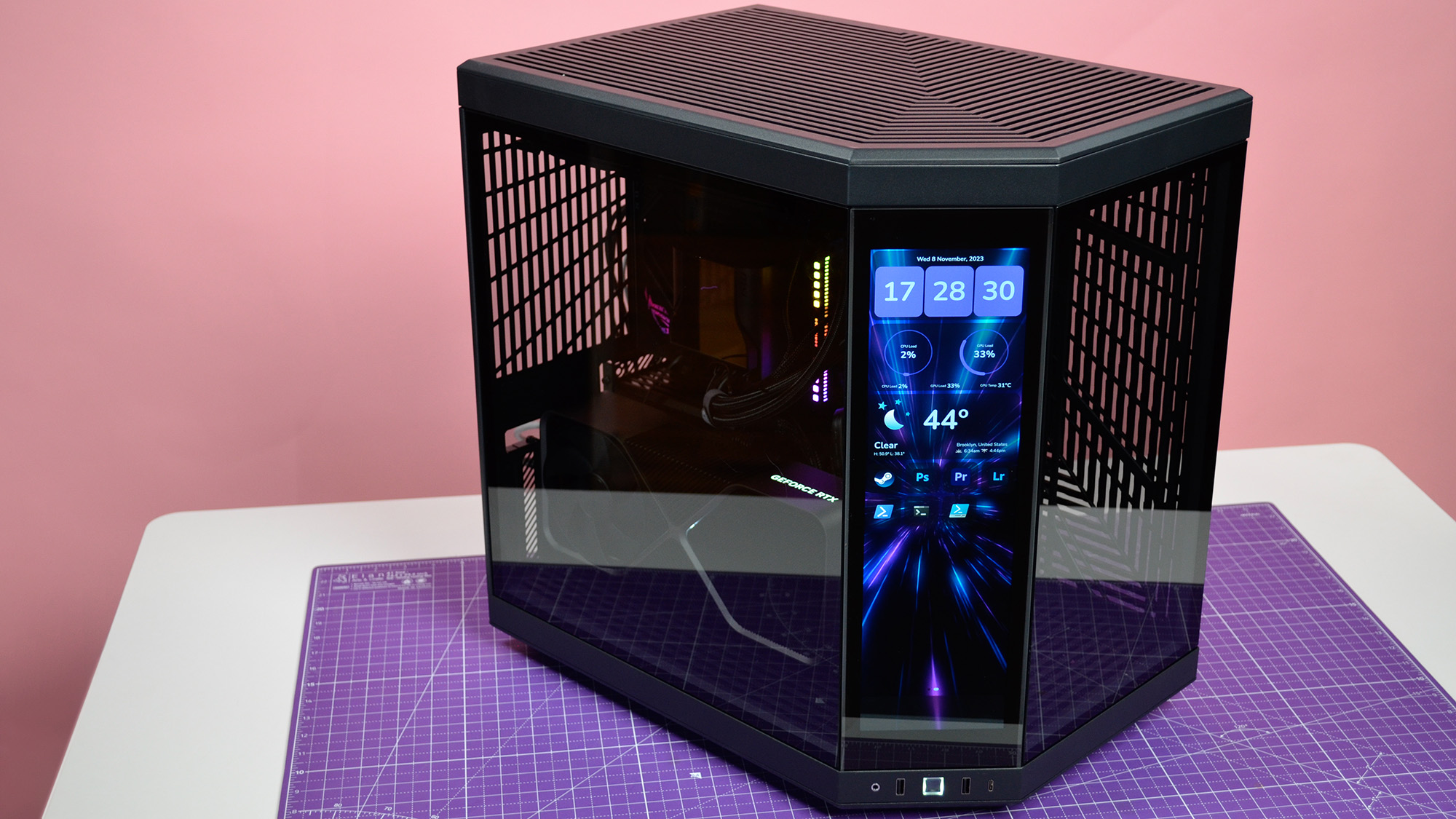

A PC case has to do more than hold components. It determines how easily you can build, how much air reaches the GPU, how clean the finished system looks, and whether future upgrades become a careful exercise in disassembly. The Best PC Cases make those decisions easier by balancing airflow, clearance, cable routing, and access.
This list includes practical mesh cases, panoramic glass showpieces, back-connect designs, and models with unusual extras such as adjustable fan rails or an integrated display. Some include useful fans from the start, while others leave more room for you to choose the cooling setup.
Our top pick is the Corsair 4000D RS ARGB Frame, with the Lian Li V100, Fractal Design North, and NZXT H5 Flow covering different build priorities.
Comparison table
| # | Product | Award | Motherboard and GPU support | Cooling | Best for |
|---|---|---|---|---|---|
| 1 | Corsair 4000D RS ARGB Frame | Best overall | ATX, reverse-connect support | 3 front PWM ARGB fans, adjustable rails | Flexible airflow builds |
| 2 | Lian Li V100 | Best ready-to-build design | ATX, Micro-ATX, Mini-ITX, back-connect support | 4 120mm PWM ARGB fans | Large components |
| 3 | MUSETEX K2 | Best fan bundle | ATX support | 7 PWM ARGB fans, up to 10 | RGB-focused builds |
| 4 | MUSETEX Y6 | Best infinity-mirror look | ATX, Micro-ATX, Mini-ITX | 7 infinity-mirror ARGB fans | Panoramic displays |
| 5 | Fractal Design North | Best understated design | ATX, Micro-ATX, Mini-ITX | Mesh front, 2 140mm PWM fans | Quiet-looking workstations |
| 6 | Lian Li O11 Vision Compact | Best glass showcase | ATX, back-connect support | 360mm top radiator support | Clean showcase builds |
| 7 | NZXT H5 Flow | Best compact airflow | ATX | 2 120mm fans included | Smaller ATX systems |
| 8 | Thermalright A70 Vision | Best built-in display | ATX | 8 120mm fan positions | Hardware dashboards |
| 9 | HYTE Y70 | Best dual-chamber showcase | ATX | Up to 360mm radiators, 10-fan capacity | Premium vertical GPU builds |
| 10 | Corsair 3500X RS ARGB | Best panoramic flexibility | Mini-ITX to EATX | 3 reverse ARGB fans, up to 10 | Glass builds with hidden cables |
1. Corsair 4000D RS ARGB Frame: Best Overall
Pros
- Flexible InfiniRail fan positioning
- Three pre-installed RS ARGB PWM fans
- Perforated front panel supports strong airflow
- Compatible with several reverse-connect motherboard designs
Cons
- Larger and heavier than a basic mid-tower
- The most useful customization options may require extra parts
- No liquid cooler is included
Best for: builders who want a capable ATX case that can change with future hardware.
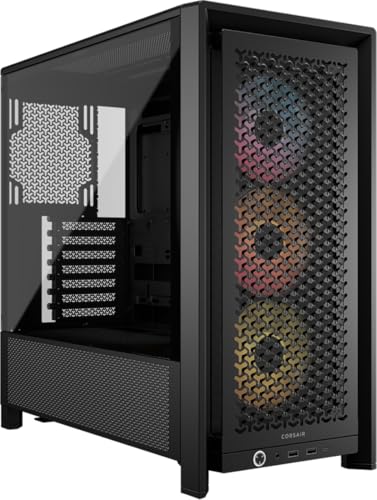
The Corsair 4000D RS ARGB Frame is the case we would choose when the build matters more than a single visual style. It has the familiar proportions of a mid-tower, but its Frame system makes it less fixed than most rivals. The internal side panel can act as a cable cover, or you can remove it and use that area for additional fans. That is a meaningful choice rather than a cosmetic trick.
Airflow starts with the three-dimensional Y-pattern steel front panel, which gives the front fans a relatively open path into the chassis. Corsair includes three RS ARGB PWM fans at the front, and their daisy-chainable four-pin connections simplify the wiring. Zero RPM mode is supported for low-load operation, so the fans can remain still when the system does not need active cooling. The InfiniRail system is the more interesting feature: its rails let you slide fans into a position that suits the GPU or radiator rather than accepting only fixed mounting holes. The rails support front fans up to 200mm and roof fans up to 140mm.
The case measures about 19.17 inches long, 9.41 inches wide, and 19.13 inches tall, with a weight of roughly 22.7 pounds. Those dimensions leave room for a substantial ATX build without making the case especially compact. Compatibility with ASUS BTF, MSI Zero, and Gigabyte Stealth gives it a cleaner route for newer back-connect motherboard layouts. That makes the 4000D RS ARGB Frame more adaptable than the NZXT H5 Flow, while the Lian Li V100 offers more explicit clearance for very large graphics cards.
Its weakness is complexity. A straightforward builder may never use the removable side section or the more flexible rail arrangement, and the case is not a featherweight enclosure to move around a desk. The included fans also solve the starting airflow problem, not every possible cooling problem. Choose it over the Fractal Design North if you value configuration and future changes more than furniture-like styling. For a builder who wants one case to accommodate several different build plans, this is the strongest all-rounder.
2. Lian Li V100: Best Ready-to-Build Design

Pros
- Four pre-installed PWM ARGB fans
- Supports graphics cards up to 420mm
- Supports CPU coolers up to 178mm
- Back-connect motherboard compatibility
- Tool-less side panels
Cons
- Fan noise rises at maximum speed
- Less distinctive than the panoramic cases
- The included lighting may not suit a restrained build
Best for: builders fitting large hardware who want cooling and lighting already installed.
The Lian Li V100 is refreshingly direct. It looks like a conventional ATX mid-tower, then removes several common setup chores by including four 120mm PWM ARGB fans. The fans support daisy-chain connectivity, and an integrated 26-LED ARGB strip adds another lighting element that can synchronize through motherboard software. This is a sensible choice for a first build or a replacement chassis where you want to get to component installation quickly.
The useful numbers are its clearances. A GPU up to 420mm long, CPU cooler up to 178mm tall, and top radiator up to 360mm give the V100 more headroom than the NZXT H5 Flow and Fractal Design North. It supports ATX, Micro-ATX, Mini-ITX, and back-connect ATX or Micro-ATX boards. That broad motherboard support makes it unusually flexible for a regular-looking case. The roughly 17.56-inch length and 9.25-inch width keep its footprint manageable, although it stands just over 19 inches tall.
Lian Li lists a maximum fan speed of 1, 800 RPM, airflow between 60.4 and 61.47 CFM, and noise between 26.5 and 30.8 dBA for the included fans. Those figures indicate useful adjustment range, but they also explain why maximum speed is not the setting to leave on constantly if a quiet desk is important. The tool-less side panels make access simpler when routing cables or changing a cooler.
The V100 lacks the dramatic glass presentation of the MUSETEX Y6 or HYTE Y70. It also does not have the Corsair 4000D RS ARGB Frame's movable fan rails. Its appeal is practical capacity: it accepts big parts, several motherboard formats, and four fans without asking the owner to start with an empty cooling layout. Pick it when component clearance and a simple build path matter more than making the chassis the centerpiece.
3. MUSETEX K2: Best Fan Bundle
Pros
- Seven pre-installed PWM ARGB fans
- Supports up to 10 fans
- 270-degree dual tempered-glass view
- 360mm top liquid cooler support
- Type-C front connection
Cons
- Fan airflow is modest compared with larger fan designs
- Tight PSU limits depend on the drive cage
- Highly visible lighting is not for every room
Best for: builders who want a fully populated RGB case with a wide view of the components.
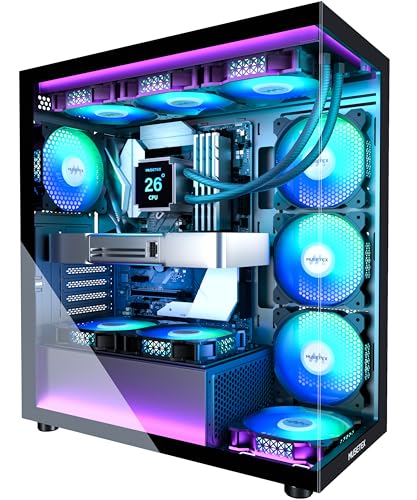
The MUSETEX K2 arrives with the visual impact already switched on. Seven PWM ARGB fans fill the case, with three reverse fans on the side, three forward fans on top, and one forward fan at the rear. That layout gives the enclosure a finished look before the motherboard and GPU are installed. Its dual tempered-glass panels meet in a 270-degree panoramic arrangement, so the build remains visible from more than one angle.
The case supports graphics cards up to 400mm and CPU coolers up to 165mm. A top-mounted liquid cooler can measure up to 360mm, which gives a high-performance ATX build room to breathe. The 16.73-inch depth, 8.35-inch width, and 18.5-inch height make it somewhat narrower than the Lian Li V100. The power supply limit is more conditional: it supports units up to 140mm with the hard-drive cage installed, and up to 150mm to 180mm without that cage, depending on the arrangement.
Each 120mm fan is adjustable from 600 to 1, 300 RPM, with listed airflow of 24.72 CFM, static pressure of 0.45mm H2O, and noise of 20.819 dBA. The seven-fan count is the headline, but the individual airflow figure is the detail to keep in mind. The case offers cooling coverage and plenty of visual movement, yet a builder with exceptionally hot hardware should pay close attention to radiator placement and the final intake path. The front panel includes one Type-C port, two USB 3.0 ports, audio, power, and restart controls.
Compared with the MUSETEX Y6, the K2 has a similar panoramic idea but uses conventional ARGB fans rather than infinity-mirror models. Compared with the Corsair 4000D RS ARGB Frame, it gives you more fans immediately, while Corsair provides more flexibility in where those fans can go. The K2 is the better fit for a visible RGB build that should look complete from the first boot. Skip it if you want understated lighting or a simpler, less crowded interior.
4. MUSETEX Y6: Best Infinity-Mirror Look

Pros
- Seven pre-installed infinity-mirror ARGB fans
- 270-degree tempered-glass view
- Supports GPUs up to 410mm
- Supports a 360mm top radiator
- Wide PSU clearance
Cons
- CPU cooler clearance is limited to 160mm
- Glass-focused design needs careful cable work
- Only one USB 3.0 port
Best for: showcase builders who want continuous lighting effects around a panoramic interior.
The MUSETEX Y6 is built around the lighting effect, not merely an illuminated front panel. Its seven 120mm infinity-mirror ARGB fans create continuous gradient bands that make the fans look deeper and more integrated than ordinary illuminated blades. Three reverse fans sit on the side, three more on the bottom, and a forward fan handles the rear. With 270-degree dual tempered glass, nearly every part of that layout is meant to be seen.
The interior accepts ATX, Micro-ATX, and Mini-ITX motherboards, graphics cards up to 410mm, CPU coolers up to 160mm, and a top liquid cooler up to 360mm. It also supports power supplies up to 230mm, a generous allowance that is useful in a dual-purpose gaming and storage build. At 16.73 inches deep and 10.83 inches wide, the case is broad enough to provide a comfortable display area, while its 15.67-inch height is shorter than many conventional mid-towers.
The side and bottom fan arrangement can create a coherent intake route, and the fans are speed adjustable through motherboard software. The front I/O includes Type-C, USB 3.0, USB 2.0, audio, power, and restart controls. That is a practical set of connections, although the single USB 3.0 port is less generous than the MUSETEX K2's two. The Y6's internal layout is clearly organized, but a panoramic case shows messy cables more readily than the NZXT H5 Flow.
This is the more visually ambitious choice between the two MUSETEX models. The K2 has the more conventional and slightly more flexible cooler clearance, while the Y6 wins if the fan lighting is the main event. It is also less suited to a quiet, minimal workstation than the Fractal Design North. Choose the Y6 for a display build with collectible figures or coordinated lighting, and avoid it if you do not want to spend time making the visible side look deliberate.
5. Fractal Design North: Best Understated Design

Pros
- Genuine walnut front detail
- Open mesh front for natural ventilation
- Two included 140mm PWM fans
- Supports ATX, Micro-ATX, and Mini-ITX
- Useful built-in drive mounting
Cons
- GPU clearance falls with a front 360mm radiator
- Less glass area than showcase cases
- Only two fans are included
Best for: builders who want a PC that fits a room or office without looking like a lighted display.
The Fractal Design North is the antidote to the glass box. Its walnut front slats and dark tempered-glass side give the system a furniture-like presence, while the open front and integrated mesh keep the design from becoming purely decorative. It is the case we would put in a study or shared living space where a wall of RGB is not the desired look.
Two 140mm Aspect PWM fans are included, and their larger diameter is a good starting point for moving air without relying on a dense array of small fans. The case supports ATX, Micro-ATX, and Mini-ITX motherboards. A GPU can be up to 355mm long, or up to 300mm when a 360mm radiator is installed at the front. That distinction matters: the North can support a substantial liquid cooler, but not alongside every long graphics card.
The enclosure measures about 17.6 inches long, 8.46 inches wide, and 18.46 inches tall. It has seven bridgeless expansion slots and includes two combined 3.5-inch or 2.5-inch drive mounts plus two dedicated 2.5-inch mounts. Side panels come off, the front unclips, and the top panel lifts from an integrated tab, making access less frustrating than the restrained exterior might suggest. USB Type-C is also included on the front.
The North cannot match the Lian Li V100's 420mm GPU clearance or the HYTE Y70's dual-chamber cable space. Its strength is balance. It looks calmer than the Corsair 3500X RS ARGB, has a more open front than the glass-heavy Lian Li O11 Vision Compact, and includes larger fans from the start. Choose it for a tasteful, airflow-minded build. Skip it only if the main purpose of the case is to showcase elaborate lighting or a vertical graphics card.
6. Lian Li O11 Vision Compact: Best Glass Showcase

Pros
- Three-panel tempered-glass presentation
- Back-connect motherboard compatibility
- Side-chamber liquid cooler tubing route
- Top mesh panel for a 360mm radiator
- Clean uninterrupted component view
Cons
- Heavy at about 26.4 pounds
- Cooling hardware is not included
- Glass-heavy layout leaves little room for untidy cabling
Best for: builders who want a clean component display with a back-connect motherboard.
The Lian Li O11 Vision Compact is designed around the finished view. Tempered glass covers the front, top, and left side, creating a three-panel window with few visual interruptions. It is a particularly strong fit for a build where the motherboard, tubing, and lighting arrangement deserve to be seen from several angles.
The back-connect design is the practical feature that keeps the view clean. Compatible motherboards can place their connections behind the board, reducing the cable clutter that normally appears across the visible side. Lian Li also describes a route that conceals liquid-cooling tubing within the second chamber when a side-mounted AIO is used. A top mesh panel provides a more suitable location for a 360mm radiator than the solid glass would.
At roughly 17.6 inches long, 11.3 inches wide, and 17.57 inches tall, the case is broad rather than especially tall. Its 26.4-pound weight reinforces that this is a substantial enclosure intended to stay in place. The extra width is useful for a two-chamber layout and hidden routing, but it consumes more desk or floor space than the NZXT H5 Flow or Fractal Design North.
This case is a better display platform than the Corsair 4000D RS ARGB Frame, but Corsair is the more flexible choice when fan placement and airflow experimentation matter. The O11 Vision Compact also needs a careful parts plan because it includes no pre-installed cooling fans in the supplied feature list. Choose it when a clean, glass-wrapped presentation is the goal and you are prepared to plan the cooling layout around it.
7. NZXT H5 Flow: Best Compact Airflow

Pros
- Compact mid-tower footprint
- Fine mesh on front, top, and side
- Two included 120mm fans
- 360mm front radiator support
- Wide cable-routing channels and straps
Cons
- Extra lower GPU fans are not included
- Less component clearance than larger cases
- Plain design lacks showcase appeal
Best for: compact ATX builds that need a practical airflow path and easy cable routing.
The NZXT H5 Flow earns its place by being easy to understand. It is a compact ATX mid-tower with mesh on the front, top, and side, plus two 120mm Quiet Airflow fans installed at the front and rear. There is no dramatic glass wrap or unusual display system, which is precisely why it suits a builder who wants the components to work without the enclosure dominating the room.
The perforated PSU shroud and side and bottom intake areas are designed to help feed air toward the graphics card. NZXT supports up to two additional 120mm fans in that lower area, but those fans are not included. Liquid cooling support reaches 360mm at the front and 240mm at the top, giving the case useful options for a compact build. The main trade-off is clearance: it does not offer the 420mm GPU and 178mm CPU cooler allowances of the Lian Li V100.
Its dimensions are about 16.93 inches long, 8.86 inches wide, and 18.31 inches tall, with a weight around 17.6 pounds. That makes it easier to place than the wide Lian Li O11 Vision Compact or the heavy HYTE Y70. Cable management is one of its strongest ownership features, with broad channels, hooks, and straps that help keep the rear side from turning into a compressed bundle.
The H5 Flow is not as visually exciting as the Corsair 3500X RS ARGB and does not arrive with the MUSETEX K2's large fan count. It is the calmer, smaller alternative. If you are planning a compact ATX gaming system, the fan arrangement that keeps a graphics card supplied with cool air is worth considering before filling the lower mounts. Choose the H5 Flow when footprint and straightforward routing matter more than maximum clearance or decorative lighting.
8. Thermalright A70 Vision: Best Built-In Display

Pros
- Included 9.16-inch magnetic display
- 1920 by 480 display resolution
- Eight 120mm fan mounting positions
- GPU support up to 420mm
- Adjustable GPU support bracket
Cons
- Display adds software and setup considerations
- Cooling fans are not listed as included
- Wide chassis takes more space
Best for: builders who want system information, images, or video visible on the case itself.
The Thermalright A70 Vision has one feature that none of the other picks can quite replicate: a magnetic 9.16-inch secondary display built into the chassis. The screen has a 1920 by 480 resolution, supports customizable themes, and can show images or video through TRCC software. It can also mirror a screen, turning the case into an extra dashboard rather than merely a housing for the computer.
The display is not the only unusual part. Thermalright provides eight mounting positions for 120mm fans, with a four-direction airflow layout and a large side mesh panel. GPU support reaches 420mm, and the case includes a detachable, adjustable GPU bracket. That bracket is especially useful with a large graphics card, since it helps address sag without relying on an improvised support.
The front I/O includes one Type-C port with data transfer up to 10Gbps, two Type-A USB ports, audio, and a power button. The chassis measures about 17.75 inches long, 11.4 inches wide, and 18.78 inches tall, and weighs roughly 11.44kg according to the product details. Its 1.0mm and 0.8mm steel panels, along with a snap-fit tempered-glass panel, are intended to make assembly and maintenance easier.
The A70 Vision is more specialized than the Lian Li V100. Lian Li is the safer choice for a conventional high-clearance build, while Thermalright makes sense for someone who specifically wants the screen and the large side mesh area. The listing does not identify pre-installed case fans, so the eight mounting points are an expansion opportunity rather than a complete cooling solution. Choose it for a dashboard-focused build, not for a minimal enclosure that should disappear beneath a desk.
9. HYTE Y70: Best Dual-Chamber Showcase

Pros
- Three-piece panoramic glass
- Dual-chamber interior
- Included PCIe 4.0 x16 riser cable
- Supports large side and top radiators
- Extensive rear cable-management space
Cons
- Heavy and wide
- Cooling fans are not listed as included
- Vertical graphics layout requires careful planning
Best for: premium showcase builds using a vertically mounted graphics card.
The HYTE Y70 is a proper showcase chassis rather than a standard mid-tower with a glass panel attached. Its three-piece panoramic glass and dual-chamber interior put the visible components in a clean display area, while the rear chamber gives cables, storage, and less attractive hardware somewhere to go. Tool-less panels, reusable Velcro straps, labels, and floating storage sleds show that the design is intended to make a polished build easier to maintain.
The case supports a 360mm radiator on the side with a listed thickness of up to 125mm, as well as a 360mm radiator on the adjustable top with a thickness of up to 68mm. The floor can take three 120mm fans or two 140mm fans up to 32mm thick. HYTE describes cooling capacity for up to 10 fans, giving a builder plenty of ways to separate intake and exhaust paths.
An included PCIe 4.0 x16 riser cable supports the vertical graphics layout and includes a color-matched canopy. That is a useful bundled part because vertical mounting is central to the case's appearance, not a secondary option. At 18.5 inches long, 12.5 inches wide, and 18.5 inches tall, the Y70 is broader than the Corsair 4000D RS ARGB Frame. Its weight is about 24.3 pounds, so it is better treated as a permanent installation than a case to move between rooms.
The Y70 offers more rear organization than the Corsair 3500X RS ARGB and a more deliberate dual-chamber structure than the Thermalright A70 Vision. Its main weakness is that the feature list does not identify included case fans, so the owner must plan the cooling hardware. If a clean vertical GPU presentation is the center of the build, the extra space makes sense. If you want a conventional horizontal layout with fans already fitted, the Lian Li V100 is easier.
10. Corsair 3500X RS ARGB: Best Panoramic Flexibility

Pros
- Supports Mini-ITX through EATX
- Three pre-installed reverse ARGB fans
- Up to 10 120mm fan positions
- Removable front and side glass
- Supports reverse-connect motherboards
Cons
- The wide layout occupies substantial space
- Only three fans are included
- Glass surfaces show cable clutter easily
Best for: builders who want a panoramic system with broad motherboard support and hidden rear connections.
The Corsair 3500X RS ARGB gives a panoramic case a more flexible foundation than its glass-first appearance suggests. It supports motherboard formats from Mini-ITX through EATX, so it can house anything from a compact build to a much larger enthusiast board. The front and side tempered-glass panels are removable, which makes access much less awkward when installing a cooler or reaching the motherboard.
Three RS120-R ARGB reverse fans are pre-installed. Their reverse orientation keeps the visible side clean while allowing the lighting to face the component area. The case has mounting positions for up to 10 120mm fans across the side, roof, and power-supply areas. That is substantial cooling capacity, although the included three fans are only a starting point rather than a fully populated thermal layout.
Reverse connection support includes ASUS BTF, MSI Project Zero, and Gigabyte Project Stealth motherboards. With compatible hardware, the board connections remain behind the motherboard and do not spoil the view across the front of the build. That makes the 3500X RS ARGB a natural alternative to the Lian Li O11 Vision Compact, although the O11's three-panel glass design is more focused on uninterrupted viewing and the Corsair offers broader motherboard support.
The case is about 19.92 inches long, 18.11 inches wide, and 9.45 inches high according to the product information, with a weight of roughly 19.9 pounds. The unusually broad footprint deserves attention before ordering. It also has no reason to appeal to someone who dislikes visible lighting or wants a compact desk system. Choose it when a wraparound view, reverse-connect board, and room for extensive fan expansion matter more than a narrow enclosure.
How to choose best pc cases
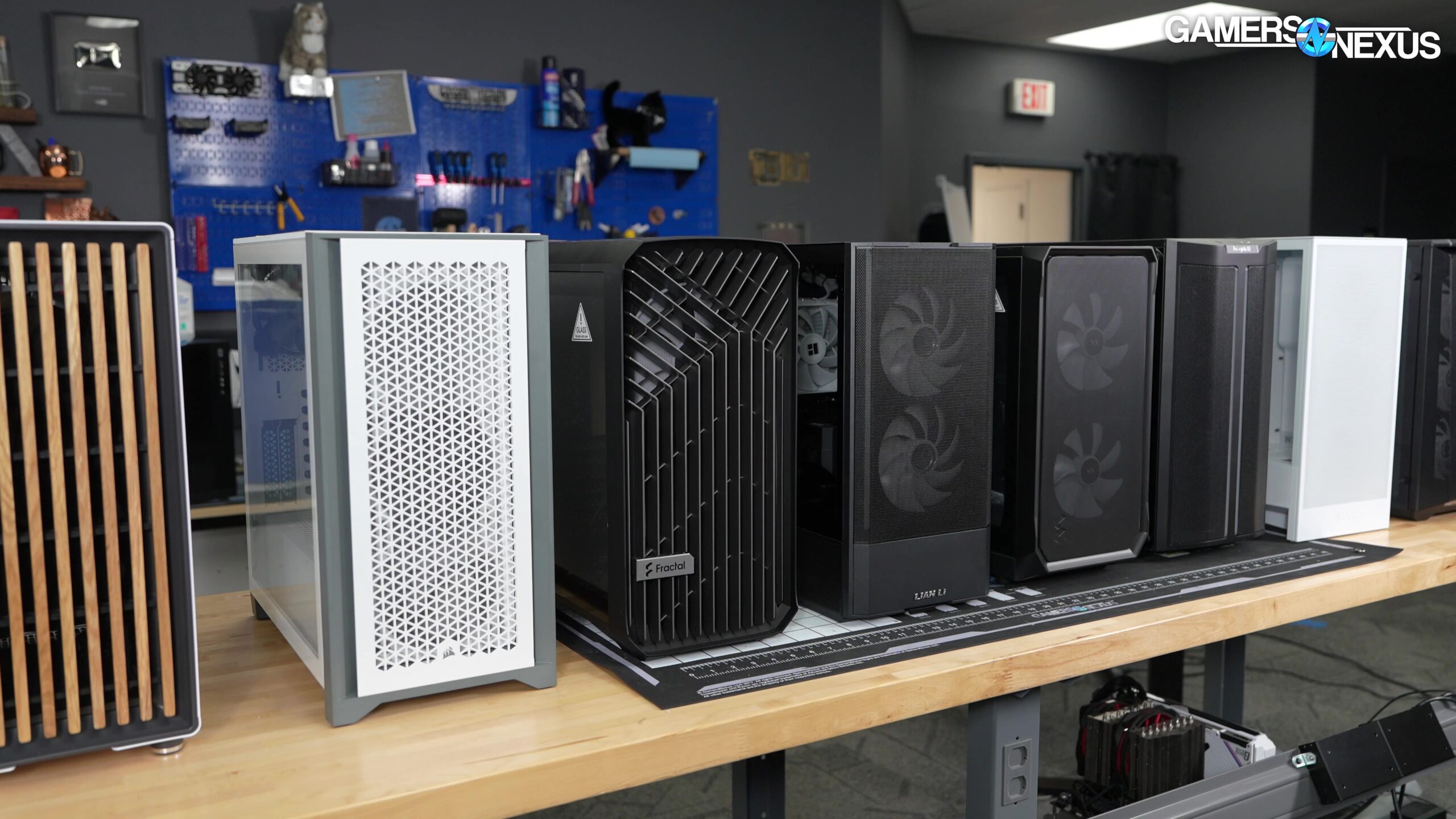
The right case starts with the hardware you already own or plan to install, then narrows down by airflow, clearance, access, and the amount of the build you want to display.
Motherboard compatibility
ATX is the most common full-size format in this group, but support varies at the edges. The Corsair 3500X RS ARGB reaches EATX, while the Lian Li V100, MUSETEX Y6, Fractal Design North, and NZXT H5 Flow also accommodate smaller Micro-ATX or Mini-ITX boards. Back-connect compatibility matters only if your motherboard places its connections on the rear, so check the board layout before treating that feature as a deciding factor.
Graphics card clearance
Long graphics cards can turn an apparently roomy case into a difficult build. The Lian Li V100, Thermalright A70 Vision, and HYTE Y70 offer particularly generous space, while the Fractal Design North drops from 355mm to 300mm with a front 360mm radiator installed. Leave room for the power connector and radiator thickness, not just the bare length of the card.
Airflow and fan positions
Mesh panels help air enter the case, but fan placement determines whether that air reaches the hottest components. The Corsair 4000D RS ARGB Frame stands out because its InfiniRail system lets you move fans along the rail. The NZXT H5 Flow uses a more focused compact layout, while the MUSETEX K2 and Y6 arrive with seven fans each. A large fan count is useful only when intake and exhaust are arranged sensibly.
A case with ten fan mounts is not automatically cooler than one with four. The path between intake, GPU, CPU cooler, and exhaust matters more than the headline count.
Cooler and radiator support
Air coolers need enough height above the motherboard, while liquid coolers need a compatible radiator position and enough clearance for the graphics card. The Lian Li V100 supports CPU coolers up to 178mm and a top radiator up to 360mm. The MUSETEX K2 supports a 165mm CPU cooler and a 360mm top radiator, while the Fractal Design North's front radiator option can reduce GPU space.
Cable routing and access
Cable management is not just about appearance. A cramped rear chamber can make a routine upgrade frustrating. The HYTE Y70 and Lian Li O11 Vision Compact use separate areas to hide connections, and the NZXT H5 Flow provides wide channels, hooks, and straps. Tool-less or easily removable panels also matter when you expect to change storage, cooling, or graphics cards later.
Glass, mesh, and display features
Glass gives the build a clear view but can expose dust and untidy wiring. Mesh generally supports a simpler airflow strategy. The Fractal Design North combines mesh with a walnut front for a restrained look, while the MUSETEX cases, Corsair 3500X RS ARGB, and HYTE Y70 prioritize display value. The Thermalright A70 Vision adds a 9.16-inch screen, which is useful if you want information or media visible on the chassis itself.
When the case is only one part of a new system, component matching matters just as much. The right enclosure should leave room for the parts that shape a gaming build's heat and power demands, rather than being selected in isolation. For a desk-focused setup, also consider how the chassis will sit beside your keyboard, display, and audio gear. A wider dual-chamber case can change the layout more than its specifications suggest.
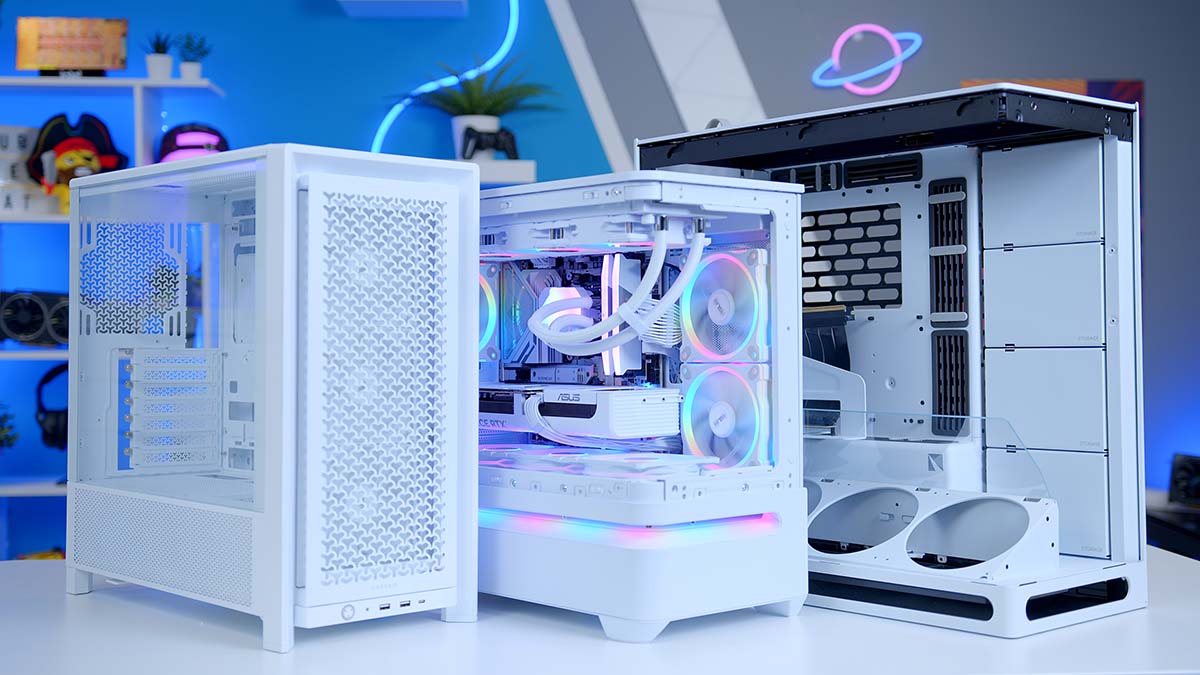
Frequently asked questions
What size PC case should I buy?
Choose a case based on the motherboard, graphics card, CPU cooler, and radiator you intend to install. An ATX mid-tower is the most flexible choice for a standard desktop build, while a compact model such as the NZXT H5 Flow can reduce the footprint. Check the manufacturer's clearance figures before buying, especially for a long GPU or tall air cooler.
Are more pre-installed fans always better?
No. More fans can make cooling easier, but their position, airflow direction, and control range still matter. The MUSETEX K2 and Y6 include seven fans, while the Fractal Design North uses two larger 140mm fans as a simpler starting point. A balanced intake and exhaust arrangement is more important than filling every mount.
Is tempered glass good for airflow?
Tempered glass itself does not provide airflow, so a glass-heavy case needs mesh vents or a carefully designed intake route. The Lian Li O11 Vision Compact uses a top mesh panel for radiator installation, while the HYTE Y70 uses side, top, and floor cooling positions. If thermal simplicity matters more than visibility, a mesh-front case is usually easier to configure.
Do I need a back-connect motherboard case?
You need one only if you plan to use a compatible back-connect motherboard. These cases can make the visible side cleaner by moving cable connections behind the motherboard tray. The Corsair 4000D RS ARGB Frame, Corsair 3500X RS ARGB, Lian Li V100, and Lian Li O11 Vision Compact support this type of build in different ways.
Will every graphics card fit an ATX mid-tower?
No. ATX describes the motherboard format, not a universal graphics card clearance standard. The Lian Li V100 supports GPUs up to 420mm, while the Fractal Design North supports up to 355mm without a front 360mm radiator. Check both GPU length and the space needed for its power cable.
Do PC cases include a power supply?
The products in this roundup are cases only. The features list for each model identifies case hardware such as fans, panels, brackets, and displays, but not a bundled power supply. Select a separate power supply that matches the processor, graphics card, and planned upgrades.

The bottom line
The Best PC Cases on this list serve very different builds, but the Corsair 4000D RS ARGB Frame is the strongest choice for most people. Its airflow-focused front, three included fans, movable InfiniRail system, and reverse-connect support give it more room to adapt than the NZXT H5 Flow without the full commitment of a panoramic showcase.
Choose the Lian Li V100 if large hardware clearance and four included fans matter most. The Fractal Design North is the better fit for a room-friendly build, while the HYTE Y70 and Lian Li O11 Vision Compact are the compelling choices when the computer should be displayed as part of the room.
If you are undecided, buy the Corsair 4000D RS ARGB Frame unless your build's defining feature is a panoramic glass display, an integrated screen, or a back-connect layout.
As an Amazon Associate we earn from qualifying purchases.