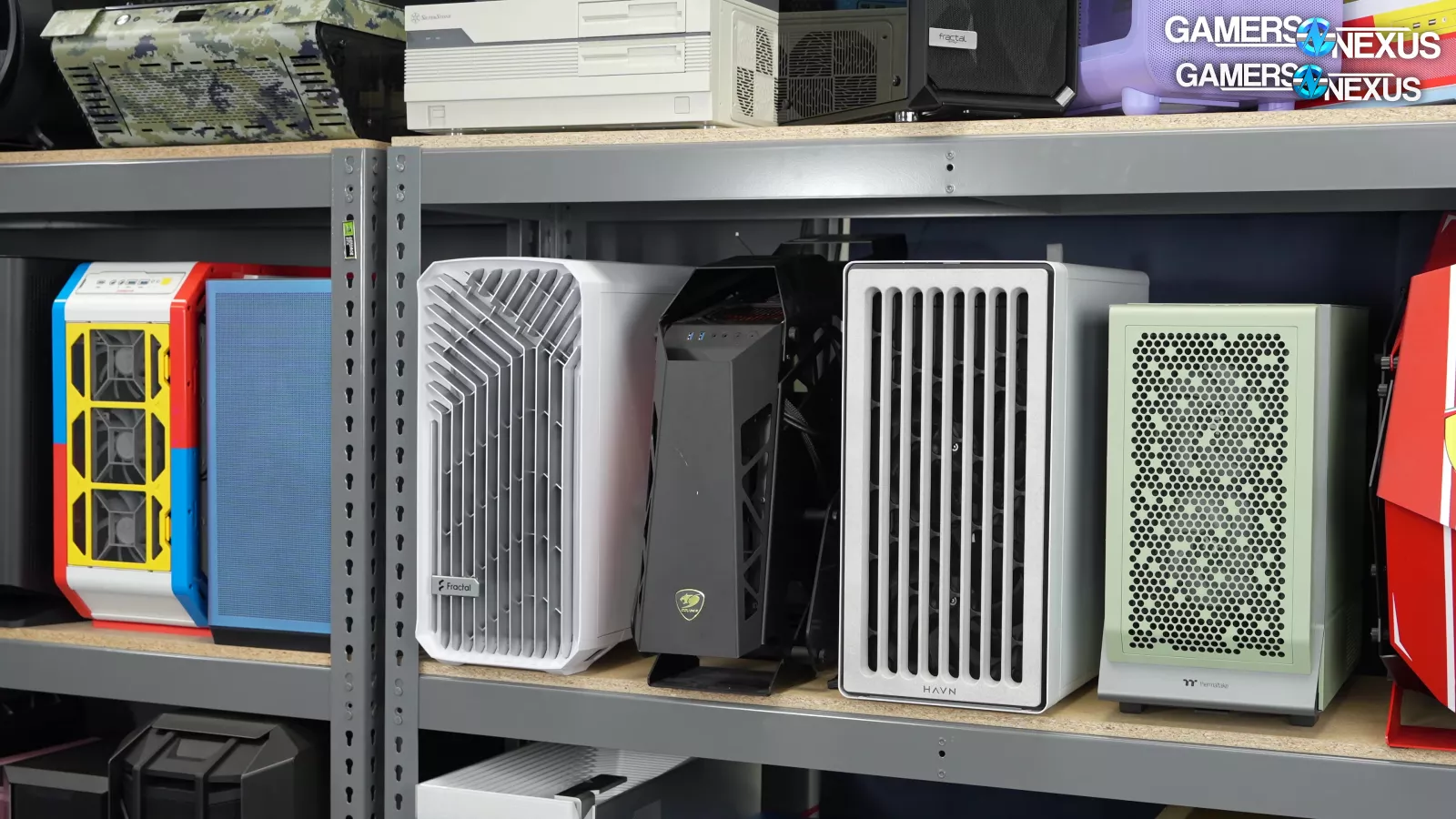

A poor case can turn a promising gaming build into a cramped, noisy box with hot spots around the graphics card. The right one gives the GPU room to breathe, makes cable routing less frustrating, and leaves enough clearance for the cooler and radiator you actually want to use. Our Best gaming pc cases picks cover airflow-first designs, panoramic glass models, fan-packed builds, and a quieter-looking wood-front option.
The Corsair 4000D RS is our top pick for its adaptable airflow layout, useful pre-installed fans, and modular approach. The nine cases below range from compact, straightforward chassis to spacious showcase builds with support for large graphics cards and 360mm radiators.
| # | Product | Award | Airflow and fans | Hardware support | Best for |
|---|---|---|---|---|---|
| 1 | Corsair 4000D RS | Best overall | 3 RS ARGB PWM fans, 200mm front support | GPUs up to 400mm, top fans up to 140mm | Flexible airflow builds |
| 2 | MUSETEX K2 7-Fan | Best panoramic airflow | 7 PWM ARGB fans, expandable to 10 | GPU up to 400mm, top radiator up to 360mm | Fan-packed showcase PCs |
| 3 | MUSETEX Y6 | Best for lighting | 7 Infinity Mirror PWM ARGB fans | GPU up to 410mm, top radiator up to 360mm | Highly visible RGB builds |
| 4 | Lian Li V100 | Best spacious layout | 4 PWM ARGB fans, 1, 800 RPM maximum | GPU up to 420mm, CPU cooler up to 178mm | Large modern components |
| 5 | Corsair 3500X RS | Best reverse-connection case | 3 RS120-R ARGB fans, up to 10 fans | Mini-ITX to EATX | Back-connected motherboards |
| 6 | Fractal Design North | Best understated design | 2 140mm Aspect PWM fans | GPU up to 355mm | Refined ATX builds |
| 7 | MUSETEX K2 6-Fan | Best for broad compatibility | 6 PWM ARGB fans | GPU up to 420mm, top radiator up to 360mm | Large, illuminated builds |
| 8 | DARKROCK EC2 | Best compact airflow | Supports up to 8 120mm fans | GPU up to 340mm, front radiator up to 360mm | Simple ATX builds |
| 9 | MUSETEX NN8 | Best easy-access design | 6 PWM ARGB fans | Supports a top 280mm liquid cooler | Frequent hardware access |
1. Corsair 4000D RS: Best Overall
Pros
- Three pre-installed RS ARGB PWM fans
- InfiniRail system allows flexible fan placement
- Perforated 3D Y-pattern front panel
- Supports several reverse-connection motherboard standards
Cons
- Only three fans are included
- Modular features may matter less in a one-time build
- The case is relatively heavy at 22.74 pounds
Best for: builders who want a flexible ATX case that can adapt to changing cooling plans.
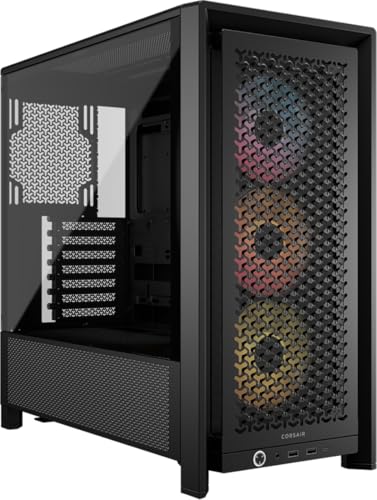
The Corsair 4000D RS is the case we would hand to someone who has a clear idea of the components but does not want to lock the cooling layout too early. Its front panel uses a three-dimensional Y-pattern perforation, so the design is aimed at moving air with less obstruction rather than simply putting glass on every visible surface. That makes it a more practical starting point than the display-first MUSETEX models.
Corsair includes three RS ARGB PWM fans at the front. They use daisy-chainable four-pin PWM connections, support Zero RPM mode at low loads, and connect lighting through a motherboard 5V ARGB header. That combination matters because the fans can slow down for quieter everyday use and ramp up when the system needs more airflow. The listing does not include a complete radiator specification, but it does identify front and roof fan flexibility, including support for fans up to 200mm at the front and 140mm in the roof.
The InfiniRail mounting system is the unusual feature here. Instead of restricting fans to a few fixed mounting points, the steel rail can slide to position them where the build needs airflow. Corsair also lets you use the internal side panel near the motherboard tray as a cable cover or remove it to mount additional fans. That is a useful choice between a tidy interior and a more aggressive cooling setup. The 19.17-inch length, 9.41-inch width, and 19.13-inch height give it a substantial mid-tower footprint.
Compatibility is another reason it ranks above the Corsair 3500X RS for most buyers. The 4000D RS supports ASUS BTF, MSI Zero, and Gigabyte Stealth reverse-connection standards, while its conventional layout remains easy to understand. The weakness is that its flexibility comes with more decisions. Builders who simply want a glass-sided display and a large group of included fans may prefer the MUSETEX K2 7-Fan.
Choose the Corsair 4000D RS if airflow control, motherboard flexibility, and future changes matter more than a dramatic wraparound-glass presentation. For help planning the components that go inside, the parts that shape a balanced gaming build are worth considering before ordering the case.
2. MUSETEX K2 7-Fan: Best Panoramic Airflow
Pros
- Seven pre-installed PWM ARGB fans
- Supports up to ten total fans
- 270-degree dual tempered glass view
- Type-C and two USB 3.0 ports
- Supports a top 360mm liquid cooler
Cons
- Full glass leaves less front-panel airflow flexibility
- Included fans have modest 24.72 CFM maximum airflow
- A hard drive cage changes power supply clearance
Best for: builders who want a ready-lit showcase case with extensive included cooling.
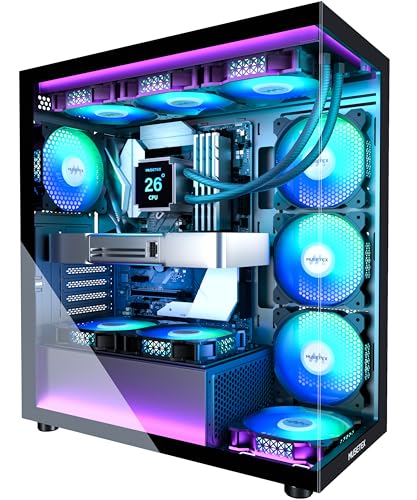
The MUSETEX K2 7-Fan is built around immediate visual impact. Its dual tempered glass panels create a 270-degree view of the hardware, and seven included fans mean the interior does not look unfinished after the first boot. It is a strong fit for a gaming desk where the components and lighting are part of the room, not something hidden under it.
The fan arrangement is specific and useful: three reverse fans sit on the side, three forward fans sit on top, and one forward fan is installed at the back. The 120mm fans run from 600 to 1, 300 RPM, with a listed maximum airflow of 24.72 CFM and a 20.819 dB(A) noise figure. Those numbers suggest a tuned, moderate-speed setup rather than a set of high-pressure performance fans. Motherboard software can control both fan speed and ARGB lighting.
Clearance is one of the K2's better practical traits. It accepts graphics cards up to 400mm, CPU coolers up to 165mm, and a top-mounted liquid cooler up to 360mm. The power supply limit is more complicated: it supports up to 140mm with the hard drive cage installed, and 150mm to 180mm without it. That detail deserves attention before choosing a long power supply or planning multiple drives.
The I/O panel has one Type-C port, two USB 3.0 ports, audio connections, a power button, and a restart button. Compared with the MUSETEX Y6, this K2 has a taller 18.5-inch body and a more generous CPU cooler limit, though the Y6 accepts a slightly longer GPU and a longer power supply. Compared with the MUSETEX K2 6-Fan, the seven-fan version arrives with more airflow hardware, but its fan specifications are not as strong on paper as the Lian Li V100's.
The compromise is the glass. It shows the build beautifully, but a display-oriented chassis requires more care with fan direction, dust, and component selection than a simple mesh-front design. Skip it if you want a restrained case or if you prefer buying fans individually. Pick it when the goal is a complete-looking RGB build with generous radiator and GPU clearance from the start.
3. MUSETEX Y6: Best for Lighting

Pros
- Seven pre-installed Infinity Mirror ARGB fans
- 270-degree dual tempered glass view
- Supports GPUs up to 410mm
- Top-mounted 360mm liquid cooler support
- Supports ATX, Micro-ATX, and Mini-ITX boards
Cons
- CPU cooler height is limited to 160mm
- The control panel has only one USB 3.0 port
- Lighting is central to the design, not an optional extra
Best for: RGB-focused builders who want infinity-style fan lighting around a visible system.
The MUSETEX Y6 is the most overtly decorative case in this group. Its seven Infinity Mirror ARGB fans create continuous gradient light bands instead of the simpler ring or blade lighting found on many standard fans. Combined with the 270-degree tempered glass layout, the Y6 is meant to make the inside of the computer a focal point.
The included fan arrangement uses three reverse fans on the side, three reverse fans on the bottom, and one forward fan at the back. The listing says the fans use anti-vortex blades and adjustable speed control through motherboard software. That gives the Y6 a more deliberate intake layout than a case that simply adds fans wherever there is room. The lighting remains dependent on a compatible motherboard connection and software setup, so builders should check their board's ARGB support.
The Y6 supports ATX, Micro-ATX, and Mini-ITX motherboards. It accepts graphics cards up to 410mm, CPU cooling up to 160mm in height, and a top-mounted liquid cooler up to 360mm. Its power supply clearance reaches 230mm, which is unusually accommodating for a mid-tower. The 16.73-inch depth and 10.83-inch width make it broader than some alternatives, while its 15.67-inch height is relatively compact.
That extra width helps the glass presentation, but the 160mm CPU cooler limit is the specification to watch. A large tower cooler that fits in the Lian Li V100 or MUSETEX K2 6-Fan may not fit here. The MUSETEX K2 7-Fan is the closer rival: it offers the same seven-fan concept and a 360mm top radiator limit, but gives the CPU cooler 165mm of headroom and provides two USB 3.0 ports instead of one.
The Y6 makes sense for a builder who already knows the lighting is part of the build's identity. It is less suitable for someone who wants a quiet, neutral workstation that happens to play games. If visual continuity between the fans matters more than a conventional front panel, this is the MUSETEX model to choose.
4. Lian Li V100: Best Spacious Layout

Pros
- Four pre-installed PWM ARGB fans
- Supports GPUs up to 420mm
- Supports CPU coolers up to 178mm
- Accommodates a top 360mm radiator
- Tool-less side panel mounting
Cons
- Fan noise is listed up to 30.8 dBA
- Less visually distinctive than the panoramic cases
- No detailed front-panel port list is provided
Best for: high-end component builds that need generous clearance without an oversized chassis.
The Lian Li V100 is the sensible choice when clearance takes priority over spectacle. It arrives with four 120mm PWM ARGB fans, but its real appeal is the room around the components. A 420mm graphics card limit, 178mm CPU cooler limit, and top radiator support up to 360mm give it more headroom than most of the cases here.
The included fans are specified at up to 1, 800 RPM, with maximum airflow between 60.4 and 61.47 CFM and static pressure between 2.17 and 2.54 mm-H2O. The listed noise range is 26.5 to 30.8 dBA. These are more performance-oriented fan figures than those listed for the MUSETEX K2 7-Fan, although the Lian Li includes fewer fans and may be more audible when they run hard.
The V100 supports ATX, Micro-ATX, Mini-ITX, and back-connect ATX or Micro-ATX motherboards. That gives builders a cleaner route for cables without forcing them into a single motherboard format. A built-in 26-LED ARGB strip adds lighting across the case, and the fans can be daisy-chained for a simpler installation. Tool-less side panel mounting also makes it easier to access the system after the build is complete.
Its 17.56-inch length, 9.25-inch width, and 19.06-inch height put it firmly in mid-tower territory. That footprint is not tiny, but it is reasonable given the component support. The Corsair 4000D RS offers more inventive fan positioning, while the Lian Li offers the cleaner answer for someone choosing a long GPU or tall air cooler. The MUSETEX K2 6-Fan also accepts a 420mm GPU, but the V100's stated fan performance and tool-less panels make it feel more focused on the build process.
The V100 is not the pick for a buyer who wants the most dramatic glass showcase. It is the one to choose when a large graphics card, tall cooler, or back-connect motherboard is already on the parts list. For a wider look at complete systems and how case clearance affects them, the component room a gaming desktop needs is useful context.
5. Corsair 3500X RS: Best Reverse-Connection Case

Pros
- Supports Mini-ITX through EATX boards
- Compatible with several reverse-connection standards
- Removable front and side tempered glass panels
- Supports up to ten 120mm fans
- Three RS120-R ARGB fans included
Cons
- Only three fans are included
- Panoramic glass needs careful airflow planning
- The broad chassis occupies considerable desk space
Best for: builders using ASUS BTF, MSI Project Zero, or Gigabyte Project Stealth motherboards.
The Corsair 3500X RS is designed around the cleaner look made possible by reverse-connection motherboards. With the main cables routed behind the board, the wraparound glass can show more of the hardware without a bundle of connectors crossing the visible side. It is a compelling alternative to the 4000D RS for a carefully planned showcase build.
Corsair includes three RS120-R ARGB fans with motherboard control through a 5V ARGB header. The case has mounting space for up to ten 120mm fans across the side, roof, and power supply areas, so there is a clear path to a much more heavily cooled build. The included fan count is not as generous as the MUSETEX Y6 or MUSETEX K2 7-Fan, but the expansion ceiling is high.
The 3500X supports motherboard formats from Mini-ITX to EATX. It also supports ASUS BTF, MSI Project Zero, and Gigabyte Project Stealth boards, all of which place connections on the rear of the motherboard. Removable front and side tempered glass panels make access easier during installation and maintenance. Those panels are a practical detail because a panoramic case can otherwise make every cable adjustment feel like a full disassembly.
The biggest issue is physical planning. The published dimensions are approximately 19.92 inches long, 18.11 inches wide, and 9.45 inches high, so it is broad even by mid-tower standards. The unusual dimensions and reverse-connection compatibility mean you should confirm the motherboard and power supply arrangement before buying. The Corsair 4000D RS is a better general-purpose choice, while the 3500X is the more specialized pick for a clean, cable-hidden presentation.
Choose this case when the motherboard is part of the design plan rather than an afterthought. It is less compelling if you are using a conventional board and want the smallest straightforward ATX enclosure.
6. Fractal Design North: Best Understated Design

Pros
- Genuine walnut front details
- Two included 140mm Aspect PWM fans
- Open front with integrated mesh
- Supports ATX, Micro-ATX, and Mini-ITX
- Includes Type-C USB connectivity
Cons
- GPU clearance drops to 300mm with a 360mm front radiator
- Maximum GPU length is 355mm
- More restrained lighting and presentation than most picks here
Best for: a gaming PC that should fit a room without looking like a showroom display.
The Fractal Design North is the outlier in a list full of ARGB fans and wraparound glass. Its genuine walnut front slats and dark tempered glass side panel give it the look of furniture rather than gaming equipment. That makes it a particularly good fit for a shared office, living room, or desk where a large RGB display would be distracting.
The cooling approach is straightforward. The front is open and integrated with mesh, and two 140mm Aspect PWM fans are included. Larger front fans can move air at lower speeds than small fans, though the listing does not provide a full airflow or noise figure for these units. The important point is that the North starts with a ventilated front rather than asking the glass panels to serve as the visual centerpiece.
Hardware support is more measured than on the Lian Li V100 or Corsair 3500X RS. It supports ATX, Micro-ATX, and Mini-ITX motherboards, with a maximum GPU length of 355mm. That falls to 300mm when a 360mm radiator is installed at the front, so a long graphics card and large front radiator require careful planning. Seven bridgeless expansion slots and two combined 3.5-inch or 2.5-inch drive mounts are included, along with two dedicated 2.5-inch mounts.
Access is sensibly designed. The side panels come off, the front unclips, and the top panel lifts using an integrated tab. A Type-C USB port adds current connectivity to the front I/O. At roughly 18.46 inches high, 17.6 inches long, and 8.46 inches wide, the North is not a small case, but its proportions are less visually imposing than the wider panoramic options.
The North loses if your priority is showing off an elaborate RGB interior. The DARKROCK EC2 is also a more basic airflow-first option, while the North has the stronger design identity and larger included fans. Choose it when you want competent ventilation, easy access, and a case that still looks appropriate after the gaming session ends.
7. MUSETEX K2 6-Fan: Best for Broad Compatibility

Pros
- Six adjustable PWM ARGB fans included
- Supports GPUs up to 420mm
- Supports CPU coolers up to 178mm
- Supports a top 360mm liquid radiator
- Magnetic top and power supply dust filters
Cons
- The full-glass design needs careful fan setup
- No Type-C specification for the front panel beyond the listing's headline
- Older K2 styling is less distinctive than the Y6
Best for: builders who need generous hardware clearance and a fully illuminated interior.
The MUSETEX K2 6-Fan takes the same broad visual direction as the newer K2 7-Fan, but its appeal is more practical than decorative. Six adjustable PWM ARGB fans are already installed, and the internal layout is designed around large mainstream components. It is a strong option for a build that needs room without moving to a larger chassis class.
The case supports graphics cards up to 420mm, CPU coolers up to 178mm, and a top-mounted 360mm liquid radiator. It also supports power supplies up to 238mm. Those figures are more generous than the newer K2's CPU cooler and power supply limits, and they match the Lian Li V100 on maximum GPU length. Builders using a long graphics card and a tall air cooler should pay attention to this distinction.
MUSETEX places two of the included fans on the side for intake and uses anti-vortex blades to help direct air through the chassis. The fans can be adjusted through motherboard software, as can the ARGB lighting. The case adds a magnetic dust filter at the top and a power supply dust filter at the bottom, both useful on a glass-heavy design where cleaning the interior is part of keeping the presentation sharp.
The I/O panel includes two USB 3.0 ports, a Type-C interface, audio, and a reset button. The case measures about 16.57 inches deep, 9.06 inches wide, and 18.05 inches high. That gives it a substantial but manageable footprint. The MUSETEX NN8 is easier to open for quick access, but the K2 6-Fan is the better fit for a new build where clearance and radiator placement are more important.
Its weakness is that the visual design can make the system feel busy, especially with six fans running different lighting effects. Skip it if you want a quiet, minimal appearance. Choose it when you want broad compatibility, included cooling, and a clear view of the components.
8. DARKROCK EC2: Best Compact Airflow

Pros
- Mesh front panel
- Supports up to eight 120mm fans
- Front radiator support up to 360mm
- Magnetic dust filters on top and bottom
- Compatible with ATX, Micro-ATX, and Mini-ITX
Cons
- Fans are not listed as included
- GPU clearance is lower than most picks here
- The design is less showcase-oriented
Best for: builders who want a conventional airflow case and plan to choose their own fans.
The DARKROCK EC2 is refreshingly direct. It has a mesh front panel, tempered glass side panels, Type-C readiness, and enough mounting space to build a proper cooling system around the components. Unlike the fan-packed MUSETEX cases, it does not try to make the included accessories the main event.
The chassis supports up to eight 120mm fans and a 360mm radiator at the front. The listing does not say that fans are pre-installed, so factor that into the build plan. That omission is also a benefit for experienced builders who already have preferred fans or want to control the noise and airflow characteristics themselves.
Compatibility covers ATX, Micro-ATX, and Mini-ITX motherboards. It supports graphics cards up to 340mm and power supplies up to 200mm. The GPU limit is notably tighter than the Corsair 4000D RS, Lian Li V100, or MUSETEX options, but 340mm still accommodates many builds. Confirm the exact graphics card length before choosing a particularly large model.
The magnetic dust filters on the top and bottom are welcome maintenance features. The case measures about 17.6 inches long, 8.6 inches wide, and 15.2 inches high, making it one of the shorter cases in this group. That can help on a crowded desk, although the lower height does not remove the need to check cooler and graphics card clearance.
The EC2 is not the right pick for someone who wants seven glowing fans straight out of the box. The Fractal Design North has a stronger finish and arrives with two larger fans, while the EC2 offers a simpler blank canvas. Choose DARKROCK when you want to select the cooling hardware yourself and prefer an open mesh front over a glass showcase.
9. MUSETEX NN8: Best Easy-Access Design

Pros
- Six PWM ARGB fans included
- Opening tempered glass side door
- Polygonal mesh front panel
- Supports up to five SSDs and two HDDs in listed configurations
- Two USB 3.0 ports
Cons
- No Type-C port is listed
- GPU mounting claims require careful planning
- The side door needs room to open beside the desk
Best for: builders who regularly clean, upgrade, or rearrange the hardware.
The MUSETEX NN8 has one feature that changes day-to-day ownership: its tempered glass side panel opens like a door. A metal pull ring and magnetic closure make it possible to reach the graphics card, radiator, or decorative items without removing a row of screws. That is more convenient than the standard removable panel on the Corsair 3500X RS, especially for builders who make frequent changes.
Six PWM ARGB fans are pre-installed, and their speed can be adjusted through motherboard software. The case uses a polygonal mesh front panel for airflow and lists two side fans as part of its cooling arrangement. The combination of mesh, adjustable fans, and a side door gives it a more functional cooling layout than its showcase appearance initially suggests.
Storage support is one of its distinguishing points. The listing describes configurations reaching five SSDs and one HDD, or four SSDs and two HDDs. It also says the case can accommodate a top 280mm liquid cooler without touching the memory sticks. That is a useful detail for an upgrade-focused system, though buyers should confirm the exact drive and radiator arrangement against their motherboard and power supply.
The I/O panel includes two USB 3.0 ports and audio connections. A Type-C port is not listed, which puts it behind the MUSETEX K2 7-Fan and Corsair 4000D RS for newer front-panel connectivity. The case is about 18.98 inches high, 15.75 inches long, and 8.07 inches wide, so it is tall but not especially deep.
The side-opening panel is both the NN8's strength and its limitation. It needs clearance beside the case, and the hinge-style access may not suit a tight shelf. Choose it if accessible maintenance matters more than the cleanest modern I/O or the largest graphics card support. For broader case comparisons, the trade-offs between airflow, clearance, and case layout can help narrow the choice.
How to choose best gaming pc cases
The Best gaming pc cases are separated less by appearance than by how well their airflow, clearances, motherboard support, and maintenance features match the rest of the build.
Airflow path
A mesh front panel or an open front with integrated mesh gives intake air a direct route into the case. The Corsair 4000D RS uses a perforated Y-pattern panel, while the DARKROCK EC2 and MUSETEX NN8 use mesh-front approaches. Glass-front designs can still cool well, but they need carefully placed side, bottom, roof, and rear fans.
Look at the complete path rather than the fan count alone. Intake fans should have a clear route toward the graphics card and CPU cooler, while exhaust fans should not be blocked by a solid top panel or cramped cable area.
Fan count matters only after the case gives those fans somewhere useful to move air.
Graphics card clearance
Graphics cards vary greatly in length, thickness, and power connector placement. The Lian Li V100 supports up to 420mm, the MUSETEX K2 6-Fan reaches 420mm, and the MUSETEX Y6 reaches 410mm. The DARKROCK EC2 is listed at 340mm, while the Fractal Design North reaches 355mm without a front 360mm radiator.
Radiator placement can reduce the available GPU length. Fractal Design specifically lists a 300mm GPU limit with a 360mm front radiator, so check both components together instead of comparing the case's maximum GPU figure in isolation.
Cooler and radiator support
Tower cooler height is the key number for air-cooled systems. The Lian Li V100 and MUSETEX K2 6-Fan allow up to 178mm, while the MUSETEX Y6 lists 160mm. A case can accept a large graphics card and still reject the CPU cooler you planned.
For liquid cooling, several picks support a top-mounted 360mm radiator, including the MUSETEX K2 7-Fan, MUSETEX Y6, Lian Li V100, and MUSETEX K2 6-Fan. Top mounting can preserve graphics card space, but confirm motherboard heatsink and memory clearance before finalizing the layout.
Motherboard format
ATX is common, but the smaller Micro-ATX and Mini-ITX formats appear across this list. The Corsair 3500X RS goes further by supporting EATX, while the Corsair 4000D RS and Lian Li V100 support reverse-connection standards. Those standards can make the visible side of a build cleaner, but only if the motherboard is designed for rear-mounted connections.
Do not assume every ATX case supports every back-connect board. Check the exact board standard and the case's stated compatibility before buying.
Front-panel connectivity
Type-C is useful for current external drives and accessories, but it is not listed on every case here. The Corsair 4000D RS and MUSETEX K2 7-Fan include modern front-panel features in their listings. The MUSETEX NN8 lists two USB 3.0 ports but does not list Type-C, while DARKROCK describes itself as Type-C ready.
Also check the internal motherboard header required by the case. A front Type-C port is not helpful if the motherboard lacks the appropriate connection or if the cable routing is difficult.
Frequently asked questions
How many fans should a gaming PC case have?
There is no universal fan count. A case with a clear mesh intake and well-positioned front, rear, or roof fans can work better than a glass case with more fans but a restricted airflow path. The included fan layout, fan control method, and radiator placement matter as much as the number printed in the listing.
Are tempered glass cases good for gaming PCs?
Tempered glass cases are suitable when the case still provides a sensible intake and exhaust path. The MUSETEX K2 and Y6 use side and bottom fan positions to support their panoramic layouts, while the Corsair 3500X RS provides several mounting areas around its glass panels. Glass adds visibility, but it also makes dust and cable presentation more noticeable.
Should I choose a mesh or glass front panel?
Choose mesh when cooling simplicity is the priority. A glass-heavy case can be the better choice for a showcase build, but it may require more deliberate fan placement and component planning. The Corsair 4000D RS, DARKROCK EC2, and MUSETEX NN8 are stronger starting points for airflow-first builds.
Will a 360mm radiator fit in every ATX case?
No. Some cases support a 360mm radiator only at a particular location, and the radiator can reduce graphics card or memory clearance. The MUSETEX K2 7-Fan, MUSETEX Y6, and Lian Li V100 list top 360mm support, while the Fractal Design North lists a 360mm front radiator with a reduced GPU limit.
What graphics card length should I check?
Check the exact card length from its manufacturer, including any front power connector arrangement that may need extra room. Then compare it with the case limit after accounting for a front radiator or front fans. The listed limits range from 340mm on the DARKROCK EC2 to 420mm on the Lian Li V100 and MUSETEX K2 6-Fan.
Are included ARGB fans compatible with every motherboard?
The products generally describe motherboard-controlled ARGB lighting, but compatibility depends on the motherboard header and the fan connection type. The Corsair 4000D RS specifically mentions a 5V ARGB connector, and other cases describe software control through the motherboard. Check the board manual before assuming every lighting function will work.
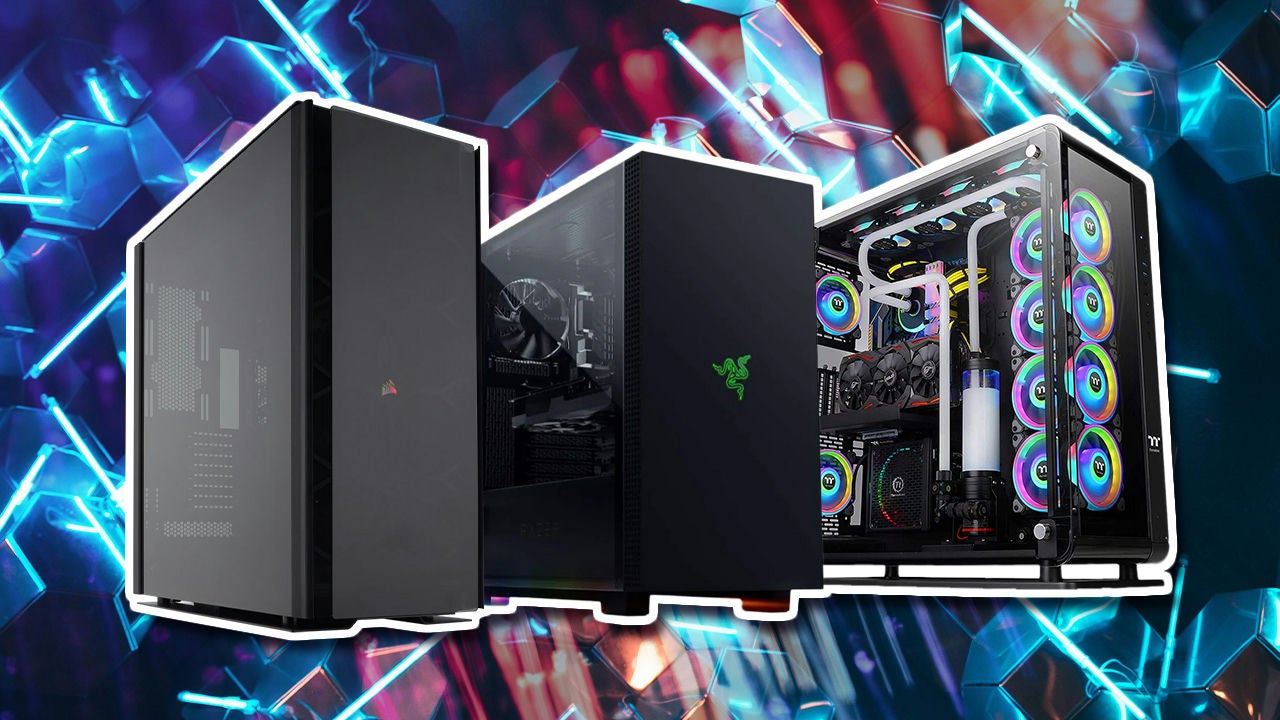
The bottom line
The Best gaming pc cases pick is the Corsair 4000D RS for most builders. Its 3D-pattern front panel, three RS PWM fans, sliding InfiniRail mounts, and reverse-connection motherboard support give it a useful combination of airflow and flexibility. The Lian Li V100 is the better alternative for a long graphics card, tall CPU cooler, or back-connect board.
Choose the Fractal Design North if your gaming PC needs to look at home in a living space, or the MUSETEX Y6 if infinity-style lighting and a 270-degree view are central to the build. If you are undecided, start with the graphics card, cooler, and motherboard clearances, then choose the case that leaves the most comfortable room around them.
As an Amazon Associate we earn from qualifying purchases.