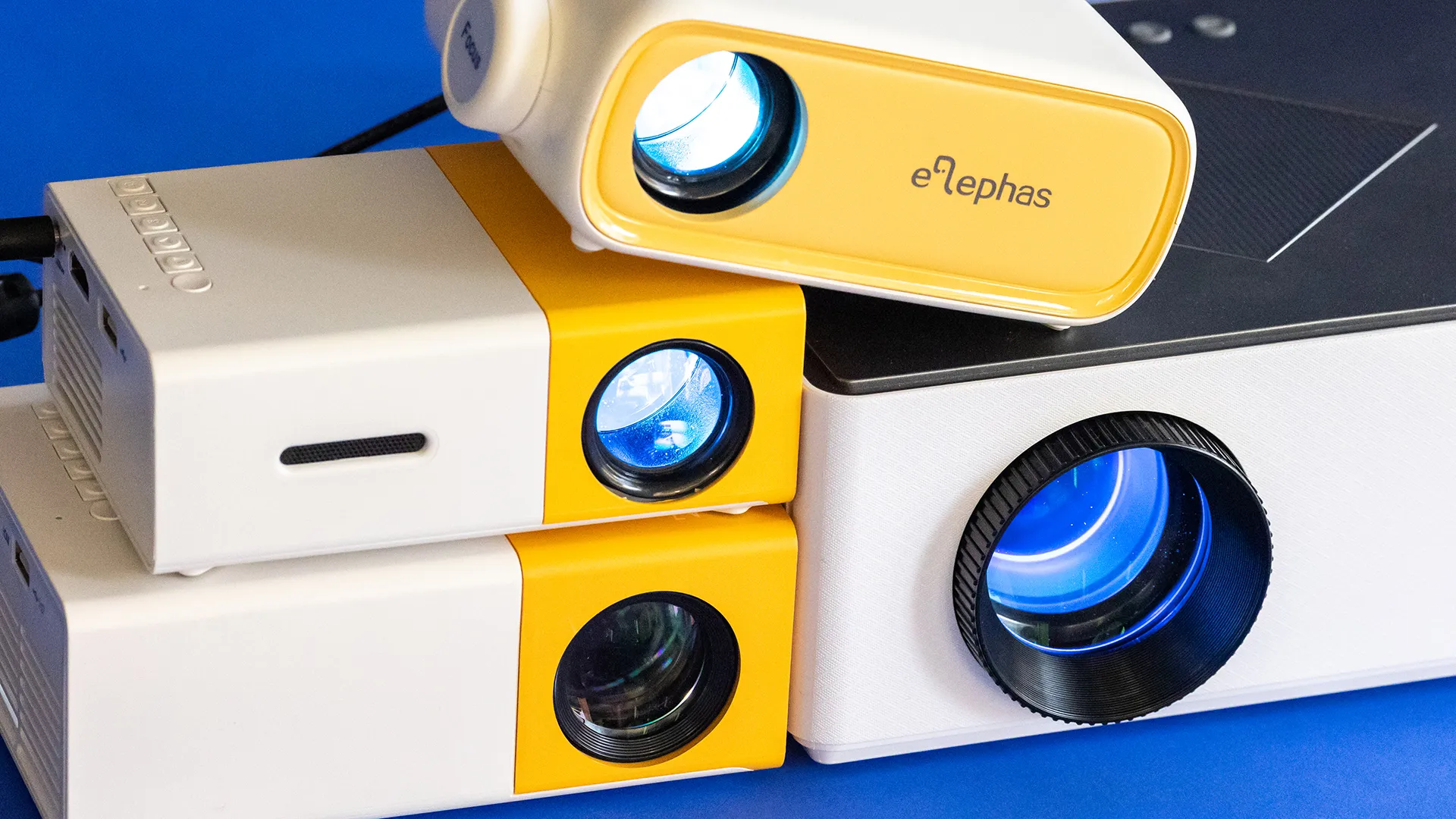

A projector can turn a blank wall into a movie screen, but the cheapest models often hide important compromises. Some need a streaming stick, some are only comfortable in a dark room, and a few make you wrestle with focus every time you move them.
Our Best cheap projector picks focus on the details that affect daily use: native resolution, smart streaming, wireless audio, alignment controls, and how easily each model moves from a bedroom to a backyard. The list includes genuinely compact options, projectors with included screens, and a couple of models that trade sharpness for convenience.
The YGSKK Mini Projector is our single best pick, with native 1080p, built-in streaming apps, Wi-Fi 6, electric focus, and an unusually flexible rotating base. The rest of the lineup ranges from simple plug-in projectors to Roku-equipped models and lightweight ceiling-friendly designs.
Comparison table
| # | Product | Award | Resolution or brightness | Smart and wireless features | Best for |
|---|---|---|---|---|---|
| 1 | YGSKK Mini Projector | Best overall | Native 1080p, 300 ANSI lumens | Wi-Fi 6, Bluetooth 5.3, built-in apps | Streaming and flexible placement |
| 2 | HAPPRUN H1 | Best native 1080p alternative | Native 1080p | Bluetooth 5.1, TV stick support | Bedroom and backyard movies |
| 3 | VOPLLS Slim Projector | Best for automatic setup | Native 1080p, 320 ANSI lumens | Wi-Fi 6, Bluetooth 5.2 | Ceiling viewing and quick alignment |
| 4 | Aurzen Roku TV D1R | Best smart TV experience | 1080p, 60 to 150 inches | Roku, dual-band Wi-Fi, Bluetooth 5.2 | Simple app-based streaming |
| 5 | WISHOLY 180 Degree Projector | Best flexible budget design | 1080p supported | Dual-band Wi-Fi, Bluetooth, 180-degree stand | Bedside and ceiling projection |
| 6 | TMY V08 | Best included screen bundle | 1080p supported, 32 to 220 inches | Two-way Bluetooth | Plug-and-play movie nights |
| 7 | Magcubic 200 ANSI Projector | Best lightweight smart model | Native 720p, 200 ANSI lumens | Wi-Fi 6, Bluetooth 5.4 | Casual travel viewing |
| 8 | CiBest Mini Projector | Best wired pocket projector | 1080p supported | No Wi-Fi or Bluetooth | HDMI and USB playback |
| 9 | PANSEBA Mini Projector | Best two-way audio option | 1080p supported | Bluetooth 5.2, two-way Bluetooth | Indoor and outdoor audio flexibility |
| 10 | Magcubic HY300PRO | Best compact smart projector | Native 720p, 4K playback support | Wi-Fi, Bluetooth, 180-degree rotation | Small rooms and casual streaming |
1. YGSKK Mini Projector: Best Overall

Pros
- Native 1080p picture
- Built-in Prime Video, YouTube, and Hulu apps
- Electric focus works from the remote
- Wi-Fi 6 and Bluetooth 5.3
- 210-degree rotating base
Cons
- Bluetooth is for audio devices, not smartphone mirroring
- Built-in speakers cannot match a dedicated sound system
- Large images need a dark room
Best for: someone who wants a sharp, flexible projector without adding a streaming stick.
The YGSKK Mini Projector is the easiest projector in this group to recommend because it removes several annoyances at once. You get native 1080p rather than merely support for a 1080p signal, built-in streaming apps, remote-controlled electric focus, and a base that rotates 210 degrees. It feels designed for people who will move it around instead of leaving it permanently mounted.
Its 300 ANSI lumens rating gives the image a useful advantage over the lower-output models here, although it is still a dark-room projector rather than a television replacement for daytime viewing. Native 1080p keeps text, subtitles, and faces cleaner than the native 720p Magcubic models. The projector can accept 4K content through HDMI, but that does not turn its display into a native 4K panel. The meaningful benefit is compatibility with common sources, not extra pixel detail.
The built-in Prime Video, YouTube, and Hulu apps are a major convenience. They mean a movie night does not automatically require an external TV stick, and the app store gives the software some room to expand. Wi-Fi 6 works with Wi-Fi 6, 5G, and 2.4G networks, while Bluetooth 5.3 can send audio to headphones or a speaker. The limitation is important: Bluetooth does not handle smartphone video mirroring. Phone connections use the J-Share setting, with iPhones mirroring through their built-in function and Android phones requiring a program.
The physical design is unusually useful. Its listed dimensions are about 7.87 by 3.94 by 3.94 inches, and it weighs 1.7 pounds. The base can aim the image across a wall or toward a ceiling, while the electric focus reaches a clear rectangular image in about three seconds according to the product description. That is more practical than manual focus when the projector sits on a bedside table.
Compared with the HAPPRUN H1, the YGSKK offers better setup convenience and a more complete smart interface. The VOPLLS Slim Projector counters with automatic focus and automatic keystone, but its more unusual thin body and accessory-focused design will not suit everyone. The YGSKK's weakness is that its 300 ANSI lumens still demand controlled lighting, and its built-in audio is best treated as a convenience. Choose it when you want native 1080p, direct access to streaming apps, and placement flexibility in one small package.
2. HAPPRUN H1: Best Native 1080p Alternative

Pros
- Native 1920 by 1080 resolution
- Bluetooth 5.1 audio support
- Built-in Hi-Fi stereo speakers
- Supports ceiling, desktop, and tripod installation
- Large 200-inch image capability
Cons
- Smartphone connections need an HDMI adapter or Chromecast
- TV stick is not included
- Heavier than the smallest models
Best for: a bedroom or backyard setup built around a native 1080p source.
The HAPPRUN H1 is a straightforward projector with the picture fundamentals in the right order. Its native 1920 by 1080 resolution is the reason to choose it over the smaller native 720p models. Movies retain more fine detail, subtitles are easier to read, and a game console feed looks less soft when the image is expanded across a wall.
This is not a fully self-contained streaming television. It works with TV sticks such as Fire TV Stick and Chromecast, but those devices are separate. That arrangement is not inherently bad. An external streamer can be faster to replace and easier to update than built-in projector software. It does mean the H1 is less immediate than the YGSKK Mini Projector or Aurzen Roku TV D1R if you want to open an app directly from the projector.
Wireless audio is handled by Bluetooth 5.1, which can connect headphones or external speakers. The built-in Hi-Fi stereo speakers are suitable for a small bedroom or a quiet movie night, but outdoor viewing will benefit from a larger audio system. The product supports common sources through a TV stick and can also be used with a computer or other HDMI device. Smartphone and tablet connections require an adapter, and the necessary adapter is not included.
The H1 is portable, though its 4.5-pound weight and dimensions of 9.3 by 8.1 by 3.5 inches make it more of a move-between-rooms projector than a backpack accessory. It supports desktop, ceiling, and tripod installation, so you have more placement options than the size suggests. Its stated 200-inch maximum image is best treated as a positioning capability rather than a promise of a bright, detailed image at that size.
The HAPPRUN H1 beats the WISHOLY 180 Degree Projector on native resolution, while WISHOLY is easier to position near a bed because of its rotating design. The YGSKK Mini Projector is the better pick for built-in apps and remote focus. The H1's weakness is the extra hardware needed for convenient streaming, and buyers who want a single-box smart interface should skip it. For a user who already owns a TV stick and wants native 1080p, it is a sensible, uncomplicated choice.
3. VOPLLS Slim Projector: Best for Automatic Setup

Pros
- Native 1080p resolution
- Automatic focus and 6D keystone correction
- 320 ANSI lumens
- Wi-Fi 6 and Bluetooth 5.2
- 360-degree adjustable stand
Cons
- HDMI and USB playback do not support 4K resolution
- The thin design is less conventional
- Bluetooth handles audio only
Best for: viewers who want automatic alignment and ceiling projection in a slim design.
The VOPLLS Slim Projector is the unusual pick here. Its body is listed as 1.81 inches wide, and the supplied design includes a 360-degree adjustable bracket. That combination makes it interesting for ceiling viewing, temporary setups, and rooms where a conventional box projector is awkward to place. The stand also protects the lens during storage, according to the product details.
Automatic focus and 6D keystone correction are the headline practical features. The projector claims to reach a clear image in five seconds, using a gyroscope and sensor to respond to movement. Automatic correction cannot replace careful placement, since aggressive keystone adjustment can affect the usable image, but it is valuable when the projector is moved between a nightstand, shelf, and ceiling-facing position.
The image is native 1080p, with a stated 320 ANSI lumens. That puts it slightly ahead of the YGSKK Mini Projector on the supplied brightness figure, though both remain most convincing in a dark room. The VOPLLS supports 4K playback in its apps, but the listing specifically says USB and HDMI playback do not support 4K resolution. That distinction matters for buyers who plan to connect a console, laptop, or local media drive.
Its smart features include Wi-Fi 6, pre-installed YouTube and Prime Video, and Bluetooth 5.2. Bluetooth can send sound to headphones or speakers, and it can also function as a Bluetooth speaker for phone music. It does not carry video over Bluetooth. The listing also describes officially licensed app support, which is more reassuring than vague claims about access to every streaming service.
The VOPLLS Slim Projector has a more sophisticated setup system than the HAPPRUN H1, while the Aurzen Roku TV D1R offers the cleaner app experience for viewers invested in Roku. VOPLLS is also heavier than its thin profile might suggest, at about 3.31 pounds. Its weakness is the confusing split between app-based 4K playback and lower-resolution HDMI or USB playback. Skip it if you need a simple, conventional projector for wired sources. Pick it if automatic focus, broad keystone correction, and ceiling-friendly positioning matter most.
4. Aurzen Roku TV D1R: Best Smart TV Experience

Pros
- Roku interface with popular streaming apps
- Auto focus and auto keystone
- Dual 5W speakers
- Bluetooth 5.2 and dual-band Wi-Fi
- AirPlay and smart-home compatibility
Cons
- Roku account and internet connection are required
- Heaviest projector in the group
- Requires regular lens cleaning in dusty spaces
Best for: anyone who wants projector streaming to feel like using a television.
The Aurzen Roku TV D1R is the most familiar product in this roundup. Roku supplies a known home screen, search tools, app navigation, and a large selection of streaming channels. That matters more than a long list of connection standards when the main goal is to sit down and watch television without first finding a compatible cable or configuring phone mirroring.
The projector produces a 1080p image and is designed for screens from 60 to 150 inches. Auto focus and auto keystone reduce the two setup chores that make inexpensive projectors frustrating. Place it, power it on, and let it make the first adjustment. The image will still benefit from a reasonably flat wall and careful positioning, but the D1R is less dependent on perfect manual alignment than the CiBest Mini Projector or PANSEBA Mini Projector.
Roku brings Netflix, Prime Video, Hulu, YouTube, the Roku Channel, and live content into one interface. The listing says more than 500 free TV channels are available through the platform, while voice control can work through the Roku mobile app. AirPlay, Apple TV compatibility, and support for Apple HomeKit, Siri, Alexa, and Google Assistant make it a strong fit for a household that already uses connected-home products.
Audio is another strength. Dual 5W speakers support Dolby audio and 3D stereo sound, giving the D1R a better chance of filling a small room without an external speaker. Bluetooth 5.2 supports private listening or a larger speaker, and dual-band Wi-Fi handles both 2.4G and 5G networks. The main requirement is a Roku account and internet connection for activation, so this is not the right model for fully offline playback.
At 4.63 pounds, the D1R is the heaviest model on this list. It is portable in the sense that it can move between a shelf and a backyard table, but it is not the one to pack for every trip. The product also recommends checking and cleaning the lens every three months and using it in a low-dust environment.
The Aurzen Roku TV D1R is more polished for streaming than the YGSKK Mini Projector, but the YGSKK is lighter and offers a rotating base with electric focus. The D1R's weakness is its weight and reliance on a Roku account and internet access. Skip it if you want local files and simple HDMI playback without a smart platform. Choose it when app navigation, voice control, and television-like operation are more important than ultimate portability.
5. WISHOLY 180 Degree Projector: Best Flexible Budget Design
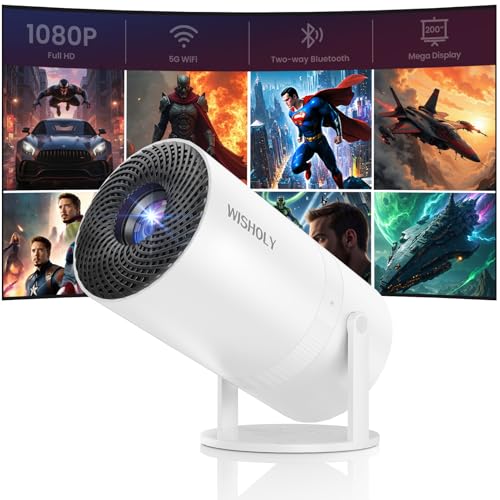
Pros
- 180-degree adjustable stand
- Automatic vertical keystone correction
- Dual-band Wi-Fi
- Supports TV sticks, laptops, HDMI, and USB
- Compact 2.3-pound design
Cons
- Streaming services require a TV stick or another source
- Bluetooth is audio only
- 1080p is supported rather than native
Best for: a casual viewer who wants to aim the picture at a wall or ceiling with minimal fuss.
The WISHOLY 180 Degree Projector gets its appeal from the stand. A projector that can rotate 180 degrees is much easier to use beside a bed, on a low table, or pointed upward at the ceiling. That flexibility is more meaningful than a tiny body alone because it changes where the projector can live during a movie.
Automatic vertical keystone correction helps square the image when the projector is not perfectly level. It is not the same as full all-direction correction, so placement still matters, but the automatic adjustment should make casual setups quicker. The product supports 1080p video, though the listing does not identify native 1080p resolution. That places it behind the YGSKK Mini Projector and HAPPRUN H1 for fine detail.
Dual-band 2.4G and 5G Wi-Fi support wireless screen mirroring, including a setup that can use a phone's cellular data when Wi-Fi is unavailable. Phone mirroring remains separate from Bluetooth, which is reserved for speakers and headphones. For streaming services, the projector works with a TV stick, while a laptop can connect over HDMI. This is a more flexible input arrangement than the CiBest Mini Projector's wired-only approach, but it is not as self-contained as the Aurzen Roku TV D1R.
The dimensions are listed as 4.72 by 5.2 by 7.28 inches, with a weight of 2.3 pounds. That is portable enough for travel between rooms or an outdoor movie setup. The projector also includes HDMI and USB connectivity, giving you a path for local media and common playback hardware. Its audio will be adequate for a small room, with Bluetooth available when the built-in sound is not enough.
The WISHOLY is a good example of a projector that prioritizes placement over picture sophistication. The VOPLLS Slim Projector has stronger automatic correction and native 1080p, while WISHOLY is less elaborate and easier to understand. Its weakness is the need for an external source for major streaming services, and buyers seeking the cleanest picture should look higher in the list. Choose it for bedside projection, ceiling viewing, and simple flexible positioning.
6. TMY V08: Best Included Screen Bundle

Pros
- Includes an 80-inch foldable screen
- Two-way Bluetooth
- HDMI and USB inputs
- Supports consoles and streaming sticks
- 32 to 220-inch stated image range
Cons
- Phone connections require an adapter
- Some streaming apps are blocked through screen mirroring
- Picture is only 1080p supported
Best for: someone who wants a ready-made screen and broad wired compatibility.
The TMY V08 solves a problem that is easy to overlook: many people have a projector but nowhere good to put the image. Its included 80-inch foldable screen gives the setup a defined viewing surface, and the screen can fold away for storage or travel. A proper screen can produce a more consistent result than a textured or colored wall, even when the projector itself is modest.
The V08 supports 1080p video and lists a projection range from 32 to 220 inches, with a recommended distance range of 1.5 to 6 meters. The smaller end is more realistic for maintaining a concentrated image in a bedroom, while the largest size is better viewed as a placement limit than a guarantee of strong brightness. Its 16:9 aspect ratio suits films, television, and modern game consoles.
Two-way Bluetooth is the standout connection feature. The projector can send sound to a Bluetooth speaker or headphones, and it can switch into Bluetooth speaker mode to play music, podcasts, or audiobooks from a phone. HDMI and USB inputs cover laptops, disc players, consoles, streaming sticks, and USB drives. This gives the V08 a useful role as a simple hub for devices you already own.
Phone and tablet use is less convenient. iPhones need an official Lightning to HDMI adapter, while Android devices may need an MHL cable, a USB-C to HDMI cable, or Chromecast depending on the phone. Those adapters are not included. Copyright restrictions also prevent direct mirroring from some apps, including Prime Video and Hulu, so a TV stick or laptop is the safer route for protected streaming.
The TMY V08 is more complete as a physical movie-night package than the WISHOLY 180 Degree Projector, while WISHOLY is easier to aim toward a ceiling. The TMY weighs 2.2 pounds and measures about 7.48 by 3.78 by 2.83 inches, so it remains fairly manageable despite the bundled screen. Its main weakness is that the convenience of the screen does not remove the need for an external streaming device. Pick it when you want a defined 80-inch viewing surface and reliable HDMI or USB connections.
7. Magcubic 200 ANSI Projector: Best Lightweight Smart Model

Pros
- Weighs 0.88 pound
- Wi-Fi 6 and Bluetooth 5.4
- 180-degree rotation
- Built-in apps
- 5W SoundBase speaker
Cons
- Native resolution is 720p
- 200 ANSI lumens limits room brightness
- Firmware updates may be needed
Best for: travel, casual bedroom viewing, and lightweight outdoor setups.
The Magcubic 200 ANSI Projector is the lightest projector here by a clear margin. At 0.88 pound, it is easy to move from a shelf to a backpack or outdoor table. The 180-degree rotation adds to that portability because you can point the image at a wall or ceiling without constructing a complicated stand arrangement.
The compromise is native resolution. This model displays at native 720p and supports 4K input, so 4K compatibility should not be confused with 4K detail. For cartoons, casual television, simple games, and occasional movies in a dark bedroom, 720p can be perfectly serviceable. The native 1080p YGSKK Mini Projector and HAPPRUN H1 are better choices when subtitles, fine textures, or larger images are a priority.
Brightness is listed as 200 ANSI lumens, with a 2000:1 contrast ratio. That is enough for casual viewing in controlled lighting, but it leaves little room for lamps, open curtains, or a large outdoor image before the picture loses impact. The product recommends a 5.2-foot distance for an 80-inch screen, which is a useful starting point for a compact room.
The smart side is stronger than the picture specification. Built-in apps provide access to online video without a separate TV stick, and Wi-Fi 6 supports the wireless connection. Bluetooth 5.4 can handle audio devices, while the 5W SoundBase speaker gives the projector a more substantial built-in audio claim than many tiny models. An Air Mouse remote adds pointer control and voice commands, which can make app navigation less tedious.
The product recommends updating the firmware for optimal performance. That is not an unusual request for a low-cost smart projector, but it is another step buyers should expect. The Magcubic HY300PRO offers a similar native 720p foundation and rotating design, while this model is lighter and has the stated 200 ANSI brightness. Its weakness is obvious: image detail and daytime visibility trail the higher-ranked projectors. Choose it when carrying weight matters more than sharpness.
8. CiBest Mini Projector: Best Wired Pocket Projector

Pros
- Weighs about 1.15 pounds
- Small 5.5 by 2.36 by 4.33-inch design
- HDMI, USB, and AV inputs
- Built-in stereo speakers
- Three-year replacement warranty
Cons
- No Wi-Fi or Bluetooth
- Netflix, Prime Video, and Hulu need an external streaming device
- No battery is included
Best for: wired playback from a laptop, USB drive, game console, or TV stick.
The CiBest Mini Projector is refreshingly clear about what it is not. There is no Wi-Fi and no Bluetooth, so it does not pretend to be a self-contained smart projector. Instead, it is a small wired display for people who already have a laptop, TV box, game console, USB drive, or streaming stick and want a simple way to show that content on a larger surface.
Its 1080p support is useful for compatibility, but the listing does not state that the display itself is native 1080p. That makes it less attractive for demanding movie viewing than the YGSKK Mini Projector. The recommended display range is 60 to 130 inches, within a broader 30 to 200-inch stated range. Keeping the image toward the recommended range should help preserve clarity and make the modest hardware less conspicuous.
HDMI, USB, and AV inputs give the CiBest a wide range of physical connections. It can work with iOS, Android, Windows, laptops, MacBooks, TV boxes, and USB flash drives, though phone connections may need a proper data cable or adapter. Because of HDCP restrictions, Netflix, Prime Video, and Hulu do not work through ordinary mirroring. A Fire TV Stick or Roku Stick is the practical solution.
The compact body measures about 5.5 by 2.36 by 4.33 inches and weighs roughly 1.15 pounds. That makes it substantially easier to carry than the HAPPRUN H1 or PANSEBA Mini Projector. It has built-in stereo speakers and an audio output for headphones or external speakers. The listing also claims reduced fan noise through temperature-control technology, but quiet operation should not be mistaken for silent operation in a small projector.
The CiBest's three-year replacement warranty and lifetime after-sales service are useful ownership details. The TMY V08 is a better fit if you want an included screen and two-way Bluetooth, while the CiBest is the more compact choice for a cable-based kit. Its weakness is the complete absence of wireless connectivity and a battery. Skip it if you want phone mirroring without adapters. Choose it for a small, predictable projector that works through cables.
9. PANSEBA Mini Projector: Best Two-Way Audio Option

Pros
- Two-way Bluetooth 5.2
- Supports 1080p video
- HDMI and USB inputs
- Built-in Hi-Fi speaker
- Intended for indoor and outdoor use
Cons
- Phone adapters are not included
- Protected streaming may require a TV stick
- Weighs 3 pounds
Best for: people who want a projector that can also play music through Bluetooth.
The PANSEBA Mini Projector has a practical party trick: its two-way Bluetooth can send audio to a speaker or headphones, and the projector itself can act as a Bluetooth speaker. That makes it useful beyond movie night. It can play music from a phone when the screen is not in use, a feature the CiBest Mini Projector cannot provide.
The projector supports 1080p video and advertises an image up to 200 inches. The listing does not identify native 1080p resolution, so buyers should expect compatibility with a 1080p source rather than the same fine detail delivered by the YGSKK Mini Projector. The stated 8000:1 contrast ratio and claims about brighter images describe the manufacturer's performance targets, but they do not replace a real ANSI brightness figure.
HDMI and USB inputs make it compatible with laptops, smartphones through an adapter, tablets, USB drives, Xbox, and other common sources. The product notes that mirrored content from Hulu is incompatible because of copyright restrictions, with a TV stick recommended instead. iPhone and Android users should also plan for an appropriate HDMI adapter or Chromecast when direct phone connection is required.
The cooling system is described as quieter than previous models, and the lamp life is listed as up to 50, 000 hours. Those figures are manufacturer claims rather than a guarantee of a particular lifespan in every environment. The projector weighs 3 pounds and measures about 7.28 by 5.98 by 2.95 inches, making it portable for room-to-room use but less convenient for frequent travel.
The PANSEBA Mini Projector is more audio-flexible than the TMY V08, while TMY's included 80-inch screen makes it easier to create a consistent image surface. The Aurzen Roku TV D1R is a much better choice for built-in streaming and automated setup. PANSEBA's weakness is that several everyday phone and streaming functions depend on extra hardware. Choose it when two-way Bluetooth and broad physical input support are the main priorities.
10. Magcubic HY300PRO: Best Compact Smart Projector

Pros
- Compact design for travel
- Native 720p resolution
- 180-degree rotation
- Built-in apps
- Wi-Fi and Bluetooth
Cons
- Not native 1080p
- 4K support does not mean 4K display resolution
- External power supply is required
Best for: casual smart projection in a small bedroom or travel setup.
The Magcubic HY300PRO is built around convenience and compactness. The product says it is 30 percent smaller than the previous model and 60 percent more compact than competitors, though the listing does not provide the exact body dimensions. Its external power supply is intended to keep the projector cooler and faster, but it means this is not a battery-powered device.
The image is native 720p with 4K support. As with the other native 720p Magcubic, that means the projector can accept or play compatible 4K content while displaying it at its native panel resolution. It is suitable for casual bedroom viewing, cartoons, and simple outdoor use after dark. The YGSKK Mini Projector, HAPPRUN H1, and VOPLLS Slim Projector are better fits for readers who care about native 1080p detail.
Built-in apps provide direct access to online video, while Wi-Fi and Bluetooth handle wireless connections. HDMI and USB ports allow instant setup with a laptop, console, TV stick, or other wired source. The listing advises manually updating the system version for the best performance, so buyers should be comfortable treating the software as part of the setup process rather than expecting a television-like appliance.
The 180-degree rotation is helpful in a small room. It can aim the image upward or across a wall without requiring a separate mounting solution. That makes it more adaptable than a fixed mini projector, especially when the available table or shelf is not directly opposite the wall. The absence of a stated brightness figure makes it difficult to judge how well it will handle ambient light, so a dark room is the safest expectation.
The Magcubic HY300PRO is similar to the Magcubic 200 ANSI Projector, but the other model supplies a clear 200 ANSI brightness figure and a lighter listed weight. The HY300PRO remains appealing for its compact shape, built-in apps, and rotating design. Its weakness is the limited native resolution and external power requirement. Choose it for casual smart viewing in a small space, not as a replacement for a sharper home theater projector.
How to choose the best cheap projector
The right projector depends less on the biggest advertised image and more on how it handles resolution, light, streaming, placement, and sound in your room.
Native resolution
Native resolution describes the number of pixels the projector actually displays. Native 1080p models such as the YGSKK Mini Projector, HAPPRUN H1, and VOPLLS Slim Projector show more detail than the native 720p Magcubic models.
A projector that supports 1080p or 4K can accept those signals without displaying them at that resolution. For subtitles, computer text, game interfaces, and large movie images, native 1080p is the stronger target. Native 720p remains reasonable for casual viewing at a moderate image size.
Brightness and room lighting
Projector brightness matters most when the room is not completely dark. The YGSKK lists 300 ANSI lumens, VOPLLS lists 320 ANSI lumens, and the Magcubic 200 ANSI model lists 200 ANSI lumens. ANSI lumens are more useful for comparison than vague claims about being brighter than similar projectors.
Even a relatively bright mini projector performs best with curtains closed or lights off. A large image spreads the available light over more area, so reducing the image size can make a low-output model look stronger. Outdoor use after sunset is much more realistic than daytime backyard viewing.
Streaming and input compatibility
Built-in apps make the YGSKK Mini Projector, VOPLLS Slim Projector, Aurzen Roku TV D1R, and Magcubic models more self-contained. Roku offers the most familiar television interface, while generic built-in app systems may require firmware updates or have different app availability.
HDMI and USB are still valuable because they work with laptops, TV sticks, consoles, and local media. Phone mirroring is often limited by adapters and copyright protection. Before buying, decide whether the projector will receive video from a streaming stick, laptop, phone, USB drive, or built-in app platform.
A projector with native 1080p and a modest image size usually looks better than a low-resolution model stretched across an enormous wall.
Focus and keystone correction
Focus controls sharpen the image. Keystone correction changes the shape of an image when the projector is angled relative to the wall. Automatic focus and correction make frequent repositioning easier, but they cannot fully compensate for a projector placed far off-center.
The VOPLLS Slim Projector has automatic focus and 6D keystone correction, while the Aurzen Roku TV D1R offers auto focus and auto keystone. The YGSKK uses electric focus from the remote and a rotating base. Simpler models may need manual adjustment each time they move.
Placement and portability
Weight, rotation, and mounting options determine whether a projector is genuinely portable. The Magcubic 200 ANSI Projector weighs 0.88 pound, while the Aurzen Roku TV D1R weighs about 4.63 pounds. Both can move, but they serve different ideas of portability.
A 180-degree or 360-degree stand helps with bedside and ceiling viewing. Tripod and ceiling support matter when the projector will stay in one location. If you are comparing several small designs, how much room a projector needs behind the viewer can matter more than the size printed on the box.
Audio
Built-in speakers are convenient, but small projector enclosures have limited space for bass and volume. The Aurzen Roku TV D1R uses dual 5W speakers, the Magcubic 200 ANSI model uses a 5W SoundBase speaker, and several others provide stereo speakers without a stated wattage.
Bluetooth lets you connect headphones or external speakers, but it usually carries audio only. Two-way Bluetooth on the TMY V08 and PANSEBA Mini Projector also lets the projector act as a speaker. For a backyard setup, plan the audio separately rather than assuming the built-in speaker will fill a large area.
Frequently asked questions
Are cheap projectors really native 1080p?
Some are, and some only support a 1080p input. The YGSKK Mini Projector, HAPPRUN H1, and VOPLLS Slim Projector are listed as native 1080p models. The WISHOLY, TMY, CiBest, and PANSEBA models support 1080p but do not have native 1080p stated in the provided specifications.
Can these projectors play Netflix without a streaming stick?
The Aurzen Roku TV D1R includes Roku streaming, and several other models list built-in apps. The YGSKK Mini Projector includes Prime Video, YouTube, and Hulu, while the VOPLLS and Magcubic models also describe built-in app access. Models without a suitable built-in app may need a TV stick because protected services often block ordinary phone mirroring.
Can a phone connect directly to a projector?
It depends on the projector and the phone. The YGSKK supports wireless phone connection through its J-Share setting, while other models may require an HDMI adapter, Chromecast, or a compatible cable. Bluetooth generally connects audio devices and does not carry smartphone video.
Are these projectors suitable for outdoor movies?
They can work well outdoors after sunset, provided the projector has access to power and the surface is reasonably flat. The HAPPRUN H1, TMY V08, PANSEBA Mini Projector, and several rotating models are designed with outdoor use in mind. Ambient light, wind, sound, and a suitable screen will affect the result more than the maximum image size in the listing.
Can a projector show a 4K movie?
Several products support 4K playback or accept a 4K source, but that does not mean they display native 4K resolution. The YGSKK is native 1080p, while the Magcubic 200 ANSI Projector and HY300PRO are native 720p. The VOPLLS listing says 4K playback is available in its app, but USB and HDMI playback do not support 4K resolution.
Do these projectors have batteries?
The provided specifications do not identify an internal battery for any of these models. The CiBest listing specifically says no battery is included, and the Magcubic HY300PRO uses an external power supply. Plan to use an outlet or an appropriate external power setup.
What screen size should I use?
A smaller image is usually easier for a compact projector to illuminate clearly. The TMY V08 includes an 80-inch screen and recommends a projection distance between 1.5 and 6 meters, while the YGSKK lists a range from 50 to 200 inches. Use the manufacturer's recommended range as a starting point, then reduce the image if the picture looks dim or soft.
The bottom line
The Best cheap projector for most people is the YGSKK Mini Projector. Its native 1080p image, built-in apps, Wi-Fi 6, electric focus, and 210-degree base give it the strongest mix of picture quality and everyday convenience. The main limitation is that its 300 ANSI lumens still call for a dark room.
Choose the Aurzen Roku TV D1R if the simplest streaming interface matters most, or the HAPPRUN H1 if you already have a TV stick and want native 1080p without depending on built-in apps. The VOPLLS Slim Projector is the more interesting choice for automatic alignment and ceiling viewing, while the Magcubic models make more sense when low weight is the priority.
If you are undecided, buy the YGSKK for the best balance of sharpness, streaming, and placement flexibility.