

A smart home can become complicated quickly. One plug needs its own app, another works only with Alexa, and a third expects a hub before it will do anything useful. The right device should make an ordinary routine simpler, not add another layer of maintenance.
Our Best smart home devices guide covers practical smart plugs, Alexa speakers, smart displays, and a thermostat. The Amazon Echo Show 11 is our single best pick, while the rest of the list covers smaller rooms, multi-platform homes, kitchen organization, and straightforward automation.
Comparison table
| # | Product | Award | Type | Key platform or feature | Best for |
|---|---|---|---|---|---|
| 1 | Amazon Echo Show 11 | Best overall | Smart display | Full-HD 11-inch screen, built-in smart home hub | A central home control screen |
| 2 | Linkind Matter Smart Plug | Best multi-platform plug | Smart plug | Matter, Apple Home, Alexa, Google Home, SmartThings | Homes using more than one platform |
| 3 | Amazon Echo Show 15 | Best kitchen hub | Smart display | 15.6-inch Full HD, built-in Fire TV | Family schedules and kitchen viewing |
| 4 | Amazon Echo Dot | Best compact speaker | Smart speaker | Alexa, routines, temperature and motion sensors | Bedrooms, offices, and small rooms |
| 5 | Amazon Smart Thermostat | Best Alexa thermostat | Smart thermostat | Alexa, Ring, schedules, presence detection | Alexa-centered heating and cooling |
| 6 | Amazon Echo Show 5 | Best small display | Smart display | 5.5-inch screen, 2 MP camera | Bedside control and video calls |
| 7 | Amazon Echo Spot | Best smart alarm clock | Smart speaker and display | Custom clock faces, motion detection | Nightstands and morning routines |
| 8 | Amazon Smart Plug | Best simple Alexa plug | Smart plug | Alexa app, no hub, schedules | One-device Alexa setups |
| 9 | Amazon Basics Smart Plug | Best Alexa plug multipack | Smart plug | 2.4 GHz Wi-Fi, Alexa, four plugs | Automating several appliances |
| 10 | EIGHTREE Smart Plug | Best compact multipack | Smart plug | 15A, Smart Life, Alexa, Google Assistant | Multiple outlets in tight spaces |
1. Amazon Echo Show 11: Best Overall
Pros
- Large Full-HD touchscreen is easy to read across a room
- Built-in smart home hub reduces setup clutter
- Spatial audio and room-filling sound
- Centered auto-framing camera with 3.3x zoom
- Useful calendar, recipe, shopping list, and camera controls
Cons
- Larger and heavier than the smaller Echo displays
- The camera and microphones require deliberate privacy management
- Its many features make it less discreet than a basic smart speaker
Best for: households that want one visible control center for devices, schedules, entertainment, and calls.
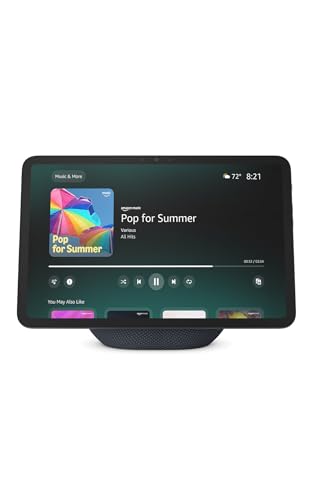
The Amazon Echo Show 11 is the device that makes a smart home feel like a system rather than a pile of unrelated accessories. Its 11-inch screen is large enough for a calendar, recipe, shopping list, or camera feed without the cramped feel of a bedside display. It also has enough presence to work as a kitchen or living room centerpiece, though its size means it needs a dedicated surface.
The Full-HD touchscreen gives text and video a cleaner presentation than the 5.5-inch panel on the Amazon Echo Show 5. Sound is a major part of the upgrade too. Spatial audio, a wider sound stage, crisper vocals, and up to twice the bass of the Echo Show 8 from 2023 make it a more convincing entertainment device. It supports Prime Video, Netflix, and other services, while Alexa can identify songs and help find shows.
For home control, the Echo Show 11 has a built-in smart home hub. That matters because compatible lights, thermostats, cameras, and other devices can be managed from the screen or by voice without adding a separate hub. Its Omnisense features can activate routines through temperature, presence, or visual ID detection. Those capabilities are more ambitious than the straightforward schedules available on the Amazon Smart Plug, and more useful for a home with several device types.
Video calls are another clear strength. The centered auto-framing camera has 3.3x zoom, a wide field of view, and noise reduction, so the display is better suited to family calls than the smaller Echo Spot. The weakness is physical scale. At 10.03 inches long, 7.18 inches high, and 2.87 pounds, it is not something to tuck beside a lamp. The camera and microphones also make privacy controls important, although the device includes a disable button and dedicated camera controls. Choose it if you want a central dashboard that can also entertain. Skip it if you only need voice commands or a compact alarm clock.
2. Linkind Matter Smart Plug: Best Multi-Platform Plug

Pros
- Matter support works across several major platforms
- Local network control can continue during an internet outage
- Supports Apple Home, Alexa, Google Home, SmartThings, and Siri
- 15A, 1800W capacity
- Compact four-pack design
Cons
- Requires a Matter-certified controller for major platforms
- Supports only 2.4 GHz Wi-Fi and IPv6
- AiDot is the hub-free alternative, adding another app
Best for: people who want smart plugs that will not lock the household into one voice assistant.
The Linkind Matter Smart Plug is the most flexible plug here, but it is important to understand what that flexibility requires. Matter lets the plug join Apple Home, Alexa, Google Home, SmartThings, or AiDot, so it is a much safer choice for a household that may change platforms later. It is also a four-pack, making it practical for spreading automation across lamps, fans, a humidifier, or seasonal lighting.
Matter's local network behavior is the feature that separates this plug from the Amazon Smart Plug and Amazon Basics Smart Plug. Once the device is set up on the local network, Matter devices can communicate directly and remain controllable within that network if the wider internet goes offline. Remote control from outside the home still depends on the relevant app and connection, but local routines do not have to stop just because cloud access is interrupted.
The electrical rating is 15A and 1800W, which gives useful headroom for ordinary household electronics. Linkind also describes the housing as using fire-resistant materials and includes short-circuit and overload protection. The plug supports schedules and timers, so it can shut down a device after a chosen period rather than relying only on a fixed clock schedule.
There is a setup catch. Apple Home, Alexa, Google Home, and SmartThings require a Matter-certified hub or controller, such as a HomePod, Echo Dot, Nest device, or SmartThings Hub. AiDot can be used without that separate hub, but it means managing the plug through another ecosystem. The 2.4 GHz Wi-Fi and IPv6 requirement may also need attention on a mixed network. For homes with one firmly established Alexa setup, the Amazon Smart Plug is simpler. For homes with Apple and Google users under one roof, Linkind is the more durable choice.
3. Amazon Echo Show 15: Best Kitchen Hub

Pros
- Spacious 15.6-inch Full-HD display
- Widgets make calendars and lists visible to the whole household
- Built-in Fire TV
- Smart home dashboard and live camera feeds
- Auto-framing video calls with 3.3x zoom
Cons
- Requires substantially more wall or counter space
- Less discreet than a small Echo speaker
- Some entertainment content may require a subscription
Best for: families that need a shared visual dashboard in the kitchen or a common area.
The Amazon Echo Show 15 is not simply a larger Echo Show 11. Its 15.6-inch Full-HD screen is designed to act as a household noticeboard, with calendars, to-do lists, local weather, smart home controls, and other widgets visible at the same time. That makes it particularly effective in a kitchen where several people need the same information without passing a phone around.
The large display also changes how entertainment fits into the room. Built-in Fire TV brings Prime Video, Netflix, YouTube, Apple TV, and other apps to the panel, and the included Fire TV remote makes it behave more like a television than a typical smart display. The feature list mentions vibrant sound, but the data does not specify a speaker configuration, so this is best viewed as a very capable screen with audio rather than a dedicated home theater replacement. For more focused listening, a device such as the Echo Dot can join compatible Echo systems.
Smart home controls sit beside the family widgets. You can turn lights on in groups, check camera feeds, or use voice commands from the dashboard. Video calling uses a centered auto-framing camera with a wide field of view, 3.3x zoom, and noise reduction. A built-in shutter and microphone and camera off button provide physical privacy controls, which are reassuring on a large always-visible screen.
The main limitation is its footprint. The display measures 16.1 inches wide, 10.1 inches high, and 1.4 inches deep, and weighs 4.92 pounds. It makes sense as a deliberate kitchen hub or wall-mounted family screen, not as a casual bedside accessory. The Echo Show 11 is easier to place and offers spatial audio, while the Show 15 wins when shared information and a large viewing area matter more than compactness.
4. Amazon Echo Dot: Best Compact Speaker

Pros
- Compact 3.94-inch-wide footprint
- Motion and indoor temperature sensors support routines
- Alexa voice control and Bluetooth playback
- Can pair with other Echo devices
- Eero Built-in can add up to 1, 000 square feet of coverage to an existing eero network
Cons
- No screen for visual information or video calls
- The eero feature requires an existing eero network
- Mic control is physical, but the device is still designed for listening for commands
Best for: bedrooms, offices, dining rooms, and other spaces where voice control matters more than a display.
The Amazon Echo Dot is the least distracting way to add Alexa to a room. It occupies a 3.94-inch square footprint, stands 3.53 inches high, and weighs 0.75 pounds, so it can sit on a desk, shelf, or bedside table without taking over. Its role is clear: play audio, answer questions, set timers, and trigger routines without asking you to look at a screen.
The routine features are more interesting than the basic speaker functions. Built-in motion and indoor temperature sensors can trigger actions, such as turning on a light when someone enters or starting a fan when a room gets too warm. Those sensors give it a more active role than the Amazon Smart Plug, which can follow schedules and voice commands but does not provide the same room-awareness features.
The Echo Dot supports music, audiobooks, and podcasts from Amazon Music, Apple Music, Spotify, and other services. Bluetooth playback is available too, and compatible Echo devices can be paired for multiroom music or a Fire TV home theater system. Eero Built-in can add up to 1, 000 square feet of Wi-Fi coverage to an existing eero network, though that is an extension feature for eero owners rather than a general-purpose mesh system.
The obvious compromise is the absence of a screen. You cannot glance at weather, song titles, a camera feed, or a calendar as you can with the Echo Show 5. It also lacks the Echo Show 11's built-in smart home hub. Still, the Dot is the one we would place in several rooms because it makes voice routines feel natural without demanding much space. If your home needs a compact Alexa endpoint, it is the more useful pick than the display-based Echo Spot.
5. Amazon Smart Thermostat: Best Alexa Thermostat

Pros
- Alexa app supports remote temperature control
- Home, away, and sleep schedules
- Presence detection can adjust comfort zones
- Guided do-it-yourself installation
- Works with Alexa and Ring
Cons
- Requires a C-wire
- Primarily suited to Alexa households
- Installation depends on compatible existing wiring and HVAC equipment
Best for: households that already use Alexa and want heating and cooling automation in the same ecosystem.
The Amazon Smart Thermostat is the only product here that changes the home's comfort system instead of adding control to an existing lamp or appliance. Its appeal is the way it connects temperature management to Alexa routines. You can create home, away, and sleep schedules, check the temperature from the Alexa app, and use compatible Alexa devices to help adjust comfort zones around the home.
Presence detection gives those schedules a more responsive quality. The thermostat can work with select Alexa devices to adjust heating and cooling based on temperature readings or whether people are present. That is more useful than a fixed timer when household routines change, although the quality of the result depends on the placement and compatibility of the connected Alexa devices.
Amazon says the thermostat uses Honeywell Home Thermostat Technology and provides guided installation through the Alexa app. The unit itself measures 3.56 inches by 3.56 inches and is 0.84 inches deep. Its compact body should fit familiar thermostat locations, but physical size does not remove the need to check the wiring before buying.
The C-wire requirement is the deciding weakness. Homes without the required common wire may need electrical work or another thermostat, and the product data does not provide a workaround. This is also a more specialized choice than the Echo Show 11, which can control many smart home categories from one screen. Choose the Amazon Smart Thermostat when Alexa is already central to the home and the HVAC wiring is compatible. Skip it if you want broad platform support or have not checked the C-wire.
6. Amazon Echo Show 5: Best Small Display

Pros
- Small 5.5-inch display fits bedside tables
- Built-in 2 MP camera supports video calls
- Camera shutter and mic off button
- Controls compatible lights, thermostats, and cameras
- Deeper bass and clearer vocals than the previous sound profile
Cons
- Screen is too small for shared calendars or detailed recipes
- Less capable as a room-wide entertainment display
- Camera placement makes privacy controls important
Best for: bedside tables, desks, and small rooms that need glanceable Alexa information.
The Amazon Echo Show 5 is a small display with a focused purpose. Its 5.5-inch screen can show weather, news, song titles, and compatible camera feeds, while Alexa handles timers, announcements, and smart home commands. At 5.78 inches long, 3.56 inches wide, and 3.23 inches high, it is substantially easier to place than either larger Echo Show.
It is also more than a clock. The built-in 2 MP camera supports video calls with people using the Alexa app or a screen-equipped Echo, and compatible video doorbells can be viewed from the display. Photos can rotate when the device is idle, turning the screen into a small digital frame. Audio has deeper bass and clearer vocals, which should help with casual music and spoken content, though the small enclosure cannot fill a room like the Echo Show 11.
The Echo Show 5 can control compatible lights and thermostats while you are at home or away. That makes it a useful bedside command point, particularly for a routine that turns devices off at night or shows a camera feed before bed. A camera shutter and microphone and camera off button give you direct privacy controls rather than requiring a software-only setting.
The limitation is the screen's scale. It is fine for a glance, but not the display we would choose for a family calendar, a recipe spread across several steps, or prolonged video viewing. The Echo Spot is a better alarm clock if you want a clock-first design, while the Echo Dot is smaller and simpler when a screen is unnecessary. Choose the Show 5 for a personal control point rather than a shared household dashboard.
7. Amazon Echo Spot: Best Smart Alarm Clock

Pros
- Designed specifically for nightstands and small surfaces
- Customizable clock faces and colors
- Clear vocals and deep bass
- Motion detection can trigger routines
- Gradual light and music wake-up routines
Cons
- Display is more limited than an Echo Show
- No built-in camera for video calls
- Eero Wi-Fi extension requires an existing eero network
Best for: people who want an Alexa alarm clock with quick visual information and strong bedside routines.
The Amazon Echo Spot is the most purpose-built bedside device in this group. It shows the time, weather, reminders, and song titles at a glance, with customizable clock faces and colors that make it feel less like a generic smart speaker. Its 4.1-inch length, 4.5-inch width, and 4.4-inch height create a compact footprint, though it is taller than the Echo Dot.
The alarm functions are the reason to choose it over the Dot. Alexa can wake you with music and gradual light, while the display gives you a quick look at the time or weather without reaching for a phone. Touch controls let you manage music and dim the display, and voice commands handle compatible lights, thermostats, and other devices.
Motion detection opens the door to useful routines. The Spot can help turn down a thermostat as you leave or open blinds when you enter, depending on the compatible devices in the home. It also includes Eero Built-in, which can add up to 1, 000 square feet to an existing eero network. That is a worthwhile extra for eero households, but it should not be the main reason to choose the product.
The Echo Spot does not include a camera, so it cannot handle the video calls or live camera viewing available on the Echo Show 5. Its display is also not intended for recipes, calendars, or entertainment. The Spot is the better bedside device because its interface is centered on time and alarms, while the Show 5 is a more general small display. Pick the Spot if morning and bedtime routines are the priority.
8. Amazon Smart Plug: Best Simple Alexa Plug

Pros
- No separate smart home hub required
- Setup takes place in the Alexa app
- Compact design leaves the second outlet available
- Supports timers, schedules, and routines
- Automatically reconnects after power or Wi-Fi outages
Cons
- Works within the Alexa ecosystem
- Requires the connected appliance to have a physical on and off switch
- Single-plug format is less convenient for outfitting several rooms
Best for: Alexa users who want one dependable plug with minimal setup.
The Amazon Smart Plug is the least complicated plug in the roundup. It works with the Alexa app and compatible Alexa devices, and the setup does not require a separate smart home hub. For a lamp, fan, coffee maker, or similar appliance with a physical on and off switch, the process is easy to understand: plug it in, add it in Alexa, then create the routine you need.
Its compact shape is practical. The plug measures 3.15 inches long, 1.48 inches wide, and 2.24 inches high, and it is designed to leave the second outlet free. That makes it a better fit than bulky smart plugs when two outlets share a crowded wall plate or power strip. The device can turn an ordinary outlet into a scheduled one for lights, morning coffee, or an appliance that should switch off at bedtime.
The Alexa routines are the real reason to select it over a basic timer. You can trigger actions with voice commands or schedules, and the Alexa app provides control when you are away. Automatic reconnection after power or Wi-Fi outages is another practical detail, since it reduces the chance that a temporary interruption leaves the plug disconnected.
The drawback is ecosystem lock-in. Unlike the Linkind Matter Smart Plug, it does not offer the same broad Apple Home, Google Home, and SmartThings flexibility. It is also a single plug, while the Amazon Basics Smart Plug and EIGHTREE Smart Plug are designed for several devices at once. Choose this model for a clean Alexa setup with one or two appliances. If your household uses multiple platforms, start with Matter instead.
9. Amazon Basics Smart Plug: Best Alexa Plug Multipack

Pros
- Four plugs can automate several appliances
- No third-party app or hub required
- Alexa setup can include zero-touch linking
- Compact body leaves other outlets free
- Supports schedules, voice commands, sunrise, and sunset routines
Cons
- Alexa only
- Uses 2.4 GHz Wi-Fi
- Not intended for Apple Home or Google Home control
Best for: Alexa households that want to automate several lamps, fans, or other compatible appliances together.
The Amazon Basics Smart Plug makes the most sense when the first plug will not be the last. This four-pack is aimed at homes that want to automate several lamps, fans, kettles, coffee makers, or holiday lights without introducing another app. Setup and management happen directly in Alexa, and one setup option can link the device to an Alexa account at checkout.
Each plug is designed to occupy one socket while leaving the remaining socket available. The body measures 2.68 inches long, 1.5 inches wide, and 2.1 inches high, so it is compact enough for crowded outlet areas. That physical design is similar in spirit to the Amazon Smart Plug, but the multipack format is more suitable when the same household routine spans multiple rooms.
Scheduling options are broad for a basic plug. Alexa can switch devices at designated times, respond to voice commands, or follow sunrise and sunset. Remote control through the Alexa app also lets you turn connected lights or fans on and off while away. The plugs require 2.4 GHz Wi-Fi, and there is no third-party app or hub to add to the setup.
The major limitation is clear platform exclusivity. The Amazon Basics Smart Plug is for Alexa, unlike the Linkind model, which uses Matter to reach several ecosystems. It also lacks the temperature and motion sensors found in the Echo Dot, so routines depend on time, voice, or other Alexa devices. Choose it when Alexa is already the household standard and several ordinary appliances need automation.
10. EIGHTREE Smart Plug: Best Compact Multipack

Pros
- Four-plug pack for multiple rooms
- 15A capacity
- Small round body is designed not to block the second outlet
- Supports timers, countdowns, cycles, and random schedules
- Works with Alexa, Google Assistant, and SmartThings after setup
Cons
- Alexa and Google control require Smart Life setup first
- Direct Alexa connection is not supported
- Platform compatibility is less streamlined than Matter
Best for: users who need several compact plugs and do not mind an extra setup step.
The EIGHTREE Smart Plug is a practical four-pack for spreading simple automation across a home. Its mini round design measures 1.96 inches by 1.96 inches and 2.03 inches high, with a listed 0.12-pound weight. The compact body is intended to fit in tight spaces without blocking the second outlet, which is useful when several wall sockets are already occupied.
The plugs support 15A loads and offer more scheduling flexibility than a basic on and off timer. You can set a countdown, cycle, random schedule, or fixed schedule. That gives you options for a coffee maker, fan, lamp, or lights that need different behavior from day to day. ETL and FCC certifications are also listed, along with a focus on consistent everyday operation.
Setup is where EIGHTREE falls behind the Linkind Matter Smart Plug. You first connect the plugs through the Smart Life app, then link that service to Alexa or Google Home. The product specifically notes that direct Alexa connection is not supported. SmartThings support is also listed, but the experience still depends on the app and the linking process rather than a direct Matter enrollment.
That extra layer is not a dealbreaker if you are comfortable with Smart Life, but it weakens the plug's claim to simplicity. The Amazon Basics Smart Plug is easier for an Alexa-only home because it stays inside Alexa, while Linkind is the cleaner choice for multi-platform control. Pick EIGHTREE when the compact four-pack and flexible schedules matter more than the fewest setup steps.

How to choose best smart home devices
The Best smart home devices are not defined by one feature. Match the device to your home's platform, the room where it will live, and the type of automation you actually want to maintain.
Platform compatibility
Start with the voice assistant and smart home platform already used in the home. The Amazon Smart Plug, Amazon Basics Smart Plug, Echo devices, and Amazon Smart Thermostat are closely tied to Alexa. Linkind's Matter support is more flexible, while EIGHTREE reaches Alexa, Google Assistant, and SmartThings through Smart Life.
Matter is useful when several household members use different platforms, but it may require a certified controller. A plug that works with many systems is not automatically simpler if setup needs a hub, app, and account linking.
Hub and app requirements
A hub can coordinate devices locally and make a larger system easier to manage, but it is another piece of hardware to configure. The Amazon Smart Plug and Amazon Basics Smart Plug avoid that requirement, while Linkind needs a Matter-certified controller for several of its supported platforms. EIGHTREE requires Smart Life before Alexa or Google control is available.
The best setup is the one that leaves you with fewer apps and fewer disconnected routines.
Display size and placement
A smart display should be judged by viewing distance and the information it needs to show. The Echo Show 5 works for a bedside glance, while the Echo Show 11 is large enough for shared calendars, recipes, calls, and camera feeds. The Echo Show 15 is closer to a wall-mounted household dashboard or small entertainment screen.
Measure the surface before choosing a display. The Show 15 is 16.1 inches wide and weighs 4.92 pounds, while the Show 11 weighs 2.87 pounds. A large panel is useful only if it can be placed where people will actually see it.
Automation sensors
Schedules are useful for predictable routines, such as switching lights on at sunset. Sensors make routines responsive. The Echo Dot and Echo Spot include motion and indoor temperature sensing, and the Amazon Smart Thermostat can use temperature and presence information through compatible Alexa devices.
Do not buy a sensor-equipped device without a routine in mind. Presence detection can be useful for lights or comfort zones, but simple time-based control may be more reliable for an appliance that must always follow a fixed schedule.
Electrical and installation requirements
Smart plugs are usually the easiest entry point, but check the appliance before connecting it. The Amazon Smart Plug is intended for devices with a physical on and off switch, while Linkind and EIGHTREE list 15A capacity. A thermostat needs a closer inspection of the existing HVAC system and wiring.
The Amazon Smart Thermostat specifically requires a C-wire. That requirement should be confirmed before installation, even if the Alexa app provides guided instructions.
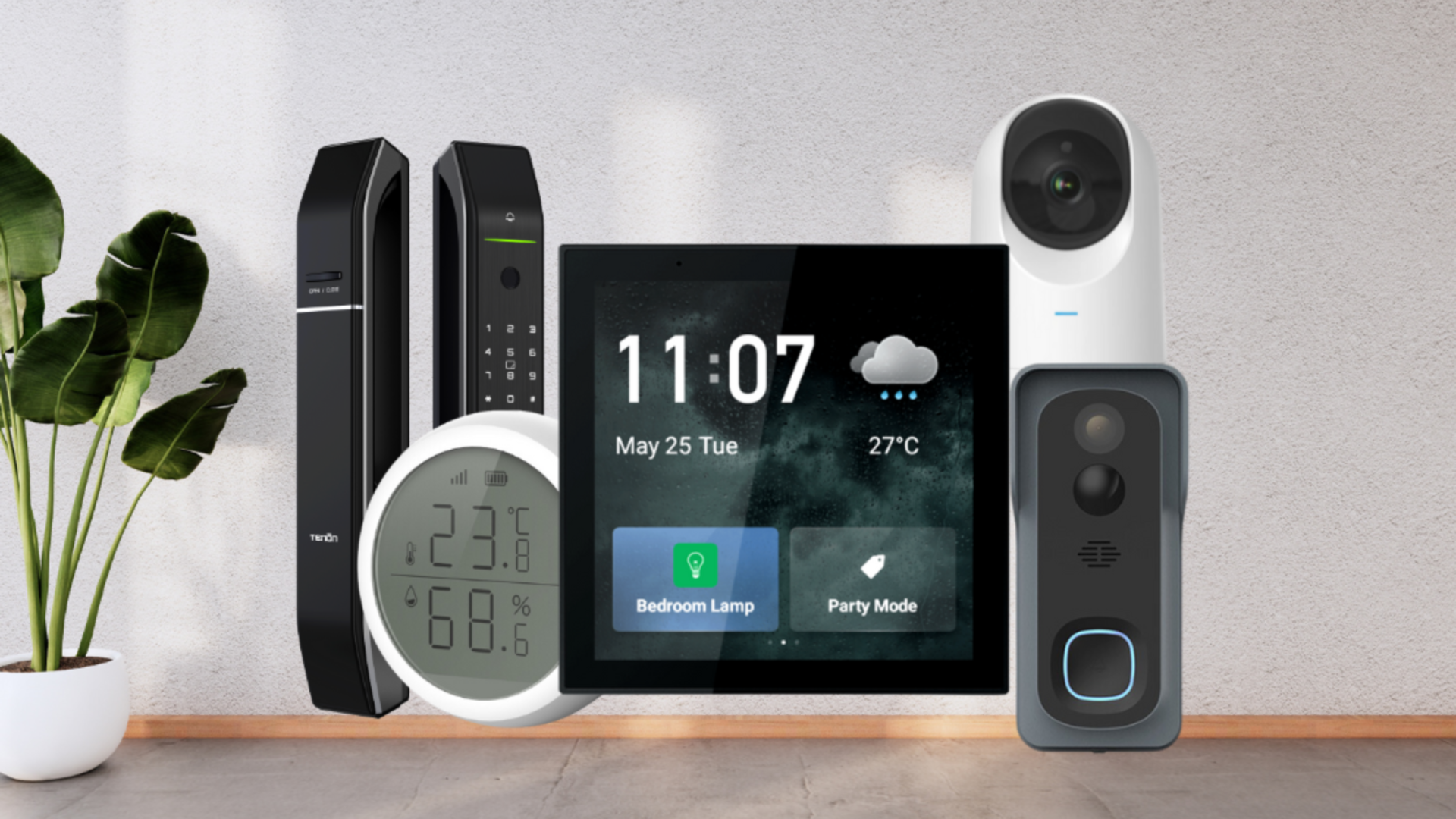
For devices that protect the home rather than automate ordinary appliances, how connected cameras fit into a wider home setup is a useful next consideration. A smart display can show camera feeds, but it is not a replacement for dedicated monitoring hardware.
Frequently asked questions
Do smart plugs work without a hub?
Some do, and some do not. The Amazon Smart Plug and Amazon Basics Smart Plug do not require a separate hub, while the Linkind plug requires a Matter-certified controller for several supported platforms. EIGHTREE uses Smart Life for its Alexa and Google Home connection.
Is Matter better than an Alexa-only smart plug?
Matter is more flexible because it can work across Apple Home, Alexa, Google Home, and SmartThings. An Alexa-only plug can be easier to set up when every person and device in the household already uses Alexa. The right choice depends on whether platform flexibility or minimal setup matters more.
Can a smart plug control any appliance?
A smart plug is best suited to an appliance that resumes operation when power is applied or has a physical on and off switch. The Amazon Smart Plug specifically identifies lamps, fans, coffee makers, and similar devices as compatible examples. Avoid assuming that every appliance will behave correctly after a power interruption.
Which Echo device is best for a bedroom?
The Echo Spot is the most focused bedroom choice because it combines a clock, customizable display, alarm routines, and motion detection. The Echo Show 5 is better if you want video calls, camera viewing, or more visual information. The Echo Dot is the simplest option when you only need voice control and audio.
Do smart displays need to stay connected to the internet?
Most remote features and cloud-based voice services depend on an internet connection. Matter devices such as the Linkind plug can communicate locally on the home network after setup, so some local control can continue during an internet outage. The exact behavior depends on the platform and routine involved.
Does the Amazon Smart Thermostat work without a C-wire?
The product data specifies that a C-wire is required. Check the existing thermostat wiring before starting installation. If the home does not have the required wire, this thermostat may not be a suitable replacement without additional electrical work.
The bottom line
The Amazon Echo Show 11 is the strongest all-around choice among the Best smart home devices because it combines a readable Full-HD screen, a built-in smart home hub, useful household widgets, spatial audio, cameras, and broad device control. It is large enough to serve as a genuine home dashboard without reaching the footprint of the Echo Show 15.
For a mixed-platform home, choose the Linkind Matter Smart Plug. It supports the widest range of ecosystems in this roundup and can keep local Matter control working on the home network when the wider internet is unavailable. Alexa households that want several simple automations should choose the Amazon Basics Smart Plug four-pack, while the Amazon Echo Spot is the better bedside specialist.
If you are undecided, choose the Echo Show 11 for a central dashboard, Linkind for platform flexibility, or Echo Dot for discreet voice control.
As an Amazon Associate we earn from qualifying purchases.