

A tablet can be wonderfully simple for video calls, news, photos, streaming, and staying in touch. It can also become frustrating quickly when the screen is cramped, the software is cluttered, or the tablet needs constant charging. The right choice depends less on flashy specifications than on readable display quality, familiar controls, and how easily the owner can hold it.
Our best tablet for seniors is the Apple iPad 11-inch, thanks to its polished software, strong A16 chip, clear 11-inch display, Touch ID, and excellent support for calls, photos, and everyday apps. The other nine picks include larger Lenovo models, compact tablets that are easier to hold, and simpler Android options for specific needs.
Comparison table
| # | Product | Award | Display | Memory and storage | Battery or charging | Best for |
|---|---|---|---|---|---|---|
| 1 | Apple iPad 11-inch | Best overall | 11-inch Liquid Retina | 128GB | All-day battery life | Families wanting the easiest long-term experience |
| 2 | Lenovo Idea Tab 8GB | Best Android tablet | 11-inch 2.5K IPS, 90Hz | 8GB, 256GB | Up to 12 hours of YouTube, 20W charger | Streaming, browsing, and handwriting |
| 3 | Samsung Galaxy Tab A11+ | Best family tablet | 11-inch, up to 90Hz | 6GB, 128GB, expandable | Fast charging, long-lasting battery | Shared household use |
| 4 | Lenovo Idea Tab Plus | Best large screen | 12.1-inch 2.5K IPS, 90Hz | 8GB, 128GB | Up to 13 hours of YouTube | Reading and watching from a stand |
| 5 | Lenovo Idea Tab 4GB | Best with a pen | 11-inch 2.5K IPS, 90Hz | 4GB, 128GB | Up to 12 hours of YouTube, 20W charger | Notes, browsing, and comfortable viewing |
| 6 | Amazon Fire HD 8 | Best compact tablet | 8-inch HD | 4GB, 64GB, expandable | Up to 13 hours | Portable entertainment and Alexa |
| 7 | Lenovo Tab One | Best lightweight tablet | 8.7-inch HD, 60Hz | 4GB, 64GB | Up to 12.5 hours of YouTube, 15W charging | Holding in one hand |
| 8 | URAO 10.1-inch Tablet | Best connectivity | 10.1-inch 1280 x 800 IPS | 36GB, 128GB, expandable to 1TB | Up to 8 hours, 18W charging | Video calls and basic Android use |
| 9 | COLORROOM 11-inch Tablet | Best battery capacity | 11-inch 1280 x 800 | 32GB, 128GB, expandable to 1TB | 8, 000mAh, 18W charging | Long reading and viewing sessions |
| 10 | ECOPAD 10.1-inch Tablet | Best basic tablet | 10.1-inch 1280 x 800 IPS | 12GB, 64GB, expandable to 1TB | 6, 000mAh, up to 8 hours | Simple household tasks |
1. Apple iPad 11-inch: Best Overall

Pros
- Clear 11-inch Liquid Retina display
- Fast A16 chip keeps apps responsive
- Touch ID is simple and familiar
- Strong camera and video-call features
- Wi-Fi 6 and USB-C connectivity
Cons
- Apple’s interface takes some learning for Android users
- Storage cannot be expanded with a memory card
- Some accessories are separate
Best for: someone who wants a polished tablet that family members can easily help manage.
The iPad 11-inch is the tablet we would hand to a relative who wants to browse, make video calls, watch shows, read, and keep photos in one place without wrestling with inconsistent software. The interface is familiar once set up, and the top-button Touch ID sensor makes unlocking much less awkward than typing a password every time.
Its 11-inch Liquid Retina display gives text, photos, and video enough room to breathe. True Tone adjusts the display to the room’s color temperature, which can make long reading sessions feel more natural. The A16 chip is considerably more capability than basic tablet tasks require, but that headroom matters as apps become more demanding and helps the iPad stay responsive when several apps are open.
The cameras are unusually useful for a tablet. The 12MP Center Stage front camera is designed to keep the user in view during video calls, while the 12MP rear camera can scan documents, capture photos, and record 4K video. Wi-Fi 6 helps with streaming and downloads, and the USB-C connector is now the standard port many households already use for charging other devices.
Compared with the Lenovo Idea Tab 8GB, the iPad has the cleaner app ecosystem and the easier support story, while Lenovo offers a pen and more built-in storage. The iPad’s weakness is that it does not accept a memory card, and people moving from Android may need a short adjustment period. Those who already use Android phones and want to keep everything in one ecosystem may prefer Samsung or Lenovo.
For families that want dependable software, strong accessibility options, and a tablet that should remain useful for years, this is the safest recommendation. Readers comparing Apple devices can also consider how a larger screen changes everyday tablet use before deciding.
2. Lenovo Idea Tab 8GB: Best Android Tablet

Pros
- Sharp 11-inch 2.5K display
- 90Hz refresh rate makes scrolling smooth
- Includes a Tab Pen and folio case
- 8GB memory and 256GB storage
- Dolby Atmos-tuned quad speakers
Cons
- Larger body is less comfortable for one-handed use
- Android setup can feel busy at first
- Pen features are more useful for some owners than others
Best for: an Android user who wants a sharp screen, generous storage, and a pen in the box.
The Lenovo Idea Tab 8GB is the Android model we would choose for someone who watches a lot of video, keeps plenty of photos and downloads, or likes writing directly on the screen. The included folio case gives it a ready-to-use stand, while the Tab Pen makes notes, marking up documents, and circling items for search more natural than tapping with a finger.
The 11-inch 2.5K IPS touchscreen is one of the clearest displays in this group. Its 90Hz refresh rate makes web pages and menus move smoothly, which reduces the slightly jerky feeling found on basic 60Hz tablets. Lenovo also lists TÜV Rheinland Low Blue Light hardware, a useful detail for people who spend long stretches reading.
The MediaTek Dimensity 6300 processor and 8GB of memory give the tablet comfortable room for everyday multitasking. The 256GB storage capacity is especially welcome for downloaded shows, photos, and apps. Up to 12 hours of YouTube use gives it a strong endurance claim, and the 20W charger is a sensible match for a tablet that may be used throughout the day.
It is more capable than the Lenovo Idea Tab 4GB, and the extra memory and storage make the difference worthwhile for heavier use. The Apple iPad 11-inch still has the more refined software and stronger support ecosystem, but the Lenovo is the better fit for Android households that want handwriting without buying a separate stylus.
The main drawback is physical size. A 1.05-pound tablet is manageable, but it is not the easiest model to hold above the face for a long time. Choose it for table, lap, or stand use, especially if the owner values large text, sharp images, and plenty of space for files.
3. Samsung Galaxy Tab A11+: Best Family Tablet

Pros
- Smooth 11-inch display with refresh rate up to 90Hz
- Expandable storage
- Quad speakers with Dolby Atmos
- Google Gemini and Circle to Search features
- 5MP front camera for video calls
Cons
- Samsung software includes many settings and features
- Camera system is less ambitious than the iPad’s
- The listed configuration has less storage than the Lenovo Idea Tab 8GB
Best for: a household that wants one tablet for calls, streaming, browsing, and shared entertainment.
The Galaxy Tab A11+ feels designed for a family room. Its 11-inch screen is large enough for recipes, video calls, television, and web pages, while the slim 1.05-pound body remains practical to carry between rooms. The quad Dolby Atmos speakers are another advantage when the tablet is being used without headphones.
The display can run at up to 90Hz, so scrolling through news or websites feels more fluid than on ordinary 60Hz panels. Samsung does not provide the same sharp 2.5K resolution as the Lenovo Idea Tab models, but the larger screen and smooth motion still make it easy to use for mainstream tablet tasks.
This configuration includes 6GB of memory and 128GB of storage, with expandable storage for people who keep a large photo or video library. Samsung also highlights fast charging and a long-lasting battery, though it does not provide a specific playback-hour figure here. The 5MP front camera is suited to everyday video calls, and Circle to Search plus Google Gemini may help users find information without jumping between apps.
The Samsung Galaxy Tab A11+ is less pen-focused than the Lenovo Idea Tab 8GB, and the iPad remains the stronger choice for the most polished video calling and document scanning. Samsung answers with a familiar Android environment, expandable storage, and features that work well when several people share the same device.
The weakness is the software density. Samsung adds useful tools, but the number of menus and options can make the first setup feel less direct. It is a good pick when a family member is available to configure it and the tablet will serve as a shared entertainment and communication screen.
4. Lenovo Idea Tab Plus: Best Large Screen
Pros
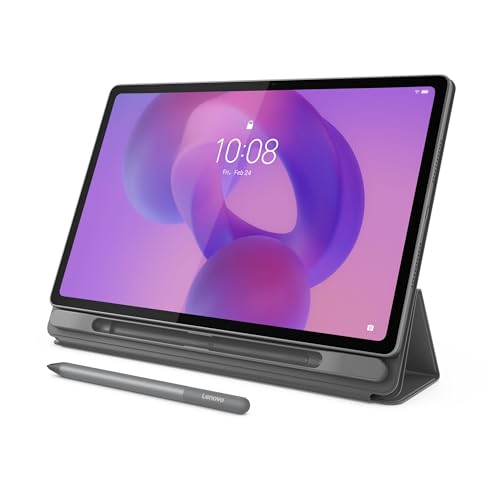
- Spacious 12.1-inch 2.5K display
- Up to 800 nits of brightness
- 90Hz refresh rate
- Includes Tab Pen and folio case
- Up to 13 hours of YouTube streaming
Cons
- Largest tablet in this roundup
- 128GB storage is lower than the smaller 8GB Idea Tab
- Best used with two hands or a stand
Best for: readers and viewers who want the largest, sharpest screen that remains reasonably light.
The Idea Tab Plus is the answer when small text and cramped video controls are the main complaint. Its 12.1-inch display gives web pages, recipes, newspapers, and subtitles more space, and the included folio case lets the owner prop it up rather than hold it continuously.
Resolution is 2.5K, and Lenovo lists brightness up to 800 nits. That combination produces a sharper, more legible image than the 1280 x 800 panels used by the URAO, ECOPAD, and COLORROOM tablets. The 90Hz refresh rate also keeps swiping through pages feeling clean, while the low-blue-light feature may be welcome for evening reading.
Inside is a MediaTek Dimensity 6400 processor with 8GB of memory and 128GB of storage. That is enough for browsing, streaming, video calls, and ordinary multitasking. Quad Dolby Atmos-tuned speakers give it more presence than a small tablet, and Lenovo claims up to 13 hours of YouTube streaming, the strongest stated streaming figure among the Lenovo models here.
The Lenovo Idea Tab Plus is easier to read than the Samsung Galaxy Tab A11+, but Samsung’s slightly smaller design is more convenient to carry. The Apple iPad 11-inch is lighter on the software side, while this Lenovo gives Android users more physical screen and a pen included in the package.
Size is the trade-off. At 1.17 pounds, it is not excessively heavy, but the nearly 11-inch-wide body is not a natural one-handed device. Choose it for a lap, desk, kitchen counter, or bedside stand, and skip it if portability matters more than comfortable large-format viewing.
5. Lenovo Idea Tab 4GB: Best With a Pen

Pros
- Sharp 11-inch 2.5K IPS touchscreen
- Includes Tab Pen and folio case
- 90Hz refresh rate
- Dolby Atmos-tuned quad speakers
- Up to 12 hours of YouTube streaming
Cons
- 4GB memory gives less multitasking room
- 128GB storage is more limited than the 8GB version
- Not as easy to hold for long periods as a compact tablet
Best for: someone who wants a large, clear Android screen and occasional handwritten notes.
The 4GB Idea Tab shares the features that make its sibling appealing, but it is aimed at lighter use. It has the same 11-inch 2.5K IPS touchscreen, 90Hz refresh rate, Tab Pen, and folio case. For handwritten reminders, browsing, reading, and streaming, that is a well-rounded package.
The display is the star. A 2.5K panel makes small text and detailed photos look more defined than they do on entry-level HD tablets. The 90Hz refresh rate smooths scrolling, and Lenovo’s hardware low-blue-light certification gives the screen a useful comfort feature for extended viewing.
The MediaTek Dimensity 6300 processor handles everyday work, and Lenovo claims up to 12 hours of YouTube streaming. The 20W charger should reduce the time spent waiting for a top-up. Four Dolby Atmos-tuned speakers are helpful for spoken content and television, particularly when the tablet is resting in its folio stand.
The Lenovo Idea Tab 4GB is more affordable in capability than the Lenovo Idea Tab 8GB, but the latter is the better choice for many open apps, large downloads, or years of heavier use. The Lenovo Tab One is easier to carry, though its smaller 8.7-inch display is not as comfortable for text.
The limitation is the 4GB of memory. It should suit straightforward use, but it offers less breathing room when switching repeatedly between video calls, browsers, and other apps. Pick it for a pen-friendly screen and simple daily tasks, not for intensive multitasking.
6. Amazon Fire HD 8: Best Compact Tablet

Pros
- Light 8-inch design
- Up to 13 hours of battery life
- 4GB memory and 64GB storage
- Storage expands up to 1TB
- Alexa supports reminders and video calls
Cons
- Google Play is not supported
- Smaller display can make text harder to read
- Amazon Appstore has a different app selection
Best for: someone who wants a small tablet for reading, video, music, and Alexa commands.
The Fire HD 8 is the most straightforward entertainment tablet here if the owner already uses Alexa or Amazon services. At 0.74 pounds, it is comfortable to carry from a chair to the kitchen, and its compact shape is less tiring to hold than an 11-inch model.
Its 8-inch HD display is not as spacious or sharp as the Lenovo screens, but it works well for books, downloaded shows, weather, and basic browsing. The tablet has up to 4GB of memory, 64GB of storage, and support for expansion up to 1TB with a separate card. Amazon claims up to 13 hours for reading, browsing, video, games, and music.
Alexa is a genuine advantage for users who prefer speaking rather than typing. It can provide news and weather, update lists, set reminders, control compatible smart-home devices, and help make video calls. The 5MP rear camera handles basic photos, while video calls can use Alexa or apps such as Zoom.
The Amazon Fire HD 8 is more compact than the Lenovo Tab One, and its stated battery life is slightly longer. The Lenovo has Google Android features and a folio case, while Fire OS is centered on Amazon’s Appstore. That difference matters more than the processor for many owners.
The major weakness is app compatibility. Google Play is not supported, so some familiar Android apps may be unavailable or require an alternative. It is a good recommendation for Amazon-centered households, but people who expect the full Google Play catalog should choose Lenovo, Samsung, or the iPad instead.
7. Lenovo Tab One: Best Lightweight Tablet

Pros
- Weighs less than a pound
- Compact 8.7-inch form
- Up to 12.5 hours of YouTube streaming
- Folio case includes a stand
- Dolby Atmos speakers
Cons
- Smaller screen than the other Lenovo tablets
- 60Hz refresh rate
- 64GB storage is limited for large media libraries
Best for: a reader who wants a tablet that is easy to hold in one hand.
The Lenovo Tab One solves a very specific problem: an 11-inch tablet can be tiring when held for a long time. This model weighs 0.704 pounds and has an 8.7-inch display, making it a better fit for reading in a chair, carrying around the house, or taking on a trip.
The HD screen is smaller and less detailed than the 2.5K panels on the Idea Tab models, but it remains well suited to books, video, email, and casual browsing. Lenovo lists 480 nits of brightness, a useful figure for ordinary indoor viewing. Its 60Hz refresh rate is standard, so scrolling will not feel as fluid as on a 90Hz tablet.
The MediaTek Helio G85 processor and 4GB of memory are aimed at everyday use. Lenovo claims up to 12.5 hours of YouTube streaming, and the 15W charging system is faster than previous models according to the product information. Dual Dolby Atmos speakers help spoken programs and shows sound fuller than they would through a single small speaker.
The included folio case is an important part of the experience because its built-in stand supports hands-free viewing. The Amazon Fire HD 8 is a close alternative with Alexa and up to 13 hours of mixed use, while the Tab One is the more natural choice for someone who wants standard Android software and Google-oriented features.
The small screen is also its limitation. Large text can be enabled, but some pages and controls will still feel tighter than on the 11-inch tablets. Choose it when low weight matters most, and choose the Lenovo Idea Tab Plus when comfortable reading from a stand is the priority.
8. URAO 10.1-inch Tablet: Best Connectivity

Pros
- Android 16 operating system
- Wi-Fi 6 and Bluetooth 5.4
- Google Play Store included
- 128GB storage with expansion up to 1TB
- 18W fast charging
Cons
- Screen resolution is only 1280 x 800
- No GPS
- Battery claim is up to 8 hours of mixed use
Best for: basic video calls, browsing, and streaming where newer wireless standards matter.
The URAO tablet has a practical feature mix for someone who wants a conventional Android tablet without moving into a larger premium model. Its 10.1-inch size is comfortable for video calls and web pages, and the Google Play Store means users can install familiar apps directly.
The 1280 x 800 IPS display is adequate for shows, email, and simple reading, but it cannot match the sharpness of the Lenovo Idea Tab 8GB or the Apple iPad 11-inch. Its low-blue-light design is intended to reduce irritating blue light and screen flicker, which may make it more comfortable during extended use.
The tablet uses an octa-core processor listed at 1.8GHz and advertises 36GB of memory as 6GB plus 30GB, alongside 128GB of internal storage. The memory terminology is less straightforward than the figures on the Lenovo and Samsung tablets, so buyers should focus on the real-world tasks they need rather than assuming it will behave like a premium device. Storage can expand up to 1TB with a TF card.
Wireless support is a strong point. Wi-Fi 6 helps it connect efficiently to compatible home networks, and Bluetooth 5.4 suits newer headphones and accessories. The 5MP front and 8MP rear cameras cover video calls and basic photography, while 18W charging is useful because the tablet claims up to 8 hours of mixed reading, viewing, gaming, and web use.
The absence of GPS is the key omission, and the display is plainly behind the sharper Lenovo and Apple screens. The ECOPAD 10.1-inch Tablet has similar screen dimensions but a weaker camera specification. Choose URAO for Google Play, Wi-Fi 6, Bluetooth 5.4, and expandable storage, not for demanding games or high-detail reading.
9. COLORROOM 11-inch Tablet: Best Battery Capacity
Pros
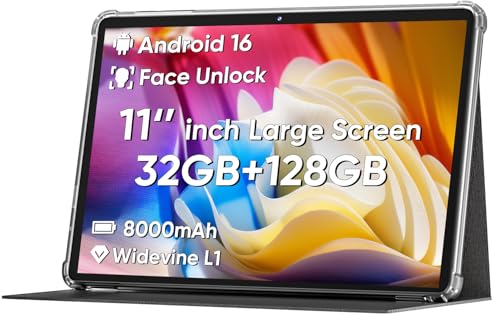
- Large 11-inch screen
- Face unlock
- 8, 000mAh battery
- 18W fast charging
- Storage expands up to 1TB
Cons
- 1280 x 800 resolution is modest for an 11-inch display
- Limited feature information compared with established brands
- No camera specifications are provided
Best for: long reading or viewing sessions when battery capacity is the main concern.
The COLORROOM tablet is unusually light for an 11-inch model, with a listed weight of 0.55 pounds. That makes the large screen easier to carry than expected, although the long body still works better on a lap or stand than held overhead.
Its 11-inch fully in-cell display has a 1280 x 800 resolution, automatic brightness adjustment, and an anti-blue-light design. Those features address comfort, but the resolution is low for this screen size. Text and photos will look less crisp than they do on the 2.5K Lenovo tablets, especially when viewed close up.
The tablet runs Android 16 on a Unisoc octa-core CPU and lists 32GB of memory as 4GB plus 28GB, with 128GB of storage. A MicroSD card can expand capacity up to 1TB. The product also includes dual stereo speakers, which should suit spoken content and casual video, though detailed camera specifications are not provided.
The 8, 000mAh battery is the standout feature. COLORROOM claims 8 to 10 hours of reading or video viewing, and 18W fast charging helps shorten top-up time. Face unlock can make access easier than entering a PIN, but it is sensible to keep a PIN available for situations where face recognition is less reliable.
The COLORROOM 11-inch Tablet is lighter than the Samsung Galaxy Tab A11+ and has a larger stated battery capacity, but Samsung offers a clearer camera specification, established software support, and a smoother display option. Choose COLORROOM for simple media use and long sessions, while readers who need sharper text should move up to Lenovo or Apple.
10. ECOPAD 10.1-inch Tablet: Best Basic Tablet

Pros
- 10.1-inch IPS touchscreen
- Android 15 and Google Mobile Services
- Storage expands up to 1TB
- 6, 000mAh battery
- One-year warranty listed
Cons
- Heavy at just over 2 pounds
- 1280 x 800 display is not especially sharp
- 2MP front camera is basic
Best for: uncomplicated browsing, video playback, and occasional video calls.
The ECOPAD is a straightforward Android tablet with the essentials covered. It has a 10.1-inch IPS touchscreen, Google Mobile Services, dual-band Wi-Fi, Bluetooth 5.0, and a case configuration listed in the product information. That makes it suitable for browsing, watching video, reading, and keeping a few everyday apps on hand.
The 1280 x 800 resolution is typical of basic tablets, but it is noticeably less refined than the 2.5K display on the Lenovo Idea Tab 4GB. The IPS panel should provide useful viewing angles, and the 10.1-inch format gives text more room than the compact Fire HD 8 or Lenovo Tab One.
ECOPAD lists a quad-core processor, 12GB of memory as 4GB plus 8GB, and 64GB of internal storage. The memory figure uses a combination of physical and expanded memory, so it should not be compared directly with the 8GB in Lenovo’s Idea Tab. A MicroSD card can expand storage up to 1TB, which is helpful for photos and downloaded video.
The 6, 000mAh battery is rated for up to 8 hours of uninterrupted video playback. Its 2MP front camera and 8MP rear camera cover basic calls and snapshots, but the front camera is clearly behind the iPad’s 12MP Center Stage camera and the URAO’s 5MP front camera. The listed one-year warranty adds some reassurance for buyers who want a basic device with a defined support period.
The biggest concern is weight. At just over 2 pounds, it is far heavier than every other model in this list, making it a poor choice for extended handheld use. It works better propped on a table, and it suits someone who needs a simple shared tablet rather than a particularly portable one.

How to choose best tablet for seniors
The right tablet should make ordinary tasks feel calm and predictable. Start with the display and handling, then consider software, battery life, storage, and the support a family member may need to provide.
Display size and clarity
An 8-inch tablet is easier to hold, but an 11-inch screen gives text, buttons, and video-call faces more room. Resolution matters too. The 2.5K Lenovo displays look sharper than the 1280 x 800 screens on the URAO, ECOPAD, and COLORROOM models, especially when reading small print.
Brightness and viewing comfort are useful in real rooms. Lenovo lists low-blue-light hardware, while the URAO and COLORROOM models also describe eye-comfort features. These do not replace sensible breaks, but they can make a screen more pleasant for long reading sessions.
Weight and handling
A tablet that stays on a stand can be large and relatively heavy. A tablet used in a chair or held during a video call should be light enough to grip without fatigue. The Lenovo Tab One and Amazon Fire HD 8 are the easiest to carry, while the ECOPAD is substantially heavier than the rest.
The most readable tablet is not useful if its weight makes the owner put it down after ten minutes.
Software and app access
Apple’s iPadOS is polished and has a broad app ecosystem, while Lenovo, Samsung, URAO, COLORROOM, and ECOPAD use Android. Fire HD 8 uses Amazon’s Fire software, and its Appstore does not support Google Play. Confirm which apps the owner already uses before choosing a platform.
Simple setup matters as much as the operating system. A family member should configure large text, accessibility controls, saved contacts, automatic updates, and video-calling apps before handing over the tablet.
Battery and charging
Battery claims use different testing methods, so treat them as useful comparisons rather than guarantees. Lenovo lists up to 12 hours on the Idea Tab and up to 13 hours on the Idea Tab Plus, while the Tab One claims up to 12.5 hours of YouTube streaming. The Fire HD 8 claims up to 13 hours across several activities.
Fast charging can matter when the tablet is forgotten overnight. URAO and COLORROOM list 18W charging, Lenovo’s Idea Tab models list a 20W charger, and the Tab One lists 15W charging.
Storage and expandable memory
A tablet used for streaming services may need little local storage. Photos, downloaded shows, and many apps can fill a smaller drive quickly. The Apple iPad has 128GB in this listing but no memory-card expansion, while Samsung, URAO, ECOPAD, COLORROOM, and Amazon provide expansion options in their product information.
Do not take unusually large memory figures at face value without checking how they are defined. URAO’s 36GB and COLORROOM’s 32GB include expanded memory, while ECOPAD’s 12GB is listed as 4GB plus 8GB. Physical memory and storage capacity are separate specifications.

Frequently asked questions
What screen size is easiest for seniors?
An 11-inch screen is a strong middle ground because it gives text and controls plenty of room without becoming as cumbersome as a laptop. The Lenovo Idea Tab Plus offers even more space at 12.1 inches, while the Lenovo Tab One and Amazon Fire HD 8 are easier to hold.
Is an iPad easier to use than an Android tablet?
The iPad has a polished interface and a broad selection of tablet-focused apps, which can make it easier for a family to support. Android tablets offer more variety and may feel more familiar to someone who already uses an Android phone. The best fit usually follows the phone and other devices the owner already knows.
How much storage does a tablet need?
For browsing, email, video calls, and streaming, 64GB can be sufficient if content is not downloaded heavily. People who keep lots of photos, apps, or offline video should consider 128GB or a model with expandable storage. The Lenovo Idea Tab 8GB has 256GB, the largest internal storage figure in this group.
Can these tablets make video calls?
Yes. The iPad has a 12MP Center Stage front camera, URAO has a 5MP front camera, Samsung lists a 5MP front camera, and ECOPAD lists a 2MP front camera. The Fire HD 8 supports Alexa video calls and apps such as Zoom.
Is a smaller tablet better for reading?
A smaller tablet is easier to hold, especially for long periods, but it displays less text at once. The Lenovo Tab One and Fire HD 8 are convenient for handheld reading, while an 11-inch model is usually more comfortable for large text, documents, and newspapers.
Do these tablets include a case?
The Lenovo Idea Tab 4GB, Lenovo Idea Tab 8GB, Lenovo Idea Tab Plus, and Lenovo Tab One list folio cases. The ECOPAD product information identifies the configuration as Tablet plus Case. The other models should be checked carefully for included accessories before ordering.
Which tablet is easiest for a family to support?
The Apple iPad 11-inch is the simplest recommendation when family members already use Apple devices or are comfortable helping with iPadOS. Samsung and Lenovo are strong Android choices. Amazon Fire HD 8 is especially convenient in a household that already uses Alexa, but its app selection is different from Google Android.
The bottom line
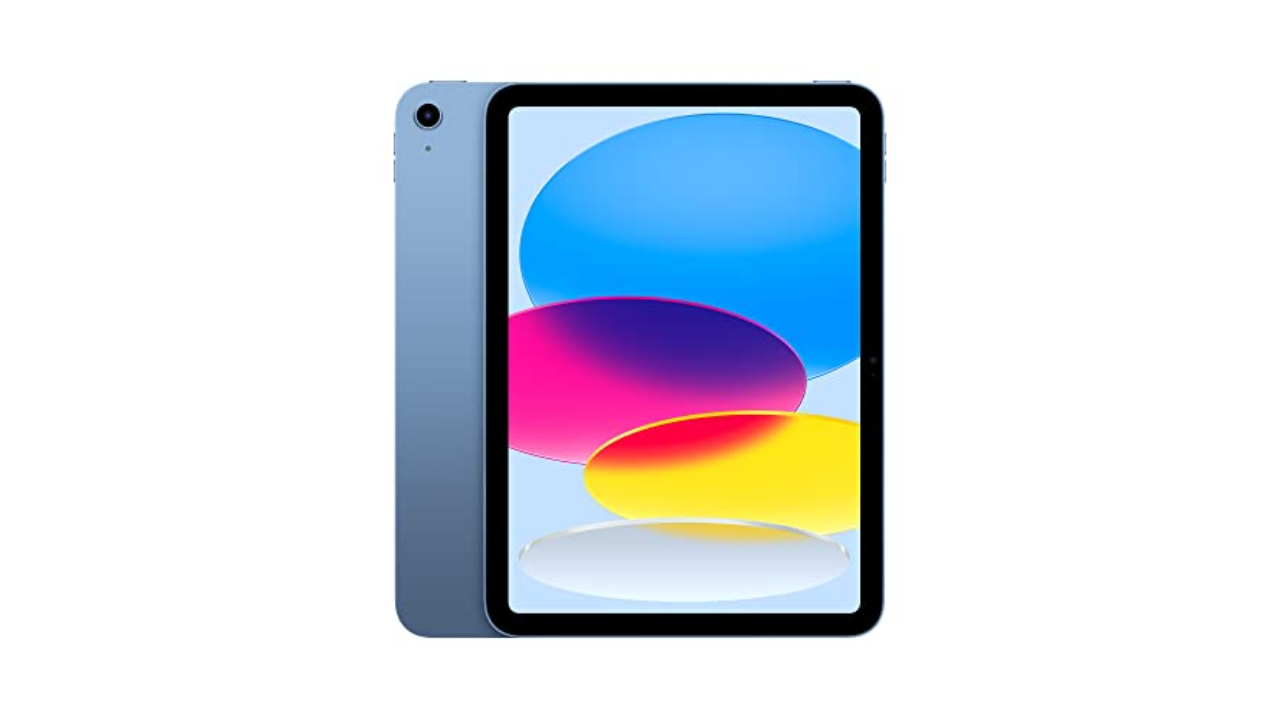
The Apple iPad 11-inch is our leading best tablet for seniors because it combines a clear 11-inch display, fast A16 performance, Touch ID, capable cameras, Wi-Fi 6, and a mature software ecosystem. It is the one we would choose for a relative who wants video calls, photos, reading, streaming, and help from family members without too much friction.
For an Android household, the Lenovo Idea Tab 8GB is the strongest alternative. Its 2.5K 90Hz display, 256GB storage, Tab Pen, folio case, and Dolby Atmos speakers make it especially appealing for reading, streaming, and notes. Choose the Lenovo Idea Tab Plus instead when the largest readable screen matters more than portability.
If you are undecided, choose the iPad for the smoothest overall experience, Lenovo for Android flexibility, or Lenovo Tab One when low weight is the deciding factor.
As an Amazon Associate we earn from qualifying purchases.