
An AM4 build can still be a fast, capable gaming or workstation PC, but the wrong motherboard can leave a Ryzen processor with weak power delivery, limited storage, or outdated networking. The socket is only the starting point. B550 boards vary sharply in size, expansion layout, wireless standards, BIOS support, and cooling.
Our Best AM4 Motherboard picks cover full-size ATX boards for feature-heavy systems and micro-ATX models for smaller cases. The ASUS ROG Strix B550-F is the best all-rounder, while the other eight make stronger cases for specific builds.
Comparison table
| # | Product | Award | Format | PCIe and storage | Networking | Best for |
|---|---|---|---|---|---|---|
| 1 | ASUS ROG Strix B550-F | Best overall | ATX | PCIe 4.0, dual M.2 | Wi-Fi 6E, 2.5Gb Ethernet | Feature-rich gaming PCs |
| 2 | Gigabyte B550 Eagle | Best modern ATX layout | ATX | PCIe 4.0, dual M.2 | Wi-Fi 6, 1Gb Ethernet | Newer general-purpose builds |
| 3 | Gigabyte B550M K | Best compact basic board | Micro-ATX | PCIe 4.0, dual M.2 | 1Gb Ethernet | Simple small-form-factor builds |
| 4 | Gigabyte B550 AORUS Elite | Best enthusiast Gigabyte board | ATX | PCIe 4.0, dual M.2 | Wi-Fi 6, 2.5Gb Ethernet | Powerful Ryzen systems |
| 5 | ASUS TUF B550-PLUS | Best durable gaming board | ATX | PCIe 4.0, dual M.2 | Wi-Fi 6, 2.5Gb Ethernet | Gaming and upgrade-friendly builds |
| 6 | Gigabyte B550 Gaming X V2 | Best wired ATX board | ATX | PCIe 4.0, dual M.2 | 1Gb Ethernet, Bluetooth 5.3 | Wired gaming desktops |
| 7 | ASUS Prime B550-PLUS | Best creator-friendly layout | ATX | PCIe 4.0, dual M.2 | Wi-Fi 5, 1Gb Ethernet | Flexible home and work PCs |
| 8 | MSI PRO B550M-VC | Best compact wireless board | Micro-ATX | PCIe 4.0, M.2 | Wi-Fi 6E, Bluetooth 5.2 | Compact wireless systems |
| 9 | MSI B550M PRO-VDH | Best compact utility board | Micro-ATX | PCIe 4.0, M.2 | Wi-Fi, Bluetooth | Small everyday PCs |
1. ASUS ROG Strix B550-F: Best Overall

Pros
- Strong 12+2 teamed power design
- Wi-Fi 6E and 2.5Gb Ethernet
- Dual M.2 storage and PCIe 4.0
- BIOS Flashback and a useful rear I/O selection
Cons
- Full ATX layout needs a suitably spacious case
- More board than a basic Ryzen build needs
Best for: a feature-rich Ryzen gaming PC with fast networking and room to expand.
The ASUS ROG Strix B550-F is the board we'd choose when the goal is to build around AM4 without making obvious compromises. It feels like a complete platform rather than a bare socket and chipset: the layout gives a gaming system room for a graphics card, two M.2 drives, modern USB devices, and fast wired or wireless networking.
Its 12+2 teamed power stages, alloy chokes, and durable capacitors give the board a more substantial power section than the ASUS TUF B550-PLUS. That matters most with higher-core-count Ryzen processors, where sustained workloads put more pressure on the VRM than a typical short gaming session. The board also has VRM cooling and a ProCool power connector, so the power delivery is not treated as an afterthought.
Storage and connectivity are the main reasons to pick it over the simpler Gigabyte B550 Gaming X V2. Both support PCIe 4.0 and dual M.2 drives, but the ROG Strix adds Wi-Fi 6E, Bluetooth 5.2, Intel 2.5Gb Ethernet, USB 3.2 Gen 2 Type-C, HDMI 2.1, and DisplayPort 1.2. The onboard video outputs only matter with a compatible processor, but they make troubleshooting easier when a discrete graphics card is not installed.
The weakness is straightforward: this is an ATX board with a feature set that can be excessive for a modest Ryzen build. A small case owner should look at the Gigabyte B550M K or MSI PRO B550M-VC instead. Its size and richer power hardware make sense for someone planning a strong CPU, multiple drives, and several high-speed peripherals.
For a buyer who wants one AM4 motherboard to support gaming, fast local storage, wired networking, wireless networking, and future component changes, this is the safest all-around pick. It is also the board here we'd keep for a long-lived AM4 system.
2. Gigabyte B550 Eagle: Best Modern ATX Layout

Pros
- 10+3 power phase design
- Wi-Fi 6 and dual M.2 slots
- PCIe EZ-Latch and pre-installed I/O armor
- Front USB-C and USB 3.2 Gen 2
Cons
- Ethernet is limited to 1Gb
- Less powerful VRM design than the top ATX picks
Best for: a current-feeling ATX Ryzen build that needs wireless connectivity and straightforward assembly.
The Gigabyte B550 Eagle is the newer-feeling middle ground in this group. It avoids the stripped-back character of the B550M K while keeping the design focused on the parts most builders actually install: one graphics card, DDR4 memory, two M.2 drives, and a handful of fast USB accessories.
Gigabyte uses a digital 10+3 power phase solution with premium chokes and capacitors. Its enlarged VRM heatsinks and 5 W/mK thermal pads are intended to move heat away from the power circuitry, which gives the board a better foundation for a mainstream Ryzen 5 or Ryzen 7 than the 3+3 B550M K. The four DIMM slots also leave more memory expansion flexibility than a compact board with fewer physical slots would.
PCIe 4.0 support covers the primary graphics slot, while the board provides two M.2 slots and USB 3.2 Gen 2 alongside USB 3.2 Gen 1 Type-C. The PCIe EZ-Latch feature is a small but useful build detail because releasing a graphics card is less awkward when the slot latch is difficult to reach. Pre-installed I/O armor serves a similar practical purpose during assembly.
The main compromise compared with the ASUS ROG Strix B550-F and Gigabyte B550 AORUS Elite is networking. Wi-Fi 6 is current enough for most home networks, but the wired connection is 1Gb Ethernet rather than 2.5Gb. There is also less reason to choose it for an especially demanding high-core-count processor when the AORUS Elite has a 12+2 power design and stronger thermal hardware.
Pick the B550 Eagle when you want a clean ATX foundation with built-in Wi-Fi, two fast storage locations, and builder-friendly touches. It is a better fit than the B550 Gaming X V2 for a system that will rely on wireless networking.
3. Gigabyte B550M K: Best Compact Basic Board

Pros
- Compact micro-ATX format
- Two M.2 slots with PCIe 4.0 support on the primary slot
- Four DIMM slots
- Q-Flash support
Cons
- Basic 3+3 power phase design
- No built-in Wi-Fi or Bluetooth listed
- Fewer high-speed rear connectivity options
Best for: a compact wired Ryzen system with one graphics card and uncomplicated storage needs.
The Gigabyte B550M K is the no-nonsense small-board choice. Its micro-ATX format fits cases that cannot accept a full ATX motherboard, while the layout still includes four DIMM slots and two M.2 positions. That combination makes it more flexible than an ultra-basic board, even though the overall feature set is restrained.
The storage arrangement is sensible. One M.2 slot uses PCIe 4.0, and the second uses PCIe 3.0, so the board can handle a fast boot drive plus another SSD without relying entirely on SATA cables. The primary PCIe 4.0 x16 slot is the appropriate home for a modern graphics card. Four USB 3.2 Gen 1 ports also make initial setup and ordinary desktop use uncomplicated.
The trade-off is the 3+3 digital VRM design. Gigabyte adds premium chokes, capacitors, and chipset heatsinks, but this is still the least ambitious power section among the ATX contenders. It is a sensible match for a mainstream Ryzen processor, yet builders choosing a high-core-count chip for long rendering or compilation sessions should step up to the ASUS ROG Strix B550-F or Gigabyte B550 AORUS Elite.
There is no onboard Wi-Fi in the listed feature set, and the networking is 1Gb Ethernet. That makes the board less convenient than the MSI PRO B550M-VC, which adds Wi-Fi 6E and Bluetooth 5.2 in the same general compact category. You will need a wired connection or a separate wireless adapter.
The B550M K makes sense when case size and a clean parts list matter more than premium connectivity. It is the compact board to choose for a straightforward Ryzen desktop, especially if the system will use wired Ethernet and one or two M.2 drives.
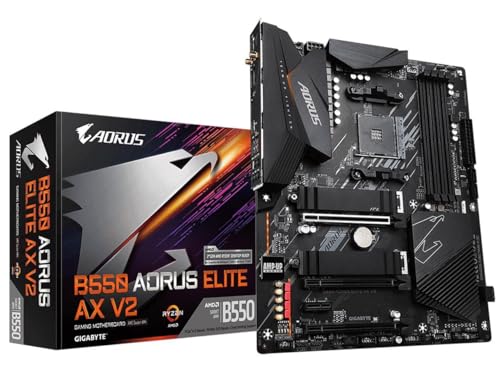
4. Gigabyte B550 AORUS Elite: Best Enthusiast Gigabyte Board
Pros
- Strong 12+2 power phase solution
- Wi-Fi 6 and 2.5Gb Ethernet
- PCIe 4.0, dual M.2, and front USB-C
- Integrated I/O shield and M.2 Thermal Guard
Cons
- ATX dimensions limit case choices
- One M.2 slot uses PCIe 3.0
Best for: a high-performance ATX AM4 system with strong power delivery and fast networking.
The Gigabyte B550 AORUS Elite is built around the parts that matter when an AM4 system is expected to work hard. Its 12+2 digital twin power phase design, reinforced primary PCIe slot, VRM heatsink, and M.2 Thermal Guard give it a more serious platform feel than the Gigabyte B550 Eagle.
Four DDR4 DIMM slots support the usual expansion path for a full-size build, and the dual M.2 arrangement keeps fast storage inside the board rather than forcing a stack of SATA drives. The primary M.2 slot is PCIe 4.0, while the second is PCIe 3.0. That division is common on B550, but it is important if you plan to install two cutting-edge drives and expect both to operate at the same interface generation.
Connectivity is a strong point. The AORUS Elite includes Wi-Fi 6, 2.5Gb Ethernet, two USB 3.2 Gen 2 Type-A ports, three USB 3.2 Gen 1 Type-A ports, and a front USB 3.2 Gen 1 Type-C header. Q-Flash Plus allows a BIOS update without installing the CPU, memory, or graphics card, which is particularly useful when a board needs firmware support before a processor will boot.
Compared with the ASUS ROG Strix B550-F, this board gives up Wi-Fi 6E and some of ASUS's specific rear I/O features. Compared with the B550 Eagle, it brings a stronger power design and a more substantial thermal approach. The drawback is that neither board is a sensible pick for a compact case, and the second M.2 slot is not PCIe 4.0.
Choose it for a demanding Ryzen build that will stay wired or use Wi-Fi 6, carry several drives, and benefit from a robust power section. It is especially compelling for buyers who prefer Gigabyte's Q-Flash Plus and RGB Fusion tools.
5. ASUS TUF B550-PLUS: Best Durable Gaming Board

Pros
- Wi-Fi 6 and 2.5Gb Ethernet
- Dual M.2 slots and PCIe 4.0
- BIOS Flashback
- USB 3.2 Gen 2 Type-C and Type-A
- Good fan-control support
Cons
- 8+2 power design is below the top two boards
- ATX format may be too large for compact cases
Best for: a gaming-focused AM4 build with fast networking, practical cooling control, and easy firmware updates.
The ASUS TUF B550-PLUS gets the important gaming decisions right without chasing every premium extra. It has the full ATX footprint, two M.2 slots, a PCIe 4.0 graphics connection, and the network hardware most gaming desktops will want. The board is easier to recommend than its feature list might suggest because it concentrates on useful, visible parts of the build.
Its 8+2 DrMOS power stages are supported by alloy chokes, durable capacitors, and fanless VRM and PCH heatsinks. That is a capable arrangement for mainstream Ryzen processors and gaming workloads. It is not as imposing as the 12+2 designs on the ASUS ROG Strix B550-F or Gigabyte B550 AORUS Elite, so those boards remain the better choices for sustained heavy CPU work.
The networking is stronger than the Gigabyte B550 Gaming X V2 and ASUS Prime B550-PLUS. Wi-Fi 6 and 2.5Gb LAN are built in, with ASUS LANGuard included in the wired networking design. The board also has HDMI 2.1 output supporting 4K at 60Hz, DisplayPort 1.2, USB 3.2 Gen 2 Type-C and Type-A, and a front-panel USB 3.2 Gen 1 connector.
Fan Xpert 4 and UEFI Q-Fan Control give builders more ways to tune connected fans, while BIOS Flashback can update firmware without a CPU or memory installed. The real weakness is that its ATX layout and 8+2 power design do not make it the obvious pick for either a tiny case or a particularly demanding workstation. The MSI PRO B550M-VC is more space-conscious, while the ROG Strix has more headroom.
For a conventional gaming tower, the TUF board is a balanced choice. It has the connectivity and firmware tools that make a first build less frustrating, plus enough cooling and power hardware for a broad range of Ryzen gaming processors.
6. Gigabyte B550 Gaming X V2: Best Wired ATX Board

Pros
- 10+3 power phase design
- Dual M.2 and PCIe 4.0
- Front USB-C header
- Q-Flash Plus without CPU, memory, or GPU
- Bluetooth 5.3
Cons
- No built-in Wi-Fi listed
- 1Gb Ethernet rather than 2.5Gb
- Heavy ATX board for a basic system
Best for: a wired ATX gaming PC with two M.2 drives and a straightforward expansion plan.
The Gigabyte B550 Gaming X V2 is a practical ATX board for builders who already have Ethernet at the desk and do not need onboard Wi-Fi. It has the familiar B550 foundation: support for Ryzen 3000, 4000, and 5000 series processors, DDR4 memory across four DIMM slots, a PCIe 4.0 x16 slot, and two M.2 locations.
Gigabyte's 10+3 digital twin power phase design is paired with premium chokes, capacitors, and an enlarged VRM heatsink. That gives it a stronger technical foundation than the B550M K's 3+3 design. It is also less elaborate than the 12+2 solutions in the ROG Strix B550-F and AORUS Elite, so the choice depends on the processor and workload rather than the name on the heatsink.
The board's storage and rear connectivity are well judged. One M.2 slot uses PCIe 4.0 and the other PCIe 3.0, while the expansion area includes a PCIe 4.0 x16 slot. Three USB 3.2 Gen 2 Type-A ports, a USB 3.2 Gen 1 Type-A port, and a front USB 3.2 Gen 1 Type-C header cover a healthy range of peripherals. Bluetooth 5.3 is included, but the listed features do not include Wi-Fi.
Q-Flash Plus is the standout convenience feature. Being able to update the BIOS without installing the CPU, RAM, or graphics card can remove one of the most annoying compatibility hurdles in an AM4 build. The board also has an integrated I/O shield and a refreshed BIOS with Easy Mode, both useful when assembling a system from scratch.
The weakness is its networking package. The ASUS TUF B550-PLUS and Gigabyte B550 AORUS Elite offer both wireless networking and 2.5Gb Ethernet, while this board is built for a wired 1Gb connection. Choose the Gaming X V2 when that limitation does not matter and you want a clean ATX layout with strong basic expansion.
7. ASUS Prime B550-PLUS: Best Creator-Friendly Layout

Pros
- Dual M.2 and PCIe 4.0
- Rear and front USB-C
- Wi-Fi 5 included
- Comprehensive protection features
- CEC Tier II ready
Cons
- Wi-Fi 5 is older than Wi-Fi 6 and Wi-Fi 6E
- 1Gb Ethernet
- 8+1 power stage design
Best for: a flexible ATX home, office, or creator system that needs front USB-C and dual M.2 storage.
The ASUS Prime B550-PLUS is the quiet practical option in this lineup. It does not present itself as a gaming-first board, but its layout is a good match for a general-purpose desktop that needs fast storage, wireless access, front-panel USB-C, and several cooling connections.
The 8+1 DrMOS power stages use alloy chokes and durable capacitors, with a VRM heatsink to keep the area around the processor controlled. That is adequate for a mainstream AM4 processor, though the ROG Strix B550-F and AORUS Elite are better equipped for the most demanding high-core-count workloads. ASUS OptiMem trace layout is designed to help DDR4 memory run at higher frequencies with lower voltages, but the actual result still depends on the memory kit and processor.
Dual M.2 slots and PCIe 4.0 give the Prime a useful storage and graphics foundation. Rear USB 3.2 Gen 2 Type-A and Type-C ports sit alongside front USB 3.2 Gen 1 Type-A and Type-C headers, which makes it easier to connect fast external storage without routing everything to the rear panel. The board also has SATA 6Gbps support and CEC Tier II readiness.
Its 5X Protection III system covers LANGuard, DRAM overcurrent protection, overvoltage protection, SafeSlot Core, and a stainless-steel back I/O. Those features do not make the board indestructible, but they show that ASUS has paid attention to the less glamorous parts of a long-term desktop build. Fan Xpert 2 and hybrid fan headers add useful control over case cooling.
The limitation is the networking hardware. Wi-Fi 5 and 1Gb Ethernet are functional, yet the ASUS TUF B550-PLUS offers Wi-Fi 6 and 2.5Gb LAN, while the ROG Strix moves to Wi-Fi 6E. The Prime is the better fit for a mixed home and work PC than a network-heavy gaming rig. If you are still deciding which processor belongs in that system, the difference between AM4 CPUs for gaming workloads can help narrow the platform before you buy.
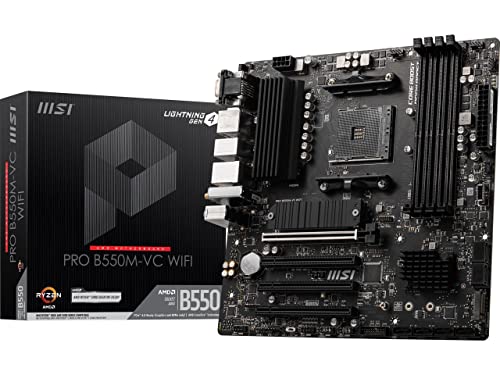
8. MSI PRO B550M-VC: Best Compact Wireless Board
Pros
- Compact 9.6-inch square micro-ATX design
- Wi-Fi 6E and Bluetooth 5.2
- PCIe 4.0 and Lightning Gen4 x4 M.2
- M.2 Shield Frozr and substantial thermal pads
- DDR4 support up to 4400 MHz through overclocking
Cons
- Only one M.2 slot is specified
- No detailed multi-phase count is listed
- Ryzen 5 3400G and Ryzen 3 3200G are not supported
Best for: a compact wireless AM4 build using a modern Ryzen 5000 or compatible Ryzen 3000 or 4000 G-Series processor.
The MSI PRO B550M-VC is the micro-ATX board to consider when wireless networking matters more than having a second M.2 slot. Its 9.6-inch by 9.6-inch footprint is easy to place in a compact case, and Wi-Fi 6E plus Bluetooth 5.2 means it does not feel like a compromise in everyday connectivity.
MSI supports Ryzen 5000 and 3000 series desktop processors along with Ryzen 4000 G-Series processors, but the compatibility list specifically excludes the Ryzen 5 3400G and Ryzen 3 3200G. That detail matters for owners reusing an older APU. DDR4 support reaches up to 4400 MHz through overclocking, although the final memory speed depends on the processor, modules, and configuration.
The board uses PCIe 4.0 and a Lightning Gen4 x4 M.2 slot with M.2 Shield Frozr. The shield is intended to help manage SSD heat, which can matter during long transfers or sustained application work. MSI also specifies a 7 W/mK thermal pad, an additional choke thermal pad, a 2-ounce thickened copper PCB, Core Boost, Digital PWM, and DDR4 Boost.
Compared with the Gigabyte B550M K, the MSI is far more convenient for a desk without nearby Ethernet because wireless is already built in. Compared with the ASUS ROG Strix B550-F, it takes up less space but gives up the second M.2 slot, 2.5Gb Ethernet, and the more expansive ATX layout. It also does not list a detailed power-phase count, so the larger ASUS and Gigabyte boards remain easier recommendations for exceptionally demanding CPUs.
Choose the PRO B550M-VC for a compact PC that needs Wi-Fi 6E, a fast primary NVMe drive, and modern wireless accessories. It is a particularly good match for a small gaming or general-purpose desktop where a second internal M.2 drive is not essential.
9. MSI B550M PRO-VDH: Best Compact Utility Board

Pros
- Compact micro-ATX design
- PCIe 4.0 and Lightning Gen 4 M.2
- Flash BIOS Button
- HDMI, DisplayPort, and D-Sub outputs
- Audio Boost and thickened copper PCB
Cons
- USB connectivity is less advanced than the higher-ranked boards
- Wireless specification is less detailed
- One M.2 slot is specified
Best for: a compact everyday PC that needs display flexibility and easy BIOS recovery.
The MSI B550M PRO-VDH is an adaptable little board for builds where the display output and case size matter as much as raw expansion. Its micro-ATX dimensions are 9.6 inches square, and the rear panel includes D-Sub, HDMI, and DisplayPort. That combination is useful for a system built around integrated graphics or for troubleshooting a graphics card problem.
MSI lists support for third-generation Ryzen processors and future Ryzen processors with a BIOS update, plus dual-channel DDR4 up to 128GB and 4400 MHz. As with other boards here, the higher memory figure is an overclocked limit rather than a guarantee for every kit. The PCIe 4.0 slot and Lightning Gen 4 M.2 connection provide a fast route for a graphics card and primary SSD.
Power delivery uses Core Boost technology, optimized circuit layouts, and digital power regulation. The board also has a 7 W/mK thermal pad and a 2-ounce thickened copper PCB. These details give it a more carefully managed thermal design than the simplest compact boards, though it does not offer the same wireless generation or storage flexibility as the MSI PRO B550M-VC.
The Flash BIOS Button is the most useful builder feature. It permits a BIOS flash without a CPU or memory installed, which can make an older board more practical when pairing it with a processor that needs newer firmware. Audio Boost and the Realtek ALC892 or ALC897 codec address basic onboard audio needs, while USB 3.2 Gen 1 covers ordinary peripherals.
The main limitation is that its wireless feature list only says Wi-Fi and Bluetooth, without the more specific Wi-Fi 6E and Bluetooth 5.2 details supplied for the PRO B550M-VC. Its USB connectivity is also less advanced than the ASUS and Gigabyte ATX choices. Pick it for a compact utility build with flexible display outputs, a primary M.2 drive, and a BIOS button that simplifies setup.
How to choose the best am4 motherboard
The right AM4 motherboard depends less on the socket label than on the processor, case, storage plan, and network connection you intend to use.
Processor power delivery
A motherboard's VRM design feeds power to the CPU and must shed the heat created while doing so. Higher phase counts do not tell the entire story, but the 12+2 designs in the ASUS ROG Strix B550-F and Gigabyte B550 AORUS Elite provide more headroom than the 3+3 design in the Gigabyte B550M K.
For a mainstream Ryzen gaming chip, a well-cooled 8+1 or 8+2 design can be perfectly sensible. A high-core-count processor used for long rendering or code compilation sessions deserves stronger heatsinks and a more substantial power section.
Form factor
ATX boards provide more physical room for expansion slots, headers, and larger heatsinks. The ASUS ROG Strix B550-F, ASUS TUF B550-PLUS, and Gigabyte ATX models suit conventional mid-tower builds.
Micro-ATX boards such as the Gigabyte B550M K, MSI PRO B550M-VC, and MSI B550M PRO-VDH fit smaller cases. Check the case's motherboard support before buying, then consider how many expansion cards will be installed. A compact board is not automatically better if it leaves no comfortable space for a capture card, sound card, or other add-in hardware.
PCIe and M.2 storage
B550 gives compatible Ryzen processors PCIe 4.0 support for the primary graphics slot and at least one fast M.2 connection. That is useful for a graphics card and a modern NVMe boot drive.
Dual M.2 slots are more flexible, but they are not always identical. The ASUS ROG Strix B550-F, ASUS TUF B550-PLUS, and Gigabyte ATX boards list two M.2 slots, while the Gigabyte B550M K uses one PCIe 4.0 M.2 slot and one PCIe 3.0 M.2 slot. The MSI compact boards list one M.2 slot, so plan for SATA storage if you need more internal capacity.
Wired and wireless networking
Wi-Fi 6E is the newest wireless standard represented here, appearing on the ASUS ROG Strix B550-F and MSI PRO B550M-VC. Wi-Fi 6 appears on the Gigabyte B550 Eagle, Gigabyte B550 AORUS Elite, and ASUS TUF B550-PLUS. Wi-Fi 5 on the ASUS Prime B550-PLUS is older but still functional with a compatible router.
A 2.5Gb Ethernet connection can matter when the rest of the network supports it or when moving large files between local devices. The ROG Strix, AORUS Elite, and TUF boards include it. The other models use 1Gb Ethernet where wired networking is specified.
Pick the motherboard around the CPU and case first, then use wireless, M.2 count, and rear USB as the tie-breakers.
BIOS update tools
BIOS Flashback, Q-Flash Plus, and Flash BIOS Button can update firmware without a fully assembled system. That is useful when an older board needs compatibility support for a newer AM4 processor.
The ASUS ROG Strix B550-F and ASUS TUF B550-PLUS include BIOS Flashback. Gigabyte's B550 Gaming X V2 and B550 AORUS Elite use Q-Flash Plus, while the B550M K lists Q-Flash. MSI includes a Flash BIOS Button on the PRO-VDH. These features are especially helpful for a new build assembled from a mixture of existing and newer parts.
If you are comparing platforms rather than choosing between B550 models, the move to a newer AM5 socket changes the upgrade path. For a graphics-heavy system, the motherboard features that matter most for gaming expansion are worth checking before settling on the board layout.
Frequently asked questions
Which AM4 motherboard is best for Ryzen 5000?
The ASUS ROG Strix B550-F is the strongest all-round choice in this group for a Ryzen 5000 system. It combines a 12+2 power design with PCIe 4.0, dual M.2, Wi-Fi 6E, 2.5Gb Ethernet, and BIOS Flashback.
Is B550 compatible with Ryzen 3000 processors?
The listed B550 boards support Ryzen 3000 processors, but processor support can vary by exact model and BIOS version. The MSI PRO B550M-VC specifically excludes the Ryzen 5 3400G and Ryzen 3 3200G, so owners of those APUs should check compatibility carefully.
Should I choose ATX or micro-ATX?
Choose ATX when you need more physical expansion room, additional headers, or a larger power and cooling layout. Choose micro-ATX when the case is smaller or the system will use one graphics card and limited expansion hardware.
How many M.2 drives can these motherboards use?
The ASUS ROG Strix B550-F, ASUS TUF B550-PLUS, ASUS Prime B550-PLUS, and Gigabyte ATX boards listed here provide two M.2 slots. The Gigabyte B550M K also has two, with one using PCIe 4.0 and one using PCIe 3.0. The MSI PRO B550M-VC and MSI B550M PRO-VDH list one M.2 slot each.
Does every board include Wi-Fi?
No. The Gigabyte B550M K and Gigabyte B550 Gaming X V2 do not list built-in Wi-Fi. The other boards include wireless networking, though the standard ranges from Wi-Fi 5 on the ASUS Prime B550-PLUS to Wi-Fi 6E on the ASUS ROG Strix B550-F and MSI PRO B550M-VC.
Do I need 2.5Gb Ethernet?
You only need 2.5Gb Ethernet when your router, switch, storage device, or local network can use that speed. It can improve transfers across a compatible network, but a 1Gb connection remains suitable for many ordinary internet and desktop setups.
The bottom line
The ASUS ROG Strix B550-F is the Best AM4 Motherboard pick for most builders who want a complete ATX platform. Its 12+2 power design, dual M.2 slots, Wi-Fi 6E, 2.5Gb Ethernet, PCIe 4.0, and BIOS Flashback cover nearly every important requirement without forcing a separate network adapter.
The Gigabyte B550 AORUS Elite is the better alternative for a demanding Ryzen system that favors Gigabyte's layout and Q-Flash Plus, while the MSI PRO B550M-VC is the compact choice when Wi-Fi 6E matters more than a second M.2 slot. Smaller wired builds should look closely at the Gigabyte B550M K or MSI B550M PRO-VDH.
If you are undecided, choose the ASUS ROG Strix B550-F for a full-size build and the MSI PRO B550M-VC for a compact wireless one.
As an Amazon Associate we earn from qualifying purchases.