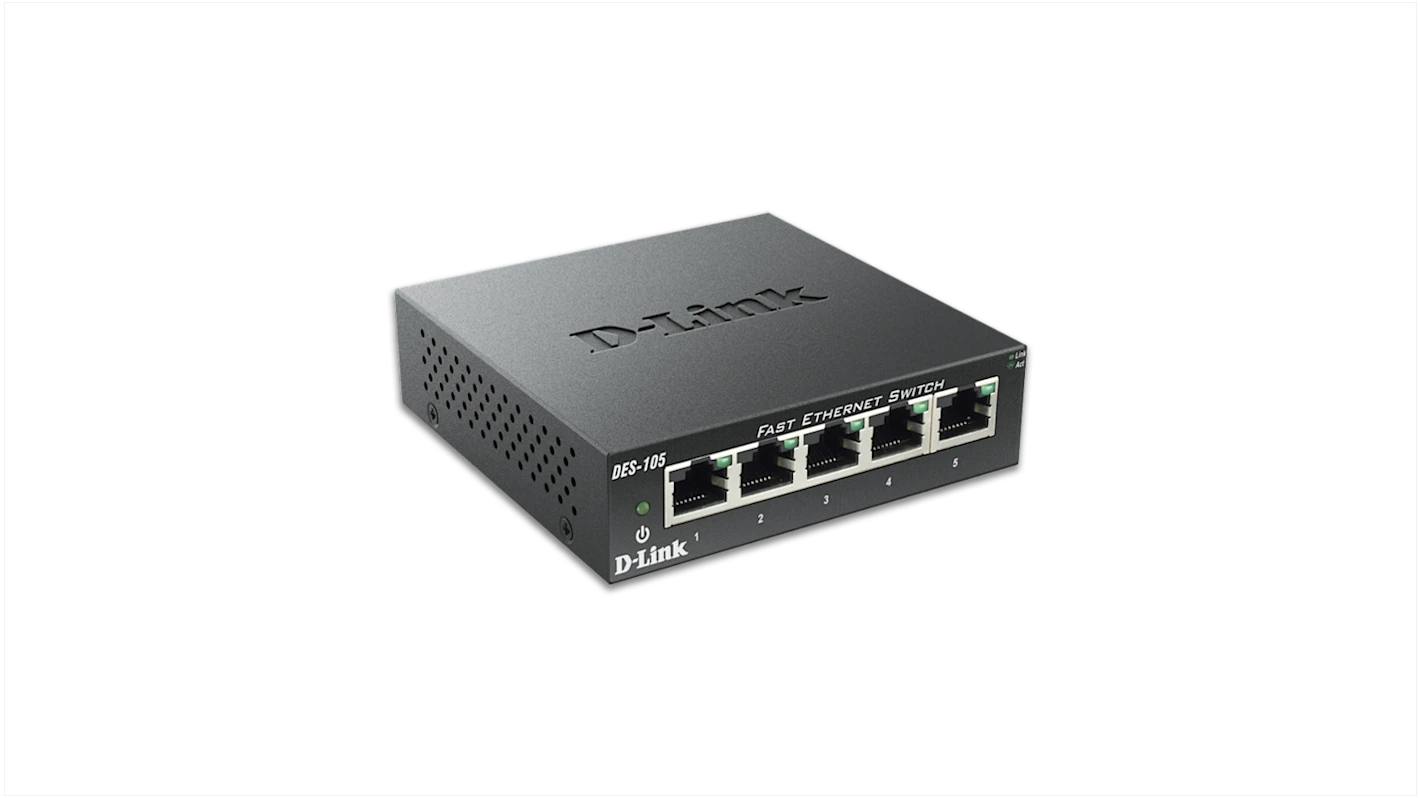

A crowded router can leave a home office, entertainment center, or gaming setup short on wired connections. The right switch fixes that without replacing the router, adding another wireless network, or forcing you to configure a miniature data center.
The Best ethernet switch options here range from compact five-port boxes to a 16-port expansion switch, a smart managed model, a PoE switch for powered devices, and an eight-port 2.5Gb option. Most are silent, plug-and-play devices, but their differences matter once you look at port count, network speed, and the kind of equipment you plan to connect.
Our top pick is the TP-Link TL-SG105, with options below for larger networks, PoE installations, simple five-port setups, and multi-gig connections.
| # | Product | Award | Ports | Speed | Management or power | Best for |
|---|---|---|---|---|---|---|
| 1 | TP-Link TL-SG105 | Best overall | 5 | Gigabit | Unmanaged, QoS, IGMP Snooping | Most home networks |
| 2 | NETGEAR GS308 | Best eight-port switch | 8 | Gigabit | Unmanaged | Offices and media centers |
| 3 | NETGEAR GS305 | Best simple five-port switch | 5 | Gigabit | Unmanaged | Small wired setups |
| 4 | TP-Link TL-SG116 | Best for large networks | 16 | Gigabit | Unmanaged, QoS, IGMP Snooping | Many wired devices |
| 5 | TP-Link TL-SG108 | Best compact eight-port design | 8 | Gigabit | Unmanaged | Desktop and wall mounting |
| 6 | NETGEAR GS105NA | Best established five-port design | 5 | Gigabit | Unmanaged | Straightforward wired expansion |
| 7 | NETGEAR GS305E | Best smart management | 5 | Gigabit | Easy Smart managed, VLAN, QoS | Small networks needing control |
| 8 | TP-Link LS108GP | Best for PoE devices | 8 | Gigabit | 802.3at/af PoE+, 65W | Cameras and access points |
| 9 | BrosTrend 2.5Gb Switch | Best multi-gig upgrade | 8 | 2.5Gbps | Unmanaged | Gaming and fast local transfers |
1. TP-Link TL-SG105: Best Overall
Pros
- Five auto-negotiating Gigabit RJ45 ports
- Fanless operation stays quiet
- QoS and IGMP Snooping add useful traffic handling
- Compact metal case supports desktop or wall mounting
Cons
- Five ports can disappear quickly in a busy office
- Unmanaged design does not provide VLAN configuration
- Limited to Gigabit networking
Best for: most homes that need a quiet, sturdy switch with more control than a basic port expander.
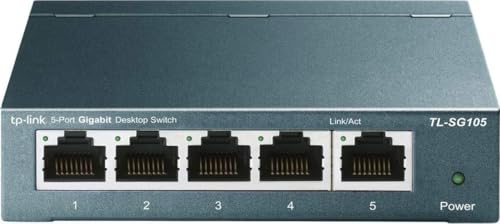
The TP-Link TL-SG105 is the switch we'd put behind a typical home router first. It gives you five 10/100/1000Mbps RJ45 ports, so a router connection can share wired access with a desktop, television, game console, access point, or network storage device. Auto-negotiation handles the connection speed for each device, while Auto MDI/MDIX avoids the old hassle of worrying about cable type.
Its quiet operation is a major reason it earns the top spot. The fanless design has no small cooling fan to whine beside a desk or television, and the metal casing makes it feel more substantial than a lightweight plastic networking box. At 4.2 inches long and wide, and about 0.49 pounds, it is easy to place near a router or mount on a wall without demanding much room.
The TL-SG105 also separates itself from the simpler five-port choices with traffic features that can help on a mixed home network. Port-based 802.1p and DSCP QoS can prioritize traffic, while IGMP Snooping is designed to handle multicast traffic more intelligently. Those features do not turn it into a fully managed switch, but they give streaming and voice traffic more attention than a completely bare-bones unit.
Compared with the NETGEAR GS305, the TP-Link offers the more interesting feature set and a similarly straightforward setup. The NETGEAR GS305E goes much further if you need VLANs, monitoring, or configurable QoS, while the TP-Link TL-SG116 is the obvious choice when five ports are not enough. The real weakness is capacity: with one port usually connected back to the router, only four remain for devices. Anyone wiring a growing office should skip this model and move to an eight-port or 16-port switch.
For a compact home network, though, the TL-SG105 gets the important decisions right. It is quiet, sturdy, fast enough for Gigabit equipment, and simple to install while retaining a few useful traffic controls.
2. NETGEAR GS308: Best Eight-Port Switch

Pros
- Eight 1.0Gbps Ethernet ports
- Fanless and silent
- Metal case supports desktop or wall placement
- Works with Cat5e and Cat6 cabling
Cons
- Unmanaged, with no VLAN or port monitoring controls
- Larger than five-port alternatives
- Listed for use in the United States and Canada
Best for: home offices, media centers, and workspaces that need several extra wired connections.
The NETGEAR GS308 is the practical step up when five ports feel too restrictive. Its eight 1.0Gbps ports leave room for a router uplink plus seven connected devices, which is enough for a desktop, printer, television, console, streaming box, access point, and another spare connection. That extra breathing room is often more useful than a switch with a long feature list.
Setup is deliberately uneventful. The ports auto-negotiate the best available speed and work with existing Cat5e or Cat6 Ethernet cables. There is no software installation or configuration interface to learn. Connect the router, connect the devices, and the switch handles the basic traffic forwarding in the background.
The GS308 uses a compact metal design that can sit on a desk or attach to a wall. At about 6.22 inches long, 4.02 inches wide, and 1.02 inches high, it is not tiny, but the flat shape should fit behind most desks and entertainment units. Its fanless cooling keeps the room quiet, and IEEE 802.3az Energy Efficient Ethernet is intended to reduce power consumption when network activity is lower.
The TP-Link TL-SG108 is the closest alternative here, and it offers a similarly useful eight-port layout with a metal enclosure. The GS308's clean simplicity makes it a comfortable fit for a general home network, while the TP-Link TL-SG105 is smaller and includes QoS and IGMP Snooping. The GS308's limitation is the same reason it is easy to use: it is unmanaged, so there are no VLANs, port controls, or traffic monitoring tools for a more complex network.
That is not a serious drawback for most households. Choose the GS308 when you want eight Gigabit connections, silent operation, and no configuration project. If the switch will sit in a small office with separate work and guest devices, the managed NETGEAR GS305E is a better match.
3. NETGEAR GS305: Best Simple Five-Port Switch

Pros
- Five auto-negotiating 1.0Gbps ports
- Simple plug-and-play setup
- Silent fanless design
- Compact metal enclosure supports wall mounting
Cons
- No traffic management or VLAN features
- Four device connections remain after the router uplink
- Listed for use in the United States and Canada
Best for: a small desk, television stand, or home office that needs a few more wired ports.
The NETGEAR GS305 is the uncomplicated answer for a small wired network. Its five 1.0Gbps ports cover the common arrangement of one connection back to the router and four wired devices. That could mean a computer, printer, television, and console, or a workstation with a couple of peripherals and one open port for later.
There is no setup ceremony. Each port detects the connected device's available speed, and the switch works with Cat5e or Cat6 cables. This is the kind of hardware that can disappear behind a desk and do its job without an app, account, software installation, or network planning.
Its fanless design is useful in rooms where even a low hum becomes annoying. The metal enclosure supports desktop and wall placement, and the 6.2 by 4 by 1.1-inch body is compact enough for most shelves. IEEE 802.3az Energy Efficient Ethernet is included to reduce power use without giving up the advertised Gigabit connection when devices need it.
The TP-Link TL-SG105 is the more capable five-port pick because it adds QoS and IGMP Snooping, making it better for mixed media and voice traffic. The NETGEAR GS305E is the more flexible choice for anyone who needs VLANs or port monitoring. The GS305 makes more sense when those controls would go unused and the priority is a clean, quiet installation.
One detail deserves attention before buying: the listing identifies this model for use in the United States and Canada. For a basic home setup in those regions, the GS305 is refreshingly easy to recommend. It is not the right choice for a network that needs segmentation or room for many devices, but it is a tidy solution for a short list of wired connections.
4. TP-Link TL-SG116: Best for Large Networks

Pros
- Sixteen auto-negotiating Gigabit ports
- QoS and IGMP Snooping
- Fanless metal construction
- Desktop and wall-mounting options
Cons
- Takes substantially more room than smaller switches
- Unmanaged, despite its traffic features
- Gigabit only
Best for: a home office, media room, or small business with many wired devices.
The TP-Link TL-SG116 is for the network that has already outgrown small switches. Sixteen 10/100/1000Mbps RJ45 ports provide enough space for a router uplink and a large collection of wired equipment. It is an especially sensible layout for an office with several computers, printers, access points, cameras, and entertainment devices that would otherwise require multiple small switches.
The port count is the whole story, but the supporting design matters. Auto-negotiation and Auto MDI/MDIX keep device connections straightforward, while IEEE 802.3X flow control is intended to support reliable data transfer. The switch also includes port-based 802.1p and DSCP QoS, plus IGMP Snooping, so it is better prepared for a network carrying voice, video, and ordinary data at the same time.
This is a larger piece of equipment at 11.26 inches long, 4.4 inches wide, and 1 inch high. It weighs about 2.1 pounds, which gives the metal case a solid presence but also makes placement worth planning. The fanless design avoids adding noise to an office or media cabinet. TP-Link lists an operating temperature range of 0 to 40 degrees Celsius, a useful detail for choosing a sensible indoor location.
The NETGEAR GS308 is easier to place and is enough for most households, but it cannot offer the same expansion room. The TP-Link TL-SG105 is more compact and includes the same general traffic-oriented features, yet its five ports will fill quickly in a larger setup. The TL-SG116's weakness is that it remains unmanaged: QoS and IGMP Snooping are helpful, but you cannot create VLANs or inspect individual port activity as you could with the NETGEAR GS305E.
Choose the TL-SG116 when running several network cables is preferable to stacking smaller switches. It is a straightforward way to centralize wired equipment, provided you have a shelf, cabinet, or wall location large enough for its elongated case.
5. TP-Link TL-SG108: Best Compact Eight-Port Design

Pros
- Eight-port Gigabit layout
- Fanless metal construction
- Desktop or wall-mounting design
- Plug-and-play operation
Cons
- No documented management interface in the supplied details
- Larger than five-port alternatives
- No multi-gigabit or PoE support
Best for: adding eight wired Gigabit connections without a noisy or complicated box.
The TP-Link TL-SG108 is the classic eight-port expansion format. It gives a home office or entertainment setup enough connections for a router uplink plus seven devices, which leaves useful room for equipment that tends to accumulate over time. A desktop, television, console, printer, access point, NAS, and spare connection can all share one switch.
Its metal body and fanless design suit a visible desktop or a tucked-away networking shelf. The listed dimensions are about 6.22 inches long, 3.94 inches wide, and 0.98 inches high, with a weight of about 0.86 pounds. That is compact for an eight-port unit, and the desktop or wall-mounting design gives you more choice than a box that has to lie flat in one location.
The title identifies Gigabit Ethernet, plug-and-play operation, shielded ports, traffic optimization, and an unmanaged design. Those labels point to a switch aimed at simple expansion rather than network administration. It should be judged as a quiet connection hub, not as a tool for creating separate networks or tuning individual ports.
The NETGEAR GS308 provides a more detailed feature set in the supplied specifications, including auto-negotiation, Cat5e and Cat6 compatibility, and Energy Efficient Ethernet. The TP-Link TL-SG105 is the better small-switch pick if its QoS and IGMP Snooping features matter, while the TL-SG116 is the better answer for a much larger installation. The TL-SG108 sits between those choices with a useful port count and an unobtrusive physical design.
The missing management controls are the main reason to skip it for a business network that needs segmentation or monitoring. For a household that simply needs more Gigabit sockets and wants a fanless metal switch that can sit on a desk or wall, the TL-SG108 remains a sensible fit.
6. NETGEAR GS105NA: Best Established Five-Port Design

Pros
- Five 1.0Gbps Ethernet ports
- Auto-negotiation works with Cat5e and Cat6
- Fanless and energy-efficient
- Compact metal desktop or wall-mount design
Cons
- Unmanaged with no VLAN controls
- Five ports limit expansion
- Listed for use in the United States and Canada
Best for: a basic five-port wired network where proven simplicity matters more than extra controls.
The NETGEAR GS105NA is a straightforward five-port Gigabit switch with a long-running, conventional design. Its five auto-negotiating 1.0Gbps ports work with Cat5e and Cat6 cables, so it can connect common home and office equipment without requiring special cabling or manual speed selection.
Like the newer GS305, it is plug and play. The switch has no software installation or configuration requirement, which is exactly what many people want when extending a router's wired connections. Its fanless operation is appropriate for a desk, television stand, or quiet office, and IEEE 802.3az Energy Efficient Ethernet is designed to reduce power consumption during lighter activity.
The supplied dimensions are unusual compared with the other small NETGEAR options, measuring about 4.02 inches long, 1.06 inches wide, and 3.9 inches high. The listed weight is about 0.44 pounds. Regardless of orientation, it is a small piece of hardware, and the compact metal design supports desktop or wall placement.
The NETGEAR GS305 is the closer modern alternative, offering the same five-port Gigabit arrangement and the same broad operating approach. The TP-Link TL-SG105 adds QoS and IGMP Snooping, so it is more interesting for homes with streaming or voice traffic. The GS105NA's limitation is that it does not provide those documented traffic controls or any managed features, making it a poor fit for users who want to tune the network.
There is also the regional compatibility note: the supplied listing says this model is made for use in the United States and Canada. If that matches your location and you want a small, silent switch with familiar basics, the GS105NA is easy to install and easy to leave alone.
7. NETGEAR GS305E: Best Smart Management

Pros
- Five auto-negotiating Gigabit ports
- VLAN configuration
- QoS traffic prioritization
- Port monitoring and network security controls
- Fanless metal design
Cons
- More setup than an unmanaged switch
- Only five ports
- Listed for use in the United States and Canada
Best for: small offices and advanced home networks that need VLANs, traffic control, or port monitoring.
The NETGEAR GS305E looks like a small five-port switch, but it is aimed at a different buyer from the GS305. It keeps five 1.0Gbps auto-negotiating ports and a fanless metal enclosure, then adds an Easy Smart management interface for people who need their wired network to do more than pass traffic.
The useful additions are practical rather than obscure. The interface can configure VLANs, prioritize traffic with QoS, monitor ports, and manage network security for small businesses. VLAN support lets you separate types of traffic logically, while port monitoring can help identify activity that would be invisible on an unmanaged switch. QoS provides a way to give selected traffic priority when the network is busy.
The compact body measures about 3.7 inches long, 3.9 inches wide, and 1.1 inches high, with a listed weight of about 0.55 pounds. It supports desktop or wall placement, and the fanless design keeps it suitable for a workspace. IEEE 802.3az Energy Efficient Ethernet is also listed, so the switch is not trading its management functions for a louder or more demanding physical design.
The trade-off is the setup itself. The TP-Link TL-SG105, NETGEAR GS305, and NETGEAR GS105NA are better when the only task is adding wired ports. The GS305E becomes the smarter choice when you need separate network groups or visibility into port behavior. If you are still deciding how the wired equipment should connect to the wider network, the router features that shape a wired setup are worth sorting out before configuring VLANs.
Five ports can also be restrictive once a router uplink is used. The TP-Link TL-SG116 offers far more physical capacity, but it does not provide the same documented smart management in this group. Pick the GS305E for control in a compact package, and skip it if you know you will never use VLANs, QoS, monitoring, or security settings.
8. TP-Link LS108GP: Best for PoE Devices

Pros
- Eight Gigabit PoE+ ports
- Up to 30W per port
- 65W total PoE power budget
- PoE Auto Recovery
- Fanless metal case
Cons
- PoE features are unnecessary for ordinary wired devices
- Larger and heavier than basic switches
- No managed configuration described in the supplied details
Best for: powering compatible cameras, access points, and other PoE devices over Ethernet.
The TP-Link LS108GP is not simply an eight-port switch with a different label. Its reason to exist is power. All eight ports provide Gigabit PoE+ under the 802.3at/af standards, allowing compatible devices to receive network connectivity and electrical power through the Ethernet connection.
The switch can provide up to 30W per port, with a total PoE power budget of 65W. That makes it a useful center for a group of compatible surveillance cameras, access points, or other powered network hardware. The total budget matters because the maximum per-port figure does not mean every port can draw that amount at the same time. A planned installation needs to consider the combined demand of the connected devices.
Its Extend Mode can send PoE transmission as far as 820 feet, according to the supplied feature list. That is aimed at long cable runs, especially surveillance deployments across a large property or building. PoE Auto Recovery adds another practical feature by automatically rebooting dropped or unresponsive PoE-powered devices when the mode is enabled.
This model is physically larger than the ordinary switches here, measuring 7.72 inches long, 5.16 inches wide, and 4.76 inches high, with a listed weight of 1.48 pounds. The metal case supports desktop or wall mounting, and the fanless design keeps operation quiet. It also offers plug-and-play setup, so the switch is not asking the installer to configure a complex management system before powering devices.
The NETGEAR GS308 and TP-Link TL-SG108 are better for ordinary Ethernet expansion because they are smaller and do not add unused PoE hardware. The LS108GP is the clear choice when connected devices need power, but it is the wrong tool for someone who only wants more sockets. Before installing cameras or access points, confirm that each device supports the relevant PoE standard and that its combined power demand stays within the 65W budget.
9. BrosTrend 2.5Gb Switch: Best Multi-Gig Upgrade

Pros
- Eight 2.5Gbps RJ45 ports
- Up to 40Gbps switching capacity
- Fanless operation
- Plug-and-play setup
- Compatible with computers, NAS devices, access points, televisions, and consoles
Cons
- Requires multi-gigabit equipment to use its extra speed
- Unmanaged design offers no VLAN or QoS controls
- No PoE support
Best for: gaming setups, workstations, and home networks built around 2.5Gbps devices.
The BrosTrend 2.5Gb Switch is the outlier in this group because every one of its eight ports supports 2.5Gbps. That creates a much faster local network for compatible computers, NAS devices, workstations, access points, consoles, and other equipment. If the goal is moving large files between a workstation and network storage, or keeping several fast wired devices connected, the extra headroom is more meaningful than another basic Gigabit switch.
The listed switching capacity is up to 40Gbps, matching the eight-port multi-gigabit design. The ports are standard RJ45 connections, so the installation does not require optical SFP modules or fiber cabling. It also works as a simple plug-and-play device: connect it to the router, attach the wired devices, and let the switch establish the available connection speeds.
The physical design is compact at 5.6 inches long, 3.5 inches wide, and 0.9 inches high, with a listed weight of about 0.44 pounds. Its fanless cooling is welcome for a bedroom, office, or gaming area, particularly when the network may be active for long periods. The small case should be easy to place near a router, computer, or storage device.
The important catch is that a 2.5Gbps switch cannot make Gigabit hardware operate faster. The router, Ethernet adapters, access points, NAS, and cabling all influence the actual link. The TP-Link TL-SG105 or NETGEAR GS308 is a better fit for a conventional Gigabit network, while the BrosTrend is the more forward-looking choice for a collection of multi-gig devices. It is also unmanaged, so the NETGEAR GS305E remains preferable when VLANs, QoS, or port monitoring matter more than raw link speed.
For the right hardware mix, this is the switch to choose when a Gigabit ceiling has become the bottleneck. If only one computer supports 2.5Gbps and the rest of the network is Gigabit, its advantage will be limited until more of the system catches up.
How to choose best ethernet switch
A switch should match the devices you already own, the connections you expect to add, and the amount of network control you actually need.
Port count
Count the devices first, then reserve one port for the connection back to the router. A five-port switch normally leaves four usable device connections, while an eight-port model leaves seven. The 16-port TP-Link TL-SG116 is the safer choice for a growing office or media setup where running another switch later would be inconvenient.
Ethernet speed
Gigabit Ethernet remains the common baseline in this group. It is suitable for ordinary wired computers, televisions, consoles, printers, and access points, but it cannot provide multi-gigabit links to compatible hardware. The BrosTrend switch supports 2.5Gbps on all eight ports, which matters most when the connected devices, router, adapters, and storage equipment support the same speed.
Managed controls
Unmanaged switches are easy because they require no configuration. Smart managed models such as the NETGEAR GS305E add VLANs, QoS, port monitoring, and security controls, but those features require planning and setup. Choose management when you need separate traffic groups or visibility into the network, not simply because the option exists.
PoE support
Power over Ethernet can simplify installations by sending power and data through one cable. The TP-Link LS108GP supports 802.3at/af PoE+ on eight Gigabit ports, with up to 30W per port and a 65W total budget. If your devices have their own power adapters, PoE adds no benefit and a standard switch is easier to place.
Cooling and placement
Fanless cooling is preferable in bedrooms, offices, and media cabinets because there is no cooling fan adding constant noise. Metal cases can be useful for a sturdy desktop or wall-mounted installation, but check the dimensions before choosing a shelf. A 16-port switch or PoE model needs much more physical space than a five-port unit.
Buy ports for the network you will have after the router uplink is connected, not the number printed on the front of the box.
Cable quality also affects the result. A switch can negotiate speed automatically, but old, damaged, or unsuitable cables may prevent a device from reaching its expected link rate. If the wiring itself is the uncertain part of the installation, the cable traits that affect a stable wired connection should be settled before blaming the switch.
A switch does not replace the router. The router still handles the internet connection and network addressing, while the switch expands the number of wired devices that can connect to it. For a broader look at how the two pieces work together, how wired expansion fits alongside routing hardware can help clarify the layout.

Frequently asked questions
What does an Ethernet switch do?
An Ethernet switch expands the number of wired network connections available from a router or another network connection. It forwards data between connected devices and does not normally replace the router's internet, addressing, or wireless functions.
How many ports do I need?
Subtract one port for the cable linking the switch to the router, then count the devices you want to connect. A five-port switch leaves four device connections, an eight-port switch leaves seven, and a 16-port switch leaves 15.
Is an unmanaged switch easier than a managed switch?
Yes. An unmanaged switch such as the TP-Link TL-SG105 or NETGEAR GS308 is designed to work without software or configuration. A managed model such as the NETGEAR GS305E takes more setup but adds VLANs, QoS, port monitoring, and security controls.
Does a Gigabit switch slow down internet service?
A Gigabit switch can limit a connection or local transfer to the capabilities of its Gigabit ports. It does not automatically reduce a slower internet connection, but a network service or local device that exceeds Gigabit speed cannot use its full capacity through a Gigabit-only switch.
What is PoE used for?
PoE sends electrical power and network data through one Ethernet cable to compatible devices. It is commonly useful for cameras and access points, but ordinary computers, televisions, and consoles do not gain a benefit unless they specifically support PoE.
Do all devices need 2.5Gbps Ethernet?
No. A 2.5Gbps switch can connect slower equipment, but the faster link only appears when the connected device and its network adapter support 2.5Gbps. The router and other network hardware can also affect the speed available to the rest of the system.
Can I connect a switch to another switch?
Yes, provided the network is laid out sensibly and the available ports and link speeds meet your needs. Connecting switches can add capacity, but a device connected through a Gigabit uplink cannot receive more than that uplink can carry.
The bottom line
The TP-Link TL-SG105 is the Best ethernet switch for most homes because it combines five Gigabit ports, quiet fanless cooling, a metal case, and useful QoS and IGMP Snooping features without requiring configuration. The NETGEAR GS308 is the better pick when seven device connections are more important than the smaller footprint.
Choose the NETGEAR GS305E for VLANs, QoS, port monitoring, and other smart controls. Choose the TP-Link LS108GP when cameras or access points need power, and choose the BrosTrend 2.5Gb Switch when the rest of your network is ready to move beyond Gigabit speeds.
If you are undecided, count your devices after reserving a router port, then buy the smallest switch that leaves room for the next connection you expect to add.
As an Amazon Associate we earn from qualifying purchases.