

A modem can be technically compatible with Xfinity and still be the wrong purchase for your home. The biggest decision is whether you want one box handling both the cable connection and WiFi, or a standalone modem paired with a router you already own. Upload capacity, Ethernet ports, and DOCSIS generation matter just as much as the headline download number.
Our Best wifi modem xfinity picks cover both kinds. The NETGEAR CAX30 is the best all-around gateway, while the NETGEAR CM3000 is the smarter foundation for a separate high-end router. The list also includes compact standalone modems, older DOCSIS 3.0 options, and a few renewed gateways that make sense only for more modest plans.
The NETGEAR CAX30 is our top pick, with the CM3000, CAX80, Hitron CODA56, and ARRIS G20 covering the most important alternatives.
Comparison table
| # | Product | Award | Modem and router | Wireless | Provider ceiling | Best for |
|---|---|---|---|---|---|---|
| 1 | NETGEAR CAX30 | Best overall | Combo, DOCSIS 3.1 | WiFi 6 AX2700 | Up to 2.7 Gbps | Most Xfinity households |
| 2 | NETGEAR CM3000 | Best standalone modem | Modem only, DOCSIS 3.1 | Requires router | Up to 2.5 Gbps | Multi-gig plans |
| 3 | NETGEAR CAX30S | Best security bundle | Combo, DOCSIS 3.1 | WiFi 6 AX2700 | Up to 6.0 Gbps | Built-in protection tools |
| 4 | NETGEAR CAX80 | Best high-capacity gateway | Combo, DOCSIS 3.1 | WiFi 6 AX6000 | Up to 10 Gbps cable plans | Busy large homes |
| 5 | Hitron CODA56 Black | Best simple multi-gig modem | Modem only, DOCSIS 3.1 | Requires router | Up to 2.5 Gbps | Separate router owners |
| 6 | NETGEAR C7000 Xfinity Renewed | Best basic renewed gateway | Combo, DOCSIS 3.0 | AC1900 | Up to 800 Mbps | Existing Xfinity cable plans |
| 7 | NETGEAR C7000 Renewed | Best coverage-focused legacy gateway | Combo, DOCSIS 3.0 | AC1900 | Up to 800 Mbps | Up to 30 connected devices |
| 8 | NETGEAR CM500 | Best basic standalone modem | Modem only, DOCSIS 3.0 | Requires router | Xfinity up to 200 Mbps | Low-speed cable service |
| 9 | Hitron CODA56 White | Best compact DOCSIS 3.1 modem | Modem only, DOCSIS 3.1 | Requires router | Up to 2.5 Gbps | Data-only cable service |
| 10 | ARRIS G20 | Best straightforward WiFi 6 gateway | Combo, DOCSIS 3.1 | WiFi 6 AX3000 | Major cable providers | Simple whole-home setup |
1. NETGEAR CAX30: Best Overall

Pros
- Combines a DOCSIS 3.1 modem and WiFi 6 router
- Covers up to 2, 000 square feet
- Supports up to 25 concurrent devices
- Four Gigabit Ethernet ports and USB 3.0
- Nighthawk app simplifies setup and management
Cons
- Does not support fiber, DSL, or bundled voice service
- Ethernet ports are Gigabit rather than multi-gig
- Armor protection starts with a 30-day trial
Best for: Xfinity households that want one capable box instead of separate modem and router hardware.
The NETGEAR CAX30 is the easiest recommendation here because it gets the important combination right. It replaces both pieces of network equipment, uses DOCSIS 3.1 on the cable side, and gives you WiFi 6 without requiring a separate router purchase or a more complicated setup. For a typical Xfinity home with streaming devices, work laptops, phones, and a console, it is the one we would keep connected and forget about.
Its dual-band WiFi 6 system is rated AX2700 and is designed for up to 2, 000 square feet and 25 concurrent devices. Those figures are useful boundaries rather than guarantees. Walls, floors, and the placement of the gateway will affect coverage, but the CAX30 has enough wireless capacity for a busy apartment or average-size house. Four 1 Gigabit Ethernet ports leave room for a desktop, console, streaming player, and another wired device, while the USB 3.0 port can connect a storage drive.
The DOCSIS 3.1 modem uses 32x8 channel bonding and is listed for cable providers including Xfinity, Spectrum, and Cox. It also supports port aggregation, which can help in a compatible wired setup, though its individual Ethernet ports are still Gigabit ports. The Nighthawk app handles setup and network management, and WPA security support is built into the wireless system. NETGEAR Armor adds protection features against threats such as malware and identity theft, but the included trial lasts 30 days.
Compared with the ARRIS G20, the CAX30 gives you more clearly documented wired connectivity and a more specific coverage and device target. The NETGEAR CAX80 has a stronger AX6000 wireless system and a 2.5 Gigabit port, so it is the better fit for a larger, more demanding network. The CAX30 remains the better-balanced choice for most Xfinity customers because it avoids paying for capacity they may never use.
The main weakness is its lack of fiber, DSL, and bundled voice support, along with the absence of a dedicated multi-gig Ethernet port. Skip it if you already own a premium WiFi 7 system or need to move traffic above Gigabit over a single wired connection. For everyone else, this is the most complete answer to the Best wifi modem xfinity question.
2. NETGEAR CM3000: Best Standalone Modem

Pros
- Mid/high-split DOCSIS 3.1 support
- Up to 2.5 Gbps download and 1 Gbps upload capability
- Dedicated 2.5 Gigabit port
- Can connect to WiFi 6E, WiFi 7, or Orbi systems
- Compact 1.09-pound design
Cons
- Requires a separate router
- The advanced upload capability depends on compatible service
- Made for use in the United States only
Best for: Xfinity customers with a separate router who want a modem ready for multi-gig download and faster upstream service.
The NETGEAR CM3000 is a modem for people who already know what they want on the WiFi side. It does not create a wireless network, but that is precisely why it makes sense in a network built around an Orbi system, a WiFi 7 router, or a carefully configured wired router. It keeps the cable termination separate from the wireless equipment, which makes future router changes less disruptive.
This is the most technically ambitious standalone modem in the group. Its mid/high-split DOCSIS 3.1 design supports download speeds up to 2.5 Gbps and upload speeds up to 1 Gbps. The higher upload figure matters for households that send large files, host remote access, make frequent video calls, or upload security-camera footage. It is not just a faster download pipe with the same upstream limitation found on older cable hardware.
The connection options are unusually useful for a standalone modem. Plug a router’s multi-gig Internet port into the 2.5 Gigabit port for a direct multi-gig connection. The CM3000 can also use its two Gigabit ports with link aggregation on a compatible router, supporting up to 2 Gbps in that arrangement. That flexibility gives it a longer useful life than a modem restricted to one standard Gigabit output.
The trade-off is that the CM3000 leaves every WiFi decision to you. That is an advantage for an enthusiast, but a complication for someone replacing an ISP gateway. The Hitron CODA56 Black also offers a 2.5 Gigabit port and DOCSIS 3.1, but the CM3000 has the more advanced mid/high-split focus and the option of two Gigabit connections. The CAX30 is much simpler for a one-box installation.
Before choosing it, confirm that the specific Xfinity service available at your address supports the speed and upload features you want. A modem cannot create upstream capacity that the provider has not enabled. If you are choosing a separate router as well, the difference between a modem that handles the cable line and one that also provides wireless networking should guide the whole setup.
3. NETGEAR CAX30S: Best Security Bundle

Pros
- DOCSIS 3.1 modem with 32x8 channel bonding
- WiFi 6 coverage up to 2, 000 square feet
- Four Gigabit Ethernet ports and USB 3.0
- WPA, WPA2, and WPA3 support
- Includes a 90-day NETGEAR Armor trial
Cons
- No multi-gig Ethernet port
- Not compatible with fiber, DSL, or bundled voice
- Larger than some standalone modem options
Best for: families that want a WiFi 6 gateway with broad wireless security support and integrated protection features.
The NETGEAR CAX30S is very close to the CAX30 in everyday use, but it puts more emphasis on security features. It is a dual-band WiFi 6 gateway with a DOCSIS 3.1 modem, so the installation remains straightforward: connect the coaxial cable, activate the modem with the provider, and finish the network setup in the Nighthawk app.
Its wireless system is rated AX2700, with coverage listed up to 2, 000 square feet and support for 25 concurrent devices. That makes it a sensible fit for a medium home rather than a sprawling property with several floors. Four Gigabit Ethernet ports handle wired clients such as game consoles and desktop computers, and the USB 3.0 port can connect a storage drive. WPA, WPA2, and WPA3 support give newer and older wireless clients room to coexist.
The 32x8 channel bonding and DOCSIS 3.1 modem are well matched to current cable service. The headline 6.0 Gbps figure in the product title refers to the combined modem and wireless capability rather than a single wired connection. A single client will not pull that number through one Ethernet port, and actual wireless performance depends on the client device, channel conditions, and service plan.
The included NETGEAR Armor trial lasts 90 days, longer than the CAX30 listing's 30-day trial. Armor is designed to help protect against hackers, malware, and identity theft, but continuing access requires a separate subscription after the trial. The NETGEAR CAX80 offers much more wireless capacity and a 2.5 Gigabit port, while the CAX30S is less demanding to place and configure.
Its weaknesses are the same ones that affect many all-in-one gateways. You cannot use it with fiber or DSL, and it does not support bundled voice service. The large body also needs an open location rather than a cramped shelf. Choose it when integrated protection matters more than multi-gig wired performance, and skip it if you want a completely separate router platform.
4. NETGEAR CAX80: Best High-Capacity Gateway

Pros
- AX6000 WiFi 6 wireless system
- Supports up to 30 devices
- 2.5 Gigabit port plus four Gigabit LAN ports
- Coverage listed up to 2, 500 square feet
- Includes USB 3.0 and port aggregation
Cons
- Heavy and physically large
- Armor protection begins with a 30-day trial
- Wireless range varies substantially with walls and floors
Best for: large or heavily connected cable homes that need stronger wireless capacity and multi-gig wired connectivity.
The NETGEAR CAX80 is the heavyweight gateway in this group. Its job is not simply to get one laptop online. It is built for a home where several people stream, game, work, and transfer files at the same time, with enough wired connectivity to avoid making every device compete for wireless airtime.
AX6000 WiFi 6 is a major step above the AX2700 systems in the CAX30 and CAX30S. NETGEAR lists coverage up to 2, 500 square feet in open layouts and support for up to 30 devices. That does not make it immune to concrete walls or poor placement, but the additional wireless capacity gives busy households more headroom. Older WiFi 5 devices can connect as well.
The wired layout is the CAX80's most practical advantage. It has four Gigabit Ethernet LAN ports, one 2.5 Gigabit multi-gig port that can serve as a LAN or Internet connection, and the ability to aggregate two Gigabit ports for up to 2 Gbps with compatible equipment. A USB 3.0 port rounds out the connections. The modem supports DOCSIS 3.1, and the listing states support for cable plans up to 10 Gbps with Xfinity, Spectrum, Cox, and other providers. Provider approval and the exact service available at your address still need to be confirmed.
This gateway is much larger and heavier than the CAX30. Its listed weight is 4.45 pounds, and its tall design needs a stable, ventilated spot. That is a poor fit for a small media cabinet, but a reasonable exchange for the added wireless and wired capacity. The CM3000 is the better technical foundation if you want to choose a separate router, while the CAX80 is the cleaner one-box solution.
The CAX80 is also more capability than a small household with a handful of devices needs. Its Armor feature starts with a 30-day trial, and advanced protection requires a separate subscription after that period. Pick it for a large, active home with a compatible high-speed cable plan. Skip it if your network is modest or if the gateway would have to sit behind furniture where its range cannot be used.
For more context on the separate-router route, the trade-offs between a gateway and individual networking components are worth considering before committing to a large all-in-one device.
5. Hitron CODA56 Black: Best Simple Multi-Gig Modem

Pros
- DOCSIS 3.1 support
- 2.5 Gigabit Ethernet port
- Supports plans up to 2.5 Gbps
- Backward compatible with DOCSIS 3.0 networks
- Compact standalone design
Cons
- No WiFi
- Requires a separate router
- Only one device can connect without a router
Best for: people who already have a router with a 2.5 Gigabit port and want a straightforward cable modem.
The Hitron CODA56 Black strips the setup down to the part that connects to the coaxial cable. There is no wireless system, no phone service, and no extra network layer to manage. Connect it to a separate router, activate it with the cable provider, and let the router handle WiFi, parental controls, and wireless device management.
Its DOCSIS 3.1 platform supports plans up to 2.5 Gbps and uses a 2.5 Gigabit Ethernet port. That port is important because a standard Gigabit output would become the bottleneck on a faster plan. The modem is also backward compatible with DOCSIS 3.0 networks, which gives it flexibility if the local service has not moved entirely to the newer standard.
The CODA56 is a good match for an existing WiFi 6E or WiFi 7 router with a 2.5 Gigabit WAN port. It can support high-speed streaming, gaming, and video calls without forcing you to replace a wireless system that already works. The product information also describes low-latency performance, but actual latency remains dependent on the provider network, service plan, and router configuration.
The catch is easy to miss in a gateway-heavy category: this is not a WiFi device. Without a separate router, only one wired device can connect. It also does not support fiber, DSL, satellite, fixed wireless, or bundled voice services. The NETGEAR CM3000 is the more advanced standalone option for users who need mid/high-split support and link aggregation, while the Hitron keeps the physical setup simpler.
The black CODA56 and the Hitron CODA56 White have nearly the same role in this list, so the choice between them is mostly about the particular listing and finish. Choose this model when you already own the right router and need a clean multi-gig modem. Do not choose it expecting an all-in-one replacement for an Xfinity gateway.
6. NETGEAR C7000 Xfinity Renewed: Best Basic Renewed Gateway

Pros
- Combines cable modem and WiFi router
- Supports Xfinity and Cox
- AC1900 wireless system
- Intended for cable plans up to 800 Mbps
- Supports up to 30 connected devices
Cons
- DOCSIS 3.0 platform
- Not compatible with Spectrum, fiber, DSL, or bundled voice
- Renewed condition may not suit buyers wanting new hardware
Best for: an existing Xfinity or Cox customer on a service tier within the listed 800 Mbps limit.
The NETGEAR C7000 Xfinity Renewed is an older gateway with a narrow but still useful job. It combines the modem and router in one enclosure, so there is no separate WiFi device to configure. For a customer with an approved Xfinity or Cox cable plan within its stated limit, that simplicity can be more useful than chasing newer wireless standards.
The AC1900 wireless system is listed for up to 1, 800 square feet and 30 connected devices. That device count is generous for a DOCSIS 3.0 gateway, but it does not mean every client will have the same experience at once. The C7000 is best suited to ordinary streaming, browsing, and work devices rather than a household built around multi-gig service or demanding local file transfers.
Compatibility is where this model needs careful attention. The listing names Xfinity and Cox, but excludes Spectrum, Verizon, AT&T, CenturyLink, DSL providers, satellite services, and bundled voice. It also comes in renewed condition, so the buyer should be comfortable with refurbished hardware and should verify activation eligibility before installing it.
The newer NETGEAR CAX30 is the stronger choice for most households because DOCSIS 3.1 and WiFi 6 provide more room for newer plans and devices. The C7000's advantage is narrower: it remains a simple gateway for a supported Xfinity or Cox plan that does not need current-generation capacity. The similarly named NETGEAR C7000 Renewed below covers the same basic class but lists more detailed coverage and device information.
Skip this one if you use Spectrum, have fiber or DSL, need bundled phone service, or expect to move to a faster cable tier soon. It makes sense only when the service, device condition, and age of the network all line up.
7. NETGEAR C7000 Renewed: Best Coverage-Focused Legacy Gateway

Pros
- AC1900 WiFi 5 wireless system
- Coverage listed up to 1, 800 square feet
- Supports up to 30 devices
- Combines modem and router in one unit
- Designed for cable plans up to 800 Mbps
Cons
- Uses DOCSIS 3.0
- Supports fewer named providers than newer picks
- Renewed hardware has an older platform
Best for: a medium-size Xfinity or Cox home with a stable cable plan below the gateway's stated ceiling.
The second NETGEAR C7000 listing is similar enough that it deserves a careful explanation rather than a generic repeat. This version gives more detail about its wireless target: up to 1, 800 square feet and 30 connected devices through an AC1900 WiFi 5 system. It is an all-in-one gateway for people who would rather avoid separate modem and router hardware.
Its DOCSIS 3.0 modem is intended for cable plans up to 800 Mbps, though the listing specifically points buyers toward checking their provider's speed-tier compatibility. The wireless AC1900 number describes combined theoretical wireless capacity, not a single device's measured speed. WiFi 5 clients can still work well for ordinary browsing and streaming, but newer WiFi 6 clients will not receive the same efficiency features offered by the CAX30 or CAX30S.
The provider list is restrictive. Xfinity and Cox are named as compatible, while Spectrum and several other services are excluded. Bundled voice service is not supported either. That makes the activation check especially important, since a modem can have the right coaxial connection and still be rejected by the provider or limited to an unsupported tier.
Between this model and the NETGEAR C7000 Xfinity Renewed, the practical distinction is small. This listing makes the 1, 800-square-foot and 30-device wireless target clearer, while the other is more explicitly framed around Xfinity and Cox compatibility. Both trail the ARRIS G20 and the NETGEAR WiFi 6 gateways in wireless generation and future flexibility.
The main reason to skip it is not that WiFi 5 is unusable. It is that the purchase locks the network into older DOCSIS and wireless hardware. Choose it only for a supported Xfinity or Cox plan where the stated coverage is a close fit, and look higher in the list if you want a gateway for newer service tiers.
8. NETGEAR CM500: Best Basic Standalone Modem

Pros
- Compact standalone cable modem
- 16x4 channel bonding
- One Gigabit Ethernet port
- Works with a separate WiFi router
- Xfinity support up to the listed 200 Mbps limit
Cons
- DOCSIS 3.0
- Requires a separate router
- Xfinity and Cox service limits are lower than newer picks
Best for: a lower-speed Xfinity cable connection paired with a router you already own.
The NETGEAR CM500 is the simplest standalone modem here and one of the easiest to understand. It does not provide WiFi, so it connects to your existing router through its single Gigabit Ethernet port. That division of labor is useful if your router is still in good shape and your cable service falls within the CM500's modest limits.
Inside, the modem uses DOCSIS 3.0 with 16x4 channel bonding. The listing identifies support for Xfinity plans up to 200 Mbps and Cox plans up to 150 Mbps. Those provider-specific limits matter more than the general Gigabit Ethernet port, because the port's capability does not turn the modem into a faster DOCSIS platform.
The CM500 can work with any WiFi router through its Ethernet connection. That means you can use a separate router for wireless coverage and network controls, but the modem itself adds no WiFi, USB connection, or multi-gig port. The small enclosure is easy to place, though it still needs access to the coax outlet and router.
The Hitron CODA56 Black is a far more suitable standalone modem for a modern multi-gig plan, while the CM3000 adds advanced upstream capability and multiple connection options. The CM500 is only the better fit when the service tier is firmly within its listed range and the goal is a basic cable termination rather than future capacity.
Do not buy it for a new high-speed Xfinity plan without checking the exact approved tier. It also is not a fit for fiber, DSL, satellite, or bundled voice service. For a low-speed cable connection and an existing router, its restrained design is exactly the point.
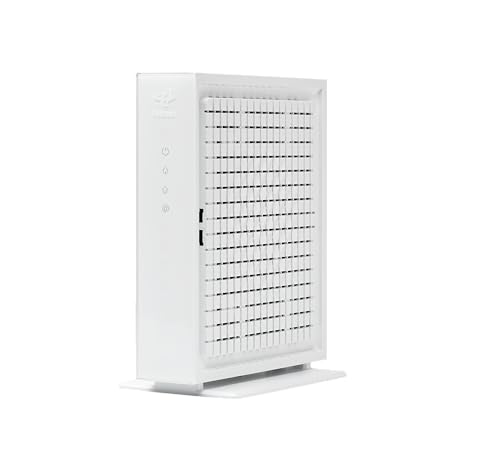
9. Hitron CODA56 White: Best Compact DOCSIS 3.1 Modem
Pros
- DOCSIS 3.1 with 32x8 channel bonding
- 2.5 Gigabit Ethernet port
- Supports up to 2.5 Gbps plans
- Backward compatible with DOCSIS 3.0
- Data-only design is easy to pair with a router
Cons
- No WiFi or voice service
- One Ethernet port
- Requires a separate wireless router
Best for: cable-only customers who want a compact white modem for a separate multi-gig router setup.
The Hitron CODA56 White is the white counterpart to the black CODA56 earlier in the list. Its role is clear: handle the cable signal and leave WiFi to a separate router. That can be the right arrangement for someone who has already built a wireless network and wants a modem that will not dictate how the rest of the home network works.
The modem uses DOCSIS 3.1 and 32x8 channel bonding, with support for plans up to 2.5 Gbps and a 2.5 Gigabit Ethernet port. The port allows a compatible router to receive a multi-gig connection rather than stopping at Gigabit speeds. The modem is backward compatible with DOCSIS 3.0 networks, which helps when service technology varies by area.
This is data-only hardware. It provides no WiFi, router functions, or phone service, and the single Ethernet port means a separate router is required for multiple devices and wireless access. The listing specifically excludes fiber services such as Verizon Fios, AT&T Fiber, Frontier Fiber, Google Fiber, and CenturyLink Fiber, along with DSL, satellite, and fixed wireless connections.
The black CODA56 is effectively the same kind of choice, so color and the details of the individual listing matter more than a major hardware difference. The NETGEAR CM3000 is more compelling for a demanding Xfinity setup that can use mid/high-split service, while the CODA56 is a clean option for a router owner who simply needs a DOCSIS 3.1 modem with a 2.5 Gigabit output.
Check four things before ordering: cable service, approved provider status, the plan's speed tier, and a separate router with a suitable WAN port. If any of those are missing, this compact modem will not replace an all-in-one gateway.
10. ARRIS G20: Best Straightforward WiFi 6 Gateway

Pros
- DOCSIS 3.1 cable modem
- Dual-band WiFi 6
- AX3000 wireless rating
- Works with Xfinity, Spectrum, and Cox
- Combines modem and router
Cons
- Few detailed wired specifications are provided
- Not compatible with fiber, DSL, or satellite
- No stated coverage or device capacity
Best for: someone who wants a current DOCSIS 3.1 gateway from ARRIS without choosing a separate router.
The ARRIS G20 keeps the product decision simple. It is a modem and WiFi 6 router in one unit, using DOCSIS 3.1 for the cable connection and dual-band WiFi 6 for wireless devices. For an Xfinity customer who wants a single box and does not need the more specialized features of the NETGEAR models, the G20 is a credible alternative.
Its AX3000 wireless rating puts it slightly above the CAX30 and CAX30S on paper, though the number is a combined theoretical wireless capacity rather than a promise to one device. ARRIS describes the G20 as suitable for streaming, gaming, browsing, and whole-home wireless use. It also says the gateway works with major providers including Xfinity, Spectrum, and Cox.
The modem's DOCSIS 3.1 technology is the more important part for long-term compatibility. It supports the newer cable standard and should be considered before older DOCSIS 3.0 hardware when the service tier allows it. The product information lists a relatively broad physical footprint, so it needs a clear location near the coaxial outlet and the devices that need wired access.
The limitation is missing detail. Unlike the NETGEAR CAX30, the listing does not provide a coverage area, concurrent-device target, Ethernet-port count, USB port, or specific wired speed information. That does not make the G20 unusable, but it makes it harder to plan a demanding home network. The CAX80 remains the better choice for multi-gig wired connections and high device density.
Choose the G20 when the basic combination of DOCSIS 3.1, WiFi 6, and major cable-provider compatibility is enough. Skip it if you need clearly documented ports, advanced security tools, or a defined coverage target before buying.
How to choose best wifi modem xfinity
Start with the type of network you want to live with. A gateway combines the modem and router, while a standalone modem requires a separate router but gives you more flexibility.
Provider compatibility
Xfinity cable service uses a coaxial connection, but not every modem supports every Xfinity tier. Confirm that the exact model is approved for your plan and address, especially when considering older DOCSIS 3.0 devices. These products are not interchangeable with fiber, DSL, satellite, or fixed wireless equipment.
The same check applies to bundled voice service. Several picks here explicitly exclude phone service, so a customer with a voice bundle needs a compatible voice-capable device or a different arrangement.
DOCSIS generation
DOCSIS 3.1 is the right starting point for newer and faster cable service. It provides more capacity than DOCSIS 3.0 and appears throughout the CAX30, CM3000, CAX30S, CAX80, CODA56, and G20.
DOCSIS 3.0 products such as the C7000 and CM500 can still work on supported plans, but their provider limits are more restrictive. Do not use the WiFi rating to compensate for an old modem standard. The modem remains the gateway to the cable network.
Gateway or standalone modem
A gateway is easier to install because one device handles the modem and WiFi. The CAX30, CAX30S, CAX80, C7000 models, and G20 follow this approach.
A standalone modem is better when you already own a router you like or want to upgrade wireless equipment independently. The CM3000 and CODA56 models require a separate router. This is also the arrangement to consider if you want a dedicated WiFi 6E or WiFi 7 system.
A 2.5 Gigabit modem port only helps when the router and service plan can use it.
Ethernet capacity
Look beyond the wireless label. The CAX30 provides four 1 Gigabit Ethernet ports, while the CAX80 adds a 2.5 Gigabit port and port aggregation. The CM3000 and CODA56 models use 2.5 Gigabit Ethernet to connect to a capable router.
A single Gigabit port can limit a faster service plan or a fast local network. If you use a wired workstation, gaming computer, NAS, or multi-gig router, confirm the modem's output and the router's WAN input before buying.
Wireless coverage and capacity
Coverage depends on building materials, floor plan, placement, and client devices. The CAX30 and CAX30S list up to 2, 000 square feet and 25 concurrent devices, while the CAX80 lists up to 2, 500 square feet and 30 devices.
AX6000 does not guarantee a particular speed in every room, and an AX3000 gateway can be sufficient in a smaller home. Treat wireless ratings as a capacity class, then choose based on the number of active devices and the physical layout.
Frequently asked questions
Is the NETGEAR CAX30 compatible with Xfinity?
The CAX30 is listed as compatible with Xfinity and other major cable providers. It is a DOCSIS 3.1 modem router combo, but Xfinity activation and plan approval are still required. It is not compatible with fiber, DSL, or bundled voice service.
Should I choose a modem router combo or a standalone modem?
Choose a combo if you want one device to provide both the cable connection and WiFi. Choose a standalone modem if you already own a router or want to select a separate WiFi system. The CM3000 and CODA56 require a router, while the CAX30 and G20 provide both functions.
Does DOCSIS 3.1 matter for Xfinity?
DOCSIS 3.1 matters most when you have a newer or faster cable plan. It offers more capacity than DOCSIS 3.0 and is used by the multi-gig-capable picks in this roundup. Older DOCSIS 3.0 models may work on lower service tiers, but confirm the exact Xfinity approval and speed limit.
Can the Hitron CODA56 create WiFi?
No. The Hitron CODA56 is a modem only and has no wireless router. You need to connect its Ethernet port to a separate router, especially if multiple devices need internet access.
Can these modems work with fiber internet?
No. The listed products are cable modems designed for coaxial cable service. The product listings specifically exclude fiber, and several also exclude DSL, satellite, and fixed wireless service.
What does a 2.5 Gigabit Ethernet port do?
A 2.5 Gigabit port lets a compatible router receive more than a standard Gigabit connection can carry. It is useful for faster service plans and multi-gig local networks. The router, cables, client devices, and provider service must all support the higher connection speed.
Do the C7000 models support current Xfinity plans?
The C7000 listings identify cable plans up to 800 Mbps and use DOCSIS 3.0. They may be suitable for an approved Xfinity plan within that limit, but they are not the right choice for every current tier. Check Xfinity's exact compatibility list before ordering.

The bottom line
The Best wifi modem xfinity choice for most homes is the NETGEAR CAX30. It combines DOCSIS 3.1, WiFi 6, four Gigabit ports, USB 3.0, and defined coverage for a practical one-box setup. Choose the NETGEAR CM3000 instead if you already have a separate router or want multi-gig service with stronger upload capability.
The NETGEAR CAX80 is the step-up gateway for large homes and heavy device loads, while either Hitron CODA56 is a sensible standalone option when you already own a capable router. The older C7000 and CM500 models should be reserved for specific, supported lower-speed plans.
If you are undecided, buy the CAX30 for a simple gateway or the CM3000 for a separate-router network.