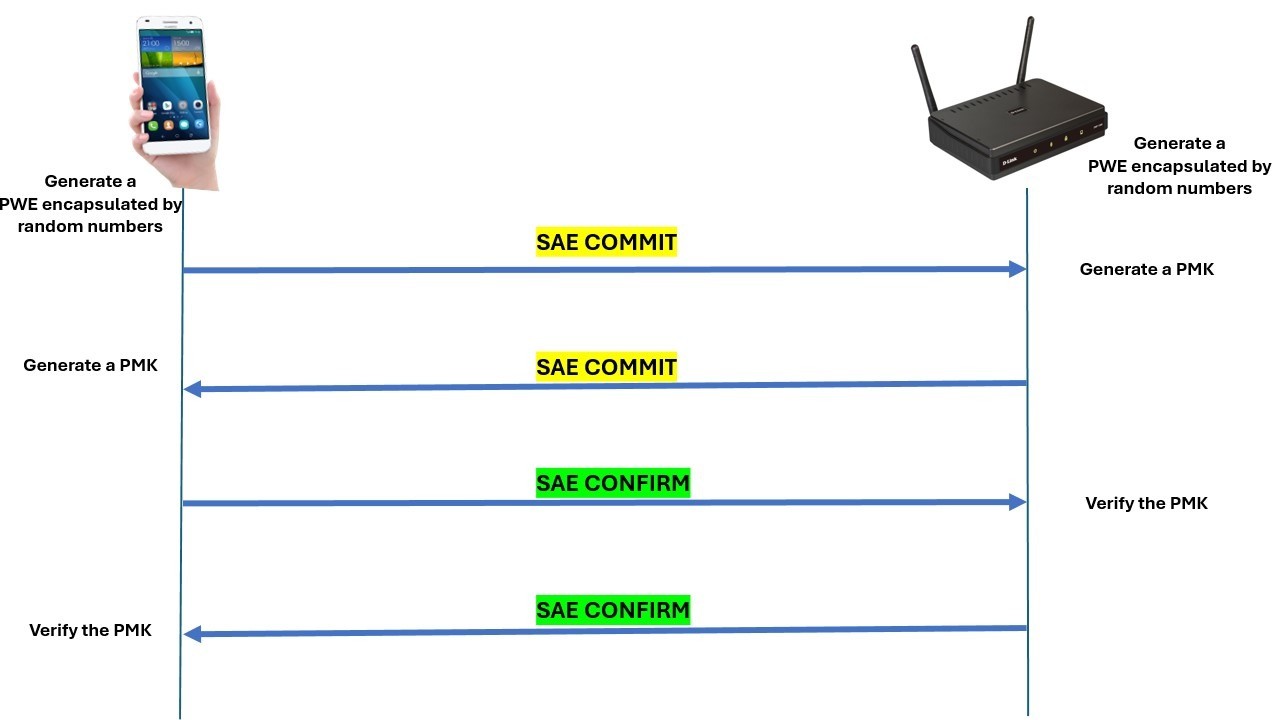

A router can have excellent wireless speed and still leave your home network feeling dated if it lacks modern security. WPA3 helps strengthen protection against password guessing, but the right router also needs enough capacity, useful wired ports, and coverage that fits your rooms.
Our Best WPA3 routers range from compact travel hardware to powerful Wi-Fi 7 models. The TP-Link Archer AX55 is the single best pick for most homes, while the rest cover multi-gig internet, large spaces, low-cost upgrades, and advanced VPN use.
| # | Product | Award | Wi-Fi | Wired | Best for |
|---|---|---|---|---|---|
| 1 | TP-Link Archer AX55 | Best overall | Wi-Fi 6, AX3000 | Gigabit, USB 3.0 | Most homes |
| 2 | TP-Link Archer BE400 | Best Wi-Fi 7 upgrade | Wi-Fi 7, 6.5 Gbps | Two 2.5 Gbps ports | Newer devices |
| 3 | TP-Link Archer AX73 | Best for coverage | Wi-Fi 6, AX5400 | Gigabit, USB 3.0 | Larger homes |
| 4 | TP-Link Archer AX55 Pro | Best multi-gig value | Wi-Fi 6, AX3000 | Two 2.5 Gbps ports | Fast wired networks |
| 5 | NETGEAR Nighthawk RS90 | Best simple Wi-Fi 7 router | Wi-Fi 7, 3.6 Gbps | 2.5 Gbps WAN, four Gigabit LAN | Straightforward upgrades |
| 6 | TP-Link Archer BE600 | Best for large networks | Wi-Fi 7, tri-band | 10 Gbps, 2.5 Gbps | Multi-gig households |
| 7 | TP-Link Archer AX80 | Best Wi-Fi 6 capacity | Wi-Fi 6, AX6000 | 2.5 Gbps | Many connected devices |
| 8 | GL.iNet Beryl 7 | Best travel router | Wi-Fi 7, dual-band | Two 2.5 Gbps, USB 3.0 | Secure travel |
| 9 | TP-Link Archer A6 | Best older-device upgrade | Wi-Fi 5, AC1200 | Four Gigabit LAN | Basic home networks |
| 10 | TP-Link Archer A54 | Best compact basic router | Wi-Fi 5, AC1200 | Four 100 Mbps LAN | Modest connections |
1. TP-Link Archer AX55: Best Overall

Pros
- Strong Wi-Fi 6 performance for everyday homes
- OFDMA and MU-MIMO help with busy networks
- Four external antennas and beamforming
- USB 3.0 and VPN client and server support
Cons
- Only Gigabit wired networking
- HomeShield's richer controls are not all included as basic features
Best for: most households that want modern security, stable Wi-Fi, and useful network controls.
The Archer AX55 gets the fundamentals right without making the network feel like a project. It is the router we'd choose for a typical home with phones, laptops, televisions, smart-home hardware, and several simultaneous streams. Its Wi-Fi 6 design feels substantially more current than the older Archer A6 and Archer A54, yet it remains easier to place than some of the larger high-capacity models here.
Its stated wireless capacity is 2, 402 Mbps on 5 GHz and 574 Mbps on 2.4 GHz. Those figures are link-rate ceilings, not guaranteed internet speeds, but the split makes sense for a busy home. The 5 GHz band handles nearby high-speed devices, while 2.4 GHz reaches farther through obstacles. OFDMA lets multiple clients share a transmission rather than waiting in a long queue, and MU-MIMO helps the router serve several compatible devices at once.
The hardware also has practical touches that are easy to overlook. Four high-gain external antennas work with beamforming to focus the signal toward connected devices, and the cooling redesign is intended to help the router maintain performance. A USB 3.0 port supports storage and media sharing, while VPN client and server support gives the network more flexibility than a basic ISP gateway. HomeShield includes network security scanning, IoT identification, basic parental controls, quality of service, and basic reports.
The limitation is the wired side. This is a Gigabit-class router, so it is not the right long-term center for a home already using internet service above Gigabit or a multi-gig local network. The Archer AX55 Pro adds two 2.5 Gbps ports, and the Archer BE400 goes further with Wi-Fi 7. The AX55 remains the more balanced choice for ordinary Gigabit connections, especially if you want a straightforward path to expanded coverage through EasyMesh.
If you are replacing an older router and want WPA3, Wi-Fi 6, VPN features, USB sharing, and sensible device management in one box, this is the safest recommendation. Readers comparing broader wireless capabilities can also see how coverage, wired ports, and device capacity shape a home network.
2. TP-Link Archer BE400: Best Wi-Fi 7 Upgrade

Pros
- Wi-Fi 7 features including MLO and 4K-QAM
- Very high 5 GHz stated capacity
- Two 2.5 Gbps connections
- EasyMesh and VPN client and server support
Cons
- Dual-band design lacks a separate 6 GHz radio
- Older client devices cannot use every Wi-Fi 7 feature
Best for: households buying newer Wi-Fi 7 phones, laptops, and other devices.
The Archer BE400 is the most sensible step into Wi-Fi 7 for a home that does not need the full complexity of a tri-band flagship. It has a clean focus: modern wireless features, strong 5 GHz capacity, and enough multi-gig connectivity to prevent the wired network from becoming the immediate bottleneck.
TP-Link lists up to 5, 764 Mbps on 5 GHz and 688 Mbps on 2.4 GHz, for 6.5 Gbps of total stated bandwidth. The headline figures matter less than the technology underneath. Multi-Link Operation can transfer data across bands for better throughput, lower latency, and improved reliability when compatible clients support it. Multi-RUs and 4K-QAM are also designed for newer Wi-Fi 7 equipment, so this router becomes more compelling as the devices in the home catch up.
There is one 2.5 Gbps WAN/LAN port, one 2.5 Gbps LAN port, and three Gigabit LAN ports. That is a useful arrangement for a multi-gig modem, a fast desktop, or network storage, though it does not offer the generous high-speed port selection of the Archer BE600. EasyMesh provides a route to broader coverage, and the Tether app or web interface handles setup and management. HomeShield and VPN client and server support add security and remote-access options.
The chief compromise is its dual-band layout. The Archer BE600 has a dedicated 6 GHz band and more multi-gig ports, which makes it better suited to a dense network with many Wi-Fi 7 clients. The BE400 is also less interesting if every device in your home is still Wi-Fi 5 or Wi-Fi 6, since much of its advantage depends on compatible hardware.
Choose the Archer BE400 when you want the responsiveness and future headroom of Wi-Fi 7 without moving to a larger tri-band design. It is a particularly good match for a household replacing several devices at once.
3. TP-Link Archer AX73: Best for Coverage

Pros
- Strong AX5400 Wi-Fi 6 capacity
- Six antennas with beamforming
- 4T4R and HE160 support on 5 GHz
- USB 3.0 for storage and media sharing
Cons
- No multi-gig Ethernet port
- Large footprint compared with basic routers
Best for: homes that need stronger wireless reach without moving to Wi-Fi 7.
The Archer AX73 is the coverage specialist among the mainstream Wi-Fi 6 choices. Its six antennas and high-power front-end modules give it a more substantial wireless design than the AX55, and that matters when the router sits away from a bedroom, kitchen, or upstairs office. It is not magic, since walls and interference still determine real coverage, but it has the hardware to make a larger home easier to serve from one location.
The router's stated wireless capacity reaches 4, 804 Mbps on 5 GHz and 574 Mbps on 2.4 GHz. Its 4T4R arrangement and HE160 support on 5 GHz are aimed at high-throughput compatible clients. MU-MIMO and OFDMA help when multiple devices are active, so the benefit is not limited to one laptop downloading at a time. The AX73 is better suited than the AX55 when several people stream, work, and browse concurrently.
A USB 3.0 port supports media sharing and private cloud storage. HomeShield provides network security and IoT protection features, along with basic parental controls, quality of service, and reports. The broad ventilation is another thoughtful detail for a router expected to handle sustained traffic. Its Ethernet ports remain Gigabit, however, which makes the wireless capacity more useful for local device-to-device activity than for internet plans beyond Gigabit.
The AX73 loses to the Archer AX80 in wired flexibility and to newer Wi-Fi 7 models in future wireless features. The AX80 includes a 2.5 Gbps port and eight high-gain antennas, while the AX73 keeps a simpler Gigabit layout. It also does not have the compact profile of the Archer A6. If you need coverage first and are staying with a conventional Gigabit network, those trade-offs are reasonable.
The Archer AX73 is the pick for a larger or busier home that wants a mature Wi-Fi 6 platform. Before adding an extender, consider how a router's placement affects rooms at the edge of coverage, since antenna capability cannot overcome a poor central location.
4. TP-Link Archer AX55 Pro: Best Multi-Gig Value

Pros
- Two 2.5 Gbps ports
- Wi-Fi 6 with OFDMA and MU-MIMO
- VPN client and server support
- EasyMesh expansion
Cons
- Wireless capacity is lower than the AX73 and AX80
- Four antennas provide less coverage hardware than larger models
Best for: homes with multi-gig internet or fast wired devices.
The Archer AX55 Pro looks like a modest Wi-Fi 6 router until you examine its ports. One 2.5 Gbps port can serve as WAN or LAN, and a second 2.5 Gbps LAN port gives a fast desktop, server, or storage device room to breathe. That makes it more useful than the standard AX55 for a home where wired networking matters as much as wireless coverage.
Wireless capacity is up to 2, 402 Mbps on 5 GHz and 574 Mbps on 2.4 GHz. OFDMA divides a transmission among multiple clients, while MU-MIMO handles several data streams at once. Together, those features help keep a crowded network responsive, though the AX55 Pro does not have the higher radio capacity of the Archer AX73 or Archer AX80.
Four high-performance antennas and beamforming focus the signal toward devices. The design supports EasyMesh, so a compatible extender or router can expand coverage under one network name. VPN client and server support is useful for securing selected home devices or connecting back to the home network, and a USB 3.0 port adds storage and media-sharing options.
The weakness is that the Pro label does not mean a stronger wireless range class. The Archer AX73 has six antennas and a more capable 5 GHz radio, while the Archer BE400 brings Wi-Fi 7 features. Skip the AX55 Pro if your main problem is a distant room and you have no multi-gig equipment. Choose it when the two 2.5 Gbps ports solve a real bottleneck.
For a household with fast wired hardware and mostly Wi-Fi 6 clients, this is a smart middle ground. It keeps the useful security and management features of TP-Link's larger routers while giving the wired network a much longer runway.
5. NETGEAR Nighthawk RS90: Best Simple Wi-Fi 7 Router

Pros
- Wi-Fi 7 dual-band wireless
- 2.5 Gbps WAN connection
- Four Gigabit LAN ports
- WPA3, firewall, and automatic firmware updates
Cons
- 2.5 Gbps port is WAN only
- Security subscription trial does not make every feature permanent
Best for: users who want a guided Wi-Fi 7 upgrade with familiar wired connections.
The Nighthawk RS90 keeps the move to Wi-Fi 7 uncomplicated. It is a standalone router, not a modem, and its setup process is designed around the Nighthawk app or a web browser. That straightforward approach will appeal to anyone replacing an ISP gateway and wanting clear instructions rather than a deep networking exercise.
Its dual-band wireless capacity is listed at up to 3.6 Gbps, with a quad-core 2.0 GHz processor handling gaming, streaming, video calls, and smart-home traffic. Smart Connect can choose the appropriate band for each device, and a separate guest network keeps visitors away from the main network. Wi-Fi 7 support gives compatible clients newer wireless capabilities, although a dual-band layout is less flexible than the tri-band Archer BE600.
The 2.5 Gig WAN port is intended for the modem connection, while four Gigabit LAN ports serve wired computers, consoles, televisions, and storage devices. WPA3, a SPI firewall, and automatic firmware updates cover the basic security expectations. NETGEAR Armor adds broader protection for connected devices, but the listing describes that as a 30-day trial, so buyers should understand the difference between the router's included security functions and the optional service.
The RS90 is less attractive for someone building a multi-gig local network. The Archer AX55 Pro has two 2.5 Gbps connections, and the Archer BE600 offers several faster LAN options plus a 10 Gbps port. The RS90 is better for a home that wants one fast incoming connection and several ordinary wired devices.
Pick the Nighthawk when easy setup and clear app management matter more than maximum port speed. It is also worth checking ISP requirements before installation, since fiber service may need bridge mode or extra configuration.
6. TP-Link Archer BE600: Best for Large Networks

Pros
- Tri-band Wi-Fi 7 design
- Dedicated 6 GHz band
- 10 Gbps port and three 2.5 Gbps LAN ports
- Broad stated device and coverage capacity
Cons
- Larger physical design
- More capability than smaller households may need
Best for: large, busy homes with multi-gig internet and several new devices.
The Archer BE600 is the serious network builder's option. Its tri-band design gives Wi-Fi 7 clients access to 6 GHz while older hardware continues using 5 GHz and 2.4 GHz. That extra band can reduce contention, particularly when several high-speed devices are active at once.
The stated rates are 5, 765 Mbps on 6 GHz, 2, 882 Mbps on 5 GHz, and 1, 032 Mbps on 2.4 GHz. The router also supports Multi-Link Operation, Multi-RUs, 4K-QAM, and channels up to 320 MHz. Those features only reach their full potential with compatible clients, but the architecture is well prepared for a home gradually moving to Wi-Fi 7.
The wired layout is the standout. There is one 10 Gbps WAN/LAN port, one 2.5 Gbps WAN/LAN port, and three 2.5 Gbps LAN ports. That gives fast storage, workstations, access points, and multi-gig internet room to operate without immediately needing a switch. TP-Link lists coverage of up to 2, 600 square feet and support for up to 120 devices, though house construction and placement remain decisive.
The Archer BE600 is overkill for a small apartment or a home with a single ordinary internet connection. The Archer BE400 offers Wi-Fi 7 in a simpler dual-band form, and the AX55 is easier to justify when current devices are mostly Wi-Fi 6. The BE600 earns its place when both wireless congestion and wired capacity are genuine concerns.
This is the router to buy for a demanding home network that you expect to keep for years. It also supports VPN clients and servers, HomeShield, and EasyMesh-style management through TP-Link's software, giving its impressive hardware a useful day-to-day control layer.
7. TP-Link Archer AX80: Best Wi-Fi 6 Capacity

Pros
- High AX6000 wireless capacity
- Eight high-gain antennas
- 2.5 Gbps WAN or LAN port
- OneMesh and VPN client support
Cons
- Heavy and physically large
- No Wi-Fi 7 support
Best for: homes with many connected devices that still prefer Wi-Fi 6.
The Archer AX80 is the biggest Wi-Fi 6 option here, and it feels designed for homes that keep adding devices. Eight high-gain antennas with beamforming give it more coverage hardware than the AX55 Pro, while the AX6000 class provides more wireless capacity than the AX55 and AX73.
TP-Link lists up to 4, 804 Mbps on 5 GHz and 1, 148 Mbps on 2.4 GHz. MU-MIMO allows multiple data streams, and OFDMA divides a stream among devices to improve efficiency and latency. Those features are most useful in a crowded home, not because one phone will suddenly receive the full headline rate, but because simultaneous traffic is less likely to become a queue.
A 2.5 Gbps port can serve as WAN or LAN, which is useful for multi-gig internet or a fast local device. OneMesh can extend the network with a compatible range extender, and the router supports VPN client connections. HomeShield covers network and IoT protection, with basic parental controls, quality of service, and reporting features included in the listed feature set.
The AX80's drawback is its age relative to Wi-Fi 7 models. The Archer BE400 and BE600 are better choices if you are specifically buying for Wi-Fi 7 phones or laptops, and the BE600 has a much more advanced wired layout. The AX80 also weighs 2 pounds and takes up more space than the AX55, so it is not the discreet option.
Choose it for maximum Wi-Fi 6 capacity, strong antenna hardware, and a useful 2.5 Gbps port. It is especially compelling for a busy home that has not yet accumulated enough Wi-Fi 7 devices to justify moving to the newer standard.
8. GL.iNet Beryl 7: Best Travel Router

Pros
- Compact Wi-Fi 7 travel design
- Two 2.5 Gbps Ethernet ports
- USB 3.0
- Strong VPN client and server features
Cons
- Not a substitute for a full-size home router
- VPN services require an active subscription
- Advanced OpenWrt controls need patience
Best for: travelers who want their own encrypted network in hotels, cruise ships, and other temporary setups.
The Beryl 7 is the clear outlier in this roundup, and that is exactly why it is useful. It is small enough to travel with, but it is not a stripped-down hotspot. The device is built around secure network control in places where hotel or public Wi-Fi is inconvenient, inconsistent, or difficult to trust.
Its dual-band wireless rates are listed as 688 Mbps on 2.4 GHz and 2, 882 Mbps on 5 GHz. Two 2.5 Gbps Ethernet ports provide one WAN and one LAN connection, and USB 3.0 adds another flexible connection. The device can support up to 120 devices according to the feature listing, though a travel router's real advantage is controlling a smaller personal group of devices through one private network.
VPN capability is unusually deep for this size. WireGuard and OpenVPN are pre-installed, with listed maximum VPN speeds of 1, 100 Mbps for WireGuard and 1, 000 Mbps for OpenVPN-DCO under local testing conditions. The Beryl 7 can run a VPN client and server at the same time, and its physical toggle can be assigned to features such as a VPN client or AdGuard Home. An active subscription is required for VPN service providers.
Security support includes WPA3, DNS over HTTPS, DNS over TLS, and IPv6. OpenWrt 21.02 firmware and 512MB of storage provide extensive customization, but they also make this more technical than the Archer AX55. It is not the best choice for someone who simply wants a living-room router with broad antenna coverage.
Buy the Beryl 7 if travel privacy, VPN routing, and portability are the reason for the purchase. For a permanent home network, the AX55, AX73, or BE600 provides a more natural physical and wireless foundation.
9. TP-Link Archer A6: Best Older-Device Upgrade

Pros
- WPA3 support on an older Wi-Fi platform
- Four Gigabit LAN ports
- OneMesh and access point modes
- Four antennas with beamforming
Cons
- Wi-Fi 5 rather than Wi-Fi 6 or Wi-Fi 7
- No USB port
- Lower wireless capacity than newer picks
Best for: basic networks that need WPA3 and Gigabit wired connections without advanced Wi-Fi demands.
The Archer A6 is a straightforward older-standard router that earns attention because it combines WPA3 with four Gigabit LAN ports. It is more capable on the wired side than the Archer A54, and its access point mode makes it useful when a wired connection needs to become wireless in another part of a home.
Its AC1200 design is rated at 900 Mbps on 5 GHz and 300 Mbps on 2.4 GHz. Those are theoretical wireless link rates, but they indicate the intended use: ordinary browsing, streaming, and a modest number of connected devices. MU-MIMO helps compatible devices share the 5 GHz band, while four external antennas and beamforming aim the signal more effectively.
The A6 supports OneMesh, so a compatible extender can create one network name across a broader area. That is a practical route for a home that does not need the full radio capacity of the Archer AX55. It also works with the Tether management ecosystem and supports the WPA3 protocol, which is the central reason to consider it over a much older router.
The compromises are clear. Wi-Fi 5 lacks the efficiency improvements of Wi-Fi 6, there is no USB port, and the router is not suited to a very busy household or high-speed wireless transfers. The AX55 has better capacity, OFDMA, newer client support, and VPN features. The A6 is the one to skip if you are already dealing with congestion or a large number of active devices.
For a small household with Gigabit Ethernet devices and uncomplicated wireless needs, the Archer A6 remains a sensible basic upgrade. It is also a useful access point when the router's main job is to provide secure Wi-Fi from an existing wired network.
10. TP-Link Archer A54: Best Compact Basic Router

Pros
- WPA3 support
- Dual-band wireless
- EasyMesh and access point modes
- Guest Wi-Fi and parental controls
Cons
- Fast Ethernet ports limit wired throughput
- Lower range and capacity than newer models
- No USB port
Best for: small, modest networks that need basic WPA3 support and simple management.
The Archer A54 is the most basic full-size home router here. Its appeal is not ambitious wireless performance. It is the compact, uncomplicated option for a small network where WPA3, guest Wi-Fi, access point mode, and straightforward controls matter more than multi-gig hardware.
The dual-band design is rated at up to 867 Mbps on 5 GHz and 300 Mbps on 2.4 GHz. Four external antennas support the listed coverage of up to 1, 000 square feet, while EasyMesh compatibility offers a path to expansion. IPTV features such as IGMP proxy and snooping, bridge, and tagged VLAN support are useful in the right setup, though they are not relevant to every household.
The four Ethernet ports are 10/100 Mbps Fast Ethernet rather than Gigabit. That is the decisive limitation. Wired computers, televisions, and access points can be capped well below what newer routers support, and the A54 is a poor fit for a fast internet plan or substantial local file transfers. It does offer access point mode, IPv6, guest Wi-Fi, and parental controls, which give it more flexibility than its basic radio suggests.
The Archer A6 is the better choice when four Gigabit LAN ports matter, while the AX55 is the better choice for a busy wireless home. The A54 makes sense only when the network is modest and the slower wired connections will not become a daily frustration. It should not be chosen solely because its wireless label also says AC1200.
Choose the Archer A54 for a small apartment, a secondary access point, or a limited-device network. If you are uncertain, moving one step up to a Gigabit-equipped router will leave much more room for future devices.
How to choose best wpa3 routers
WPA3 is important, but it should be considered alongside wireless generation, coverage, wired connectivity, and the router's management tools.
Wireless generation
Wi-Fi 5 models such as the Archer A6 and A54 can support WPA3, but Wi-Fi 6 adds OFDMA and more efficient handling of busy networks. Wi-Fi 7 adds features such as Multi-Link Operation, Multi-RUs, and 4K-QAM for compatible devices. Do not choose the newest standard simply because it is newer. Match it to the phones, computers, and access points you expect to use.
Coverage and antennas
Antenna count is only one part of coverage, but it can reveal how ambitious a router's design is. The AX73 has six antennas, the AX80 has eight, and the AX55 uses four high-gain antennas with beamforming. Walls, floors, interference, and router placement can matter more than the number printed on the box.
A router cannot compensate for being hidden in a cabinet or placed at the far edge of the home.
For difficult layouts, EasyMesh, OneMesh, or a compatible extender can be more useful than choosing a router with a higher theoretical wireless rate.
Wired ports
Check the WAN port first if your internet connection is faster than Gigabit. The AX55 Pro has two 2.5 Gbps ports, the BE400 has two, and the BE600 includes a 10 Gbps port plus several 2.5 Gbps ports. The NETGEAR RS90 has a 2.5 Gbps WAN port but four Gigabit LAN ports. A router with a fast wireless specification can still bottleneck a desktop or network storage device if its wired ports are slow.
Network capacity
OFDMA and MU-MIMO help Wi-Fi 6 routers manage multiple clients. Tri-band designs provide another band for separating traffic, while dual-band Wi-Fi 7 models concentrate their capacity across 2.4 GHz and 5 GHz. Count the devices that are active at the same time, not every device that has ever joined the network. A home with video calls, game downloads, cameras, televisions, and smart-home equipment needs more capacity than a small home with occasional browsing.
Security and management
WPA3 is the starting point, not the whole security plan. Automatic firmware updates, guest Wi-Fi, firewall features, IoT identification, parental controls, and VPN support all affect how manageable the network is. HomeShield appears on several TP-Link models, while the NETGEAR RS90 combines WPA3 with a SPI firewall and automatic firmware updates. For a wider look at choosing hardware for a household network, consider which network controls matter after the initial setup.
Frequently asked questions
Do all of these routers support WPA3?
The listed features explicitly identify WPA3 support for the Archer A6, Archer A54, NETGEAR RS90, GL.iNet Beryl 7, and Archer AX80. The other products are presented as modern secure routers, but the supplied feature details do not explicitly state WPA3 for every model. Check the current product documentation before buying if WPA3 compatibility is a strict requirement.
Is Wi-Fi 7 necessary for WPA3?
No. WPA3 and Wi-Fi generation are separate considerations. A Wi-Fi 6 router such as the Archer AX55 can provide a strong modern network, while Wi-Fi 7 mainly adds newer wireless capabilities for compatible clients.
Should I buy a router with a modem included?
None of the full-size home routers in this roundup is presented as a modem. Most require a separate modem or an ISP gateway with an Ethernet connection. The NETGEAR RS90 specifically states that it is router-only and has no coax input.
Which router is best for a large home?
The Archer AX73 is the strongest coverage-focused Wi-Fi 6 choice, while the Archer BE600 is the more capable option for a large, busy, multi-gig home. Neither coverage estimate overrides walls, floors, interference, and placement. A compatible mesh expansion may be necessary in a multi-story home.
Can these routers use a VPN?
VPN support varies. The Archer AX55, AX55 Pro, BE400, BE600, and Beryl 7 support VPN client and server functions according to their listings. The Archer AX80 supports a VPN client, while the NETGEAR RS90's supplied features focus on WPA3, firewall protection, and NETGEAR Armor.
What is the difference between the Archer A6 and Archer A54?
Both are AC1200-class dual-band routers with WPA3 support, but the Archer A6 has four Gigabit LAN ports. The Archer A54 has four 10/100 Mbps Fast Ethernet ports and is intended for a more modest network. The A6 is the better fit when wired performance matters.
Can I use a travel router as my main home router?
The Beryl 7 can route traffic, run VPN services, and connect many devices, but its compact travel design is intended for hotels, cruise ships, and temporary networks. A full-size router is usually a better main-home choice because it is designed around broader coverage and permanent placement.

The bottom line
The TP-Link Archer AX55 is the Best WPA3 routers pick for most homes because it combines Wi-Fi 6 efficiency, four external antennas, OFDMA, MU-MIMO, USB 3.0, VPN support, and useful HomeShield features without forcing a household into a more complicated network. The TP-Link Archer BE400 is the better choice when newer Wi-Fi 7 devices and two 2.5 Gbps connections matter.
Choose the TP-Link Archer BE600 for a large, demanding home with multi-gig wired equipment, or the GL.iNet Beryl 7 when secure VPN control needs to fit in a travel bag. The Archer AX73 and AX80 remain strong Wi-Fi 6 alternatives for coverage and device capacity.
If you are undecided, buy the Archer AX55 unless your network has a clear multi-gig, Wi-Fi 7, large-home, or travel requirement.
As an Amazon Associate we earn from qualifying purchases.