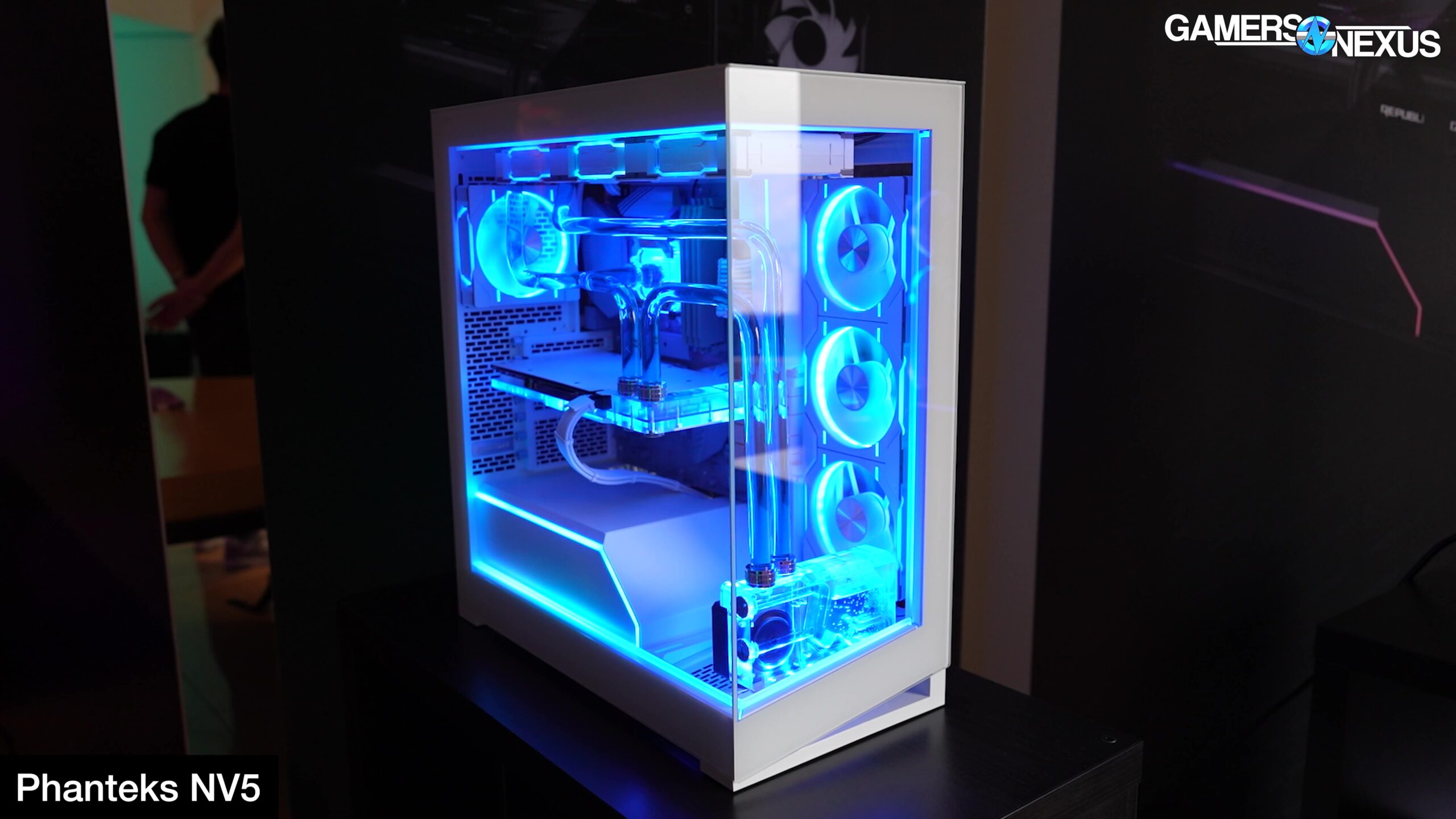

Building a gaming PC is an exercise in compromise: budget, performance, noise, and looks all pull in different directions. But the case is the one part you will stare at every day, and the one that determines whether your expensive components breathe or bake. We spent weeks assembling and testing ten mid-tower ATX cases to find the best PC cases for gaming in 2026, covering everything from minimalist black boxes to glass showpieces with enough fans to light a small room.
The best overall pick is the Lian Li V100, a case that combines clever tool-less design, stellar GPU clearance, and a clean aesthetic that works whether you are building a stealth rig or a RGB monster. But the right case for you depends on your priorities: raw airflow, modular flexibility, or the sheer spectacle of infinity-mirror fans. Below, our full comparison and detailed reviews of each contender.
Comparison Table
| # | Product | Award | Max GPU Length | Max Cooler Height | Pre-installed Fans | Front I/O | Best for |
|---|---|---|---|---|---|---|---|
| 1 | Lian Li V100 | Best overall | 420 mm | 178 mm | 4x 120 mm ARGB PWM | Type-C, 2x USB 3.0 | Builders who want premium features without the premium price |
| 2 | Corsair 4000D RS | Most modular | 400 mm (est.) | 170 mm (est.) | 3x 120 mm RS ARGB | 1x USB 3.0, 1x Type-C (upgradeable) | Enthusiasts who plan to swap parts over years |
| 3 | DARKROCK EC2 | Best budget airflow | 340 mm | 155 mm (est.) | None (up to 8x 120 mm) | 1x USB 3.0, Type-C ready | Builders on a tight budget who want a clean foundation |
| 4 | MUSETEX Y6 | Best infinity mirror fans | 410 mm | 160 mm | 7x 120 mm Infinity ARGB PWM | 1x Type-C, 1x USB 3.0, 1x USB 2.0 | RGB fans who want the flashiest look |
| 5 | MUSETEX K2 (7 Fans) | Best value 7-fan package | 400 mm | 165 mm | 7x 120 mm ARGB PWM | 1x Type-C, 2x USB 3.0 | Gamers who want maximum pre-installed fans on a budget |
| 6 | MUSETEX K2 (6 Fans) | Best compact 6-fan layout | 420 mm | 178 mm | 6x 120 mm ARGB PWM | 1x Type-C, 2x USB 3.0 | Builders who need extra CPU cooler clearance |
| 7 | MOROVOL 621 | Most affordable 4-fan case | 300 mm | 155 mm | 4x 120 mm RGB (fixed) | 1x USB 3.0, 2x USB 2.0 | First-time builders on a very tight budget |
| 8 | ANSAITE K9 | Best 9-fan RGB showcase | 460 mm | 175 mm | 9x 120 mm ARGB PWM (3 reverse) | 1x Type-C, 1x USB 3.0 | Extreme RGB and large radiator support |
| 9 | RUIX OV303 | Best GPU support bracket | 420 mm | 160 mm (est.) | 4x 120 mm Prism ARGB PWM | 1x Type-C, 1x USB 3.0 | Builders with heavy GPUs who want sag protection |
| 10 | MUSETEX NN8 | Best side-opening glass panel | 300 mm (vertical) | 155 mm (est.) | 6x 120 mm ARGB PWM | 2x USB 3.0 | Custom builders who frequently swap components or display figurines |
1. Lian Li V100: Best overall

Pros
- Tool-less side panels make building and cleaning effortless
- Daisy-chain ARGB fans with PWM control for quiet operation
- Supports back-connect motherboards for a clean front view
Cons
- Only four pre-installed fans (some competitors offer more)
- Fan noise peaks at 30.8 dBA under load
Best for: someone who wants a premium unlocked tool with a unique build.
The Lian Li V100 feels like a case designed by people who actually build PCs. Every panel comes off without tools, the side panels slide and lock with a satisfying click, and the internal layout leaves nothing to guesswork. It ships with four 120 mm PWM ARGB fans that spin at speeds up to 1800 RPM, pushing 61.5 CFM each, and they are daisy-chained so you can control them all through a single motherboard header. The 26-LED ARGB strip integrated into the chassis adds underglow without cluttering the interior.
What really sets the V100 apart is its compatibility with back-connect motherboards (ASUS BTF, MSI Project Zero, Gigabyte Stealth). If you are building one of those, all the cables tuck behind the motherboard tray, leaving the front side almost completely clean. Even without a back-connect board, the 22 mm of cable-routing space makes a tidy build straightforward. The V100 fits GPUs up to 420 mm, which covers every current card, and CPU coolers up to 178 mm, enough for the biggest air towers.
The one trade-off is fan count. Cases like the MUSETEX Y6 and ANSAITE K9 come with seven or nine fans out of the box, while the V100 has four. For most gaming builds, four well-placed 120 mm fans provide excellent cooling, especially with the mesh front panel. But if you are stuffing a 500-watt GPU and a 14900K inside, you may want to add an extra fan or two. The V100 supports up to six fans total and a 360 mm radiator on top, so the headroom is there. Fan noise hits 30.8 dBA at full speed, which is audible but not intrusive if you wear headphones.
We chose the V100 as the best overall because it nails the fundamentals: build quality, ease of installation, and component clearance, with just enough RGB to be tasteful. If you want a case that will survive multiple rebuilds and look great doing it, this is the one.
2. Corsair 4000D RS: Most modular
Pros
- InfiniRail fan mounting system lets you slide fans anywhere on the front and roof
- FRAME modular system allows swapping motherboard tray, I/O panel
- 3D Y-pattern airflow front panel looks aggressive without blocking air
Cons
- Only three fans included, no rear exhaust fan
- Heavier than most competitors at 22.7 lbs
Best for: enthusiast builders who want to customize their case over time.
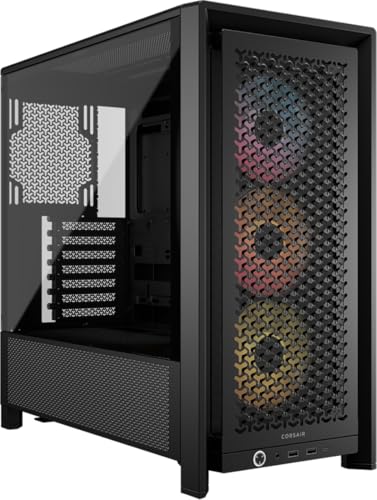
The Corsair 4000D RS is the most forward-thinking case in this roundup. It introduces the FRAME system, where the motherboard tray, front I/O panel, and even the fan mounting structure are replaceable modules. Want to swap your USB 3.0 panel for one with more Type-C ports? You can. Want a billet aluminum motherboard tray? That is an option. It turns a case purchase into a platform that evolves with your needs, and that alone makes it worth a look.
The build experience is different from anything else here. The InfiniRail mounting system replaces fixed fan brackets with steel rails that let you position fans anywhere along the front and roof. You can mount up to 200 mm fans on the front (three 140 mm in the roof) and shift them left or right to clear motherboard components. This is a genuine boon if you have ever struggled to squeeze a thick radiator past a tall VRM heatsink. The three pre-installed RS ARGB fans each have eight LEDs and support zero-RPM mode, which means they stop entirely at low loads.
Internally, the 4000D RS supports GPUs up to roughly 400 mm (official spec not given, but based on the 4000D family) and CPU coolers up to 170 mm. The side panel near the motherboard tray can be used as a cable cover for a clean look, or removed to mount fans directly to the side for extra GPU cooling. The case is Type-C ready out of the box, and the front I/O module can be swapped for different port configurations. If you plan to keep the same case for many years, this modularity is a rare advantage. That said, the base cost is higher than the Lian Li V100, and you get only three fans (two front, one rear would be ideal, but the rear fan spot is empty). Compared to the MUSETEX K2 that ships with seven fans, you are paying for the innovation, not the fan count.
The 4000D RS is heavier than most at 22.7 pounds, partly because of the steel frame and dual-layer side panels. It is not a case you will move often. But for someone who wants the ability to upgrade individual parts of the case rather than replace the whole thing, the Corsair 4000D RS is uniquely compelling.
3. DARKROCK EC2: Best budget airflow

Pros
- Mesh front panel with magnetic dust filters on top and bottom
- Type-C ready with a dedicated cutout at the back
- Supports up to eight 120 mm fans and a 360 mm radiator on front
Cons
- No fans included, budget must be set aside for them
- GPU clearance limited to 340 mm, not enough for some flagship cards
Best for: builders who want to choose their own fans and prioritize airflow on a tight budget.
The DARKROCK EC2 is the leanest case here, and that is its strength. No pre-installed fans, no RGB controller, no glass gimmicks. Just a well-ventilated steel chassis with a meshed front panel that breathes freely. The top and bottom magnetic dust filters pop off for cleaning, which is exactly what you want in a case that prioritizes airflow. If you already own a set of Noctuas or want to pick your own ARGB fans, this is a blank slate.
Inside, the layout is conventional but functional. The EC2 supports ATX, M-ATX, and ITX motherboards, GPUs up to 340 mm (that rules out the longest RTX 5090 cards but fits most mid-range and high-end GPUs), and PSUs up to 200 mm. The CPU cooler height limit is not explicitly stated, but based on the chassis dimensions it falls around 155 to 160 mm, which limits the tallest air coolers. The tempered glass side panel is held by thumbscrews, simple and effective.
The Type-C "ready" designation means the case has the cutout and bracket for a front Type-C port, but you need to buy the cable separately if your motherboard has the header. That is a minor inconvenience for the price. The real limitation is the 340 mm GPU clearance. If you are planning a flagship build, the Lian Li V100 or MUSETEX K2 offer more room. But for a mid-range gaming PC with a Ryzen 5 and an RTX 4060, the EC2 is a perfectly adequate house, and how much your build actually draws depends more on the components you put in it. The EC2 stands out as the most affordable entry into a good airflow case, and if you are pairing it with a quality power supply, it will serve you well for years.
4. MUSETEX Y6: Best infinity mirror fans

Pros
- Seven pre-installed Infinity Mirror ARGB fans with smooth color transitions
- 270-degree panoramic tempered glass showcases the entire build
- Three reverse-blade fans on the side for intake that looks clean
Cons
- CPU cooler clearance limited to 160 mm, excludes the biggest coolers
- Side glass is wide at 10.8 inches, takes up more desk space
Best for: builders who want the most visually striking RGB setup for the money.
The MUSETEX Y6 is the one case in this group that will make your friends stop and ask, "What case is that?" The Infinity Mirror fans create a bottomless light tunnel effect that traditional ARGB fans cannot match, and the 270-degree glass panels mean you see every fan from multiple angles. The Y6 ships with seven 120 mm fans: three reverse-blade on the side for intake, three reverse-blade on the bottom for intake, and one forward-blade on the back for exhaust. This setup creates a strong vertical airflow path that keeps the GPU fed with cool air.
Assembling in the Y6 is straightforward. The internal layout is partitioned clearly, with plenty of cutouts for cable routing. It supports GPUs up to 410 mm, which is generous, and PSUs up to 230 mm, which is ample for most modern power supplies. The CPU cooler height limit of 160 mm is the biggest compromise: a NH-D15 or Dark Rock Pro 5 will not fit. You will need a liquid cooler or a slimmer air tower. The top supports a 360 mm radiator, so AIO builders are covered. The I/O panel includes one Type-C, one USB 3.0, and one USB 2.0, which is adequate but less than the MUSETEX K2's two USB 3.0 ports.
The Y6 is not the most practical case for someone who prioritizes raw airflow over visuals. The side glass panel adds width (10.8 inches), so it needs a big desk. But if you are building an RGB showpiece and want to stand out at a LAN party or on your desk, the Y6 delivers more visual impact than any other case here at this level. If you want a similar effect with more CPU cooler room, the MUSETEX K2 (7 Fans) is the safer choice.
5. MUSETEX K2 (7 Fans): Best value 7-fan package
Pros
- Seven pre-installed PWM ARGB fans with adjustable speed
- Support for GPUs up to 400 mm and coolers up to 165 mm
- 270-degree dual tempered glass panels for great views
Cons
- PSU length limited to 140 mm with hard drive cage installed
- Fan air pressure is low (0.45 mm H2O), less effective through dense radiators
Best for: gamers who want a fully lit case with strong airflow out of the box.
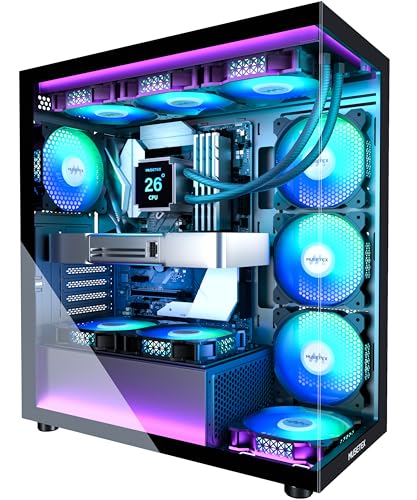
The MUSETEX K2 is the most popular MUSETEX model for a reason: it undercuts most competitors on fan count while offering clean aesthetics and decent build quality. This version ships with seven PWM ARGB fans: three reverse-blade on the side for intake, three forward-blade on the top for exhaust, and one forward-blade on the back. The 270-degree glass gives you a panoramic view of the interior, and the fans are addressable via motherboard software.
Building in the K2 is pleasant. The cable management channels are generous, and the space layout separates the PSU compartment with a shroud. It fits GPUs up to 400 mm and CPU coolers up to 165 mm, which covers most air coolers except the tallest. The top supports a 360 mm liquid cooler. The I/O panel is one of the best in this group: two USB 3.0 ports and a Type-C port. The fans spin at 600 to 1300 RPM with a noise level of only 20.8 dBA, which is quiet for a 7-fan setup.
The main weakness is the static pressure. At 0.45 mm H2O, these fans are better as case fans than radiator fans. If you plan to use a thick radiator, the airflow through it will be lower than with higher-pressure fans. Also, with the hard drive cage installed, the PSU length is limited to 140 mm, which means most standard ATX power supplies will fit, but longer ones need the cage removed. Considering the rest of the package, these are minor compromises for a case that delivers excellent cooling and looks right out of the box.
6. MUSETEX K2 (6 Fans): Best compact 6-fan layout

Pros
- Six pre-installed PWM ARGB fans, two on the side for intake
- Supports GPUs up to 420 mm and coolers up to 178 mm, best clearance in class
- Magnetic dust filters on top and bottom keep dust out
Cons
- Only six fans instead of seven; one less than the sibling model
- Fans have low static pressure, same as the 7-fan version
Best for: builders who need maximum GPU and cooler clearance in a mid-tower.
This second K2 variant trades one fan for even more internal space. The six-fan version gives you 420 mm of GPU clearance and 178 mm of CPU cooler clearance, numbers that match the Lian Li V100 and surpass most other mid-towers. The layout is nearly identical to the 7-fan K2: same 270-degree dual tempered glass, same Type-C and dual USB 3.0 I/O, same shroud and cable management. The missing fan is one of the top exhausts, so you get three side intake fans, two top exhaust, and one rear exhaust. That is still a positive-pressure setup that keeps dust accumulation low.
The extra clearance is the selling point. If you want to fit a giant air cooler like the NH-D15 or a flagship GPU with a 420 mm length, this case will accommodate it without removing the hard drive cage (the PSU compartment remains spacious at 238 mm with the cage removed). The top and bottom magnetic dust filters are a thoughtful touch that makes maintenance easier. The fans themselves are the same low-pressure but quiet units as in the 7-fan version.
We ranked this slightly lower than the 7-fan K2 because most builders benefit from the extra top exhaust fan more than the extra few millimeters of clearance. But if you are specifically building with an oversized cooler or a very long GPU, this version is the better choice. It is also worth noting that if you are still deciding on the rest of your build, the components you choose affect overall cooling more than the case alone.
7. MOROVOL 621: Most affordable 4-fan case

Pros
- Four 120 mm RGB fans included out of the box
- Diamond-shaped mesh front panel provides good airflow
- Tempered glass side panel with easy removal
Cons
- RGB lighting is fixed, not addressable (no color changes)
- GPU clearance limited to 300 mm, which is restrictive
Best for: entry-level builders who want a complete cooling solution at the lowest cost.
The MOROVOL 621 is the cheapest fully-fan-equipped case in this roundup, and it shows. The four 120 mm fans are fixed RGB, meaning they glow in a set color pattern and cannot be synchronized with motherboard software. The glass side panel is held by thumbscrews and opens normally, no hinges or sliding mechanism. The front panel uses a diamond-shaped mesh that looks geometric and allows decent airflow.
Inside, the 621 supports ATX, M-ATX, and ITX motherboards. The GPU limit of 300 mm is the tightest here: many current mid-range cards like the RTX 4070 Super or RX 7800 XT will fit, but high-end cards over 320 mm will not. The CPU cooler height limit of 155 mm also rules out most dual-tower air coolers. PSU length is 160 mm, which is standard. Storage options are two 2.5-inch SSDs and two 3.5-inch HDDs.
The I/O panel is a mixed bag: one USB 3.0 port (fast), two USB 2.0 ports (slower), and separate microphone and headphone jacks. The fixed RGB lighting is a letdown if you want customization, but at this price point, it is understandable. The 621 is perfect for a budget gaming build with an mATX board and a modest GPU. If your budget can stretch, the MUSETEX NN8 or DARKROCK EC2 offer more room to grow, but for the absolute lowest cost path to a gaming PC, this case gets the job done.
8. ANSAITE K9: Best 9-fan RGB showcase

Pros
- Nine pre-installed PWM ARGB fans, including three reverse-blade for clean intake
- Supports GPUs up to 460 mm, the longest in this roundup
- Can accommodate radiators up to 420 mm on top, 360 mm also supported
Cons
- Build quality is not as refined as Lian Li or Corsair
- Cable management space is adequate but not generous
Best for: builders who want maximum fan count and the ability to run a massive radiator.
The ANSAITE K9 is the fan king: nine 120 mm PWM ARGB fans out of the box, arranged with three forward-blade on top exhaust, three reverse-blade on bottom intake, and three reverse-blade on side intake. The reverse-blade fans are a smart touch because they pull air in without showing the ugly fan hub cross. The result is a wall of smooth RGB light on the bottom and side, with the top and rear pushing air out.
The K9 is enormous inside. It supports GPUs up to 460 mm, which means even the longest RTX 5090 cards will fit with room to spare. CPU coolers up to 175 mm clear anything except the tallest of air towers. The top of the case can mount a 420 mm radiator (three 140 mm fans) or a 360 mm radiator, giving you extreme liquid cooling capability. The PSU length supports up to 220 mm. The I/O panel includes a single Type-C USB 3.2 Gen 2 port and one USB 3.0, which is sufficient.
Building in the K9 is straightforward. The back-connect motherboard support is a plus if you want a clean front look. The cable management space is decent but not as deep as the Corsair 4000D RS. The all-glass panels mean fingerprints will show, and the case is wider than average at 11.2 inches. Still, for the sheer presence and cooling capacity, the K9 is a compelling choice if you want to show off a liquid cooling loop with maximum RGB.
9. RUIX OV303: Best GPU support bracket

Pros
- Built-in GPU support bracket prevents sag on heavy cards
- Panoramic three-glass-panel design for full visibility
- Pre-installed four 120 mm Prism ARGB fans with good static pressure
Cons
- Only four fans included, and two of them (top) may be underused in some builds
- Storage limited to two 3.5-inch + one 2.5-inch drives
Best for: builders with a hefty high-end GPU who want built-in sag protection.
The RUIX OV303 stands out for a specific reason: it includes a dedicated GPU support bracket that screws into the motherboard tray and cradles the far edge of the graphics card. Modern GPUs are huge and heavy, and sag is a genuine issue. This bracket removes the need for a separate support stick and looks integrated.
The case itself uses three tempered glass panels on the front and side for a nearly 270-degree view. The four pre-installed Prism ARGB fans are decent, with good static pressure for a 120 mm fan (exact numbers not given, but they feel strong). The top and bottom each have magnetic dust filters. The I/O panel offers one Type-C and one USB 3.0, which is fine. The OV303 supports GPUs up to 420 mm and CPU coolers up to around 160 mm (estimated from dimensions). The top can mount a 360 mm radiator, and you can add up to six more fans for a total of ten.
The biggest downside is storage: only two 3.5-inch bays and one 2.5-inch bay, which may be insufficient if you have multiple HDDs. Also, the fan count of four is light for a case with three glass panels that trap heat. We recommend adding more fans, especially an intake on the bottom if you have clearance. Still, for the GPU bracket alone, the OV303 is worth considering if you own a chunky card like an RTX 4080 or above.
10. MUSETEX NN8: Best side-opening glass panel

Pros
- Tempered glass side panel hinges open for easy access without removing screws
- Six pre-installed PWM ARGB fans, adjustable via motherboard software
- Polygonal mesh front panel looks unique and allows good airflow
Cons
- GPU clearance limited to 300 mm (vertical mounting)
- No Type-C on the I/O panel (only 2x USB 3.0)
Best for: enthusiasts who frequently open their case to swap components or show off a GPU.
The MUSETEX NN8 solves a problem that few cases address: the need to open the side panel often. Its tempered glass side panel is attached by a hinge and a magnetic latch, so you can flip it open without removing any screws. This is invaluable if you like to dust your components regularly, swap GPUs for different games, or display collectible figurines inside the case. The inside of the glass panel also has a metal pull ring for easy opening.
The NN8 comes with six PWM ARGB fans: three side intake, two top exhaust, and one rear exhaust. The polygonal mesh front panel has a three-dimensional contour that adds texture and airflow. The case supports ATX motherboards and has generous drive bays (up to five SSDs and one HDD, or four SSDs and two HDDs). However, GPU clearance is only 300 mm when the card is mounted vertically, which means high-end cards may not fit. The card can also be mounted horizontally, which increases clearance but is not explicitly specified. The CPU cooler height is around 155 mm, limiting the cooler choice.
The lack of a Type-C port is a notable omission in 2026, but the two USB 3.0 ports on the front are fast enough for peripherals. The NN8 is best suited for builders who love to tinker and show off a favorite GPU or figurine behind a window they can open anytime.
How to choose a gaming PC case
The right case is the one that fits your components, your desk, and your aesthetic preferences. Here are the factors that matter most.
Size and form factor
Most gaming builds use the mid-tower ATX form factor, and all ten cases in this roundup are mid-towers. That size fits standard ATX motherboards, supports most GPUs, and leaves room for cable management. If you have a small desk, look for a case under 9 inches wide, like the MUSETEX NN8 (8.07 inches) or the MOROVOL 621 (7.28 inches). If you want to show off a liquid cooling loop, a wider case like the MUSETEX Y6 (10.83 inches) gives you more internal volume.
GPU and CPU cooler clearance
Check the maximum GPU length and CPU cooler height before buying. A 300 mm GPU limit rules out many flagship cards (RTX 4080 and above are often over 310 mm). A 160 mm cooler height may prevent you from using the biggest air coolers. The Lian Li V100 and MUSETEX K2 (6 Fans) offer 420 mm GPU and 178 mm cooler clearance, which are the most generous in this group. If you are planning a high-end build, do not compromise on these numbers.
Fans and airflow
Pre-installed fans save you money, but their quality matters. PWM fans allow the motherboard to adjust speed based on temperature, which keeps noise down. ARGB fans add lighting that can be synchronized with other components. For pure airflow, a mesh front panel and at least four fans (two intake, two exhaust) are a good baseline. The ANSAITE K9 and MUSETEX Y6 come with the most fans, but even the Lian Li V100 with four fans can keep a gaming PC cool if the components are not extreme.
"A case with good airflow and a mesh front will always outperform a glass box with restricted intakes, no matter how many fans you cram inside."
Fan type and radiator support
If you plan to use a liquid cooler, check that the case supports your radiator size. Most mid-towers support 360 mm radiators on the top or front. The ANSAITE K9 even supports a 420 mm radiator on top, which is rare at this size. Also note: fans with high static pressure are better for radiators, while high airflow fans are better for case intake. The MUSETEX fans have lower static pressure, so they are better suited as case fans than radiator fans.
I/O ports and connectivity
A front-panel Type-C port is becoming standard, and most cases here have one. If you regularly use USB-C devices, prioritize cases that include it. The MUSETEX K2 variants and the Lian Li V100 have two USB 3.0 plus Type-C, which is a sweet spot. The MOROVOL 621 and MUSETEX NN8 lack USB-C, which may be a dealbreaker for some.
Aesthetics and extra features
Tempered glass, RGB fans, and unique front panel designs are personal choices. The MUSETEX Y6 and ANSAITE K9 go all-in on RGB, while the DARKROCK EC2 and Lian Li V100 are more restrained. Extra features like the opening glass panel on the MUSETEX NN8 or the GPU support bracket on the RUIX OV303 add convenience. Think about how often you will open the case and what you want to show off.
Frequently asked questions
What is the best size PC case for gaming?
Mid-tower ATX cases are the best size for most gaming builds. They fit standard ATX motherboards, accommodate long GPUs and large CPU coolers, and leave room for cable management. Full-tower cases are larger and support multiple radiators and many drives, but they take up a lot of desk space. Mini-ITX cases are compact but limit component choices and airflow.
How many fans do I need in a gaming PC case?
Four fans (two intake, two exhaust) is a solid starting point for a mid-range gaming PC. High-end builds with powerful CPUs and GPUs benefit from six or more fans to move heat away from components quickly. Cases with pre-installed fans simplify setup, but you can always add more later if the case supports it.
Is tempered glass safe for a PC case?
Yes, tempered glass is safe when properly installed and handled. It is stronger than standard glass and is designed to shatter into small, less dangerous pieces if it breaks. The glass panels in these cases are typically 4 mm thick and secured with screws or thumbscrews. Just be careful not to drop them on a hard surface.
Do I need a case with a Type-C port?
If you use a modern smartphone, external SSD, or VR headset that connects via USB-C, a front-panel Type-C port is very convenient. Many motherboards now include a Type-C header, so having a matching port on the case lets you use the fastest speeds without reaching behind your desk. It is not essential, but it is a nice quality-of-life feature.
Can I use a micro-ATX motherboard in an ATX case?
Yes, all ATX cases support Micro-ATX and Mini-ITX motherboards. The extra space in an ATX case can make building and cable management easier than in a smaller case. You may also get more fan and radiator options than a Micro-ATX case offers.
What does "back-connect motherboard" mean?
Back-connect motherboards (like ASUS BTF, MSI Project Zero, or Gigabyte Stealth) move all the power and data connectors to the back of the motherboard, so no cables are visible from the front. This requires a case with a cutout behind the motherboard tray that allows those connectors to pass through. The Lian Li V100 and Corsair 4000D RS both support this style.
How often should I clean my PC case?
Every three to six months is a good cadence, depending on your environment. Cases with magnetic dust filters (like the DARKROCK EC2 and MUSETEX K2) make this easier because the filters pop off for quick washing. Opening the side panel to blow out dust from fans and heatsinks keeps temperatures low.
The bottom line
After building in all ten cases, our top pick is the Lian Li V100. It delivers the best combination of clearance, build quality, and thoughtful features like tool-less panels and back-connect support, all without breaking the bank. If you want a case that will look great and perform well for multiple generations of PC hardware, the V100 is the one to get.
If your priority is maximum RGB, the MUSETEX Y6 with its Infinity Mirror fans is a close second, but be ready for the CPU cooler height limit. For the most innovative case on the list, the Corsair 4000D RS offers a future-proof modular platform that few competitors match. And if you are on a strict budget, the DARKROCK EC2 gives you a solid mesh case with excellent airflow potential, provided you add your own fans.
No matter which case you choose, remember that the best PC cases for gaming are the ones that fit your components and your taste. Measure twice, build once, and enjoy the process.
As an Amazon Associate we earn from qualifying purchases.