

A 32-inch screen gives you room to spread out, but it also exposes weak resolution quickly. Text can look soft on a large Full HD panel, while a sharp 4K model may ask more from your computer than you expect. The right choice depends on whether your desk is mainly for documents, games, movies, or a mix of all three.
Our Best 32 inch monitor picks range from straightforward 75Hz Full HD displays to fast curved gaming screens and high-resolution USB-C models. The Dell S3225QS is the top pick for the most complete desktop experience, while the LG 32U631A-B is the strongest alternative for a more flexible work setup.
| # | Product | Award | Resolution | Panel | Refresh rate | Best for |
|---|---|---|---|---|---|---|
| 1 | Dell S3225QS | Best overall | 4K UHD | VA | 120Hz | Work, media, and gaming |
| 2 | LG 32U631A-B | Best for mixed work | QHD | IPS | 100Hz | Laptops and multitasking |
| 3 | Samsung 32-inch Flat Monitor | Best simple setup | Not specified | Not specified | 75Hz | Everyday computing |
| 4 | ViewSonic VS3225-2K | Best QHD IPS | 1440p | IPS | 75Hz | Sharp office viewing |
| 5 | SANSUI 240Hz Monitor | Best for high refresh gaming | 1080p | Not specified | 240Hz | Competitive gaming |
| 6 | Samsung S3 S39GD | Best curved all-rounder | FHD | Not specified | 100Hz | Immersive everyday use |
| 7 | LG 32MR50C-B | Best curved work display | FHD | VA | 100Hz | Reading and casual gaming |
| 8 | Philips 32E1N1100L | Best connectivity | FHD | VA | 100Hz | Older and newer PCs |
| 9 | ViewSonic VA3209M | Best basic IPS option | 1080p | IPS | 75Hz | General home computing |
1. Dell S3225QS: Best Overall

Pros
- Sharp 4K resolution on a large screen
- 120Hz refresh rate with FreeSync Premium
- Wide stated color coverage
- ComfortView Plus eye-care feature
- Built-in sound improvements
Cons
- Heavier than most of the other picks
- VA viewing characteristics may not suit every creator
- HDR is described as readiness rather than a full HDR specification
Best for: someone who wants one large display for detailed work, entertainment, and responsive gaming.
The Dell S3225QS is the monitor we would keep for a desk that has to do several jobs well. Its 32-inch VA panel and 4K resolution give text, photos, spreadsheets, and video a level of definition that the Full HD models in this group cannot match. On a screen this large, the extra pixels are not a luxury. They make windows, menus, and fine interface elements look more controlled instead of visibly coarse.
Motion is another major advantage. The panel can run at up to 120Hz, and AMD FreeSync Premium is designed to keep the display and compatible graphics hardware synchronized. That makes scrolling feel more immediate and helps games avoid tearing when frame rates fluctuate. Dell also lists an ultra-low 0.03ms response time, though buyers should treat that figure as a manufacturer specification rather than a guarantee of identical results in every mode.
The color claims are unusually strong here for a general-purpose display. Dell specifies 99% sRGB and 95% DCI-P3 coverage, along with a 1500:1 contrast ratio. That combination suits photo work, video watching, and games that benefit from deeper contrast. The improved ComfortView Plus system reduces harmful blue light emissions to 35% or less without presenting it as a simple warm color filter, which is useful for long sessions.
The S3225QS is also more substantial than the simpler displays below it. Its listed weight is 19.33 pounds, and its footprint is about 28.05 inches wide by 8.73 inches deep. That is not a monitor for a shallow desk or a casual move between rooms. It also does not offer the USB-C laptop connection found on the LG 32U631A-B. The LG is easier to build into a laptop-centered setup, while the Dell wins when sharpness, smoothness, and color coverage matter most.
Choose it if you want the most capable large-screen desktop display in this group and have a computer that can make sensible use of 4K. If your work involves mostly documents and your hardware is modest, one of the QHD or Full HD options will be less demanding.
2. LG 32U631A-B: Best for Mixed Work

Pros
- QHD IPS panel with wide viewing angles
- 100Hz refresh rate and 5ms response time
- USB Type-C with up to 15W power delivery
- HDR10 and up to 99% sRGB
- Reader Mode and flexible screen layouts
Cons
- USB-C power delivery is limited
- Not as sharp as the Dell S3225QS
- Some features depend on compatible connected devices
Best for: laptop users who want a large, sharp workspace with one-cable connectivity.
The LG 32U631A-B is the practical choice for a modern home office where a laptop is part of the routine. Its QHD resolution of 2560 by 1440 is a meaningful step up from Full HD without demanding the same graphics bandwidth as 4K. On a 32-inch screen, that balance gives documents and browser windows more usable detail while keeping text comfortable at ordinary desktop scaling.
The IPS panel is suited to shared desks and collaborative work because the picture is designed to remain vivid across wider viewing angles. LG also lists up to 99% sRGB color expression, HDR10 support, and a 100Hz refresh rate. The refresh rate makes pointer movement, scrolling, and compatible games feel smoother than a 60Hz office display. Its listed 5ms gray-to-gray response time is sensible for mixed use, though it is not aimed at the most demanding competitive players.
The unusual feature is USB Type-C with up to 15W power delivery. That can simplify a laptop setup by carrying the display connection and supplying some power through the same cable, but 15W is modest. It is not a replacement for a high-power laptop charger. The monitor also includes Reader Mode, Flicker Safe technology, and a Switch app that can split the display into up to six sections. Those tools matter more to someone managing several windows than to someone who only wants a large video screen.
Compared with the Dell S3225QS, the LG gives up 4K detail, higher refresh capability, and the Dell's wider stated DCI-P3 coverage. In return, the LG is a more natural match for a USB-C laptop workflow. It also has a virtually borderless three-sided design and an ultra-slim stand that helps keep the desk visually tidy. The display is about 28.12 inches wide, so it still needs serious desk space despite its slim appearance.
Buy this LG if your day moves between writing, research, video calls, light creative work, and casual play. Skip it if you need full laptop charging from the monitor or if your priority is maximum gaming speed. For a broader comparison of large displays, how far back you should sit from a panel this size is a useful question to settle before rearranging your desk.
3. Samsung 32-inch Flat Monitor: Best Simple Setup

Pros
- Three-sided borderless design
- AMD FreeSync support
- 75Hz refresh rate
- Flicker Free and Eye Saver modes
- Suitable for multi-monitor arrangements
Cons
- Resolution and panel type are not specified
- Fewer stated connection details than several rivals
- Less motion headroom than 100Hz and 120Hz models
Best for: someone who wants a clean, uncomplicated 32-inch screen for daily computing.
The Samsung 32-inch Flat Monitor is the least complicated pick in this roundup, and that is its appeal. The three-sided borderless design gives it a clean look on a single desk and makes it easier to line up beside another screen. Samsung specifically presents the design as suitable for multi-monitor setups, where narrow bezels help keep the transition between displays from becoming distracting.
The listed 75Hz refresh rate is a small but useful improvement over basic 60Hz screens. It can make scrolling and general movement feel a little more fluid, while AMD FreeSync helps synchronize the refresh behavior with a compatible graphics card. Samsung also includes Game Mode, which adjusts image settings for game scenes and contrast. This is a general-purpose screen with gaming assistance, not a specialist gaming model.
Samsung's eye-care tools are more compelling for office use. Flicker Free technology is intended to remove irritating screen flicker, while Eye Saver Mode reduces blue-light output. Those features do not change the size of the display, but they can make long reading and spreadsheet sessions easier to tolerate. The listed dimensions are about 28.09 inches wide, 20.97 inches high, and 8.71 inches deep, with a weight of 11.02 pounds.
There is an important information gap. The supplied specifications do not identify the panel type or resolution, and the feature list does not provide the connection selection. That makes the Samsung less predictable than the ViewSonic VA3209M, which clearly identifies an IPS panel, Full HD resolution, HDMI, and VGA. It is also less capable than the LG 32U631A-B for high-detail work. Choose the Samsung when its straightforward borderless design and eye-care features are the priority, but check the listing carefully for the inputs and display specification before ordering.
4. ViewSonic VS3225-2K: Best QHD IPS

Pros
- QHD 2560 by 1440 resolution
- IPS panel with wide viewing angles
- DisplayPort and HDMI inputs
- Frameless design
- Variable Refresh Rate support
Cons
- Limited to 75Hz
- No USB-C connection listed
- Less detailed than a 4K model
Best for: office users who want sharper text and more workspace than Full HD provides.
The ViewSonic VS3225-2K makes a strong case for stopping at QHD. Its 2560 by 1440 resolution is much better suited to a 32-inch desktop than 1920 by 1080, giving documents and application panels more definition without taking the full step to 4K. For office work, that often means a comfortable middle ground between screen size and usable sharpness.
The IPS panel is the other reason to choose it. ViewSonic describes the display as supporting vivid visuals across wide viewing angles, which helps when another person is looking at the screen or when the panel is not positioned directly in front of you. The 75Hz refresh rate is not exciting for fast games, but it is adequate for browsing, office work, streaming, and everyday movement.
Connectivity is better defined than on the Samsung 32-inch Flat Monitor. The VS3225-2K supports HDMI and DisplayPort, so it can fit both common laptop and desktop arrangements. Its Variable Refresh Rate technology can smooth gameplay by matching frame output more closely with the display. That is a useful extra, although the 75Hz ceiling means it is still an office-first monitor.
The frameless edge-to-edge design works well for a clean desk or a side-by-side arrangement. ViewSonic lists the display at about 28.1 inches wide, 20.5 inches high, and 9.1 inches deep, with a 15-pound weight. That is a substantial footprint, so the sizes that still work in tight spaces should guide your desk choice before you commit to a 32-inch screen.
Against the LG 32U631A-B, this ViewSonic lacks the higher 100Hz refresh rate, USB-C, HDR10, and the LG's software features. It remains a good fit when QHD clarity and DisplayPort matter more than laptop convenience. Choose it for text-heavy work, research, and general desktop use. Skip it if you want smooth high-refresh gaming or a single cable for your laptop.
5. SANSUI 240Hz Monitor: Best for High Refresh Gaming

Pros
- 240Hz refresh rate
- 1ms MPRT response time
- 1500R curved screen
- FreeSync and Adaptive-Sync features
- DisplayPort and HDMI support
Cons
- Full HD resolution is soft for a 32-inch screen
- No built-in speakers
- Not designed primarily for text sharpness
Best for: competitive players with hardware capable of producing very high frame rates.
The SANSUI 240Hz Monitor is the outlier here. It is not trying to be the most refined office display. Its purpose is to put fast motion first, with a 240Hz refresh rate and a stated 1ms MPRT response time. If your computer can produce high frame rates in the games you play, this screen has far more motion headroom than every other model in the roundup.
The 1500R curve adds immersion and keeps the broad panel wrapped more closely around the viewer's field of vision. SANSUI also lists FreeSync, a 300-nit brightness specification, HDR technology, a 3500:1 contrast ratio, and 125% sRGB gamut coverage. The display has a 178-degree viewing angle, and its stand tilts from minus 5 to 15 degrees. It is also VESA compatible at 100 by 100 millimeters, giving owners the option of a monitor arm or wall mount.
The compromise is obvious: Full HD resolution on a 32-inch screen. That can be perfectly workable from a gaming distance, especially when the priority is keeping frame rates high, but text and fine desktop details will not look as crisp as they do on the QHD or 4K picks. The monitor supports HDMI up to 240Hz and DisplayPort 1.4 up to 240Hz, plus an earphone jack. It has no built-in speakers, so audio needs to come from headphones or a separate system.
The SANSUI is a better gaming tool than the Samsung S3 S39GD or LG 32MR50C-B when speed is the deciding factor. Those curved displays are more balanced for mixed use, but neither approaches 240Hz. The Dell S3225QS is sharper and more polished for work, yet it is not the obvious choice for a player who specifically wants maximum refresh. Choose SANSUI only if your PC and games can take advantage of the speed. For documents, photo work, and close viewing, the LG 32U631A-B or ViewSonic VS3225-2K is easier to live with.
6. Samsung S3 S39GD: Best Curved All-Rounder

Pros
- 100Hz refresh rate
- Curved design for immersive viewing
- Built-in speakers
- Eye-comfort technology with reduced flicker
- Game image adjustments
Cons
- Full HD is less crisp than QHD at this size
- Port details are not fully specified
- Curve is not ideal for every work setup
Best for: someone who wants a curved screen for work, streaming, and casual gaming.
The Samsung S3 S39GD is the most approachable curved monitor in the group. Its curve is intended to wrap the image more closely around the viewer, reducing peripheral distraction and adding depth to games and video. That effect is subjective, but on a wide 32-inch screen it can make the panel feel more immersive than a flat equivalent.
The 100Hz refresh rate gives it a useful advantage over the 75Hz Samsung 32-inch Flat Monitor. Scrolling, video, and game movement should look smoother, and Samsung includes game settings that adjust color and contrast for darker scenes. This is still a Full HD display, so it does not have the fine desktop detail of the Dell S3225QS or the LG 32U631A-B. Its strengths are fluidity and presentation rather than pixel density.
Built-in speakers make the S39GD easier to use in a study, bedroom, or compact entertainment setup. They remove the need for another audio device on the desk, though the supplied data does not describe their power or sound profile. Samsung also cites TÜV-certified eye-comfort technology that reduces blue light and irritating flicker. Those features give the display a clear everyday-use identity beyond gaming.
The main question is whether the curve suits your work. Straight lines in design software and spreadsheets can feel less natural to some users, while people who sit centered may enjoy the wraparound image. The listed dimensions are about 28.2 inches wide, 20.7 inches high, and 10.3 inches deep, with an 11.2-pound weight. Compared with the LG 32MR50C-B, the Samsung adds built-in speakers and a more explicit eye-comfort focus. The LG counters with Reader Mode, OnScreen Control, and tilt adjustment.
Choose the S39GD for a centered desk where games, shows, and general computing share equal space. If you need the clearest text possible, a QHD model is a better direction. If you want a curved screen but also care about software controls and reading comfort, the LG 32MR50C-B is the more work-focused alternative.
7. LG 32MR50C-B: Best Curved Work Display
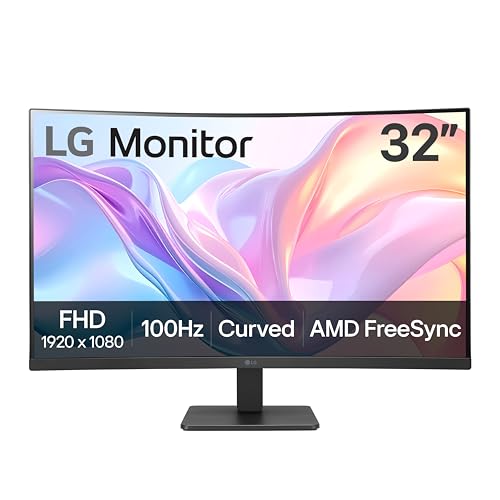
Pros
- 100Hz refresh rate
- VA panel with curved Full HD display
- AMD FreeSync
- Reader Mode and OnScreen Control
- Tilt-adjustable stand
Cons
- Full HD resolution is modest at 32 inches
- Only HDMI is listed
- No built-in speakers are specified
Best for: a home office user who wants a curved screen with useful reading and gaming controls.
The LG 32MR50C-B takes the curved Full HD formula and gives it a more office-friendly control set. The 32-inch VA panel has a 1920 by 1080 resolution, while the 100Hz refresh rate keeps scrolling and casual games feeling smoother than a conventional 60Hz screen. The curve adds a more enveloping view, although the Full HD resolution means close-up text will not have the precision of the QHD models.
LG's Reader Mode is a useful inclusion for anyone who spends a large part of the day with documents or web pages. It reduces blue light to create a reading-oriented image, while OnScreen Control lets users split the workspace and adjust basic monitor settings through software. That is more convenient than repeatedly opening the physical monitor menu when arranging several windows.
For games, AMD FreeSync is designed to keep frame delivery smooth, and Dynamic Action Sync is intended to reduce input delay. Black Stabilizer brightens dark scenes so details are easier to see in shadows. These features do not turn the display into a high-end gaming panel, but they give it more flexibility than a basic office screen. The stand tilts for a more comfortable viewing position.
The LG is about 27.9 inches wide, 20.2 inches high, and 9.2 inches deep, with an 11.3-pound weight. Its listed connection is HDMI, which is less flexible than the Philips 32E1N1100L, with its HDMI, DisplayPort, VGA, and audio out connections. The Samsung S3 S39GD is the better pick if built-in speakers matter, while this LG is the one we would choose for reading tools and simple screen management.
Buy it for a centered work setup that also handles streaming and casual games. Avoid it if you routinely inspect fine images, code, or dense text from close range. A QHD IPS display will make those tasks look cleaner.
8. Philips 32E1N1100L: Best Connectivity

Pros
- HDMI, DisplayPort, VGA, and audio out
- 100Hz refresh rate
- Adaptive-Sync support
- 1ms response time specification
- VESA compatible
Cons
- Full HD resolution on a large screen
- Heavy at over 19 pounds
- Panel is less detailed than QHD alternatives
Best for: users who need one monitor to work with a mix of older and newer computers.
The Philips 32E1N1100L is the connectivity specialist. It includes HDMI, DisplayPort, VGA, and audio out, making it unusually adaptable for a home office that includes an older desktop, a newer laptop, or several devices from different generations. That selection is more useful than an extra gaming menu when the monitor has to fit into an existing setup without replacing every cable.
The display is a 32-inch Full HD VA monitor with a 100Hz refresh rate. Philips also lists a 1ms response time and Adaptive-Sync technology for fluid, artifact-free gaming. Those features give it more motion ability than the 75Hz ViewSonic VA3209M, but the 1920 by 1080 resolution remains the limiting factor for fine text. It is better suited to viewing from a little farther back than to close-up design work.
VESA compatibility makes the Philips easier to mount on an arm or wall, which can help reclaim desk depth. The listed dimensions are about 28.11 inches wide, 20.19 inches high, and 10.27 inches deep. At 19.15 pounds, it is one of the heavier options here, so mounting hardware and desk support need to be chosen with care.
The Philips is more flexible than the LG 32MR50C-B because it includes DisplayPort and VGA, and it is more motion-focused than the ViewSonic VA3209M. It cannot match the QHD clarity of the ViewSonic VS3225-2K or the Dell's 4K detail. Philips also lists a four-year advance replacement service in the United States, which may matter to offices that need to minimize downtime.
Choose it when input flexibility and easy mounting matter more than pixel density. If all your devices use modern digital connections and you spend hours reading small text, the LG 32U631A-B or ViewSonic VS3225-2K is a better fit.
9. ViewSonic VA3209M: Best Basic IPS Option

Pros
- IPS panel with Full HD resolution
- HDMI and VGA inputs
- 75Hz refresh rate
- Variable Refresh Rate support
- Several built-in viewing presets
Cons
- Full HD looks soft at 32 inches
- Lower refresh rate than several alternatives
- No DisplayPort or USB-C listed
Best for: everyday home computing with a preference for an IPS panel and simple connections.
The ViewSonic VA3209M is a straightforward 32-inch IPS display for people who want a large desktop image without a complicated feature set. Its 1920 by 1080 resolution is enough for email, web browsing, documents, and video, but it does not make the best use of the panel's physical size. At ordinary viewing distances it can be comfortable, while close text work will look less crisp than it does on the QHD options.
The IPS panel is the central reason to choose it. ViewSonic says it provides vivid Full HD images, and the panel type is generally well suited to desks where the viewer is not always perfectly centered. The 75Hz refresh rate adds a little smoothness to scrolling and movement. Variable Refresh Rate support can help reduce tearing in compatible games, although this is not a high-refresh gaming display.
HDMI and VGA inputs give it a useful connection range for a basic setup. ViewSonic also includes Game, Movie, Web, Text, and Mono presets, so users can quickly change the image profile for different tasks. Flicker-Free technology and a Blue Light Filter address long sessions, though they cannot overcome the fundamental detail limit of Full HD on a 32-inch panel.
The VA3209M is easier to recommend than a generic large display because its IPS panel, input selection, and presets are clearly described. Still, the Philips 32E1N1100L provides 100Hz and more connection options, while the ViewSonic VS3225-2K provides a much sharper 1440p image. The VA3209M makes sense when basic HDMI and VGA compatibility is enough and the screen will be used for ordinary home tasks.
Its listed dimensions are about 28.1 inches wide, 20.5 inches high, and 9.1 inches deep, with a 16.1-pound weight. Choose it for a simple desktop or older computer. Skip it if you expect to work with dense spreadsheets, detailed images, or small type for much of the day.
How to choose best 32 inch monitor
A 32-inch monitor needs more than a large diagonal measurement. Resolution, panel behavior, refresh rate, connections, and desk ergonomics determine whether the screen feels spacious or merely oversized.
Resolution and pixel density
Resolution controls how much detail the panel can show. Full HD at 1920 by 1080 is workable for video, everyday browsing, and gaming from a moderate distance, but it can look soft for text on a 32-inch screen. QHD at 2560 by 1440 is a stronger middle ground for office work, while 4K gives the sharpest image and the most room for detailed windows.
Panel type
IPS panels are useful when consistent color and wider viewing angles matter. VA panels can suit people who prefer stronger contrast and deeper-looking blacks, though their viewing behavior differs by model. The Dell S3225QS uses VA and emphasizes contrast and color coverage, while the ViewSonic VS3225-2K and LG 32U631A-B use IPS for broad viewing angles.
Refresh rate and response
A 75Hz screen is adequate for work and ordinary media. A 100Hz or 120Hz display makes scrolling and motion feel more fluid, while 240Hz is aimed at competitive gaming with a computer capable of producing very high frame rates. Response figures need context, since a listed millisecond figure does not describe every setting or type of motion equally well.
On a 32-inch monitor, choose resolution for the work you do and refresh rate for the motion you watch.
Connections
HDMI is common, but DisplayPort matters for many desktop graphics cards and high-refresh configurations. VGA remains useful when an older computer is part of the setup. USB-C can simplify a laptop desk, but check its power delivery rating carefully. The LG 32U631A-B supplies up to 15W, which may not replace a laptop charger.
Stand and desk space
A 32-inch monitor is physically wide and deep enough to dominate a small desk. Check the stand footprint, the screen's listed weight, and whether VESA mounting is supported. The SANSUI 240Hz Monitor and Philips 32E1N1100L support VESA mounting, while a heavier display may need a more robust arm or desk.

Frequently asked questions
Is Full HD enough for a 32-inch monitor?
Full HD can be suitable for gaming, streaming, and general use, especially when the viewer sits farther from the screen. Text and fine interface details are less sharp than on QHD or 4K, so people who work close to the panel may prefer a higher resolution.
Is QHD better than Full HD at 32 inches?
QHD is usually the more comfortable choice for detailed desktop work at this size. It provides more pixels for text, images, and multitasking without requiring the same graphics performance as 4K.
Is a curved 32-inch monitor good for work?
A curved screen can make a wide panel feel more immersive and keep the edges closer to the viewer's line of sight. Some people prefer flat screens for design work, spreadsheets, and straight lines, so the choice depends on how centered your seating is and which applications you use.
What refresh rate should a 32-inch monitor have?
A 75Hz display is adequate for office work and video. A 100Hz or 120Hz model is a better mixed-use choice for smoother scrolling and casual gaming, while 240Hz is intended for competitive players whose computers can produce very high frame rates.
Does USB-C charge a laptop from a monitor?
It can, but the monitor must support USB-C power delivery. The LG 32U631A-B lists up to 15W, which can help with some devices but is not the same as the higher-power charging provided by a dedicated laptop charger.
Are IPS monitors better than VA monitors?
Neither panel type is automatically better for every user. IPS is often attractive for viewing angles and consistent color, while VA can provide stronger contrast. Look at the whole monitor, including resolution, refresh rate, connections, and eye-care features.

The bottom line
The Dell S3225QS is the strongest Best 32 inch monitor choice for someone who wants sharp 4K detail, up to 120Hz motion, broad stated color coverage, and useful eye-comfort features in one display. The LG 32U631A-B is the better pick for a laptop-centered desk because its QHD IPS panel, USB-C connection, screen-layout tools, and 100Hz refresh rate fit mixed work especially well.
For high-refresh gaming, choose the SANSUI 240Hz Monitor and accept its Full HD limitation. For a simpler office screen, the ViewSonic VS3225-2K offers a more convincing balance of QHD clarity and IPS viewing than the Full HD models.
If you are undecided, choose the Dell for maximum detail or the LG for the most flexible everyday setup.
As an Amazon Associate we earn from qualifying purchases.