
A desk covered in individual adapters, watch cables, and half-charged phones is a small daily annoyance that quickly becomes a serious tangle. The right charging station turns that mess into one predictable place for everything.
The Best charging station depends on what you need to charge. Some of these models are compact wireless docks for an iPhone, Apple Watch, and AirPods. Others are high-output desktop hubs designed to feed laptops, tablets, phones, and accessories at the same time.
Our top pick is the Anker Prime 200W, with the SABRENT VOLTIK and Acer Gadget 7-in-1 covering the strongest alternatives for high-power desks and Apple-focused nightstands.
| # | Product | Award | Ports | Max output | Best for |
|---|---|---|---|---|---|
| 1 | Anker Prime 200W | Best overall | 6 USB ports | 200W | Laptops and mixed devices |
| 2 | Zobirez 750W 10-Port | Best for large households | 5 USB-C, 5 USB-A | 750W claimed | Ten-device charging |
| 3 | Acer Gadget 7-in-1 | Best Apple nightstand | Wireless, USB-C, USB-A | 30W adapter support | Apple devices and bedside use |
| 4 | Zobirez 420W 10-Port | Best organized family dock | 5 USB-C, 5 USB-A | 420W claimed | Mixed household gear |
| 5 | GETPALS 3-in-1 | Best foldable dock | Wireless 3-in-1 | 7.5W phone | Travel and compact spaces |
| 6 | SABRENT VOLTIK | Best with live monitoring | 4 USB-C, 4 USB-A | 252W shared | Power-conscious workstations |
| 7 | Anker 9-in-1 Power Strip | Best for outlets and USB | 3 AC, 4 USB-C, 2 USB-A | 100W USB-C | Desks with many plugs |
| 8 | MagSafe 3-in-1 Stand | Best magnetic stand | Wireless 3-in-1 | 15W phone | MagSafe iPhones |
| 9 | Anlmz 3-in-1 | Best non-MagSafe dock | Wireless 3-in-1 | 18W adapter included | Case-friendly Apple setups |
| 10 | BREEKET 100W 6-Port | Best compact wired hub | 3 USB-C, 3 USB-A | 100W total | Phones and accessories |
1. Anker Prime 200W: Best Overall
Pros
- Six devices can charge from one compact desktop unit
- Two USB-C ports can each reach 100W when used together
- Sturdy 1.24-pound build stays planted
- Temperature monitoring and a 24-month warranty
Cons
- Designed for a desk, not travel
- No wireless charging surface
- The strongest ports require compatible cables and devices
Best for: someone who wants one well-built wired charger for laptops, tablets, phones, and accessories.
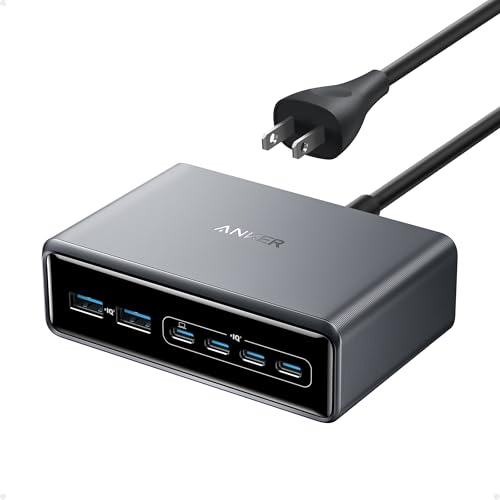
The Anker Prime 200W is the one we'd keep on a busy desk. It does not try to turn charging into furniture or add a clock and mood light. Instead, it is a compact, weighty power block that gives six devices a clear home and enough output for demanding USB-C gear.
Its headline capacity is 200W, and the important detail is how that power is arranged. Each USB-C port supports up to 100W, including when two USB-C ports are used simultaneously. That makes this a much more practical laptop charger than a six-port block limited to phone-sized output. The product listing specifically says it can charge two 14-inch MacBook Pros to 50 percent in 28 minutes, though actual results depend on the laptops and cables.
The physical design helps it work as a permanent desktop accessory. It measures about 4.4 by 3.0 by 1.4 inches and weighs 1.24 pounds, so a collection of cables is less likely to drag it around the desk. A five-foot AC power cord gives some placement flexibility, while the safety system continuously monitors temperature. It is a sensible arrangement for an office where several high-demand devices remain connected throughout the day.
The trade-off is that the Prime is not a bedside dock. It has no wireless charging pad, upright phone stand, or dedicated watch cradle. The SABRENT VOLTIK adds a useful live display and two more ports, while the Anker 9-in-1 Power Strip adds AC outlets. The Prime is the cleaner choice when USB-C power is the priority and you want fewer compromises.
Skip it if your main goal is cable-free charging for an Apple Watch and earbuds. For a laptop-heavy desk, though, the Anker Prime 200W is the strongest all-rounder here. It is also the clearest starting point for readers comparing the power needs of phones, tablets, and laptops in one setup.
2. Zobirez 750W 10-Port: Best for Large Households

Pros
- Five USB-C and five USB-A ports
- Wide center bays fit a laptop or thick-case tablet
- Includes ten short charging cables
- One-piece flame-retardant ABS slot design
Cons
- The 750W claim needs to be read alongside device and port limits
- Large cable bundles can still crowd the station
- No wireless charging
Best for: a family, classroom, or shared workspace that needs ten devices upright in one place.
The Zobirez 750W 10-Port is built around a simple problem: too many people need to charge at once. Its ten slots are more useful than a loose collection of wall adapters because phones and tablets stay separated, visible, and ready to pick up. The station combines five USB-C ports with five USB-A ports, so it can handle newer laptops and older accessories without forcing every cable to be replaced.
The USB-C outputs are rated up to 120W each, while the USB-A ports are rated up to 30W each. That mix makes sense for a shared charging area. The USB-C side has the headroom for MacBook Air or Pro models, iPad Pro devices, and other compatible laptops. USB-A remains suitable for phones, earbuds, Kindle readers, headphones, controllers, and power banks. Those are maximum port figures, not a guarantee that every connected device will draw them.
The most thoughtful physical detail is the one-piece slot construction. Removable dividers can wobble or disappear, while this design keeps the bays fixed. Two wider center bays are intended for a laptop or a tablet with a thick case. The station also includes ten cables: one 100W USB-C to USB-C cable, five short USB-C cables, two iPhone cables, and two Micro USB cables. That makes setup faster, although cable compatibility will vary as household devices change.
The advertised 750W total output is far beyond what most families will draw at once, so buyers should focus on the port mix and physical organization rather than the headline alone. The Zobirez 420W 10-Port offers a similar ten-device layout with a more specifically described 65W dual GaN arrangement. The 750W model is the better fit when ten occupied slots and a generous USB-C count matter most.
It is not a travel charger, and its wired-only design will feel excessive beside a single bed. Choose it for a shared charging shelf, home office, classroom, or hotel-style setup where device separation matters more than wireless convenience.
3. Acer Gadget 7-in-1: Best Apple Nightstand

Pros
- Two wireless phone charging positions
- Dedicated AirPods and Apple Watch areas
- Bluetooth time synchronization and temperature display
- Warm and cool ambient lighting
- USB-C and USB-A ports for extra gear
Cons
- Phone cases must be less than 2mm thick
- AirPods need careful centering
- Not compatible with Samsung Watch
Best for: an Apple household that wants a charging dock, clock, and bedside organizer in one unit.
The Acer Gadget 7-in-1 is less of a power hub and more of a bedside command center. Its appeal is immediate if the same nightstand holds two phones, an Apple Watch, AirPods, and a few USB accessories. Instead of spreading those devices across cables, it gives the main items dedicated charging positions and puts the time display where it can be seen from bed.
The seven charging functions include two wireless phone chargers, an AirPods charging area, an Apple Watch charger, USB-A, and USB-C. The station supports a 30W adapter and can charge up to six devices at once according to the listing. It is designed around Apple devices, including iPhones from the listed recent generations, Apple Watch models through Series 11 and Ultra 3, and AirPods with a wireless charging case. The wired ports broaden its usefulness to items such as power banks and compatible Mac accessories.
The Bluetooth time synchronization is an unusual extra. Connecting a phone to the station through the S1 Bluetooth connection synchronizes the clock, and the display also shows the day and indoor temperature. Adjustable warm and cool lighting lets it serve as a soft nightstand light rather than an always-bright gadget. These additions make it more pleasant beside a bed than the purely functional Anker Prime 200W.
There are important fit limits. Phone cases should be under 2mm thick, and AirPods need to be centered on their charging area. The product is also not compatible with Samsung Watch, so Android users should check their wearable before choosing it. The 0.84-pound construction is reasonably easy to move, but its roughly 8.5-inch length and 6.3-inch width need real nightstand space.
The GETPALS 3-in-1 is a simpler and more portable Apple dock, while the Acer is the better pick for a permanent bedside setup with more display and lighting features. Choose the Acer Gadget 7-in-1 when organization and bedside information matter as much as charging speed.
4. Zobirez 420W 10-Port: Best Organized Family Dock

Pros
- Ten charging slots with five USB-C ports
- Two 65W fast charging positions
- Extra-wide bays fit larger tablets
- Includes eight short mixed cables
- Non-slip feet and one-piece construction
Cons
- No wireless charging
- The 420W figure is shared across the station
- The supplied cable mix may not suit every household
Best for: families that want a stable ten-slot organizer with laptop support and mixed cable compatibility.
The Zobirez 420W 10-Port makes a strong case for the traditional charging station shape. It is not trying to be sleek or pocketable. It is a fixed organizer with ten device positions, four rubber feet, and enough room in the center for larger tablets and some laptops. That is exactly what a shared charging shelf needs.
Five USB-C ports provide the newer connection standard, and the station describes its top two ports as 65W fast charging positions with 20V and 3.25A output. Three additional ports are rated at 45W, while five ports are rated at 30W. The arrangement gives it more structure than a generic multi-port block, letting a laptop, iPad, phone, Kindle, headphones, and game controller share the same station without every device competing for one type of port.
Its two center slots measure 1.57 inches wide and 1.77 inches high. That is a useful distinction for devices in protective cases, especially a child's iPad. The fixed ABS construction should also be less frustrating than a rack held together by loose dividers. Eight short mixed cables are included, covering iPhone and iPad, USB-C, and Micro USB devices.
The Zobirez 750W 10-Port is the closer rival. It offers five USB-C and five USB-A ports, with higher claimed per-port figures on paper. The 420W model is easier to evaluate from its more detailed port layout, and its wide center bays are particularly useful for tablets. It also weighs 1.55 pounds, which helps it stay in place when several cables are being pulled free.
The weakness is its lack of wireless charging. Anyone who wants to drop an iPhone onto a pad at bedtime should look at the Acer Gadget 7-in-1 or one of the three-device wireless docks. For a family charging station where upright storage, cable coverage, and a steady base come first, the Zobirez 420W is a practical choice.
5. GETPALS 3-in-1: Best Foldable Dock

Pros
- Charges an iPhone, Apple Watch, and AirPods together
- Foldable and lightweight design
- Supports phone cases up to 4mm
- Non-slip surface and charging indicators
- Protection against overcurrent, overvoltage, and overheating
Cons
- Phone output is limited to 7.5W
- Requires a compatible wireless AirPods case
- Cases with metal, pockets, or magnets can interfere
Best for: Apple users who need a compact three-device dock for travel, work, or a small nightstand.
The GETPALS 3-in-1 is the most travel-friendly design in this group. It folds down, weighs about a third of a pound, and replaces three loose charging spots with one small stand. That makes it useful for a hotel nightstand or a remote-work bag where the full-size ten-port organizers would be absurd.
Its charging arrangement is straightforward. The phone position supports up to 7.5W, the earbuds area up to 3W, and the watch position up to 2.5W. Those figures are modest beside the 15W claim of the MagSafe 3-in-1 Stand, but they are appropriate for overnight charging and general desk use. The dock supports a wide range of listed iPhone, Apple Watch, and AirPods generations, provided the earbuds use a compatible wireless charging case.
Case support is one of its better practical details. It accepts cases up to 0.16 inches, or 4mm, but metal rings, pockets, and magnets can block or disrupt charging. The non-slip surface helps devices stay aligned, while LED indicators show charging status. Protection against overcurrent, overvoltage, and overheating adds reassurance for a dock likely to remain plugged in overnight.
Compared with the Anlmz 3-in-1, the GETPALS is easier to pack and has a slimmer foldable concept. The Anlmz includes an 18W adapter and supports cases up to 5mm, so it may suit a thicker-case user better. The GETPALS is the one to choose when a bag-friendly shape matters more than higher phone output.
It is not the right tool for a laptop or a family charging shelf, and the slower phone rating makes it less suitable for quick top-ups. For an Apple traveler who wants one small dock for three personal devices, its folding design is the main reason to buy it.
6. SABRENT VOLTIK: Best with Live Monitoring

Pros
- Four USB-C and four USB-A ports
- LCD shows wattage, voltage, amperage, and temperature
- USB-C ports support up to 100W each
- Supports PD 3.0, PPS, QC 4.0, and QC 3.0
- UL Certified safety design
Cons
- 252W is shared across all ports
- USB-A ports are limited to 18W
- The display adds complexity some users will not need
Best for: a workstation owner who wants to see exactly how connected devices are drawing power.
The SABRENT VOLTIK is for people who find a single blinking light insufficient. Its color LCD can cycle through all eight ports and show current wattage, voltage, amperage, and internal temperature. That information is useful when a laptop seems to charge slowly or when you want to understand whether a cable, device, or port is limiting the result.
The port arrangement is balanced for a mixed workstation: four USB-C ports rated up to 100W each and four USB-A ports rated up to 18W each. The USB-C side supports PD 3.0 and PPS, along with QC 4.0 and QC 3.0 compatibility. That gives laptops and tablets a capable connection while keeping the USB-A side suited to phones, earbuds, watches, and other smaller accessories.
The key qualification is that the 252W total is shared. The station cannot provide 100W to all four USB-C ports at once. Its own description is unusually clear about this, saying a port reaches its maximum when the other ports are lightly loaded. That honesty makes the display more valuable because you can see the actual allocation rather than assuming every port is operating at its ceiling.
At 4.57 by 2.94 by 2.05 inches and about 1.58 pounds, it is compact enough for a desk but heavier than a small travel block. UL certification and protection against overcharge, overcurrent, overheating, and short circuits are meaningful additions for a unit likely to serve several expensive devices. The Anker Prime 200W is smaller and simpler, while the VOLTIK wins if monitoring and USB-A availability are central.
The display is overkill for someone who simply wants to charge a phone at night. It also does not provide wireless charging or device slots. Choose the SABRENT VOLTIK for a technically minded desk where knowing what each port is doing is part of the appeal.
7. Anker 9-in-1 Power Strip: Best for Outlets and USB

Pros
- Three AC outlets plus six USB ports
- Two USB-C ports support up to 100W individually
- 300J surge protection
- Eight-point safety system
- Stable 19.75-ounce desktop design
Cons
- USB power is not as high as the Prime's total output
- It has no wireless charging surface
- AC outlets take up space that could hold more USB ports
Best for: desks that need regular outlets as well as USB charging.
The Anker 9-in-1 Power Strip solves a different desk problem from the Prime. It is a desktop power strip first, with charging built in. Three AC outlets sit alongside four USB-C ports and two USB-A ports, giving a monitor, lamp, laptop adapter, phone, and accessories a shared home without requiring a separate surge protector.
The two primary USB-C ports can each support up to 100W when used individually. That is enough to make the strip useful for a laptop and phone setup, while the other USB-C and USB-A ports cover smaller devices. The product does not provide the Prime's 200W charging total, but its mix of AC and USB connections is more flexible for a desk with traditional plugs.
The 300J surge protector rating is a useful layer of protection for connected electronics, and the eight-point safety system is designed to help guard against overvoltage and short circuits. At 19.75 ounces, or 560 grams, it has enough mass to remain stable during ordinary cable use. Its roughly 4.1 by 3.1 by 3.1-inch footprint is compact, though the shape still needs to be placed where AC plugs can reach.
The Anker Prime 200W is better for several high-output USB-C devices. The SABRENT VOLTIK is better if you want a readout of live charging figures. The Anker 9-in-1 is the choice when removing a separate power strip matters more than maximizing USB output.
One limitation is inherent to the format: three AC outlets consume physical room that could otherwise hold more charging ports. It also lacks wireless charging, so an Apple user may still need a separate dock. For a home office with a laptop, display, lamp, and mobile accessories, this is a tidy and capable center point.
8. MagSafe 3-in-1 Stand: Best Magnetic Stand

Pros
- Charges iPhone, Apple Watch, and AirPods together
- Magnetic alignment for iPhone 12 and later
- Up to 15W phone charging
- Portrait and landscape viewing positions
- Adjustable blue night light
Cons
- Requires a magnetic case or compatible iPhone
- No USB-A or USB-C device ports
- The product name does not identify a separate manufacturer brand
Best for: an iPhone owner who wants magnetic alignment and a hands-free viewing angle.
The MagSafe 3-in-1 Stand is the most focused wireless dock here. Its magnetic phone mount snaps an iPhone into place, while separate charging positions handle an Apple Watch and AirPods. The vertical layout keeps the phone visible for notifications, videos, or StandBy Mode instead of leaving it flat on a nightstand.
The phone charger is rated up to 15W, which is the strongest wireless phone figure in this group. The dock uses N52 magnets and requires an iPhone 12 or newer with a magnetic case or compatible bare phone. It supports portrait and landscape orientation, so the stand is more useful than a flat charging pad when the phone needs to function as a small bedside display.
A blue ambient light is built into the base and can be turned on, off, or dimmed through a touch sensor. That is a pleasant touch for finding the dock in the dark, although some people will prefer total darkness while sleeping. The charger also claims temperature control, overcurrent protection, and short-circuit prevention, with a blue indicator showing alignment and charging status.
The GETPALS 3-in-1 is lighter and foldable, while the Anlmz 3-in-1 works without magnetic alignment and accommodates thicker cases. The MagSafe stand is the clear choice for an iPhone 12 or later user who wants the snap-in experience and a visible screen. It is less versatile for mixed households because it has no wired accessory ports.
The listing includes a three-year warranty and describes a replacement policy for quality issues. Still, buyers should confirm their case supports magnetic attachment before ordering. If that requirement is met, this is the most convenient personal bedside dock in the roundup.
9. Anlmz 3-in-1: Best Non-MagSafe Dock

Pros
- Charges iPhone, Apple Watch, and AirPods together
- Works with wireless charging iPhones from iPhone 8 onward
- Includes an 18W adapter and USB-C cable
- Supports cases up to 5mm
- Foreign object detection and soft charging indicator
Cons
- No magnetic alignment
- Phone must be centered carefully
- Metal accessories, cards, or magnets can interrupt charging
Best for: Apple users who want a three-device dock without relying on MagSafe attachment.
The Anlmz 3-in-1 is a useful alternative to magnetic stands because the phone simply rests in the charging area. That makes it compatible with a wider group of wireless charging iPhones, including models from the iPhone 8 onward according to the listing. It is designed for the familiar three-device arrangement: phone, Apple Watch, and AirPods.
The dock includes an 18W adapter and a 3.3-foot USB-C cable, so the basic setup is covered in the box. Its phone area supports cases up to 5mm, or 0.2 inches, which is more generous than the Acer Gadget 7-in-1's 2mm case guidance. It still requires the phone to be centered, and metal, magnets, or cards in the case can interrupt charging.
A soft blue LED indicates charging, while foreign object detection can pause charging when metal accessories are detected. The ABS housing is designed for heat dissipation, and the listing says the phone can shift to trickle mode when full. Those details suit a nightstand, where a harsh display or an unexpectedly warm charger would be unwelcome.
The main difference from the MagSafe 3-in-1 Stand is not just speed. The MagSafe model offers magnetic alignment, up to 15W phone charging, and portrait or landscape positioning. The Anlmz is more forgiving of older wireless charging iPhones and thicker cases, but it demands better placement. The GETPALS 3-in-1 folds for travel, while the Anlmz is more of a permanent dock.
It is not the right pick for someone who wants to grab and drop a phone without checking alignment. For a household with several wireless charging iPhone generations, an Apple Watch, and AirPods, it provides a straightforward three-device setup with the adapter included.
10. BREEKET 100W 6-Port: Best Compact Wired Hub

Pros
- Three USB-C and three USB-A ports
- 100W total output
- Compact 3.4 by 2.2 by 0.9-inch design
- Five-foot AC extension cable
- Automatic safeguards against common charging faults
Cons
- USB-C ports are limited to 20W each
- The listing says it is not compatible with laptops
- No wireless charging or device slots
Best for: phones, earbuds, watches, and other accessories in a compact wired setup.
The BREEKET 100W 6-Port is the smallest straightforward wired hub in this lineup. It is meant to replace a cluster of phone adapters without taking over the desk. The six ports split evenly between three USB-C and three USB-A connections, which is a useful arrangement for a household with both current and older cables.
The three USB-C ports are rated up to 20W each, and the three USB-A ports up to 18W each. The station advertises 100W maximum total output, but its own port figures explain why it belongs with phones and accessories rather than laptops. It can charge a watch, earphones, phone, fan, or similar small devices at the same time.
Its compact dimensions are 3.4 by 2.2 by 0.9 inches, and the included five-foot AC extension cable makes it easier to place away from a crowded wall outlet. Built-in protections cover short circuits, overcurrent, overvoltage, overheating, and overcharging. The charger also says it stops automatically when a device is full, though connected-device behavior can vary.
The Anker Prime 200W is substantially better for laptops and high-demand USB-C equipment. The BREEKET is easier to tuck into a small desk drawer or travel case, and it avoids the bulk of a multi-device organizer. The GETPALS 3-in-1 adds wireless charging for Apple devices, but the BREEKET works across a broader range of ordinary USB accessories.
The major weakness is the explicit laptop incompatibility. Do not treat the 100W total as laptop support when the product is positioned for smaller devices. Choose it for a compact desk, guest room, or charging shelf where six wired ports are enough and portability matters more than high-output performance.
How to choose the best charging station
The best charging station is the one whose port layout, power allocation, and physical design match the devices that actually gather on your desk.
Port mix
Start by counting the cables you use now, not the devices you might own later. USB-C is the important connection for current laptops, tablets, and many phones, while USB-A remains useful for watches, earbuds, older iPhones, controllers, and power banks.
A station with ten ports is not automatically more useful than one with six. The Anker Prime 200W has fewer ports than the Zobirez models but gives its USB-C connections much more headroom. A wireless dock can be a better fit when three Apple devices are the only items that need a nightly charge.
Power allocation
Maximum output figures need context. A station may advertise a large total while sharing that capacity across every active port. The SABRENT VOLTIK explains this clearly: its 252W budget is shared, so four USB-C ports cannot all deliver 100W simultaneously.
For phones and earbuds, 18W to 30W ports are generally the relevant range in this selection. Laptops need a USB-C port with substantially more headroom, along with a suitable cable and a device that accepts that charging level. If you regularly charge a laptop, the Anker Prime, Zobirez 750W, Zobirez 420W, and SABRENT models are the more appropriate designs.
A large total wattage matters less than the output available on the port your laptop is actually using.
Wireless alignment
Wireless charging is convenient, but it is not interchangeable across these products. The MagSafe 3-in-1 Stand uses magnetic alignment for compatible iPhones, while the Anlmz dock requires the phone to be centered manually. The Acer station combines wireless phone charging with dedicated Apple Watch and AirPods areas.
Check case restrictions before choosing a wireless dock. The Acer requests cases under 2mm, GETPALS supports up to 4mm, and Anlmz supports up to 5mm. Metal rings, cards, magnets, and pockets can interfere with wireless charging even when the case fits physically. Readers comparing different Apple charging approaches may also want to consider how connector type changes everyday phone charging.
Device organization
A charging station with upright slots is useful when several people share one surface. Fixed dividers are preferable to loose inserts because phones and tablets stay separated when cables are pulled. The Zobirez 420W and Zobirez 750W both include wider center areas for larger devices.
Wireless stands organize fewer devices but make a nightstand cleaner. A flat or foldable dock can travel more easily, while a heavier desktop hub is better when many cables will remain connected. Measure the available surface before choosing an organizer such as the Acer Gadget 7-in-1.
Safety and monitoring
Look for protections against overcurrent, overvoltage, overheating, overcharging, and short circuits. They do not replace a sound cable or a compatible device, but they are useful safeguards when several products remain plugged in overnight.
A display is not essential, but it can make troubleshooting easier. The SABRENT VOLTIK shows wattage, voltage, amperage, and internal temperature for each port. Simpler models such as the Anker Prime focus on temperature monitoring without placing live numbers on the desk. For portable setups, compact size and a stable cable connection may matter more than a screen.
Frequently asked questions
Can a charging station charge a laptop?
Some can, but not all. The Anker Prime, Zobirez 750W, Zobirez 420W, and SABRENT VOLTIK include high-output USB-C ports intended for compatible laptops. The BREEKET listing specifically says it is not compatible with laptops, so its 100W total should not be treated as laptop support.
Is a wireless charging station faster than a wired charger?
Usually, wired charging provides a more direct and predictable connection. Wireless output varies by phone, alignment, case, and charger design. In this selection, the MagSafe 3-in-1 Stand lists up to 15W for a compatible iPhone, while GETPALS lists up to 7.5W for phones.
Can all ports deliver their maximum output at once?
Not necessarily. Many charging stations share a total power budget across active ports. The SABRENT VOLTIK states that its 252W is shared, and the Zobirez models also describe total output alongside individual port limits. Check the port layout and power allocation rather than relying on one headline number.
Do charging stations include cables?
Some do and some do not. The Zobirez 750W includes ten cables, the Zobirez 420W includes eight mixed cables, and the Anlmz dock includes a USB-C cable and an 18W adapter. The Anker Prime includes a five-foot AC power cord, but you should confirm that your device cables match its ports.
Will a thick phone case work with a wireless dock?
It depends on the station. Acer recommends a case under 2mm, GETPALS supports up to 4mm, and Anlmz supports up to 5mm. Metal rings, cards, magnets, and pockets can still interfere even when the thickness is within the stated limit.
Are charging stations safe to leave plugged in overnight?
The products here list protections such as overcurrent, overvoltage, overheating, overcharging, and short-circuit safeguards. A compatible cable and device are still important, and a charging station should be placed on a stable, unobstructed surface. The Acer, Anker, Zobirez, SABRENT, and BREEKET models all describe safety systems, though their implementations differ.
What is the difference between a power strip and a charging hub?
A power strip provides AC outlets, while a charging hub is primarily built around USB ports. The Anker 9-in-1 Power Strip combines three AC outlets with six USB ports. The Anker Prime is more focused on high-output USB-C and USB charging, with no AC outlets or wireless charging surface.

The bottom line
The Anker Prime 200W is the best charging station for a desk that needs reliable wired power for laptops, tablets, phones, and accessories. Its 200W output, two 100W USB-C ports, compact footprint, and solid weight make it more balanced than the larger family organizers.
The Acer Gadget 7-in-1 is the better choice for an Apple-focused nightstand, while the SABRENT VOLTIK earns consideration from anyone who wants live information about charging behavior. For a shared household, the Zobirez 420W and Zobirez 750W provide the most useful combination of ten device slots and mixed ports.
If you are undecided, choose the Best charging station by counting your USB-C, USB-A, wireless, and AC needs before choosing the number of ports.
As an Amazon Associate we earn from qualifying purchases.