

A 14-inch laptop has to do more than fit neatly into a bag. It needs a screen that remains comfortable for a full workday, enough memory for real multitasking, and ports that do not force you to carry an adapter everywhere. The wrong model can be portable but frustrating, or powerful but unnecessarily bulky.
We compared nine Windows laptops spanning refurbished business machines, modern AI PCs, flexible 2-in-1 designs, and practical student systems. The Best 14 inch laptop for most people is the HP OmniBook 3, while the other picks make stronger cases for business durability, touchscreen flexibility, maximum memory, or uncomplicated everyday work.
Comparison table
| # | Product | Award | Display | Memory and storage | Best for |
|---|---|---|---|---|---|
| 1 | HP OmniBook 3 | Best overall | 1920 x 1200 IPS | 16GB, 512GB SSD | Long battery life and travel |
| 2 | Lenovo ThinkPad E14 Gen 7 | Best business laptop | 1920 x 1200 IPS, 60Hz | 16GB, 512GB SSD | Secure professional work |
| 3 | HP OmniBook X Flip | Best 2-in-1 | 1920 x 1200 touch IPS | 16GB, 512GB SSD | Notes, drawing, and flexibility |
| 4 | Dell Latitude 7420 | Best touchscreen business laptop | 1920 x 1080 touch IPS | 32GB, 512GB SSD | Refurbished office computing |
| 5 | ASUS Vivobook 14 | Best port selection | 1920 x 1080 IPS | 16GB, 1TB SSD | Office and home productivity |
| 6 | Lenovo V14 40GB Laptop | Best maximum memory | 1920 x 1080 anti-glare | 40GB, 1TB SSD | Heavy multitasking |
| 7 | Lenovo V14 Gen 4 | Best Windows Pro value | 1920 x 1080 anti-glare | 16GB, 512GB SSD | Small business and study |
| 8 | Dell Latitude 5420 | Best compact refurbished laptop | 1920 x 1080 | 16GB, 256GB SSD | Basic office work |
| 9 | HP 14 Business Laptop | Best bundled accessories | 14-inch display | 16GB, 128GB UFS plus 500GB external drive | School and home basics |
1. HP OmniBook 3: Best Overall

Pros
- 1920 x 1200 IPS screen gives extra vertical workspace
- Snapdragon platform is designed for long battery life
- 512GB PCIe Gen4 SSD and 16GB LPDDR5x memory
- FHD camera with HDR auto-switch
- Wi-Fi 6E and Copilot+ features
Cons
- Windows on an ARM-based Snapdragon platform may require software compatibility checks
- The display resolution is listed as 2K in the title but specified as 1920 x 1200
- Windows 11 Home is less suited to managed business environments
Best for: travelers, students, and home workers who want a thin laptop with unusually long claimed battery life.
The HP OmniBook 3 is the easiest laptop here to recommend without a long list of conditions. It has the modern feel many people want from a 14-inch machine: a relatively thin 0.58-inch profile, a 3.13-pound listed weight, a tall 16:10 screen, and a processor platform built around efficient mobile use. It is not trying to be a workstation. It is aimed at documents, browser tabs, video calls, streaming, and the kind of daily work where carrying a charger all day is a nuisance.
Its 1920 x 1200 IPS display gives you 120 extra vertical pixels compared with a standard 1920 x 1080 panel. That small difference matters when reading long pages or keeping more of a document visible. The display also promises wide viewing angles and lifelike color reproduction. The Snapdragon X X1-26-100 processor, Qualcomm Adreno graphics, and 16GB of LPDDR5x memory form a sensible combination for productivity, while the 512GB PCIe Gen4 NVMe SSD gives applications and files fast local storage.
Battery life is the headline feature. HP claims up to 32 hours and 15 minutes, with Fast Charge restoring the battery from zero to 50 percent in about 45 minutes. Claims like this depend heavily on workload and display settings, but the direction is clear: this is the pick for someone who spends long stretches away from an outlet. Qualcomm Wi-Fi 6E adds newer wireless capacity, and the FHD camera has HDR auto-switching to help balance contrast when a window or bright lamp is behind you.
The catch is the Snapdragon platform. Most everyday Windows software should be fine, but buyers who depend on specialist legacy applications, unusual drivers, or specific games should verify compatibility before committing. The Lenovo ThinkPad E14 Gen 7 is the safer conventional business machine, while the HP OmniBook X Flip makes more sense if touch and pen input matter. The HP OmniBook 3 wins on mobility and endurance, not universal software flexibility.
For a fuller look at how newer processors and designs differ, the practical differences between current laptop generations can help set expectations. Choose the HP OmniBook 3 if your day is mostly mobile productivity, meetings, web work, and media, and you want the strongest combination of screen space and claimed battery life in this group.
2. Lenovo ThinkPad E14 Gen 7: Best Business Laptop

Pros
- Ryzen 7 250 processor reaches up to 5.1GHz
- MIL-STD-810H testing supports a more durable business design
- WUXGA anti-glare display has 300 nits brightness
- Fingerprint reader, backlit keyboard, and 5MP RGB webcam
- Thunderbolt 4, Ethernet, HDMI, and Wi-Fi 6
Cons
- Memory and SSD were installed through a system upgrade
- Windows 11 Pro is more than casual users may need
- Display refresh rate is limited to 60Hz
Best for: professionals who want a durable 14-inch work computer with business-focused security and connectivity.
The ThinkPad E14 Gen 7 is the most convincing traditional work laptop in the group. Its design is compact without chasing extreme thinness, and the listed 3-pound weight makes it practical for commuting. Lenovo says the chassis has been tested to MIL-STD-810H standards, which does not make it indestructible, but it does distinguish this machine from ordinary consumer laptops built mainly for desk use.
The AMD Ryzen 7 250 processor is listed with a 3.30GHz base speed and up to 5.1GHz, giving it the headroom for spreadsheets, large browser sessions, presentations, and other demanding office routines. The 16GB of DDR5 SODIMM memory and 512GB 2242 PCIe NVMe SSD are well matched for professional work. The memory format also makes more sense for a business system than an unusually large but less clearly upgradeable configuration.
The 14-inch IPS WUXGA display uses a 1920 x 1200 resolution, 60Hz refresh rate, anti-glare coating, and 300 nits brightness. That is a useful office specification. The taller aspect ratio helps with documents, while the anti-glare surface is more comfortable under overhead lighting than a glossy panel. It will not give creators the wide-gamut presentation of a specialist display, but it is built around readable productivity rather than visual theatrics.
Connectivity is a major reason to choose it over the HP OmniBook 3. You get Thunderbolt 4, USB 3.2 Type-C, HDMI, Ethernet, a headphone and microphone combo jack, Wi-Fi 6, and Bluetooth 5.3. The fingerprint reader, backlit standard keyboard, and 5MP RGB webcam make it better equipped for regular office use than the more basic Lenovo V14 Gen 4. Windows 11 Pro adds enterprise-oriented security and management tools, including Copilot support.
There is one important qualification: the original seal was opened for certified RAM and SSD installation. The upgraded components carry a three-year warranty from the upgrading company, while the remaining hardware has a one-year manufacturer warranty. That arrangement may be perfectly acceptable, but buyers who want an untouched factory configuration should look elsewhere. The ThinkPad E14 Gen 7 is the Best 14 inch laptop here for structured work environments, especially when ports, durability, and video-call hardware matter more than entertainment features.
3. HP OmniBook X Flip: Best 2-in-1

Pros
- Touchscreen folds flat, into tent mode, or tablet mode
- 1920 x 1200 IPS panel reaches 400 nits
- Intel Arc 130V graphics support light creative work
- Thunderbolt 4 and HDMI 2.1 connectivity
- Stylus pen is included
Cons
- Listed weight is 5 pounds
- Windows 11 Home is not aimed at managed business fleets
- Stylus availability is tied to the seller bundle
Best for: students, note-takers, and creative users who will genuinely use tablet and pen modes.
The HP OmniBook X Flip is the obvious choice when a normal clamshell feels too limiting. Its 14-inch touchscreen can lie flat, fold into a tent, or turn into a tablet, so the same machine can handle a keyboard-heavy work session and a handwritten note or sketch. The included stylus makes that flexibility more useful from the start, although the listing says the pen is supplied by the seller.
The 1920 x 1200 IPS panel has a 16:10 shape, 400 nits brightness, and an 89.5 percent screen-to-body ratio. That combination should make documents feel less cramped while giving images and video more room to breathe. The edge-to-edge multitouch glass is scratch and damage resistant according to the listing. A bright screen is especially useful in tablet mode, where viewing angles and reflections can otherwise become irritating.
Inside, the Intel Ultra 5 226V has eight cores, a dedicated NPU rated at 40 TOPS, and Intel Arc 130V integrated graphics. Those parts are aimed at efficient AI features and light creative projects rather than serious gaming or workstation rendering. The 16GB of LPDDR5X memory and 512GB SSD provide a straightforward everyday configuration. HP also claims up to 22 hours and 45 minutes of battery life with fast charging, though convertible use and high screen brightness will affect real results.
Port selection is stronger than many thin convertibles. The listing specifies Thunderbolt 4, USB-C 3.1, two USB-A 3.1 ports, and HDMI 2.1. The backlit keyboard helps in dim rooms, while walk-away lock, wake on approach, automatic screen dimming, and screen distance reminders add thoughtful privacy and wellness controls.
The compromise is portability. The listed 5-pound weight is much higher than the roughly 3-pound business laptops here, and that matters when the machine is carried every day. The HP OmniBook 3 is a better fit for lightweight travel, while the HP OmniBook X Flip earns its place through touch, pen input, and adaptable positioning. Buy this one only if those features will become part of your routine, not simply because the hinge looks impressive.
4. Dell Latitude 7420: Best Touchscreen Business Laptop

Pros
- 14-inch 1920 x 1080 touchscreen
- 32GB RAM and 512GB NVMe SSD
- 300-nit anti-glare IPS display
- Backlit keyboard and Wi-Fi 6
- Windows 11 Pro installation
Cons
- Renewed condition requires attention to unit condition
- 11th generation quad-core processor is older than newer picks
- Renewed coverage is limited to a 90-day warranty and support
Best for: office users who want a touchscreen and generous memory in a compact refurbished business laptop.
The Dell Latitude 7420 remains appealing because it focuses on the details that make a work laptop pleasant: a responsive touchscreen, a backlit keyboard, plenty of memory, and a compact carbon-fiber design. At a listed 2.89 pounds, it is one of the easier machines here to carry. The renewed status is central to the buying decision, but the underlying configuration is still well suited to office work.
Its 11th generation Intel Core i7-1185G7 is a quad-core processor with a listed boost speed of up to 4.70GHz. It is not as current as the processor in the Lenovo ThinkPad E14 Gen 7 or the HP OmniBook X Flip, yet 32GB of RAM gives it considerable room for large spreadsheets, dozens of browser tabs, remote desktops, and communication tools running together. The 512GB PCIe M.2 NVMe SSD provides fast local storage for documents and applications.
The 14-inch FHD IPS touchscreen uses 1920 x 1080 resolution, 300 nits brightness, and an anti-glare surface. That is a conventional 16:9 layout rather than the taller 16:10 screen found on the HP OmniBook 3 and ThinkPad E14 Gen 7. Touch support is the differentiator. It is useful for scrolling, signing documents, selecting items in presentations, and navigating when the laptop is used away from a desk.
Intel Iris Xe graphics handle ordinary display duties, and the laptop includes Wi-Fi 6, Bluetooth, USB ports, and HDMI. The backlit keyboard is a welcome business feature, while the Windows 11 Pro installation arrives without the bloatware the listing says is commonly found on other systems. Those choices make it a more work-oriented machine than the HP 14 Business Laptop, even though that HP includes more bundled accessories.
The weakness is the age and condition of the platform. A renewed laptop can be a sensible way to get a capable business chassis, but the listing provides a 90-day warranty and 90-day technical support, so it does not offer the same long-term assurance as a new machine with broader coverage. Choose the Dell Latitude 7420 when its touchscreen, low weight, and 32GB memory matter more than having the newest processor generation.
5. ASUS Vivobook 14: Best Port Selection

Pros
- 10-core Intel Core 5 120U processor
- 1TB SSD provides substantial internal storage
- Windows 11 Pro and Copilot
- Camera privacy shutter
- USB-C, three USB-A ports, HDMI, and Wi-Fi 6
Cons
- Listed weight is 4.6 pounds
- Display is standard 1920 x 1080
- The listing presents varying maximum memory and storage claims
Best for: home and office users who need many directly connected peripherals.
The ASUS Vivobook 14 is a practical desk companion with a more generous port layout than most thin 14-inch systems. It is not the lightest choice, with a listed 4.6-pound weight, but it reduces dependence on dongles. That makes it especially useful for someone who regularly connects a mouse, external drive, display, wired accessories, and headphones.
The Intel Core 5 120U is specified with 10 cores, 12 threads, a maximum boost clock of up to 5GHz, and a 12MB cache. The supplied configuration lists 16GB of RAM and a 1TB SSD, enough room for a large working library and common applications. The listing also mentions configurations up to 40GB RAM and 2TB SSD, so buyers should pay close attention to the actual selected configuration rather than assuming those maximum figures apply to every listing.
The 14-inch IPS LED display runs at 1920 x 1080 resolution. It is a sensible resolution for documents, web browsing, video calls, and streaming, but it lacks the extra vertical room of the HP OmniBook 3 and Lenovo ThinkPad E14 Gen 7. The 720p front camera is ordinary, though the physical privacy shutter is a worthwhile feature for anyone who leaves the laptop open in a shared room.
Connectivity is this ASUS's strongest argument. It has one USB-C 3.2 port, two USB-A 3.2 ports, one USB-A 2.0 port, HDMI, and a headphone and microphone combo jack. Wi-Fi 6 and Bluetooth cover wireless connections, while SonicMaster-tuned speakers handle everyday audio. Windows 11 Pro and Copilot make it suitable for a small office, and the bundled 8-in-1 hub adds even more expansion, though a buyer should confirm the exact included accessories.
Compared with the Lenovo V14 Gen 4, the ASUS offers more internal storage in the listed configuration and a broader port mix. The Lenovo is lighter and has clearer business-focused details such as BitLocker and Remote Desktop. The ASUS is also heavier than the HP OmniBook 3, so it is better as a mobile desk machine than a daily commuter laptop. Pick the ASUS Vivobook 14 when connection flexibility is more important than the lightest carry.
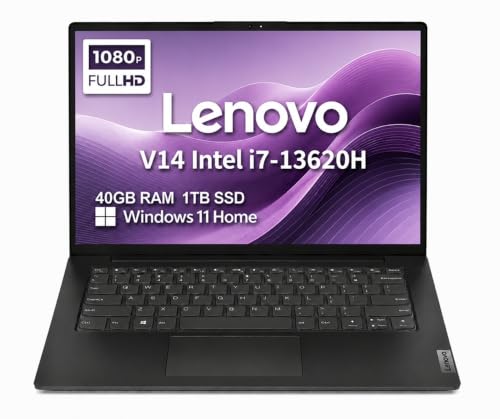
6. Lenovo V14 40GB Laptop: Best Maximum Memory
Pros
- Intel Core i7-13620H has 10 cores
- 40GB DDR4 RAM
- 1TB PCIe NVMe SSD
- Supports two external monitors
- Ethernet, HDMI, USB-C, and Wi-Fi 6
Cons
- Windows 11 Home rather than Pro
- Display is limited to 45 percent NTSC coverage
- Memory and SSD were installed through an upgrade
Best for: users who keep many applications, browser tabs, and large working files open at once.
The Lenovo V14 40GB Laptop is built around a simple idea: give ordinary work more headroom than it usually gets. Its 40GB of DDR4 RAM is the standout feature, paired with a 1TB PCIe NVMe SSD. That combination is excessive for email and a few browser tabs, but it makes sense for people who move between large spreadsheets, virtual meetings, remote sessions, photo tools, and a crowded collection of documents.
The Intel Core i7-13620H is a 10-core processor designed for much more than basic browsing. The extra memory helps prevent slowdowns when several demanding applications stay open, while the SSD should keep system startup and file access responsive. This machine is also listed with a 3.15-pound weight, making it relatively easy to carry despite its high-capacity configuration.
The 14-inch FHD display uses 1920 x 1080 resolution, an anti-glare coating, and 45 percent NTSC color coverage. TÜV Rheinland Low Blue Light certification is intended to make extended viewing more comfortable. The screen is well matched to office work, though people editing photos or video who care about wide color coverage should consider the HP OmniBook X Flip instead. Intel UHD graphics are suited to standard productivity and external display work, not demanding graphics workloads.
Lenovo specifies HDMI 1.4b and USB-C support for two external monitors at up to 4K resolution and 60Hz. There are also USB-A 3.2, USB 2.0, Ethernet, a power connector, and an audio combo jack. Wi-Fi 6 and Bluetooth 5.2 cover wireless connections, while the 720p camera includes a privacy shutter. MIL-STD-810H testing is another useful sign that this is intended for regular business movement rather than occasional home use.
The main compromise is Windows 11 Home, which lacks some of the business management features found on the Lenovo V14 Gen 4 and ThinkPad E14 Gen 7. The configuration was also resealed for memory and SSD upgrades, with the upgraded parts covered by a three-year warranty from the upgrading company and the remaining components covered by Lenovo for one year. If you want the most multitasking room in the group, this Lenovo is compelling. If you want a cleaner business configuration, the ThinkPad is the better fit.
7. Lenovo V14 Gen 4: Best Windows Pro Laptop

Pros
- 10-core Intel Core i7-13620H processor
- Windows 11 Pro with BitLocker and Remote Desktop
- MIL-STD-810H testing
- 3.15-pound listed weight
- Ethernet, HDMI, USB-C, and privacy-shutter camera
Cons
- 16GB RAM and 512GB SSD are less generous than the 40GB model
- 45 percent NTSC display is not for color-critical work
- System was resealed for an upgrade
Best for: students, remote workers, and small businesses that need Windows 11 Pro in a straightforward chassis.
The Lenovo V14 Gen 4 is the sensible middle ground between a basic home laptop and a premium business model. It uses the same Intel Core i7-13620H family found in the higher-memory Lenovo V14, but the configuration is more restrained with 16GB of DDR4 RAM and a 512GB PCIe NVMe SSD. For office documents, online classes, browser work, meetings, and general administration, that is a clean and capable specification.
Its 14-inch 1920 x 1080 anti-glare display is easy to place on a desk or in a small bag. The 45 percent NTSC coverage means it is designed for everyday viewing rather than precise color work. TÜV Rheinland Low Blue Light certification is included, and Intel UHD graphics handle the display output. The laptop can drive two external monitors through HDMI and USB-C at up to 4K resolution and 60Hz, which gives a small desk much more room to work.
The connectivity is especially useful for a business-oriented laptop. You get USB-C 3.2 Gen 1, USB-A 3.2 Gen 1, USB 2.0, HDMI 1.4b, Ethernet, and an audio combo jack, plus Wi-Fi 6 and Bluetooth 5.2. The 720p webcam has a privacy shutter. Windows 11 Pro adds BitLocker encryption, Remote Desktop, and enhanced device management, features that make this model more appropriate for a managed work setup than the Lenovo V14 40GB Laptop running Windows 11 Home.
The chassis is listed at 3.15 pounds and is described as meeting MIL-STD-810H requirements. That should reassure people who carry the laptop between home, school, and an office, although certification does not remove the need for ordinary care. The listing says the computer was resealed to upgrade the system, and Lenovo provides a one-year warranty on the remaining components.
Compared with the ASUS Vivobook 14, the Lenovo has a lighter listed build and a clearer business software profile, while the ASUS counters with more storage and a broader everyday accessory package. The Lenovo V14 40GB Laptop is the faster choice for extreme multitasking simply because it has much more memory. The V14 Gen 4 is the cleaner recommendation for anyone who wants a familiar, durable work laptop without paying for features they will not use.
8. Dell Latitude 5420: Best Compact Refurbished Laptop

Pros
- 11th generation Intel Core i7-1185G7 processor
- 16GB DDR4 RAM and NVMe SSD
- Thunderbolt 4 ports
- HDMI, Ethernet, microSD, and USB connectivity
- 3.1-pound listed weight
Cons
- 256GB SSD is the smallest internal drive here
- Refurbished condition means unit condition can vary
- Intel Tiger Lake graphics are not aimed at demanding creative work
Best for: basic office work, study, and travel when a compact business chassis matters.
The Dell Latitude 5420 is an uncomplicated refurbished business laptop with the ports many newer thin machines have started to omit. Its listed dimensions are 0.8 by 12.7 by 8.4 inches, and the listed feature data puts its weight at 3.1 pounds. That makes it a practical machine for carrying between a home office, classroom, and meeting room.
The 11th generation Intel Core i7-1185G7 is a quad-core processor with a 2.80GHz base speed. It is older than the chips in the newer HP and Lenovo models, but it remains well suited to documents, web apps, video meetings, and general Windows work. The 16GB of DDR4 RAM is enough for normal multitasking. The limitation is the 256GB NVMe SSD, which leaves less room for large media libraries and extensive local archives than the 512GB and 1TB alternatives.
The 14-inch display uses 1920 x 1080 resolution, a conventional format for office work and streaming. Intel Tiger Lake graphics handle ordinary tasks, while the port list is unusually useful: two USB 3.0 ports, two USB-C Thunderbolt 4 ports, HDMI, a microSD card reader, Ethernet, and a headphone and microphone combo jack. Integrated Wi-Fi and Bluetooth complete the basic connections without requiring a dock.
Windows 11 Pro is already installed, giving it a more business-ready operating system than the HP OmniBook 3 or Lenovo V14 40GB Laptop. Buyers who want to connect fast storage, external displays, wired networking, or memory cards will find it more flexible than the simpler HP 14 Business Laptop. The chassis is the reason to choose this Dell, not cutting-edge graphics or a large internal drive.
This is a renewed machine, so condition and support deserve more attention than they would on a new laptop. The feature data identifies it as Microsoft Authorized Refurbished, but the listing still gives less storage and an older platform than the Lenovo ThinkPad E14 Gen 7. Choose the Dell Latitude 5420 if you want a compact, port-rich business laptop for ordinary work and can live with its smaller SSD.
9. HP 14 Business Laptop: Best Bundled Accessories

Pros
- 16GB DDR4 RAM
- Windows 11 Pro
- Quad-core Intel N150 processor
- External 500GB drive included
- USB-C hub, wireless mouse, and HDMI cable included
Cons
- Internal storage is only 128GB UFS
- Display resolution is not specified
- Bundled accessories add convenience but also more components to manage
Best for: students and home users who need a ready-to-use setup with office software and accessories.
The HP 14 Business Laptop is sold as a complete starter setup rather than just a computer. The bundle includes a 6-in-1 USB-C hub, 500GB external drive, USB extension cable, HDMI cable, mouse pad, and wireless mouse. It also includes Microsoft Office 2024 described as a lifetime installation. That makes the package appealing to a student or home worker who would otherwise need to gather several accessories separately.
The laptop itself uses an Intel N150 quad-core processor with four cores, four threads, a listed boost speed of up to 3.6GHz, and 6MB of L3 cache. The 16GB of DDR4 memory is generous for web browsing, online classes, documents, and everyday multitasking. The storage arrangement is unusual: 128GB of UFS storage inside the laptop plus a 500GB external drive. The external drive adds capacity, but it is not the same as having a larger internal SSD available whenever the laptop is away from the desk.
The listing describes a 14-inch display with narrow bezels, but does not specify its resolution. That missing detail matters for anyone comparing screen sharpness directly with the 1920 x 1080 and 1920 x 1200 panels elsewhere in this roundup. The HP True Vision 720p camera and integrated dual-array microphones are aimed at online classes and video calls. Windows 11 Pro adds security and productivity features that are unusual in a basic student bundle.
The HP 14 is lighter than some of the larger configurations here, with a listed weight of 3.24 pounds and dimensions of 0.71 by 12.76 by 8.86 inches. Wi-Fi 6 supports modern wireless networking. The included hub provides USB 3.0, 4K HDMI, USB-C, and SD and TF card readers, so the bundle can quickly become a small workstation.
Its weakness is the balance between the modest internal storage and the long list of extras. The Dell Latitude 5420 has a faster NVMe SSD and more explicit display and port specifications, while the HP OmniBook 3 is a much stronger choice for long mobile sessions. The HP 14 Business Laptop is best for someone who wants a Windows setup with office software and accessories already gathered together, and who does not mind relying on the external drive.

How to choose best 14 inch laptop
A good 14-inch laptop balances screen comfort, carrying weight, processing ability, ports, and operating system features. The right mix depends on whether the machine will live in a bag, on a desk, or in a classroom.
Display shape and brightness
Resolution affects how much text and detail fit on screen, while aspect ratio affects how much vertical space documents receive. A 1920 x 1200 display, such as the panels on the HP OmniBook 3 and Lenovo ThinkPad E14 Gen 7, gives more vertical room than 1920 x 1080. Brightness also matters near windows or under strong office lighting. The HP OmniBook X Flip lists 400 nits, while the ThinkPad lists 300 nits.
Processor and platform
The processor determines how comfortably a laptop handles demanding applications and sustained multitasking. Intel Core i7 and Ryzen 7 systems here are better suited to heavier office workloads than the Intel N150 in the HP 14 Business Laptop. Snapdragon can be exceptionally efficient, but buyers who rely on older or specialist Windows software should confirm compatibility before choosing an ARM-based machine.
Memory and storage
Sixteen gigabytes of RAM is a sensible starting point for modern Windows productivity. The Dell Latitude 7420 increases that to 32GB, while the Lenovo V14 40GB Laptop is designed for users who keep unusually large workloads open. Storage type matters too. NVMe SSDs provide quick access to applications and files, while the HP 14 Business Laptop uses 128GB of internal UFS storage and a separate 500GB external drive.
A large memory figure helps only when the processor, storage, and software workload can use it.
Ports and wireless connections
Count the ports you use before choosing a laptop. HDMI is useful for a monitor or projector, Ethernet helps in fixed office setups, and USB-C can handle charging, storage, or display duties depending on the machine. Thunderbolt 4 on the Dell Latitude 5420 and Lenovo ThinkPad E14 Gen 7 offers particularly flexible high-speed expansion. Wi-Fi 6 and Wi-Fi 6E are useful for newer routers and busy networks.
Weight and durability
A 3-pound laptop is much easier to carry every day than a 4.6-pound or 5-pound model. Thinness is not the only consideration. The Lenovo V14 models and ThinkPad E14 Gen 7 list MIL-STD-810H testing, while the HP OmniBook 3 focuses on a thin 0.58-inch profile and long claimed battery life. If you are comparing machines for regular commuting, the laptop size and weight trade-offs for daily carrying deserve as much attention as processor names.
Operating system and business features
Windows 11 Pro includes features that matter in managed work environments, such as BitLocker, Remote Desktop, and device management tools. Windows 11 Home is sufficient for many students and home users, and it appears on the HP OmniBook 3, HP OmniBook X Flip, and Lenovo V14 40GB Laptop. Business buyers should also check warranty terms when a system has been opened for memory or storage upgrades.
Frequently asked questions
Is a 14-inch laptop large enough for work?
Yes. A 14-inch screen offers a useful balance between workspace and portability for documents, spreadsheets, web applications, and meetings. Models with 1920 x 1200 resolution provide extra vertical room that can make long documents more comfortable.
Which 14-inch laptop is best for travel?
The HP OmniBook 3 is the strongest travel-oriented choice in this group because it lists a 3.13-pound weight, a thin profile, Wi-Fi 6E, and claimed battery life of up to 32 hours and 15 minutes. Actual battery life will vary with brightness, applications, and connectivity.
Is 16GB RAM enough for a Windows laptop?
Sixteen gigabytes is enough for most office work, study, web browsing, streaming, and video calls. Choose 32GB or 40GB if you routinely use large spreadsheets, many browser tabs, virtual machines, or several demanding applications at once.
Are refurbished Dell Latitude laptops worth considering?
A refurbished Dell Latitude can provide a compact business chassis, useful ports, and Windows 11 Pro. Check the warranty, storage capacity, and stated condition carefully. The Dell Latitude 7420 and Dell Latitude 5420 both offer capable configurations, but their processors are older than those in several new models.
Should I choose a touchscreen 2-in-1 laptop?
Choose a 2-in-1 when you will use tablet, tent, touch, or pen modes regularly. The HP OmniBook X Flip is the only convertible here and includes a stylus, but its listed weight is higher than several standard clamshell laptops.
Is Windows 11 Pro important for students?
Most students can complete everyday work with Windows 11 Home. Windows 11 Pro becomes more useful when a school or employer requires BitLocker, Remote Desktop, advanced device management, or other business controls.
The bottom line
The Best 14 inch laptop in this group is the HP OmniBook 3. Its 1920 x 1200 display, 16GB of LPDDR5x memory, 512GB SSD, efficient Snapdragon platform, FHD camera, and very long claimed battery life make it the most balanced pick for mobile work and study.
For a more traditional work machine, choose the Lenovo ThinkPad E14 Gen 7. It has the stronger business profile, a durable design, useful ports, a fingerprint reader, a backlit keyboard, and Windows 11 Pro. The HP OmniBook X Flip is the better alternative for touch and pen input, while the Dell Latitude 7420 is the more compact touchscreen option if a refurbished business laptop suits your needs.
If you are undecided, choose the HP OmniBook 3 for mobility or the Lenovo ThinkPad E14 Gen 7 for conventional business work.
As an Amazon Associate we earn from qualifying purchases.