

A 4K-ready desktop is not automatically a powerful desktop. Some systems here are compact office PCs that can drive sharp high-resolution displays, while others are webcams designed to improve the video calls made from that desk. The important split is processor headroom, display connectivity, storage, and whether the machine is a renewed business tower or a tiny new mini PC.
Our Best 4K Desktop pick is the KAMRUI Pinova P1, with the HP EliteDesk 800 G6 Mini close behind for demanding office work. The lineup also includes sensible dual-display mini PCs, renewed Dell towers, and two 4K webcams for buyers building a complete workstation.
Comparison table
| # | Product | Award | Processor | Memory and storage | 4K display support | Best for |
|---|---|---|---|---|---|---|
| 1 | KAMRUI Pinova P1 | Best overall | AMD Ryzen R2544, up to 3.7GHz | 16GB RAM, 256GB SSD | Triple 4K via HDMI, DisplayPort, USB-C | Multi-monitor office work |
| 2 | HP EliteDesk 800 G6 Mini 512GB | Best for business workloads | Intel Core i5-10500T | 16GB RAM, 512GB SSD | 4K, dual-monitor DisplayPort | Heavy multitasking |
| 3 | GMKtec G10 | Best storage | Ryzen 5 3500U | 16GB RAM, 1TB SSD | Triple 4K via HDMI, DisplayPort, USB-C | Large local files |
| 4 | KAMRUI AK1PLUS | Best dual-display mini PC | Intel Celeron N5095, up to 2.9GHz | 16GB RAM, 256GB SSD | Dual 4K at 60Hz | Everyday productivity |
| 5 | Dell OptiPlex 7050 | Best renewed tower | Intel Core i5-7500, up to 3.8GHz | 16GB RAM, 512GB SSD | 4K support | Traditional desktop setups |
| 6 | HP EliteDesk 800 G6 Mini 256GB | Best compact business PC | Intel Core i5-10500T | 16GB RAM, 256GB SSD | 4K support | Small professional desks |
| 7 | GMKtec G3S | Best entry mini PC | Intel N95, up to 3.4GHz | 8GB RAM, 256GB SSD | Dual 4K at 60Hz | Basic office and media use |
| 8 | Dell OptiPlex 3050 | Best small renewed tower | Intel Core i5-6500, up to 3.6GHz | 16GB RAM, 256GB SSD | Dual 4K | Basic home office |
| 9 | Angetube 967 | Best 4K webcam with light | Not applicable | USB webcam | 4K at 30fps | Dim home offices |
| 10 | Philips 4K Webcam | Best simple webcam | Not applicable | USB webcam with microphone | 4K | Plug-and-play calls |
1. KAMRUI Pinova P1: Best Overall

Pros
- Ryzen R2544 processor has four cores and eight threads
- Supports three simultaneous 4K displays
- Small body can mount behind a monitor
- 16GB memory and an extra M.2 slot
- USB-C, DisplayPort, and HDMI output
Cons
- 256GB SSD leaves limited room for large media libraries
- Integrated Radeon graphics are not intended for demanding games
- Product listing gives limited detail about the full port layout
Best for: people building a compact workstation around several high-resolution screens.
The Pinova P1 is the easiest system here to recommend when the desk has to do several jobs at once. It is small enough to disappear behind a monitor, yet its Ryzen R2544 processor has four cores and eight threads, giving it more multitasking room than the entry-level Intel systems lower in this list. Open a large spreadsheet, browser windows, communications software, and document tools together, and the processor is better suited to that kind of sustained office clutter.
Its headline feature is the display arrangement. AMD Radeon graphics can drive three 4K screens at the same time through HDMI, DisplayPort 1.4, and USB-C. That makes the P1 a natural fit for financial dashboards, editing timelines, accounting work, or any workflow where switching between windows gets tiresome. It is a more flexible 4K setup than the dual-screen KAMRUI AK1PLUS and GMKtec G3S.
The 16GB of DDR4 memory is a comfortable starting point for Windows multitasking, and the installed 256GB M.2 SSD should keep startup and application loading responsive. The extra M.2 slot supports storage expansion up to 4TB according to the listing, so the small internal drive does not permanently limit the machine. Dual-band Wi-Fi, Bluetooth, Gigabit Ethernet, Wake on LAN, PXE Boot, RTC Wake, and Auto Power On also make sense in an office or small server role.
There are limits. The R2544 is still an integrated-graphics mini PC, not a workstation with a dedicated graphics card, and the short storage capacity means anyone keeping video projects or a large photo library will need an upgrade. The listing also makes broad performance claims that should not be treated as a substitute for a dedicated graphics system. For ordinary office work across multiple 4K panels, though, this is the most capable and adaptable package here.
Buy the Pinova P1 if three screens, a tiny footprint, and strong everyday multitasking matter more than gaming or graphics-heavy creation. If your priority is a business-class renewed machine with more included storage, the HP EliteDesk 800 G6 Mini 512GB is the more conservative alternative.
2. HP EliteDesk 800 G6 Mini 512GB: Best for Business Workloads

Pros
- 10th-generation Core i5-10500T processor
- 16GB memory for demanding multitasking
- 512GB SSD
- Wi-Fi 6 and USB-C connectivity
- DisplayPort outputs for dual monitors
Cons
- Renewed condition requires realistic expectations
- No detailed display specification beyond 4K support
- Integrated graphics limit demanding visual workloads
Best for: office users who need a compact business PC with stronger processor headroom.
The HP EliteDesk 800 G6 Mini 512GB is the most serious office computer in this group. Its 10th-generation Intel Core i5-10500T is a substantial step up from the Celeron N5095 in the KAMRUI AK1PLUS and the N95 in the GMKtec G3S. That difference matters when a desktop has to keep several applications open, handle large spreadsheets, manage databases, or support heavier business software.
HP pairs the processor with 16GB of RAM and a 512GB SSD. The memory is enough for a busy Windows workspace, while the larger drive gives documents, applications, and local project files more breathing room than the 256GB systems. The listing describes rapid booting and application loading, which is exactly where an SSD-equipped office computer should feel more pleasant than an older mechanical-drive tower.
The EliteDesk also has the right connectivity for a clean desk. USB-C 3.1 Gen 2 sits alongside multiple USB 3.1 ports, and the DisplayPort outputs support a dual-monitor arrangement. Built-in Wi-Fi 6 should be useful in a crowded wireless office, while Bluetooth handles compatible peripherals without consuming another USB port. Windows 11 Pro and TPM 2.0 add business-oriented security and management features that are absent or less certain on some older refurbished systems.
This is not the choice for a video editor who needs a dedicated GPU, and the product listing does not spell out every output detail or the exact dimensions. It is also a renewed PC, so the physical condition and included accessories deserve a check before ordering. Compared with the Pinova P1, it offers a more established business-PC platform and more internal storage, but the Pinova has the stronger three-display story.
Choose this HP when the computer will spend its life inside spreadsheets, browser tabs, databases, and office applications. Readers comparing the hardware for a wider range of work tasks may also want to consider how a desktop handles sustained office multitasking before settling on a processor class.
3. GMKtec G10: Best Storage

Pros
- Ryzen 5 3500U with Radeon Vega 8 graphics
- 16GB dual-channel DDR4 memory
- 1TB SSD included
- Triple-display output
- 2.5GbE Ethernet
Cons
- Older Ryzen 5 3500U platform
- Larger than some ultra-compact mini PCs
- Integrated graphics are suited to light gaming, not demanding titles
Best for: users who need substantial local storage and three-screen connectivity in a small computer.
The GMKtec G10 stands apart because it solves a problem that many tiny desktops create: running out of storage almost immediately. Its 1TB SSD gives office documents, applications, photos, and media a sensible amount of room from the start. The 16GB of dual-channel DDR4 memory also gives the Ryzen 5 3500U a useful foundation for multitasking.
The processor is a quad-core, 64-bit mobile chip with a 2.1GHz base frequency and boost speed up to 3.7GHz. It is an older Zen+ design, but the included Radeon Vega 8 graphics make it more versatile than the basic Intel graphics in the GMKtec G3S. The listing positions it for office work, video playback, light video editing, and casual gaming. Those claims fit the hardware category, provided expectations stay well below modern gaming-PC levels.
For a 4K desk, the output selection is unusually useful. HDMI 2.1 TMDS, DisplayPort 1.4, and full-function USB-C can connect three displays simultaneously. The HDMI output supports 4K at 60Hz, while the other outputs add flexibility for a mixed monitor setup. Two USB 3.2 ports, USB 2.0, audio, Wi-Fi 5, and Bluetooth 5.0 cover the everyday accessories without forcing an immediate hub purchase.
The G10 is not as tiny as the Pinova P1, and its processor is not as modern as the HP EliteDesk's Core i5-10500T. It also uses Wi-Fi 5 rather than Wi-Fi 6. Still, the combination of 1TB storage, triple-display support, and Radeon graphics makes it a compelling middle ground. The two M.2 2280 slots can support further expansion according to the listing, with memory expansion up to 64GB.
This is the right GMKtec for someone who wants a small desktop that can hold a substantial working library. Pick the HP for heavier business processing, or the Pinova P1 for the smallest three-screen installation, but choose the G10 when storage capacity is the feature that will affect daily use most.
4. KAMRUI AK1PLUS: Best Dual-Display Mini PC

Pros
- Dual 4K output at 60Hz
- 16GB LPDDR4X memory
- M.2 and 2.5-inch storage expansion
- Four USB 3.2 ports
- Very small 5.04-inch square footprint
Cons
- Celeron processor is intended for everyday tasks
- 256GB installed SSD
- Not suitable for demanding creative applications
Best for: compact office desks that need two crisp displays and straightforward connectivity.
The AK1PLUS is a tidy answer to the basic dual-monitor office problem. At roughly 5.04 inches square and 2.05 inches tall, it takes up far less space than a traditional tower. Its Intel Celeron N5095 has four cores and four threads and can reach 2.9GHz, which is enough for browsers, email, video calls, documents, and light multitasking.
The key specification is its pair of HDMI 2.0 outputs. Both can run 4K displays at 60Hz simultaneously, giving the desktop a practical extended workspace instead of merely supporting a single high-resolution panel. That makes it a better dual-screen choice than the GMKtec G3S only when the extra memory and storage expansion matter, since both machines support dual 4K output.
KAMRUI includes 16GB of LPDDR4X memory and a 256GB M.2 2280 SSD. The listing says the M.2 slot can support up to 2TB and that a separate 2.5-inch SATA drive can add another 2TB. That is a useful long-term design for an office PC that may start with documents and later become a media or backup machine. Four USB 3.2 ports, Gigabit Ethernet, Wi-Fi, Bluetooth, and a 3.5mm audio jack round out the connection options.
The processor is the obvious ceiling. It will not match the Core i5-10500T in either HP EliteDesk, and heavy spreadsheet calculations or multiple demanding applications will expose that difference. The installed drive is also modest, and the listing does not provide a detailed Windows configuration beyond the product description. Buyers who need only office basics should not mistake 4K display support for workstation performance.
Choose the AK1PLUS for a quiet, compact two-screen desk with room to expand storage later. It is a more capable foundation than the GMKtec G3S for multitasking, but the Pinova P1 is the better choice if three displays or heavier processor work is part of the plan.
5. Dell OptiPlex 7050: Best Renewed Tower

Pros
- Core i5-7500 processor with Turbo Boost up to 3.8GHz
- 16GB DDR4 memory
- 512GB SSD
- Built-in Wi-Fi and Bluetooth
- Large selection of USB ports
Cons
- Older seventh-generation platform
- TPM 1.2 may limit some Windows 11 security features
- Traditional tower takes more desk space than a mini PC
Best for: buyers who prefer a conventional renewed business desktop with generous connectivity.
The Dell OptiPlex 7050 is the familiar business-PC option. It is larger and less discreet than the mini computers here, but that traditional form factor leaves room for a broad selection of ports and makes the machine easier to handle than a palm-sized box. It comes with 16GB of DDR4 memory and a 512GB SSD, a practical combination for ordinary work and local files.
Its Intel Core i5-7500 runs at 3.4GHz and can reach 3.8GHz with Turbo Boost. That is older silicon than the HP EliteDesk 800 G6 models, but it remains a sensible fit for web work, documents, office software, and media playback. The integrated HD Graphics 630 supports 4K according to the listing, though this is not a machine for modern graphics-heavy applications.
The rear panel includes two DisplayPort 1.2 connections, HDMI 1.4, USB-C, five USB 3.0 ports, and four USB 2.0 ports. That is more peripheral flexibility than most tiny PCs provide. Built-in 802.11ac Wi-Fi and Bluetooth keep the desk reasonably uncluttered, too. For someone attaching printers, storage devices, older accessories, and two monitors, the 7050 is easy to live with.
The most important caveat is the TPM 1.2 note in the listing. It specifically warns that the computer may not support all Windows 11 security features and newest updates. That is a meaningful concern for a long-term business deployment. Its size is another drawback when compared with the Pinova P1 or either HP mini PC.
The 7050 makes sense when ports, a conventional chassis, and a larger SSD matter more than having the newest platform. For a smaller desk, choose one of the HP EliteDesk systems. For a more compact 4K display arrangement, the KAMRUI AK1PLUS has a cleaner modern footprint.
6. HP EliteDesk 800 G6 Mini 256GB: Best Compact Business PC

Pros
- 10th-generation Intel Core i5-10500T
- 16GB RAM
- Integrated Wi-Fi and Bluetooth
- 4K support and DisplayPort
- Small business-oriented chassis
Cons
- 256GB SSD
- Listing provides few detailed specifications
- Renewed condition
Best for: a small professional workspace that needs a capable Intel business platform.
The HP EliteDesk 800 G6 Mini 256GB shares the same important processor and memory combination as the 512GB version above. Its Core i5-10500T is a 10th-generation chip, and the 16GB of RAM should handle normal office multitasking comfortably. That makes it a stronger productivity system than the Celeron and N95 mini PCs, particularly when applications are open all day.
The integrated Intel UHD Graphics 630 supports 4K output according to the title and feature data. HP also includes DisplayPort, RJ-45, Wi-Fi, and Bluetooth, so the machine can sit behind or beside a monitor without needing a wireless adapter. The compact format is the main reason to choose this model over the Dell OptiPlex 7050.
Storage is the point of separation from the other HP in this roundup. This version has a 256GB SSD, enough for Windows, office software, and active documents, but less forgiving for large files. The 512GB HP EliteDesk 800 G6 Mini is the better fit if the computer will hold substantial project folders without external storage.
The listing is sparse, offering little detail about the exact port count, display configuration, dimensions, or included accessories. That makes it harder to plan a tightly specified workstation before arrival. As a renewed model, it also deserves the usual attention to condition and what is included in the box.
Pick this HP when the compact chassis and Core i5 processor matter more than storage capacity. It is a sensible office machine, but the Pinova P1 is more interesting for three-monitor users, while the 512GB HP is the safer choice for larger local files.
7. GMKtec G3S: Best Entry Mini PC
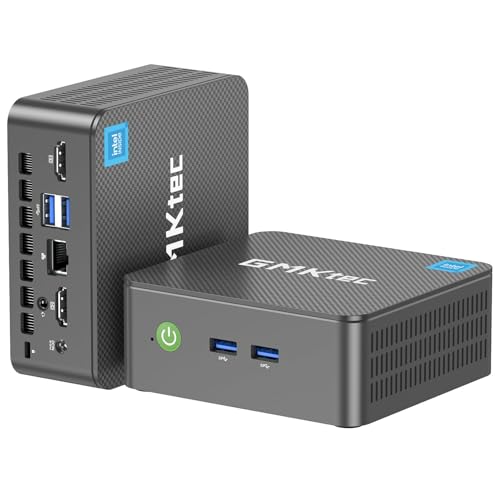
Pros
- Intel N95 processor reaches 3.4GHz
- Dual HDMI 2.0 outputs
- Dual 4K at 60Hz
- Wi-Fi 5, Bluetooth 5.0, and Gigabit Ethernet
- Wake on LAN and PXE Boot support
Cons
- Only 8GB of RAM
- 256GB SSD
- Limited to routine office and entertainment work
Best for: basic desk work, streaming, and a two-monitor setup in a small space.
The G3S keeps the mini-PC formula simple. Its 12th-generation Intel N95 has four cores, four threads, a 6MB cache, and burst speed up to 3.4GHz. That is enough for web browsing, documents, streaming, email, and routine office software. It is not a replacement for the Core i5 systems when the workload involves sustained calculations or serious content creation.
Two HDMI 2.0 ports can run two 4K displays at 60Hz simultaneously. That is the G3S's strongest feature, since it enables a useful extended desktop without a dock. Intel graphics also support 4K video playback and AV1 decoding, which suits a small media center or office display system.
The configuration is more restrained than the KAMRUI AK1PLUS. It has 8GB of DDR4 RAM and a 256GB M.2 2242 SSD, so browser-heavy multitasking will reach its limits sooner. Wi-Fi 5, Bluetooth 5.0, Gigabit Ethernet, USB 3.2, USB 2.0, and a 3.5mm audio jack provide a good everyday connection set, while Wake on LAN, PXE Boot, RTC Wake, and Auto Power On give it some useful administrative features.
The G3S is best understood as a straightforward productivity box. It lacks the memory of the AK1PLUS, the storage of the GMKtec G10, and the processor headroom of the HP EliteDesk. Its one-year limited warranty is a useful support detail, but it does not change the hardware's entry-level position.
Choose it for a basic two-screen desk, signage, streaming, or a home office that will not run demanding software. If you expect many browser tabs and several office applications to remain open, the AK1PLUS's 16GB memory is worth prioritizing.
8. Dell OptiPlex 3050: Best Small Renewed Tower

Pros
- Core i5-6500 processor
- 16GB DDR4 memory
- SSD storage and Windows 11 Pro
- Dual 4K display support
- Includes USB keyboard and mouse
Cons
- Older sixth-generation processor
- 256GB SSD
- Uses a USB Wi-Fi adapter
- Renewed product
Best for: basic home office work in a compact traditional desktop chassis.
The Dell OptiPlex 3050 is an older business desktop with a useful amount of memory. Its Intel Core i5-6500 has four cores and can reach 3.6GHz, while 16GB of DDR4 keeps the system from feeling constrained by ordinary multitasking. It is a reasonable fit for documents, email, browsing, and basic administrative work.
Dell lists support for dual 4K displays at 3840 by 2160. The rear panel provides DisplayPort and HDMI, along with USB 3.0, USB 2.0, and RJ-45. That makes it possible to build an extended desktop with two monitors without relying on a separate graphics card. The included USB keyboard and mouse help it function as a complete starter workstation.
The 256GB SSD should make Windows startup and common applications feel much more responsive than an older hard-drive configuration. A USB Wi-Fi adapter is included, though that is less elegant than the built-in wireless hardware on the Dell OptiPlex 7050 and the HP mini PCs. The listing also mentions a 30-day Microsoft Office trial, which should not be confused with a permanent software license.
The i5-6500 is the main reason to place this model below the 7050. It is an older generation, and the compact small-form-factor case is not as space-efficient as a mini PC. Buyers should also remember that this is a renewed product, with the normal possibility of cosmetic variation and generic packaging.
The 3050 is a practical choice for a basic two-monitor home office when a conventional tower is preferred. Choose the 7050 for the newer processor and larger SSD, or the AK1PLUS when desk space and storage expansion are more important than the traditional chassis.
9. Angetube 967: Best 4K Webcam With Light
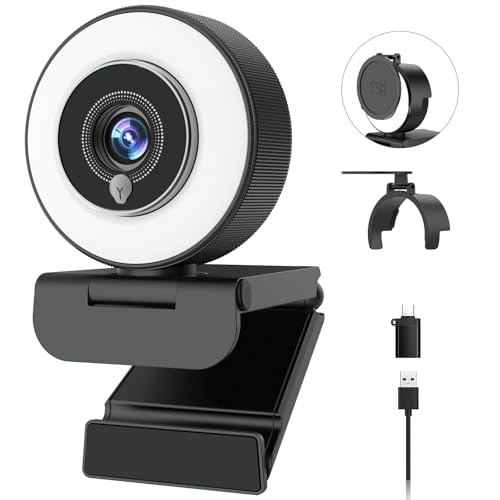
Pros
- 4K at 30fps
- 1080p at 60fps
- PDAF autofocus
- Three-level adjustable ring light
- Privacy shutter and dual microphones
- USB-A connection with USB-C adapter
Cons
- Ring light adds another control to manage
- Best suited to video calls and streaming, not a desktop computer itself
- Image quality depends on room lighting and software
Best for: video calls and streaming from a 4K-ready desktop in a dim room.
The Angetube 967 is not a desktop computer, but it is a useful companion for anyone assembling a 4K workstation around one of the PCs above. Its 4K capture mode runs at 30fps, while 1080p can reach 60fps. That gives the camera a sharper mode for presentations and a smoother mode for movement or streaming.
The built-in ring light is the feature that separates it from the Philips webcam. It offers three brightness settings and is designed to soften shadows in dim rooms. PDAF autofocus should help keep the subject sharp as they move slightly toward or away from the camera. Those details are more useful in a home office than a resolution label alone.
Angetube also includes dual microphones and a physical privacy shutter. The shutter is a worthwhile mechanical safeguard because it blocks the lens rather than relying on software. Plug-and-play USB-A setup, a USB-C adapter, and support for Windows, macOS, and Linux make it straightforward to move between computers.
The weakness is that no integrated light can fully solve a badly positioned desk lamp or a bright window behind the user. The camera is also an accessory, not a computer, so it belongs in a workstation setup rather than a direct comparison with the mini PCs. Buyers should select it for the camera, microphone, and lighting package.
Pair it with the HP EliteDesk or KAMRUI Pinova P1 if frequent meetings are part of the working day. For a simpler camera without the ring light, the Philips 4K Webcam is the cleaner alternative.
10. Philips 4K Webcam: Best Simple Webcam
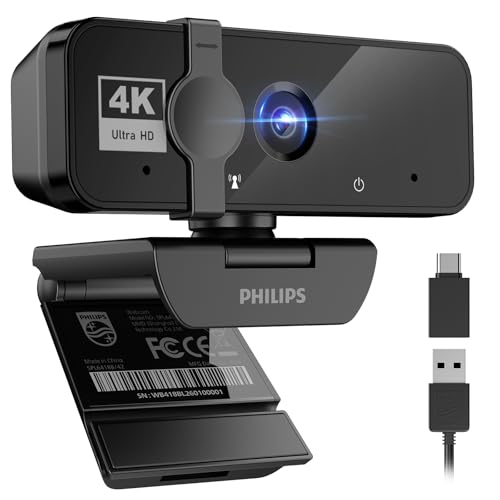
Pros
- 4K video resolution
- Built-in microphone
- Physical privacy shutter
- Plug-and-play USB setup
- Works with Windows and macOS
Cons
- No integrated light
- Limited detail about frame rates and autofocus
- Accessory rather than a desktop computer
Best for: straightforward meetings, classes, and video chats without extra software.
The Philips 4K Webcam is the uncomplicated option in this list. It combines a 4K camera with a built-in microphone, so a desktop user can add video and audio without assembling separate equipment. The product is aimed at meetings, presentations, remote learning, telehealth, and casual calls.
Its physical privacy shutter is a particularly useful touch. Slide it closed when the camera is not needed and the lens is mechanically blocked. That is more reassuring than relying only on a meeting application's camera indicator. Plug-and-play USB setup also means there are no drivers or complicated software steps described in the listing.
The camera supports Windows and macOS and is intended to work with Microsoft Teams, Skype, and Google Meet. That broad compatibility makes it a sensible partner for nearly every desktop in this roundup, including the renewed Dell systems. Philips does not provide the same level of detail about frame rates, autofocus, or lighting as Angetube, so buyers should not assume identical video behavior.
The lack of an integrated light is the main drawback. In a dim room, the Angetube 967 is more flexible because its three-level ring light can add illumination at the camera. Philips is the better fit when the room is already well lit and the priority is a neat, low-effort setup.
Choose this webcam for ordinary calls and classes where 4K capture, a microphone, and a privacy shutter are enough. It is a practical add-on, not one of the computers themselves, and the desktop choice should still be based on processor, memory, storage, and display outputs.

How to choose best 4k desktop
A good 4K desktop needs more than a display output. Match the processor and memory to the software you use, then check the exact display connections and storage options.
Processor class
The processor determines how comfortably the computer handles several applications at once. Intel Celeron N5095 and N95 systems are suited to browsing, documents, streaming, and routine office work. The Ryzen R2544 and Intel Core i5-10500T offer more cores, threads, and general headroom for large spreadsheets, databases, and heavier multitasking.
Older Core i5 chips in the Dell OptiPlex systems can still handle ordinary work, but they sit behind the 10th-generation HP processor in platform age and sustained workload capacity.
Memory capacity
Memory affects how many programs and browser tabs can remain open without slowdowns. The 16GB configurations in the KAMRUI, HP, Dell, and GMKtec systems are the safer choice for a busy office. The GMKtec G3S has 8GB, which is acceptable for lighter use but leaves less room for multitasking.
Do not treat 4K support as evidence of high performance. A mini PC can drive a sharp display while still being intended only for routine applications.
A 4K output tells you what the computer can display, not how quickly it can run your work.
Display outputs
Check both the number and type of outputs. The Pinova P1 and GMKtec G10 support three displays through HDMI, DisplayPort, and USB-C. The AK1PLUS and G3S support two 4K displays at 60Hz through dual HDMI 2.0 outputs. The Dell OptiPlex 3050 and 7050 also support dual-screen setups, but their connectors differ.
USB-C is not automatically a display output. Confirm that the listing specifically identifies it for video before planning a monitor connection around that port.
Storage and expansion
A 256GB SSD is adequate for Windows, office software, and active documents, but large photo, video, and business libraries will fill it quickly. The GMKtec G10 begins with a 1TB SSD, while the Pinova P1 and AK1PLUS offer expansion options. The HP EliteDesk 800 G6 512GB version gives more working space than its 256GB counterpart.
Expansion claims should be checked against the exact model and drive type. A system with an extra slot is more useful than one that requires replacing the original drive.
Size and connectivity
Mini PCs are the easiest to hide behind a display and suit small desks, shared work areas, and monitor-mounted installations. Traditional Dell towers provide more physical room and a broad selection of USB ports, but they take up more space.
Also check wireless hardware. The HP EliteDesk 800 G6 512GB includes Wi-Fi 6 according to its listing, the Dell OptiPlex 7050 has 802.11ac Wi-Fi, and the smaller systems vary by model. Ethernet remains useful for stable large-file transfers and office networks.

Frequently asked questions
Can these desktops run a 4K monitor?
Yes. Every computer in the roundup lists 4K support, though the number and type of display outputs vary. The KAMRUI Pinova P1 and GMKtec G10 are the most flexible for three-screen arrangements, while the KAMRUI AK1PLUS and GMKtec G3S support two 4K displays at 60Hz.
Is a mini PC suitable for office work?
Yes, provided the processor and memory match the workload. The HP EliteDesk systems, KAMRUI Pinova P1, and GMKtec G10 have 16GB of memory and are better suited to busy multitasking than the 8GB GMKtec G3S. Mini PCs are particularly useful when desk space is limited.
Which computer supports three 4K displays?
The KAMRUI Pinova P1 and GMKtec G10 both list triple 4K display support. The Pinova uses HDMI, DisplayPort 1.4, and USB-C, while the G10 uses HDMI, DisplayPort, and USB-C. Check that your displays accept the relevant connectors before choosing either system.
Is 8GB of RAM enough for a 4K desktop?
Eight gigabytes can handle browsing, documents, streaming, and basic office work. It provides less room for many browser tabs, large spreadsheets, and several active applications than 16GB. The GMKtec G3S is the 8GB model here, while the other computers have 16GB.
Are renewed Dell and HP desktops reliable choices?
Renewed business desktops can be sensible when the configuration fits the work, but buyers should check the condition, included accessories, and warranty terms. The Dell OptiPlex 7050 listing also warns that its TPM 1.2 hardware may not support every Windows 11 security feature or newest update.
Do I need a 4K webcam with a 4K desktop?
No. A 4K monitor and a 4K webcam serve different purposes. The webcam affects the quality of your outgoing video calls, while the desktop and display determine the quality of the work shown on your screen. The Angetube 967 adds lighting, while the Philips model focuses on simple plug-and-play use.

The bottom line
The Best 4K Desktop here is the KAMRUI Pinova P1 because its Ryzen R2544 processor, 16GB memory, small body, and triple-display support cover the widest range of office setups. The HP EliteDesk 800 G6 Mini 512GB is the better choice for demanding business applications and users who want a more established business platform with more local storage.
Choose the GMKtec G10 when a 1TB SSD and three displays matter most, or the KAMRUI AK1PLUS for a compact two-screen desk with storage expansion. The Angetube 967 and Philips 4K Webcam are useful additions for calls, but they are peripherals rather than desktop computers.
For an undecided buyer, choose the Pinova P1 for flexibility, or the HP EliteDesk 800 G6 Mini 512GB for heavier office work.
As an Amazon Associate we earn from qualifying purchases.