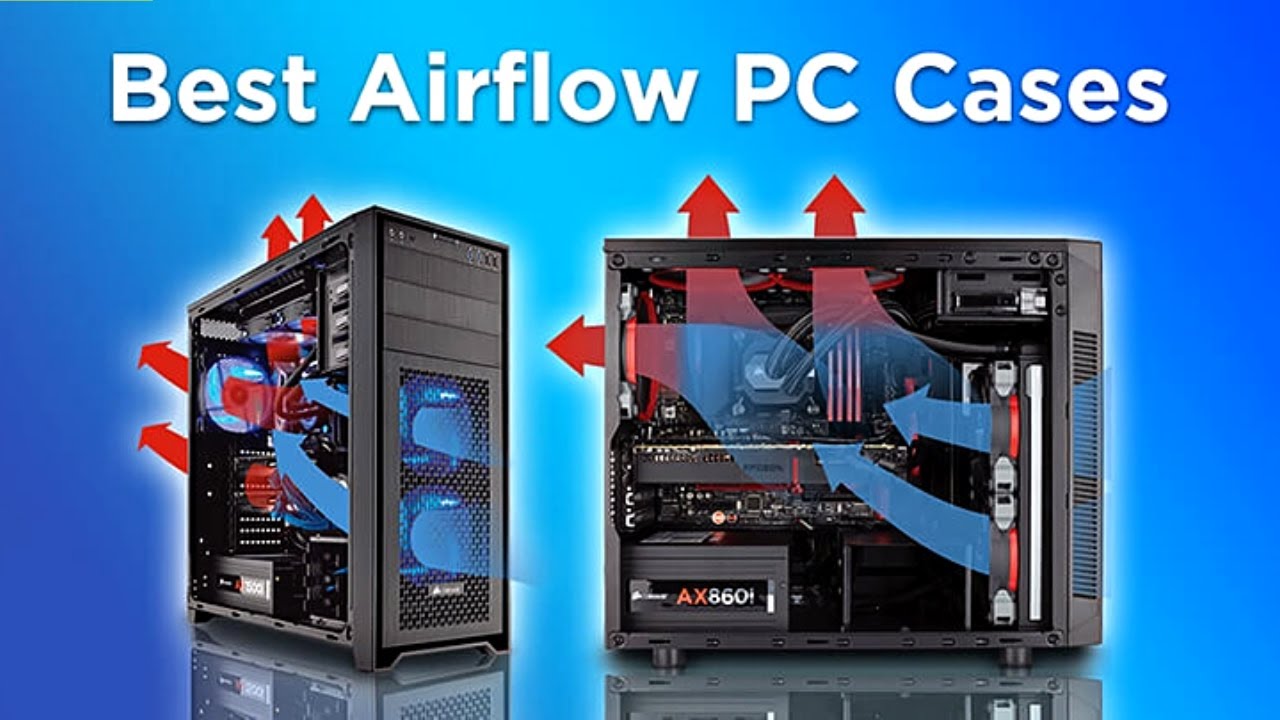

A hot graphics card can turn a powerful PC into a noisy box that throttles under load. The right case does more than add vents. It gives cool air a clear route in, moves warm air out, and leaves enough room around the components for that plan to work.
Our Best airflow PC case picks cover compact ATX towers, panoramic glass designs, modular layouts, and small Micro-ATX builds. Corsair 4000D RS ARGB Frame is the strongest all-rounder, while the other nine make better sense for specific builds and priorities.
Comparison table
| # | Product | Award | Cooling | Hardware support | Best for |
|---|---|---|---|---|---|
| 1 | Corsair 4000D RS ARGB Frame | Best overall | 3 x 120mm ARGB PWM fans, up to 200mm front fans | Up to 360mm front radiator | Flexible ATX builds |
| 2 | NZXT H5 Flow | Best compact ATX | 2 x 120mm fans included | Up to 360mm front radiator | Small ATX systems |
| 3 | MUSETEX K2 | Best fan bundle | 7 x 120mm PWM ARGB fans | Up to 400mm GPU, 360mm top radiator | High-airflow gaming builds |
| 4 | Lian Li V100 | Best large GPU support | 4 x 120mm ARGB PWM fans | Up to 420mm GPU, 360mm top radiator | Large components |
| 5 | Montech XR | Best compact panoramic case | 3 x ARGB PWM fans | Up to 360mm top radiator | Showcase builds |
| 6 | Cooler Master Q300L | Best Micro-ATX option | Up to 5 fans | Up to 360mm GPU, 240mm liquid cooler | Small Micro-ATX systems |
| 7 | Lian Li O11D Mini V2 | Best compact airflow showcase | 5 x 120mm reverse-blade fans | ATX, Micro-ATX, Mini-ITX | Compact glass builds |
| 8 | NZXT H6 Flow RGB | Best panoramic NZXT case | 3 x 120mm RGB fans | Dual-chamber layout | Clean RGB systems |
| 9 | Corsair 3500X RS ARGB | Best glass-front airflow | 3 x RS120-R ARGB fans | Up to 10 x 120mm fans, EATX support | Large showcase builds |
| 10 | Corsair Frame 4000D Wood | Best distinctive design | 4 x RS120 PWM fans | Three 360mm radiator locations | Quiet, customizable systems |
1. Corsair 4000D RS ARGB Frame: Best Overall
Pros
- Three front-mounted RS ARGB PWM fans included
- InfiniRail system allows unusually flexible fan placement
- Perforated 3D Y-pattern front panel limits airflow restriction
- Supports reverse-connection motherboard standards
Cons
- Large and heavy for a mid-tower
- Side fan mounting requires removing the cable-cover panel
- Some of its modular potential depends on future compatible parts
Best for: builders who want a flexible ATX case that can be tuned around different cooling layouts.
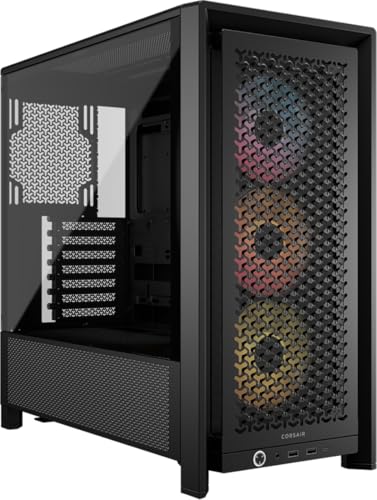
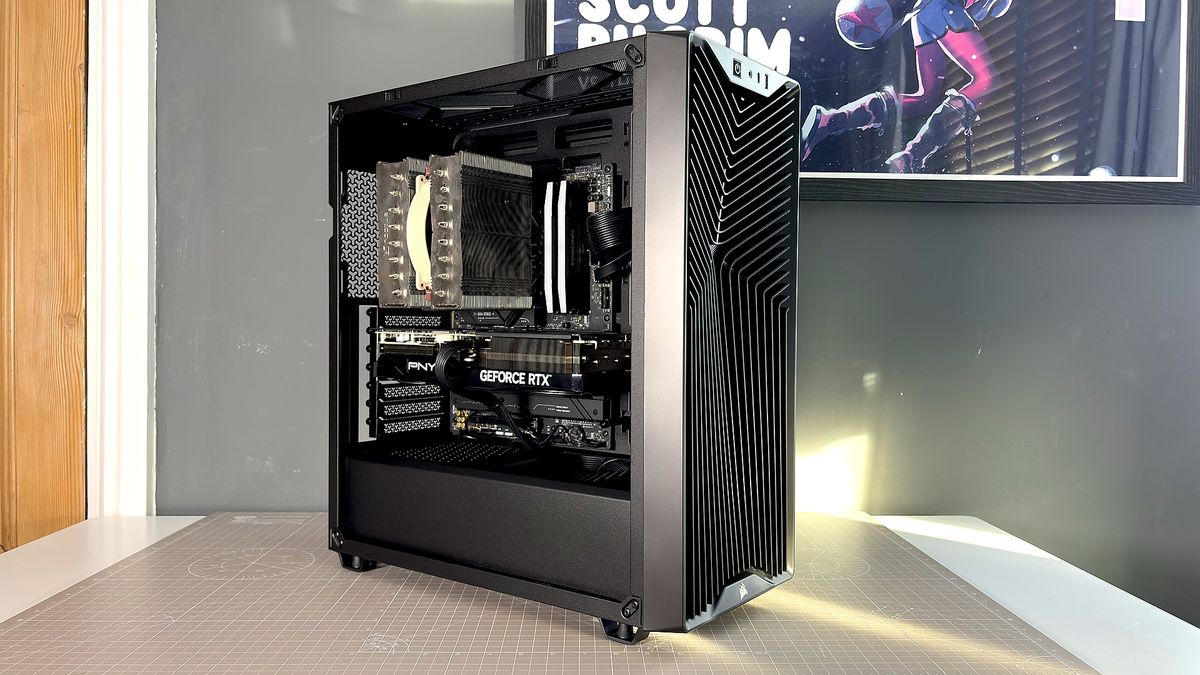
The Corsair 4000D RS ARGB Frame is the case we would keep for a build that may change over time. It starts with a sensible airflow layout, three front RS fans, and a front panel designed to avoid the sealed-off look and performance of a solid façade. The useful difference is that the case does not force every fan into one fixed position.
Corsair's InfiniRail system lets you slide front fans along a steel mounting rail. It accepts fans up to 200mm at the front and up to 140mm in the roof, so you can position intake where a long graphics card, radiator, or other obstruction makes airflow more difficult. The included fans use four-pin PWM connections, support daisy chaining, and can enter Zero RPM mode at low loads. That gives the system a quieter idle without giving up manual fan control.
The internal side panel near the motherboard tray can serve as a cable cover, or you can remove it and use the space for side-mounted fans. That is a more meaningful customization option than decorative modularity. The front panel's three-dimensional Y-pattern perforations also provide a relatively direct intake path. Support for ASUS BTF, MSI Zero, and Gigabyte Stealth layouts makes the case useful for builds that put motherboard connections on the rear.
Compared with the more compact NZXT H5 Flow, the Corsair offers more fan-placement freedom and a more adaptable interior, though the NZXT is easier to fit into a smaller workspace. The Corsair Frame 4000D Wood has the same modular spirit and more radiator locations, but it is aimed at buyers who want a distinctive front panel. This model's weakness is its footprint, measuring about 19.17 inches long, 9.41 inches wide, and 19.13 inches high, with a listed weight of about 22.7 pounds. Skip it if you need a truly compact tower. For a conventional ATX build with room to experiment, it is the safest recommendation.
2. NZXT H5 Flow: Best Compact ATX

Pros
- Compact dimensions without abandoning ATX support
- Fine mesh on the front, top, and side panels
- Two 120mm Quiet Airflow fans included
- Supports 360mm front radiators
Cons
- Two additional bottom intake fans are not included
- Less fan-placement flexibility than the Corsair 4000D RS
- Smaller interior leaves less room for unusual builds
Best for: anyone building a compact ATX PC and wanting a straightforward cooling layout.
The NZXT H5 Flow gets the basics right without trying to turn the case into a display cabinet. It is a compact ATX mid-tower with a front intake fan, a rear exhaust fan, and fine mesh across the front, top, and side panels. That layout makes it easier to maintain a sensible front-to-back airflow path than many glass-heavy alternatives.
The perforated PSU shroud is the feature that separates this case from a merely small ATX tower. Its side and bottom openings allow two 120mm fans to feed air toward the graphics card, although those fans are not included. That is a useful upgrade route for a graphics card that runs warm. The case also accepts a 360mm radiator at the front and a 240mm radiator up top, giving liquid-cooling builders practical options without moving to a much larger chassis.
At about 16.93 inches long, 8.86 inches wide, and 18.31 inches high, the H5 Flow is noticeably easier to place than the Corsair 4000D RS ARGB Frame. Its wide cable channels, hooks, and straps also reduce the amount of wrestling behind the motherboard tray. The trade-off is clear: the NZXT favors a prescribed layout, while the Corsair is better when you want to move fans around or build around less typical hardware.
The included two-fan arrangement is enough for a sensible midrange system, but buyers with a power-hungry GPU should plan the lower intake fans rather than treating them as optional decoration. The case is also less suited to very elaborate custom cooling than the Lian Li V100. Choose the H5 Flow when compact ATX dimensions and clean installation matter more than maximum expansion.
3. MUSETEX K2: Best Fan Bundle
Pros
- Seven PWM ARGB fans included
- Supports up to 10 fans in total
- 400mm graphics card clearance
- 270-degree dual tempered-glass view
- Type-C front-panel connection
Cons
- Fan airflow figures are modest compared with the larger Lian Li V100 fans
- Glass-heavy design needs careful fan balancing
- Hardware compatibility still depends on the drive-cage configuration
Best for: builders who want extensive pre-installed cooling and a prominent view of the components.
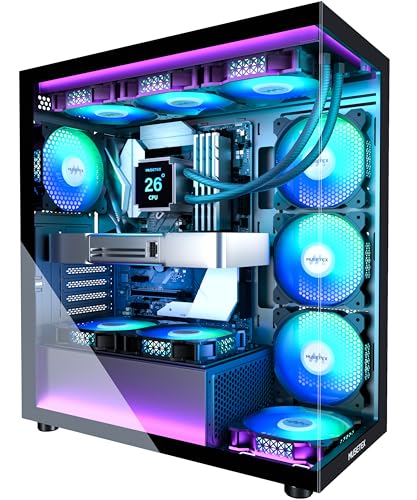
The MUSETEX K2 takes a different route from the restrained NZXT H5 Flow. It arrives with seven PWM ARGB fans already installed, including three reverse fans on the side, three forward fans on top, and one forward fan at the rear. That makes it appealing for a build where cooling hardware and lighting are part of the plan from the start, rather than an upgrade to add later.
Those 120mm fans run from 600 to 1300 RPM, with a listed maximum airflow of 24.72 CFM and noise level of 20.819 dB(A). The figures describe a fan setup aimed at broad, steady airflow rather than high static pressure. Motherboard software can control both fan speed and the ARGB lighting, and the fans use hydraulic bearings. Seven fans can still create a good air path, but the layout should be checked carefully so the side and top positions are not simply competing with one another.
The K2 has useful room for a modern gaming system. It supports graphics cards up to 400mm, CPU coolers up to 165mm, and a top radiator up to 360mm. Its PSU clearance changes with the hard-drive cage installed, ranging from 140mm with the cage to 150 to 180mm without it. The Type-C port joins two USB 3.0 ports on the front I/O, which is a practical touch for newer peripherals.
The Montech XR is smaller and simpler, while the K2 provides more included fans and more expansive interior clearance. The Corsair 3500X RS ARGB offers a more open showcase presentation and can take up to 10 120mm fans, but it includes only three. The K2's weakness is that the impressive fan count should not be mistaken for unlimited cooling headroom. It is best for a builder who wants a highly lit, already-populated case and is willing to tune the airflow direction.
4. Lian Li V100: Best Large GPU Support

Pros
- Four 120mm ARGB PWM fans included
- Supports graphics cards up to 420mm
- Accepts CPU coolers up to 178mm
- 360mm top radiator support
- Compatible with several back-connect motherboard formats
Cons
- Fan noise rating rises to 30.8 dBA at the upper end
- Larger than the NZXT H5 Flow and Montech XR
- Glass-focused layout may not suit a quiet, understated build
Best for: high-end builds with long graphics cards and a large CPU cooler or radiator.
The Lian Li V100 is the practical pick when component clearance is the first concern. Four pre-installed 120mm PWM ARGB fans give it a complete starting layout, and daisy-chain connectivity keeps the wiring from becoming as messy as a four-fan bundle might suggest. It feels designed for a large graphics card and a substantial cooler rather than a compact showcase build.
The clearance figures are strong. The V100 accommodates graphics cards up to 420mm, CPU coolers up to 178mm, and a top-mounted radiator up to 360mm. That combination gives more breathing room than the MUSETEX K2, particularly for tall air coolers and very long GPUs. It supports ATX, Micro-ATX, and Mini-ITX boards, as well as back-connect ATX and Micro-ATX layouts.
The included fans are specified at up to 1800 RPM, with maximum airflow between 60.4 and 61.47 CFM and maximum static pressure between 2.17 and 2.54 mm-H2O. Those are useful numbers for moving air through a busy case, although the listed noise range reaches 30.8 dBA at the upper end. The case also uses tool-less side-panel mounting, so access to the components should be less frustrating during a build or upgrade.
At roughly 17.56 inches long, 9.25 inches wide, and 19.06 inches high, the V100 is not a small tower. The Corsair 4000D RS ARGB Frame is more configurable, and the Lian Li O11D Mini V2 is shorter, but neither matches the V100's stated 420mm GPU clearance. Choose this case for hardware that needs room, and plan a fan curve if low noise matters as much as cooling.
5. Montech XR: Best Compact Panoramic Case

Pros
- Three ARGB PWM fans included
- Supports up to nine fans
- 360mm top radiator support
- Filters on the top, bottom, and side panels
- Compact footprint for an ATX case
Cons
- Maximum included-fan speed is 1500 RPM
- Panoramic glass limits the visual and acoustic character of the build
- Less component clearance detail is provided than for several larger cases
Best for: compact ATX builds where airflow, lighting, and a wide component view all matter.
The Montech XR is a compact panoramic case that avoids being just a glass box with a few token vents. It includes two reverse-blade fans on the side and one regular-blade fan at the rear, creating a sensible starting point for bringing air across the graphics card and exhausting it behind the CPU area. The arrangement also keeps the visible side cleaner than a front bank of fans would.
The included ARGB PWM fans reach a maximum of 1500 RPM, and the case can support up to nine fans in total. That gives the XR a useful upgrade path if the initial three fans are not enough for a hot processor and graphics card combination. A 360mm radiator can fit at the top, and the case is described as supporting high-end graphics cards such as 40-series models, though the listing does not provide a maximum GPU length.
Dust management is unusually well covered for this form factor. Filters sit over the top, bottom, and side panels, which should make routine cleaning more manageable than on an open-frame design. The case measures about 17.1 inches long, 9 inches wide, and 17.7 inches high, making it smaller than the Lian Li V100 and the Corsair 4000D RS ARGB Frame.
Its weakness is that the panoramic layout demands more attention to fan direction and component heat than a conventional mesh-front tower. The MUSETEX K2 includes more fans and gives more explicit clearance figures, while the XR has the cleaner, more compact presentation. Pick the Montech when the build needs to look good from the side without giving up a real airflow path.
6. Cooler Master Q300L: Best Micro-ATX Option

Pros
- Perforated panels on all sides
- Supports Micro-ATX and Mini-ITX motherboards
- Flexible I/O panel placement
- Magnetic dust filters
- Supports a 240mm liquid cooler
Cons
- No fans are listed as included
- Smaller motherboard support limits expansion
- CPU cooler clearance is limited to 159mm
Best for: compact Micro-ATX or Mini-ITX systems that need open ventilation and flexible placement.
The Cooler Master Q300L is the outlier here because it is built for Micro-ATX and Mini-ITX rather than standard ATX boards. Its appeal is straightforward: a perforated design on all sides, a transparent side panel, and a small footprint that does not attempt to imitate a full tower. For a compact build, that open thermal design can be more useful than a crowded set of decorative panels.
The case supports up to five fans and a 240mm liquid cooler. It accepts graphics cards up to 360mm, CPU coolers up to 159mm, and power supplies up to 160mm long. Those limits are workable for a carefully selected compact build, but they leave less room for oversized air coolers than the Lian Li V100 or Corsair 4000D RS ARGB Frame.
The magnetic dust filters are placed to match the open ventilation strategy, and the I/O panel can be moved to the front, top, or bottom on either side. That flexibility is helpful when the case sits in an awkward position on a desk. At about 15.39 inches long, 9.06 inches wide, and 15 inches high, it is much easier to place than every other case in this roundup.
The major limitation is that the listing does not include fans, so the cooling layout starts with an empty slate. That is less convenient than the NZXT H5 Flow, which includes two fans, but it also lets the builder choose the exact intake and exhaust hardware. Anyone planning a large ATX motherboard or a very tall CPU cooler should skip it. For a compact Micro-ATX build, it remains a practical airflow-first chassis.
7. Lian Li O11D Mini V2: Best Compact Airflow Showcase

Pros
- Five reverse-blade 120mm fans included
- Angled bottom improves direct GPU intake
- Supports ATX, Micro-ATX, and Mini-ITX boards
- GPU anti-sag brackets included
- Full-size ATX power supply support
Cons
- Heavy for its compact height
- Glass panels can make fan tuning more important
- The compact layout may require more deliberate cable planning
Best for: builders who want a compact glass case with a strong graphics-card cooling concept.
The Lian Li O11D Mini V2 makes its cooling argument from below. Its bottom is angled 10 degrees to direct cooler air toward the graphics card, and five pre-installed 120mm reverse-blade fans are positioned to support that layout. This is a more purposeful approach than simply adding more fans to every available panel.
The case supports ATX, Micro-ATX, and Mini-ITX motherboards, with particular attention to ATX back-connect boards. A protruding mesh side panel creates room for a full-size ATX power supply while preserving the compact shape. The pillar-less tempered-glass front and side panels give the interior an unobstructed view, which makes tidy routing and fan lighting part of the finished design.
GPU support comes with useful mechanical help. Horizontal and vertical anti-sag brackets support heavy graphics cards, and a dedicated bracket for the 24-pin motherboard cable helps keep the front of the build clean. At about 16.68 inches long, 10.73 inches wide, and 15.41 inches high, it is shorter than the Corsair 4000D RS ARGB Frame, though its 22-pound listed weight makes it far from a lightweight case.
The O11D Mini V2 is less forgiving than the Cooler Master Q300L because its glass presentation places more pressure on the build layout, and it is not the case to choose if every inch of desk width matters. The NZXT H6 Flow RGB offers a similar showcase direction with a dual-chamber design, but the Lian Li has the more explicit bottom-intake strategy and five included fans. It suits builders who want the GPU to be the center of both the cooling plan and the visual design.
8. NZXT H6 Flow RGB: Best Panoramic NZXT Case
Pros
- Three 120mm RGB fans included
- Angled fan placement supports direct component airflow
- Dual-chamber layout keeps the main area clear
- Wraparound glass provides an unobstructed view
- Wide channels and straps simplify cable management
Cons
- Panoramic design is less flexible than a conventional mesh tower
- The listing does not provide detailed radiator or GPU clearance figures
- Larger footprint than the H5 Flow
Best for: clean RGB builds where a panoramic view and an uncluttered main chamber are priorities.
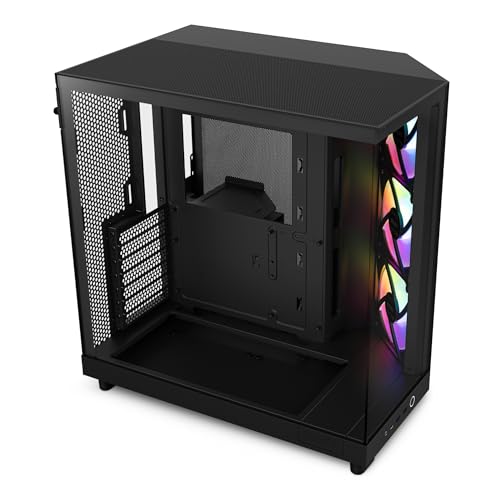
The NZXT H6 Flow RGB is for the builder who wants the PC to look composed from the first glance. Its wraparound glass panels have a seamless edge, while the three included 120mm RGB fans sit at an angle intended to feed air directly into the main chamber. The result is a more deliberate presentation than a standard front-intake tower.
Its dual-chamber design keeps cables and supporting hardware away from the visible component area. That improves the visual result, but it also helps prevent a dense bundle of cables from interfering with the primary airflow route. The top and side panels use airflow-focused perforations that also filter dust, so the case is not relying on glass alone for its identity.
The H6 Flow RGB measures about 16.34 inches long, 11.3 inches wide, and 17.13 inches high. It is shorter than the NZXT H5 Flow, but wider, and the width is part of what makes the dual-chamber design possible. Wide cable channels and straps should make the extra rear-side space useful rather than merely decorative.
The listing does not state the detailed radiator, cooler, or graphics-card clearances that appear for the MUSETEX K2 and Cooler Master Q300L, so builders with unusually large hardware should confirm fit before committing. The Lian Li O11D Mini V2 offers five included fans and stronger stated GPU support, while the H6 Flow RGB has the cleaner out-of-box visual design. Choose it for a tidy RGB system rather than maximum specification flexibility.
9. Corsair 3500X RS ARGB: Best Glass-Front Airflow

Pros
- Three RS120-R ARGB fans included
- Supports up to 10 120mm fans
- Mini-ITX through EATX motherboard support
- Removable tempered-glass panels
- Compatible with several reverse-connection motherboard designs
Cons
- Only three fans are included despite the larger cooling capacity
- Glass front and side panels need careful airflow planning
- Unusual dimensions may be awkward in some setups
Best for: large showcase builds that need extensive fan mounting and reverse-connection motherboard support.
The Corsair 3500X RS ARGB is a spacious panoramic case with a more ambitious cooling ceiling than its included fan count suggests. Three RS120-R ARGB fans are pre-installed, while mounting points on the side, roof, and PSU area can accommodate up to 10 120mm fans. That makes it a strong foundation for a high-heat system, provided the builder is prepared to add and tune the rest of the cooling layout.
The case supports motherboard formats from Mini-ITX through EATX, which is broader than the ATX focus of the NZXT H5 Flow. Its wraparound glass design puts the components on display, and the front and side glass panels can be removed for easier building and maintenance. The case is also validated for ASUS BTF, MSI Project Zero, and Gigabyte Project Stealth boards, allowing cables to stay out of the main view.
The 3500X's cooling capacity is useful because the front glass would otherwise be a concern. Side, roof, and PSU fan positions give air more than one route into the system, and the wide interior should be a better match for large boards than the Montech XR. It is a case for a planned airflow arrangement, not a model where three included fans automatically settle the question.
The published dimensions are unusual, at about 19.92 inches long, 18.11 inches wide, and 9.45 inches high, so check the intended orientation and available desk space carefully. The Corsair 4000D RS ARGB Frame is easier to recommend for a conventional ATX build, while this case is the more suitable option for a broad motherboard and a showcase interior. Pick it when expansion room and reverse-connection support matter more than a simple front-to-back layout.
10. Corsair Frame 4000D Wood: Best Distinctive Design

Pros
- High-airflow wood slat front panel
- Four RS120 PWM fans included
- Three 360mm radiator mounting locations
- InfiniRail fan positioning system
- Zero RPM support at low loads
Cons
- More expensive components are not the only reason to choose it
- Large and heavy mid-tower footprint
- Wood front panel will not suit every build style
Best for: builders who want quiet-capable cooling and a design-led ATX case with serious radiator flexibility.
The Corsair Frame 4000D Wood is the design-forward sibling to the first-place Corsair. Its wood slat front panel gives the case a warmer, less industrial appearance, but the important point is that the front still prioritizes airflow. Four RS120 PWM fans are pre-installed, with fans placed at the front and rear to establish a clear path through the chassis.
The InfiniRail system returns here, allowing front fans up to 200mm and roof fans up to 140mm to slide into a more useful position. The fans use daisy-chainable four-pin PWM connections and support Zero RPM mode at low loads. That combination makes it possible to build for low idle noise without giving up the option of a more forceful cooling curve during heavy workloads.
Radiator support is the headline capability. The case offers three 360mm radiator locations at the front, roof, and side, giving a liquid-cooling build far more placement freedom than the NZXT H5 Flow. The FRAME modular system also allows future changes to parts such as the motherboard tray, front panel, or PSU shroud. This is the case to consider if the build is likely to evolve rather than remain fixed.
The weakness is practical rather than thermal. At roughly 19.21 inches long, 9.41 inches wide, and 19.13 inches high, it has almost the same substantial footprint as the standard Corsair 4000D RS ARGB Frame, and the wood treatment will not blend into every setup. The first-place Corsair is the more neutral recommendation, while the Wood model is the one to choose when appearance and radiator flexibility are equally important. For a design-conscious ATX builder, it is a compelling final option.
How to choose best airflow pc case
The right airflow case is a balance between open intake space, exhaust placement, hardware clearance, and the number of fans you actually need.
Mesh and ventilation
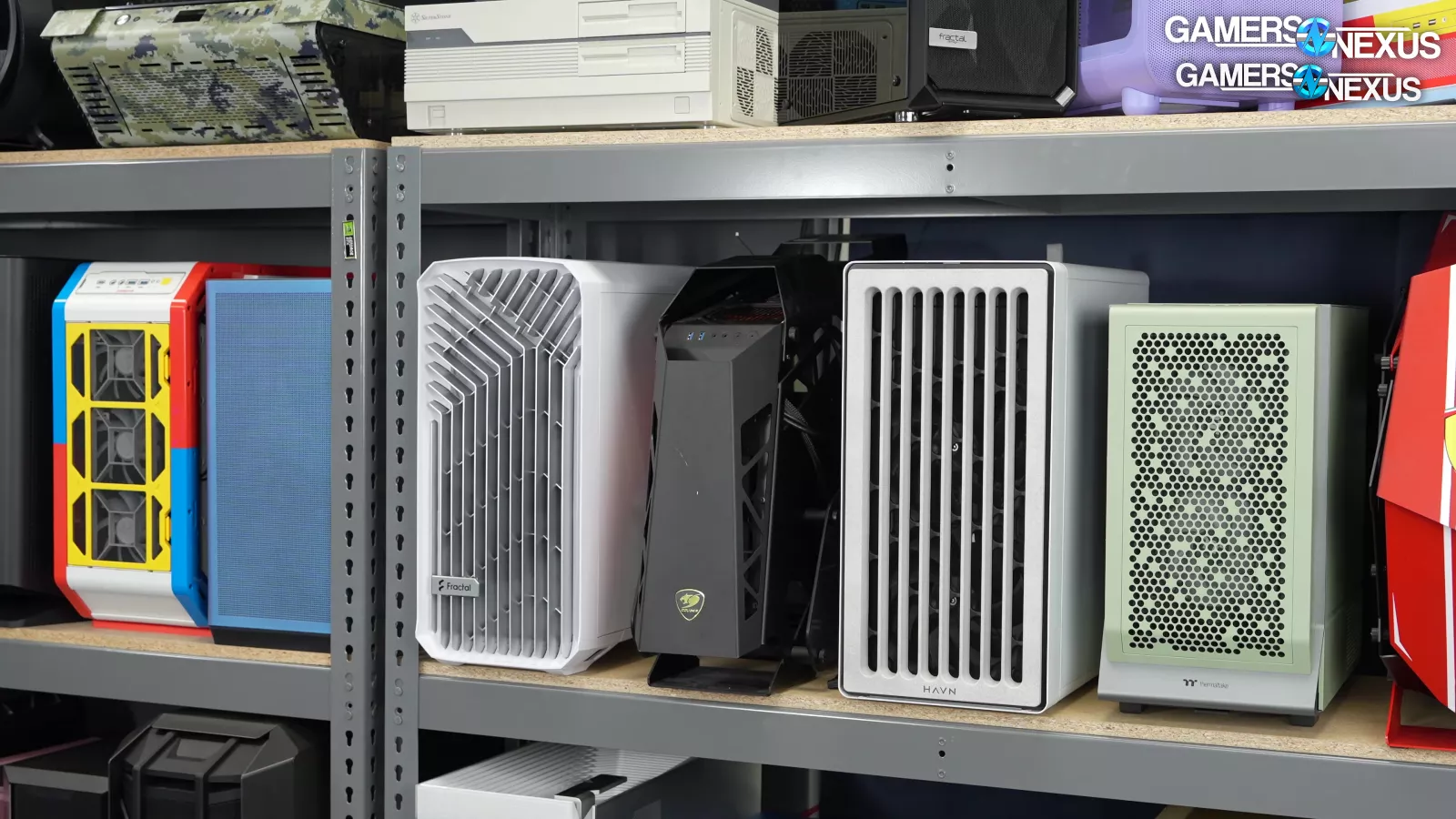
A mesh front or side panel reduces the obstruction between the intake fans and the components. Fine mesh, such as the pattern used on the NZXT H5 Flow, can help filter dust while maintaining a broad intake area. The open perforations on the Cooler Master Q300L provide even more ventilation, but they also make the choice and placement of fans more important.
Glass panels can still work well when the case uses side intake, bottom intake, or angled fan positions. The Lian Li O11D Mini V2 and NZXT H6 Flow RGB are examples of cases that use layout rather than a simple mesh front to create airflow.
Fan layout
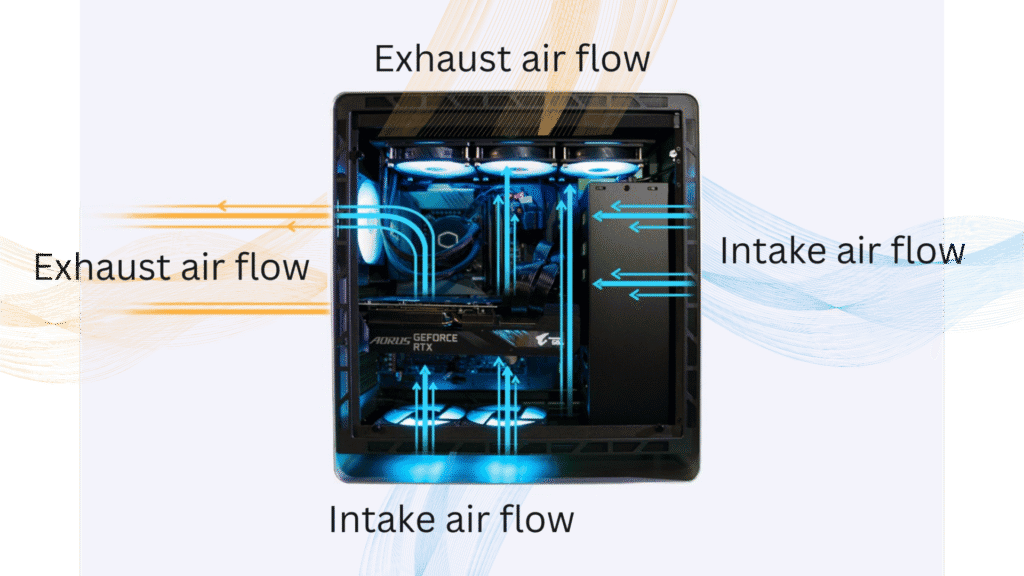
Included fans save installation time, but the count alone does not determine cooling quality. A front or side intake should have a clear exhaust route through the rear or top. Reverse-blade fans can keep the visible side of a showcase build clean while still moving air in the intended direction.
Cases such as the MUSETEX K2 include seven fans, while the Q300L includes none. The important question is whether the case supports the direction and size of fans your components need. For more help planning intake and exhaust positions, see how to arrange intake and exhaust fans in a PC.
Radiator clearance
Radiator support matters if you plan to use liquid cooling now or later. The front of the H5 Flow supports a 360mm radiator, the V100 supports one at the top, and the Corsair Frame 4000D Wood offers three 360mm mounting locations.
A larger radiator is not automatically better if it blocks the graphics card or disrupts the case's intake path. Check the proposed radiator position against the GPU length, memory height, and motherboard area before choosing the case.
A case has good airflow only when the intake, component, and exhaust positions form one continuous route.
Component clearance
Graphics card length, CPU cooler height, radiator placement, and power supply length should be checked together. The Lian Li V100 has the clearest large-GPU advantage here with support up to 420mm, while the MUSETEX K2 supports GPUs up to 400mm and CPU coolers up to 165mm.
Smaller cases can still handle powerful hardware, but they leave less room for cable routing and fan placement. If you are choosing among several chassis sizes, the component clearances that matter before a PC build can prevent an avoidable fit problem.
Motherboard and cable layout
Standard ATX support is common in this group, but some cases also support Mini-ITX, Micro-ATX, EATX, or back-connect motherboard formats. The Corsair 3500X RS ARGB supports Mini-ITX through EATX, while the Q300L is limited to Micro-ATX and Mini-ITX.
Back-connect support can make the visible side much cleaner, but only if the case has the appropriate openings and routing space. Wide cable channels, straps, removable panels, and modular covers all help keep wiring from becoming a physical obstruction to airflow.
Frequently asked questions
Is a mesh PC case always cooler than a glass PC case?
No. Mesh usually makes direct intake easier, but a glass case can perform well when it uses side, bottom, or angled fans effectively. The Lian Li O11D Mini V2 and NZXT H6 Flow RGB rely on those layout choices rather than a conventional mesh front.
How many case fans do I need?
A basic system can work with a front intake and rear exhaust, while a higher-heat gaming build may benefit from additional top or bottom airflow. The important factor is balanced intake and exhaust, not simply filling every mounting position.
Are the included case fans enough?
It depends on the hardware and the case. The three fans in the Corsair 4000D RS ARGB Frame provide a sensible starting layout, while the MUSETEX K2 includes seven. A case such as the Cooler Master Q300L gives you a mounting limit of five fans but does not list fans as included.
Can these cases fit large graphics cards?
Several can. The Lian Li V100 supports graphics cards up to 420mm, the MUSETEX K2 supports up to 400mm, and the Cooler Master Q300L supports up to 360mm. Always check the clearance against the radiator and front-fan position because those components can reduce usable GPU space.
Is a 360mm radiator necessary for a gaming PC?
No. A 360mm radiator is useful for some high-output processors and gives more surface area for cooling, but it is not required for every system. A case with 240mm support or a capable air cooler may be a better fit for a smaller build.
Do ARGB fans improve cooling?
ARGB lighting does not improve cooling. The fan's airflow, static pressure, speed range, bearing, and placement determine its cooling contribution. Lighting is useful for appearance and motherboard synchronization, but it should not replace a sensible intake and exhaust plan.
What is the best way to keep an airflow case quiet?
Use a fan curve that avoids unnecessary high speeds at low loads, keep filters clear, and choose fans that match the resistance of the case panels or radiator. Several Corsair fans in this list support Zero RPM mode, which can reduce idle noise when the system does not need active cooling.
The bottom line
The Best airflow PC case for most ATX builders is the Corsair 4000D RS ARGB Frame. Its three included fans, low-obstruction front panel, reverse-connection support, and InfiniRail system make it easier to adapt around different hardware than the other conventional mid-towers here.
Choose the NZXT H5 Flow when desk space is tight, the Lian Li V100 when a very long graphics card needs room, or the Lian Li O11D Mini V2 when a compact glass build and GPU-focused intake matter most. The Cooler Master Q300L is the sensible specialist choice for Micro-ATX and Mini-ITX systems.
If you are undecided, choose the Corsair 4000D RS ARGB Frame unless your motherboard size, graphics card, or available space points clearly to another case.
As an Amazon Associate we earn from qualifying purchases.