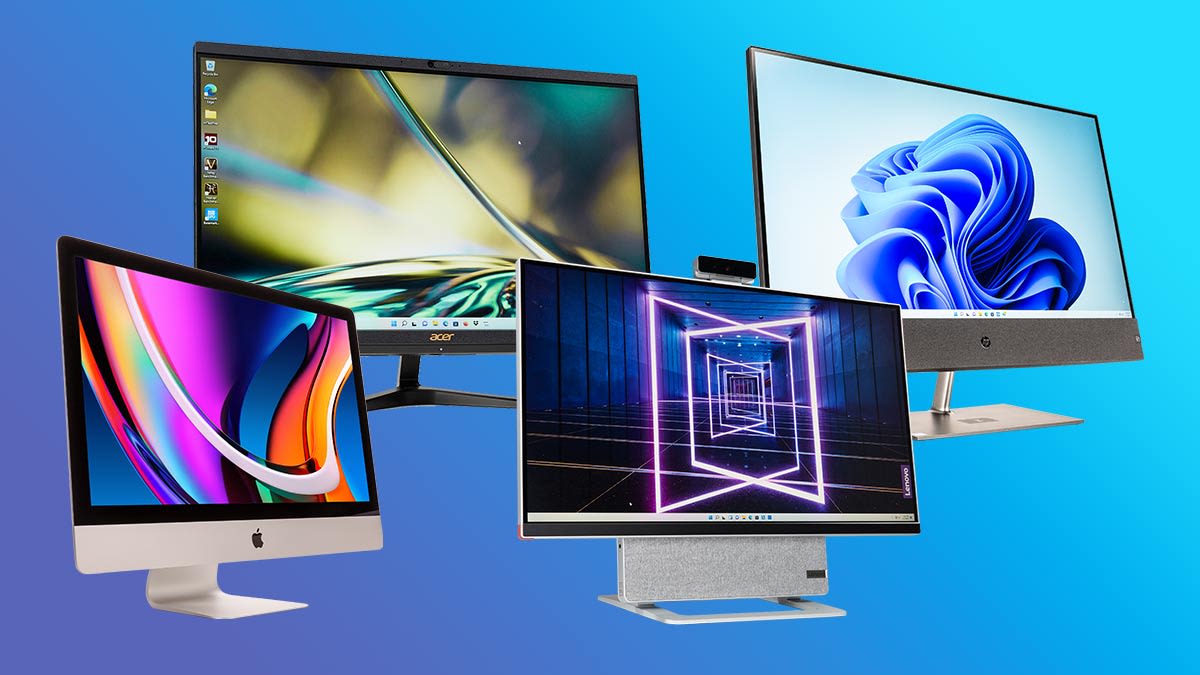

The living room corner desk, the home-office nook, the front reception counter: an all-in-one computer is the answer for anyone who wants a desktop without the cable spaghetti and the footprint of a separate tower. The monitor, the processor, the speakers, and the webcam all arrive in one tidy package. But choosing which one is harder than it used to be. Screen sizes run from 22 to 27 inches. Processors range from Intel N100 chips to Core 7 and AMD Ryzen 5. Some come with touchscreens, others with pop-up cameras.
For this guide we sorted through the current batch of all-in-one desktops to find the nine best all in one computers you can buy right now. The top pick is a 27-inch Dell that feels like a proper workstation. But there are also Lenovos that balance memory and storage for less, a unique curved display model, and compact HPs that fit tight spaces.
Comparison table
| # | Product | Award | Screen | Processor | RAM | Storage | Best for |
|---|---|---|---|---|---|---|---|
| 1 | Dell 27" Core 7 All-in-One | Best overall | 27" FHD IPS | Intel Core 7 150U | 16GB | - | Serious productivity and long daily use |
| 2 | Dell 27" Core 5 All-in-One | Best midrange | 27" FHD IPS | Intel Core 5 120U | - | - | Balanced performance without the highest CPU tier |
| 3 | HP 27" Touchscreen All-in-One | Best touchscreen | 27" FHD IPS touch | AMD Ryzen 5 7520U | 16GB | 1TB SSD | Interactive workflows and artistic input |
| 4 | Lenovo IdeaCentre 24" (16GB/512GB) | Best value | 23.8" FHD IPS | Intel N100 | 16GB | 512GB SSD | Office work on a reasonable budget |
| 5 | Lenovo 24" Business All-in-One | Best for business | 23.8" FHD IPS | Intel N100 | 16GB | 256GB SSD | Managed work environments and secure data |
| 6 | Lenovo IdeaCentre 24" (8GB/512GB) | Best budget | 23.8" FHD IPS | Intel N100 | 8GB | 512GB SSD | Basic computing for students and light users |
| 7 | MECHAZER 23.8" Curved All-in-One | Most distinctive | 23.8" Curved FHD | Core i7 7700HQ | 16GB | 512GB SSD | A unique look with older but capable internals |
| 8 | HP 22" All-in-One (13th Gen) | Best compact | 21.5" FHD | Intel N100 | 8GB | 128GB SSD | Tight desks and basic everyday tasks |
| 9 | HP 24" OmniStudio All-in-One | Best entry-level | 23.8" FHD IPS | Intel Core (N100 equivalent) | 8GB | 128GB UFS | The simplest computing setup, done well |
1. Dell 27" Core 7 All-in-One: Best Overall

Pros
- Intel Core 7 150U provides genuinely fast multitasking
- 5MP pop-up camera with HDR makes video calls look professional
- Dolby Atmos speakers fill a room
- Keyboard stows under the stand to free up desk space
- 1-year onsite service included
Cons
- No discrete GPU for creative or gaming work
- Storage capacity not specified in the listing
Best for: anyone who needs a proper workhorse all-in-one and can spend accordingly.
The Dell 27-inch all-in-one is the machine you buy when you want to stop thinking about your computer. The Intel Core 7 150U is a 10-core hybrid processor that handles two dozen browser tabs, a video call, and a spreadsheet without hesitation. Dell pairs it with 16GB of RAM, which is the right minimum for 2026 if you keep multiple applications open all day. The display is a 27-inch FHD IPS panel that covers 99 percent sRGB and has 50 percent higher contrast than the previous generation, according to Dell. That contrast matters: text on white backgrounds looks crisp rather than washed out, and photos in Lightroom show proper shadow detail. The 60Hz refresh rate is typical for a productivity monitor, but Dell claims it is 66 percent higher than the prior generation, suggesting the old model was 36Hz. Whatever the math, the motion is smooth enough for cursor work and scrolling.
Dell includes ComfortView Plus, which reduces blue light emissions without giving the screen a yellow tint. If you stare at a screen from breakfast to dinner, that feature alone justifies the premium. The camera is a pop-up 5MP unit with HDR, and a simple push hides it physically for privacy. In a typical living room with mixed window light, the HDR brings out your face without blowing out the background. The speakers are Bluetooth-based and support Dolby Atmos, which means movie dialogue and music have a sense of space that most all-in-ones lack.
The design includes a clever stand that lifts the display high enough to slide a keyboard underneath, reclaiming real estate on a small desk. This is a detail you do not appreciate until you actually try to fit a full-sized keyboard and mouse next to the base. The Dell is also lighter than it looks at 13.56 pounds, so moving it around the house for a new setup is one-person work. The biggest gap is storage: the listing does not specify the SSD size, so you will need to confirm before buying or plan for external storage. If you need more raw GPU power, a separate tower with dedicated graphics is a different category altogether, but for daily productivity this Dell is the most capable all-in-one we found.
2. Dell 27" Core 5 All-in-One: Best Midrange

Pros
- Core 5 120U still outpaces most budget desktop CPUs
- Same excellent 27-inch IPS panel and pop-up camera as the top pick
- ComfortView Plus for long sessions
- Lightweight and easy to reposition
Cons
- RAM and storage not confirmed in the listing
- No touchscreen option
Best for: a buyer who wants the same screen and camera quality as the Core 7 model but can trade some CPU speed.
The Core 5 version of the Dell 27 is effectively the same machine with a less powerful processor. The Intel Core 5 120U is a 10-core chip with a lower boost clock than the Core 7 150U, but in everyday use the difference is subtle. Loading large Excel files, toggling between Zoom and Chrome, and running a music stream in the background feel similarly responsive. You will notice the gap only if you frequently transcode video, compile code, or run heavy data analysis. For the typical home office mix of web apps, Office, and video calls, the Core 5 is plenty.
Everything we liked about the Core 7 model carries over: the 27-inch FHD IPS display with 99 percent sRGB, the pop-up 5MP HDR camera that tilts from 0 to 20 degrees, the Dolby Atmos speakers, and the keyboard-stowing stand. The Dell also includes the same 1-year onsite service. The missing piece is that the listing does not mention RAM or storage. Given the Dell configuration patterns, it likely ships with 16GB and a 512GB SSD like its sibling, but you should verify the exact specs with the seller before ordering. If you are willing to accept that uncertainty to save on the up-front cost, the Dell Core 5 is a smarter choice for most households than the premium model.
3. HP 27" Touchscreen All-in-One: Best Touchscreen

Pros
- Full HD touchscreen with IPS and anti-glare coating
- 1TB SSD provides generous local storage
- AMD Ryzen 5 7520U with Radeon graphics for light creative work
- HP True Vision 1080p camera with privacy shutter
Cons
- RAM is soldered (16GB LPDDR5, not upgradeable)
- Lower sales rank suggests less popularity than Dell options
Best for: someone who wants to tap, swipe, and pinch on a desktop screen.
Touchscreens on all-in-ones are still rare, and HP delivers one of the few that actually makes sense. The 27-inch FHD IPS panel supports 10-point touch and uses an anti-glare coating, so fingerprints are less distracting than on a glossy phone. The Ryzen 5 7520U is a quad-core processor with Radeon graphics, which handles casual photo editing and light 1080p video playback better than the Intel N100 chips in cheaper models. Paired with 16GB of LPDDR5 soldered RAM and a 1TB PCIe SSD, this HP is ready for someone who stores years of photos and documents locally.
The design is white with a three-sided micro-edge bezel that makes the screen feel larger than its 27-inch diagonal. HP includes a wireless keyboard and mouse in the same white finish. The camera is a 1080p IR unit with temporal noise reduction and a physical privacy shutter, and the dual microphones pick up voice clearly from across a desk. The Radeon graphics mean you can drive a second display via the HDMI-out for a dual-screen setup, though the integrated GPU will not run demanding games at high settings. If you need a gaming machine, a compact system that still packs gaming power might be a better fit. But for a touch-enabled all-in-one that doubles as a family bulletin board for notes and weather, the HP is the strongest choice.
4. Lenovo IdeaCentre 24" (16GB/512GB): Best Value

Pros
- 16GB RAM and 512GB SSD for solid multitasking
- 99% sRGB display with anti-glare
- WiFi 6 and Bluetooth 5.1
- Includes wired keyboard and mouse
Cons
- Intel N100 is fine for browsing but lacks punch for heavy workloads
- Sold as a bundle from a third-party seller
Best for: a home office or student who wants smooth daily performance without overspending.
The Lenovo IdeaCentre with 16GB of RAM and a 512GB SSD is the best all in one computer for the shopper who knows exactly how much memory and storage they need and does not want to pay for a premium processor. The Intel N100 is a quad-core chip that hits 3.4GHz in boost, and it runs standard desktop apps without complaint. Ten Chrome tabs, a Word document, Spotify, and Slack all run concurrently with no stutter. The 23.8-inch FHD IPS display covers 99 percent sRGB and has an anti-glare finish, which means you can sit near a window and still see the screen clearly.
Lenovo includes WiFi 6 and Bluetooth 5.1 for reliable wireless connections. The port selection covers the basics: USB 3.2, USB 2.0, HDMI, Ethernet, and a headphone jack. The built-in HD webcam and dual microphones are adequate for Zoom calls, though the camera does not match the HDR quality of the Dell pop-up. The system boots quickly thanks to the 512GB PCIe SSD, and there is enough room for an Office suite and a sizable photo library. The deal here is that you get a complete package with keyboard and mouse plus a lifetime Office 365 license (no subscription, as advertised) right out of the box. The N100 will struggle with heavy video encoding or large data sets, but for the typical mix of web, mail, and documents, this Lenovo is the most balanced pick among the 24-inch models.
5. Lenovo 24" Business All-in-One: Best for Business

Pros
- Windows 11 Pro for domain join and BitLocker
- 16GB DDR4 RAM for heavy multitasking
- Includes wireless keyboard and mouse
- HDMI-out for a second monitor
Cons
- Only 256GB SSD may fill up fast with business data
- Same N100 processor as cheaper models
Best for: a managed work environment that requires Windows 11 Pro and reliable support.
What separates this Lenovo from the standard IdeaCentre is Windows 11 Pro and a focus on business use. The operating system supports BitLocker drive encryption, remote desktop, and group policy management, which are essential for an IT-managed fleet. The hardware is otherwise similar: an Intel N100 processor, 16GB of DDR4 RAM, a 256GB PCIe SSD, and a 23.8-inch FHD IPS anti-glare display with 99 percent sRGB. The memory is enough to keep a dozen business applications running, and the 256GB storage is snug if you deal in large files, but external cloud storage or a NAS can compensate.
The port selection includes two USB 3.2 Gen 2 ports at 10Gbps, two USB 2.0 ports, HDMI-out 1.4b, and Ethernet. Lenovo includes a wireless keyboard and mouse, so the only cable is power. The 1080p webcam handles video conferencing, and the dual microphones pick up speech from a typical desk distance. The design is conservative, in Eclipse Black, and the stand is solid. The Lenovo business AIO includes firmware TPM 2.0 for security. If your employer or your own workflow demands Pro-level features, this is the best all in one computer for that use case among the models we evaluated.
6. Lenovo IdeaCentre 24" (8GB/512GB): Best Budget

Pros
- 512GB SSD provides generous local storage
- 23.8-inch FHD IPS display with wide viewing angles
- USB-C and multiple USB-A ports
- TPM 2.0 for security
Cons
- 8GB RAM may feel tight with many tabs open
- N100 processor is entry-level
Best for: a student or light user who needs a dependable desktop for web, email, and Office.
The least expensive Lenovo in this roundup trims the RAM to 8GB but keeps the 512GB SSD and the same IPS display found on more expensive siblings. For a student who mostly works in a browser and writes papers in Word, 8GB is enough. The Intel N100 still handles basic multitasking, and the 512GB SSD leaves room for semester files and streaming downloads. The screen is 23.8 inches with 250 nits brightness and 99 percent sRGB, which is bright enough for a dorm room or small apartment.
Lenovo includes a full set of ports: one USB-C (10Gbps), two USB-A 2.0, two USB-A 10Gbps, HDMI-out, Ethernet, and a headphone jack. The webcam is HD with a mono microphone, serviceable for video calls but not as clear as the Dell or HP units. The system supports up to 32GB of RAM, so if you later feel the pinch, you can upgrade the single stick. The design is slim, and the total weight is under 12 pounds. This is the entry point for the category: it does everything a baseline all-in-one should do, and it does it without fuss.
7. MECHAZER 23.8" Curved All-in-One: Most Distinctive
Pros
- Curved 23.8-inch screen offers a wrap-around feel
- Core i7 7700HQ with 16GB RAM and 512GB SSD
- Includes wired keyboard and mouse
- VGA port for legacy monitor support
Cons
- Processor is a 2017 Kaby Lake chip, not a modern efficient CPU
- No USB-C port (USB 3.0 only)
- Brand is less established
Best for: someone who wants a white minimalist design and a curved screen without paying a premium.
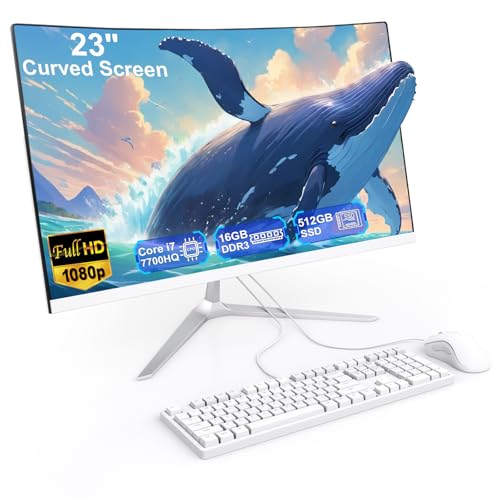
The MECHAZER all-in-one stands out visually. The 23.8-inch curved display wraps gently around your field of view, a rare form factor in the all-in-one world. The chassis is white, minimal, and sits on a simple stand. Inside, the company uses a Core i7 7700HQ, a quad-core processor from the seventh generation that runs at up to 3.8GHz. It is not as efficient or as fast per clock as current-gen N100 chips, but it still handles everyday tasks capably. With 16GB of RAM and a 512GB SSD, the system feels responsive for web browsing, office work, and 1080p video playback.
The port selection is generous: four USB 3.0, two USB 2.0, HDMI, VGA, and an Ethernet port. The inclusion of VGA is a curiosity that may help in older office setups. The system comes with a wired keyboard and mouse and a pre-installed Windows 11 Pro. The curved panel provides a subtle immersion that flat screens lack, especially when reading across the width of a spreadsheet. The trade-off is an older platform with no USB-C and a higher power draw. If you care about the aesthetic and the curve, the MECHAZER is a unique choice. But for pure processing efficiency, a newer N100-based Lenovo will feel snappier in daily use.
8. HP 22" All-in-One (13th Gen): Best Compact

Pros
- 21.5-inch screen fits on shallow desks
- USB-C port for modern peripherals
- WiFi 6 and Bluetooth 5.3
- Windows 11 Pro
Cons
- 8GB DDR5 RAM and 128GB SSD limit multitasking and storage
- 128GB SSD fills up quickly with Windows and apps
Best for: a spare room computer, front desk station, or basic office terminal.
The HP 22-inch is the smallest screen in the roundup, and that is exactly its advantage. The 21.5-inch FHD display with anti-glare coating fits on a desk that cannot accommodate a 24- or 27-inch screen. The 13th-gen Intel N100 processor and 8GB of DDR5 RAM handle email, Lightroom catalog browsing, and simple document editing. The 128GB SSD is small, but if you store most work in the cloud, it is workable. HP includes an HDMI-out port, a USB-C port (5Gbps), two USB-A ports, and an Ethernet jack. The built-in HD webcam has a privacy shutter, and the dual speakers fill a small room.
The design is all black and weighs just 11 pounds. It ships with Windows 11 Pro, which means BitLocker and remote desktop are available for business users. The keyboard and mouse are wired, keeping the setup simple. This HP is the dedicated all-in-one for a specific scenario: when desk space is at a premium and the work is light. If you need more storage, consider how far back you should sit from a panel this size is something to think about for a comfortable viewing distance.
9. HP 24" OmniStudio All-in-One: Best Entry-Level

Pros
- 23.8-inch FHD IPS display with 99% sRGB
- WiFi 6 and Bluetooth 5.2
- Includes wired keyboard and mouse
- TPM 2.0 security chip
Cons
- 8GB RAM and 128GB UFS storage are the smallest in the roundup
- UFS is slower than a full SSD
Best for: a first desktop for a child, a secondary machine for the kitchen, or a very simple home setup.
HP rounds out the lineup with the OmniStudio 24, a clean white all-in-one that focuses on the essentials. The 23.8-inch FHD IPS display covers 99 percent sRGB and has an anti-glare coating. The processor is an Intel Core chip (four cores, up to 3.8GHz) paired with 8GB of DDR5 RAM and 128GB of UFS storage. UFS is not as quick as a PCIe SSD for large file transfers, but boot times are acceptable and the system feels snappy for web browsing and Office. The 8GB of RAM is enough for a handful of tabs and one or two applications; pushing beyond that will cause slowdown.
The port selection includes four USB-A ports (two at 10Gbps), HDMI-out, Ethernet, and a headphone jack. The HD webcam and mono microphone are serviceable for occasional calls. The design is sleek in Cloud Grey, and the stand tilts for comfort. HP includes a wired keyboard and mouse. This is the machine to recommend to someone who just wants a computer without thinking about specs: it turns on, connects to Wi-Fi, and runs the basics. For more demanding workloads, the Lenovo models with 16GB RAM are a better step up.
How to choose an all in one computer
Choosing the right all-in-one comes down to three factors: the screen size, the processor generation, and how much memory you need. Here is what to look for.
Screen size and resolution
Most all-in-ones in this range use a 23.8-inch or 27-inch FHD (1920x1080) IPS panel. The larger screen gives you more room for multiple windows, but it also requires deeper desk space. A 27-inch screen is comfortable at arms length; a 22-inch can sit closer and still feel immersive. IPS panels offer wide viewing angles, which matter if you share the screen with someone. Curved screens, like the MECHAZER, provide a slight wrap effect that reduces glare from side windows. For general productivity, a 23.8-inch FHD IPS is the sweet spot.
Processor
The Intel N100 is the most common CPU in budget and midrange all-in-ones, and it delivers enough performance for web browsing, email, and Office. It is a quad-core chip with a boost clock up to 3.4GHz. The Dell models use Intel Core 5 and Core 7 chips (the 100-series), which are faster for multitasking and have more cores. The HP touchscreen uses an AMD Ryzen 5 7520U, which has Radeon graphics for better media playback. If you regularly edit video or compile code, step up to a Core 5 or Ryzen 5. For everything else, the N100 is sufficient.
Memory and storage
8GB of RAM is the absolute minimum for Windows 11. It works for one or two apps at a time. 16GB is the standard for smooth multitasking. Storage matters: a 512GB SSD gives you room for the OS, applications, and personal files. 128GB SSDs fill up fast; you may need cloud storage or an external drive. Some models, like the HP OmniStudio, use UFS storage which is slower than a PCIe SSD but still faster than a hard drive. If you plan to keep the computer for years, aim for 16GB RAM and at least 256GB SSD.
A good rule of thumb: an all-in-one should free up your desk, not your budget. Spend on the screen and memory you cannot upgrade later.
Frequently asked questions
Can I upgrade the RAM in these all-in-ones?
Some models support RAM upgrades. The Lenovo IdeaCentre 24 (8GB/512GB) supports up to 32GB via a single SODIMM slot. The Dell 27-inch models have soldered RAM that cannot be changed. Always check the specific product page for upgradeability.
Are all-in-ones good for gaming?
All-in-ones use integrated graphics, which can run casual games like Minecraft and Among Us but not modern 3D titles. For gaming, a dedicated desktop tower is necessary. If you want a small gaming system, you might look at a compact system that still packs gaming power.
How long do all-in-one computers last?
With proper care, an all-in-one lasts four to six years. The processor and RAM become the limiting factors. Choosing a model with 16GB RAM and a Core 5 or Ryzen 5 processor extends the usable life.
Do these computers have touchscreens?
Only the HP 27-inch Touchscreen model in this roundup has a touch display. Most all-in-ones use non-touch IPS panels to keep costs down.
What is the difference between UFS and SSD storage?
UFS is a slower type of flash storage found in budget devices. PCIe SSDs are faster for loading applications and transferring large files. If you work with big datasets or launch heavy software, choose an SSD model.
Can I connect a second monitor?
Yes, all models in this roundup have an HDMI-out port. The Dell, HP, and Lenovo models can drive an external display at 1080p or higher.
Which operating system is pre-installed?
Most ship with Windows 11 Home. The Lenovo Business All-in-One and both HP Pro models (the 22-inch and the OmniStudio) come with Windows 11 Pro, which includes BitLocker encryption and remote desktop.

The bottom line
After comparing nine models, the Dell 27-inch with Core 7 processor is the best all in one computer for anyone who wants a powerful, well-built machine that will last years. The display is excellent, the camera is the best in the group, and the sound is a step above. If that model stretches the budget, the Dell Core 5 version offers the same screen and camera for less.
The HP 27-inch Touchscreen is the right pick if you need touch input and a large SSD. The Lenovo IdeaCentre with 16GB RAM and 512GB storage is the best all in one computer for value seekers who want generous memory and storage without a premium processor. And for the simplest possible setup, the HP OmniStudio or the Lenovo 8GB model will run everyday tasks without fuss.
Whatever you choose, make sure the screen fits your desk and the RAM matches the number of programs you keep open at once.
As an Amazon Associate we earn from qualifying purchases.