

A gaming CPU can be the difference between a graphics card running freely and a system that stutters whenever a busy scene appears. The hard part is separating genuinely gaming-focused chips from processors that simply have a long list of cores.
Our Best AMD CPU for Gaming picks include standalone AM4 and AM5 processors, plus three complete desktops built around AMD chips. The AMD Ryzen 7 9800X3D is the top pick for a new gaming build, while the rest cover high-end multitasking, older AM4 upgrades, and ready-to-use PCs.
Comparison table
| # | Product | Award | Cores and threads | Platform | Best for |
|---|---|---|---|---|---|
| 1 | AMD Ryzen 7 9800X3D | Best overall | 8 cores, 16 threads | Socket AM5, Zen 5 | High-end gaming builds |
| 2 | iBUYPOWER Element 7900X | Best complete PC | Ryzen 9 7900X, 12 cores | AM5, RTX 5070 12GB | Ready-to-play desktop buyers |
| 3 | AMD Ryzen 7 7800X3D | Best previous-generation gaming CPU | 8 cores, 16 threads | Socket AM5, 3D V-Cache | Strong gaming performance |
| 4 | AMD Ryzen 5 5500 | Best AM4 starter | 6 cores, 12 threads | Socket AM4, DDR4 | Entry-level upgrades |
| 5 | AMD Ryzen 9 9950X3D | Best for gaming and creation | 16 cores | AM5, Zen 5, up to 5.7GHz | Gaming alongside heavy workloads |
| 6 | AMD Ryzen 5 9600X | Best six-core AM5 option | 6 cores, 12 threads | AM5, Zen 5, DDR5 | New mainstream builds |
| 7 | Corsair Vengeance a7500 | Best liquid-cooled PC | Ryzen 5 9600X, 6 cores | AM5, RTX 5060 | Finished gaming systems |
| 8 | iBUYPOWER Element SE 8400F | Best ready-built entry PC | Ryzen 5 8400F, 6 cores | AM5, RTX 3050 6GB | First gaming desktop |
| 9 | AMD Ryzen 7 5800X3D | Best AM4 gaming upgrade | 8 cores, 16 threads | AM4, DDR4, 3D V-Cache | Existing AM4 systems |
| 10 | AMD Ryzen 7 7700X | Best all-round AM5 chip | 8 cores, 16 threads | AM5, Zen 4, DDR5 | Gaming and everyday workloads |
1. AMD Ryzen 7 9800X3D: Best Overall
Pros
- 3D V-Cache is built specifically with gaming in mind
- Zen 5 architecture brings stronger per-core performance
- 8 cores and 16 threads suit modern games and streaming
- AM5 gives the build a current platform
Cons
- Cooler is not included
- Its gaming focus is less useful for heavily threaded professional work than a Ryzen 9
Best for: a new high-end gaming PC where frame consistency matters most.
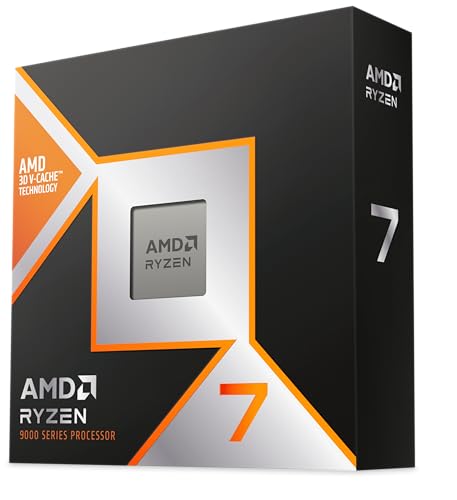
The AMD Ryzen 7 9800X3D is the processor we would choose for a dedicated gaming build. It has the right balance of eight cores and 16 threads without spending the design around workloads that most games never use. The important feature is AMD’s next-generation 3D V-Cache, which gives the chip 96MB of L3 cache. That large cache can keep more game data close to the cores, helping demanding titles avoid the uneven frame pacing that makes a fast system feel less smooth.
This is a Zen 5 processor with an advertised boost clock of up to 5.2GHz and an approximately 16% IPC uplift listed in its features. IPC, or instructions per clock, matters because it helps each core complete more work at the same frequency. The result is a chip that should remain responsive in high-refresh gaming while still handling voice chat, a browser, and recording software in the background.
The 9800X3D uses Socket AM5, so it belongs in a current AMD motherboard ecosystem rather than an older AM4 system. That makes it a more sensible foundation than the AMD Ryzen 7 5800X3D for a new build, even though the older chip remains a compelling upgrade for an existing AM4 PC. The AMD Ryzen 9 9950X3D has more cores and is the stronger workstation choice, but the 9800X3D keeps the gaming brief cleaner.
There is one important catch: no cooler is included. You need to select a compatible cooler and account for the space and airflow inside the case. Skip this processor if your main work is large-scale rendering or other heavily threaded production tasks and gaming is secondary. For the player building around a powerful graphics card and a high-refresh display, this is the clearest answer in the roundup.
2. iBUYPOWER Element 7900X: Best Complete PC

Pros
- Ryzen 9 7900X and RTX 5070 create a capable gaming combination
- 32GB of DDR5 memory is ready for demanding games and multitasking
- 1TB NVMe SSD provides fast boot and load times
- Wi-Fi, Ethernet, keyboard, and mouse are included
Cons
- This is a complete desktop, not a standalone CPU
- The bundled memory is listed at DDR5-4800, below the faster memory speeds in some other AM5 options
- Large tower needs substantial desk or floor space
Best for: someone who wants a current AMD gaming platform without assembling individual components.
The iBUYPOWER Element 7900X is the practical pick for readers who searched for a CPU but actually need a whole computer. Its Ryzen 9 7900X supplies 12 cores, while the GeForce RTX 5070 brings 12GB of graphics memory. That division of labor matters: the processor handles game logic and background tasks, while the graphics card does the heavy lifting for resolution, effects, and image generation.
The rest of the system is sensibly configured for immediate use. It has 32GB of DDR5 memory arranged as two 16GB modules, a 1TB NVMe SSD, Windows 11 Home, and Wi-Fi support. Six USB 3.1 ports give peripherals room to grow, and the system also includes gigabit Ethernet and onboard audio. The included gaming keyboard and RGB mouse mean there is no need to assemble a separate starter kit before playing.
Compared with the standalone AMD Ryzen 7 9800X3D, this desktop is less focused on extracting the highest possible gaming performance from a custom graphics card. Its advantage is completeness. Compared with the Corsair Vengeance a7500, it has a larger 12-core CPU and twice the listed memory, while the Corsair counters with liquid cooling and a more deliberate enthusiast-oriented case design.
The main limitation is that the product is a tower computer, so buyers should not treat it as a drop-in processor upgrade. Its listed dimensions are 17.4 inches high, 20 inches long, and 9.1 inches wide, with a 36-pound weight. That is a sizeable machine. Choose it if you want one finished desktop with strong multitasking headroom. Choose a standalone chip instead if you already own a motherboard, memory, storage, and graphics card.
3. AMD Ryzen 7 7800X3D: Best Previous-Generation Gaming CPU

Pros
- 96MB of L3 cache favors game workloads
- Eight cores and 16 threads remain a strong gaming layout
- AM5 support gives it a path to newer platform components
- Integrated Radeon graphics controller is useful for basic display output
Cons
- Cooler is not included
- Older Zen 4 design is behind the 9800X3D
- Listed base clock information is only 4.20GHz
Best for: builders who want a proven AM5 gaming processor without moving to a Ryzen 9.
The AMD Ryzen 7 7800X3D remains easy to understand: it is an eight-core, 16-thread gaming CPU with a very large cache and no attempt to become a workstation monster. Its 96MB of L3 cache is the central reason to consider it. Games that repeatedly access the same data can benefit from having more of that data available near the processor, which is one reason this class of chip has become so popular for gaming systems.
Its Zen 4 architecture uses a 5nm process, and the listing gives a 4.20GHz clock speed plus a maximum operating temperature of 89°C. The 7800X3D also includes 8MB of L2 cache and an AMD Radeon graphics controller. The graphics controller is not a substitute for a gaming graphics card, but it can help with basic display output and troubleshooting when a discrete GPU is removed.
The newer AMD Ryzen 7 9800X3D is the more convincing choice for a fresh top-end build because its Zen 5 design and advertised boost of up to 5.2GHz move the platform forward. The AMD Ryzen 7 7700X is more general-purpose, with a higher listed boost clock but without 3D V-Cache. The 7800X3D sits between them as the focused gaming option for an AM5 buyer who does not need the latest generation.
This chip still needs a separate cooler, and the listing does not include one. It also makes less sense for a content creator whose day is dominated by workloads that scale across many cores. For a gaming-first AM5 system, though, eight cores and 16 threads provide plenty of room for current games, streaming software, and normal desktop use. It is the pick for buyers who care more about the gaming behavior of the platform than about having the newest model number.
4. AMD Ryzen 5 5500: Best AM4 Starter

Pros
- Six cores and 12 threads are suitable for mainstream gaming
- Wraith Stealth cooler is included
- Unlocked multiplier allows overclocking
- Supports DDR4-3200 and the established AM4 platform
Cons
- Requires a discrete graphics card for gaming
- AM4 is an older platform than AM5
- 19MB of listed cache is much smaller than the X3D processors
Best for: an older AM4 system or a simple first build using DDR4 memory.
The AMD Ryzen 5 5500 is the straightforward option for a system that already uses AM4. It has six cores and 12 threads, a 4.2GHz maximum boost, and an unlocked design. Those are sensible ingredients for a mainstream gaming PC, especially when the graphics card is doing most of the rendering work.
Unlike nearly every other standalone processor here, it includes AMD’s Wraith Stealth cooler. That simplifies a first build and removes one compatibility decision, though cooling requirements can change if you overclock. The chip supports DDR4-3200, so it fits the memory already common in older AM4 machines. Its 19MB cache is adequate for its class, but it is nowhere near the 96MB L3 cache found in the AMD Ryzen 7 7800X3D.
The biggest decision is platform age. The 5500 uses Socket AM4, while the AMD Ryzen 5 9600X and AMD Ryzen 7 7700X use AM5 and DDR5. AM5 is the better direction for a new enthusiast build, but replacing a motherboard and memory just to use a newer processor changes the scope of the project. The 5500 makes sense when the rest of the machine is already built around AM4.
A discrete graphics card is required for gaming, and the listing claims 100-plus frames per second in popular games with such a card. Treat that claim as a broad capability statement rather than a guarantee for every title or graphics setting. If you want a low-complexity AM4 upgrade with a bundled cooler, this is the sensible pick. Skip it for a new high-end build where the platform matters as much as the CPU itself.
5. AMD Ryzen 9 9950X3D: Best for Gaming and Creation

Pros
- 16 cores provide substantial multitasking headroom
- Zen 5 architecture is built for the AM5 platform
- 3D V-Cache targets gaming workloads
- Up to 5.7GHz boost clock is suited to demanding applications
Cons
- More processor than a gaming-only build needs
- Cooler is not included
- Requires an AM5 motherboard and compatible DDR5 memory
Best for: a creator or streamer who wants one desktop for gaming and serious multithreaded work.
The AMD Ryzen 9 9950X3D is the heavyweight in this list. Its 16 cores are a major step above the eight-core gaming chips, and the product is explicitly positioned for gaming and content creation. That makes it attractive to someone who edits video, renders scenes, compiles software, or runs several demanding applications while still expecting the system to play games smoothly.
The chip uses AMD’s Zen 5 architecture and the AM5 platform. Its listed base clock is 4.3GHz, with a maximum boost of up to 5.7GHz. Those numbers describe a processor with both strong sustained capability and fast short bursts, though the motherboard, cooling, and software workload will influence how the chip behaves in practice. The X3D branding also signals AMD’s cache-focused gaming design, rather than a simple high-core-count productivity processor.
For a gaming-only build, the AMD Ryzen 7 9800X3D is a more targeted answer. It has eight cores and 16 threads, which is enough for most gaming setups, and its simpler focus avoids paying for cores that may sit idle during play. The 9950X3D wins when gaming is only one part of the workload. It also stands apart from the iBUYPOWER Element 7900X, which is a ready-made computer with a 12-core Ryzen 9, because this is a standalone chip for a custom system.
No cooler is included, so the build needs a cooling solution appropriate for a 16-core processor. That raises the complexity of the system and makes it a poor choice for a basic upgrade or a small, lightly cooled case. Pick it when gaming, creation, and multitasking all matter. If all you do is play games, the 9800X3D is the more disciplined choice.
6. AMD Ryzen 5 9600X: Best Six-Core AM5 Option

Pros
- Zen 5 architecture in a six-core, 12-thread design
- Up to 5.4GHz boost clock
- Supports DDR5-5600
- Unlocked for overclocking and compatible with AM5
Cons
- Cooler is not included
- Six cores offer less production headroom than Ryzen 9 chips
- PCIe 5.0 support depends on the motherboard
Best for: a new AM5 gaming build that needs strong everyday responsiveness without a large core count.
The AMD Ryzen 5 9600X is the cleanest mainstream choice among the standalone AM5 processors. Six cores and 12 threads are enough for gaming, everyday applications, and background tasks, while the Zen 5 architecture gives it a current foundation. It is a chip for the builder who wants the newer socket and memory standard without stepping up to a large Ryzen 7 or Ryzen 9.
Its maximum boost is listed at 5.4GHz, and it supports DDR5-5600. A high boost clock helps games and desktop applications that depend on quick work from a small number of cores. DDR5-5600 also gives the platform a faster memory target than the 5500’s DDR4-3200 support, though actual memory behavior depends on the modules and motherboard selected.
The AMD Ryzen 7 7700X offers two more cores and two more threads, making it the safer choice for heavier multitasking. The 9600X counters with the newer Zen 5 design and a focused six-core layout. The AMD Ryzen 7 9800X3D remains ahead for a premium gaming build because of its 96MB L3 cache, but the 9600X is easier to justify when the graphics card and display are doing most of the visible work.
This processor is unlocked, but the listing does not include a cooler. Its support for PCIe 5.0 is also dependent on choosing a compatible motherboard, so do not assume every AM5 board exposes the same expansion features. Choose the 9600X for a new, balanced gaming system with room to grow. Skip it if you already own an AM4 machine and want the simplest possible upgrade.
7. Corsair Vengeance a7500: Best Liquid-Cooled PC

Pros
- Liquid-cooled Ryzen 5 9600X processor
- GeForce RTX 5060 graphics card is included
- 16GB Vengeance RGB DDR5 memory
- 1TB M.2 NVMe SSD
- 3500X ARGB case has tempered glass panels and multiple fan locations
Cons
- Complete desktop rather than a processor upgrade
- 16GB memory leaves less room for heavy multitasking than the iBUYPOWER Element 7900X
- Large case may not suit a compact desk
Best for: a buyer who wants a finished AM5 gaming system with liquid cooling and a visible component layout.
The Corsair Vengeance a7500 is another important distinction in this roundup: it is a complete gaming PC built around the Ryzen 5 9600X, not a boxed CPU. The liquid-cooled processor should appeal to buyers who want a more polished system without choosing a cooler, case, motherboard, and fans separately. Its GeForce RTX 5060 handles graphics duties, while the six-core, 12-thread AMD processor covers game logic and normal desktop work.
Corsair pairs the processor with 16GB of Vengeance RGB DDR5 memory and a 1TB M.2 SSD. That gives the system a modern memory and storage baseline, with fast boot and game loading from the NVMe drive. The 3500X ARGB mid-tower case uses wraparound tempered glass panels and has side, rear, and roof fan positions. It is designed to show the internal components while providing several routes for airflow.
The iBUYPOWER Element 7900X is the stronger option for heavy multitasking because it has a 12-core Ryzen 9 and 32GB of DDR5 memory. The Corsair is more deliberate about cooling and presentation, and it uses the same Ryzen 5 9600X found as a standalone option above. That makes it easier to understand as a finished system, but it also means the processor itself is not the reason to choose this desktop over every custom build.
The case measures 19.9 inches high, 18.1 inches long, and 9.4 inches wide, and the system weighs 30.78 pounds. Buyers with limited space should measure first. The 16GB memory configuration is also less generous for large creative projects or extensive multitasking. Choose it for a finished, liquid-cooled gaming desktop with a clear component showcase. If you want the most CPU and memory headroom in a ready-made tower, the iBUYPOWER is the better fit.
8. iBUYPOWER Element SE 8400F: Best Ready-Built Entry PC

Pros
- Ryzen 5 8400F provides six cores and 12 threads
- 16GB DDR5 memory and a 1TB NVMe SSD are included
- GeForce RTX 3050 6GB is installed
- Wi-Fi, keyboard, mouse, and Windows 11 Home are included
- Six USB 3.1 ports provide useful connectivity
Cons
- RTX 3050 is the least capable graphics card among the complete PCs here
- The single listed 16GB memory module is less ideal than a two-module setup
- Complete tower is not a standalone CPU upgrade
Best for: a first gaming desktop for mainstream games and everyday use.
The iBUYPOWER Element SE 8400F is aimed at someone who wants to start gaming on a complete desktop rather than assemble a machine from parts. Its Ryzen 5 8400F has six cores and 12 threads, and the system adds a GeForce RTX 3050 with 6GB of graphics memory. That combination is a sensible entry point for mainstream gaming, provided expectations stay aligned with the graphics card.
The supporting hardware is clear and useful. There is 16GB of DDR5 memory, a 1TB NVMe SSD, Windows 11 Home, Wi-Fi support, gigabit Ethernet, onboard audio, and six USB 3.1 ports. A tempered glass RGB case, gaming keyboard, and RGB mouse are included too. It is the kind of package that gets a new player from an unopened box to a working desk with fewer separate purchases and setup decisions.
The Corsair Vengeance a7500 is the more capable complete PC because its RTX 5060 and liquid-cooled Ryzen 5 9600X sit higher in the range. The iBUYPOWER Element 7900X goes further still with an RTX 5070, 32GB of memory, and a 12-core CPU. The Element SE earns its place by keeping the hardware simpler, not by matching those systems in graphics performance.
One detail deserves attention: the memory is listed as 16GB DDR5-4800 in a 16GB single-module configuration. That can leave less memory bandwidth than a matched two-module arrangement, and buyers should keep the upgrade path in mind. The tower measures 17.3 inches high, 19.4 inches long, and 8.3 inches wide. Choose it for a first complete gaming PC and everyday computer. Skip it if you want high-resolution gaming headroom or already own most of the components needed for a custom build.
9. AMD Ryzen 7 5800X3D: Best AM4 Gaming Upgrade

Pros
- 3D V-Cache remains well suited to games
- Eight cores and 16 threads support modern multitasking
- 100MB of listed cache is unusually generous
- Compatible with AM4 and DDR4-3200
- PCIe 4.0 support is available on X570 and B550 boards
Cons
- Cooler is not included
- AM4 limits the upgrade path compared with AM5
- High-performance cooling is recommended
Best for: an existing AM4 gaming PC that needs a substantial processor upgrade.
The AMD Ryzen 7 5800X3D is not the processor to start a completely new platform around unless the surrounding parts make that decision unusually convenient. It is the processor to consider when a current AM4 gaming system already has a suitable motherboard and DDR4 memory. Its eight cores and 16 threads remain a strong match for games, while AMD’s 3D V-Cache gives it a gaming-first identity.
The listing specifies a 4.5GHz maximum boost, 100MB of cache, and DDR4-3200 support. That cache figure is the feature to pay attention to. More cache can reduce the need to retrieve frequently used game data from slower system memory, which can help CPU-limited scenes. The chip also supports PCIe 4.0 on X570 and B550 motherboards, giving compatible systems a useful high-speed expansion interface.
The AMD Ryzen 7 7800X3D is the cleaner choice for a new gaming build because it moves to AM5, while the AMD Ryzen 7 9800X3D uses a newer Zen 5 design and pushes performance further. The 5800X3D wins a different comparison: it can preserve an existing AM4 build without requiring a motherboard and memory change. That makes its platform compatibility more important than its age.
A cooler is not included, and the product features recommend high-performance cooling. Check motherboard BIOS support before buying, since compatibility is more than matching the physical socket. If you have an AM4 board that can support it, this is the upgrade pick that can extend the life of a gaming system. If you are selecting every component from scratch, start with AM5 instead.
10. AMD Ryzen 7 7700X: Best All-Round AM5 Chip
Pros
- Eight cores and 16 threads suit gaming and multitasking
- 5.4GHz maximum boost
- Supports DDR5-5200 and AM5
- Unlocked for overclocking
- PCIe 5.0 support is available on select 600 Series boards
Cons
- Cooler is not included
- Lacks the 3D V-Cache of the gaming-focused Ryzen 7 chips
- PCIe 5.0 support depends on the motherboard
Best for: a flexible AM5 system used for games, work, and general desktop tasks.
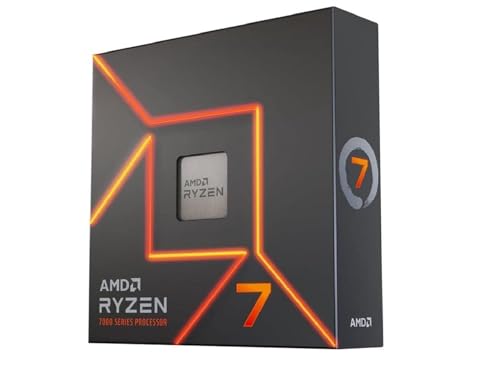
The AMD Ryzen 7 7700X is the balanced middle ground in the standalone lineup. It has eight cores and 16 threads, which gives it more general-purpose headroom than the six-core Ryzen 5 chips without moving into Ryzen 9 territory. For a desktop that will handle games, browsing, office work, streaming, and occasional demanding applications, that layout remains easy to recommend.
Its Zen 4 architecture reaches a listed 5.4GHz maximum boost, with a 4.5GHz base clock and 80MB of cache. It supports DDR5-5200 and the AM5 socket, while PCIe 5.0 is available on select 600 Series motherboards. Those platform details matter more for a new build than they do for a quick CPU swap. Choose the motherboard and memory as a matched foundation rather than treating the processor in isolation.
The AMD Ryzen 5 9600X uses the newer Zen 5 architecture and is the more focused six-core option. The AMD Ryzen 7 7800X3D is the more gaming-specialized choice because of its 3D V-Cache. The 7700X sits between those approaches, giving you eight cores for broader use without the cache design of the X3D models.
The cooler is not included, so the parts list needs a separate cooling solution. PCIe 5.0 support is also conditional on the motherboard, which means the processor alone does not guarantee that feature. Choose this chip when you want one AM5 desktop to do several jobs well. If gaming is the only priority, move up to the 9800X3D or consider the 7800X3D instead.

How to choose best amd cpu for gaming
The right gaming processor depends on the platform you already own, the graphics card you plan to use, and how much work the PC will do outside games.
Gaming cache
Large L3 cache is the defining feature of AMD’s X3D processors. It can keep more frequently used game data close to the CPU cores, which is particularly useful in CPU-limited games and busy simulation-heavy scenes. The 9800X3D, 7800X3D, and 5800X3D all use 3D V-Cache, while the Ryzen 7 7700X and Ryzen 5 9600X take a more conventional approach.
Cache is not a substitute for a capable graphics card. If the GPU is already the limiting part of the system, a faster gaming CPU may not change the image quality or frame rate much.
Cores and threads
Six cores and 12 threads are a reasonable starting point for a gaming PC. Eight cores and 16 threads offer more breathing room for streaming, recording, browsers, and background applications. The 16-core Ryzen 9 9950X3D is aimed at people who combine gaming with serious creation work, not simply those who want a bigger number.
The AMD Ryzen 7 9800X3D is the strongest focused gaming choice here, while the Ryzen 5 9600X is a better fit for a compact mainstream build. Think about what runs alongside the game before choosing extra cores.
Socket and memory
AM4 and AM5 are different platforms. The Ryzen 5 5500 and Ryzen 7 5800X3D use AM4 and DDR4, making them relevant to existing systems. The 9800X3D, 7800X3D, 9950X3D, 9600X, and 7700X use AM5, which requires an AM5 motherboard and DDR5 memory.
A processor upgrade is only simple when the motherboard, memory, cooler, and BIOS already agree with it.
For a new build, AM5 is the forward-looking route in this group. For an older AM4 desktop, the 5800X3D can make more sense than replacing the entire platform.
Cooling
Several CPUs here are sold without a cooler. That applies to the 9800X3D, 7800X3D, 9950X3D, 9600X, 5800X3D, and 7700X. The Ryzen 5 5500 includes a Wraith Stealth cooler, while the two complete desktops arrive as finished systems.
Cooling affects sustained performance, noise, and installation complexity. The 9950X3D deserves particular planning because its 16 cores can create a much heavier thermal load than a six-core chip. The 5800X3D listing specifically recommends high-performance cooling.
Complete systems
The iBUYPOWER Element 7900X, Corsair Vengeance a7500, and iBUYPOWER Element SE 8400F are complete PCs, not standalone processors. They include graphics cards, memory, storage, cases, operating systems, and other components. That makes them appropriate for someone starting without a compatible desktop, but not for someone who only needs to replace a CPU.
Before choosing a tower, check its dimensions and the graphics card you actually need. If you are selecting the rest of the machine yourself, our guide to the components that shape a gaming PC can help you build a compatible parts list, while the power delivery a gaming desktop really needs deserves attention before the final purchase.

Frequently asked questions
Is the Ryzen 7 9800X3D the best AMD CPU for gaming?
It is the strongest focused gaming pick in this roundup. Its Zen 5 architecture, eight cores, 16 threads, and 96MB of L3 cache make it a particularly well-matched processor for a new high-end gaming build. It does not include a cooler, so the rest of the build still needs careful planning.
Should I choose an X3D processor for gaming?
X3D processors are the most gaming-focused options in this list because they use a large cache design. The Ryzen 7 9800X3D, Ryzen 7 7800X3D, and Ryzen 7 5800X3D are the main examples here. A conventional chip such as the Ryzen 7 7700X can still be a better fit when the PC also handles broader workloads.
Is the Ryzen 5 5500 still suitable for a gaming PC?
Yes, if the build uses AM4 and a discrete graphics card. It has six cores, 12 threads, a 4.2GHz maximum boost, and bundled Wraith Stealth cooling. It is less suitable for a new high-end system because AM4 and DDR4 are older than the AM5 platform used by the newer processors.
What is the difference between AM4 and AM5?
AM4 is the platform used by the Ryzen 5 5500 and Ryzen 7 5800X3D in this roundup, while AM5 is used by the newer Ryzen 7000 and Ryzen 9000 options. AM4 pairs with DDR4 memory, and AM5 uses DDR5 memory. The motherboard must match the processor socket, so these platforms are not interchangeable.
Do these AMD processors include a cooler?
Most of the standalone chips here do not include one. The Ryzen 5 5500 is the exception because its listing includes a Wraith Stealth cooler. The Corsair and iBUYPOWER products are complete PCs, so their cooling is part of the finished system.
Is a complete gaming PC better than buying a CPU?
It depends on what you already own. A complete PC such as the iBUYPOWER Element 7900X includes the processor, graphics card, memory, storage, case, and operating system, while a standalone CPU only replaces one part. Buyers with an existing compatible desktop should compare processor upgrades, while first-time builders may prefer a finished tower.

The bottom line
The AMD Ryzen 7 9800X3D is the Best AMD CPU for Gaming in this group for a new performance-focused build. Its eight cores, 16 threads, Zen 5 design, and 96MB of L3 cache make it a more focused gaming choice than the 16-core Ryzen 9 9950X3D, unless creation work is just as important as play.
For a complete desktop, choose the iBUYPOWER Element 7900X when you want a powerful ready-to-use system with a 12-core CPU, RTX 5070 graphics, 32GB of memory, and a 1TB NVMe SSD. Existing AM4 owners should look closely at the AMD Ryzen 7 5800X3D, while new mainstream AM5 builders have a sensible alternative in the AMD Ryzen 5 9600X.
If you are undecided, match the CPU to your current socket first, then choose the processor that leaves the graphics card and cooling system properly balanced.
As an Amazon Associate we earn from qualifying purchases.