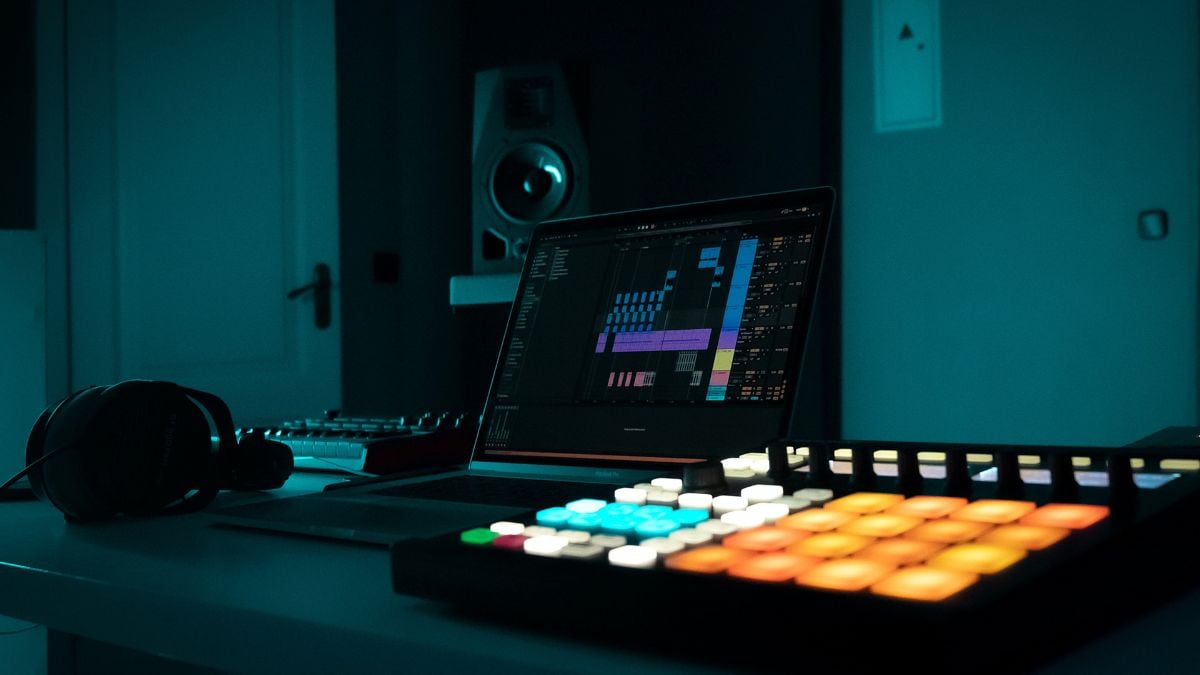

A beat maker should get your hands off the mouse and onto the rhythm. The right controller makes it easy to trigger drums, shape samples, and build a groove, but the wrong one can leave you sorting through software menus before you play a note. Our Best beat maker picks include MIDI pad controllers for full DAW production, plus one compact standalone drum machine.
Donner StarryPad is our top pick because its 16 pads, 48 assignable pad locations, physical controls, MIDI connections, and included software make it the most complete starting point. The rest of the lineup ranges from the self-contained Stylophone Beat to the deep MPC Studio, with several portable wireless options in between.
Comparison table
| # | Product | Award | Pads and control | Connection | Best for |
|---|---|---|---|---|---|
| 1 | Donner StarryPad | Best overall | 16 pads, 3 banks, 2 faders, 2 knobs | USB-C, MIDI in/out | New producers who want room to grow |
| 2 | Stylophone Beat | Best standalone drum machine | 4 drum kits, 4 bass sounds | Speaker, wired headphones | Quick beats without a computer |
| 3 | Akai MPD218 | Best for finger drumming | 16 MPC pads, 3 banks, 18 knobs | USB | Expressive pad performance |
| 4 | Synido Wireless P16 | Best wireless controller | 16 RGB pads, 16-step sequencer, 8 knobs | Bluetooth, USB, MIDI in/out/thru | Mobile production and live control |
| 5 | Umelody JP-1 | Best beginner wireless pad | 16 RGB pads | Wireless connection | First steps in sampling and looping |
| 6 | HXW EMP16 | Best for hands-on controls | 16 pads, 4 banks, 4 faders, 4 knobs | Bluetooth, USB, MIDI in/out | Producers who need extensive mapping |
| 7 | Donner StarryPad White | Best white controller | 16 pads, 3 banks, 2 faders, 2 knobs | USB-C, MIDI in/out | A bright alternative to the StarryPad |
| 8 | Synido TempoPad P16 | Best portable wired pad | 16 pads, 3 banks, 4 knobs | USB-C, MIDI out | Backpack production |
| 9 | Akai LPD8 | Best compact controller | 8 pads, 8 knobs, 4 presets | USB | Small laptop setups |
| 10 | Akai MPC Studio | Best MPC workflow | 128 pad locations, aftertouch, ribbon strip | USB | Dedicated MPC2 production |
1. Donner StarryPad: Best Overall

Pros
- 16 velocity-sensitive pads with three banks
- Two faders, two knobs, and extra assignable controls
- USB-C and standard MIDI in/out
- Includes Melodics courses and Cubase LE software
Cons
- It needs DAW software to make sound
- iPhone and iPad use requires a separate Lightning adapter
- The editor handles setup but not recording or arranging
Best for: new producers who want a flexible controller for both learning and serious DAW work.
The Donner StarryPad is the controller we'd put in front of someone who has outgrown tapping beats on a laptop keyboard but does not yet know exactly how their setup will evolve. The 16 soft silicone pads feel like the central feature, but the broader appeal is how much control sits around them. You can trigger drums, samples, and effects, then move to the two faders or two knobs without reaching for the mouse.
Its three pad banks create 48 assignable pad locations, which is enough room to separate a drum kit, one-shot samples, and performance effects. Adjustable velocity curves let you decide how much force changes the sound. That matters for finger drumming because a pad that responds too abruptly can make quiet ghost notes difficult, while a pad that feels too flat can make every hit sound mechanically identical. The seven-color backlighting also gives each group a visual identity.
The StarryPad is USB-C class compliant and works with Android, iOS, Mac, and Windows. It also includes MIDI in and out, with a cable for connecting external synthesizers or older MIDI hardware. Tap Tempo syncs with a DAW, while Note Repeat is aimed at fast repeating patterns. The included Melodics courses and Cubase LE software give a beginner somewhere to start, though the controller still relies on a DAW for sound. That distinction separates it from the small machines that can make drum patterns without a computer.
Compared with the Akai MPD218, the StarryPad gives you faders and standard MIDI connections, while the Akai counters with a larger set of assignable knobs and a familiar MPC-style layout. The Synido TempoPad P16 is smaller and easier to carry, but it does not offer the same collection of physical controls. The Donner's weakness is its setup curve. The editor can set the pads and lighting, but it cannot record or arrange music, and iPad users need an adapter for Lightning devices. Choose it if you want one controller that can remain useful as your production habits become more ambitious.
2. Stylophone Beat: Best Standalone Drum Machine

Pros
- Works without a computer or DAW
- Four drum kits and four bass sounds
- Records multiple layers and patterns
- Built-in speaker and wired headphone output
Cons
- Three AA batteries are not included
- Fewer sounds and controls than the MIDI controllers here
- Stylus operation is less like conventional pad drumming
Best for: beat makers who want immediate pattern creation in a compact standalone unit.
The Stylophone Beat is the odd one out in this roundup, and that is exactly why it earns a high place. Most of these products are controllers that send MIDI messages to another device. This one has its own drum kits, bass sounds, speaker, pattern memory, and controls, so you can pick it up and start making a rhythm without opening a DAW.
Its sound palette is intentionally focused: four drum kits and four bass sounds. That will feel narrow beside a computer loaded with samples, but it keeps the experience direct. The unit records multiple layers, lets you mute sounds, and supports multiple patterns. A click track and tempo lock help keep those patterns coherent while you build them, which is useful for quick sketches and casual practice.
At 7.09 inches long, 4.8 inches wide, and 1.5 inches high, the Stylophone Beat is easy to keep beside a notebook or take on a trip. It weighs about 0.63 pounds. Three AA batteries power it, and wired headphones can be connected when the built-in speaker is not appropriate. There is no claim here that it replaces a full production setup. It is closer to an immediate rhythm instrument than a computer production surface.
The Akai MPD218 and Donner StarryPad are much better if you want expressive control over a large sample library. The Stylophone Beat wins when the goal is to make a pattern without cables, software compatibility questions, or a screen. Its main weakness is its limited sonic range and stylus-based approach, so skip it if you specifically want MPC-style finger drumming or extensive MIDI mapping. For spontaneous grooves and simple layered patterns, it is the most self-contained pick here.
3. Akai MPD218: Best for Finger Drumming

Pros
- 16 thick MPC-style pads
- Three banks provide 48 assignable pad locations
- 18 assignable rotary controls
- Note Repeat and Full Level functions
Cons
- No built-in sounds
- USB connection is required for normal operation
- The two-pound body is less travel-friendly than smaller controllers
Best for: producers who care more about expressive MPC-style pads than wireless operation.
The Akai MPD218 is a focused pad controller with a strong sense of purpose. Its 16 thick MPC pads are the reason to buy it. They have enough physical presence for repeated finger-drumming sessions, and the layout feels natural for separating kick, snare, hats, and samples across a kit. It does not try to be a keyboard, mixer, sequencer, or standalone drum machine.
Three dedicated pad banks expand the controller to 48 assignable pads. That makes it easier to move from a basic kit to a collection of samples without constantly replacing mappings. The MPD218 also has 18 fully assignable 360-degree potentiometers, arranged across three banks. Those knobs can control DAW parameters, virtual instruments, and effects, giving it more hands-on mixing potential than the Donner StarryPad.
The controller includes MPC Note Repeat and Full Level. Note Repeat is useful for quickly generating consistent rolls or repeated notes, while Full Level makes every pad hit send the same maximum velocity. The MPD218 is USB powered, measures 10 by 8 by 2 inches, and weighs 2 pounds. It includes MPC Beats, Ableton Live Lite, and Drum Synth 500 from AIR Music Tech, so there is a practical software path after setup.
The Akai LPD8 is much smaller, but its eight pads are a clear limitation for full kit layouts. The Akai MPC Studio goes far deeper with aftertouch, a ribbon strip, and 128 pad locations, though its MPC2-centered workflow is more demanding. The MPD218's weakness is that it has no independent sound engine and no wireless option. Choose it when the pad response and familiar MPC layout matter more than portability or onboard sequencing.
4. Synido Wireless P16: Best Wireless Controller

Pros
- Bluetooth and USB MIDI connectivity
- Rechargeable battery for mobile sessions
- 16 RGB velocity-sensitive pads
- Built-in 16-track, 16-step sequencer
- OLED screen and extensive assignable controls
Cons
- It is still not a standalone sound source
- Larger and heavier than the simplest portable pads
- Wireless compatibility depends on the host device and software
Best for: mobile producers who want wireless flexibility without giving up sequencing and physical controls.
The Synido Wireless P16 is built for the producer who does not want every session tied to a USB cable. Bluetooth MIDI lets it connect wirelessly to a Mac, PC, or smart device, while USB MIDI remains available when a wired connection makes more sense. Its rechargeable battery removes the need for an external power supply during mobile sessions, though the exact runtime is not specified.
The control surface is busy in a useful way. There are 16 RGB backlit velocity-sensitive pads, eight endless rotary knobs, and 12 assignable buttons with LED indicators. Three modes, labeled Keyboard, Custom, and Dark, let you adapt the surface to the task. The OLED screen provides device-level feedback, so you can adjust settings without relying entirely on a computer editor.
Synido also includes a 16-track, 16-step sequencer, Note Repeat, a tempo pad, and aftertouch support. Those features give the P16 more performance depth than the straightforward Synido TempoPad P16. It measures about 12.4 inches high, 9.65 inches long, and 2.56 inches wide according to the listed dimensions, with a weight of about 3.84 pounds. The slim profile is useful in a backpack, but this is not the lightest controller in the group.
The Wireless P16 beats the Umelody JP-1 on controls and the HXW EMP16 on its rechargeable wireless design. The MPC Studio remains more capable for a dedicated MPC2 workflow, particularly with its ribbon control and aftertouch pads. The Synido's biggest limitation is fundamental: it still needs software such as GarageBand to produce sound. It is the right pick for someone who wants a mobile control surface with a real onboard workflow, not just a wireless row of triggers.
5. Umelody JP-1: Best Beginner Wireless Pad

Pros
- Wireless connection for mobile production
- 16 RGB beat pads
- Designed for finger drumming, sampling, and looping
- Compact approach for beginners
Cons
- The available feature information is less detailed than for competing models
- No listed faders, knobs, sequencer, or MIDI ports
- Requires a DAW or music app to make sound
Best for: beginners who want a simple wireless entry into pad-based music production.
The Umelody JP-1 keeps its pitch simple. It is a wireless MIDI pad controller with 16 RGB pads, aimed at people learning finger drumming, sampling, and looping on a laptop, tablet, or phone. That narrow focus can be helpful at the start because there are fewer physical controls to map and fewer decisions to make before the first beat.
The pads are described as responsive to playing force, so they can add variation to a performance rather than sending every hit at the same intensity. RGB lighting gives the surface a visual cue in a dim room and can help distinguish pad groups when working inside a music app. The product information does not provide a pad-bank count, knob count, fader count, sequencer specification, or physical dimensions, so buyers should not assume those features are present.
Its compatibility claim covers major DAWs and music apps, which makes it a practical match for a phone or tablet-centered setup. Like the Donner and Synido controllers, it is not a standalone instrument. The sound comes from the connected host and its software. That means the JP-1 is best understood as a compact performance interface, not a drum machine with built-in kits.
The Synido Wireless P16 is the stronger choice for someone who wants a screen, sequencer, knobs, and MIDI routing. The Donner StarryPad offers more detailed control and broader expansion through its pad banks. The JP-1's weakness is its limited published feature set, which makes it harder to recommend for a complex studio. It makes sense for a first controller when wireless pad triggering and a low-friction learning curve are the priorities.
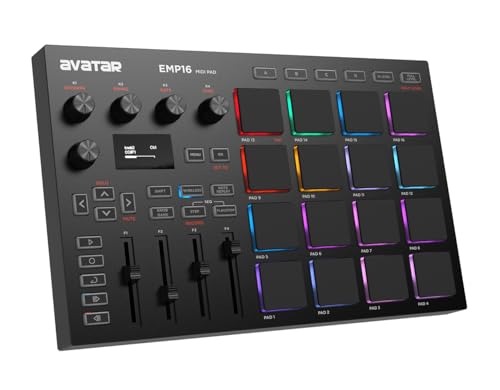
6. HXW EMP16: Best for Hands-On Controls
Pros
- Four pad banks provide 64 assignable pads
- Four faders, four knobs, and five assignable buttons
- Bluetooth 5.0 plus USB and standard MIDI
- OLED display for settings feedback
- Supports Note Repeat, Swing, Sequencer, and Tap Tempo
Cons
- Two AA batteries are not included
- No built-in sound engine
- The many controls can take time to configure
Best for: producers who want a broad set of physical controls for studio and performance use.
The HXW EMP16 is the controller for someone who wants to reach for a fader or knob instead of a software parameter. Its 16 RGB pads are divided across four banks, creating 64 assignable pad locations. That is more room than the Donner StarryPad and Akai MPD218 provide, particularly useful when a live set includes several kits, loops, and effect triggers.
The control count is unusually generous in this group. There are four assignable faders, four endless rotary knobs, and five assignable buttons, with access to 12 assignable controls through three banks. The pads offer three velocity curves, a threshold setting for crosstalk protection, 16 Level, Full Level, Half Level, and aftertouch. These features give experienced users plenty to shape, but they also mean more setup work for a beginner.
Bluetooth 5.0 can connect the EMP16 to an iPad, iPhone, or iPod touch, while USB MIDI and standard MIDI input and output support wired studio gear. It can run from USB or two AA batteries. An OLED display shows settings on the device, reducing the need to open a computer editor for every adjustment. Note Repeat, Time Division, Swing, Gate, Sequencer, clock synchronization, transport, and Tap Tempo round out the performance features.
The Synido Wireless P16 is slimmer and has a rechargeable battery, while the EMP16 offers more traditional MIDI routing and a larger banked control system. The Donner StarryPad is easier to approach, but it gives up two pad banks and several controls. The EMP16's weakness is complexity, plus the need to supply batteries if you want cable-free operation. Pick it when mapping depth and external MIDI integration matter more than a minimal learning curve.
7. Donner StarryPad White: Best White Controller

Pros
- 16 pads and 48 assignable pad locations
- Two faders and two knobs
- USB-C and MIDI in/out
- Customizable seven-color lighting
- Includes Melodics courses and Cubase LE software
Cons
- It needs a DAW to produce sound
- iPad and iPhone setup may require an adapter
- The editor does not record or arrange music
Best for: producers who want the StarryPad layout in a white finish.
The Donner StarryPad White has the same working concept as the black StarryPad, with a white finish that gives the controller a visibly different place on a desk. The important part is still the 16-pad layout, the soft silicone surfaces, and the ability to move across three pad banks. Those banks provide 48 assignable trigger locations for drums, samples, and effects.
Two faders, two knobs, and three buttons provide more direct control than a basic pad-only surface. The Shift key adds another layer of customization, while adjustable velocity curves let you tune the response to your playing style. The seven-color backlighting is not just decoration. Assigning colors to instrument groups can help you find the right pad during a live pattern or a darker studio session.
The controller is class compliant and uses USB-C for power and data. It works with Android, iOS, Mac, and Windows, and its MIDI in and out can connect to external synthesizers or older MIDI equipment. Tap Tempo syncs with the DAW, and Note Repeat is designed to keep repeated samples connected without obvious gaps. Melodics courses and Cubase LE are included, though the software code must be obtained through customer service according to the listing.
Functionally, this is the same kind of choice as the black Donner StarryPad, so the decision comes down to the finish and the specific listing rather than a different control layout. The Synido TempoPad P16 is more compact, while the HXW EMP16 has four pad banks and more faders and knobs. The white StarryPad's limitation is its reliance on host software and a somewhat involved editor workflow. Choose it when its appearance suits your setup and you want the same balanced feature set as the original StarryPad.
8. Synido TempoPad P16: Best Portable Wired Pad

Pros
- 16 velocity-sensitive RGB pads
- Three banks provide 48 triggers
- Four velocity curves and four assignable knobs
- USB-C plug-and-play connection
- Includes a carry case and MIDI adapter
Cons
- No wireless operation
- It does not produce sound on its own
- The included editor is needed for deeper remapping
Best for: producers who want a small wired controller for a laptop, phone, or tablet.
The Synido TempoPad P16 is a straightforward travel controller with enough range to avoid feeling disposable after the first few sessions. Its 16 velocity-sensitive pads respond to four selectable velocity curves, and three banks bring the total to 48 assignable triggers. That combination works well for a compact setup where the same physical surface needs to handle a drum kit, samples, and effects.
The pads use full RGB backlighting rather than a small set of fixed colors. Through the companion editor, you can change pad mapping, velocity curves, and lighting. Four assignable knobs add a modest amount of hands-on control for effects or instruments, though the surface is less control-heavy than the HXW EMP16 or Synido Wireless P16.
USB-C provides a driver-free connection to a laptop, iPad, or iPhone, and the listing says it works with Ableton Live, FL Studio, Cubase, and GarageBand. It includes a carry case, USB-C cable, and MIDI adapter. The controller measures 8.42 inches long, 6.18 inches wide, and 1.18 inches high, which makes its portability a meaningful advantage. A separate DC 5V port can keep a connected device charged while you play.
The lack of wireless operation is the obvious trade-off against the Synido Wireless P16 and Umelody JP-1. In exchange, the TempoPad P16 keeps the setup simple and avoids battery management. It is also more compact than the Donner StarryPad, though it gives up faders and standard MIDI in. If you want a small controller that can fit into a bag and work quickly with common DAWs, this is the Synido to choose.
9. Akai LPD8: Best Compact Controller

Pros
- Eight RGB backlit MPC-style pads
- Eight assignable Q-Link knobs
- Four programmable preset slots
- USB powered and driver free
- Works with major DAWs
Cons
- Only eight pads
- No standalone sounds or wireless connection
- Less room for a full kit than 16-pad controllers
Best for: laptop producers who need pads and knobs in the smallest practical layout.
The Akai LPD8 is the smallest serious controller in this roundup. It takes the essential parts of the MPC-style experience, eight responsive pads and eight knobs, and puts them in a slim surface designed to sit beside a laptop. This is not the controller to buy for a large live sample set. It is the one to choose when desk space and bag space are tight.
The eight RGB backlit pads can trigger samples, loops, and virtual instruments, while the eight Q-Link knobs provide tactile control over DAW parameters, plug-ins, and instruments. Four programmable preset slots let you recall mappings for different software setups. That is a useful compromise for a compact controller because it reduces the need to rebuild assignments every time you change projects.
The LPD8 is USB powered, requires no driver installation, and does not need an AC adapter. Its listed dimensions are 12.13 inches wide, 3.11 inches long, and 1.26 inches high, with a weight of about 0.88 pounds. The dimensions make it broad and shallow rather than truly tiny, but it remains light enough for a laptop bag. Compatibility includes GarageBand, Logic, Studio One, Cubase, Ableton Live, Pro Tools, FL Studio, and Adobe Audition.
The Akai MPD218 gives you twice as many pads and three banks, making it more suitable for dedicated beat construction. The Donner StarryPad adds faders, MIDI connections, and 48 triggers. The LPD8 fights back with its eight knobs and unusually slim form. Its central weakness is the eight-pad limit, which can force bank changes during a kit performance. Pick it when portable parameter control matters as much as pad count.
10. Akai MPC Studio: Best MPC Workflow

Pros
- 128 pad locations across eight banks
- Velocity-sensitive pads with pressure and aftertouch
- Ribbon touch strip for effects and Note Repeat
- LCD display and transport controls
- MPC2 software and production suite included
Cons
- Designed around the MPC2 software workflow
- USB connection is required
- More demanding than a simple pad controller
Best for: producers who want a dedicated computer-based MPC production environment.
The Akai MPC Studio is the most substantial production surface here, but it is not simply a larger version of the MPD218. It is designed around MPC2 software and gives that environment physical controls for pads, transport, effects, and performance. For someone who already likes the MPC workflow, it is the most coherent pick in this list.
Eight banks of 16 RGB pads provide 128 pad locations. The pads are velocity and pressure sensitive, with aftertouch for expressive control after the initial hit. That is a major step beyond the LPD8 and a more complete performance system than the basic Donner and Synido controllers. Chords and Scale modes can help turn a pad surface into a more melodic instrument, while the color LCD provides visual feedback.
The ribbon touch strip can control effects and Note Repeat in real time. Transport controls keep recording and playback within reach, and the controller supports MPC2 as a software instrument inside a DAW, including Cubase and Ableton. The included MPC2 license adds eight instrument plug-ins, mixing and mastering effects, vocal tuning, harmonizer, and doubler tools. MPC Stems can isolate drums, bass, music, and vocals from an audio recording or sample.
At 13 inches long, 6.7 inches wide, and 1.58 inches high, the MPC Studio is not enormous, and its listed weight is about 1.5 pounds. The real limitation is not portability. It is commitment to the MPC2 ecosystem. The Akai MPD218 is easier to use as a general MIDI pad controller, while the Synido Wireless P16 is better suited to cable-free mobile sessions. Choose the MPC Studio if you want a complete computer-based MPC environment and are willing to learn its deeper workflow.
How to choose best beat maker
The right beat maker depends on whether you need a standalone instrument, a simple MIDI surface, or a full production controller with software integration.
Standalone operation
The Stylophone Beat is the only product here with built-in drum kits, bass sounds, a speaker, pattern recording, and no requirement for a computer. Every other pick is a MIDI controller, which means it sends performance information to a DAW, music app, virtual instrument, or external MIDI device. Decide this first because a controller cannot replace a self-contained drum machine when you want to play without a host.
If it cannot make sound by itself, treat it as a control surface, not a complete drum machine.
Pad count and pad banks
Sixteen pads are a useful starting point for a complete drum kit. Banks expand that physical surface, with the Donner StarryPad and Synido TempoPad P16 offering 48 assignable locations, the HXW EMP16 offering 64, and the MPC Studio offering 128. The Akai LPD8 has only eight pads, but that can be enough for a compact setup built around a small number of samples.
Velocity and aftertouch
Velocity sensitivity changes the sound based on how hard you hit the pad, which helps a programmed rhythm feel less rigid. Velocity curves change how quickly the controller reaches louder values. Aftertouch adds control after a pad is pressed, and it appears on the Synido Wireless P16, HXW EMP16, and Akai MPC Studio. For expressive finger drumming, these details matter more than colorful lighting.
Physical controls
Knobs and faders let you adjust filters, effects, volume, and instrument parameters without stopping to move a mouse. The HXW EMP16 has the broadest conventional control set in this group, while the Akai MPD218 offers 18 assignable rotary controls. The Akai LPD8 is a good example of a small controller that prioritizes knobs over pad count.
Connections and portability
USB is the most common route into a DAW. Bluetooth can make a mobile setup cleaner, as on the Synido Wireless P16, Umelody JP-1, and HXW EMP16. Standard MIDI in and out matter when you plan to connect synthesizers or other hardware. Also check the power method: the Stylophone Beat uses three AA batteries, the HXW EMP16 can use two AA batteries, and the Synido Wireless P16 has a rechargeable battery.

Frequently asked questions
Do these beat makers make sound without a computer?
Only the Stylophone Beat is described as a standalone drum machine with built-in kits, bass sounds, speaker, and pattern recording. The other products are MIDI controllers, so they need a DAW, music app, virtual instrument, or external MIDI sound source.
Are 16 pads enough for making beats?
For most basic drum kits, 16 pads provide a sensible layout for kicks, snares, hats, percussion, and samples. Banks add more sounds without requiring a larger physical surface. The Akai MPC Studio expands this idea to 128 pad locations across eight banks.
Which beat maker is easiest for a beginner?
The Donner StarryPad is a strong starting point because it combines 16 pads, three banks, a few physical controls, and included learning and production software. The Umelody JP-1 is another approachable option if wireless pad triggering is more important than extensive controls.
Can these controllers work with a phone or tablet?
Several can. The Donner StarryPad lists compatibility with Android and iOS, while the Synido Wireless P16 supports wireless connection to smart devices. The Synido TempoPad P16 connects through USB-C, and the HXW EMP16 supports Bluetooth as well as USB and MIDI.
What is the difference between the Akai MPD218 and Akai MPC Studio?
The MPD218 is a focused MIDI pad controller with 16 pads, three pad banks, and 18 assignable knobs. The MPC Studio is a deeper production surface built around MPC2 software, with 128 pad locations, aftertouch, a ribbon strip, display, transport controls, and a larger software suite.
Do wireless MIDI controllers need batteries?
The Synido Wireless P16 has a built-in rechargeable battery. The HXW EMP16 can use two AA batteries or USB power. The Umelody JP-1 is described as wireless, but the provided product information does not specify its battery type or runtime, so check the current listing before buying.
The bottom line
The Best beat maker for most new producers is the Donner StarryPad. Its 16 pads, 48 assignable locations, faders, knobs, USB-C, standard MIDI, and included software give it the most balanced path from first beat to a more developed setup. The black and white versions offer the same core control concept, with the finish as the visible difference.
Choose the Stylophone Beat if you want a self-contained instrument that works without a DAW. Choose the Akai MPC Studio if you already want the MPC2 workflow and need deeper pad, software, and performance control. For an undecided buyer, start by choosing between standalone operation and MIDI control, then let pad count and portability settle the rest.
As an Amazon Associate we earn from qualifying purchases.