
A laptop's built-in speakers can make voices sound thin, while a desktop monitor may offer no speakers at all. The right pair of compact speakers fixes that without taking over the desk. Our Best Best Budget PC Speakers picks focus on useful controls, simple connections, clear dialogue, and enough low-end presence for music, games, and video.
The Creative Pebble V3 is the strongest all-rounder here because it combines USB-C audio, Bluetooth 5.0, an analog input, elevated drivers, and a gain switch. The rest of the lineup covers small desks, RGB lighting, wired simplicity, headphone access, and subwoofer-equipped sound.
Comparison table
| # | Product | Award | Connection | Standout feature | Best for |
|---|---|---|---|---|---|
| 1 | Creative Pebble V3 | Best overall | USB-C, Bluetooth 5.0, 3.5mm | 8W RMS, 45° drivers | Most desktop setups |
| 2 | Creative Pebble | Best compact wired pair | USB, 3.5mm AUX | 45° drivers, passive radiators | Small workspaces |
| 3 | Logitech Z313 | Best bass setup | 3.5mm wired | 2.1 system, 25W RMS | Games and movies |
| 4 | Logitech Z207 | Best wireless flexibility | Bluetooth 4.2, 3.5mm | Easy-Switch device switching | Mixed desk and mobile use |
| 5 | Redragon GS520 | Best RGB design | USB, 3.5mm | Six touch lighting modes | Gaming desks |
| 6 | Nylavee Lighting Speakers | Best lighting controls | USB, 3.5mm | Six lighting modes, bass ports | Colorful desktop setups |
| 7 | Amazon Basics Stereo 2.0 | Best tiny speakers | USB, 3.5mm AUX | In-line volume control | Basic desktop audio |
| 8 | LENRUE G11 | Best under-monitor fit | USB-C, USB, 3.5mm | Touch lighting, top knob | Narrow desks |
| 9 | Amazon Basics AC-Powered | Best wall-powered pair | AC, 3.5mm | Front headphone jack | Desktops near an outlet |
| 10 | Amazon Basics Compact USB | Best portable pair | USB, 3.5mm headphone jack | Compact plug and play setup | Temporary workstations |
1. Creative Pebble V3: Best Overall

Pros
- USB-C audio keeps the desk wiring simple
- Bluetooth 5.0 adds phone and tablet playback
- 45° drivers aim sound toward the listener
- Gain switch and 8W RMS output give it useful headroom
- Clear Dialog processing helps spoken content
Cons
- AUX cable is not included
- Gain mode requires a 10W USB-C or USB-A port
- No dedicated subwoofer
Best for: people who want one compact pair for computer, phone, and streaming audio.
The Pebble V3 is the pair we would put on the most desks. It is compact enough for a normal workstation, but it does not feel like a token upgrade over laptop audio. The 45° elevated drivers direct sound upward toward your ears instead of firing straight across the desktop, which makes the listening position less fussy.
Creative uses larger 2.25-inch full-range drivers here and rates the system at 8W RMS, with peak output up to 16W. That gives the V3 more authority than the smaller Amazon Basics pairs, especially when a video soundtrack gets busy. Its Clear Dialog processing is a practical touch for spoken content, helping voices remain intelligible without forcing the entire soundtrack to an uncomfortable level.
The connection options are the reason this model leads the group. A single USB-C cable can carry audio and power from a compatible computer, while a USB-C to USB-A converter is included for older ports. Bluetooth 5.0 handles phones and tablets, and the 3.5mm input covers older computers and other analog devices. The gain switch can push the output further, but Creative says that mode requires a 10W USB-C or USB-A port.
Compared with the wired Creative Pebble, the V3 is more adaptable and more powerful. The Logitech Z207 offers Bluetooth too, but its Bluetooth version is 4.2 and it does not offer USB audio. The V3's weakness is its lack of a separate bass module, so listeners who want room-filling low frequencies should look at the Logitech Z313 instead. The AUX cable also is not included, which matters if the computer has no suitable USB port.
For a broader look at compact desktop audio, the connection mix that makes speakers easy to share between devices is a useful thing to consider. For most people, the Pebble V3 gets the balance right: clear computer audio, straightforward controls, and wireless playback without a large speaker footprint.
2. Creative Pebble: Best Compact Wired Pair

Pros
- 45° drivers project sound toward the listener
- USB power avoids a separate power adapter
- Rear passive radiators add bass presence
- Front volume control is easy to reach
Cons
- No Bluetooth
- Requires both USB power and 3.5mm audio
- Less flexible than the Pebble V3
Best for: a small desk that needs a clean, wired stereo upgrade.
The original Creative Pebble remains a smart choice when the goal is simple desktop sound rather than a feature-heavy setup. Its rounded enclosures take up little room, and the 45° driver angle gives it a more deliberate listening position than many small speakers that fire horizontally into the monitor stand.
The system uses USB for power and a 3.5mm AUX connection for audio. That split means two cables, but setup remains plug and play and there is no wall adapter to find. The front-facing volume control is placed where it can be reached without leaning around the monitor, a small convenience that becomes important during a workday.
Creative also uses rear-facing passive radiators to improve bass reproduction. The listed range is 100 Hz to 17 kHz, so this is not a substitute for a subwoofer, but the design should sound fuller than a pair of tiny full-range drivers with no bass assistance. It suits speech, casual music, system sounds, and video particularly well.
The Pebble V3 beats it on output, wireless playback, and USB-C audio. The Amazon Basics Stereo 2.0 is smaller and more basic, while the Pebble has the more purposeful driver angle and a stronger desktop presentation. The clear limitation is the lack of Bluetooth, so this is not the pair to choose if a phone will be a regular source.
The white finish is also more visually distinctive than most products here, although color is a matter of taste. If your computer has an available USB port and a headphone output, the original Pebble is an uncomplicated way to get directional stereo sound without crowding the desk.
3. Logitech Z313: Best Bass Setup

Pros
- Separate subwoofer gives bass more physical weight
- 25W RMS output has the most headroom here
- Wired control pod keeps volume within reach
- Traditional 2.1 layout suits movies and games
Cons
- Subwoofer takes extra floor or desk space
- Wired connection only
- Fewer direct source options than the Pebble V3
Best for: listeners who want stronger bass from a desktop speaker system.
The Z313 takes a different approach from every other pick in this roundup. Instead of two compact satellites trying to cover the whole range, it adds a dedicated subwoofer. That makes the system physically larger, but it also gives games, action movies, and music a sense of impact that small USB pairs cannot reproduce in the same way.
Logitech lists 25W RMS output, and the extra amplifier capacity gives the Z313 room to play louder than the compact systems. The control pod is the most convenient part of the design. It puts volume adjustment on the desktop and provides a simple way to manage listening without reaching behind a speaker.
There is only a wired connection, so the Z313 is best treated as a permanent computer setup. It does not have the Creative Pebble V3's Bluetooth 5.0, USB-C audio, or 3.5mm flexibility beyond the system's basic computer connection. The tradeoff is a fuller low end and more convincing scale for content that benefits from bass.
The Logitech Z207 is a better fit if the speakers need to switch between a computer and mobile devices. The Z313 is also less tidy than the Amazon Basics AC-Powered pair because the subwoofer creates another component to place. Small desks may struggle with that footprint, especially when the subwoofer has to sit near the computer rather than under a monitor.
For anyone building a movie or gaming setup, the Z313 is the direct answer to thin-sounding compact speakers. It is not the most discreet option, but it is the one to choose when bass matters more than wireless convenience or minimal cabling.
4. Logitech Z207: Best Wireless Flexibility

Pros
- Bluetooth and 3.5mm wired input
- Easy-Switch simplifies switching between devices
- Passive radiators add bass extension
- Headphone jack is on the speaker
Cons
- Bluetooth 4.2 is older than the Pebble V3's Bluetooth 5.0
- Tall enclosures need more vertical room
- No USB audio
Best for: a desktop that also serves as a speaker system for phones and tablets.
The Z207 is the most convenient choice for households that move between computer audio and wireless playback. Its Bluetooth connection lets a phone or tablet use the speakers without plugging in, while the 3.5mm input keeps it compatible with a conventional desktop or laptop.
Logitech's Easy-Switch feature is central to the experience. You can pause audio on one device and press play on another to move between sources, rather than repeatedly opening pairing menus. Each speaker has an active driver and a passive radiator, a combination intended to extend bass without adding a separate subwoofer.
The front or on-speaker controls also include power and volume adjustment, and there is a headphone jack for private listening. The speakers measure about 9.5 by 3.5 by 4.9 inches according to the listed size, making them taller than the Creative Pebble models. That height can help keep them near ear level, but it may not work beneath a low monitor shelf.
The Creative Pebble V3 is a stronger choice for USB-C computer audio and newer Bluetooth connectivity. The Z313 has more low-end authority because of its subwoofer. The Z207 sits between them, favoring source flexibility over maximum output.
Its age shows most clearly in the Bluetooth 4.2 specification and the absence of USB audio. Skip it if your computer has unreliable analog output or if you need a single cable for both sound and power. Choose it if multiple people will use the speakers with different devices throughout the day.
5. Redragon GS520: Best RGB Design
Pros
- Six touch-controlled RGB lighting modes
- Separate volume up and down buttons
- USB power and 3.5mm audio
- Long cable between the speakers
- Modern brushed-style design
Cons
- No Bluetooth
- Lighting adds style but not audio capability
- Large listed dimensions may challenge small desks
Best for: a gaming or RGB workstation where appearance matters.
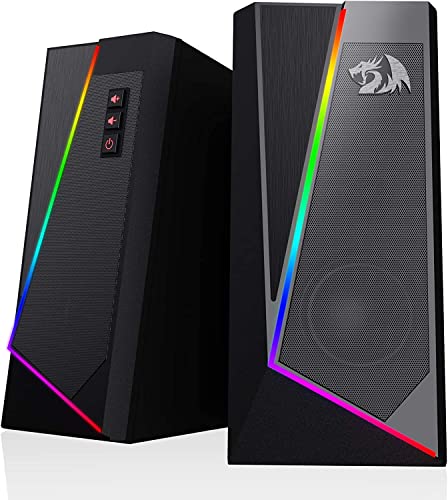
The GS520 is aimed at the desk rather than the living room. Its main visual feature is a lighting bar with six selectable modes, controlled by touch. The lighting can be switched off, so the speakers do not have to remain in gaming mode during work or study.
Sound comes from a wired 2.0 stereo design with USB power and separate 3.5mm audio and microphone cables. Redragon describes the system as using a full-range enhanced stereo core. There is no wattage or frequency range listed in the supplied information, so the meaningful distinction is its layout and controls rather than a numerical promise about output.
The individual volume up and down buttons are more precise than a single shared knob when you want to make small changes. The cable between the speakers reaches up to 31 inches, giving more freedom to place them on either side of a monitor. That helps a wide desk, though the listed dimensions are unusually large and should be checked against the available surface.
The Nylavee Lighting Speakers also offer six lighting modes, but they use a single knob for volume and explicitly lack Bluetooth, a headphone port, and a microphone. The GS520 has the more useful control arrangement, while the Creative Pebble V3 remains the better pick for cleaner connectivity and more flexible sources.
Skip the GS520 if RGB lighting is irrelevant or if you want phone playback. The speaker's appeal is its visible desk presence and accessible buttons, not a minimalist cable count. For a gaming desk that already has a coordinated lighting setup, it is the most natural match in this group.
6. Nylavee Lighting Speakers: Best Lighting Controls
Pros
- Six touch-controlled lighting modes
- Two full-range dual-magnet speaker units
- Dedicated speaker ports for bass
- One knob handles power and volume
- Works with computers, phones, and tablets through AUX
Cons
- No Bluetooth
- No headphone port or microphone
- USB carries power only
Best for: listeners who want prominent lighting and a simple analog setup.
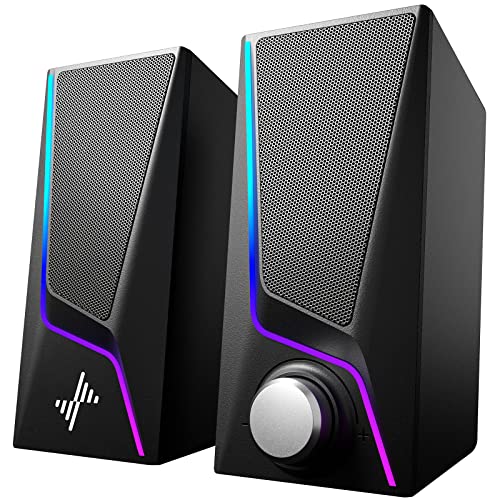
Nylavee's speakers make the lighting a central feature rather than a small accent. Six touch-controlled modes include animated patterns and three solid colors. The controls are easy to understand, and a single knob handles power and volume, which keeps everyday operation straightforward.
The audio hardware uses two full-range dual-magnet speaker units and dedicated speaker ports intended to concentrate bass energy. The supplied data does not include a wattage or frequency range, so there is no reason to treat the bass claim as equivalent to the Logitech Z313's separate subwoofer. Still, the ported enclosure gives this pair a more deliberate low-frequency design than the smallest compact speakers.
Setup uses a USB cable for power and a 3.5mm audio cable for sound. It works with PCs, laptops, phones, and tablets through that analog input, with no drivers needed. There is no Bluetooth, and the product specifically does not include a headphone port or microphone, so the source device needs to provide the audio connection and private listening must be handled elsewhere.
The Redragon GS520 is the closer rival because both models provide six lighting modes. Redragon gives you individual volume buttons and a longer listed speaker-to-speaker cable, while Nylavee offers a single smooth control knob and dedicated bass ports. The Creative Pebble V3 is more versatile for wireless use and USB audio.
The listed dimensions are 3.23 inches long, 4.21 inches wide, and 7 inches high, so these are not the shortest speakers for a cramped setup. Choose them when lighting and a simple knob matter more than Bluetooth or headphone access. Skip them if the speakers need to serve as a wireless room system.
7. Amazon Basics Stereo 2.0: Best Tiny Speakers

Pros
- Very compact stereo pair
- USB powered with 3.5mm AUX input
- In-line volume control
- Blue LED accents
- Bottom radiator adds bass presence
Cons
- No Bluetooth
- In-line control is less integrated than front controls
- Limited physical scale compared with larger pairs
Best for: a basic desktop that has almost no spare surface area.
The Amazon Basics Stereo 2.0 pair is built around a small footprint and uncomplicated setup. Each speaker measures approximately 2.88 inches high, 3.94 inches long, and 2.6 inches wide. That makes them easy to place beside a laptop, monitor stand, or compact workstation where taller speakers would get in the way.
Power comes from USB, while sound enters through a 3.5mm AUX connection. The in-line volume control means the adjustment is on the cable rather than directly on one enclosure. It is still convenient for quick changes, though it creates another object to place on the desktop.
A bottom radiator is intended to give the speakers a springier bass response, and the metal finish with a padded base should help them sit securely. Blue LED lights add a small visual accent. The supplied information does not specify output power or a frequency range, so these should be viewed as close-range desktop speakers rather than a system for filling a room.
The Creative Pebble has the more purposeful 45° driver angle and rear passive radiators, while the Amazon Basics pair wins on physical compactness. The Amazon Basics Compact USB model adds a headphone jack and front control but has a narrower listed frequency range of 103 Hz to 20 kHz. This Stereo 2.0 model is the better fit when an AUX input and the smallest footprint matter most.
Its weakness is scale. It will not produce the broad, weighty sound of the Logitech Z313 or the fuller output of the Pebble V3. If the desk is tight and the speakers mainly need to improve system alerts, calls, and casual video, this pair keeps the setup neat.
8. LENRUE G11: Best Under-Monitor Fit

Pros
- Designed to fit beneath a monitor
- Top volume knob is easy to reach
- Touch control switches the lights
- USB-C adapter is included
- USB power and 3.5mm audio are simple to set up
Cons
- No Bluetooth
- No headphone port or microphone
- Not compatible with TVs or headphones
- Speaker cable is joined to reduce clutter
Best for: narrow desks where a compact horizontal arrangement matters.
The G11 is shaped for the space directly under a monitor. Its listed dimensions are 2.55 inches high, 2.48 inches long, and 14.96 inches wide, making the horizontal layout the defining feature. LENRUE joins the cables between the speakers to reduce loose wiring, which is useful when the pair sits beneath a display.
A top-mounted volume knob is more practical than a rear control for this position. Touch control turns the angular lighting on or off, adding a visual feature without requiring a separate lighting button. LENRUE also describes four large amplifier IC horns and a distortion-free stereo design, but the supplied information does not include output power or a frequency range.
The G11 uses USB for power and 3.5mm for audio. A USB-C adapter is included, which helps when the computer uses USB-C rather than a conventional USB port. There is no driver installation, but there is also no Bluetooth, headphone port, or microphone. The product specifically says it is not compatible with TVs or headphones, so its role is tightly focused on computer audio.
The Amazon Basics Stereo 2.0 is more compact as two separate units, while the Creative Pebble has a more directional driver arrangement. The G11's advantage is the single under-monitor bar-like layout and top knob. Its limitation is that it gives up the source and listening flexibility offered by the Creative Pebble V3.
For a narrow workstation, those compromises may be acceptable. Choose the G11 when cable tidiness and under-monitor placement are more important than wireless playback. Skip it if you expect to connect headphones directly or use the speakers with a television.
9. Amazon Basics AC-Powered: Best Wall-Powered Pair

Pros
- Direct AC power avoids drawing power from USB
- Front volume and standby control
- Front headphone jack
- 4.6W total RMS output
- Listed 68 Hz to 20 kHz range
Cons
- Requires a wall outlet
- Wired 3.5mm audio only
- Larger than the compact USB pairs
Best for: a fixed desktop with an accessible outlet and front headphone access.
The AC-Powered Amazon Basics pair is the straightforward option for a permanent desktop. It plugs into a wall outlet rather than relying on the computer's USB port, and the front control combines power, standby, and volume. That arrangement feels more like a traditional powered speaker set than the tiny USB models.
Its total RMS output is 4.6W, split as 2.3W per speaker, and the listed frequency range runs from 68 Hz to 20 kHz. The lower stated frequency reaches deeper than the Compact USB model's 103 Hz starting point, so this pair should have a better chance of sounding rounded with music and video. It is still a small 2.0 system, not a subwoofer setup.
The front headphone jack is a major practical advantage. You can leave the speakers connected and move to headphones without reaching behind the computer. The speakers measure approximately 3 by 5.3 by 3.2 inches and weigh about 1.695 pounds as a pair, so they require more room than the smallest Amazon Basics model.
The Logitech Z313 offers dramatically more system scale through its subwoofer, while the Creative Pebble V3 avoids a wall adapter and adds Bluetooth. The AC-Powered pair makes sense between those extremes for someone who wants a conventional outlet-powered setup with accessible controls and headphone switching.
It is the wrong choice for a portable workstation or a desk already crowded with power adapters. Choose it for a stable desktop near an outlet, especially if a front headphone jack matters more than wireless playback.
10. Amazon Basics Compact USB: Best Portable Pair

Pros
- USB powered and plug and play
- Compact dimensions suit temporary desks
- Front volume and standby control
- 3.5mm headphone jack
- No drivers required
Cons
- Lowest listed output in this group
- No Bluetooth
- Frequency range starts at 103 Hz
- USB connection supplies power, not audio
Best for: moving between workstations or adding basic audio to a laptop.
The Compact USB pair is the easiest product here to move from one desk to another. It connects directly to a computer for USB power, uses a conventional computer audio connection, and needs no drivers. The front control includes power and volume, so there is little to learn after plugging it in.
The speakers measure 2.76 by 3.55 by 5.3 inches and weigh approximately 1.4 pounds. Their vertical shape uses less horizontal space than a wide soundbar-style speaker, while the modest weight makes them practical for a temporary office, classroom, or secondary computer.
The listed output is 2.2W RMS total, or 1.1W per speaker, with a frequency range of 103 Hz to 20 kHz. Those figures explain the product's role. It can make system audio, calls, and online video easier to hear, but it is not intended to create strong bass or a large soundstage. The front 3.5mm headphone jack is useful when the desk needs a quick private-listening option.
The Amazon Basics Stereo 2.0 offers a bottom radiator and a 3.5mm AUX input, while the AC-Powered model provides more output and a lower listed frequency starting point. The Compact USB pair wins when portability and headphone access are more important than fuller sound. The Creative Pebble is a better stationary wired pick because its 45° drivers aim audio more directly toward the listener.
For readers comparing more small-room audio options, the speaker size that fits around a monitor and keyboard can matter as much as the connection type. Choose this Amazon Basics model for a simple secondary setup, and skip it if music and game sound need meaningful bass.
How to choose best budget pc speakers
The Best Best Budget PC Speakers are separated less by appearance than by how they connect, where they fit, and what kind of sound they can produce.
Connection type
USB-powered speakers are convenient because a computer can supply power, but USB does not always carry audio. The Amazon Basics pairs use USB for power and a 3.5mm connection for sound, while the Creative Pebble V3 can use a single USB-C cable for both on compatible computers. Bluetooth is useful for phones and tablets, but wired input remains valuable for computers without reliable wireless support.
Speaker layout
A 2.0 pair uses two stereo speakers and usually fits more easily around a monitor. A 2.1 system such as the Logitech Z313 adds a subwoofer, which gives bass more physical weight but requires another component and more placement space. Under-monitor designs such as the LENRUE G11 save side-to-side space but give up the flexibility of separating two small speakers.
Output and bass design
Look for stated RMS output when you need speakers to play clearly at a greater distance. The Creative Pebble V3 lists 8W RMS, the Amazon Basics AC-Powered pair lists 4.6W RMS, and the Compact USB pair lists 2.2W RMS. Passive radiators and speaker ports can add bass presence, but only a dedicated subwoofer provides the deeper, more physical low end of the Logitech Z313.
A small speaker can sound clear at a desk and still be the wrong choice for filling a room.
Controls and headphone access
Front or top controls are easier to use than a knob hidden behind a speaker. A headphone jack is especially useful in a shared room because it lets you keep the speakers connected while switching to private listening. The Logitech Z207, Amazon Basics AC-Powered model, and Amazon Basics Compact USB model include headphone access, while the LENRUE G11 specifically does not.
Desk footprint
Measure the space around the monitor before choosing. The Amazon Basics Stereo 2.0 pair is particularly small, the Creative Pebble models use angled enclosures, and the LENRUE G11 is designed to sit horizontally beneath a display. Taller models such as the Logitech Z207 and Nylavee speakers need vertical clearance, while the Logitech Z313 needs room for its subwoofer.
Wireless playback
Bluetooth turns computer speakers into a convenient source for a phone or tablet. The Creative Pebble V3 uses Bluetooth 5.0, while the Logitech Z207 uses Bluetooth 4.2 and adds Easy-Switch source handling. The wired RGB models from Redragon, Nylavee, and LENRUE are better suited to a fixed computer desk.

Frequently asked questions
Do these speakers work with a laptop?
Yes. Every model in this roundup is intended for computer use, though the connection method differs. Several use USB for power and 3.5mm for audio, while the Creative Pebble V3 can use USB-C audio and Bluetooth.
Which speakers have Bluetooth?
The Logitech Z207 has Bluetooth 4.2, and the Creative Pebble V3 has Bluetooth 5.0. The other eight models are wired and do not list Bluetooth support.
Which pick has the strongest bass?
The Logitech Z313 has the strongest bass-oriented design because it includes a separate subwoofer and lists 25W RMS output. The other models are 2.0 systems, so their bass comes from compact speaker enclosures, ports, or passive radiators.
Can I plug headphones into these speakers?
The Logitech Z207 and both Amazon Basics models with headphone access include a 3.5mm headphone jack. The LENRUE G11 specifically does not have a headphone port, and the supplied information does not list one for the Redragon GS520, Nylavee speakers, or Creative Pebble models.
Are USB-powered speakers using USB for audio?
Not always. The Amazon Basics Stereo 2.0, Amazon Basics Compact USB, Redragon GS520, Nylavee speakers, and LENRUE G11 use USB for power while relying on 3.5mm audio. The Creative Pebble V3 supports USB-C audio on compatible computers.
Which speakers are best for a small desk?
The Amazon Basics Stereo 2.0 is the smallest separate pair in this list, while the LENRUE G11 is designed to sit beneath a monitor. The Creative Pebble is another strong compact option because its angled drivers direct sound toward the listener.
Do any of these speakers need special drivers?
The plug and play models do not require driver installation according to their supplied features. The Creative Pebble V3, Amazon Basics pairs, Nylavee speakers, and LENRUE G11 are designed for straightforward setup through their listed wired connections.
The bottom line
The Best Best Budget PC Speakers pick is the Creative Pebble V3. Its USB-C audio, Bluetooth 5.0, 3.5mm input, clear dialogue processing, angled drivers, and gain switch make it the most complete system for a typical desktop.
Choose the Logitech Z313 instead if bass and movie or game impact matter more than a tidy footprint. For a tiny desk, the Creative Pebble and Amazon Basics Stereo 2.0 are sensible wired choices, while the Logitech Z207 is the better fit for frequent wireless device switching.
If you are undecided, choose the Creative Pebble V3 unless you specifically need a subwoofer, a headphone jack, or the smallest possible speakers.
As an Amazon Associate we earn from qualifying purchases.