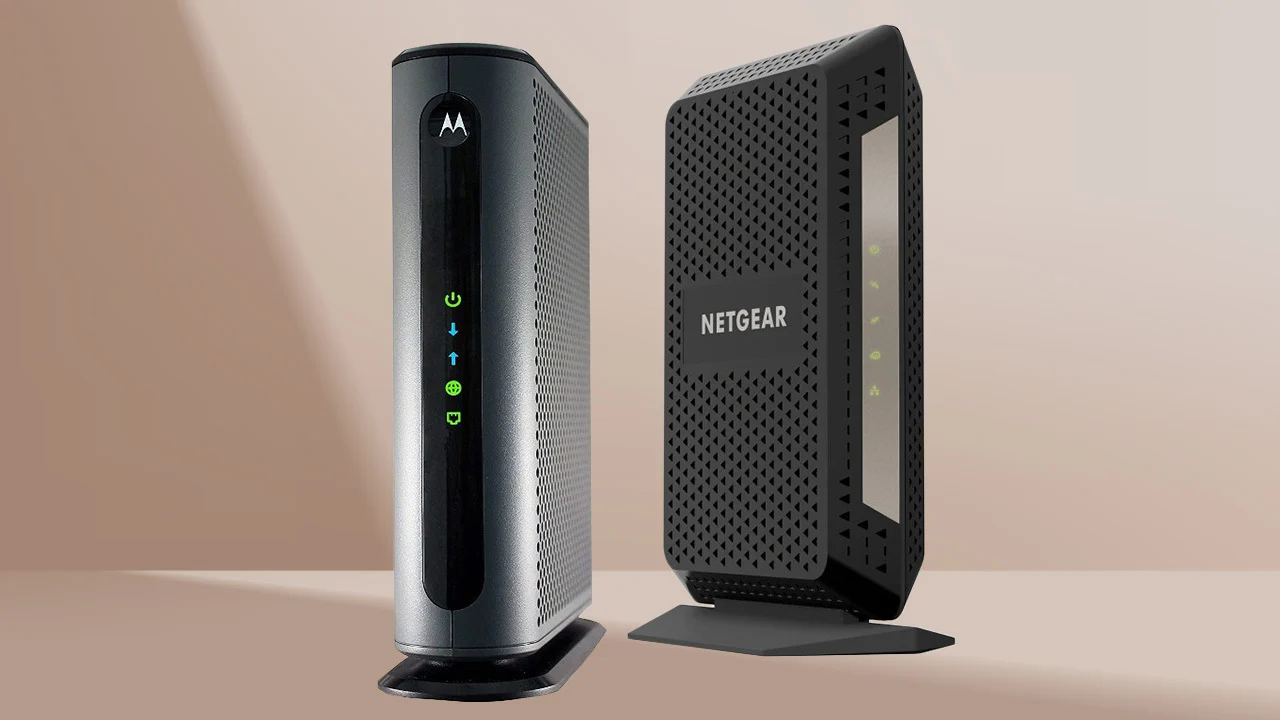

Cable internet problems often start with the wrong box. A modem that cannot handle your plan's speed, lacks the right Ethernet port, or does not support your provider can leave a fast connection performing like a slow one. The Best cable modem for you also depends on whether you already own a router, need voice service, or want a modem ready for faster upstream speeds.
We compared ten cable modems ranging from dependable 1 Gbps DOCSIS 3.1 models to multi-gig mid/high-split hardware. The NETGEAR CM3000 is the strongest choice for demanding cable plans, while the NETGEAR CAX30 is the simplest route to a complete modem and Wi-Fi setup.
Comparison table
| # | Product | Award | Speed capability | Ethernet | Best for |
|---|---|---|---|---|---|
| 1 | NETGEAR CM3000 | Best overall | Up to 2.5 Gbps down, 1 Gbps up | 2.5 Gigabit plus two Gigabit ports | High-speed cable plans |
| 2 | NETGEAR CAX30 | Best complete setup | AX2700 Wi-Fi 6 | Four Gigabit ports | Replacing modem and router |
| 3 | NETGEAR CM2500 | Best mid/high-split alternative | Up to 2 Gbps down, 1 Gbps up | Two Gigabit ports | Faster upstream on supported plans |
| 4 | Hitron CODA56 White | Best simple multi-gig modem | Up to 2.5 Gbps | One 2.5 Gigabit port | A separate high-speed router |
| 5 | ARRIS S34 | Best ARRIS multi-gig pick | Up to 2.5 Gbps | 2.5 Gigabit plus 1 Gigabit | Multi-gig ARRIS setups |
| 6 | NETGEAR CM3000 1AZNAS | Best alternate CM3000 listing | Up to 2.5 Gbps down, 1 Gbps up | 2.5 Gigabit plus two Gigabit ports | Existing multi-gig routers |
| 7 | ARRIS S33 | Best compact multi-gig modem | Up to 2.5 Gbps | Not specified | Compact modem-only installations |
| 8 | ARRIS SB8200 | Best proven standard-speed pick | Up to 2 Gbps supported | Two Gigabit ports | Standard cable plans |
| 9 | Hitron CODA56 Black | Best straightforward Hitron option | Up to 2.5 Gbps | One 2.5 Gigabit port | Cable-only internet users |
| 10 | ARRIS SB8200 Renewed | Best renewed basic modem | Up to 1 Gbps | Two Gigabit ports | Existing routers and 1 Gbps plans |
1. NETGEAR CM3000: Best Overall

Pros
- Supports up to 2.5 Gbps download service
- Mid/high-split design supports faster upstream connections
- Includes a 2.5 Gigabit port
- Two Gigabit ports can use link aggregation
Cons
- Requires a separate Wi-Fi router
- Larger than the compact ARRIS models
- Made for use in the US only
Best for: households with a fast cable plan and a capable multi-gig router.
The NETGEAR CM3000 is the modem we'd choose when the cable connection itself is the priority. It does not try to be a router, access point, or phone gateway. Instead, it concentrates on handling fast DOCSIS 3.1 service and passing that connection cleanly to the router you already want to use.
Its headline capability is up to 2.5 Gbps downstream and 1 Gbps upstream. The upstream figure matters for large uploads, video calls, cloud backups, security-camera access, and households where several people are sending data at once. Its mid/high-split support is the important part, since a regular DOCSIS 3.1 modem may not be able to use the faster upstream tiers offered on newer cable networks.
The 2.5 Gigabit Ethernet port is the natural connection for a multi-gig router. If your router has only Gigabit connections, the CM3000 can instead use its two Gigabit ports with link aggregation for up to 2 Gbps. That gives it more flexibility than the Hitron CODA56 models, whose single 2.5 Gigabit port makes the router's WAN port especially important. For a closer look at the standard behind these newer speeds, the differences between current DOCSIS modem generations are useful before you activate a device.
The drawback is physical and practical. This is a modem only, so it cannot create Wi-Fi, and its 8.2-inch height, 6.8-inch length, and 3.7-inch width need more shelf space than an ARRIS S33. It is also more modem than a slower plan requires. Choose it for a fast or improving cable connection, a separate router, and a need for strong upstream capability.
2. NETGEAR CAX30: Best Complete Setup

Pros
- Combines a DOCSIS 3.1 modem and Wi-Fi 6 router
- Covers up to 2, 000 square feet
- Supports up to 25 concurrent devices
- Four Gigabit Ethernet ports and one USB 3.0 port
Cons
- Not compatible with fiber, DSL, or bundled voice service
- Wi-Fi hardware is less flexible than a separate router
- Wired ports are Gigabit rather than multi-gig
Best for: someone replacing both an existing cable modem and home Wi-Fi router.
The NETGEAR CAX30 makes the most sense when two separate boxes feel like unnecessary complexity. It combines a DOCSIS 3.1 cable modem with a dual-band Wi-Fi 6 router, so setup is one gateway rather than a modem, Ethernet cable, and separate wireless system. The Nighthawk app is intended to help with installation and network management.
The wireless side is rated AX2700, and the listed coverage is up to 2, 000 square feet with up to 25 concurrent devices. Those figures are planning guides rather than guarantees, since wall materials and router placement still matter. In a typical home, the combination should be more convenient than assembling a modem and router separately, especially for phones, laptops, streaming players, and game consoles.
Four 1 Gigabit Ethernet ports give wired devices room to connect, and the CAX30 supports port aggregation. The USB 3.0 port can connect a storage drive or another compatible device. DOCSIS 3.1 and 32x8 channel bonding give the modem side a solid foundation, but the Gigabit wired ports make this less appealing for someone whose service and router are built around 2.5 Gbps Ethernet. Readers deciding between a gateway and separate components should consider how one box compares with a separate modem and router.
The CAX30's biggest weakness is its fixed design. If the Wi-Fi range is not enough, you replace or add networking hardware rather than simply upgrading the router. It also does not support Verizon, AT&T, CenturyLink, DSL services, or bundled voice service. Pick it when you want a tidy cable setup and do not need mid/high-split upstream performance or multi-gig wired networking.
3. NETGEAR CM2500: Best Mid/High-Split Alternative

Pros
- Supports up to 2 Gbps download speeds
- Supports up to 1 Gbps upload speeds
- Mid/high-split DOCSIS 3.1 support
- Two Gigabit ports support link aggregation
Cons
- Requires a separate router
- Not compatible with Xfinity Voice plans
- No 2.5 Gigabit Ethernet port
Best for: cable customers who want faster upstream service but have a router with Gigabit ports.
The NETGEAR CM2500 is the more restrained sibling to the CM3000. It retains the mid/high-split focus, but its listed downstream ceiling is 2 Gbps rather than 2.5 Gbps. For many cable households, that is still more than enough headroom, particularly when upload performance matters as much as downloads.
It supports up to 1 Gbps upstream and is designed for newer cable tiers that use mid/high-split technology. That can make a visible difference for frequent large uploads, remote work, multi-person video calls, and access to files stored on a home NAS. The modem is not a Wi-Fi device, so a separate Wi-Fi 6E, Wi-Fi 7, or other compatible router remains necessary.
The two Gigabit Ethernet ports can use link aggregation for up to 2 Gbps. That approach is useful with a router that supports it, though it is less straightforward than plugging the CM3000's 2.5 Gigabit port into a matching WAN port. The CM2500 therefore beats older basic modems for upstream potential, while the CM3000 is the better fit for a router built around a single multi-gig connection.
Compatibility needs careful attention. The CM2500 works with major US cable providers, but it does not support Xfinity Voice plans and is intended for US use. Skip it if you need telephone service through the modem, a built-in wireless network, or a 2.5 Gigabit Ethernet handoff. It is a strong match for an existing router and a cable plan whose upstream capabilities are growing.
4. Hitron CODA56 White: Best Simple Multi-Gig Modem
Pros
- Supports plans up to 2.5 Gbps
- Includes a 2.5 Gigabit Ethernet port
- Compact 2.03-inch height
- Backward compatible with DOCSIS 3.0 networks
Cons
- Only one Ethernet port
- No Wi-Fi or voice support
- Not compatible with fiber or DSL
Best for: cable customers with a separate router that has a 2.5 Gigabit WAN port.
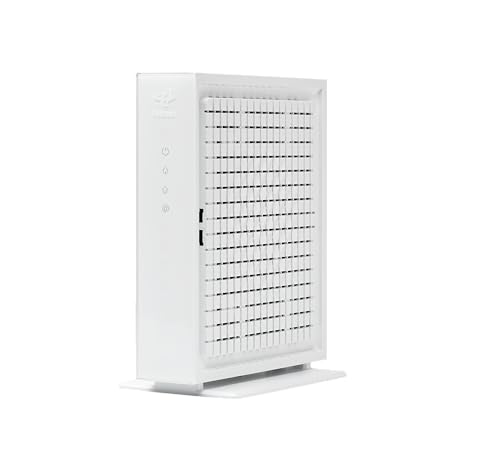
The Hitron CODA56 White is a straightforward modem for a straightforward wiring plan. Connect coaxial cable to the modem, connect its Ethernet port to a router, and let the router handle Wi-Fi and the rest of the network. Its white enclosure is compact, measuring 2.03 inches high and 6.73 inches across in the listed dimensions.
DOCSIS 3.1 support and a 2.5 Gigabit Ethernet port make it suitable for cable plans up to 2.5 Gbps. That port is important because it gives a compatible router a path beyond Gigabit Ethernet. It also means this modem is not a complete network by itself. Without a router, only one device can connect through Ethernet, and there is no wireless signal.
Hitron lists compatibility with Xfinity, Spectrum, and Cox, with support for plans such as Xfinity up to 2 Gbps, Spectrum at 1 Gbps, and Cox up to 2 Gbps. The modem handles data only and does not support telephone service or voice of any kind. Compared with the ARRIS S34, it offers the same broad multi-gig idea but gives you only one Ethernet port, so the S34 is more useful when an additional wired connection matters.
The single-port layout is the real limitation. Check both the provider and the router before choosing it, and confirm that the service is cable rather than fiber, DSL, satellite, or fixed wireless. It is a clean choice for a user who already owns a good router and wants the modem to stay out of the way.
5. ARRIS S34: Best ARRIS Multi-Gig Pick

Pros
- Supports cable plans up to 2.5 Gbps
- Includes both 2.5 Gigabit and 1 Gigabit ports
- Supports next-generation upstream tiers
- Compact modem-only design
Cons
- Requires a separate Wi-Fi router
- Provider configuration affects the second port
- Not compatible with fiber, DSL, or satellite
Best for: ARRIS users who want multi-gig service and a second wired Ethernet option.
The ARRIS S34 is a capable middle ground between a basic modem and a more specialized mid/high-split model. It supports cable plans up to 2.5 Gbps, includes a 2.5 Gigabit port for the primary router connection, and adds a 1 Gigabit port for another wired device or a backup handoff.
That second port is the useful distinction. The Hitron CODA56 has one 2.5 Gigabit port, which is perfectly sensible for a simple modem-to-router connection. The S34 gives you more flexibility, although the product notes say that service provider configuration affects how the additional port works. It is not a substitute for a router, and its LEDs only indicate modem status rather than providing wireless control.
ARRIS also positions the S34 for next-generation upstream speed tiers. That makes it more forward-looking than the standard SB8200, especially for users who upload large files, host cameras, or rely on stable video calls. The compact enclosure measures 5.24 inches high, 5.25 inches long, and 1.8 inches wide, so it takes less room than the taller Hitron Black listing and the larger NETGEAR CM3000.
The S34 still has a compatibility boundary that buyers cannot ignore. It works with cable providers including Cox, Xfinity, and Spectrum, but not fiber, DSL, or satellite. It also cannot provide Wi-Fi on its own. Choose it over the ARRIS S33 when the second Ethernet port and next-generation upstream support are meaningful, and choose the CM3000 when mid/high-split performance is the central requirement.
6. NETGEAR CM3000 1AZNAS: Best Alternate CM3000 Listing
Pros
- Supports up to 2.5 Gbps down and 1 Gbps up
- Includes a 2.5 Gigabit port
- Works with a separate existing Wi-Fi router
- Supports link aggregation through two Gigabit ports
Cons
- Requires separate Wi-Fi hardware
- Large listed footprint
- US use only
Best for: users seeking CM3000 capability for an existing multi-gig network.
The NETGEAR CM3000 1AZNAS has the same core identity as the CM3000 above. It is a DOCSIS 3.1 modem with mid/high-split support, up to 2.5 Gbps download capability, and up to 1 Gbps upload capability. For a reader, the practical decision is less about the name and more about checking the exact listing, provider approval, and the router already in the home.
Its 2.5 Gigabit port is the cleanest way to connect a multi-gig router. The two Gigabit ports can also work with link aggregation for up to 2 Gbps, which helps older routers that lack a single multi-gig WAN port but support aggregated connections. That flexibility puts it ahead of the ARRIS SB8200 for a fast plan, though the SB8200 remains easier to justify when service stops at 1 Gbps.
The modem is built for the newer cable speeds that use mid/high-split technology. NETGEAR specifically describes it as suitable for major US internet providers and recommends pairing it with a Wi-Fi 6E or Wi-Fi 7 router or Orbi system. The modem itself does not include Wi-Fi, so anyone replacing a complete gateway should read about the practical trade-offs of separate networking equipment before ordering.
The listed dimensions are much larger than those of the S34, at 4.8 inches high, 9.21 inches long, and 8.74 inches wide. That can make placement awkward on a shallow shelf. It is also unnecessary for a modest cable plan. Choose this version when the listing is the one available to you and your network genuinely needs the CM3000's multi-gig port and upstream capability.
7. ARRIS S33: Best Compact Multi-Gig Modem

Pros
- Supports plans up to 2.5 Gbps
- Compact 1.8-inch-wide design
- Simple DOCSIS 3.1 setup
- Modem-only design works with a preferred router
Cons
- Requires a separate Wi-Fi router
- Product details do not specify the Ethernet layout
- No voice or non-cable service support is listed
Best for: users who want a compact ARRIS modem for a multi-gig cable plan.
The ARRIS S33 is the compact, no-nonsense option in this group. It handles cable plans up to 2.5 Gbps and leaves Wi-Fi to a separate router or mesh system. That separation is useful for people who already have a preferred wireless system and do not want a gateway's built-in software or radio hardware deciding the network layout.
Its listed dimensions are 5.24 inches high, 5.25 inches long, and 1.8 inches wide, with a listed weight of 0.9 pounds. Those measurements make it easier to place beside a router, on a narrow shelf, or in a small network cabinet. The product data does not specify the Ethernet port arrangement, so buyers should verify the connection details and their provider's approved hardware list before relying on its 2.5 Gbps capability.
The S33's feature set is deliberately shorter than the S34's. It promises DOCSIS 3.1 multi-gig support, simple activation, status LEDs, and compatibility checking with the cable provider. The S34 is the better pick if you need a documented 2.5 Gigabit port plus a 1 Gigabit port, while the NETGEAR CM3000 is more compelling when faster upstream service is the main reason for upgrading.
The missing built-in router is not a flaw for everyone, but it is a deal breaker for anyone expecting a complete home network. It also will not work with fiber, DSL, or satellite service. Pick the S33 for a tidy ARRIS installation, a separate router, and a cable plan that can use multi-gig downstream service.
8. ARRIS SB8200: Best Proven Standard-Speed Pick

Pros
- DOCSIS 3.1 support
- Two 1 Gigabit Ethernet ports
- Compact 1.75-inch-long profile
- Compatible with major cable providers
Cons
- Requires a separate Wi-Fi router
- Not the right fit for a 2.5 Gigabit handoff
- No fiber, DSL, satellite, or voice support
Best for: cable customers with service up to 1 Gbps and an existing router.
The ARRIS SB8200 remains a sensible modem when the plan does not demand multi-gig Ethernet. It has a compact white enclosure, discreet LEDs for power, upstream, downstream, and online status, and a setup process that is essentially coax, power, activation, then router connection. That simplicity is its strongest appeal.
The feature data describes DOCSIS 3.1 support for cable plans up to 2 Gbps, while the product title frames it around plans up to 1 Gbps. The important takeaway is to match it to the provider's approved tier rather than assume the modem's DOCSIS label guarantees a particular speed. Two 1 Gigabit Ethernet ports give you useful connectivity, but neither provides a 2.5 Gigabit handoff.
The SB8200 is therefore a different proposition from the ARRIS S34 and S33. Those models target plans up to 2.5 Gbps, while the SB8200 is a better fit for a conventional Gigabit setup. Its dimensions are only 5.25 inches high, 1.75 inches long, and 5.13 inches wide, and its listed weight is 1.46 pounds. For another device to supply Wi-Fi, the router features that matter after the modem is installed deserve equal attention.
It does not support fiber, DSL, satellite, or voice service, and it cannot create a wireless network by itself. Buyers with a 2 Gbps or faster plan should skip it unless their provider specifically approves the model for that tier. For standard cable service, its two Gigabit ports and compact design keep the installation uncomplicated.
9. Hitron CODA56 Black: Best Straightforward Hitron Option

Pros
- Supports plans up to 2.5 Gbps
- Includes a 2.5 Gigabit Ethernet port
- DOCSIS 3.1 supports low-latency cable use
- Clearly states its cable-only design
Cons
- No Wi-Fi
- Requires a separate router with a 2.5 Gigabit port for full speeds
- No voice service support
Best for: cable-only households with a separate multi-gig wireless router.
The Hitron CODA56 Black is another modem-only CODA56, with a black enclosure and a feature list that spells out the setup requirements. It supports DOCSIS 3.1 cable service up to 2.5 Gbps and has one 2.5 Gigabit Ethernet port. That makes the wiring simple, but it also makes the router choice critical.
The modem works with cable providers such as Xfinity, Spectrum, and Cox. Hitron lists support for Xfinity plans up to 2.33 Gbps, Spectrum at 1 Gbps, and Cox at 2 Gbps, subject to provider approval. It will not work with fiber, DSL, satellite, fixed wireless, or services such as Verizon FiOS and AT&T Fiber.
The single Ethernet port should connect directly to a router's WAN port. Hitron specifically calls for a separate router with a 2.5 Gigabit port if you want the full multi-gig connection, and the modem cannot connect multiple devices by itself. The white CODA56 is nearly the same idea, so the choice between them comes down largely to the listing and enclosure preference rather than a different networking role.
The CODA56 Black is not suitable for a household that needs phone service through its modem or wants an all-in-one gateway. It is also overqualified for a slow cable plan that cannot use its 2.5 Gigabit connection. Choose it when you already own the router, know you have cable service, and want a single modem port dedicated to the fastest possible router handoff.
10. ARRIS SB8200 Renewed: Best Renewed Basic Modem

Pros
- DOCSIS 3.1 modem platform
- Two 1 Gigabit Ethernet ports
- Approved for major US cable providers
- Compact SB8200 design
Cons
- Renewed condition requires extra care when checking the listing
- No Wi-Fi or voice support
- Maximum listed service speed is 1 Gbps
Best for: a cable customer with a separate router and a plan capped at 1 Gbps.
The ARRIS SB8200 Renewed uses the same recognizable SB8200 platform as the standard ARRIS SB8200, but its renewed status is the detail that should drive the decision. It is intended for cable internet, not fiber, DSL, or satellite, and it does not provide Wi-Fi or digital voice service.
Its modem hardware supports 32 downstream by 8 upstream DOCSIS 3.0 bonded channels, along with two downstream and two upstream OFDM DOCSIS 3.1 channels. Two 1 Gigabit Ethernet ports give it the same useful basic connectivity as the newer SB8200 listing. ARRIS identifies it for cable plans up to 1 Gbps, which makes it a poor match for a customer moving to 2.5 Gbps service.
The SB8200 Renewed is closely related to the standard SB8200, so the choice is not about a different modem design. The newer listing is the cleaner recommendation when condition and current support matter most. The renewed version remains relevant for an existing router and a provider-approved plan that does not need multi-gig Ethernet.
The biggest reason to skip it is not performance at its intended tier. It is the possibility that a renewed unit may demand more careful inspection and activation. Confirm the provider's compatibility list and make sure your plan does not include voice service. For a straightforward 1 Gbps cable connection, it is a compact modem with two wired ports, but buyers seeking future multi-gig upgrades should choose the ARRIS S34, S33, or a NETGEAR multi-gig model instead.
How to choose best cable modem
The right modem is determined by the cable provider, service tier, Ethernet connection, and equipment you already own.
Provider compatibility
Cable modems are not universal broadband devices. They use coaxial cable and DOCSIS service, so they do not work with fiber, DSL, satellite, or fixed wireless connections. Check the provider's approved modem list before buying, especially when the plan includes phone service or a newer upstream tier.
DOCSIS generation
DOCSIS 3.1 is the standard used by the multi-gig models here. It supports faster cable connections than older DOCSIS 3.0 hardware, but the label alone does not guarantee a particular plan speed. Mid/high-split support matters when the provider offers faster upstream service, since ordinary DOCSIS 3.1 hardware may not use those tiers.
A modem's maximum speed matters only when both the provider and the Ethernet port can support it.
Ethernet port speed
A 1 Gigabit port is suitable for plans around 1 Gbps. A 2.5 Gigabit port is the better match for service above Gigabit or for a router designed to handle multi-gig WAN connections. The Hitron CODA56 has one 2.5 Gigabit port, the ARRIS S34 combines 2.5 Gigabit and 1 Gigabit ports, and the NETGEAR CM3000 can use either a 2.5 Gigabit port or two aggregated Gigabit ports.
Modem-only versus gateway
A modem-only device needs a separate Wi-Fi router or mesh system. That arrangement gives you more freedom to upgrade wireless coverage, but it adds another device and another setup step. The NETGEAR CAX30 combines a DOCSIS 3.1 modem with a Wi-Fi 6 router, making it the better fit for someone replacing both pieces at once.
Voice support
Most products in this roundup are data-only modems. The Hitron CODA56 models do not support telephone or voice service, and the NETGEAR CM2500 does not support Xfinity Voice plans. If your cable package includes a phone line, verify voice compatibility before ordering rather than assuming any DOCSIS 3.1 modem will work.

Frequently asked questions
Do cable modems work with fiber internet?
No. These products are designed for cable internet delivered over coaxial service. Fiber customers need equipment intended for their provider's fiber network, not a DOCSIS cable modem.
Does a cable modem provide Wi-Fi?
A modem-only product does not provide Wi-Fi. You must connect it to a separate wireless router or mesh system. The NETGEAR CAX30 is the exception in this roundup because it combines a cable modem and Wi-Fi 6 router in one unit.
Is DOCSIS 3.1 enough for multi-gig internet?
DOCSIS 3.1 is the necessary platform for the multi-gig models listed here, but it is not the only factor. The provider must approve the modem for the plan, and the modem needs an Ethernet port that can pass the service speed to your router.
What is mid/high-split support?
Mid/high-split technology allocates more cable network capacity to upstream traffic. It can enable faster uploads for video calls, large file transfers, remote camera access, and cloud backups. The NETGEAR CM3000 and CM2500 are specifically designed around this capability.
Can I use a modem with Xfinity, Spectrum, and Cox?
Several products here list compatibility with all three providers, including the ARRIS SB8200, ARRIS S34, Hitron CODA56 models, and NETGEAR multi-gig modems. Approval can vary by plan and service address, so confirm the exact model with the provider before activation.
Do I need a 2.5 Gigabit router for a 2.5 Gbps modem?
You need a router with a matching multi-gig WAN port to use the modem's full 2.5 Gigabit connection through one Ethernet link. A router with only a 1 Gigabit WAN port will limit the connection, even if the modem itself supports faster service.
The bottom line
The Best cable modem choice for demanding users is the NETGEAR CM3000. Its 2.5 Gigabit port, mid/high-split support, and 1 Gbps upstream capability give it the strongest combination for fast cable plans and a separate high-end router. The NETGEAR CAX30 is the better choice when you want one device to replace both a modem and a Wi-Fi router.
For a simpler modem-only installation, the ARRIS S34 and Hitron CODA56 White cover multi-gig cable plans, while the ARRIS SB8200 remains a sensible fit for standard Gigabit service. If you are undecided, check your provider's approved list and your router's WAN port before choosing the model with the highest advertised speed.
As an Amazon Associate we earn from qualifying purchases.