

A streaming camera has one job that matters more than a long feature list: keep your face sharp, well exposed, and properly framed while you concentrate on the broadcast. That gets difficult when you move around, change lighting, show a product, or try to fit a second person into the shot. The Best camera for streaming does not simply produce a high-resolution image. It makes the whole setup less distracting.
This group ranges from the straightforward Logitech Brio 101 to 4K models with phase detection autofocus, PTZ movement, AI tracking, software controls, and dedicated streaming integrations. Some are ideal for a fixed desk. Others make sense for demonstrations, fitness streams, teaching, or creators who move through a larger space.
The Insta360 Link 2 Pro is our top pick, with the Elgato Facecam 4K, EMEET S600, and Insta360 Link 2 covering the strongest alternatives.
Comparison table
| # | Product | Award | Resolution and frame rate | Standout feature | Best for |
|---|---|---|---|---|---|
| 1 | EMEET S600 | Best overall | 4K at 30fps, 1080p at 60fps | Sony 1/2.55-inch sensor, PDAF | Most streamers |
| 2 | Logitech Brio 101 | Best simple setup | 1080p | Integrated cover, USB-A | Basic streaming and calls |
| 3 | Elgato Facecam 4K | Best for studio control | 4K at 60fps | Sony STARVIS 2 sensor, 49mm filter support | Controlled creator studios |
| 4 | Logitech MX Brio | Best for mixed work | 4K at 30fps, 1080p at 60fps | Show Mode, manual image controls | Streaming and collaboration |
| 5 | NexiGo N680E Pro | Best built-in lighting | 4K, 1080p at 60fps | Tri-tone ring light, PDAF | Dim desk setups |
| 6 | EMEET C60E | Best dual-camera design | 4K | Wide-angle and telephoto cameras | Product demos and teaching |
| 7 | Insta360 Link 2 | Best AI tracking | 4K | PTZ tracking, HDR, gesture control | Mobile presenters |
| 8 | EMEET PIXY | Best tracking value | 4K | Dual-camera PTZ, three-chip AI | Active streams |
| 9 | Insta360 Link 2 Pro | Best low-light PTZ | 4K | 1/1.3-inch sensor, Stream Deck support | Serious creator setups |
1. EMEET S600: Best Overall

Pros
- 4K at 30fps and 1080p at 60fps
- Sony 1/2.55-inch sensor
- Fast PDAF autofocus
- Adjustable field of view at 1080p
- Built-in privacy cover
Cons
- Field of view is fixed at 73 degrees in 4K
- Zoom and image settings require software for deeper control
- USB connection is wired
Best for: streamers who want a sharp, flexible webcam without stepping up to a PTZ camera.
The EMEET S600 is the webcam we would put in front of most streamers first. It has the useful combination of a 4K image, a 1080p 60fps mode, quick autofocus, and a physical privacy cover. That makes it easy to use as a normal fixed desk camera while still leaving room to improve the image as a channel becomes more ambitious.
The Sony 1/2.55-inch sensor gives the S600 a stronger imaging foundation than a basic 1080p webcam. At 4K and 30fps, it is suited to detailed talking-head video, while the 1080p 60fps mode gives motion a smoother appearance for gaming, demonstrations, and animated presentations. The camera's PDAF autofocus is particularly useful when you move a little closer to the lens or hold an object toward it. It is designed to lock focus faster and more steadily than a conventional autofocus system.
Framing is more flexible than the resolution options suggest. At 1080p, the field of view can be adjusted from 40 to 73 degrees, so a narrow shot can keep attention on your face while a wider setting can include a little more of the room. In 4K, the field of view is fixed at 73 degrees. That is a sensible wide framing for streaming, but it gives you less control if your desk is close to a wall or you want a tight portrait composition.
The microphones use noise filtering that is enabled by default, and EMEETLINK software can turn it off or provide further customization. The camera also supports flexible rotation and wide-angle tilting, with a built-in cover that blocks the lens when the stream is over. Its small 0.22-pound body should be easy to place on a monitor or mount elsewhere.
The Elgato Facecam 4K is a better fit for a creator who wants 4K at 60fps and more deliberate camera control. The Insta360 Link 2 is the better choice when you need the camera to follow you. The S600 wins for the middle ground. Its real limitation is that the richest image and sound adjustments live in software, and the 4K mode does not offer the adjustable field of view available at 1080p.
If you want a camera that looks clearly more capable than a basic office webcam without bringing PTZ movement into the setup, the S600 is the sensible starting point. It is also a strong match for people comparing the image and framing trade-offs for live broadcasts before choosing their first dedicated camera.
2. Logitech Brio 101: Best Simple Setup

Pros
- Full HD 1080p video
- Integrated slide privacy cover
- Auto-light balance
- Built-in microphone
- USB-A plug and play connection
Cons
- No 4K mode
- No listed frame rate above standard Full HD operation
- Less suitable for detailed product shots
Best for: beginners who need a dependable fixed camera for streams, meetings, and casual video.
The Logitech Brio 101 is the uncomplicated pick. It does not try to compete with PTZ cameras or studio webcams. Instead, it provides Full HD 1080p video, a built-in microphone, automatic light balancing, and a cover that slides over the lens. For a streamer who sits in one place and wants to connect the camera without a setup project, that restraint is useful.
Logitech's RightLight feature is intended to increase brightness and reduce shadows, with the company stating that it boosts brightness by up to 50 percent compared with previous-generation Logitech webcams. That does not replace a proper key light, but it can make a difference at a desk where the room light is behind you or the background is brighter than your face. The camera is best thought of as a consistent everyday option rather than a cinema-style upgrade.
The USB-A cable is built in, and the camera is designed to work with common platforms including Microsoft Teams, Zoom, and Google Meet. Logitech's Logi Options+ app provides controls for zoom, framing, and camera settings. Those controls are useful when the physical camera position is inconvenient, although the Brio 101 remains a fixed camera rather than a motorized one.
The built-in microphone is convenient for calls and basic streams, but a separate microphone is still the more deliberate choice for a channel where voice quality matters. The 1080p ceiling also means it cannot show the same fine detail as the EMEET S600 or the 4K models. That is most obvious when you crop into the picture or show a small item close to the lens.
The S600 is the clear step up for creators who want 4K and faster PDAF autofocus. The Brio 101 is easier to justify when the camera will mostly cover a face at a normal desk distance and the priority is quick setup. It also weighs 0.31 pounds, making it a compact monitor-mounted camera.
Choose the Brio 101 if you want a basic Logitech webcam that handles ordinary lighting, privacy, and software compatibility without asking you to learn camera terminology. Skip it if you plan to crop aggressively, show detailed products, or build a channel around high-resolution close-ups.
3. Elgato Facecam 4K: Best for Studio Control

Pros
- 4K video at 60fps
- Sony STARVIS 2 CMOS sensor
- Prime Lens technology
- HDR and uncompressed video
- Support for standard 49mm lens filters
Cons
- More control than a casual user may need
- No PTZ tracking
- Requires deliberate lighting and composition to show its strengths
Best for: creators who want a webcam that behaves more like a controlled studio camera.
The Elgato Facecam 4K is aimed at streamers who care about the picture as an object of control, not just a feed that appears in a streaming app. Its headline feature is 4K at 60fps, which combines detailed imagery with smoother motion than the 4K 30fps modes on the EMEET S600, Logitech MX Brio, and Insta360 Link 2.
The camera uses a Sony STARVIS 2 CMOS sensor and Elgato Prime Lens technology. The combination is intended to produce sharp, colorful footage, while HDR helps preserve more detail across bright and dark parts of the image. Uncompressed video is another useful inclusion for creators who want a clean signal in the production chain rather than extra processing before the stream software receives it.
Camera Hub software is central to the experience. It allows you to customize image effects and settings, and the camera has built-in flash memory for saving those settings. That matters when the same webcam moves between a streaming computer and another setup, or when you want the picture to return to a known configuration rather than rebuilding it every time.
The unusual feature is standard 49mm lens filter support. A streamer can use a compatible filter to change the look of the shot in a way that feels closer to DSLR practice. This does not make the Facecam 4K interchangeable with a dedicated camera, but it gives a visual creator more room to shape reflections, contrast, or the atmosphere of the image.
The compromise is flexibility of movement. Unlike the Insta360 Link 2 Pro and Insta360 Link 2, the Facecam 4K does not physically pan and tilt to follow you. It is also less forgiving of a casual room setup than the Brio 101. A user who wants to press a button and let automatic modes handle everything may find Camera Hub more involved than necessary.
The Elgato is the better pick than the S600 when 4K 60fps, uncompressed video, HDR, and filter support matter more than autofocus versatility. The S600 remains more approachable for a general desk setup, while the Facecam 4K is the more interesting tool for a creator who already thinks about lens position and visual consistency.
4. Logitech MX Brio: Best for Mixed Work

Pros
- 4K at 30fps and 1080p at 60fps
- AI-enhanced image processing
- Manual controls for ISO and shutter speed
- Dual beamforming microphones
- Built-in privacy cover and Show Mode
Cons
- Large and relatively heavy
- No physical tracking
- 4K is limited to 30fps
Best for: people who stream, attend meetings, and share physical work on the same desk.
The Logitech MX Brio makes the most sense when streaming is only one part of the camera's life. It is equally interested in collaboration, desk demonstrations, and video calls. That broader role comes through in Show Mode, which lets you tilt the camera down to share notes and sketches on the desk.
Its 4K mode runs at 30fps, while 1080p runs at 60fps. Logitech says the sensor uses 70 percent larger pixels than its previous webcam sensor, and its image system combines auto exposure, auto white balance, noise reduction, and autofocus. Those features aim to preserve face detail when the room is not perfectly lit, rather than leaving the user to correct every change manually.
The MX Brio also gives experienced users more direct control. Logitech's software exposes ISO, shutter speed, tint, and vibrance, while automatic mode remains available for people who do not want to tune the image. That combination is more substantial than the Brio 101's simpler software controls and less production-focused than the Elgato Facecam 4K's studio approach.
Two integrated beamforming microphones use noise reduction to make speech clearer. They are useful for meetings and casual streams, although anyone building a serious broadcast will still want to consider a dedicated microphone. The built-in cover rotates into place for privacy, and compatibility extends across Windows, macOS, Chrome OS, and Linux as well as several meeting and streaming applications.
The MX Brio is noticeably heavier at 0.84 pounds, and the listed dimensions are larger than the other fixed webcams here. That can make monitor placement less tidy, especially on a thin screen or a narrow arm. There is also no motorized tracking, so it cannot replace the Insta360 cameras for a presenter who moves around.
Choose the MX Brio over the S600 if desk sharing, operating-system support, and Logitech workflow integration are central to your day. Choose the Facecam 4K if 4K 60fps and filter support are more important. The MX Brio is the practical hybrid for a person who wants one camera for streaming and collaborative work rather than the most specialized tool in either category.
5. NexiGo N680E Pro: Best Built-In Lighting

Pros
- Sony 1/2.5-inch 4K sensor
- 1080p at 60fps
- PDAF autofocus
- Tri-tone adjustable ring light
- 80-degree field of view and tripod mount
Cons
- Ring light adds bulk to the camera
- USB-A connection may require an adapter on some newer computers
- Zoom is not a listed feature
Best for: streamers working in dim or inconsistent room lighting who want illumination built into the camera.
The NexiGo N680E Pro takes a different route from the Facecam 4K. Instead of assuming that the creator already has a carefully arranged light, it places a ring light around the lens. That makes the camera appealing for bedrooms, spare rooms, and desks where adding a separate light would crowd the workspace.
The ring light offers three color temperature modes and stepless brightness adjustment through the outer dial. The controls are physical and immediate, which is useful when the room changes during a stream. A built-in light cannot shape a scene as precisely as a separate key light, but it can put a more consistent amount of light on the face without another stand, cable, or control app.
The camera itself uses a Sony 1/2.5-inch 4K sensor, PDAF autofocus, and a coated lens intended to improve light transmission and reduce reflections. It supports smooth 1080p at 60fps as well. PDAF should help when you move or bring an object toward the camera, while the 80-degree field of view provides a reasonably open desk shot.
Dual noise-reducing microphones are built in, and the camera connects through USB-A with plug-and-play operation. A privacy shutter covers the lens, and a standard 1/4-inch tripod mount gives you a more stable mounting option than a monitor clip alone. Compatibility includes Windows 7 through 11, macOS 10.6 or later, and Chrome OS 29 or later according to the product information.
The built-in light is also the main compromise. It adds a visible front element and cannot give you the side lighting or background separation that a properly placed external light can provide. The camera uses USB-A, so owners of a computer with only USB-C ports may need their own adapter. The EMEET S600 offers a cleaner, simpler body and a wider set of framing choices at 1080p.
Pick the N680E Pro when lighting is the problem you need solved first. Pick the S600 when you already have a good light and want the more balanced all-round camera. For a streamer starting at a bare desk, the NexiGo's integrated illumination is a genuinely practical feature rather than decoration.
6. EMEET C60E: Best Dual-Camera Design

Pros
- Wide-angle and telephoto cameras
- Up to 11X hybrid zoom
- PDAF autofocus
- Remote and software controls
- RGB status and accent lighting
Cons
- Zoom is not supported in 4K, 60fps, or YUY2 modes
- USB 2.0 Type-A connection
- Dual-camera controls may be excessive for a fixed talking-head stream
Best for: teachers, presenters, and streamers who switch between a room view and close-up details.
The EMEET C60E is not a conventional single-lens webcam with digital crop modes. It uses two cameras, one wide-angle and one telephoto, so the creator can move between showing the full scene and focusing on a nearer subject. That makes it especially interesting for product demonstrations, lessons, craft streams, and presentations where the camera needs to show more than one face.
Both cameras share a 1/2.8-inch CMOS 4K sensor according to the product information. The wide-angle camera is intended for panoramic scenes and near-focus subjects, while the telephoto camera is designed for detailed close-ups at a recommended distance of 13.8 inches. The system can move from 1X to 11X hybrid zoom, with intermediate settings such as 3X, 5X, and 7X.
There is an important technical catch. Zoom is not supported in 4K, 60fps, or YUY2 modes. That means the camera's headline flexibility depends on the mode you choose. In practice, the C60E makes the most sense when switching views is more important than keeping every available feature active at the highest setting.
The included remote and EMEET STUDIO software give you control over zoom, color, brightness, focus, and RGB lighting. That is more useful than a hidden software crop because you can change the composition without physically moving the camera. Two omnidirectional microphones are designed to capture sound within a 9.8-foot radius, and the camera works with Windows 10 and 11, macOS 10.14 or later, OBS, Twitch, YouTube, and Facebook.
The C60E is less elegant for a simple facecam. Its USB 2.0 Type-A connection and mode restrictions require more planning than the EMEET S600, and a fixed desk streamer may never use the second lens. The EMEET PIXY offers much more active framing through PTZ movement, while the C60E is better when you want to choose between two deliberate perspectives.
Buy this one for a stream with visual changes built into the format. A teacher can move from a wide classroom view to a close-up, and a product creator can show a workspace before focusing on an item. If your content is mostly one person speaking to the audience from a fixed chair, the S600 or Logitech MX Brio is easier to live with.
7. Insta360 Link 2: Best AI Tracking

Pros
- 1/2-inch sensor
- 4K video with HDR
- Physical pan and tilt tracking
- Gesture and smartphone control
- DeskView and Whiteboard modes
Cons
- Not compatible with ARM-based Windows systems
- No Windows Hello Face Recognition support
- PTZ features require software or control gestures to reach their full potential
Best for: presenters and creators who move around rather than staying centered at a desk.
The Insta360 Link 2 changes the question from “Where should I place the webcam?” to “How much should the webcam move?” Its motorized PTZ design physically pans and tilts to follow a person or group around the room. That is a meaningful improvement for teaching, exercise, demonstrations, and streams where sitting still would make the format less engaging.
A 1/2-inch sensor supports 4K video, HDR, and low-light performance. PDAF autofocus helps the camera reacquire a moving subject quickly, while the software can create a natural bokeh effect that separates the presenter from the background. The image controls are more ambitious than those on the Brio 101, though they also mean that Link 2 owners will spend more time in the dedicated Link Controller software.
Tracking is only one part of the camera's movement system. Gesture controls can start AI tracking, activate auto framing, zoom, or turn on Whiteboard Mode. Smartphone control provides another way to operate the camera remotely. DeskView and Whiteboard modes are tailored to creators who need to show a surface or a board instead of only a face.
The AI noise-canceling microphone is designed to filter unwanted background sound, and the camera supports common meeting and streaming platforms including Microsoft Teams, Zoom, and Twitch. Privacy mode tilts the camera down after 10 seconds of inactivity, or it can be adjusted manually. That is a convenient privacy behavior, though it is different from the physical lens covers found on the S600, Brio 101, and MX Brio.
The Link 2 Pro is the more advanced choice for difficult lighting and creator control, thanks to its larger 1/1.3-inch sensor and directional microphones. The EMEET PIXY can also track movement and offers a three-mic array, while the Link 2 has a more established-looking set of specialized modes and smartphone controls. The Link 2's compatibility limitation with ARM-based Windows systems is important, and people who want a completely stationary camera should not pay for movement they will not use.
For a presenter who walks, turns, or reaches toward a desk, the Link 2 is one of the most natural fits in this list. It is also a strong choice for anyone considering how camera movement changes an OBS streaming setup, especially when the stream includes demonstrations rather than only a seated face.
8. EMEET PIXY: Best Tracking Value
Pros
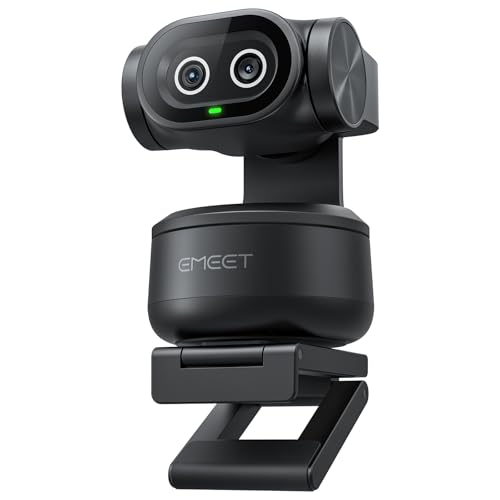
- Dual-camera AI tracking system
- 4K main imaging camera
- 310-degree pan and 180-degree tilt
- Three microphone modes
- Gesture control and preset positions
Cons
- Field of view is locked in 4K 30fps and 1080p 60fps
- Tripod is sold separately
- Software is needed for the broadest control set
Best for: active streamers who want PTZ tracking, flexible audio modes, and preset framing.
The EMEET PIXY is built around movement. It combines a 4K main imaging camera with an auxiliary AI camera that detects face position and helps manage autofocus and exposure. The result is a system designed for people who stand, turn, teach, exercise, or otherwise leave the narrow center of a normal webcam frame.
EMEET says the dual system can focus in 0.2 seconds compared with 1.1 seconds for other autofocus systems. The main camera uses a 1/2.55-inch sensor and PDAF, while the additional camera assists with face detection. That arrangement is more specialized than the S600's single-camera autofocus, and it gives the PIXY a reason to exist beyond simply adding a motorized base.
The PTZ system can pan 310 degrees and tilt 180 degrees. A three-chip design assigns imaging, motion and lighting prediction, and PTZ control to separate processing roles. Open-palm gesture control activates when the hand is held in the center for two seconds. EMEET STUDIO adds preset positions, manual framing, whiteboard detection, privacy modes, and an AIGC feature for creating shot lists and movements.
Audio is unusually configurable for an integrated webcam. Live Mode filters steady noise such as fans and air conditioning. Noise Canceling Mode also targets sudden sounds such as keyboard clicks and door slams. Original Sound Mode keeps more ambient detail for music and singing. Those modes do not eliminate the need for a dedicated microphone in a polished broadcast, but they give the PIXY a wider range of uses than a single generic noise filter.
The field-of-view behavior needs attention. It can be adjusted in 1080p and 2K at 30fps, but it is locked in 4K 30fps and 1080p 60fps for stability. The camera supports OBS, Twitch, YouTube, Switch 2 Camera, and Xbox, and it can be mounted with the included clip or on a tripod that is sold separately.
The Insta360 Link 2 has a larger 1/2-inch sensor and more developed DeskView and smartphone features. The PIXY counters with its broad pan and tilt range, three audio modes, and preset-based workflow. It is not the right tool for a quiet desk where the presenter never moves, but it is a compelling option for an active stream format.
Choose PIXY when tracking and control options are central to the show. If you want better low-light performance and Stream Deck integration, move up to the Link 2 Pro. If you want a fixed camera with the least setup, choose the Brio 101 instead.
9. Insta360 Link 2 Pro: Best Low-Light PTZ

Pros
- Large 1/1.3-inch sensor
- 4K video with HDR
- Physical AI tracking
- Directional beamforming microphones
- Stream Deck integration
- 4K Portrait Mode and Whiteboard Mode
Cons
- ARM-based Windows systems are not supported
- No Windows Hello Face Recognition support
- Advanced controls may be unnecessary for a fixed desk stream
Best for: serious creators who need PTZ movement, stronger low-light imaging, and fast control over a production setup.
The Insta360 Link 2 Pro is the most complete camera here for a creator who wants a PTZ system without giving up image quality. Its 1/1.3-inch sensor is substantially larger than the sensors listed for the S600, PIXY, and C60E. The benefit is most apparent in low light, where a larger sensor can produce cleaner, more detailed video before software enhancement enters the picture.
The camera records 4K with HDR and supports a natural bokeh effect through the Link software. AI tracking physically pans and tilts to keep the presenter or group in frame, so it is suited to a larger presentation area rather than a person who stays within arm's reach of a monitor. The camera also includes 4K Portrait Mode, DeskView, and Whiteboard modes, giving it useful formats beyond a standard landscape talking-head shot.
Audio is a key distinction from the standard Link 2. The Pro uses directional noise-canceling microphones with beamforming pickup, designed to isolate speech more effectively in a busy environment. That is not the same as a dedicated broadcast microphone, but it is a better match for a creator whose room contains computer fans, conversations, or other competing sound.
The software and control options are extensive. Gesture commands and smartphone control can start tracking, zoom, and change modes. Stream Deck integration lets a creator switch modes, trigger presets, and control multiple cameras without reaching for a separate app. Windows, macOS, Chrome OS, and Linux are supported, while the product information specifically excludes ARM-based Windows systems and Windows Hello Face Recognition.
Compared with the standard Insta360 Link 2, the Pro is the better low-light and production-control camera. The Link 2 remains a sensible choice when its 1/2-inch sensor and basic AI features cover the need. The Elgato Facecam 4K is better for a stationary creator who values 4K 60fps and 49mm filter support, while the Pro is better for a moving presenter who wants the frame to follow and the controls to sit on a Stream Deck.
The weakness is complexity. A user who sits in one chair under a good light will not benefit much from physical tracking, Portrait Mode, or multiple control routes. The camera also has no physical privacy cover described in the product information, so its software privacy behavior and physical positioning deserve attention.
If you are building a serious presentation, teaching, or live production setup, the Link 2 Pro is the most capable camera in this roundup. It is also the logical choice for creators comparing the image requirements for long-form YouTube production with the more immediate needs of a live broadcast.
How to choose best camera for streaming
The right camera depends less on the biggest resolution number than on how you move, how much control you want, and how difficult your room is to light.
Resolution and frame rate
4K gives you more detail and room to crop, but it does not automatically make a stream look better. A sharp 1080p image with good exposure can look more convincing than a poorly lit 4K feed. The EMEET S600, Logitech MX Brio, Insta360 Link 2, EMEET PIXY, and both Link 2 models support 4K, while the Brio 101 is a 1080p camera.
Frame rate changes the character of motion. The EMEET S600, Logitech MX Brio, Elgato Facecam 4K, and NexiGo N680E Pro offer 1080p at 60fps. The Facecam 4K goes further with 4K at 60fps. That mode is useful for fast hand movement and game-related presentation, but it also places more demands on the computer and streaming software.
Sensor and low-light performance
Sensor size is one of the more meaningful specifications in this category. The Insta360 Link 2 Pro has a 1/1.3-inch sensor, the Link 2 uses a 1/2-inch sensor, and several EMEET and NexiGo models use sensors around 1/2.5 to 1/2.8 inches. A larger sensor can help preserve detail and reduce the harsh, noisy appearance that often shows up when a room is dim.
Do not treat sensor size as a replacement for lighting. A face lit from the front will usually look better than one placed against a bright window, regardless of the webcam. The NexiGo N680E Pro is the most direct answer for a desk where adding a separate light is inconvenient because its ring light surrounds the lens.
A large sensor helps in a dark room, but good light still matters more than a resolution badge.
Autofocus and tracking
Autofocus and AI tracking solve different problems. PDAF, used by the S600, N680E Pro, C60E, PIXY, and Link 2, helps the camera focus quickly when the subject changes distance. PTZ tracking physically moves the camera to keep the subject in frame. The Insta360 Link 2 and Link 2 Pro use physical pan and tilt, and the PIXY offers a broad 310-degree pan and 180-degree tilt range.
Choose a fixed camera with PDAF if you mainly sit at a desk and occasionally hold an object toward the lens. Choose PTZ tracking if the format includes standing, walking, teaching, fitness, or frequent movement across a room. Tracking is not inherently better for a stationary facecam. It adds another system that has to understand what should remain in frame.
Field of view and framing
A wide field of view includes more of the room and makes it easier to fit two people into the shot. A narrower view puts more attention on the face and reduces distracting background detail. The S600 allows a 40 to 73-degree range at 1080p, while the N680E Pro has an 80-degree field of view.
The C60E takes a different approach by pairing a wide-angle camera with a telephoto camera and up to 11X hybrid zoom. Its zoom does not work in 4K, 60fps, or YUY2 modes, so read the mode restrictions before assuming it can do every combination at once. The Insta360 models use movement, digital controls, and specialized modes to change composition rather than relying only on a conventional field-of-view dial.
Microphones and software
Integrated microphones are convenient for calls and casual streams, but microphone quality should not be the only reason to choose a camera. The S600 offers adjustable noise filtering through EMEETLINK, the MX Brio uses dual beamforming microphones, and the Link 2 Pro adds directional pickup. PIXY is unusual because it provides Live, Noise Canceling, and Original Sound modes through its three-mic array.
Software determines how much control you have after the camera is mounted. Elgato Camera Hub focuses on image customization and saved settings. Logitech software adds framing and manual image controls. Insta360 Link Controller handles tracking, bokeh, gestures, and specialized modes. EMEET STUDIO adds presets, color controls, and framing tools to several EMEET models.
Privacy and mounting
A privacy cover is a small feature that becomes important after the stream ends. The S600, Brio 101, MX Brio, and N680E Pro have covers or shutters that physically block the lens. The Insta360 Link 2 uses a privacy mode that tilts the camera down after inactivity, and other PTZ cameras rely on positioning or software behavior.
Mounting also affects the final shot. Monitor clips are convenient, while a 1/4-inch tripod mount gives more freedom to place the camera away from the display. The C60E and N680E Pro include tripod mounting information, and PIXY can use a tripod that is sold separately. A camera that is slightly farther away often creates a more flattering and less cramped perspective.
Frequently asked questions
Is 4K necessary for streaming?
No. A good 1080p camera can be enough for a fixed talking-head stream, especially when the lighting and framing are strong. 4K becomes more useful when you want to crop, show small details, use HDR, or keep extra resolution for recordings.
Which camera is easiest to set up?
The Logitech Brio 101 is the simplest option in this group. It uses a built-in USB-A connection, works with common video platforms, includes a privacy cover, and does not require PTZ configuration. The EMEET S600 is also plug and play, but its EMEETLINK software offers more settings for users who want them.
Which webcam is best for moving presenters?
The Insta360 Link 2 Pro, Insta360 Link 2, and EMEET PIXY are the strongest fits because they physically pan and tilt to follow movement. The PIXY has a 310-degree pan and 180-degree tilt range, while the Insta360 models combine tracking with gesture and software controls.
Do webcams with microphones replace a dedicated microphone?
They can handle calls and casual streams, but a dedicated microphone usually gives you more control over voice placement and room sound. The cameras here use different noise-reduction and beamforming systems, with the Link 2 Pro offering directional pickup and PIXY offering three sound modes. Treat those features as convenience tools rather than a complete studio audio system.
Which camera works best in a dim room?
The Insta360 Link 2 Pro has the largest listed sensor at 1/1.3 inches and is designed for low-light performance. The Insta360 Link 2 also lists low-light capability, while the NexiGo N680E Pro adds a built-in ring light with three color temperature modes and adjustable brightness. A front-facing light will still improve almost any webcam image.
Can these cameras show products or a desk?
Yes, but they approach the task differently. The Logitech MX Brio has Show Mode for tilting down toward notes and sketches, the Insta360 cameras include DeskView or related modes, and the EMEET C60E offers wide-angle and telephoto cameras for changing between a scene and a close-up. The C60E's zoom restrictions mean you should check the selected video mode first.
Are PTZ webcams useful for a seated streamer?
They can be, but they are not essential. PTZ movement is most helpful when you stand, walk, teach, demonstrate, or want several preset angles. A seated creator may get a cleaner and simpler setup from the EMEET S600, Elgato Facecam 4K, or Logitech MX Brio.

The bottom line
The Best camera for streaming for most people is the EMEET S600. Its Sony sensor, 4K 30fps mode, 1080p 60fps mode, PDAF autofocus, adjustable 1080p field of view, and privacy cover give it the most balanced feature set. The Elgato Facecam 4K is the better specialist choice for a stationary studio where 4K 60fps, HDR, uncompressed video, and lens filter support matter more than tracking.
For a moving presenter, the Insta360 Link 2 Pro is the upgrade to choose. Its 1/1.3-inch sensor, physical AI tracking, directional microphones, HDR, and Stream Deck integration make it the most complete production tool here. The Logitech Brio 101 remains the uncomplicated alternative for a fixed 1080p setup.
If you are undecided, choose the S600 for a desk, the Link 2 Pro for movement and low light, or the Brio 101 for the least complicated start.
As an Amazon Associate we earn from qualifying purchases.