

A Chromebook can be wonderfully simple, but a cramped display, awkward keyboard, or limited ports can turn everyday tasks into a chore. The right model should make email, video calls, photo browsing, streaming, and web searches feel straightforward without adding Windows-style maintenance.
Our Best Chromebook for Seniors picks range from large 15-inch laptops with familiar layouts to lightweight convertibles that can work as tablets. We also included models with privacy shutters, touchscreens, wider viewing angles, and storage that suits different habits.
The Lenovo Chromebook m15 is our top pick, with the clearest large display, generous memory, useful ChromeOS features, and a lighter design than most big-screen alternatives.
| # | Product | Award | Display | Memory | Storage | Best for |
|---|---|---|---|---|---|---|
| 1 | Lenovo Chromebook m15 | Best overall | 15.3-inch WUXGA IPS, 400 nits | 8GB | 128GB UFS | Large-screen everyday computing |
| 2 | Lenovo Chromebook 2-in-1 | Best lightweight convertible | 14-inch WUXGA IPS touchscreen | 4GB | 128GB UFS | A light laptop with tablet modes |
| 3 | Lenovo Flex 3i Chromebook | Best compact 2-in-1 | 12.2-inch WUXGA IPS touchscreen, 300 nits | 4GB | 128GB total | Smaller spaces and touch-first use |
| 4 | Lenovo IdeaPad 3i Chromebook | Best large traditional laptop | 15.6-inch FHD | 8GB | 64GB eMMC | A familiar full-size layout |
| 5 | ASUS 15-inch Chromebook Silver | Best connected renewed model | 15-inch FHD IPS | 4GB | 128GB | HDMI and simple everyday use |
| 6 | ASUS 15-inch Chromebook Blue | Best basic large-screen option | 15-inch FHD IPS | 4GB | 128GB | Straightforward web and email |
| 7 | Acer 15.6-inch Chromebook | Best built-in storage package | 15.6-inch FHD IPS | 4GB | 64GB eMMC plus 512GB SD card | Keeping many local files |
1. Lenovo Chromebook m15: Best Overall

Pros
- Large 15.3-inch 16:10 display
- 400-nit panel is well suited to bright rooms
- 8GB RAM and 128GB UFS storage
- Physical webcam privacy shutter
- Lighter than many traditional 15-inch laptops
Cons
- No touchscreen is listed
- Larger footprint than the convertible models
- MediaTek processor is aimed at everyday tasks, not demanding desktop software
Best for: someone who wants a roomy, readable Chromebook for email, browsing, video calls, and streaming.
The Lenovo Chromebook m15 gets the most important thing right for a senior user: it gives everyday information room to breathe. The 15.3-inch screen uses a 16:10 shape, so web pages and documents show more vertical content than a conventional widescreen panel. That means less scrolling when reading an article, checking a calendar, or working through a long email. Its larger touchpad also makes pointer movement easier to manage than a cramped laptop surface.
The display is a WUXGA IPS panel with a stated 400 nits of brightness. IPS technology helps preserve the image when the viewer is not sitting directly in front of the screen, while 400 nits gives it a useful advantage in a sunny room. It is not a promise that every person will find text large enough at the default setting, but ChromeOS makes display scaling easy to adjust. The full-sized keyboard should also feel more familiar to anyone moving from a desktop setup.
Inside, the MediaTek Kompanio 540 processor is paired with 8GB of RAM and 128GB of UFS storage. That combination is more comfortable for having several browser tabs, email, a video call, and a document open than the 4GB models here. The storage is also more generous than the 64GB eMMC drive in the Lenovo IdeaPad 3i Chromebook. ChromeOS keeps the basic workload focused on web apps, so this is the kind of specification mix that makes sense for browsing and communication rather than conventional Windows software.
Lenovo adds a physical shutter for the webcam, Wi-Fi 6E, built-in ChromeOS security, and a claimed start-up time of under 10 seconds. The display is not touch-enabled according to the supplied details, so the Lenovo Chromebook 2-in-1 is a better fit for anyone who wants to tap, fold, or use a tablet posture. The m15 counters with a more spacious fixed-laptop layout and a 3.43-pound weight, which is notably easier to carry than the 5.49-pound IdeaPad 3i.
The weakness is its size. A 15.3-inch laptop takes more room on a small table, and there is no listed touchscreen for browsing by touch. People who want the simplest possible pointer-free interaction should look at Lenovo's convertible options. For a reader who mainly wants clear text, a big workspace, and enough memory to avoid constant tab management, this is the one we'd keep.
2. Lenovo Chromebook 2-in-1: Best Lightweight Convertible
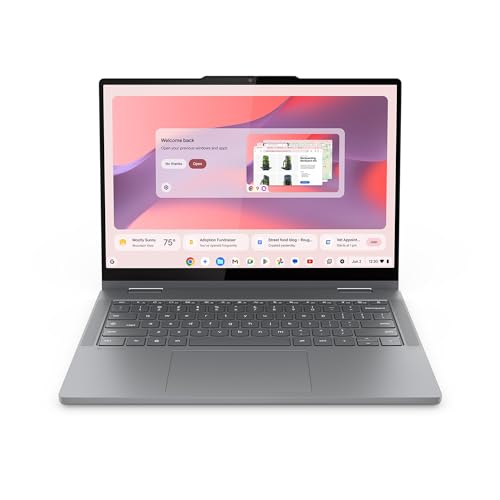
Pros
- Very light 1.5-pound design
- 14-inch WUXGA IPS touchscreen
- Laptop, tent, and tablet modes
- Physical webcam shutter
- Two USB-C, two USB-A, and HDMI ports
Cons
- Only 4GB of RAM
- Convertible hinges add complexity
- Some advertised processor details are inconsistent in the listing
Best for: someone who wants a light touchscreen Chromebook that can change shape around reading, calls, and casual viewing.
The Lenovo Chromebook 2-in-1 is the easiest model here to move from room to room. Its listed weight is just 1.5 pounds and its thickness is 0.69 inches, so it should feel less like carrying a traditional laptop and more like carrying a large tablet with a keyboard attached. That distinction matters for anyone who uses a computer on the sofa, at the kitchen table, or in more than one room during the day.
Its 14-inch WUXGA IPS touchscreen provides a useful middle ground. It is larger than the 12.2-inch screen on the Lenovo Flex 3i Chromebook, yet the 2-in-1 design still allows laptop, tent, and tablet modes. Tent mode can be convenient for a video call or a hands-off cooking video, while tablet mode makes reading and tapping through photos more natural. The listing also calls out Waves MaxxAudio, which should help spoken audio and casual entertainment feel less thin, although the supplied data does not specify speaker wattage or a battery runtime.
Lenovo includes 128GB of UFS storage, two USB-C ports, two USB-A ports, and HDMI. That is a particularly friendly port selection for someone who may need to connect a phone, a mouse, a printer, or a television without constantly reaching for an adapter. The physical webcam shutter is another small but meaningful convenience. It lets the user close the camera without relying on an on-screen setting.
The 4GB of RAM is the clearest limitation. ChromeOS is lightweight, and it is appropriate for email, web searches, streaming, and video calls, but many open tabs can put more pressure on a machine with this memory capacity. The Lenovo Chromebook m15 is better for sustained multitasking, while this model wins when low weight and touch interaction matter more than a larger keyboard.
The listing describes long battery life and fast charging but does not provide a specific runtime. It also uses broad processor language in one feature while identifying the product as an Intel N150 model in the title, so buyers should check the current listing details before ordering. Skip it if a large fixed display or maximum multitasking headroom is the priority. Choose it if handling comfort and flexibility are the priority.
3. Lenovo Flex 3i Chromebook: Best Compact 2-in-1

Pros
- Compact 2.76-pound design
- 360-degree hinge with four modes
- 300-nit WUXGA IPS touchscreen
- Wi-Fi 6 and Bluetooth 5.3
- HDMI, two USB-A, USB-C, and microSD
Cons
- Smaller screen than the other Lenovo options
- 4GB of RAM limits heavy multitasking
- Storage includes an expanded SD card arrangement
Best for: someone with limited desk space who still wants a full ChromeOS laptop that can become a tablet.
The Lenovo Flex 3i Chromebook is the most adaptable small computer in this group. Its 360-degree hinge supports laptop, yoga, flip, and tablet modes, so it can sit like a normal notebook for typing or fold back for touch navigation. At 2.76 pounds, it is not as featherlight as the Lenovo Chromebook 2-in-1, but it remains much easier to handle than most 15-inch models.
The 12.2-inch WUXGA resolution gives the display 1920 by 1200 pixels, with a 300-nit brightness rating and IPS viewing angles. The extra vertical pixels suit web pages and documents, though the physical screen is still substantially smaller than the 15.3-inch Lenovo Chromebook m15. That creates a trade-off: the Flex 3i takes less room and is easier to hold, while the m15 makes large text and side-by-side windows more comfortable.
The Intel N100 processor has four cores and is listed at up to 3.4GHz. It is paired with 4GB of LPDDR5 RAM. For ChromeOS basics, that is a sensible pairing, but users who routinely leave a large number of tabs open should expect the 8GB Lenovo models to feel more relaxed. The advertised storage totals 128GB, made up of 64GB of eMMC storage and a 64GB SD card. That split is important because removable or expanded storage is not quite the same as one internal drive for every use.
Connectivity is one of the Flex 3i's strengths. It has USB-C, two USB-A ports, HDMI 1.4, a microSD reader, and an audio combo jack. Wi-Fi 6 and Bluetooth 5.3 provide modern wireless connections, and the HD 720p webcam has a privacy shutter. Lenovo also lists support for up to two external displays at up to 4K resolution, a useful option for someone who occasionally works at a larger desk.
The screen size is the reason to skip it if reading comfort depends on a broad panel. The Lenovo IdeaPad 3i Chromebook and both ASUS models provide a much more conventional 15-inch view. The Flex 3i makes more sense for a senior who values a compact footprint, touch controls, and a hinge that can adapt to different activities. Its stated ChromeOS Auto Update Expiration date of June 2031 also gives the software support timeline useful clarity.
4. Lenovo IdeaPad 3i Chromebook: Best Large Traditional Laptop

Pros
- Large 15.6-inch FHD display
- 8GB of RAM
- Familiar non-convertible laptop design
- Up to 10 hours of stated battery life
- 720p camera and USB-C connectivity
Cons
- Heaviest model in this roundup
- 64GB eMMC storage is limited
- No touchscreen is listed
Best for: someone who wants a conventional big-screen Chromebook with a full laptop feel.
The Lenovo IdeaPad 3i Chromebook is a straightforward choice for someone who does not need a folding hinge or touch controls. Its 15.6-inch screen gives email, news pages, recipes, and streaming video plenty of physical space. A traditional clamshell design also means there are fewer modes to understand. Open it, type, and use the trackpad as you would on a standard laptop.
The display is a 1920 by 1080 FHD panel. That resolution is well suited to a screen of this size, and the 16:9 shape is familiar for video. The 720p webcam is adequate for basic calls, and the physical laptop lock slot adds a security option for shared spaces. The supplied details do not identify the panel as IPS or give a brightness figure, so buyers who need strong viewing angles or a screen for a bright room should favor the Lenovo Chromebook m15 or one of the IPS-equipped models.
The Intel Celeron N4500 processor is paired with 8GB of RAM, which gives it the same memory capacity as the m15 and more breathing room than the 4GB ASUS, Acer, and convertible Lenovo models. The 64GB eMMC storage is less generous, however. It is suitable for a cloud-centered ChromeOS routine, but anyone who keeps many downloaded photos, videos, or documents locally will need to manage storage more carefully.
Lenovo lists up to 10 hours of battery life. Actual results depend on brightness, wireless use, streaming, and the applications running, but the figure indicates that the model is intended for a full stretch away from an outlet. The port selection includes USB 3.2 Gen 1 and USB-C 3.2 Gen 1, which covers ordinary accessories without turning this into a port-heavy workstation.
The major practical drawback is its weight: the supplied dimensions list 5.49 pounds. That is a lot to carry compared with the 1.5-pound Lenovo Chromebook 2-in-1 or the 3.43-pound m15. It is also wide enough to need a stable table rather than a lap in a tight chair. Readers deciding between a laptop and desktop setup can also consider what makes a computer easier to use day to day, especially if the Chromebook will stay in one place. Pick the IdeaPad 3i for its familiar big-screen layout, not for portability.
5. ASUS 15-inch Chromebook Silver: Best Connected Renewed Model

Pros
- 15-inch FHD IPS display
- HDMI output for a larger screen
- 128GB of listed storage
- USB-C, USB-A, and audio combo jack
- Integrated webcam and Bluetooth
Cons
- Renewed product condition requires extra attention
- Only 4GB of RAM
- Listed weight is 4 pounds
Best for: someone who wants a large IPS display and a simple HDMI connection for another screen.
The ASUS 15-inch Chromebook Silver offers a familiar shape and a practical connection that not every Chromebook includes. Its 15-inch FHD IPS display should give text and images a broad viewing area, while the HDMI port makes it easy to connect a television or external monitor without depending on a USB adapter. For a stationary home setup, that can matter more than a convertible hinge.
The processor is listed at up to 2.80GHz, with 4GB of DDR4 memory and 128GB of storage. That is enough to cover the normal Chromebook routine of browser tabs, email, cloud documents, and video streaming, but the memory ceiling is lower than the Lenovo Chromebook m15 and IdeaPad 3i. Users who frequently keep many tabs and a video call open at once should move up to one of those 8GB models.
The port layout is simple rather than extensive. ASUS lists one USB-C port, one USB-A port, an audio headphone and microphone combo jack, and HDMI. Fast Wi-Fi and Bluetooth are also included, along with an integrated webcam. This is a useful arrangement for a mouse, headphones, and a second display, though someone with several older USB accessories may need to connect them one at a time.
At 4 pounds, the ASUS is manageable around the house but not especially light for a 15-inch Chromebook. The IPS panel is a positive for viewing flexibility, yet the supplied details do not state its brightness. That makes the Lenovo Chromebook m15 the safer recommendation for a room with strong daylight. The 128GB storage listing is more comfortable than the IdeaPad 3i's 64GB eMMC capacity.
This is a renewed listing, so the buyer should read the current condition and warranty information carefully. It is not the right recommendation for anyone who wants a new convertible or the lightest possible machine. It makes sense for a home user who appreciates the large display, wants HDMI built in, and prefers a traditional laptop with uncomplicated connections.
6. ASUS 15-inch Chromebook Blue: Best Basic Large-Screen Option

Pros
- Large 15-inch FHD IPS display
- 128GB of listed storage
- Built-in HDMI port
- USB-C, USB-A, and audio connections
- Integrated webcam
Cons
- 4GB of DDR4 memory
- Renewed listing needs condition checking
- No touchscreen is listed
Best for: someone who wants an uncomplicated large Chromebook for web browsing, email, and streaming.
The ASUS 15-inch Chromebook Blue is effectively the same type of computer as the Silver model above, with the listed finish separating the two entries. It is a conventional ChromeOS laptop with a generous 15-inch display, rather than a tablet-style convertible. That makes it a reasonable fit for a user who expects to sit at a desk and wants a screen that is easier to read than a compact 12-inch model.
The FHD IPS panel gives it a 1920 by 1080 class viewing area and the wider angles associated with IPS displays. ASUS lists Intel UHD Graphics, an integrated webcam, fast Wi-Fi, and Bluetooth. The graphics hardware is intended for ChromeOS browsing, streaming, and ordinary applications, not demanding creative or 3D work. For a senior buyer, the more meaningful benefit is the large workspace and familiar laptop posture.
Its processor is specified as reaching up to 2.80GHz, with 4GB DDR4 memory and 128GB of storage. That balance is acceptable for a focused set of tasks, such as email and a handful of browser tabs. It is less convincing for someone who stores many local files or keeps numerous tabs open all day. The Lenovo Chromebook m15 gives multitasking more room through its 8GB of RAM, while the Acer offers a much larger listed storage arrangement.
The connectivity is clear and useful: one USB-C port, one USB-A port, an HDMI port, and a headphone and microphone combo jack. HDMI is the standout feature because it makes sharing the screen on a television or monitor more direct. There is no listed touchscreen, so anyone who prefers tapping large on-screen controls should choose the Lenovo Chromebook 2-in-1 or Flex 3i instead.
The listing identifies this as renewed, which makes condition details important before ordering. Its 4-pound weight is also closer to a stay-at-home laptop than a travel companion. The Silver ASUS has the same core capabilities, so the choice between these two should come down to the specific listing condition and preferred finish, not a difference in performance. This model is best for a senior who wants a basic, roomy screen and does not need touch interaction.
7. Acer 15.6-inch Chromebook: Best Built-in Storage Package

Pros
- 15.6-inch 1920 by 1080 IPS display
- 64GB eMMC plus 512GB SD card
- Numeric keypad
- Two USB-C and two USB-A ports
- Wi-Fi 6 and microSD reader
Cons
- Only 4GB of RAM
- Storage depends partly on a removable SD card
- No battery runtime figure is supplied
Best for: someone who keeps a large collection of downloaded files and wants many physical ports.
The Acer 15.6-inch Chromebook takes a traditional large-screen approach and adds an unusually large listed storage package. It includes 64GB of eMMC storage plus a 512GB SD card, for a stated total of 576GB. That can suit someone who keeps photos, music, downloaded shows, or documents on the machine instead of relying entirely on cloud storage. The important qualification is that part of this capacity is on a removable card, not one internal drive.
The 15.6-inch IPS display has a 1920 by 1080 resolution. The supplied feature list says the screen provides sharp text and images and gives more vertical room for browsing and documents. IPS viewing angles are useful at a shared table, where the screen may not always face the user squarely. Acer also includes a numeric keypad, which can help anyone who enters figures frequently or prefers a wider keyboard layout.
The dual-core Intel Celeron N4500 processor reaches up to 2.8GHz and is paired with 4GB of LPDDR4X RAM. That specification is aimed at ordinary ChromeOS use, but it does not offer the multitasking cushion of the Lenovo Chromebook m15 or IdeaPad 3i. Opening a modest group of tabs should be fine, while a crowded session with several web apps and streaming video is a better fit for a machine with 8GB of memory.
Port selection is a genuine strength. Acer lists two USB-C 3.2 ports, two USB-A 3.2 ports, a headphone and microphone combo jack, and a microSD card reader. Wi-Fi 6 and Bluetooth cover wireless connections. The listing also mentions long battery life, but it does not provide a number, so buyers should not compare its endurance directly with the Lenovo Flex 3i's stated up to 12 hours or the IdeaPad 3i's stated up to 10 hours.
The Acer is also heavier than the convertible options at 4.6 pounds. The bundled PLUSERA earphones are an accessory detail, not a reason to choose the laptop itself, and the core decision should rest on the display, ports, and storage arrangement. Choose it for local file capacity and easy peripheral connections. Skip it if you want the cleanest, simplest storage setup or the lightest Chromebook to carry.
How to choose best chromebook for seniors
The right Chromebook should match the reader's eyesight, desk setup, mobility, and tolerance for managing files. These are the factors that separate a comfortable everyday computer from one that feels restrictive after the first week.
Display size and readability
A 15-inch display gives email, web pages, and streaming video more physical room than a 12.2-inch panel. That does not automatically make text large, since ChromeOS still controls scaling, but it gives the user more space to enlarge content without making the layout feel cramped. The Lenovo Chromebook m15, Lenovo IdeaPad 3i Chromebook, both ASUS models, and the Acer all take the large-screen route.
Resolution also matters. FHD means 1920 by 1080, while WUXGA models here use 1920 by 1200. The extra vertical pixels on the Lenovo Chromebook 2-in-1 and Flex 3i can show more of a document or web page before scrolling. IPS panels are preferable when the user may look from an angle or share the screen with someone else.
Touchscreen and hinge design
A touchscreen can make tapping links, zooming photos, and scrolling feel more direct. A 2-in-1 hinge adds laptop, tent, and tablet positions, which are useful for reading or watching video without keeping the keyboard in the way. The Lenovo Chromebook 2-in-1 is the lightest convertible, while the Flex 3i has the smaller screen and a more compact footprint.
A traditional clamshell is simpler if the Chromebook will stay on a desk. It also avoids the need to think about which mode to use. The ASUS, Acer, and IdeaPad 3i are better suited to that familiar setup.
Memory and processor
ChromeOS generally handles everyday web tasks with modest hardware, but memory determines how comfortably the user can keep several tabs and applications open. The 8GB Lenovo Chromebook m15 and Lenovo IdeaPad 3i Chromebook have more breathing room than the 4GB models. Four gigabytes can be perfectly workable for focused browsing and email, but it is a weaker choice for a busy browser session.
Processor names should be read alongside the memory and storage. Intel N100, Intel N150, Intel Celeron N4500, and MediaTek Kompanio 540 processors in this group are designed around ordinary ChromeOS workloads. None should be treated as a replacement for a powerful Windows desktop used for demanding software.
For a senior user, a clear 15-inch screen and comfortable text scaling usually matter more than a processor specification that sounds faster on paper.
Storage arrangement
Chromebooks work naturally with cloud storage, but local capacity still matters for downloaded photos, documents, and entertainment. The ASUS models list 128GB, the Lenovo Chromebook 2-in-1 lists 128GB UFS, and the m15 also lists 128GB UFS. The IdeaPad 3i has 64GB of eMMC storage, which calls for more active file management.
The Acer lists 64GB of eMMC plus a 512GB SD card. That is a large total, but the card is removable storage. The Flex 3i also uses a split arrangement of 64GB eMMC and a 64GB SD card. Buyers who want a single internal storage pool should pay attention to that distinction.
Ports and wireless connections
Ports determine how easily the Chromebook works with a mouse, printer, headphones, television, or external monitor. HDMI is especially convenient because it avoids a separate adapter, and it appears on the Lenovo Chromebook 2-in-1, Flex 3i, and both ASUS models. The Acer goes further with two USB-C and two USB-A ports.
Wi-Fi 6 or Wi-Fi 6E gives newer wireless networks room to perform, though the home router still matters. The Flex 3i lists Wi-Fi 6 and Bluetooth 5.3, while the m15 lists Wi-Fi 6E. A headphone combo jack remains useful for wired audio, particularly if the user does not want to manage wireless pairing.
Webcam privacy and software support
A physical webcam shutter is more reassuring than remembering to change a software setting. It appears on the Lenovo Flex 3i, Lenovo Chromebook 2-in-1, and Lenovo Chromebook m15. The IdeaPad 3i lists a 720p camera, while the other entries provide less camera detail.
ChromeOS updates are another practical consideration. The Flex 3i includes a stated Auto Update Expiration date of June 2031. When a listing does not provide an update date, buyers should check the current product page or Google's Chromebook support information before purchasing.

Frequently asked questions
Is a Chromebook a good choice for seniors?
A Chromebook can be a strong fit for web browsing, email, video calls, streaming, and cloud documents. ChromeOS has a simpler maintenance routine than a traditional desktop operating system, but it is less suitable for Windows-only programs. Check the applications the user already relies on before switching.
What screen size is easiest to read?
A 15-inch class screen usually gives more comfortable physical space for enlarged text and web pages. The 15.3-inch Lenovo Chromebook m15 is the largest display here, while the 12.2-inch Flex 3i is easier to fit into a small space. ChromeOS display scaling can make either more readable, though a larger panel gives that scaling more room.
Is 4GB of RAM enough for a Chromebook?
Four gigabytes can handle email, light browsing, streaming, and a limited number of open tabs. Eight gigabytes is the safer choice for someone who leaves many tabs, documents, and video calls open at the same time. The Lenovo Chromebook m15 and Lenovo IdeaPad 3i Chromebook have 8GB.
Are 2-in-1 Chromebooks easier to use?
A 2-in-1 can be easier when the user prefers tapping the screen, reading in tablet mode, or propping the device in tent mode. It also introduces a hinge and more ways to position the computer. The Lenovo Chromebook 2-in-1 is the lightest option, while the Flex 3i offers the smallest screen and compact dimensions.
Can these Chromebooks connect to a television?
Models with HDMI can connect directly to a compatible television or monitor. HDMI is listed for the ASUS 15-inch Chromebook Silver, ASUS 15-inch Chromebook Blue, Lenovo Chromebook 2-in-1, and Lenovo Flex 3i Chromebook. Other connection methods may be possible through USB-C, but the supplied product details do not specify every adapter requirement.
Is 64GB of Chromebook storage enough?
It can be enough for a cloud-centered user who mainly streams content and stores documents online. It is less comfortable for someone who downloads many photos, videos, or files. The IdeaPad 3i lists 64GB of eMMC storage, while the Acer and Flex 3i use combinations that include SD card storage.

The bottom line
The Best Chromebook for Seniors in this group is the Lenovo Chromebook m15. Its 15.3-inch 400-nit IPS display, 8GB of RAM, 128GB of UFS storage, physical webcam shutter, and 3.43-pound weight create the most balanced everyday package. It is the model we'd choose for email, browsing, calls, streaming, and general home use.
The Lenovo Chromebook 2-in-1 is the better alternative for someone who wants a very light touchscreen convertible, while the Lenovo Flex 3i Chromebook makes more sense when desk space is limited. Choose the IdeaPad 3i for a conventional large laptop layout, or the Acer when local storage and a wide selection of ports matter most.
If you are undecided, choose the Lenovo Chromebook m15 unless a touchscreen or compact convertible design is more important than screen size.
As an Amazon Associate we earn from qualifying purchases.