

A printer can be perfectly fine until you need to scan a signed form, print a two-sided school project, or produce a color document without fighting the wireless setup. The right model depends less on a long feature list than on how often you print, how much paper you handle, and whether color photos or office pages matter more.
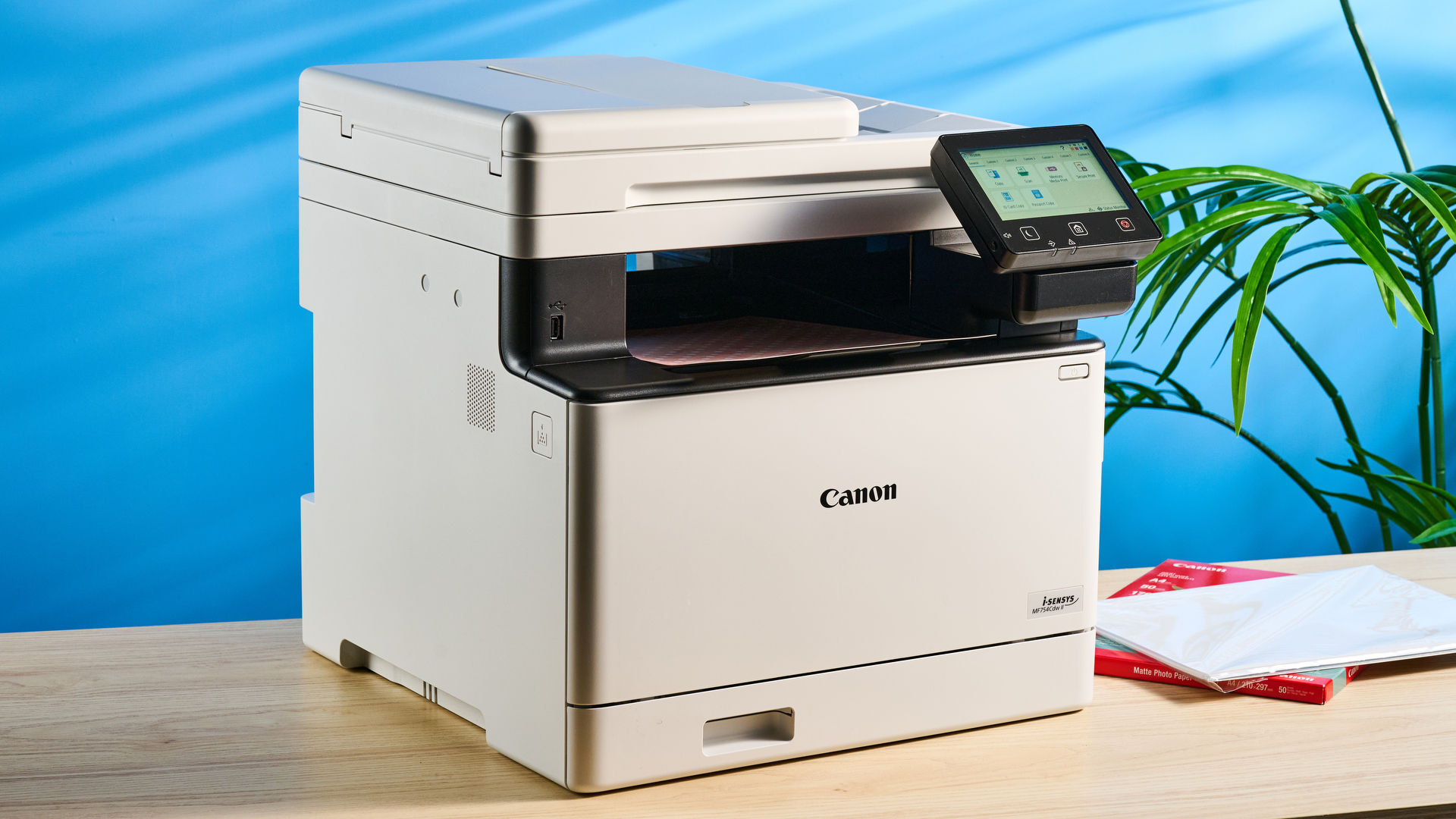
Our Best color printer picks include compact home all-in-ones, refillable ink tank models, faster office inkjets, and one color laser printer. The Canon PIXMA TS6520 is the best pick for most homes, while the Brother INKvestment MFC-J5110DW and HP Color LaserJet Pro 3301 serve heavier workloads.
Comparison table
| # | Product | Award | Print speed | Paper handling | Duplex and document feeding | Best for |
|---|---|---|---|---|---|---|
| 1 | Canon PIXMA TS6520 | Best overall | Not stated | Up to 8.5 by 11 inches | Automatic duplex, scanner, copier | Most homes |
| 2 | Brother MFC-J1360DW | Best compact office pick | Up to 16 ppm black, 9 ppm color | 150-sheet tray | Automatic duplex, 20-sheet ADF | Home offices |
| 3 | Epson EcoTank ET-2800 | Best for frequent printing | Up to 10 ISO ppm black | Not stated | Scanner and copier | High-volume home use |
| 4 | Canon PIXMA TS4320 | Best compact photo pick | Not stated | Up to 8.5 by 11 inches | Automatic duplex, scanner, copier | Small spaces |
| 5 | Brother INKvestment MFC-J5110DW | Best for busy offices | Up to 28 ppm black, 26 ppm color | Two trays, 500 sheets, plus 100-sheet multipurpose tray | Automatic duplex, single-pass duplex copy and scan, ADF up to 50 pages | Small businesses |
| 6 | HP OfficeJet Pro 8139 | Best home-office feature set | Up to 20 ppm black, 10 ppm color | 225-sheet tray | Automatic duplex, ADF | Home offices with mixed tasks |
| 7 | HP Color LaserJet Pro 3301 | Best color laser | Up to 26 ppm black and color | 250-sheet tray | Automatic duplex, ADF | Small teams |
| 8 | HP DeskJet 2955 | Best basic home printer | Up to 7.5 ppm black, 5.5 ppm color | 60-sheet tray | Scanner and copier | Occasional printing |
| 9 | HP OfficeJet Pro 8125e | Best straightforward office inkjet | Up to 20 ppm black, 10 ppm color | 225-sheet tray | Automatic duplex, ADF | Everyday office documents |
| 10 | HP OfficeJet Pro 9125 | Best for fast color documents | Up to 22 ppm black, 18 ppm color | 250-sheet tray | Automatic duplex print and scan, ADF | Demanding offices |
1. Canon PIXMA TS6520: Best Overall

Pros
- Compact footprint for a full all-in-one
- Automatic two-sided printing
- Dual-band Wi-Fi supports 2.4GHz and 5GHz networks
- OLED display keeps basic controls visible
- Handles documents and borderless photos up to 8.5 by 11 inches
Cons
- Two-cartridge ink system is less convenient for heavy printing
- No automatic document feeder is listed
- Print speed is not stated
Best for: home users who want a compact wireless printer for documents, photos, scanning, and copying.
The Canon PIXMA TS6520 is the printer we would put in the average household first. It does the routine things without turning the desk into a small office installation: print, scan, copy, and automatically print on both sides of a sheet. Its 14-inch width and 14.8-inch depth are manageable on a shelf or home workstation, while the 6.7-inch height keeps it from dominating the space above it.
Canon uses a two-cartridge hybrid ink system here, with one cartridge handling black and the other handling color. That setup keeps the printer simple, but it also means frequent color printing can be less flexible than using separate color tanks. The trade-off is sensible for mixed household use. The printer is designed for sharp text and vivid color, and it supports documents and photos up to 8.5 by 11 inches, with or without borders.
Wireless setup is one of the stronger parts of the package. Dual-band Wi-Fi can use either 2.4GHz or 5GHz, which gives it a better chance of fitting neatly into a modern home network than a printer limited to one band. Canon PRINT, Apple AirPrint, and Mopria Print Service cover the main phone and tablet workflows. The 1.42-inch monochrome OLED display is small, but it shows printer status and ink information without requiring a computer for every basic task.
Compared with the Canon PIXMA TS4320, the TS6520 is the more complete-feeling choice for a household that prints regularly. The Brother MFC-J1360DW is better when an ADF and stated print speeds matter, and the Epson EcoTank ET-2800 is the better fit for sustained volume. The TS6520 wins on balance, though its lack of a listed ADF makes multi-page scanning more manual. Choose it if you want a tidy all-in-one for school pages, forms, recipes, and occasional photos rather than a small-business workhorse.
2. Brother MFC-J1360DW: Best Compact Office Pick

Pros
- Automatic duplex printing
- 20-sheet single-sided ADF
- 150-sheet paper tray
- Cloud app access from the color display
- Wireless and USB connections
Cons
- Slower color rating than Brother MFC-J5110DW
- ADF is limited to 20 sheets
- Uses a cartridge-based system
Best for: a home office that needs document feeding and cloud access without a large office chassis.
The Brother MFC-J1360DW makes more sense than a basic home printer when scanning and copying several pages is part of the routine. Its 20-sheet ADF will not handle a thick packet in one pass, but it removes the need to place every page on the scanner glass. Automatic duplex printing also helps when reports, forms, and schoolwork would otherwise consume a sheet for every page.
Brother rates it at up to 16 pages per minute in black and 9 pages per minute in color. Those figures put it ahead of the compact Canon models where document throughput matters, though it is clearly below the Brother MFC-J5110DW. The 150-sheet tray is enough for a home office or family printer that gets regular use, and it avoids the constant hand-feeding associated with very small models.
The 1.8-inch color display is more useful than a bare icon panel. Brother says it can connect to cloud services such as Google Drive, Dropbox, Box, and OneDrive, so the printer can sit in a workflow that does not begin and end on a laptop. Wireless networking and USB provide two practical connection paths, while the Brother Mobile Connect app handles mobile printing, scanning, copying, and device management.
The main compromise is scale. A 20-sheet ADF and 150-sheet tray are adequate for home-office tasks, not a queue of paperwork from a busy team. Its LC501 series ink system also makes it less distinctive than the Epson EcoTank ET-2800, which is aimed at users who want to refill rather than replace cartridges. If your workload involves invoices, school forms, and short document batches, this is a more capable daily tool than the Canon PIXMA TS6520. If you need speed or a large paper reserve, move up to the Brother MFC-J5110DW.
3. Epson EcoTank ET-2800: Best for Frequent Printing

Pros
- Cartridge-free refillable ink tank design
- Included ink is rated for up to 4, 500 black pages and 7, 500 color pages
- Epson says the box can include up to two years of ink
- Wireless print, scan, and copy functions
- Compact 11.4-pound body
Cons
- Up to 10 ISO pages per minute in black is modest
- No ADF is listed
- Epson recommends genuine ink for performance and warranty support
Best for: households that print often enough to benefit from a refillable tank system.
The Epson EcoTank ET-2800 is the outlier among the smaller inkjets here because it does not rely on the usual collection of tiny cartridges. Its refillable tank design is built for people who print frequently and would rather replenish ink less often. That changes the ownership routine: there is more initial setup around filling the tanks, but far fewer interruptions once the printer is in regular use.
Epson rates the included ink for up to 4, 500 black pages and 7, 500 color pages. Those are substantial stated yields, and Epson says the box can contain up to two years of ink. The numbers do not turn this into a fast office printer, however. Its rated black speed is up to 10 ISO pages per minute, so a long document will take noticeably longer than it would on the Brother MFC-J5110DW or HP OfficeJet Pro 9125.
The ET-2800 uses Epson Micro Piezo Heat-Free Technology and is intended to produce vivid, detailed documents and photos. It combines printing with scanning and copying, and wireless connectivity keeps it useful for family devices. At 16 inches wide, 17 inches deep, and about 9.3 inches high, it needs more surface depth than the Canon PIXMA TS6520, but its 11.4-pound weight makes it relatively easy to reposition.
There is no listed ADF, so scanning a stack of pages means handling each sheet yourself. Epson also strongly recommends genuine ink, and says non-genuine ink could damage the printer in a way not covered by its limited warranty. That matters for buyers who want maximum freedom over supplies. The ET-2800 is the right alternative to the Canon PIXMA TS6520 when volume is the priority, but the Canon is easier for occasional mixed tasks and the Brother MFC-J1360DW is better for multi-page scanning. For a family printing worksheets, forms, and color material every week, the tank design is the reason to choose this model.
4. Canon PIXMA TS4320: Best Compact Photo Pick

Pros
- Compact body for a scanner-equipped printer
- Automatic two-sided printing
- Supports borderless documents and photos up to 8.5 by 11 inches
- Dual-band Wi-Fi
- Canon PRINT, AirPrint, and Mopria support
Cons
- No print speed is stated
- Two-cartridge system is not ideal for sustained volume
- No ADF is listed
Best for: small desks and homes that print a mix of basic documents and occasional photos.
The Canon PIXMA TS4320 is a straightforward home all-in-one with a particularly sensible footprint. It is 14 inches wide, 14.8 inches deep, and 6.7 inches high, so it can fit into places where a deeper office model cannot. It still includes printing, scanning, and copying, and automatic two-sided printing keeps ordinary documents from becoming unnecessarily bulky.
Like the TS6520, it uses a two-cartridge hybrid ink system intended to produce sharp text and vivid color. The listed media support reaches 8.5 by 11 inches and includes borderless printing, which gives it more flexibility for snapshots and full-page color material than a basic document-only device. The data does not state a print speed, so this is a poor choice for anyone shopping around a specific throughput target.
The connectivity options are well suited to a household. Dual-band Wi-Fi supports both 2.4GHz and 5GHz networks, and Canon PRINT, Apple AirPrint, and Mopria Print Service cover phones, tablets, and computers. Setup is described as quick, which matters on a compact printer that is likely to be shared by several people rather than permanently attached to one workstation.
The TS4320 is close to the Canon PIXMA TS6520 in purpose, but the TS6520 is the stronger all-around pick in this group. The Epson EcoTank ET-2800 is a better fit for repeated high-volume printing, while the Brother MFC-J1360DW adds an ADF and stated speeds for office paperwork. Pick the TS4320 when desk space and occasional photo printing matter more than fast batches. Skip it if multi-page scanning or heavy color output is part of the weekly routine.
5. Brother INKvestment MFC-J5110DW: Best for Busy Offices

Pros
- Up to 28 ppm black and 26 ppm color
- 500-sheet capacity across two trays
- 100-sheet multipurpose tray
- Single-pass duplex copy and scan
- Ethernet, Wi-Fi Direct, wireless, and USB connectivity
Cons
- Large 37.7-pound chassis
- Higher capacity may be excessive for casual home use
- Brother recommends genuine LC506 ink
Best for: small businesses and teams that print, scan, copy, and fax throughout the day.
The Brother INKvestment MFC-J5110DW is the first printer in this roundup that feels designed around a queue of work rather than a family printer corner. Its defining feature is not a clever mobile interface. It is the combination of fast output, a large paper reserve, and document handling that lets a small office keep moving without constant intervention.
Brother lists speeds of up to 28 pages per minute in black and 26 pages per minute in color. It has a 500-sheet capacity split between two trays, plus a 100-sheet multipurpose tray. That arrangement is useful when an office keeps different paper types ready or simply wants to avoid refilling the main tray throughout the day. Automatic duplex printing reduces manual page turning, and the ADF can handle up to 50 pages for single-pass duplex copy and scan.
The 4.3-inch color touchscreen gives this relatively capable machine a more approachable control surface. It can print from and scan to popular cloud apps directly, and the connection options include wireless networking, Wi-Fi Direct, Ethernet, and USB. The model also includes fax functionality, which remains useful for some small businesses even if it is unnecessary for most homes.
Its size is the cost of the capacity. The MFC-J5110DW is 17.1 inches wide, 17.3 inches deep, 13.4 inches high, and 37.7 pounds, so it needs a dedicated stand or sturdy desk. Brother also recommends genuine LC506 ink, a consideration for anyone looking for an open-ended supply strategy. The HP Color LaserJet Pro 3301 is a better office choice if you prefer laser printing, while the HP OfficeJet Pro 9125 occupies less physical space and still offers fast color output. Choose the Brother when paper capacity and duplex scanning are more important than a compact footprint.
6. HP OfficeJet Pro 8139: Best Home-Office Feature Set

Pros
- Automatic duplex printing and ADF
- 225-sheet input tray
- Up to 20 ppm black and 10 ppm color
- 2.7-inch color touchscreen
- Fax, mobile printing, and dual-band Wi-Fi
Cons
- HP cartridges with original chips or circuitry are required
- Larger than the compact home models
- Instant Ink becomes a recurring service after the included trial
Best for: home offices that need printing, scanning, copying, and faxing in one machine.
The HP OfficeJet Pro 8139 is built for the home office user who has moved past occasional printing. Its 225-sheet input tray, ADF, automatic duplex printing, scanner, copier, and fax make it a practical central station for paperwork. It is much more capable than the HP DeskJet 2955, but it does not demand the huge paper capacity or physical space of the Brother MFC-J5110DW.
HP rates it at up to 20 pages per minute in black and 10 pages per minute in color. That is enough for reports, forms, and presentations without long waits for small batches. The 2.7-inch color touchscreen gives the printer a phone-like control layout, while dual-band Wi-Fi and the HP app make it possible to print, scan, copy, or fax from a smartphone.
The OfficeJet Pro 8139 also includes HP AI features that can remove unwanted content from web pages and emails and improve formatting before printing. That is most useful for people who routinely print information from browsers and do not want a stray navigation panel or broken page layout wasting paper. HP Wolf Essential Security is intended to help protect the network, and the printer uses more than 45 percent recycled plastic content.
The supply policy deserves attention. HP says the printer is intended to work only with cartridges using original HP chips or circuitry, and firmware updates maintain those measures. The included Instant Ink trial becomes a monthly service after the trial unless cancelled. For many home offices, the 8139 is the better middle ground between the Canon PIXMA TS6520 and faster office models. The HP OfficeJet Pro 9125 prints color considerably faster, while the Brother MFC-J1360DW is smaller and lighter. Choose this HP when a touchscreen, fax, ADF, and useful paper capacity all belong in the same home-office machine.
7. HP Color LaserJet Pro 3301: Best Color Laser

Pros
- Up to 26 ppm in both black and color
- 250-sheet input tray
- Automatic duplex printing
- ADF for office scanning and copying
- TerraJet toner is designed for vivid business color
Cons
- Heavy 37.7-pound body
- Larger than the inkjet alternatives
- Uses HP toner cartridges with original chips or circuitry
Best for: small teams that print a steady stream of professional color documents.
The HP Color LaserJet Pro 3301 is the clearest choice here for readers who specifically want laser printing. It is designed around reports, presentations, and other business documents, with output rated at up to 26 pages per minute in both black and color. That consistent color speed is the important distinction from the home inkjets, especially when several people share one printer.
The 250-sheet input tray gives it a useful office reserve, and automatic duplex printing handles two-sided documents without manual intervention. An ADF supports scanning and copying, so the machine can serve as more than a dedicated printer. HP describes its next-generation TerraJet toner as producing more vivid colors, a useful trait for charts, internal presentations, and documents where clean blocks of color matter.
The trade-off is physical. This model is 16.46 inches long, 13.44 inches wide, and 16.5 inches high, with a listed weight of 37.7 pounds. It is not a printer to move casually between a closet and a desk. It belongs in a permanent office location with enough clearance for the paper tray and document feeder.
Compared with the Brother INKvestment MFC-J5110DW, the HP offers the laser workflow and matching black and color speed, but the Brother has more total paper capacity and a 50-page single-pass duplex scan specification. The HP OfficeJet Pro 9125 is a smaller inkjet alternative with faster stated color speed, while the HP Color LaserJet Pro 3301 remains the better fit for a team that wants laser output. HP also restricts it to toner cartridges using original HP chips or circuitry, so buyers who dislike supply restrictions should look carefully before choosing it. For durable office documents and steady shared printing, this is the strongest laser option in the group.
8. HP DeskJet 2955: Best Basic Home Printer

Pros
- Very light 7.55-pound design
- Compact footprint
- Wireless print, scan, and copy functions
- 70 percent recycled plastic content
- Simple icon LCD
Cons
- 60-sheet input tray
- Up to 5.5 ppm color
- No duplex or ADF is listed
Best for: occasional home printing such as recipes, letters, lists, and forms.
The HP DeskJet 2955 is for the person who prints a few pages, puts the printer away, and does not need office-style automation. It weighs 7.55 pounds and measures 16.73 inches wide, 11.97 inches deep, and 6.06 inches high. That makes it one of the easiest models here to place on a small shelf or move when the desk is needed for something else.
Its feature set is intentionally basic: color printing, scanning, copying, wireless connectivity, and a 60-sheet input tray. HP rates it at up to 7.5 pages per minute in black and 5.5 pages per minute in color. Those figures are fine for a short letter or recipe, but a larger school packet will take patience. There is no listed automatic duplex function or ADF, so two-sided pages and multi-page scans require more hands-on work.
The icon LCD keeps the controls simple, and the HP app supports printing, scanning, copying, and faxing from a phone, although fax hardware is not listed among the printer's core features. HP also includes AI formatting tools for web pages and emails, designed to remove unwanted content and improve page layout. The printer uses at least 70 percent recycled plastics and carries ENERGY STAR and EPEAT certifications.
This model should not be compared with the HP OfficeJet Pro 8139 as if they serve the same workload. The 8139 is faster, has a 225-sheet tray, an ADF, automatic duplex printing, and fax hardware. The Canon PIXMA TS4320 is a better small printer for buyers who care about borderless photos and two-sided printing. Choose the DeskJet 2955 only when low-frequency home use and easy placement matter more than speed or document automation.
9. HP OfficeJet Pro 8125e: Best Straightforward Office Inkjet

Pros
- Automatic duplex printing
- ADF and 225-sheet input tray
- Up to 20 ppm black and 10 ppm color
- Dual-band Wi-Fi
- HP app supports phones, PCs, and tablets
Cons
- No fax function is listed
- HP Instant Ink activation leads to a recurring service after the trial
- Requires HP cartridge chips or circuitry
Best for: home offices that need a capable document printer without fax hardware.
The HP OfficeJet Pro 8125e is a sensible office inkjet for people who want the practical parts of the OfficeJet Pro line without a long setup ritual. It prints, scans, and copies, feeds multi-page documents through an ADF, and automatically prints on both sides. Its 225-sheet input tray is enough to make routine work feel uninterrupted in a home office.
Its rated speeds are up to 20 pages per minute in black and 10 pages per minute in color. That matches the stated print speeds of the OfficeJet Pro 8139, so the distinction between them is less about raw output and more about the feature set. The 8125e does not list fax hardware, while the 8139 does. If faxing is irrelevant, the 8125e is the cleaner fit. If it is part of the job, the 8139 earns its place.
HP includes dual-band Wi-Fi and app support for smartphones, PCs, and tablets. Its AI formatting feature is aimed at web pages and emails, removing unwanted content and arranging the page more cleanly before printing. The dimensions are also nearly identical to the 8139, at 18.11 inches wide, 13.29 inches deep, and 9.17 inches high, so neither model is a tiny desktop printer.
The supply restrictions are the same kind of limitation found on several HP models here. HP says the printer will block cartridges that use non-HP chips or circuitry, and the included Instant Ink trial becomes a monthly service after the trial unless cancelled. The Brother MFC-J1360DW offers a smaller body and a 20-sheet ADF, while the Brother MFC-J5110DW is much faster and holds more paper. Pick the 8125e for routine home-office documents, particularly when you want an ADF and duplex printing but do not need faxing.
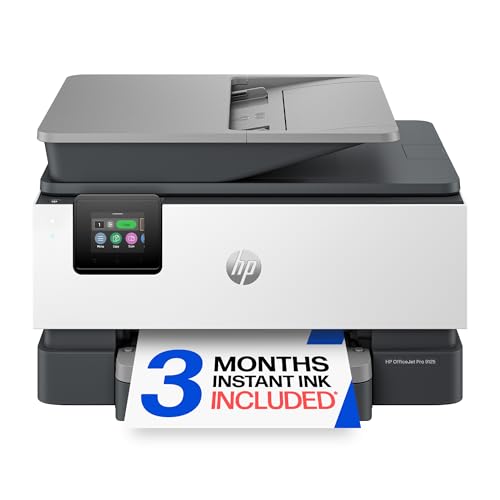
10. HP OfficeJet Pro 9125: Best for Fast Color Documents
Pros
- Up to 22 ppm black and 18 ppm color
- Automatic duplex printing and scanning
- 250-sheet input tray
- 2.7-inch color touchscreen
- Fax, ADF, and dual-band Wi-Fi
Cons
- Larger and heavier than the home-office models
- HP cartridge chip restrictions
- Instant Ink becomes a recurring service after the trial
Best for: offices that print color documents often and need fast two-sided scanning.
The HP OfficeJet Pro 9125 is the most capable of HP's inkjet office models in this list. It is aimed at offices printing presentations, brochures, flyers, and other professional color documents, and its rated speed of up to 18 pages per minute in color is a meaningful step above the HP OfficeJet Pro 8139 and 8125e. It also reaches up to 22 pages per minute in black.
The 250-sheet input tray gives it a little more breathing room than those two OfficeJet models. Automatic duplex printing and scanning are more important here than they would be on a basic home printer, since they reduce manual handling on both sides of a document workflow. The ADF, scanner, copier, and fax turn it into a complete office station rather than just a network printer.
A 2.7-inch color touchscreen provides direct access to the controls, while dual-band Wi-Fi and the HP app cover wireless work from phones and computers. HP's AI formatting feature can remove unwanted material from web pages and emails before they are printed. HP Wolf Pro Security is included to help protect the network, and the design uses more than 40 percent recycled plastic content.
The 9125 is not the automatic winner for every office. The Brother INKvestment MFC-J5110DW offers a much larger paper capacity and a 50-page single-pass duplex copy and scan capability, while the HP Color LaserJet Pro 3301 is the better choice for teams committed to laser printing. The 9125 measures 17.3 inches wide, 13.48 inches deep, and 10.94 inches high, and weighs 20.48 pounds, so it needs a permanent home. HP also says it accepts only cartridges with original HP chips or circuitry, with firmware updates maintaining that restriction. Choose this model when fast color inkjet output and automatic two-sided scanning matter more than refill flexibility.
How to choose best color printer
The right printer starts with the work it must handle repeatedly, not the number of icons on the box. These are the specifications and design choices that separate a convenient home machine from an office-ready one.
Ink system
Cartridge-based inkjets such as the Canon PIXMA TS6520, Brother MFC-J1360DW, and HP OfficeJet Pro models are convenient for ordinary household and office printing, but they require cartridge replacement. The Epson EcoTank ET-2800 uses refillable tanks and is aimed at people who print often enough for longer intervals between replenishment to matter.
Look for stated page yields when frequent printing is part of the plan. The Epson lists up to 4, 500 black pages and 7, 500 color pages from its ink supply, while the Brother MFC-J5110DW lists cartridges with 1, 800-page black and 750-page color yields. Those figures are more useful than a vague claim about lasting a long time.
A refillable tank solves interruptions, but it does not solve slow printing or manual scanning.
Print speed
Speed ratings matter most for batches. The HP DeskJet 2955 is rated at up to 7.5 pages per minute in black and 5.5 in color, which suits occasional pages. The Brother MFC-J5110DW reaches up to 28 black and 26 color pages per minute, making it a better match for a shared office queue.
Compare black and color ratings separately. A printer can be quick with text while taking much longer with color documents. The HP OfficeJet Pro 9125 is notable because its listed color speed reaches 18 pages per minute, well above the 10 pages per minute listed for the 8139 and 8125e.
Paper capacity
A 60-sheet tray on the HP DeskJet 2955 is adequate when printing is infrequent, but it creates more refill work for a family or office. The Canon PIXMA TS6520 and TS4320 support media up to 8.5 by 11 inches, though their listed features do not state a tray capacity.
For heavier work, the 225-sheet trays on the HP OfficeJet Pro 8139 and 8125e, the 250-sheet tray on the HP OfficeJet Pro 9125 and Color LaserJet Pro 3301, and the 500-sheet capacity on the Brother MFC-J5110DW are more useful. Multiple trays also help when an office regularly switches between paper types.
Duplex printing and document feeding
Automatic duplex printing turns two-sided work into a normal setting instead of a manual process. It appears on the Canon PIXMA TS6520, Canon PIXMA TS4320, Brother MFC-J1360DW, Brother MFC-J5110DW, and the HP office models listed here.
An ADF matters when scanning or copying more than one page. The Brother MFC-J1360DW has a 20-sheet ADF, while the Brother MFC-J5110DW supports up to 50 pages for single-pass duplex copy and scan. The HP DeskJet 2955 and Epson EcoTank ET-2800 do not list an ADF, so they are less convenient for stacks of paperwork.
Connectivity and controls
Dual-band Wi-Fi gives a printer the option to use either 2.4GHz or 5GHz networks. Canon adds support for Canon PRINT, Apple AirPrint, and Mopria, while Brother offers Brother Mobile Connect and cloud access on the MFC-J1360DW and MFC-J5110DW. HP relies on its app alongside dual-band wireless connectivity.
A display can reduce the need to open an app for simple tasks. The Brother MFC-J5110DW has a 4.3-inch color touchscreen, the HP OfficeJet Pro 8139 and 9125 have 2.7-inch color touchscreens, and the Canon PIXMA TS6520 uses a smaller 1.42-inch monochrome OLED. Choose the control style that matches how often several people will operate the printer directly.
Frequently asked questions
What is the best color printer for a typical home?
The Canon PIXMA TS6520 is the strongest all-around choice for most homes. It combines printing, scanning, copying, automatic duplex printing, dual-band Wi-Fi, and support for documents and photos up to 8.5 by 11 inches in a compact body.
Which printer is best for frequent color printing?
The Epson EcoTank ET-2800 is designed for frequent printing because it uses refillable ink tanks. Its listed ink yields reach up to 4, 500 black pages and 7, 500 color pages, though its up to 10 ISO pages per minute black speed is slower than the office-focused Brother and HP models.
Which model is best for a small office?
The Brother INKvestment MFC-J5110DW is the strongest small-office option. It has up to 28 ppm black and 26 ppm color output, a 500-sheet capacity across two trays, a 100-sheet multipurpose tray, and single-pass duplex copy and scan through its ADF.
Do all of these printers scan and copy?
All 10 products are listed as multifunction printers with scanning and copying features. The HP DeskJet 2955 and Epson EcoTank ET-2800 do not list an ADF, so multi-page scanning on those models requires placing pages on the scanner individually.
Which printer has the fastest color speed?
The Brother INKvestment MFC-J5110DW is listed at up to 26 pages per minute in color, matching its black print speed. The HP Color LaserJet Pro 3301 is also listed at up to 26 ppm in black and color, while the HP OfficeJet Pro 9125 reaches up to 18 ppm in color.
Is a color laser printer better for office documents?
A color laser printer can be a strong fit for teams that print a steady stream of business documents and want consistent black and color throughput. The HP Color LaserJet Pro 3301 adds a 250-sheet tray, automatic duplex printing, an ADF, scanning, and copying, but its 37.7-pound body requires a permanent location.
What should I check before buying an HP printer?
Check the cartridge policy and the role of any included service trial. The HP models in this roundup state that cartridges with non-HP chips or circuitry can be blocked, and their Instant Ink trials become recurring monthly services after the trial unless cancelled.

The bottom line
The Best color printer for most homes is the Canon PIXMA TS6520 because it keeps the essential functions together in a compact body and adds automatic duplex printing, dual-band Wi-Fi, and useful photo support. For frequent printing, the Epson EcoTank ET-2800 is the better fit, while the Brother MFC-J1360DW makes more sense when an ADF is central to the work.
For a busy office, choose the Brother INKvestment MFC-J5110DW for its paper capacity and duplex document handling, or the HP Color LaserJet Pro 3301 if a laser workflow and 26 ppm color output are the priority. The HP OfficeJet Pro 9125 is the better inkjet alternative when fast color documents and duplex scanning matter.
If you are undecided, choose the Canon for mixed home use, the Epson for repeated printing, or the Brother MFC-J5110DW for a shared office.
As an Amazon Associate we earn from qualifying purchases.