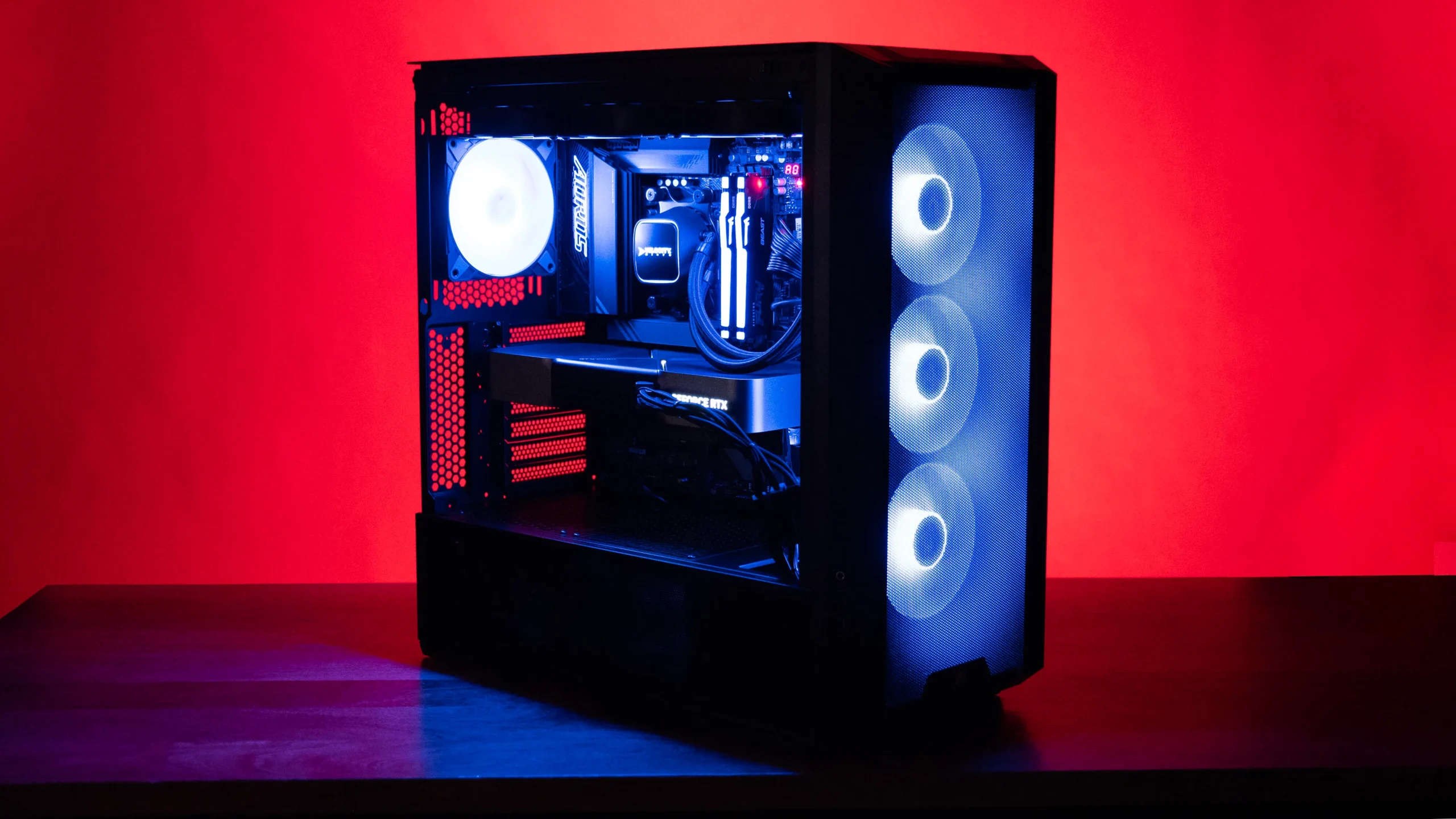

A gaming computer can look impressive on a product page and still leave you guessing about the parts that matter. The graphics card sets the ceiling for game detail, but the processor, cooling, memory, and storage decide how consistently the system gets there.
Our Best computer for gaming picks include powerful RTX 5070 desktops, a portable ASUS laptop, and more modest systems for 1080p play. KOTIN Ryzen 7 9700X PC is the best all-around choice, while the rest cover high-refresh gaming, huge storage, compact portability, and entry-level play.
Comparison table
| # | Product | Award | GPU | CPU | Memory and storage | Best for |
|---|---|---|---|---|---|---|
| 1 | KOTIN Ryzen 7 9700X PC | Best overall | RTX 5070 12GB | Ryzen 7 9700X | 32GB DDR5, 1TB NVMe SSD | 1440p and 4K desktop gaming |
| 2 | Alienware Aurora RTX 5070 | Best for polished design | RTX 5070 | Core Ultra 7 265F | 1TB storage | A branded, controlled setup |
| 3 | MSI Codex Z2 | Best for extra SSD space | RTX 5070 | Ryzen 7 8700F | 32GB DDR5, 2TB NVMe SSD | Large game libraries |
| 4 | CyberPowerPC RTX 5060 Ti | Best connected midrange desktop | RTX 5060 Ti 8GB | Ryzen 7 8700F | 16GB DDR5, 1TB NVMe SSD | 1080p and moderate 1440p gaming |
| 5 | ASUS ROG Strix G16 | Best gaming laptop | RTX 5060 Laptop GPU | Core i7-14650HX | 16GB DDR5, 1TB Gen 4 SSD | Gaming away from a desk |
| 6 | Horizon Autherium Dragon | Best for storage and multitasking | RTX 5070 OC 12GB | Unlocked Core i9 | 64GB RAM, 1TB NVMe SSD, 4TB HDD | Heavy multitasking and VR |
| 7 | KOTIN Ryzen 7 9800X3D PC | Best for high-refresh gaming | RTX 5070 12GB | Ryzen 7 9800X3D | 32GB DDR5, 1TB NVMe SSD | Competitive games and demanding AAA titles |
| 8 | STGAubron RX 580 PC | Best for basic 1080p play | RX 580 8GB | Core i7 | 16GB RAM, 512GB SSD | Older and lighter games |
| 9 | YAWYORE Ryzen 5 5600GT PC | Best integrated-graphics starter | Radeon Vega graphics | Ryzen 5 5600GT | 16GB DDR4, 1TB NVMe SSD | Mainstream 1080p games |
| 10 | SKYESEV RTX 3050 PC | Best for extra system memory | RTX 3050 6GB | Ryzen 5 5600 | 32GB DDR4, 1TB NVMe SSD | Entry-level gaming and multitasking |
1. KOTIN Ryzen 7 9700X PC: Best Overall

Pros
- RTX 5070 and Ryzen 7 9700X combination
- 32GB of fast DDR5 memory
- 360mm liquid cooling
- Built-in system information display
- Wi-Fi 7 and an 850W Gold power supply
Cons
- Only 1TB of included SSD storage
- Large cooling system adds complexity
- Windows 11 Home rather than Pro
Best for: players who want a powerful, finished desktop for modern 1440p and 4K gaming.
The first thing that separates the KOTIN Ryzen 7 9700X PC is how complete the core build feels. It pairs an RTX 5070 with an eight-core Ryzen 7 9700X, so the graphics card is not being asked to carry the entire system. That combination makes sense for demanding modern games, streaming, and creative work without forcing the buyer into an immediate component upgrade.
The 32GB of DDR5 memory runs at 6000MHz, giving Windows and large games plenty of room to operate while other applications remain open. The 1TB PCIe 4.0 NVMe SSD should keep booting and game loading responsive, although a large library can fill it quickly. That is the main storage limitation here, especially beside the MSI Codex Z2 and Horizon Autherium Dragon.
KOTIN gives this system more cooling and monitoring hardware than many prebuilt desktops. A 360mm AIO cooler handles the processor, while the built-in 11.3-inch smart display can show CPU and GPU temperatures, usage, memory status, and weather. It is a useful dashboard rather than a decorative panel. Wi-Fi 7, an 850W 80 Plus Gold power supply, and Windows 11 Home round out a sensible platform.
The case is 14.25 inches high, 16.81 inches long, and 8.66 inches wide, with a listed weight of 30 pounds. It needs real desk or floor space, and liquid cooling is one more part to monitor over time. The Alienware Aurora has a more recognizable software ecosystem, while the KOTIN is the stronger fit for someone who cares more about the component mix. If you want a well-equipped desktop that can move from high-refresh 1440p to 4K, this is the one we'd keep.
2. Alienware Aurora RTX 5070: Best for Polished Design
Pros
- RTX 5070 graphics
- Intel Core Ultra 7 265F processor
- Customizable AlienFX lighting
- Alienware Command Center profiles
- One-year onsite service
Cons
- Heavier and taller than the KOTIN desktop
- Listed storage is limited to 1TB
- Less memory detail is provided than for several rivals
Best for: buyers who want a recognizable desktop design and integrated lighting controls.
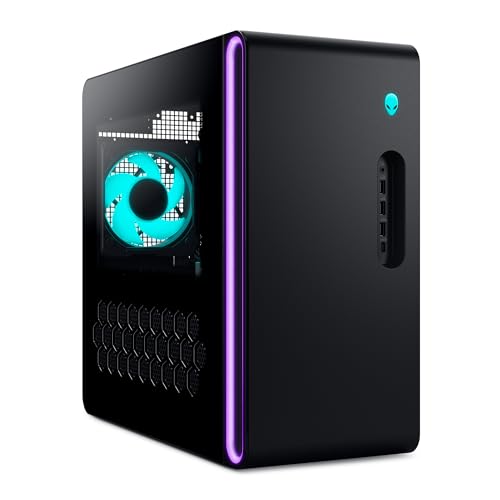
The Alienware Aurora RTX 5070 takes a different route from the more specification-heavy KOTIN systems. Its appeal is the finished experience: a matte black chassis, customizable AlienFX lighting zones, and stadium lighting that makes the desktop look deliberate rather than assembled from unrelated parts. It is the choice for someone who wants the machine to feel like part of a broader gaming setup.
The RTX 5070 provides the important graphics foundation for current games, while the Intel Core Ultra 7 265F is positioned for gaming, livestreaming, and multitasking. The listing identifies 1TB of storage, but it does not provide the same detailed memory specification found on the KOTIN or MSI machines. That makes the Alienware less straightforward for buyers who want to compare every memory detail before ordering.
Alienware Command Center is the practical advantage. It lets you edit lighting, choose performance modes, and create gaming profiles across a library. Those controls are more useful than simply having RGB fans, particularly for someone who wants a quiet or performance-focused setting without manually adjusting several utilities.
The chassis measures 16.46 inches high, 18.05 inches long, and 7.76 inches wide, and weighs 33.894 pounds. It is not a small desktop, even though its width is relatively modest. The one-year onsite service is another meaningful distinction, since covered hardware problems can be handled at the buyer's location when remote troubleshooting is not enough. Choose the Aurora over the MSI Codex Z2 if design and support matter more than detailed component expansion, but skip it if you want maximum storage clarity and a simpler, more conventional build.
3. MSI Codex Z2: Best for Extra SSD Space
Pros
- RTX 5070 with Blackwell architecture
- 2TB NVMe SSD
- 32GB DDR5 memory
- Four-fan cooling layout
- USB-C and customizable RGB
Cons
- Ryzen 7 8700F is behind newer top-end processors
- Tall chassis may not suit every desk
- Windows 11 Home
Best for: gamers who want a large fast SSD without giving up RTX 5070 graphics.
The MSI Codex Z2 is the sensible storage specialist in this group. Its RTX 5070 puts it in the same graphics class as the two KOTIN desktops and the Aurora, but the included 2TB M.2 NVMe SSD is the detail that changes daily ownership. Modern games are large, and having twice the listed SSD capacity means fewer routine uninstall and reinstall decisions.
Its Ryzen 7 8700F has eight cores and 16 threads, with a boost speed up to 5.0GHz. That gives the system the multitasking headroom to handle games, streaming, and background tasks together. The KOTIN Ryzen 7 9700X PC has the newer processor pairing, and the KOTIN Ryzen 7 9800X3D PC is the more specialized high-refresh option, but the MSI remains well matched to its RTX 5070.
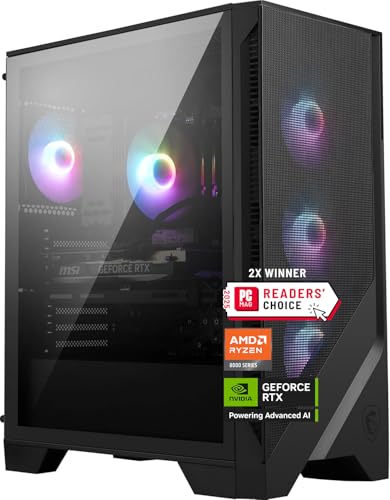
Cooling is handled by an ARGB air cooler and four system fans, with three at the front and one at the rear. That layout is easy to understand and avoids the added liquid-cooling hardware used by KOTIN and Horizon. The Codex Z2 also includes USB Type-C, Windows 11 Home, and MSI Center software for lighting control. It is a straightforward package rather than a flashy experiment.
At 19 inches high, 16 inches long, and 8.38 inches wide, the case is notably tall. Its listed weight is 21.3 pounds, which is easier to move than the heavier premium desktops. The compromise is that its processor and cooling approach are less ambitious than the top two picks. Buyers who want a large game library and a conventional air-cooled RTX 5070 desktop should choose the MSI.
4. CyberPowerPC RTX 5060 Ti: Best Connected Midrange Desktop

Pros
- Ryzen 7 8700F processor
- RTX 5060 Ti 8GB graphics
- Two USB-C 3.2 ports
- Wi-Fi 6 and Bluetooth 5.3
- Keyboard and mouse included
Cons
- 16GB memory is less generous than several desktops
- 8GB of graphics memory limits demanding settings
- Less powerful than the RTX 5070 systems
Best for: players who want a connected Windows desktop for 1080p gaming and moderate 1440p play.
The CyberPowerPC RTX 5060 Ti is the point where this list moves from enthusiast hardware to a more restrained gaming desktop. Its Ryzen 7 8700F gives it eight cores, while the RTX 5060 Ti supplies the graphics power for mainstream play. It is a better fit for 1080p gaming and sensible 1440p settings than for chasing maximum detail on a high-resolution display.
The included 16GB of DDR5 memory is workable for gaming, though it leaves less room than the 32GB systems above it. The 1TB PCIe 4.0 NVMe SSD provides quick storage for the operating system and a useful starting library. Buyers who keep many large games installed will find the MSI Codex Z2 much more comfortable.
Connectivity is one of this desktop's strongest points. It has two USB-C 3.2 ports, four USB-A 3.2 ports, two USB-A 2.0 ports, LAN, Wi-Fi 6, Bluetooth 5.3, and 7.1-channel audio. HDMI and two DisplayPort connections serve the graphics card. A tempered side panel, custom RGB lighting, and a keyboard and mouse make the setup process simple.
The one-year parts and labor warranty is paired with free lifetime technical support. The weakness is not a missing feature but the limits of the RTX 5060 Ti 8GB compared with the RTX 5070 models. If your target is competitive 1080p gaming, the CyberPowerPC is a clean match. If you want 4K headroom or expect to keep the same graphics settings for years, move up to the KOTIN Ryzen 7 9700X PC.
5. ASUS ROG Strix G16: Best Gaming Laptop

Pros
- 16-inch FHD+ 165Hz display
- Three-millisecond response specification
- RTX 5060 Laptop GPU
- Wi-Fi 7
- Vapor chamber and tri-fan cooling
Cons
- 16GB memory is modest for a long-term gaming laptop
- Laptop graphics are less powerful than desktop RTX 5070 cards
- 1TB SSD can fill quickly
Best for: players who need a serious gaming machine that can leave the desk.
The ASUS ROG Strix G16 is the only genuinely portable option here, and that changes the buying decision more than any benchmark comparison. Its 16-inch display uses a 16:10 FHD+ layout with a 165Hz refresh rate and a listed three-millisecond response time. Fast motion should look smoother than it does on a conventional 60Hz laptop, making the screen a better match for competitive games.
An Intel Core i7-14650HX processor works alongside an RTX 5060 Laptop GPU. The graphics chip supports DLSS 4 and Max-Q technologies, but it should not be treated as equivalent to the desktop RTX 5070 cards in the KOTIN, Alienware, MSI, and Horizon systems. The ASUS wins on flexibility, not raw desktop performance.
The 16GB of DDR5-5600MHz memory is enough for current gaming and ordinary multitasking, while the 1TB PCIe Gen 4 SSD offers quick application and game loading. Wi-Fi 7 is a useful forward-looking connection, especially where a compatible network is available. The 5.842-pound chassis is much easier to move than any desktop in this roundup, although the power adapter adds to what you carry.
ASUS uses an end-to-end vapor chamber, tri-fan cooling, and Conductonaut Extreme liquid metal on the chipset. Those details show that the laptop is built around sustained performance rather than a thin office chassis. The 360-degree RGB light bar can be disabled with Stealth Mode, which helps in shared or professional spaces. If portability is not important, the CyberPowerPC gives you a more conventional desktop platform. If it is important, the ROG Strix G16 is the clear answer. Readers comparing portable systems can also consider how much gaming performance a mobile chassis can sustain before choosing.
6. Horizon Autherium Dragon: Best for Storage and Multitasking

Pros
- RTX 5070 OC graphics
- 64GB of memory
- 5TB total storage
- 360mm liquid cooling
- Long parts and labor warranty terms
Cons
- Very large 18-inch square chassis
- Hard drive is slower than the NVMe SSD
- Core i9 model is not identified by generation
Best for: users who combine gaming with large files, virtual reality, and heavy multitasking.
The Horizon Autherium Dragon is built around excess capacity. It combines an RTX 5070 OC graphics card with an unlocked Core i9 processor, 64GB of RAM, and 5TB of total storage. That makes it less about a single game benchmark and more about keeping a large working environment open, from games and browsers to media projects and local files.
Storage is split between a 1TB M.2 NVMe SSD rated for speeds up to 7000MB/s and a 4TB 7200RPM hard drive. The SSD is where the operating system and frequently played games belong, while the hard drive gives the system room for less frequently accessed files. An extra M.2 NVMe port and HDD port are listed for future expansion.
The RTX 5070 is factory overclocked and supports ray tracing, DLSS 4, and VR use. The system also has one HDMI port and three DisplayPort connections, which is helpful for multi-monitor setups. Cooling is unusually elaborate: a 360mm liquid cooler and a total of 11 fans, with software-controlled ARGB lighting. The listing also identifies an 850W 80 Plus Gold power supply.
This is a substantial machine at 18 inches high, 17 inches long, and 18 inches wide, with a listed weight of 35 pounds. The Core i9's exact generation is not given, so buyers who want precise processor comparisons should favor the clearly identified KOTIN or ASUS models. The three-year parts warranty, five-year labor warranty, and specialist support are strong ownership details. Choose the Horizon when storage and multitasking are central, not simply because its specification list is long.
7. KOTIN Ryzen 7 9800X3D PC: Best for High-Refresh Gaming
Pros
- Ryzen 7 9800X3D with 3D V-Cache
- RTX 5070 12GB graphics
- 32GB DDR5-6000 memory
- 360mm liquid cooler
- Wi-Fi 7 and built-in monitoring display
Cons
- Only 1TB of SSD storage
- Large desktop footprint
- More specialized than casual players need
Best for: competitive players who want strong frame-rate consistency from a prebuilt desktop.
The KOTIN Ryzen 7 9800X3D PC is the specialist among the RTX 5070 desktops. Its Ryzen 7 9800X3D uses 3D V-Cache with 96MB of L3 cache, a design intended to keep more game data close to the processor. That matters most in high-refresh esports and processor-heavy games, where frame-time consistency can matter as much as peak graphics quality.
The RTX 5070 12GB handles the visual workload and supports ray tracing, DLSS 4 Multi Frame Generation, and Reflex in supported games. It is a powerful pairing for 1440p and 4K play, streaming, and content creation. Compared with the Ryzen 7 9700X version, the 9800X3D model is the more gaming-focused choice, while the other KOTIN remains the more balanced general-purpose recommendation.
Memory arrives as 32GB of DDR5-6000, and the 1TB PCIe 4.0 NVMe SSD keeps the platform responsive. Wi-Fi 7 and Bluetooth cover wireless networking and peripherals. The same built-in 11.3-inch smart display found on the other KOTIN system shows temperatures, usage, memory status, and SSD usage, while the cooler head adds a CPU temperature display.
A 360mm ARGB liquid cooler and an 850W 80 Plus Gold power supply provide the thermal and power foundation for long sessions. The case measures 14.25 inches high, 16.81 inches long, and 8.66 inches wide, with a listed weight of 30 pounds. The 1TB SSD is the obvious weak spot, and casual players should not buy around the 3D V-Cache feature unless their games can use it. For competitive gaming at a high refresh rate, though, this is the sharper KOTIN.
8. STGAubron RX 580 PC: Best for Basic 1080p Play

Pros
- RX 580 with 8GB graphics memory
- 16GB system memory
- Wi-Fi 6 and Bluetooth 5.0
- Four RGB fans
- Keyboard and mouse included
Cons
- Older RX 580 graphics platform
- 512GB SSD fills quickly
- Core i7 generation is not identified
Best for: players focused on lighter games and established 1080p titles.
The STGAubron RX 580 PC belongs in a different performance tier from the RTX 5070 systems. Its RX 580 has 8GB of graphics memory, and the listing describes support for popular games such as Fortnite, Warzone, GTA V, World of Warcraft, Valorant, Minecraft, and Rocket League. It is aimed at accessible 1080p gaming rather than demanding new releases at maximum settings.
The unnamed Core i7 processor is listed with speeds up to 3.9GHz, alongside 16GB of memory and a 512GB SSD. That combination is enough for everyday computing and a modest game library, but the storage capacity is a real constraint. A large modern installation can consume a meaningful share of the drive, so buyers should be prepared to manage space.
Wi-Fi 6, Bluetooth 5.0, HDMI, DisplayPort, and wired Ethernet cover the main connection needs. Four RGB fans provide airflow and lighting, while the included keyboard and mouse make the desktop ready for a basic setup. Windows 11 Home is installed, and the package includes one-year parts and labor coverage with lifetime technical support.
The 17.52-inch-high, 14.96-inch-long, and 7.87-inch-wide case is narrower than several premium towers, though its internal component details are less thoroughly identified. It is a reasonable starting point for older competitive games and less demanding titles. Buyers who want a newer graphics architecture should move to the SKYESEV RTX 3050 PC, while anyone targeting recent AAA games should skip both and choose a stronger GPU.
9. YAWYORE Ryzen 5 5600GT PC: Best Integrated-Graphics Starter

Pros
- Six-core Ryzen 5 5600GT
- 1TB NVMe SSD
- Integrated Radeon Vega graphics
- Five 12cm ARGB fans
- Wi-Fi and Bluetooth
Cons
- No dedicated graphics card
- 16GB DDR4 memory
- 550W Bronze power supply limits the platform
Best for: casual players who want a responsive desktop for mainstream 1080p games without a dedicated GPU.
The YAWYORE Ryzen 5 5600GT PC is the unusual pick here because it relies on integrated Radeon Vega graphics. The Ryzen 5 5600GT has six cores and 12 threads, with a listed 3.6GHz base speed and 4.6GHz turbo speed. That gives the desktop a capable everyday processor, but its gaming ceiling depends heavily on the integrated graphics rather than a separate card.
The listing positions the Vega graphics for mainstream 1080p games at playable quality settings. That is a narrower promise than the dedicated RTX and Radeon systems above it. Players should expect to adjust resolution and detail more often, especially in graphically demanding games. The advantage is a simpler starting platform that can be used for ordinary computing as well as lighter gaming.
The 16GB of DDR4-3200 memory is paired with a 1TB M.2 NVMe PCIe SSD. The storage capacity is more comfortable than the STGAubron's 512GB drive, and NVMe storage should keep the system responsive. An MSI A520M-A PRO motherboard, a 550W 80 Plus Bronze power supply, and built-in Wi-Fi and Bluetooth complete the core platform.
Cooling uses AMD air cooling with five 12cm ARGB fans and intelligent temperature control. The listed weight is 21.4 pounds, although other chassis dimensions are not provided. The YAWYORE is not the right answer for someone shopping for demanding AAA gaming, but it can make sense for a casual player who values a roomy SSD and everyday responsiveness. For dedicated graphics, the SKYESEV is the next step up.
10. SKYESEV RTX 3050 PC: Best for Extra System Memory

Pros
- Dedicated RTX 3050 graphics
- 32GB DDR4 memory
- 1TB NVMe SSD
- Five ARGB 120mm fans
- Wi-Fi and Bluetooth
Cons
- RTX 3050 is an entry-level graphics choice
- Graphics card brand may vary
- Ryzen 5 5600 platform is older than the leading picks
Best for: entry-level PC gaming with generous memory for multitasking.
The SKYESEV RTX 3050 PC improves on an integrated-graphics desktop by adding a dedicated GeForce RTX 3050 with 6GB of GDDR6 memory. That gives it a clearer gaming identity than the YAWYORE, though it remains an entry-level system compared with the RTX 5060 Ti and RTX 5070 machines. It is best suited to 1080p gaming with sensible expectations about detail settings.
The Ryzen 5 5600 supplies six cores and 12 threads, with a listed maximum speed of 4.4GHz. Its 32GB of DDR4 memory is the standout specification. That capacity helps with browsers, chat, launchers, and other background applications, even though the memory standard is older than the DDR5 used by the higher-ranked desktops.
A 1TB M.2 NVMe PCIe SSD provides useful space and quick boot and loading behavior. The system also has a 550W 80 Plus Bronze power supply, built-in Wi-Fi and Bluetooth, and five ARGB 120mm fans with remote control and intelligent temperature management. The RTX 3050 brand may vary, so buyers who need a specific card manufacturer should take that uncertainty seriously.
The listing gives a weight of about 23.95 pounds but does not provide chassis dimensions. The shipping instructions say to remove the shock-absorbing foam before use, an important setup step. The SKYESEV is a better gaming starting point than the YAWYORE because it has dedicated graphics, but the STGAubron offers an older 8GB graphics card and a more basic 1080p target. Choose the SKYESEV when 32GB of memory and a 1TB SSD matter more than top-end frame rates.
How to choose best computer for gaming
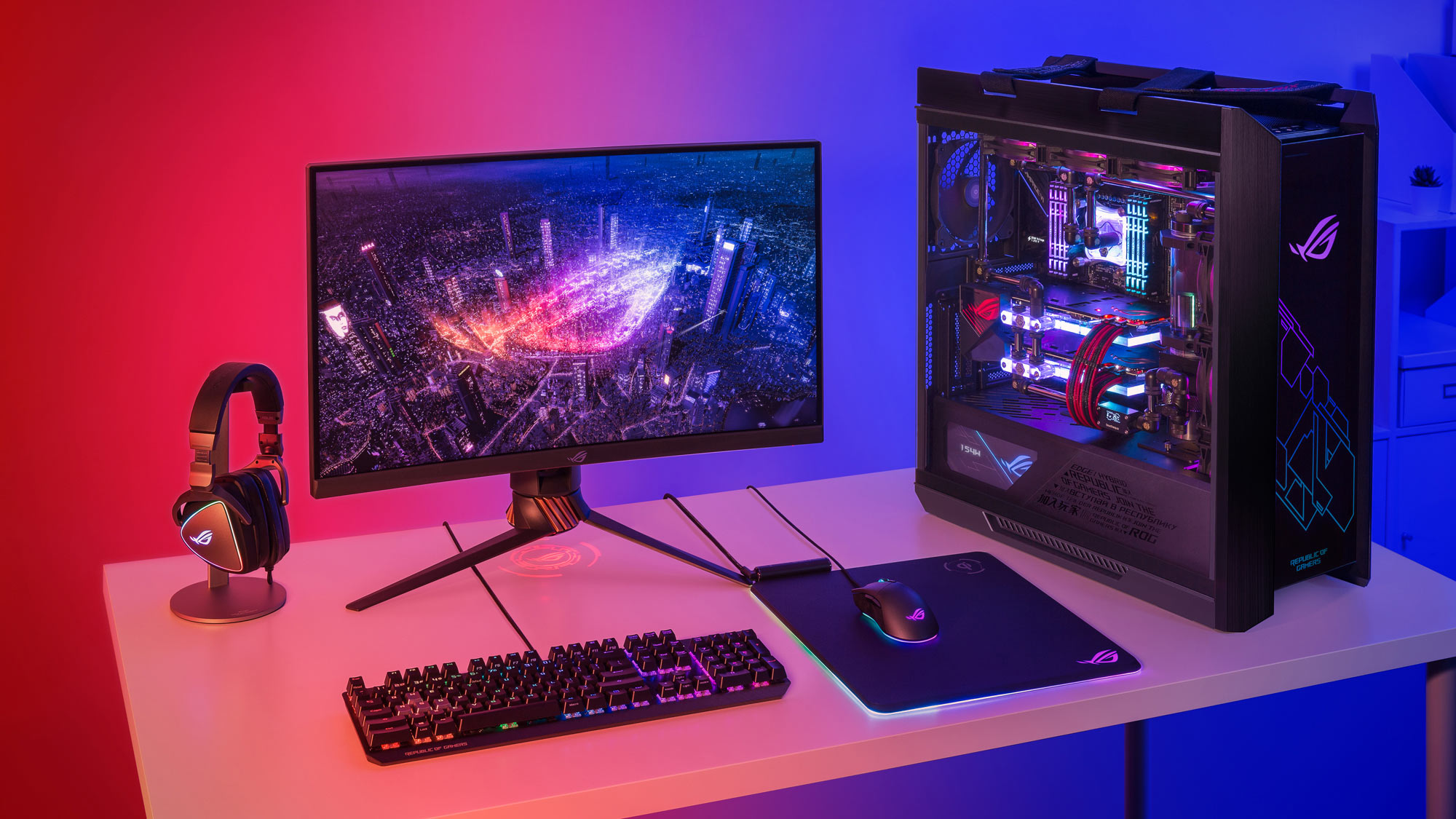
Start with the games you play and the display you plan to use. A capable gaming computer is a balance of graphics hardware, processor speed, memory, storage, cooling, and the practical limits of a desktop or laptop chassis.
Graphics card
The GPU has the largest effect on resolution, image quality, ray tracing, and frame rates. The RTX 5070 systems in this roundup are built for substantially more demanding play than the RTX 3050, RX 580, or integrated Vega graphics. An 8GB or 12GB graphics-memory specification also affects how comfortably a card handles high-resolution textures.
Look for a dedicated GPU if gaming is the main purpose. Integrated graphics can suit lighter games, but they share system resources and offer less flexibility as new releases become more demanding.
Buy the graphics card for the display you actually use, not the one you might buy someday.
Processor
The CPU affects game simulation, minimum frame rates, streaming, and background work. Eight-core processors such as the Ryzen 7 9700X, Ryzen 7 8700F, and Core Ultra 7 265F give a desktop more multitasking headroom than the six-core Ryzen 5 chips. The Ryzen 7 9800X3D is especially aimed at gaming workloads that benefit from its 3D V-Cache.
For competitive games at a high refresh rate, CPU performance can be just as important as the GPU. For cinematic single-player games at high resolution, the graphics card usually becomes the bigger constraint.
Memory
Memory capacity determines how comfortably the computer handles a game alongside browsers, voice chat, streaming tools, and creative applications. The 32GB systems here give more breathing room than 16GB configurations, while the Horizon's 64GB is designed for especially heavy multitasking.
DDR5 is the newer memory standard used by the leading desktops and the ASUS laptop. DDR4 remains functional in the entry-level systems, but the platform is less current. Capacity and speed both matter, though a larger amount of slower memory can still be preferable to running out of space during multitasking.
Storage
An NVMe SSD makes Windows, applications, and games feel much more responsive than a traditional hard drive. A 1TB SSD is a useful starting point, while the MSI's 2TB SSD is better for a large active library. Horizon combines a fast 1TB NVMe drive with a 4TB 7200RPM hard drive, which is useful for files that do not need SSD speeds.
Check how the storage is divided. A large total figure is less helpful if most of it is on a slower hard drive and the SSD fills quickly with current games.
For more component-focused planning, which hardware upgrades matter most for modern games can help identify what to prioritize.
Cooling and chassis
High-performance processors and graphics cards produce heat, so cooling affects sustained performance and noise. The KOTIN and Horizon systems use 360mm liquid coolers, while MSI uses an air cooler with four fans and the ASUS laptop uses a vapor chamber and tri-fan design.
Size matters too. Large desktops need clearance and airflow around the case, while laptops trade easy transport for tighter thermal limits. Look for a clear fan layout, sensible ventilation, and a power supply with enough capacity for the installed hardware.
Frequently asked questions
Is a desktop or laptop better for gaming?
A desktop usually provides more cooling room, easier component access, and stronger graphics options for the same general class of hardware. A laptop such as the ASUS ROG Strix G16 is the better fit when you need to move between rooms, school, or work. Portability is the deciding factor, not simply the processor name.
How much memory does a gaming computer need?
The 16GB systems in this roundup can handle gaming and ordinary background applications. 32GB gives more room for browsers, launchers, streaming, and newer demanding games, while 64GB is useful for unusually heavy multitasking. Memory capacity should be considered alongside the graphics card and processor.
Is an RTX 5070 suitable for 4K gaming?
The RTX 5070 desktops in this list are positioned for 1440p and 4K gameplay. Actual results depend on the game, graphics settings, ray tracing, and whether supported technologies such as DLSS are used. A 4K monitor places more demand on the GPU than a 1080p display.
Does an integrated GPU work for PC gaming?
Integrated graphics can run lighter and mainstream games at 1080p with appropriate settings. They are less suitable for demanding new releases and do not offer the same upgrade path as a desktop with a dedicated graphics card. The YAWYORE is the clearest example of an integrated-graphics starting point here.
Is 1TB of SSD storage enough for games?
It is enough for Windows and a useful selection of games, but large modern installations can consume it quickly. The MSI Codex Z2's 2TB SSD gives more room for an active library, while Horizon separates fast game storage from a larger hard drive. Expansion options are worth checking if you keep many games installed.
Does a gaming desktop need liquid cooling?
No. A well-designed air cooler and adequate case fans can handle many gaming processors. Liquid cooling can provide additional thermal capacity for systems such as the KOTIN desktops and Horizon, but it introduces a pump and radiator that are not present in a conventional air-cooled build.
The bottom line
The Best computer for gaming in this group is the KOTIN Ryzen 7 9700X PC. Its RTX 5070, eight-core processor, 32GB of DDR5 memory, 360mm cooler, Wi-Fi 7, and monitoring display create the most balanced high-performance desktop here. Choose the KOTIN Ryzen 7 9800X3D PC instead if high-refresh competitive gaming is the priority.
The ASUS ROG Strix G16 is the clear alternative for anyone who needs a portable machine, while the MSI Codex Z2 makes more sense for a large game library because of its 2TB SSD. Buyers with lighter gaming needs can step down to the SKYESEV, STGAubron, or YAWYORE, but should keep their expectations focused on 1080p and less demanding titles.
If you are undecided, choose the KOTIN Ryzen 7 9700X PC for the strongest balance of performance, cooling, and everyday usability.
As an Amazon Associate we earn from qualifying purchases.