

Editing 4K footage is rarely difficult because of the timeline itself. The trouble starts when playback stutters, effects take ages to render, and a full project folder leaves no room for the next one. Choosing between a tower, compact desktop, and laptop also changes what you can upgrade later.
Our Best computer for video editing picks range from a powerful Dell tower with dedicated RTX graphics to compact systems and large-screen HP laptops. The specifications vary widely, so the right choice depends on whether you edit short 1080p clips, multicamera projects, or effects-heavy footage.
The Dell Tower Plus RTX 5060 is the strongest overall pick, while the rest cover portable editing, quiet compact workspaces, large local storage, and lower-demand projects.
Comparison table
| # | Product | Award | Processor | Memory | Storage and graphics | Best for |
|---|---|---|---|---|---|---|
| 1 | Dell Tower Plus RTX 5060 | Best overall | Intel Ultra 7-265, 20 cores | 32GB DDR5 | 1TB NVMe SSD, RTX 5060 8GB | Serious desktop editing |
| 2 | Dell Tower Ultra 7 | Best upgradeable tower | Intel Core Ultra 7-265 | 32GB | 1TB SSD | Multi-monitor desktop work |
| 3 | Acer Aspire Ultra 7 | Best portable creator laptop | Intel Ultra 7 258V | 32GB LPDDR5X | 2TB PCIe SSD, Intel Arc 140V | Mobile 1080p editing |
| 4 | HP Mini i7 | Best compact desktop | Intel i7-12700T, 12 cores | 16GB DDR4 | 1TB NVMe SSD | Small desks and three displays |
| 5 | HP Quadro Workstation | Best workstation storage | Intel 8th Gen hexa-core i5 | 32GB DDR4 | 1TB SSD, 4TB HDD, Quadro K1200 4GB | Large media libraries |
| 6 | HP 17 Ryzen 5 16GB | Best large-screen laptop | Ryzen 5 7520U | 16GB DDR4 | 1TB NVMe SSD | Editing on a spacious laptop |
| 7 | Dell OptiPlex 7050 SFF | Best refurbished office tower | Intel Core i7-7700 | 32GB DDR4 | 1TB SSD, integrated graphics | Basic editing and office use |
| 8 | HP 17 Ryzen 5 8GB | Best entry-level laptop | Ryzen 5 7520U | 8GB LPDDR5 | 512GB NVMe SSD | Short clips and schoolwork |
| 9 | Dell OptiPlex 3040 RX 550 | Best basic GPU desktop | Intel Core i5-6500 | 16GB | 240GB SSD, 2TB HDD, RX 550 4GB | Simple effects and archiving |
| 10 | Dell Pro Tower i3 | Best office-first tower | Intel Core i3-14100, 4 cores | 16GB DDR5 | 512GB SSD | Light editing beside office tasks |
1. Dell Tower Plus RTX 5060: Best Overall

Pros
- Dedicated GeForce RTX 5060 graphics
- 20-core Intel Ultra 7 processor
- 32GB DDR5 memory
- Broad display and storage connectivity
Cons
- The 1TB internal drive can fill quickly with source footage
- Larger and less portable than the laptops here
- The listing does not provide detailed display information
Best for: editors who want a capable desktop foundation for demanding timelines, effects, and exports.
The Dell Tower Plus RTX 5060 is the one we would keep for a serious editing desk. Its advantage is not just a fast processor. The combination of Intel Ultra 7-265 and GeForce RTX 5060 graphics gives editing software a proper dedicated graphics processor to work with, which matters when a timeline includes GPU-accelerated effects, color work, transitions, or demanding previews.
The processor has 20 cores and can boost to 5.3GHz, while its 32GB of DDR5 memory gives multiple applications room to stay open. That is a sensible starting point for editing with a browser, audio tools, graphics software, and a video editor running together. The 1TB PCIe NVMe SSD should make application launches and project access quick, but active editors will want a separate media drive once larger projects begin to accumulate.
Connectivity is unusually useful for a workstation. The tower includes two HDMI outputs, three DisplayPort connections, Thunderbolt 4, USB 3.2 Type-C, an SD card reader, and four USB 2.0 ports. That gives editors several ways to connect displays, cards, docks, and external storage without immediately reaching for a hub. It also includes a USB keyboard and mouse, which helps get a desk operational quickly.
Compared with the Dell Tower Ultra 7, this model wins decisively for graphics-heavy work because the Dell Tower Ultra 7 listing does not identify a dedicated GPU. The Acer Aspire Ultra 7 is easier to carry and has twice the listed storage, but its integrated Intel Arc 140V graphics are aimed at lighter 1080p editing rather than the broader headroom of an RTX card. The real weakness is storage capacity relative to a large video library, and the product information does not spell out every internal expansion detail. Skip it if you need a laptop or a very small workstation. For a fixed editing setup, it is the clearest high-capability choice.
2. Dell Tower Ultra 7: Best Upgradeable Tower

Pros
- Intel Core Ultra 7 processor
- 32GB of memory
- Supports up to four FHD monitors
- Tool-less access to internal components
- Includes one year of onsite service
Cons
- No dedicated graphics card is identified
- The listed operating system is Windows 11 Home
- A 1TB drive may not suit large footage libraries
Best for: desktop editors who value expansion and several monitors more than dedicated graphics.
The Dell Tower Ultra 7 feels designed for the editor who wants a clean desktop system that can grow. It has the same Core Ultra 7-265 family of processor as the top Dell, along with 32GB of memory and a listed 1TB drive. That is enough room for applications, working files, and a modest project library, though it is not a replacement for a dedicated archive drive.
Its biggest practical strength is display support. Dell says it can connect up to four FHD monitors through DisplayPort and daisy chaining, or two 4K displays using HDMI 2.1 and DisplayPort. Editors who keep a timeline on one screen, a preview on another, and bins or audio controls nearby will appreciate that flexibility. The choice of display resolution still matters, but the computer is not limited to a single-screen desk.
The tool-less entry and removable side panel are valuable details. A desktop that can be opened without a complicated disassembly is easier to maintain and upgrade. Dell also includes a hardware TPM security chip, a lock slot, and a padlock loop, while the one-year onsite service can be reassuring for a home office or small production room.
This machine sits behind the Dell Tower Plus RTX 5060 for effects-heavy editing because the latter has a named RTX 5060 8GB graphics card. It beats the Dell Pro Tower i3 as an editing base thanks to its much stronger processor class and larger memory configuration. The missing dedicated GPU is the important limitation, so editors working with heavy noise reduction, 3D effects, or complex color grades should choose the RTX system instead. For multicamera organization, office work, and a multi-monitor editing layout, this is the more sensible expandable tower.
3. Acer Aspire Ultra 7: Best Portable Creator Laptop
Pros
- 32GB LPDDR5X memory
- Spacious 2TB PCIe SSD
- Intel Arc 140V graphics
- 14-inch touchscreen with stylus support
- USB hub includes HDMI, USB, SD, and Ethernet
Cons
- Integrated graphics are not a substitute for the RTX desktop
- The listed dimensions and weight information are inconsistent
- Windows 11 Home is installed
Best for: mobile creators editing 1080p projects between home, work, and client locations.
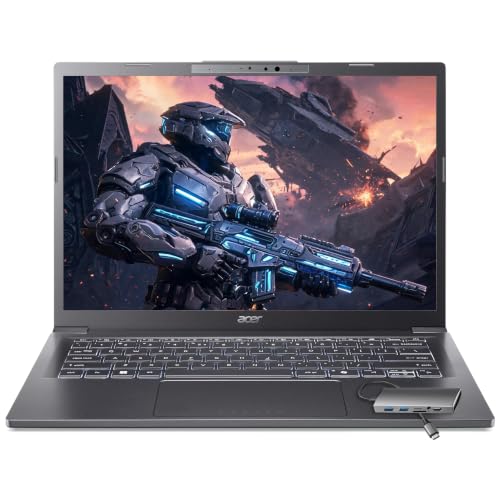
The Acer Aspire Ultra 7 is the most interesting laptop here because it balances portability with a configuration that does not feel cramped. Its 32GB of LPDDR5X memory is generous for a thin mobile machine, and the 2TB PCIe SSD gives an editor much more breathing room for current projects than the 512GB and 1TB laptop options.
The Intel Core Ultra 7 258V includes a dedicated NPU rated at 47 TOPS for local AI features. The listing specifically mentions real-time video effects, background blur, auto-framing, and AI photo editing. Those features are useful around a project, but the more relevant editing specification is the Intel Arc 140V graphics with eight Xe cores. Acer positions it for GPU-accelerated effects and 1080p editing in Premiere and DaVinci Resolve. That makes it a credible portable editor for lighter projects, not a mobile replacement for the RTX 5060 tower.
The 14-inch touchscreen is compact, but it can make quick scrubbing, image adjustments, and direct navigation more natural. The included hub adds HDMI, USB-A, USB-C, SD card, and Ethernet, so the laptop can become a more practical desk machine without requiring a collection of separate adapters. Wi-Fi 6E also suits cloud uploads and remote work, though local media remains preferable for active editing.
The Acer Aspire Ultra 7 is easier to carry than the HP 17 Ryzen 5 16GB, and its 2TB SSD is a major advantage over both HP laptops. The Dell Tower Plus RTX 5060 is still the better choice for demanding GPU work. The product data describes it as 3.09 pounds and 0.7 inches thin, but the separate dimensions field lists a one-pound weight, so we would not treat that conflicting detail as definitive. Choose Acer for freelancers and students who need a portable 1080p editing machine. Skip it if your projects depend on heavyweight effects, 4K multicamera timelines, or sustained desktop rendering.
4. HP Mini i7: Best Compact Desktop

Pros
- 12-core Intel i7-12700T processor
- Compact 6.97-inch design
- Supports three 4K displays at 60Hz
- 1TB NVMe SSD
- Wi-Fi 5 and Bluetooth included
Cons
- 16GB DDR4 memory is less comfortable for large projects
- No dedicated graphics processor is listed
- Compact systems offer less upgrade flexibility than towers
Best for: editors who need strong CPU multitasking in a small workspace.
The HP Mini i7 makes sense when desk space matters as much as processing power. Its 12-core Intel i7-12700T processor can handle a busy editing workflow, and the compact 6.97-inch design can sit behind a display or beside a small audio interface. HP also describes it as whisper quiet, though the listing does not provide an acoustic measurement.
Its display support is unusually strong for a mini desktop. Dual DisplayPort 1.4 and HDMI 2.1 can drive three 4K monitors at 60Hz. That is more useful than it sounds: an editor can keep a full-screen preview available while reserving other panels for bins, audio, and effects. The 1TB NVMe SSD should keep the operating system and applications responsive, although 16GB of DDR4 memory is a more modest starting point for large compositions than the 32GB configurations above.
The connectivity is well suited to a compact editing station. There are seven high-speed USB ports, including two USB-C ports rated at 20Gbps, plus Gigabit Ethernet, Wi-Fi 5, and Bluetooth. The included wired keyboard, mouse, stand, and 90W adapter make it a complete desktop package rather than a bare computer that needs several immediate additions.
The HP Mini i7 has a stronger CPU specification than the HP Quadro Workstation, but the HP Quadro Workstation offers a dedicated Quadro K1200 GPU and much more built-in storage. The Dell Tower Ultra 7 is the better expansion platform, while HP wins for footprint. The key limitation is the absence of a named dedicated graphics card, so this is not the right tool for GPU-intensive finishing. It is a good fit for editors who cut, organize, and export projects while keeping a very small desk.
5. HP Quadro Workstation: Best Workstation Storage

Pros
- Quadro K1200 graphics with 4GB memory
- 32GB DDR4 RAM
- 1TB SSD plus 4TB HDD
- Two DisplayPort outputs
- Wi-Fi and Bluetooth included
Cons
- Older workstation platform
- The Quadro GPU is behind the RTX 5060
- Renewed condition means configuration details should be checked
Best for: editors who need substantial local footage storage and workstation-oriented connectivity.
The HP Quadro Workstation is less about fashionable components and more about a practical editing layout. It pairs an eighth-generation hexa-core Intel Core i5 with 32GB of DDR4 memory, a 1TB SSD, and a 4TB hard drive. That split is useful for editors who want applications and active project files on solid-state storage while keeping completed footage and source media close at hand.
The Quadro K1200 has 4GB of graphics memory and is the only dedicated workstation GPU among the older refurbished systems here. HP positions it for video editing, 3D design, AutoCAD, and software with independent software vendor certification. That workstation orientation can matter for specific creative and engineering applications, but it does not make the K1200 comparable to the much newer GeForce RTX 5060 in the Dell Tower Plus RTX 5060.
Connectivity is another reason to consider it. The system has five USB 3.0 ports, four USB 2.0 ports, one USB-C port, two DisplayPort outputs, VGA, Ethernet, audio connections, and three internal SATA connections. Wi-Fi and Bluetooth are included, so it works well in a mixed studio with wireless peripherals and network storage.
The HP Quadro Workstation beats the Dell OptiPlex 7050 SFF for graphics work and built-in storage, while the Dell OptiPlex 3040 RX 550 offers a newer-sounding graphics memory configuration but a less capable overall platform. Its real weakness is age. Buyers who want modern CPU performance, current GPU acceleration, or a simpler warranty path should move up to a new Dell system. Choose HP when a large local media archive and broad workstation connectivity matter more than the latest rendering performance.
6. HP 17 Ryzen 5 16GB: Best Large-Screen Laptop
Pros
- 17.3-inch Full HD anti-glare screen
- 16GB memory
- 1TB PCIe NVMe SSD
- Wi-Fi 6 and Bluetooth
- USB-C and HDMI connectivity
Cons
- Ryzen 5 7520U has four cores
- No dedicated graphics processor is listed
- Large chassis is less convenient for travel
Best for: editors who prefer a roomy built-in display and straightforward 1080p work.
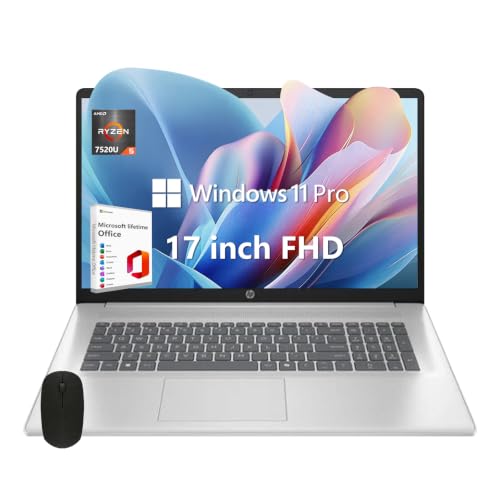
The HP 17 Ryzen 5 16GB is the laptop to choose when a large editing interface matters more than compact travel. Its 17.3-inch Full HD anti-glare screen gives the timeline, preview, and panels more room than a typical smaller notebook. The 1920 by 1080 resolution is sensible for 1080p editing, though it leaves less room for a detailed 4K preview than a higher-resolution external monitor.
The Ryzen 5 7520U has four cores, eight threads, and a listed boost speed of up to 4.3GHz. That is adequate for basic cuts, short-form content, and straightforward exports, but it does not have the processing headroom of the 12-core HP Mini i7 or 20-core Dell systems. The 16GB of DDR4 memory is a better fit for an editor than the 8GB version, especially when a browser, music, graphics application, and video editor are open together.
Storage is a strong point for a laptop in this group. The 1TB PCIe NVMe M.2 SSD should keep startup and project access responsive, while Wi-Fi 6 supports fast network transfers. HDMI, USB-C, and Bluetooth make it simple to connect a larger screen, card reader, or wireless accessories. The listing also includes a mouse and tablet stand, which can make a temporary mobile workstation easier to arrange.
The HP 17 Ryzen 5 16GB is more comfortable for long editing sessions than the HP 17 Ryzen 5 8GB, and its memory and storage configuration make that difference meaningful. The Acer Aspire Ultra 7 is the stronger mobile creator system because it has 32GB of LPDDR5X memory and Intel Arc graphics. For a wider look at mobile workflows, a laptop screen and processor change the editing experience in ways a desktop comparison cannot. Choose HP for a large screen and simple 1080p projects. Skip it if you need heavy effects, multicamera 4K work, or frequent travel.
7. Dell OptiPlex 7050 SFF: Best Refurbished Office Tower

Pros
- 32GB DDR4 memory
- 1TB SSD
- Small form factor design
- HDMI and DisplayPort outputs
- Wi-Fi adapter and Bluetooth included
Cons
- Older Core i7-7700 processor
- Integrated graphics are a poor match for demanding effects
- Renewed system includes a 90-day seller warranty
Best for: simple editing, social clips, and a compact secondary workstation.
The Dell OptiPlex 7050 SFF is an office computer adapted for light editing rather than a purpose-built modern workstation. Its Core i7-7700 runs at 3.60GHz, and the 32GB of DDR4 memory gives it more room for multitasking than several newer entry-level systems. For trimming footage, assembling short projects, and handling ordinary desktop work, that combination remains usable.
The 1TB SSD is the most helpful part of the configuration. It avoids the sluggish application launches associated with an older hard drive and leaves more working space than the 240GB SSD in the Dell OptiPlex 3040 RX 550. HDMI and DisplayPort support two monitors, which makes a small editing interface less frustrating.
Wireless connectivity is included through a USB Wi-Fi adapter, along with Bluetooth, while the computer also has USB 3.0, USB 2.0, Ethernet, and audio connections. The small form factor dimensions, about 11.4 inches high, 11.5 inches long, and 3.6 inches wide, suit a crowded desk. It also includes a wired keyboard and mouse.
The weakness is the age of the platform and its integrated graphics. It cannot compete with the Dell Tower Plus RTX 5060 for GPU-assisted effects, and it trails the HP Quadro Workstation for applications that benefit from dedicated graphics. The listing identifies a professionally renewed machine with a 90-day seller warranty, so buyers should be comfortable with a refurbished system. Pick it for basic editing and office work, not as the main machine for a growing production business.
8. HP 17 Ryzen 5 8GB: Best Entry-Level Laptop
Pros
- Large 17.3-inch Full HD anti-glare display
- Ryzen 5 processor with four cores and eight threads
- 512GB NVMe SSD
- Wi-Fi 6 and Bluetooth
- HDMI and USB-C
Cons
- 8GB memory limits heavier editing
- No dedicated graphics processor is listed
- 512GB storage can fill quickly
Best for: short 1080p projects, basic cuts, and school or home editing tasks.
The HP 17 Ryzen 5 8GB offers the same useful physical format as its 16GB sibling: a 17.3-inch Full HD anti-glare screen, a full-size laptop chassis, and enough resolution for a comfortable 1080p timeline. That wide display is helpful when a smaller laptop would force constant panel resizing.
Its Ryzen 5 7520U processor has four cores, eight threads, and a listed boost speed of up to 4.3GHz. The processor is suitable for basic editing, but the 8GB of LPDDR5 memory is the limiting factor. A video editor, browser, graphics tool, and background sync tasks can quickly consume that capacity, causing more reliance on storage and less fluid multitasking.
The 512GB PCIe NVMe SSD is fast for booting and application launches, but project footage will use it quickly. Wi-Fi 6, Bluetooth, USB-C, and HDMI provide the basic connections for transferring clips and adding a larger screen. The included mouse and tablet stand are practical extras for a simple home setup, though they do not change the system's editing ceiling.
Compared with the HP 17 Ryzen 5 16GB, this model gives up exactly the memory and storage that matter most once projects grow. The Acer Aspire Ultra 7 is substantially better equipped for mobile editing, with 32GB of memory and a 2TB SSD. The HP 17 Ryzen 5 8GB remains suitable for short clips and uncomplicated timelines. Skip it if you expect to edit long projects, use several creative applications together, or keep source media locally.
9. Dell OptiPlex 3040 RX 550: Best Basic GPU Desktop

Pros
- RX 550 graphics with 4GB DDR5 memory
- 16GB RAM
- 2TB hard drive for footage
- 240GB SSD for booting
- Wi-Fi included
Cons
- Very small 240GB system SSD
- Older Core i5-6500 processor
- Renewed system uses an aging platform
Best for: simple editing workflows that need a dedicated entry-level graphics card and archive space.
The Dell OptiPlex 3040 RX 550 is a basic editing tower with one useful twist: it includes a dedicated Radeon RX 550 graphics card with 4GB of DDR5 memory. That gives it a clearer graphics path than the integrated-graphics office systems, although the card and processor are both older and should be viewed as entry-level hardware.
The Core i5-6500 runs at 3.2GHz and is paired with 16GB of memory. That combination can handle ordinary cuts, simple transitions, and modest effects, but complex timelines will expose its age. The 240GB SSD should keep Windows and applications responsive, while the separate 2TB HDD provides a place for footage and completed projects.
The storage arrangement is practical but not ideal. Editors need to keep active project files on the faster SSD when possible, yet 240GB disappears quickly after installing a creative suite and importing media. The large hard drive helps with capacity, but it will not feel as responsive when used for active timeline work. Wi-Fi is included, and the metallic tower design gives it a conventional desktop footprint.
The Dell OptiPlex 3040 RX 550 has a more useful graphics setup than the Dell OptiPlex 7050 SFF, but the 7050 has twice the memory and a larger SSD. The HP Quadro Workstation is the better older workstation when software compatibility and storage are priorities. Choose Dell for simple projects where the RX 550 can assist supported effects. Skip it if you want a long-term editing platform or regularly work with high-resolution multicamera footage.
10. Dell Pro Tower i3: Best Office-First Tower

Pros
- Modern Intel Core i3-14100
- 16GB DDR5 memory
- 512GB TLC SSD
- Windows 11 Pro
- Useful front USB-C connection
Cons
- Four-core processor
- No Wi-Fi or Bluetooth
- No dedicated graphics card is identified
Best for: light video editing alongside office, education, or general desktop work.
The Dell Pro Tower i3 is primarily a business desktop, and that is how it should be approached. Its Intel Core i3-14100 has four cores and can reach 4.7GHz, making it responsive for office software, browser work, and simple editing. It is not intended to compete with the multi-core systems higher in this list.
The 16GB of DDR5 memory is a reasonable baseline for short projects, while the 512GB TLC SSD should provide quick boots and application launches. That storage capacity is enough for current work if footage is moved to external or network storage, but it is not generous for a library of source clips. The tower's business focus shows in its discrete TPM, chassis intrusion switch, and ENERGY STAR and EPEAT Silver credentials.
Port selection is useful at a desk. The front includes USB 2.0, USB 3.2 Gen 1 Type-C, USB 3.2 Gen 1 Type-A, and an audio jack. The rear adds USB, DisplayPort, HDMI, and Gigabit Ethernet. There is no Wi-Fi or Bluetooth, so wireless accessories and wireless network access require separate hardware.
The Dell Pro Tower i3 is clearly behind the Dell Tower Ultra 7 for editing and behind the Dell Tower Plus RTX 5060 for demanding effects. It does have a newer processor generation than the refurbished Dell systems, but its four-core design and lack of dedicated graphics keep it in the light-editing lane. Choose it for an office-first machine that occasionally handles short videos. Editors buying specifically for production should choose a stronger system.

How to choose best computer for video editing
The right editing computer needs balanced CPU performance, enough memory, fast working storage, and graphics hardware that matches the effects and resolution you use.
Processor cores and sustained performance
The processor handles timeline calculations, encoding, application responsiveness, and many effects. More cores help with exports and multitasking, while higher boost speeds can improve responsiveness during lighter work. The 20-core Intel Ultra 7-265 in the Dell Tower Plus RTX 5060 has far more headroom than the four-core processors in the HP laptops and Dell Pro Tower i3.
A modern multi-core processor is the safer choice for multicamera work, long exports, and simultaneous audio or graphics applications. Four cores can still suit short 1080p projects, but the margin disappears quickly when several demanding tasks run together.
Dedicated graphics
A dedicated GPU matters for effects, color processing, playback acceleration, and some export workflows. The RTX 5060 in the Dell Tower Plus RTX 5060 is the strongest graphics option here, while the Quadro K1200 and RX 550 offer more limited dedicated acceleration. The Acer's integrated Intel Arc 140V graphics are more capable than a basic integrated solution for the 1080p work described in its listing.
A fast CPU can finish a basic edit, but a dedicated GPU changes how confidently you can preview effects before export.
Memory capacity
Memory affects how many applications and high-resolution assets can stay active without slowdowns. A 32GB configuration is the comfortable target for more ambitious editing, especially when using a browser, audio application, and graphics tools alongside the editor. The 16GB systems can handle ordinary projects, while 8GB in the HP 17 Ryzen 5 8GB is best reserved for simple timelines.
Memory type matters less than capacity for most buyers comparing these machines. DDR5 and LPDDR5X are newer memory technologies, but an older computer with 32GB can still feel more comfortable in a multitasking session than a newer one with 8GB.
SSD capacity and media storage
An SSD makes Windows, editing software, project files, and caches feel responsive. Capacity is just as important because video files grow quickly. The Acer's 2TB SSD is the most generous single drive here, while the HP Quadro Workstation combines a 1TB SSD with a 4TB HDD for a useful system and archive arrangement.
A smaller SSD can work if source footage is stored on an external drive or network storage. Keep active project files and cache data on the fastest drive available, and use slower bulk storage for completed projects and backups.
Display workspace and ports
A laptop's built-in screen affects how comfortably you can see a timeline, preview window, and controls. The 17.3-inch HP models offer the largest built-in workspace, while the Acer's 14-inch touchscreen favors portability. Desktop users should check monitor support and connection types before buying.
The HP Mini i7 can drive three 4K monitors at 60Hz, and the Dell Tower Ultra 7 supports several monitor arrangements. A good port selection also helps with SD cards, external drives, docks, and audio interfaces. For color-critical work, the computer is only part of the setup, since screen characteristics affect how confidently you can judge edited images.
Laptop portability and desktop expansion
A laptop makes sense for editors who move between locations, while a tower usually offers easier access to storage and graphics upgrades. The Acer is the most mobile option, and its included hub helps it connect to a desk setup. Tower systems such as the Dell models are better suited to fixed workspaces and future component changes.
Small desktops split the difference. The HP Mini i7 saves desk space and supports three displays, but its compact enclosure is not as flexible as a full tower when the editing workload grows.

Frequently asked questions
How much RAM does video editing need?
16GB is a workable starting point for basic 1080p editing, but 32GB is more comfortable for larger projects, several applications, and effects-heavy timelines. The Dell Tower Plus RTX 5060, Dell Tower Ultra 7, and Acer Aspire Ultra 7 all provide 32GB.
Is a laptop good enough for video editing?
A laptop can be a good editing computer when portability matters and the workload is moderate. The Acer Aspire Ultra 7 is the strongest mobile option here because it combines 32GB of memory, a 2TB SSD, and Intel Arc graphics. A desktop remains preferable for sustained demanding work and easier upgrades.
Is a dedicated graphics card necessary?
It is not essential for basic cuts and simple 1080p projects, but a dedicated GPU helps with supported effects, color processing, previews, and some export workflows. The Dell Tower Plus RTX 5060 has the most capable graphics hardware in this group. The older Quadro K1200 and RX 550 are more limited but still provide dedicated graphics.
Is 1TB of storage enough for video editing?
A 1TB SSD can hold editing software, caches, and current projects, but it may fill quickly with high-resolution source footage. The Acer's 2TB SSD gives more room, while the HP Quadro Workstation adds a 4TB HDD for larger local archives. External storage is still useful for backups and completed projects.
Is 8GB RAM enough for editing?
8GB can handle very short and simple projects, but it leaves little room for a browser, audio tools, or graphics applications. The HP 17 Ryzen 5 8GB is best for light editing and basic tasks. A 16GB or 32GB system is a safer choice for regular editing.
Are refurbished desktops suitable for video editing?
A refurbished desktop can work well when the configuration matches the workload and the warranty terms are acceptable. The Dell OptiPlex 7050 SFF and Dell OptiPlex 3040 RX 550 are useful for basic editing, but their older processors limit demanding work. Check the included warranty and exact configuration before relying on one for professional projects.

The bottom line
The Dell Tower Plus RTX 5060 is the Best computer for video editing in this group for editors who want a desktop with a strong processor, 32GB of memory, and a current dedicated graphics card. The Dell Tower Ultra 7 is a better fit for a multi-monitor workstation where easy internal access and display flexibility matter more than GPU-intensive effects.
For mobile work, choose the Acer Aspire Ultra 7 because its 32GB memory, 2TB SSD, touchscreen, and Intel Arc graphics form the most capable laptop combination here. Buyers with lighter workloads can step down to the HP laptops or a refurbished Dell, but they should expect tighter limits on memory, graphics, or processor performance.
If you are undecided, buy the Dell Tower Plus RTX 5060 for demanding desktop editing, or the Acer Aspire Ultra 7 when carrying the computer matters more than maximum rendering headroom.
As an Amazon Associate we earn from qualifying purchases.