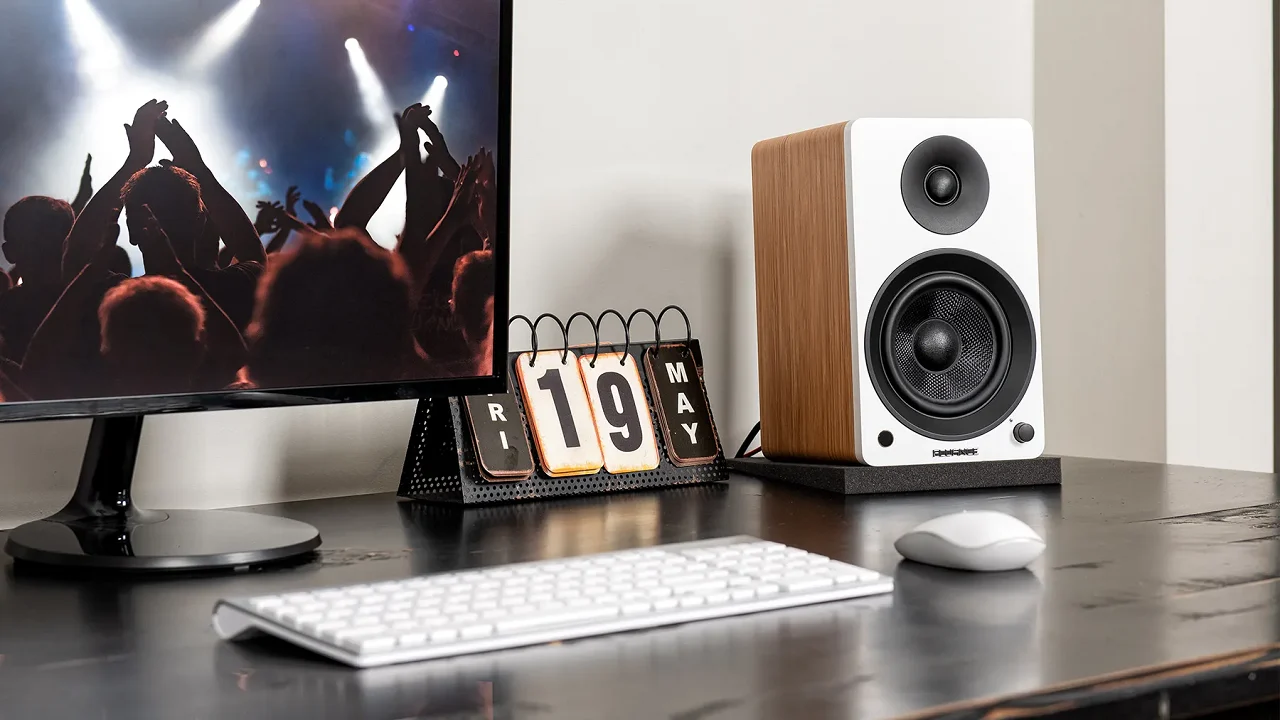

Most laptops, and even many all-in-one desktops, ship with speakers that sound like they’re broadcasting through a tin can. If you spend hours editing audio, gaming, or just watching YouTube in your home office, the upgrade to a proper set of desktop speakers is one of the most satisfying peripherals you can make. We rounded up ten of the best computer speakers for desktop use, from compact USB-powered pairs to full 2.1 systems with a subwoofer, and tested them across music, movies, and voice calls.
Our top pick is the Logitech Z313, a 2.1 system that delivers deep bass and clear mids without taking over your desk. But the right choice depends on your setup and priorities. For gamers, the Edifier G2000 offers customizable RGB and multiple EQ modes. For minimalists, the Creative Pebble proves you don’t need a lot of space or money for decent sound. Here are the ten best desktop computer speakers we recommend in 2026.
| # | Product | Award | Type | Connectivity | Special Feature | Best for |
|---|---|---|---|---|---|---|
| 1 | Logitech Z313 2.1 | Best Overall | 2.1 | 3.5mm AUX, USB power | Subwoofer | Deep bass in a compact 2.1 |
| 2 | Edifier G2000 | Best for Gaming | 2.0 | Bluetooth, USB, 3.5mm AUX | RGB, EQ modes | Gamers who want immersive audio |
| 3 | Creative Pebble 2.0 Black | Best Compact | 2.0 | USB (power+audio) | Passive radiators | Minimal desktop with good sound |
| 4 | Logitech Z207 | Best Bluetooth | 2.0 | Bluetooth, 3.5mm AUX | Bluetooth 4.2 | Wireless streaming from phone/tablet |
| 5 | Amazon Basics AC-Powered | Best AC-Powered | 2.0 | 3.5mm AUX, AC power | Headphone jack | No USB dependency |
| 6 | Amazon Basics USB-Powered | Best Ultra-Compact | 2.0 | USB, 3.5mm AUX | Portability | Travel and small desks |
| 7 | LENRUE G11 | Best Touch Lights | 2.0 | USB, 3.5mm AUX | Touch angular lights | Aesthetic lighting |
| 8 | Tylubio RGB Soundbar | Best RGB Soundbar | 2.0 Soundbar | USB-C/USB | Dynamic RGB | Clean single-unit look |
| 9 | XKX Clip-On Soundbar | Best Monitor Mount | 2.0 Soundbar | USB, USB-C adapter | Clip-on mount | Saving desk space |
| 10 | Creative Pebble 2.0 White | Best White Option | 2.0 | USB, 3.5mm AUX | Aesthetic white | Matching white setups |
1. Logitech Z313 2.1: Best Overall

Pros
- 25 watts RMS output fills a small room easily
- Compact subwoofer delivers real bass you can feel
- Convenient control pod keeps volume and power at your fingertips
Cons
- No Bluetooth or wireless connectivity
- Satellites can sound a bit boxy at high volumes
Best for: someone who wants a proper 2.1 system without dedicating half their desk to speakers.
The Z313 has been a staple of the desktop audio world for years, and for good reason. The subwoofer is roughly the size of a small shoebox, but it puts out enough low-end to make action movies rumble and synth bass in electronic music feel tactile. The two satellites are surprisingly light, each weighs just a few ounces, but together with the sub they create a balanced soundscape that beats any built-in monitor speaker or soundbar under sixty watts.
Logitech rates the system at 25 watts RMS total, which is plenty for a home office or dorm room. The control pod is a simple puck with a volume dial and a headphone jack; it sits on the desk and lets you mute or adjust without reaching behind your monitor. One detail we appreciate: the pod also doubles as a power switch, so you can kill the speakers entirely when you’re done.
This is a 2.1 system without Bluetooth, so you’ll need the 3.5mm cable connected to your computer at all times. That also means no interference or codec compression. The tradeoff is a clean, wired listening experience that prioritizes reliability over convenience. If you are looking for more low-end authority, the dedicated best computer speakers with subwoofer roundup we’ve prepared looks at larger options, but for most people the Z313’s sub is already overkill in the best way.
The biggest weakness is that the satellites don’t have much presence in the upper mids. Vocals and guitar strums can get a little congested when you push the volume past 80 percent. For a casual listener who plays music at moderate levels, this is never an issue. The Z313 remains our top pick because it gives you a complete 2.1 setup that works with any desktop, no software or drivers needed.
2. Edifier G2000: Best for Gaming

Pros
- 32W peak power with distinct EQ modes for game, movie, and music
- Bluetooth connectivity plus USB and AUX inputs
- Twelve RGB lighting effects that sync with your setup
Cons
- No subwoofer output (though there is a subwoofer output interface, but no included sub)
- Base is a bit wide for ultra-compact desks
Best for: PC gamers who want room-filling sound and RGB that actually looks good.
The G2000 is Edifier’s dedicated gaming speaker, and it shows in every detail. The column-shaped cabinets sit on a 10-degree upward tilt, aiming the 2.75-inch full-range drivers directly at your ears. Combined with the rear bass port, the speakers produce a surprising amount of slam for their size, footsteps in competitive shooters are crisp and directional, and explosions have weight.
You get three EQ modes: Game (boosts treble and bass for positional audio), Movie (wider soundstage), and Music (neutral). Switching between them is quick via the top panel, and the difference is noticeable. The RGB ring on the back of each speaker cycles through 12 patterns, and you can turn them off if you want a more serious look. We found the lighting to be smooth and non-distracting, more accent than rave.
Connectivity is generous: Bluetooth for phone streaming, USB for direct PC audio, and 3.5mm AUX for older devices. There’s even a dedicated subwoofer output, so you can add an external sub later. The speakers are powered by a small wall adapter (not USB), which means they draw clean power without sharing your computer’s bus, something gamers with high-end PCs will appreciate.
The G2000 is best for someone who builds their setup around a gaming rig and wants audio that’s as tuned as their keyboard. The included RGB and EQ presets make it genuinely useful, not just gimmicky. If you prefer a more understated look, the Logitech Z313 is a better fit, but the Edifier outshines it in detail retrieval and versatility for gaming.
3. Creative Pebble 2.0 Black: Best Compact

Pros
- Single USB cable handles both power and audio
- 45-degree elevation angles the drivers toward your ears
- Passive radiators on the back add bass punch
Cons
- Bass rolloff below 100 Hz limits deep extension
- Frequency range tops out at 17 kHz, so treble air is modest
Best for: anyone who wants decent sound without cluttering their desk with wires or big enclosures.
The Pebble is the speaker we recommend most often to people who say “I just need something better than my laptop speakers.” Its single USB cable carries both power and audio, so there’s no wall wart or separate power brick. The two globes are connected by a fixed wire, and they sit at a 45-degree angle thanks to the molded base, that tilt focuses the sound up toward your ears rather than into your monitor.
Inside each speaker is a custom far-field driver with a rear-facing passive radiator. The radiators do a decent job of adding a bit of low-end thump; you won’t feel sub-bass, but kick drums and bass guitars have enough body to keep music engaging. Creative rates the frequency response at 100 Hz to 17 kHz, which is a touch narrow on top, but for spoken word, YouTube, and most pop music it’s entirely adequate.
Volume is controlled with a front-facing knob on the right speaker. It has a smooth analog feel and doubles as a power switch. There’s no headphone jack on this model, so you’ll need to use your computer’s jack for private listening. The Pebble is fully plug-and-play with Windows, macOS, and Chrome OS, no drivers, no setup.
What makes the Pebble a standout among the best computer speakers for desktop is its balance of size and performance. It’s barely bigger than a pair of tennis balls, yet it sounds fuller than many soundbars that take up three times the footprint. If your desk is tight, and you care more about mids and clarity than earth-shaking bass, this is the one to get.
4. Logitech Z207: Best Bluetooth

Pros
- Bluetooth 4.2 with Easy-Switch for seamless device hopping
- Passive radiators in each speaker add bass extension
- Headphone jack and volume controls on the right speaker
Cons
- No subwoofer output or bass boost option
- Bluetooth range is average, about 30 feet line-of-sight
Best for: someone who wants to switch between their desktop, phone, and tablet without reaching for cables.
The Z207 is Logitech’s answer to the wireless desk. Each speaker packs one active driver and one passive radiator, so even without a subwoofer you get a noticeable low-end presence. The Bluetooth pairing is straightforward: hold the button on the right speaker, select it from your device, and you’re done. Logitech’s Easy-Switch means you can pause audio on your PC and press play on your phone, and the speakers swap sources instantly, no re-pairing.
Sound quality is clean and neutral. Vocals are clear, and the passive radiators provide just enough warmth to keep acoustic music from sounding thin. The speakers are small enough to fit under most monitors, and they’re powered by a wall adapter (included) so you don’t drain your laptop’s battery. The 3.5mm input is always active, so you can keep a wired computer connection alongside Bluetooth.
The weakness here is the lack of any bass tuning or subwoofer output. If you listen to electronic or hip-hop at higher volumes, you’ll miss the low-end rumble that the Z313 provides. But for a 2.0 system that doubles as a Bluetooth speaker for your whole desk, the Z207 is hard to beat. If you need wireless flexibility, this pair is the best computer speakers for desktop that also let you stream from your phone.
5. Amazon Basics AC-Powered: Best AC-Powered Basic

Pros
- Plugs into a wall outlet for consistent, full power
- Front headphone jack is convenient for private listening
- Simple volume knob with on/standby function
Cons
- 4.6 watts total RMS is modest; won’t get very loud
- No bass extension below 68 Hz
Best for: a straightforward, no-fuss desktop setup that doesn’t depend on USB power.
The Amazon Basics AC-Powered speakers are the definition of “it just works.” Two small boxes, one cable to the wall, one 3.5mm cable to your computer. The single knob on the front turns the speakers on and controls volume. It’s a refreshingly simple design that avoids the driver-installation and power-draw concerns of USB-powered models.
Sound quality is decent for the size. The 4.6 watts RMS total (2.3 per channel) is enough for a small office or bedroom. Dialogue and classical music come through clearly. The frequency response reaches down to 68 Hz, which means you get some bass guitar presence, but there’s no thump. These speakers are best for voice calls, Zoom meetings, and light background music.
One practical advantage: AC power means the speakers are always ready, even if your computer’s USB ports are overloaded. They also work with any device that has a 3.5mm headphone jack, a TV monitor with an audio output, a tablet with an adapter, or a vintage iPod. The tradeoff is a power brick on the floor, but it’s compact.
If you want something that just works and don’t need Bluetooth or a subwoofer, this is a sturdy choice. For a little more money, the Logitech Z207 adds wireless, but the Amazon Basics pair is the best computer speakers for desktop for the pure analog experience.
6. Amazon Basics USB-Powered: Best Ultra-Compact

Pros
- Tiny footprint, fits in the palm of your hand
- USB powered, so no wall outlet needed
- Headphone jack on the front for private listening
Cons
- Only 2.2 watts total RMS; volume is limited
- Frequency response starts at 103 Hz, so bass is very light
Best for: travel, dorm rooms, or any scenario where every inch of desk space matters.
These are the smallest speakers in our roundup, measuring about 3 by 3.5 by 2.8 inches per unit. They draw power from a single USB port, just plug the cable into your desktop or laptop, connect the 3.5mm audio, and you’re done. The right speaker has a volume knob that also acts as a power switch, plus a 3.5mm headphone jack.
Given the tiny drivers, sound is about what you’d expect: clear mids and highs for podcasts and system sounds, but virtually no low end. The 103 Hz lower limit means even a bass guitar sounds thin. They’re fine for Zoom calls, background music at low volume, or as a temporary setup while you decide on a permanent pair.
We like these for a laptop rig that moves between rooms. They weigh under 1.5 pounds and can be tossed in a bag. The build is solid plastic with a matte finish that resists fingerprints. If you need something slightly louder with a bit more body, the Creative Pebble is a step up in size and sound, but it also requires a wall adapter. The Amazon Basics USB-Powered are the best computer speakers for desktop when portability is the top priority.
7. LENRUE G11: Best Touch Lights

Pros
- Unique touch-activated angular light strip on the front
- Four amplifier IC horns deliver distortion-free sound at moderate volumes
- Fits easily under a monitor with a low profile
Cons
- No Bluetooth, headphone jack, or microphone
- Not compatible with TVs (USB and AUX only)
Best for: adding a modern, glowing accent to a desk without sacrificing audio quality.
The G11 stands out visually with a V-shaped light bar that responds to a single touch, no fiddling with buttons to cycle through modes. The lights are angular and clean, not the usual RGB rainbow. They complement a gaming or minimalist setup well.
Sound quality is a pleasant surprise. LENRUE uses four amplifier IC horns, which translates to clear, distortion-free sound at typical desktop listening volumes. The mids are well-defined, and vocals cut through without harshness. Bass is present but not overwhelming; there’s no passive radiator, so it doesn’t reach as low as the Edifier or Logitech Z207.
The speakers are powered by USB and use a 3.5mm audio cable. They include a Type-C adapter for modern laptops. Setup is plug and play, and the low profile means they won’t block a monitor stand. One frustration: there’s no headphone jack, so you either listen out loud or use your computer’s front panel jack. The lack of Bluetooth is also a miss for the price segment.
If the touch light aesthetic appeals to you, the G11 is a solid performer. It’s among the best computer speakers for desktop for someone who wants their speakers to be a design element as much as a functional tool.
8. Tylubio RGB Soundbar: Best RGB Soundbar

Pros
- Slim all-in-one design fits under most monitors
- USB-C and USB connectivity with a combined cable
- Dynamic RGB lighting with multiple modes and an off switch
Cons
- Soundstage is narrower than a separated 2.0 pair
- No headphone jack
Best for: a clean, single-speaker setup that adds ambient lighting without clutter.
The Tylubio is a soundbar that spans 15.9 inches, wide enough to stretch under a 24- or 27-inch monitor. It’s only 2.1 inches tall, so it slides under nearly any screen. The all-in-one enclosure houses dual drivers and passive radiators that produce a respectable stereo image for a single box.
RGB lighting runs the length of the bar, with auto-cycling patterns. There’s a small button on the top to cycle through modes or turn the lights off entirely. The main control is a large knob on the front that handles power and volume. It feels nice under your finger and gives precise adjustments.
Sound is clear and well-balanced. The passive radiators add a touch of bass that fills a small room better than most soundbars at this size. Dialogue in movies sounds natural, and music is enjoyable. The USB-C connector works seamlessly with modern laptops and desktops; the bar draws power and audio over one cable. For older machines, the included USB-A adapter works fine.
The main tradeoff is that a soundbar can’t create the same left-right separation as two separate speakers. You lose some stereo width, especially for games that rely on directional audio. If that matters, the Edifier G2000 or Logitech Z207 are better. But for a tidy, minimalist desk with RGB flair, the Tylubio is our pick.
9. XKX Clip-On Soundbar: Best Monitor Mount
Pros
- Clips to the top or bottom of your monitor, freeing desk space entirely
- Adaptive channel switching with G-sensor keeps left and right correct
- Dual passive radiators produce impressive bass for the size
Cons
- Touch buttons can be finicky to use without looking
- Not compatible with TVs or projectors (USB power only)
Best for: anyone with a very small desk who wants audio that attaches directly to their monitor.
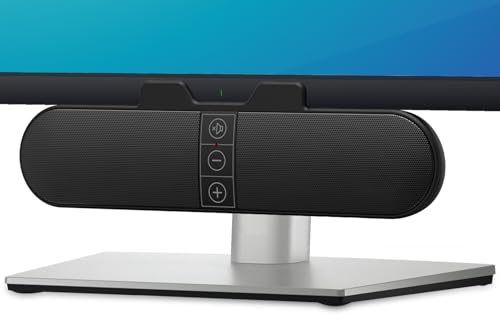
The XKX soundbar is the most innovative design in this list. It has a clamp that mounts to the top edge of your monitor (or the bottom, if you prefer). The bar hangs there, just above your screen, so it takes up zero desk real estate. The built-in G-sensor detects whether you’ve mounted it on top or bottom and automatically swaps the left and right channels, a thoughtful touch.
Sound quality is good for such a small unit. Dual ultra-magnetic drivers and passive radiators deliver clear audio with surprising bass. It won’t shake your room, but YouTube, music, and system sounds come through with authority. The three touch buttons on the front handle volume up/down and mute. They’re capacitive, so you have to tap deliberately.
Setup is completely cable-free: just the USB cable (with a USB-C adapter in the box) to your computer for power and audio. Plug in, clip on, and you’re done. The only catch is that it only works with devices that support USB audio, monitors and TVs typically don’t. For a Windows laptop or MacBook user, it’s perfect.
If desk space is the scarcest resource on your desk, the XKX is the best computer speakers for desktop you can buy. It’s the only one that doesn’t take up a single square inch of desktop.
10. Creative Pebble 2.0 White: Best White Option

Pros
- Same compact, angled design as the black Pebble
- Clean white finish matches white monitors and peripherals
- Single USB connection for power and audio
Cons
- Identical sound to the black version, no difference
- White finish may yellow over time in direct sunlight
Best for: building a cohesive white desktop aesthetic without compromising on audio.
The white Creative Pebble is functionally identical to the black version reviewed above. It uses the same far-field drivers and passive radiators, the same USB-powered design, and the same 45-degree angled base. The only difference is color, and for anyone assembling a white-themed desk, that’s a big deal.
Sound quality is exactly what we described: clear mids, decent bass from the passive radiators, and a narrow but pleasing frequency response of 100 Hz to 17 kHz. The single USB cable keeps your desk tidy. The front volume knob is easy to reach.
This model costs a tiny bit more than the black version, almost certainly because of lower production run volume. If you don’t care about color, save the money and buy the black Pebble. But for someone who wants their desk to look as good as it sounds, the white Pebble is the natural choice.
How to Choose Computer Speakers for Desktop
Choosing the right desktop speakers comes down to understanding how they’ll sit on your desk and what you’ll ask them to do. Here are the key factors to consider.
Driver and Power Ratings
The driver size and total RMS power determine maximum volume and how cleanly the speakers can reproduce sound. A 2.75-inch driver like the one in the Edifier G2000 is larger than typical and can move more air, meaning better bass and higher loudness before distortion. Total RMS wattage, not peak, is the honest number: the Logitech Z313’s 25 watts RMS is far more capable than the 2.2 watts of the Amazon Basics USB-Powered pair. For a small office, 8 to 10 watts RMS is enough; for a living room or gaming den, look for 15 watts or more.
Wired vs. Bluetooth
Bluetooth adds convenience: you can stream from your phone without plugging in. But it also introduces latency (noticeable in games and video) and potential codec compression. The Logitech Z207 handles Bluetooth well with Easy-Switch, but if low latency is critical, a wired 3.5mm or USB connection is safer. Many systems now offer both, so you can switch as needed.
If you spend most of your time in competitive shooters, wired audio is still the path to zero lag. Bluetooth is best for background music and podcasts where a few frames of delay don’t matter.
Subwoofer or Not
A 2.1 system adds a dedicated subwoofer that handles low frequencies, freeing the satellites to focus on mids and highs. The Logitech Z313’s subwoofer is compact but effective. If you listen to bass-heavy music or action movies, a sub is almost essential. For podcasts, talk radio, and productivity audio, a good 2.0 pair like the Creative Pebble will be enough.
Size and Desk Space
Measure the width under your monitor. A soundbar like the Tylubio fits flush, while a pair of satellites like the Z207 needs about 17 inches of spread for decent stereo separation. The XKX clip-on design is unique in that it uses zero desktop space. If your desk is crowded, a soundbar or clip-on mount is the most practical option.
Frequently Asked Questions
Do I need a subwoofer for desktop speakers?
It depends on your listening habits. For music with heavy bass, movies, and gaming, a subwoofer adds impact that small satellites can’t match. For voice calls, podcasts, and light background music, a good 2.0 set is sufficient.
Can I use Bluetooth speakers with my desktop computer?
Yes, but most desktop Bluetooth speakers still require a wired connection for low-latency audio. The Logitech Z207 offers Bluetooth with codec support, but for gaming you’ll want to use the 3.5mm cable.
What is the difference between RMS and peak power?
RMS is the continuous power a speaker can handle, while peak is a short burst. RMS is the honest specification. The Edifier G2000 lists 16W RMS and 32W peak, meaning it can play at 16W indefinitely without distortion.
Do USB-powered speakers sound worse than AC-powered ones?
Not necessarily. USB provides 5V at up to about 2.5W for audio, so speakers relying solely on USB are limited in maximum volume and bass. AC-powered speakers like the Amazon Basics AC-Powered have more headroom. Still, for close-up desktop listening, many USB speakers are perfectly adequate.
How much desk space do I need for a pair of speakers?
Two separate speakers typically need about 3 to 6 inches of depth and 12 to 20 inches of width for proper placement. Soundbars require less width but still need clearance below your monitor. Clip-on models use no desk space.
Can I connect these speakers to a TV or gaming console?
Most computer speakers use 3.5mm or USB audio, which many TVs lack. Some gaming consoles support USB audio, but the XKX clip-on soundbar specifically cannot be used with TVs or projectors. Check your device’s audio outputs before buying.
What is the best desktop speaker setup for Zoom calls?
Clarity is more important than bass for calls. The Creative Pebble 2.0, with its clear mids and compact footprint, is one of the best desktop speakers for Zoom meetings. The Logitech Z207 also works well with its front headphone jack for private calls.
The Bottom Line
After testing all ten speakers, the Logitech Z313 remains our top recommendation for anyone who wants a true 2.1 experience without a bulky setup. Its subwoofer adds a dimension that no 2.0 pair can match, and the 25 watts RMS is more than enough for a home office or dorm room.
For gamers, the Edifier G2000 is the clear winner with its customizable RGB, EQ presets, and Bluetooth. And if you want to spend as little as possible without sacrificing quality, the Creative Pebble 2.0 delivers more than its size suggests. The best computer speakers for desktop ultimately depend on your desk real estate, your need for Bluetooth, and how much low end you crave. Pick the one that matches your setup, and enjoy audio that doesn’t make you cringe.
As an Amazon Associate we earn from qualifying purchases.