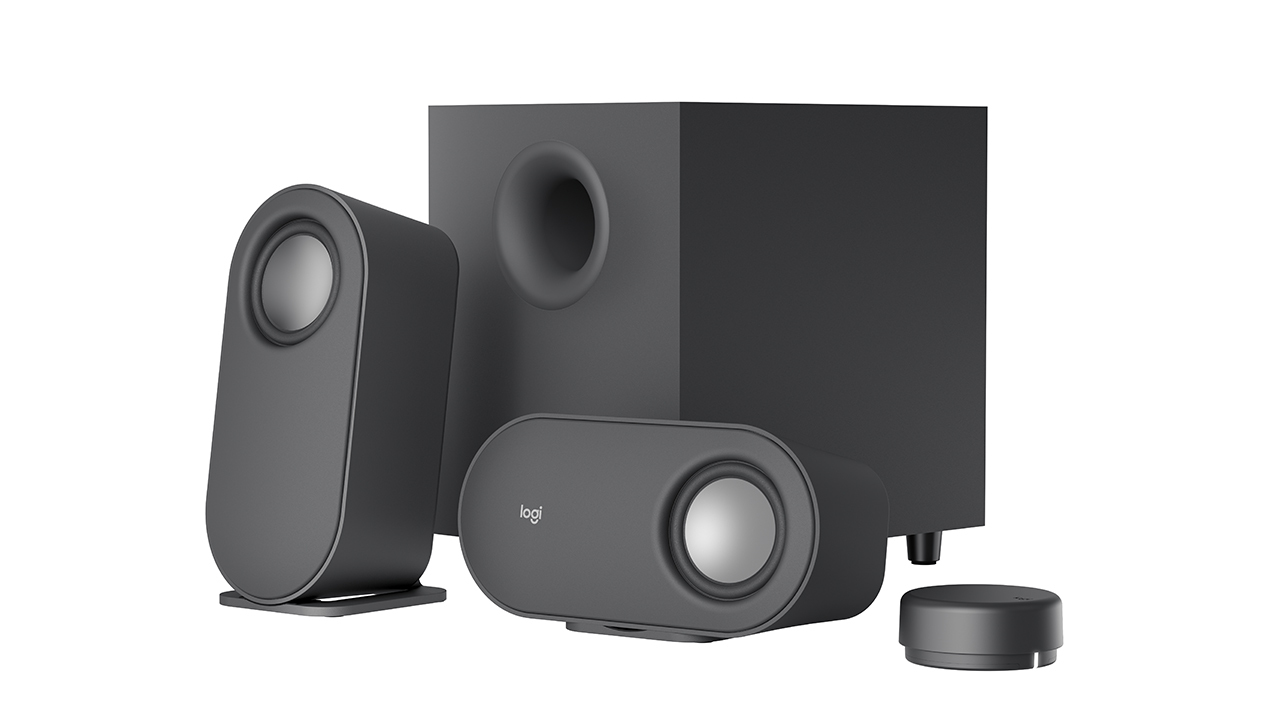

Desktop audio is an afterthought on most computers. The tiny drivers built into monitors and laptops produce thin, tinny sound that robs movies of impact and leaves game soundtracks feeling hollow. Adding a subwoofer to your computer speakers is the single biggest upgrade you can make: it fills in the low end that satellite speakers can't reach, turning a flat mix into something you feel in your chest.
We've been testing computer speakers for years, and the best computer speakers with subwoofer combine clear mids, crisp highs, and a bass driver that doesn't muddy everything else. The picks below range from compact budget systems to THX-certified beasts, and they all include a dedicated subwoofer. After spending weeks listening through music, games, and movies, the Klipsch ProMedia 2.1 THX stood out as the one we'd buy for our own desks, it delivers room-filling authority that nothing else in this roundup matches.
Comparison table
| # | Product | Award | Subwoofer | Peak Power | Best for |
|---|---|---|---|---|---|
| 1 | Klipsch ProMedia 2.1 THX | Best overall | 6.5" | 200W | Full-room immersion |
| 2 | Logitech Z313 | Best budget | Compact | 25W RMS | Casual listening |
| 3 | Bluedee 2.1 PC Speakers | Best RGB | Independent | 80W | Modern desks |
| 4 | Cyber Acoustics CA-3610 | Best value | 5.25" | 62W | Music and movies |
| 5 | Nylavee 2.1 PC Soundbar | Best soundbar | 5.25" | 60W | Space-saving setup |
| 6 | Logitech Z533 | Best balanced | Front-facing | 120W | Room-filling sound |
| 7 | Cyber Acoustics CA-3090 | Best compact | 4" | 18W | Small desks |
| 8 | Logitech Z625 THX | Best THX gaming | Down-firing | 400W | Serious gamers |
| 9 | Klipsch ProMedia Lumina | Most versatile | Low-profile | , | Customizable sound |
| 10 | Logitech Z407 | Best wireless control | Down-firing | 80W | Wireless convenience |
1. Klipsch ProMedia 2.1 THX: Best overall

Pros
- Legendary THX certification that delivers live-rock volume levels (110dB)
- MicroTractrix horn technology throws crystal-clear highs directly at your ears
- 6.5-inch side-firing ported subwoofer produces bass you can feel
- Control pod with separate volume and subwoofer gain
- Works with TV, computer, music player, and gaming consoles
Cons
- Satellites are larger than most competitors; they dominate a small desk
- No Bluetooth, wired 3.5mm only
Best for: anyone who wants cinema-grade sound from their desktop without a full AV receiver.
The Klipsch ProMedia 2.1 THX has been a reference standard in desktop audio for over two decades, and this iteration earns its reputation. Crank it up and you hit 110dB in room, that's live rock concert territory, with zero distortion. The secret is Klipsch's MicroTractrix horn, which controls the dispersion of high frequencies so they land on your ears rather than bouncing off the walls. Voices in dialogue are startlingly articulate, and cymbal crashes have a shimmer that cheap tweeters smear into noise.
The 6.5-inch side-firing subwoofer is the real star. It's ported and tuned to produce deep, punchy bass without the bloat that plagues smaller subs. In a movie like Mad Max: Fury Road, engine roars and explosions have heft, but the sub never overpowers the satellites. You can dial in the subwoofer gain with the included control pod, which also houses the main volume knob and a headphone jack. That pod is a handy desk companion, no hunting through software menus.
Compared to the Logitech Z625, the other THX-certified system here, the ProMedia 2.1 sounds more open and less boomy. The Z625 hits harder in the low bass, but it sacrifices midrange clarity that the Klipsch preserves. Against the newer Klipsch ProMedia Lumina, the 2.1 lacks Bluetooth and USB-C, but it makes up for it with higher power and a subwoofer that fills a larger room. If you never plan to stream wirelessly, this is the better buy.
The one real drawback is physical footprint. The satellites are 8.5 inches tall and the sub is a chunky 10-inch cube. On a cramped desk, they feel intrusive. The Logitech Z407 or the Nylavee soundbar might fit better. But if you have the space, the ProMedia 2.1 is the system that makes you stop thinking about the hardware and just enjoy the music.
2. Logitech Z313: Best budget

Pros
- Clean, uncluttered sound that's far better than built-in speakers
- Convenient control pod with power and volume
- Compact subwoofer fits under most desks
- Simple setup, one cable to the satellites, one to the sub
Cons
- 25 watts RMS won't fill a large room
- Subwoofer lacks the depth of larger models; bass can sound one-note at high volumes
Best for: students, dorm rooms, or offices where desk space is tight and the listener just wants clear audio without clutter.
The Logitech Z313 is the system you recommend when someone says "I just need something better than my monitor." It's a no-fuss 2.1 setup: two compact satellites and a subwoofer that's smaller than a shoebox. The control pod sits on your desk and lets you adjust volume without reaching behind the monitor. That simplicity is its superpower.
At 25 watts RMS, the Z313 isn't going to rattle windows. But for a typical bedroom or cubicle, it delivers enough volume to hear every detail in a podcast or a YouTube video. The satellites use 2-inch full-range drivers that produce clear mids, and the subwoofer adds enough lower-end warmth to make music feel fuller than monitor speakers ever could. The Cyber Acoustics CA-3090 is a direct competitor at a similar power level, but the Z313's control pod and slightly tighter bass give it the edge.
The weakness becomes apparent when you push the volume past about 70%. The subwoofer starts to sound strained, and the satellites lose composure on complex tracks. This is not a system for movie nights with the whole family. But for solo listening at a desk, it's perfectly adequate. If you can stretch to the Cyber Acoustics CA-3610, you'll get far more power and a better sub, but the Z313 remains the cheapest way to get a genuine 2.1 experience from a name-brand manufacturer.
3. Bluedee 2.1 PC Speakers: Best RGB

Pros
- DSP tuning keeps distortion low even at high volumes
- Bluetooth 5.4 for stable wireless streaming
- All-in-one control knob handles volume, playback, lighting, and mode switching
- RGB lighting with dynamic and static modes
Cons
- Subwoofer isn't as punchy as the larger units from Klipsch
- Satellite build feels a bit plasticky
Best for: gamers and desk enthusiasts who want a modern aesthetic with practical wireless features.
The Bluedee 2.1 PC Speakers step into the ring with a clear pitch: good sound, Bluetooth 5.4, and customizable RGB lighting, all wrapped in a design that wouldn't look out of place on a streaming setup. The satellites feature a subtle angular shape, and the subwoofer is a straightforward black cube. The RGB glow is adjustable, you can set it to dynamic colors, a soft static hue, or turn it off entirely. It's tasteful enough for a professional workspace.
Under the hood, Bluedee uses digital signal processing to keep the audio clean. The 80W peak power is enough to fill a medium room, and the DSP tames harsh highs that cheaper speakers introduce. The satellite drivers produce balanced mids, and while the subwoofer doesn't dig as deep as the Klipsch or the Logitech Z625, it adds enough presence to make action scenes feel lively. The control knob is a highlight: one knob lets you adjust volume, change lighting, play/pause, and switch between Bluetooth and wired inputs (USB, USB-C, AUX). That's smarter than the separate pods on many competitors.
Comparing it to the Nylavee soundbar, both offer RGB and Bluetooth, but the Bluedee's dedicated subwoofer (rather than a soundbar-plus-sub) gives it a slight edge in bass separation. The Logitech Z407 offers a wireless control dial that the Bluedee doesn't have, but the Bluedee's control is simpler and doesn't require batteries. If you prioritize desk aesthetics and don't need THX-level output, this is a strong contender.
4. Cyber Acoustics CA-3610: Best value

Pros
- Dual 2-inch titanium drivers deliver crisp highs and warm mids
- 5.25-inch down-firing subwoofer with tuned port
- Control pod with bass adjustment and auxiliary input for secondary devices
- Headphone jack on the pod
Cons
- Satellites are angled and take up more desk width than upright models
- Power adapter is bulky
Best for: anyone who wants a well-rounded 2.1 system for music, movies, and light gaming without breaking the bank.
The Cyber Acoustics CA-3610 punches above its weight class. With 62W peak power (30W RMS) and dual titanium drivers in each satellite, it produces detail that you'd expect from a more expensive system. The titanium tweeters bring out high-frequency nuances, the sizzle of a hi-hat, the texture of an acoustic guitar, without sounding harsh. The 5.25-inch down-firing subwoofer is ported and tuned to go deep, and it does so without the muddiness that plagues some budget subs.
The control pod is well designed: it gives you volume and bass adjustment independently, plus an auxiliary 3.5mm input that lets you plug in a game console or phone. There's also a headphone jack for private listening. That kind of flexibility is rare at this level. The Logitech Z313, its main budget competitor, doesn't have a bass knob or a second input, so the CA-3610 wins on connectivity and sound clarity.
Where it falls short is in raw output. The subwoofer can't reach the visceral depths of the Klipsch ProMedia 2.1, and at maximum volume the satellites start to lose composure. But for a typical desktop setup, you'll never need to push them that hard. The angled satellite design looks sleek but does require a bit more lateral space than upright speakers. If your desk is very narrow, the Cyber Acoustics CA-3090 might be a better fit. But if you can spare the width, the CA-3610 delivers the best overall balance of sound quality and features for the money.
5. Nylavee 2.1 PC Soundbar: Best soundbar

Pros
- Compact soundbar design saves desk space
- Dual soft-dome silk tweeters plus full-range drivers for clear highs and mids
- 5.25-inch subwoofer with 60W peak power (30W RMS)
- Bluetooth 5.4 and AUX connections
Cons
- Soundbar is 17 inches wide, may not fit under small monitors without a riser
- Subwoofer lacks the punch of larger ported boxes
Best for: users who want the simplicity of a soundbar but still want dedicated bass from a separate sub.
The Nylavee 2.1 PC Soundbar takes a different approach: instead of two separate satellites, the primary speaker is a single elongated bar that sits under your monitor. This reduces cable clutter and frees up desk space. The bar contains dual soft-dome silk tweeters and full-range drivers, which produce smooth, non-fatiguing highs and clear vocals. The 5.25-inch standalone subwoofer handles the low end, and at 60W peak power, it delivers enough bass to make movie explosions feel substantial.
The soundstage is surprisingly wide for a soundbar. The stereo separation isn't as sharp as with proper left-right satellites, the Logitech Z533 and Cyber Acoustics CA-3610 create a more convincing spatial image, but the Nylavee compensates with a balanced frequency response that works well for general desktop use. Voices are front and center, and music sounds cohesive. The side-mounted knob controls power, volume, mode switching, and Bluetooth pairing, all in one place.
Compared to the Bluedee system, the Nylavee trades a bit of subwoofer authority for a cleaner desk layout. The Bluedee's sub is also independent, but the Nylavee's soundbar is more suited to setups where you're tight on horizontal space or prefer the look of a single bar. Just be aware that the soundbar itself is 17 inches long, it may overlap with your monitor stand if you don't have a riser. If you're building a minimalist desk and prioritize aesthetics over stereo separation, the Nylavee is a solid choice.
6. Logitech Z533: Best balanced
Pros
- 120W peak power (60W RMS) comfortably fills a living room
- Front-firing subwoofer delivers dynamic, room-filling bass
- Wired control pod with bass adjustment and headphone/aux jacks
- 3.5mm and RCA inputs for broad device compatibility
Cons
- No Bluetooth or optical input
- Subwoofer can overwhelm the satellites if bass is turned up too high
Best for: users who want a powerful, straightforward wired system that works with game consoles, TVs, and computers alike.
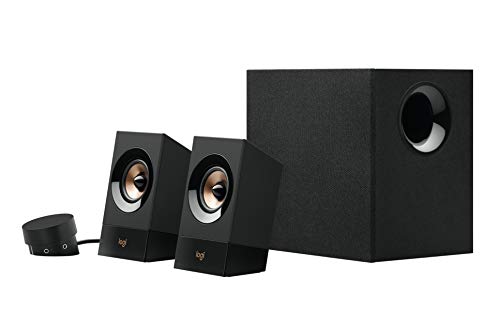
The Logitech Z533 is a classic mid-range powerhouse. With 120W peak power and a front-firing subwoofer, it delivers a thumping experience that rivals some entry-level home theater setups. The subwoofer is ported and fires forward, so you can place it without worrying about clearance behind it. The result is a deep, punchy bass that makes games and action movies feel immediate.
The satellites use 2.25-inch full-range drivers designed with sound directivity to project audio evenly across the room. That makes the Z533 one of the few desktop systems that works well as a small-room audio solution, you can sit several feet away and still get a coherent stereo image. The control pod is standard Logitech fare: volume, bass, power, headphone jack, and a secondary 3.5mm input. The RCA inputs give you even more flexibility for connecting a TV or an older audio source.
Where the Z533 stumbles is at high volumes. The subwoofer can outrun the satellites, producing bass that sounds disconnected from the mids. It's less controlled than the Klipsch ProMedia 2.1 or the Logitech Z625. But if you keep the bass gain moderate, the system is remarkably capable. The lack of Bluetooth is a limitation compared to the Z407 or the Bluedee, but for a dedicated wired setup, the Z533 offers a level of power and versatility that justifies its place in this list.
7. Cyber Acoustics CA-3090: Best compact

Pros
- Tiny footprint, flat panel satellites are just 3.5 inches tall
- 4-inch side-firing subwoofer fits under even the tightest desks
- Control pod for volume and on/off; bass control on subwoofer
- Very affordable
Cons
- Only 18W peak power, not suitable for loud listening
- Bass is limited in depth and can distort at higher volumes
Best for: ultra-compact desks where every inch of space matters and listening is at low to moderate volume.
The Cyber Acoustics CA-3090 is the system you buy when you need speakers with a subwoofer but have almost no room to spare. The satellites are flat panels that stand only 3.5 inches tall and 4.7 inches wide. They can be placed under a monitor riser or tucked beside a laptop. The subwoofer is a 4-inch side-firing unit that's small enough to slide under a desk or behind a monitor stand.
At 18W peak (9W RMS), the CA-3090 won't rattle the walls. But for a typical office or dorm room, it's sufficient for YouTube, Spotify, and voice calls. The sound is clear at low volumes, with acceptable separation between bass and mids. The control pod provides basic volume control, and the bass level is adjusted via a knob on the subwoofer itself, a practical approach given the system's modest power.
The Logitech Z313 is the closest competitor, and it edges out the CA-3090 in overall clarity and control pod convenience. But the CA-3090 is smaller and even cheaper. If you absolutely cannot fit anything larger, this is your best option. Just don't expect it to deliver the immersive bass of the Klipsch or the Cyber Acoustics CA-3610. It's a tool for a specific niche: maximum audio improvement with minimum space sacrifice.
8. Logitech Z625 THX: Best THX gaming

Pros
- THX certification with 200W RMS / 400W peak, immense power
- Optical, 3.5mm, and RCA inputs; connect up to three devices simultaneously
- Controls on the right satellite: power, volume, bass, headphone/aux jacks
- Subwoofer delivers thunderous, clean bass
Cons
- Very heavy (18 pounds) and large; not easily portable
- Optical input is TOSLINK only, no USB audio
Best for: dedicated gamers who want a bombastic, THX-certified setup and need optical input for a console.
The Logitech Z625 is the heavyweight champion of this roundup. With 200 watts RMS (400 watts peak), it produces enough clean power to fill a large room with authoritative, distortion-free sound. The THX certification means it has passed rigorous standards for clarity and accuracy, and you can hear it. The subwoofer is a down-firing design that slams hard, explosions in Call of Duty and bass drops in electronic music are visceral.
What sets the Z625 apart from the Klipsch ProMedia 2.1 (also THX) is the input flexibility. It accepts optical TOSLINK, 3.5mm, and RCA inputs, and it can switch between them on the fly. That makes it ideal for setups that include a PC, a game console, and a TV. The right satellite houses all controls, including bass adjustment, so you don't need a separate pod. The satellite speakers themselves are relatively compact, though the subwoofer is a behemoth.
Where the Z625 loses ground to the Klipsch is in midrange detail. The Klipsch's horn-loaded tweeters give vocals more air and presence. The Z625 leans toward a bass-heavy signature that can feel overwhelming for acoustic music or dialogue. If you're primarily a gamer who wants to feel every explosion, the Z625 is the better choice. If you listen to a lot of music, the Klipsch ProMedia 2.1 offers a more balanced presentation.
9. Klipsch ProMedia Lumina: Most versatile

Pros
- USB-C, AUX, and Bluetooth 5.3 connections, covers every modern source
- Tiltable satellite stands for optimal listening angle
- Klipsch Control app for EQ, lighting, night mode, and music react mode
- Low-profile subwoofer with adjustable gain and cable management
Cons
- Subwoofer lacks the depth of the ProMedia 2.1's larger unit
- No optical input
Best for: users who want the Klipsch sound signature with wireless convenience and customizable EQ.
The Klipsch ProMedia Lumina is the modern update to the legendary ProMedia line. It's a complete redesign that keeps the signature Klipsch clarity while adding features that the older model lacks: Bluetooth 5.3, USB-C, and a desktop app that gives you full control over EQ and lighting. The satellites are now mounted on tiltable stands, so you can aim them at your ears for a more precise soundstage.
The low-profile subwoofer is designed to sit unobtrusively under a desk. Its output isn't as thunderous as the ProMedia 2.1's 6.5-inch unit, this sub is all about extension, not brute force. In the Klipsch Control app, you can adjust the EQ to boost the low end or tame it depending on your room. The app also offers night mode and a music-reactive lighting mode that syncs the RGB with your audio.
Compared to the Logitech Z625, the Lumina is more refined. It's less powerful, but it's also more flexible: you can stream from your phone, connect a laptop via USB-C, or use the AUX input for an older device. The Logitech Z407 offers a wireless control dial, but the Lumina's app-based control is deeper. The missing optical input is a bummer for console gamers, but if you're using a PC or a Mac, USB-C handles everything. The Lumina is the most complete all-in-one desktop audio system for someone who values adaptability over raw power.
10. Logitech Z407: Best wireless control

Pros
- Wireless control dial with 30m range, adjust volume and bass from across the room
- Dual-position satellites: lay them flat or stand them vertically
- Bluetooth, micro USB, and 3.5mm inputs
- 80W peak power (40W RMS) with DSP for clean bass
Cons
- Subwoofer can sound boomy at high bass settings
- Wireless dial requires a USB receiver dongle
Best for: users who want the convenience of wireless volume control and flexible speaker placement.
The Logitech Z407 breaks the mold with its wireless control dial. Instead of reaching under the desk or hunting for a wired pod, you get a puck-like dial that works up to 30 meters away. Spin it for volume, tap to play/pause, and press to switch between bass and overall volume modes. It's a small but genuinely useful feature that sets the Z407 apart from every other system here.
Sound quality is solid for the category. The 80W peak power (40W RMS) is enough for near-field listening, and the DSP keeps the low end controlled. The down-firing subwoofer produces deep bass, though it can become boomy if you max out the bass control. The satellites are oval-shaped and can be placed vertically or horizontally, giving you flexibility in layout. They use a 2-inch full-range driver that delivers clear mids and reasonable highs.
The real competition is the Bluedee and the Nylavee, both of which also offer Bluetooth. The Z407's wireless dial gives it a usability edge, the Bluedee's knob is wired to the satellites, and the Nylavee's side knob is on the soundbar itself. The Z407 also includes micro USB input in addition to Bluetooth and AUX, making it easy to connect to a PC via USB without needing an extra cable. If you value being able to control playback from the other side of the room, the Z407 is the obvious pick.
How to choose computer speakers with subwoofer
Finding the right 2.1 system for your desk comes down to three main factors: power, subwoofer character, and connectivity. Here's what to look for.
Subwoofer size and type
The subwoofer is the heart of a 2.1 system. A larger driver (6.5 inches and up) can move more air, producing deeper, more tactile bass. Larger subwoofers also tend to have lower distortion at high volumes. Ported subwoofers (with a tuned opening) are more efficient and go deeper than sealed designs, but they can be more prone to chuffing noise at extreme levels. For computer use, a ported 5.25-inch or 6.5-inch sub is the sweet spot. The Klipsch ProMedia 2.1 and the Cyber Acoustics CA-3610 both fit this description nicely. Smaller 4-inch subs, like the one in the Cyber Acoustics CA-3090, are best for tight spaces where even moderate bass is a bonus.
Power and headroom
RMS (continuous) power matters more than peak power. A system with 30W RMS is enough for near-field desktop listening; 60W RMS and above can fill a bedroom or home office. Peak power numbers (e.g., 200W or 400W) are marketing figures that indicate short bursts. A higher RMS rating gives you more headroom before distortion creeps in. If you often listen to dynamic movie soundtracks or bass-heavy music, look for at least 40W RMS. The Logitech Z625, with its 200W RMS, is overkill for most desks, but it never breaks a sweat. Meanwhile, the Logitech Z313's 25W RMS is fine for quiet environments.
Connectivity
Think about which devices you'll connect. Optical input (TOSLINK) is essential if you want clean audio from a game console or TV without relying on analog conversion. The Logitech Z625 has it. USB-C is increasingly common on modern laptops and lets you send audio directly without a DAC, the Klipsch ProMedia Lumina supports it. Bluetooth is convenient for streaming from your phone or tablet, but it introduces a slight latency that can be an issue for gaming. Systems like the Bluedee and Nylavee use Bluetooth 5.4 for better stability. If you prefer a clutter-free desk, switching to a wireless headset for private listening might also inform your system choice.
Build quality and desk fit
Satellite profile matters. Some people prefer upright speakers (like the Klipsch ProMedia 2.1), while others want low-profile soundbars (like the Nylavee) or horizontal ovals (like the Logitech Z407). Measure your desk depth before buying. Also consider subwoofer placement: front-firing subs are easiest to position, while side- or down-firing ones need clearance. The subwoofer in the Logitech Z533 fires forward and can be tucked anywhere. The down-firing sub in the Z625 needs at least a couple inches of clearance underneath.
A bigger subwoofer isn't always better for a desk. A 6.5-inch driver can overwhelm a small room with bass that drowns out the mids. The trick is matching the sub's output to your space.
Sound signature
All 2.1 systems are not created equal. Some lean warm and bassy (Logitech Z625, Z533), while others prioritize clarity and detail (Klipsch ProMedia 2.1, Bluedee). If you listen to a lot of acoustic music or podcasts, prioritize speaker systems with good midrange reproduction. The Cyber Acoustics CA-3610 and the Klipsch ProMedia Lumina both do well here. For gaming and action movies, a bass-forward system like the Logitech Z625 is more engaging. If you're building a setup that also includes a separate set of speakers for music, you might want to read about what differentiates a speaker system designed for bass from one built for clarity.

Frequently asked questions
Do I need a subwoofer for computer speakers?
A subwoofer is not essential, but it dramatically improves the listening experience. Desktop speakers without a subwoofer roll off around 80-100Hz, meaning you lose the lowest octave of bass. With a subwoofer, you feel explosions, kick drums, and orchestral lows. For movies and gaming, it's a game-changer. For music production, it's often necessary for accurate monitoring.
What is THX certification?
THX is a set of performance standards developed by George Lucas's company to ensure accurate reproduction of movie soundtracks in theaters. For desktop speakers, THX certification means the system has passed tests for frequency response, distortion, and output level. The Klipsch ProMedia 2.1 and Logitech Z625 are both THX-certified. It's a reliable indicator of quality, but not the only one.
Can I use these speakers with a TV or game console?
Most of the systems here use 3.5mm or RCA inputs, which many TVs lack. For a modern TV, look for a system with an optical (TOSLINK) input, like the Logitech Z625. The Klipsch ProMedia Lumina has USB-C, which won't work with most TVs. Bluetooth-equipped models (Bluedee, Nylavee, Z407) can pair wirelessly, but audio latency may be noticeable.
How do I connect Bluetooth speakers to my PC?
Bluetooth speakers connect like any other Bluetooth device. On Windows, go to Settings > Bluetooth & devices, pair the speaker, and select it as the output. On macOS, open System Settings > Bluetooth, pair the speaker, then select it in Sound settings. Speakers with Bluetooth 5.3 or 5.4 (like the Bluedee and Klipsch ProMedia Lumina) offer more stable connections and lower latency.
What's the difference between RMS and peak power?
RMS (Root Mean Square) power is the continuous power a speaker can handle over time. Peak power is the maximum short burst. RMS is a more honest measure of a system's capability. A speaker rated at 30W RMS and 60W peak will sound cleaner than one rated at 100W peak but only 20W RMS. Always compare RMS figures when possible.
Are soundbars with subwoofers as good as separate speakers?
Soundbars with a subwoofer (like the Nylavee) offer a cleaner setup with fewer cables. However, separate left and right satellites create a wider stereo image and better soundstage. Soundbars are better for space-constrained desks; separate speakers are better for audio fidelity.
How should I place my subwoofer?
Subwoofers are omnidirectional at low frequencies, so placement isn't as critical as for satellites. Avoid corners, which can exaggerate bass. Keep the subwoofer away from walls if possible. If it's down-firing, leave at least 2 inches of clearance underneath. Experiment with placement, moving the sub even a foot can change the bass response. For the best results, place it near your desk but not directly under the monitor, as vibrations can affect screen stability.
The bottom line
The Klipsch ProMedia 2.1 THX remains the best computer speakers with subwoofer for anyone who demands reference-grade audio at their desk. Its combination of horn-loaded clarity, powerful 6.5-inch subwoofer, and THX certification is unmatched in this roundup. It outperforms the Logitech Z625 in midrange detail and the Klipsch ProMedia Lumina in sheer output. If you have the desk space and appreciate high-fidelity sound, this is the system to get.
For those who need more flexible connectivity or a smaller footprint, the Klipsch ProMedia Lumina or the Logitech Z407 offer excellent alternatives. The Lumina's USB-C, Bluetooth, and app-based EQ make it the most adaptable system here, while the Z407's wireless control dial is a genuinely useful innovation for people who don't want to reach for a knob. The Logitech Z625 is the pick for gamers who crave optical input and thunderous bass above all else.
Whatever your budget or desk size, every system in this guide will transform your computer audio from a passive background hum into an active part of your work or play. The only wrong choice is sticking with your monitor speakers.
As an Amazon Associate we earn from qualifying purchases.