

A creamy keyboard should sound rounded instead of hollow, feel smooth instead of scratchy, and give each keystroke enough cushioning to avoid a sharp plastic clack. The problem is that product listings use “creamy” for everything from a quiet membrane board to a heavily damped mechanical keyboard.
Our Best creamy keyboards picks separate those designs by switch type, layout, connectivity, customization, and sound-dampening hardware. Some are compact 75% boards, while others keep a numeric keypad and a broader office-friendly layout.
The AULA F75 Linear is our top pick for its hot-swap support, tri-mode wireless setup, 75% layout, and layered dampening. The rest of the list covers full keypad boards, wired simplicity, screens, RGB-heavy designs, and quieter membrane alternatives.
Comparison
| # | Product | Award | Layout | Connectivity | Key features | Best for |
|---|---|---|---|---|---|---|
| 1 | AULA F75 Linear | Best overall | 81-key, 75% | Bluetooth 5.0, 2.4GHz, USB-C | Hot-swap, 4000mAh battery, RGB, knob | Compact all-round use |
| 2 | SOLAKAKA A99 Pro | Best feature set | 97-key, 96% | Bluetooth 5.0, 2.4GHz, USB-C | LCD screen, gasket structure, 8000mAh battery | Feature-focused buyers |
| 3 | AULA F75 Reaper | Best compact alternative | 81-key, 75% | Bluetooth 5.0, 2.4GHz, USB-C | Reaper switches, hot-swap, RGB, knob | Gaming and small desks |
| 4 | HUO JI Z99 | Best wired option | 99-key, 96% | USB-C to USB-A | Gasket structure, PBT keycaps, RGB | Wired workstations |
| 5 | Kisnt KN85 | Best for customization | 85-key, 75% | Bluetooth 5.0, 2.4GHz, USB-C | Hot-swap, 45 to 50gf switches, RGB | Switch experimenters |
| 6 | Keymatic WK98 | Best display | WK98 layout | Three modes | Interactive screen, PBT and PC keycaps, RGB | Desk setups with flair |
| 7 | AULA S99 Green | Best membrane design | 96%, numeric keypad | Bluetooth 5.0, 2.4GHz, USB-C | Macro keys, knob, foldable stand | Quiet everyday typing |
| 8 | AULA S99 Pink | Best colorful membrane board | 99-key, 96% | Bluetooth 5.0, 2.4GHz, USB | RGB, macro keys, knob, numeric keypad | Colorful office setups |
| 9 | AULA S99 Purple | Best full-layout simplicity | 99-key, 96% | Bluetooth 5.0, 2.4GHz, USB-C | Foldable stand, macros, knob | Wireless keypad users |
| 10 | AULA S99 Blue Gray | Best basic wireless layout | 96%, numeric keypad | Bluetooth 5.0, 2.4GHz, USB-C | Five-device switching, macros, RGB | Home and office use |
1. AULA F75 Linear: Best Overall

Pros
- Smooth pre-lubricated linear switches
- Hot-swappable 3-pin and 5-pin PCB
- Five layers of sound-dampening material
- Three connection modes and a 4000mAh battery
- Useful media and lighting knob
Cons
- No numeric keypad
- Software is needed for deeper macro customization
- Heavier than many compact office keyboards
Best for: someone who wants a compact mechanical keyboard that can grow with their setup.
The AULA F75 Linear gets the central idea of a creamy keyboard right. It is compact without feeling stripped down, and the pre-lubricated linear switches give the board a smooth, even press rather than a sharp bump or click. The 81-key, 75% layout keeps the arrow keys and function row while cutting away the numeric keypad, leaving more room for a mouse.
Its construction is more serious than the soft color palette suggests. A silicone pad, PCB single-key slotting, and five layers of filling work together to reduce the hollow resonance that can make a thin mechanical keyboard sound cheap. The integrated structure is designed to add a softer, more elastic feel, while the pre-lubricated stabilizers help larger keys avoid a rattly response. It is not silent, but the sound should be rounded and controlled.
The F75 connects through Bluetooth 5.0, 2.4GHz wireless, or USB-C wired mode, and it can connect with up to five devices. Its 4000mAh battery gives it the basic endurance expected from a wireless mechanical board, while the control knob can handle lighting or media functions depending on the selected mode. Full-key macro programming, N-key rollover, and a Windows key lock make it a capable gaming board rather than just a decorative typing accessory.
Compared with the AULA F75 Reaper, this version uses linear switches and has a slightly more restrained brown and white presentation. The two boards share the same broad architecture, but this one is the better fit for users who want a smooth, familiar linear feel. The weakness is the missing numeric keypad, and the board's roughly 2.25-pound weight makes it less appealing if portability matters. Choose it when you want a compact wireless board for gaming, writing, and switch experimentation.
2. SOLAKAKA A99 Pro: Best Feature Set

Pros
- Informative LCD screen
- 8000mAh rechargeable battery
- Gasket structure with multiple dampening layers
- Hot-swappable 3-pin and 5-pin design
- Numeric keypad in a space-saving 96% layout
Cons
- Larger footprint than a 75% board
- Many controls require learning the web driver
- Backlit battery life is shorter than unlit battery life
Best for: anyone who wants a full-featured wireless board with a keypad and a built-in display.
The SOLAKAKA A99 Pro is the keyboard here for people who enjoy having something to look at and adjust. Its LCD screen can show the date, time, battery level, connected system, and connection mode, which is more useful than a decorative display that only plays animations. The metal knob adds another physical control for volume, lighting, system switching, and screen functions.
This is a 97-key, 96% board, so it retains the numeric keypad, arrow keys, and important function keys while using less desk width than a traditional full-size design. Its five-layer cushioning system, silicone components, and PCB slotting are intended to soften the typing feel and reduce cavity noise. The gasket construction gives the keys a little more flex than a rigid plate-mounted design, which suits the rounded sound this category promises.
The wireless hardware is strong on paper. Bluetooth 5.0, 2.4GHz, and USB-C wired connections are all available, with storage for up to five devices. The 8000mAh rechargeable battery is the largest listed in this group, though the stated endurance changes substantially with the backlight on. The board also includes full N-key rollover, Windows key lock, hot-swap support for 3-pin and 5-pin switches, pre-lubricated stabilizers, and LEOBOG Star Vector switches.
The AULA F75 Linear is more compact and easier to recommend for a small desk, while the A99 Pro makes more sense when a keypad and a display are priorities. Its web driver can change key mappings, macros, lighting, screen GIFs, sleep settings, and other functions, but that breadth also creates a steeper setup process. Skip it if you want a quiet, simple board with no software learning curve. For a feature-rich workstation or gaming setup, it is the most ambitious pick here.
3. AULA F75 Reaper: Best Compact Alternative

Pros
- Pre-lubricated Reaper linear switches
- Hot-swap support for 3-pin and 5-pin switches
- Compact 81-key layout
- Five layers of sound dampening
- RGB lighting with music rhythm effects
Cons
- No numeric keypad
- Battery capacity is not specified beyond the 4000mAh rating
- Driver-based customization may be more than casual users need
Best for: gamers and typists who want a compact mechanical layout with a smooth linear switch.
The AULA F75 Reaper is a close relative of the top pick, but its Reaper switches give it a distinct reason to exist. The switch is pre-lubricated and linear, making the board a natural match for repeated gaming inputs and fast everyday typing. The 75% layout keeps the keys most people use while leaving the keypad behind, a sensible trade on a crowded desk.
The internal design is built around sound control. A silicone pad, PCB slotting, and five layers of filler help keep the case from producing an empty echo when keys bottom out. The stabilizers are pre-lubricated too, which matters on the spacebar and other long keys where rattling can spoil an otherwise smooth sound. The result is aimed at a deeper, softer mechanical character rather than an aggressive click.
Like the other F75, this model supports Bluetooth 5.0, 2.4GHz wireless, and USB-C. It can connect to as many as five devices, and its 4000mAh rechargeable battery is suited to a desk that moves between a computer, tablet, and phone. A control knob switches between media and lighting behavior, with a long press changing modes. Full-key macro programming, N-key rollover, and Windows key lock add useful gaming controls.
The AULA F75 Linear is the safer pick if you prefer its particular switch feel or color scheme, but the two keyboards are otherwise remarkably close in layout and construction. The Reaper version also offers 16 lighting effects and 10 music rhythm effects, so it has plenty of visual customization. Its main limitation is the same one shared by every 75% board here: anyone who enters numbers constantly will miss a dedicated keypad.
4. HUO JI Z99: Best Wired Option
Pros
- Full 99-key functionality in a 96% layout
- Gasket structure and five sound-absorbing layers
- Hot-swappable 3-pin and 5-pin switches
- Double-shot PBT keycaps
- 15 RGB effects and eight solid colors
Cons
- Wired only
- USB-C to USB-A cable limits connection flexibility
- No wireless battery or multi-device switching
Best for: users who prefer a dependable wired keyboard with a keypad and easy switch replacement.
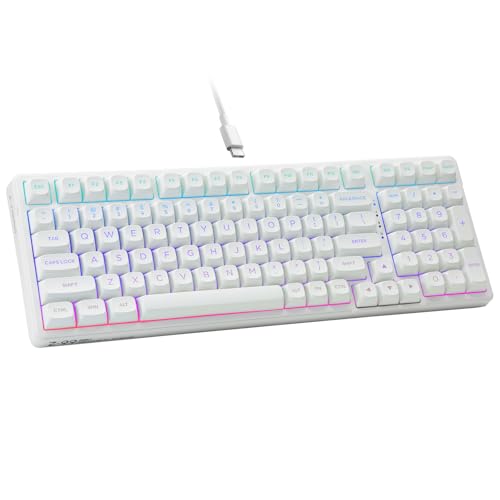
The HUO JI Z99 is refreshingly direct. It is a mechanical keyboard with a cable, a keypad, and a layout that avoids the awkward gaps found on some compact full-function boards. At 99 keys and roughly 15.5 inches long, it trims some width without asking office users to give up the number pad.
Its pre-lubricated linear switches are supported by a hot-swap PCB, so 3-pin and 5-pin replacements can be installed without soldering. That makes the board a reasonable starting point for someone curious about mechanical keyboard tuning. A gasket structure, silicone dampener, and five layers of sound-absorbing foam are intended to reduce noise and hollow resonance. The listing claims a 40% noise reduction and an 80% reduction in hollow sound, though the actual result will depend on desk surface, key force, and room acoustics.
The double-shot PBT keycaps are a practical choice for a frequently used board because the legends are designed to resist fading. Full anti-ghosting and N-key rollover support simultaneous presses in games, while the RGB system offers 15 backlight effects and eight solid color options. The included puller also makes switch and keycap changes less intimidating for beginners.
The trade-off against the SOLAKAKA A99 Pro is obvious: the HUO JI Z99 gives up wireless modes, a screen, and a large battery. It also uses a USB-C to USB-A cable rather than offering the connection freedom of the AULA boards. That simplicity is exactly why some people should choose it. If your keyboard stays in one place and you want a keypad, dampened mechanical feel, and straightforward wired operation, this is the cleanest fit.
5. Kisnt KN85: Best for Customization

Pros
- Hot-swappable 3-pin and 5-pin PCB
- 45 to 50gf pre-lubricated linear switches
- Three connection modes
- 20 RGB lighting effects
- Five layers of sound dampening
Cons
- No numeric keypad
- Windows-only driver support
- Manufacturer says it is not silent
Best for: hobbyists who want to adjust switches, macros, and lighting without soldering.
The Kisnt KN85 is the most customization-oriented compact board in this lineup. Its 85-key, 75% layout measures about 13.68 by 5.51 by 1.77 inches according to the product details, leaving room for a mouse while keeping the F1 to F12 row, arrows, and common navigation keys. It does not include a number pad, but the layout avoids the adjustment period associated with smaller 60% keyboards.
The included Bsun linear switches are pre-lubricated and specified at 45 to 50gf actuation, a moderate range that should feel light enough for rapid use without being excessively delicate. The hot-swap sockets accept both 3-pin and 5-pin switches, so the board can move from linear to tactile or clicky switches later. That is a meaningful advantage over the membrane AULA S99 models, which cannot be modified at the switch level.
Kisnt builds the sound around a gasket mount, base dampener, silicone pad, and five layers of foam. The company describes the result as a deeper marbly thock and admits that the board is not silent. That honesty matters. A creamy keyboard can still be audible, and this one is designed to reduce clack and cavity noise rather than eliminate every sound. Bluetooth 5.0, 2.4GHz, and USB-C cover computers, tablets, phones, and consoles, while the 4000mAh battery supports use during charging.
The AULA F75 Reaper is the more polished gaming-focused alternative, with a similar compact footprint and a physical knob, while the KN85 puts more emphasis on switch feel and programming. Its driver works only on Windows and only in wired or 2.4GHz mode, which is an inconvenience for Mac users who want deep remapping. Still, the KN85 is an appealing platform for anyone who wants to learn how switch feel changes the sound and rhythm of typing without buying a board that locks them into one configuration.
6. Keymatic WK98: Best Display

Pros
- Interactive custom screen with music rhythm sync
- Three-mode connectivity
- Hot-swappable switch design
- Durable PBT and PC dye-sublimation keycaps
- 20 lighting modes and nine colors
Cons
- Large 17.88-inch footprint
- Display features may distract from basic typing
- Battery capacity is not specified
Best for: people who want a colorful mechanical keyboard that acts as a visual centerpiece.
The Keymatic WK98 takes a different route to the creamy keyboard idea. Its selling point is not just the sound or the switch platform, but the animated presentation. The interactive screen can sync with music, turning the keyboard into part of the desktop display rather than a passive input device. It is a particularly natural match for a coordinated gaming or colorful work setup.
The foundation is a hot-swappable mechanical design with a PCB that supports 3-pin and 5-pin connectors. That gives users room to replace switches without committing to the factory configuration. Its PBT and PC dye-sublimation keycaps are designed to resist sweat and fading, while the MOA contour profile follows a rounded shape intended to fit the fingers more naturally during long sessions.
Lighting customization is broad. The board offers 20 lighting modes, nine colors, six brightness levels, and five speed levels. Crystal jelly styling helps spread the light around the keycaps, although buyers who prefer a restrained appearance may find the presentation busy. The WK98 also supports three connection modes and works with Windows XP through Windows 11 and Mac systems.
It is much larger than the Kisnt KN85, measuring about 17.88 by 7.53 by 2.16 inches, so it needs real desk space. It also lacks a published battery capacity, which makes long wireless sessions harder to judge from the available information. Choose it for the screen, keycap styling, and RGB effects. Skip it if you want the compact proportions and understated sound-first approach of the AULA F75 models.
7. AULA S99 Green: Best Membrane Design

Pros
- Full 96% layout with numeric keypad
- Bluetooth, 2.4GHz, and USB-C
- Three programmable shortcut keys
- Foldable two-stage stand
- Rotary knob for media and lighting control
Cons
- Membrane construction
- No hot-swap support
- Large 17.4-inch footprint
Best for: users who want a soft, colorful wireless keyboard with a familiar numeric keypad.
The AULA S99 Green is not a mechanical keyboard, and that distinction should guide the buying decision. Its membrane construction produces a softer, more cushioned key press than a conventional clicky mechanical board, but it does not provide the switch-level customization or distinct mechanical feedback found in the F75 and Z99. For people who use “creamy” to mean gentle and colorful rather than enthusiast-tuned, that can be a sensible design.
The 96% layout includes an integrated numeric keypad while measuring about 17.4 by 7.28 by 2 inches. A foldable two-stage stand lets users alter the typing angle, and the three M1, M2, and M3 buttons can be assigned shortcut functions or merged commands. The rotary knob handles volume, audio, lighting, and connection behavior, adding controls that are useful away from a mouse.
Wireless flexibility is a strong point. Bluetooth 5.0, 2.4GHz, and USB-C wired modes let the board move between a desktop, laptop, tablet, phone, or gaming setup. The product is listed as compatible with Windows XP, 7, 8, and 10, Mac, Android, and iOS. Macro customization applies across the keys, which gives the membrane design more flexibility than its simple construction suggests.
The AULA S99 Pink and AULA S99 Purple offer a similar basic formula, while the AULA S99 Blue Gray adds stated five-device switching. The Green model's weakness is the same as the others: it cannot accept replacement switches, and its broad body takes more desk depth than a 75% board. It is the pick for someone who wants a full keypad, soft membrane feel, wireless modes, and a retro appearance without entering the mechanical keyboard hobby.
8. AULA S99 Pink: Best Colorful Membrane Board

Pros
- 99-key layout with numeric keypad
- Three connection modes
- Macro support on all keys
- 16 RGB lighting effects
- Dedicated M1, M2, and M3 shortcut buttons
Cons
- Membrane rather than mechanical
- No hot-swapping
- Tall and wide body
Best for: buyers who want a pink wireless keyboard with macros, RGB, and a full numeric section.
The AULA S99 Pink is the most style-forward version of AULA's 99-key membrane family. It gives a colorful desk setup the full keypad that smaller mechanical boards remove, making it more practical for spreadsheets, data entry, and games that use the number row or keypad. The dual-mode rotary knob can adjust volume, connection mode, brightness, speed, and RGB effects without relying entirely on keyboard shortcuts.
Its wireless setup includes Bluetooth 5.0, 2.4GHz, and USB wired mode. That covers the usual desktop and laptop combinations, while compatibility extends across Windows, Mac, Android, and iOS. The foldable two-stage kickstand provides two tilt positions, and three dedicated M keys can remap functions or combine multiple commands. All-key macro support adds an unusual amount of programming potential for a membrane board.
RGB lighting includes 16 preset effects, with brightness and speed controls available from the knob or function combinations. The color can also be changed through the keyboard controls, which gives the board more visual range than a fixed pastel design. The 99-key, 96% arrangement remains broad at about 17.4 inches long and 7.28 inches wide, so it is best suited to a desk with room behind the mouse area.
The main reason to choose this over the AULA S99 Green is presentation, not a different internal platform. Both are membrane keyboards, and neither supports hot-swapping. If you expect the springy, layered sound of the HUO JI Z99, this is the wrong category of keyboard. Pick it for its pink design, keypad, wireless modes, and macro controls, especially if a soft membrane press is preferable to a louder mechanical response.
9. AULA S99 Purple: Best Full-Layout Simplicity

Pros
- 99-key 96% layout
- Bluetooth, 2.4GHz, and USB-C
- Foldable two-stage stand
- Macro programming and three M buttons
- Knob for volume and lighting
Cons
- Membrane design
- No hot-swap capability
- Larger and heavier than compact boards
Best for: users who want a wireless keyboard with a numeric keypad and simple physical controls.
The AULA S99 Purple is the straightforward full-layout choice in this group. It does not try to be an enthusiast mechanical board, and its appeal comes from the familiar 99-key arrangement, wireless flexibility, and decorative retro styling. The number pad stays close to the main keys, saving some width compared with a traditional full-size keyboard while retaining the keys needed for office work.
Bluetooth 5.0, 2.4GHz wireless, and USB-C cover the three main ways people use a modern keyboard. The board can move between systems, and the foldable two-stage stand lets users adjust the typing angle. Three M buttons provide programmable shortcuts, while the rotary knob handles volume, audio, brightness, and lighting effects. Those controls are more convenient than a row of small dedicated media keys.
AULA includes full-key macro customization, but the product listing also makes clear that this is a membrane keyboard and does not support hot-swapping. That is the dividing line between the S99 family and the mechanical choices above it. The board measures about 17.4 by 7.28 by 2 inches and weighs 2.64 pounds, so it is not a minimalist travel board. It is a settled, substantial desktop keyboard.
The AULA S99 Pink offers a similar feature set with a different appearance, while the AULA S99 Blue Gray is the better match if five-device switching matters. Choose Purple when the color and full keypad are the main reasons for buying. Skip it if you want to tune switches, chase a deeper mechanical sound, or reduce the board's footprint as much as possible.
10. AULA S99 Blue Gray: Best Basic Wireless Layout

Pros
- Three connection modes
- Up to five-device switching
- Numeric keypad in a 96% layout
- RGB backlighting
- Three programmable shortcut keys
Cons
- Membrane construction
- No hot-swapping
- No stated battery capacity
Best for: home and office users who need a wireless keypad and broad device compatibility.
The AULA S99 Blue Gray is the practical member of the S99 group. Its blue, gray, and beige keycap arrangement is less narrowly styled than the pink and purple versions, so it can sit comfortably in an office or shared workspace. The 96% layout keeps a separate numeric keypad while trimming some of the width associated with a full-size board.
The most useful differentiator is support for up to five connected devices, with switching handled through function-key combinations. Bluetooth 5.0, 2.4GHz wireless, and USB-C wired mode are all available, making this the most flexible S99 option for a desk that serves several computers or mobile devices. Compatibility is described broadly for Windows XP, 7, 8, and 10 systems, along with other common platforms.
The foldable two-stage stand gives users two tilt positions, and the M1, M2, and M3 keys can carry remapped functions or combined commands. RGB brightness and speed are adjustable from the rotary knob or function combinations. All-key macro customization adds gaming and productivity possibilities, even though the underlying membrane construction means the switches cannot be replaced.
The AULA S99 Green is the closest alternative, with a similar size and control scheme, while the HUO JI Z99 is a better fit for anyone who wants mechanical switches, gasket construction, and PBT keycaps. The Blue Gray model's main omission is a stated battery capacity, so the wireless endurance is difficult to assess from the available information. Choose it when multi-device switching and a keypad matter more than mechanical sound.
How to choose best creamy keyboards
The right creamy keyboard depends on how much of the sound, layout, connectivity, and customization you actually need.
Switch type and sound control
Mechanical boards create their character through switches, stabilizers, keycaps, plate construction, and internal dampening. Linear switches usually provide a smooth press, while a gasket structure and layers of foam can reduce the hollow echo that makes a keyboard sound sharp or empty. Membrane boards such as the AULA S99 models offer a softer, less mechanical press, but they cannot be tuned by replacing individual switches.
Look for pre-lubricated switches and stabilizers if you want a smoother out-of-box feel. A board with silicone pads, a gasket structure, and sound-absorbing foam is better positioned to produce a rounded sound than a bare rigid case.
A creamy sound comes from the whole keyboard, not from the word “creamy” in the product title.
Layout and keypad access
A 75% layout keeps the function row and arrow keys while removing the numeric keypad. It works well for gaming and general writing because it frees desk space without shrinking down to a minimalist layout. The 96% and 99-key designs retain a keypad and are more practical for spreadsheets, accounting, shortcuts, and games that use number commands.
The trade-off is physical space. The compact AULA F75 and Kisnt KN85 are easier to pair with a large mouse area, while the S99 family, HUO JI Z99, SOLAKAKA A99 Pro, and Keymatic WK98 need a wider desk.
Wireless connections
Bluetooth is useful for tablets, phones, and several computers, while 2.4GHz wireless is generally aimed at a direct low-latency connection through a receiver. USB-C wired mode is useful for charging, dependable gaming, and software configuration. Several boards in this roundup can store or switch between multiple devices, but the exact number varies.
If you regularly move between a laptop and desktop, tri-mode connectivity is more useful than RGB effects. The HUO JI Z99 is the exception here because it is wired only, which can be an advantage for a fixed workstation that does not need battery management.
Hot-swap support
Hot-swap sockets let you replace compatible switches without soldering. The AULA F75 boards, SOLAKAKA A99 Pro, HUO JI Z99, Kisnt KN85, and Keymatic WK98 support 3-pin or 5-pin switches. That makes them suitable for users who want to experiment with lighter, heavier, tactile, or clicky options.
The AULA S99 models are membrane keyboards and do not support hot-swapping. They can still offer macros, wireless modes, and RGB, but their typing feel is fixed. Beginners interested in modification should start with a hot-swappable mechanical board, while users who simply want a soft wireless keyboard can ignore this feature.
Battery and controls
Wireless boards need more than a connection list. Battery capacity affects how often the keyboard needs charging, while animated RGB can shorten runtime compared with an unlit configuration. The SOLAKAKA A99 Pro lists an 8000mAh battery, the AULA F75 boards and Kisnt KN85 list 4000mAh batteries, and the AULA S99 and Keymatic listings do not provide a battery capacity.
A rotary knob is useful when it controls volume, lighting, or media without a function-key combination. The SOLAKAKA A99 Pro adds an LCD screen, while the AULA F75 boards use a simpler knob. Choose physical controls for convenience, not just decoration.
Frequently asked questions
What makes a keyboard sound creamy?
A creamy sound usually comes from a smooth switch, controlled stabilizers, flexible mounting, and internal dampening that reduces hollow resonance. Keycaps and the desk surface also affect the result. It does not mean the keyboard is silent.
Are membrane keyboards creamy?
Membrane keyboards can feel soft and cushioned, but they do not produce the same mechanical sound or customization options as a hot-swappable mechanical board. The AULA S99 models are membrane keyboards, so their feel cannot be changed by replacing switches.
Is a 75% keyboard large enough for office work?
A 75% board keeps the function row and arrow keys, making it suitable for most writing and general office tasks. It removes the numeric keypad, so frequent spreadsheet or data-entry users may prefer a 96% or 99-key layout.
Do all of these keyboards support wireless connections?
No. The HUO JI Z99 is wired and uses a USB-C to USB-A cable. The AULA F75 boards, SOLAKAKA A99 Pro, Kisnt KN85, Keymatic WK98, and AULA S99 models offer wireless modes listed in their product details.
Can these keyboards accept replacement switches?
The AULA F75 Linear, AULA F75 Reaper, SOLAKAKA A99 Pro, HUO JI Z99, Kisnt KN85, and Keymatic WK98 support hot-swappable switches. The AULA S99 models are membrane keyboards and do not support switch replacement.
Is a creamy keyboard suitable for gaming?
A mechanical creamy keyboard can work well for gaming when it has responsive linear switches, N-key rollover, and a stable connection. The AULA F75 boards, SOLAKAKA A99 Pro, and Kisnt KN85 include gaming-oriented features such as macro programming or Windows key lock.
Which layout is easiest to use with a mouse?
A 75% layout normally leaves more horizontal room for mouse movement because it removes the numeric keypad. The AULA F75 boards and Kisnt KN85 are the most desk-friendly options here, while the 96% and 99-key boards are better when keypad access matters more.
The bottom line
The Best creamy keyboards list starts with the AULA F75 Linear because it combines a useful 75% layout, smooth pre-lubricated linear switches, hot-swap support, tri-mode connectivity, and layered dampening. The SOLAKAKA A99 Pro is the stronger choice for a full keypad, a screen, a metal knob, and a larger battery.
Choose the HUO JI Z99 if you want a wired 99-key mechanical board, or the Kisnt KN85 if switch experimentation is the priority. The AULA S99 models make more sense for users who want a soft membrane press, wireless convenience, and a numeric keypad without mechanical customization.
If you are undecided, choose the AULA F75 Linear for a compact mechanical setup, or the SOLAKAKA A99 Pro when you cannot give up the keypad.
As an Amazon Associate we earn from qualifying purchases.