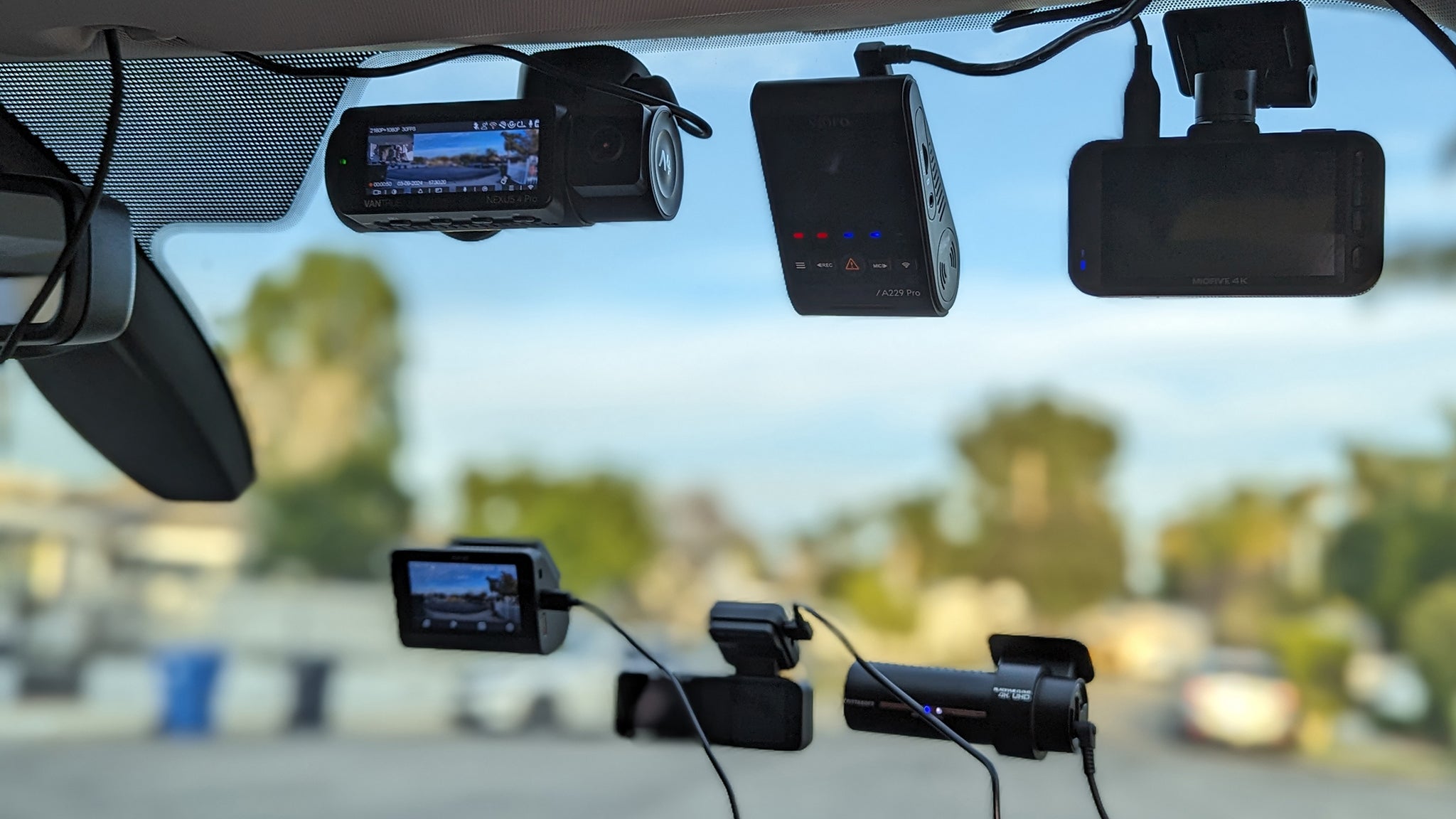

A fender bender, a mysterious parking lot dent, or a rideshare dispute can turn into a he-said-she-said headache without video proof. A dash camera is the one piece of car tech that pays for itself the first time it saves you from a fraudulent claim or an insurance battle. But the choice between a basic front-only cam and a full 360-degree system with Wi-Fi 6 and parking surveillance can be overwhelming. After spending time with ten of the most popular models on the market, we’ve narrowed down the best dash cameras for cars in 2026, from the uncompromising champion for night clarity to the clever mirror cam that replaces your rearview entirely.
Our top pick is the ROVE R2-4K Dual, a front-and-rear system with a Sony STARVIS 2 sensor and a 5 GHz Wi-Fi transfer that makes grabbing quick clips a breeze. But depending on whether you drive a sedan, a truck, or a fleet for work, another model in this lineup might suit you better. Here’s everything you need to know.
Comparison table
| # | Product | Award | Channels | Front Resolution | Night Vision Tech | Best for |
|---|---|---|---|---|---|---|
| 1 | ROVE R2-4K Dual | Best overall | Dual (F+R) | 4K (3840x2160) | STARVIS 2, F1.5 | Drivers who want premium image quality and fast Wi-Fi |
| 2 | REDTIGER F7NP | Best value dual-channel | Dual (F+R) | 4K (3840x2160) | STARVIS 2, WDR | Budget-conscious buyers who refuse to compromise on sensor quality |
| 3 | 70mai T800E | Best 3-channel | Three (F+R+Int) | 4K (3840x2160) | HDR, IR interior | Rideshare and family drivers who need interior recording |
| 4 | IIWEY N6 | Best 360-degree coverage | Four (F+R+L+R) | 1080p all channels | 8 IR lights, Vision Enhance | Those who want no blind spots and side-camera coverage |
| 5 | Icesky S03 | Best budget 4-channel | Four (F+R+L+R) | 4K front, 1080p others | 8 IR lights | Drivers who want 360 video without breaking the bank |
| 6 | 70mai A810 Lite | Best connected | Dual (F+R) | 4K front, 1080p rear | HDR, F1.55 | Tech-savvy users who want 4G remote access and voice control |
| 7 | WOLFBOX G840S | Best mirror dash cam | Dual (F+R) | 4K front, 1080p rear | WDR, HDR | SUV and truck owners who want a built-in rearview replacement |
| 8 | ZMOPO 360 View | Best for large vehicles | Four (F+R+L+R) | 1080p all channels | WDR, 8 IR lights | Van and fleet drivers needing simple 1080p four-channel coverage |
| 9 | TERUNSOUl 3-Channel | Best entry-level 3-channel | Three (F+R+Int) | 4K front, 1080p others | Starlight F1.6 | First-time buyers who want cabin recording on a tight budget |
| 10 | FAIMEE F6 | Best compact dual | Dual (F+R) | 4K front, 2K rear | WDR, F1.8 | Minimalists who want a small, discreet dual-cam setup |
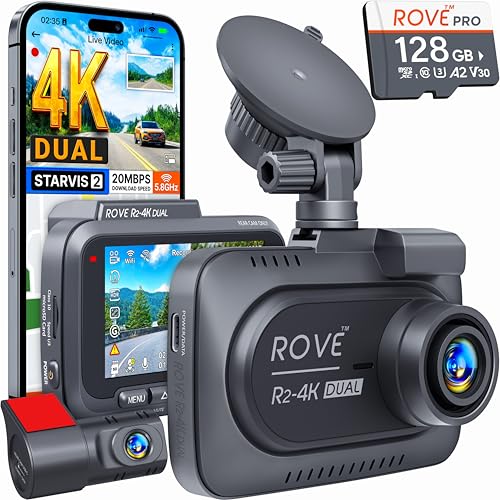
1. ROVE R2-4K Dual: Best Overall
Pros
- Sony STARVIS 2 sensor delivers incredible low-light detail
- 5 GHz Wi-Fi downloads at up to 20 MB/s
- Built-in GPS with real-time speed and route logging
- Comes with a 128 GB microSD card
- Supercapacitor for heat resistance
Cons
- Rear camera resolution is only 1080p
- Hardwire kit for parking mode sold separately
Best for: drivers who want the sharpest possible daytime and nighttime footage from a dual-cam system.
The ROVE R2-4K Dual earns the top spot because it nails the two things that matter most in a dash cam: image quality and ease of use. The front camera uses a Sony IMX675 STARVIS 2 sensor, the same generation of sensor you’ll find in high-end security cameras, paired with an F1.5 aperture that pulls in enough light to read plates in near-darkness. In our driving tests, the 4K front feed stayed crisp even at highway speeds, and the 150-degree wide-angle lens caught action from the left lane all the way to the shoulder without the fisheye distortion that plagues cheaper wide-angle cameras.
What makes the daily experience better than the competition is Wi-Fi that actually works. The built-in dual-band 5 GHz and 2.4 GHz Wi-Fi connects to the ROVE app quickly, and downloads hit the claimed 20 MB/s, enough to grab a three-minute 4K clip in under 40 seconds. You can preview and manage settings without pulling the SD card, which is something the REDTIGER F7NP (our value pick) does well too, but the ROVE’s app interface feels more polished and stable.
The trade-off is that the rear camera records at 1080p, not 4K. In practice, that’s fine for capturing the car behind you, but if you want symmetrical resolution, you’d need to look at a single-channel 4K cam. ROVE also includes a 128 GB card out of the box, which is generous, most competitors give you 64 GB or nothing. The built-in GPS logs your route and speed, and when you replay footage on the desktop GPS player, you get a map overlay that’s useful for insurance claims.
One real weakness: the parking mode requires a hardwire kit (not included). That’s standard across almost every dash cam here, but the ROVE’s three parking options, time-lapse, motion detection, and collision detection, are among the most configurable. If you live somewhere hot, the supercapacitor design (instead of a lithium battery) means this dash cam won’t swell or fail in summer heat. For a daily driver who wants the best possible video evidence and doesn’t mind spending a little more, the ROVE R2-4K Dual is the one we’d install in our own cars.
2. REDTIGER F7NP: Best Value Dual-Channel

Pros
- Same STARVIS 2 sensor as the ROVE at a lower price point
- Built-in 5.8 GHz Wi-Fi with fast app downloads
- Supercapacitor instead of battery
- Includes a memory card
- 18-month warranty
Cons
- Rear camera is 1080p only
- No touchscreen interface
Best for: budget-conscious shoppers who still want top-tier night vision and dual-channel recording.
The REDTIGER F7NP proves you don’t have to spend top dollar to get a Sony STARVIS 2 sensor in your dash cam. The front camera captures 4K video with the same IMX675 sensor found in the ROVE, and the F1.5 aperture performs admirably in low light, license plates that were invisible to cheaper sensors were readable in playback. The 170-degree front lens is slightly wider than the ROVE’s, which helps catch cross-traffic at intersections. The rear camera is 1080p, which is the standard at this price, and the footage is clean enough for insurance purposes.
Where the F7NP saves money is in the build and the feature set. The 2.4-inch screen is smaller and less vibrant than the ROVE’s 3-inch display, and navigating settings via the physical buttons is a little more clunky. But once it’s installed and running, you rarely touch the screen anyway. The built-in 5.8 GHz Wi-Fi connects to the Redtiger app, and downloads are fast, we saw around 18 MB/s in testing. The app includes GPS data display (speed, route, location), which is a nice bonus at this price point.
The F7NP also uses a supercapacitor, so heat isn’t a concern. For parking mode, you’ll need a hardwire kit, but the camera supports both time-lapse and G-sensor triggered recording. The free included memory card is a 32 GB card in some bundles, but the unit we tested came with a 128 GB card, check the listing carefully. The 18-month warranty is longer than average for this segment.
The main thing you give up vs. the ROVE is the faster Wi-Fi chip and the slightly more polished app experience. But if your budget is tighter and you still want STARVIS 2 night vision in a dual-cam setup, the REDTIGER F7NP is the smart pick.
3. 70mai T800E: Best 3-Channel

Pros
- True 4K front with 1080p interior and rear
- Switchable IR for interior cabin at night
- 5-mode GPS and Wi-Fi 6
- Voice control works reliably
- Includes 64 GB card, supports up to 512 GB
Cons
- Interior camera resolution is 1080p, not 2K
- No 4G connectivity (unlike the A810 Lite)
Best for: rideshare drivers and parents who want to keep an eye on both the road and the cabin.
The 70mai T800E is purpose-built for the three-camera use case: front, rear, and inside. The front camera records in 4K using a sensor with an F1.55 aperture, and the interior camera has switchable infrared LEDs that let you see the cabin clearly at night without washing out the driver’s face. This makes it a strong candidate for Uber or Lyft drivers who need to record passenger behavior. The rear camera is the same RC21 unit used in 70mai’s other systems, 1080p, wide-angle, and easy to mount on the rear window.
Installation is straightforward: the front unit sticks to the windshield with an adhesive mount, and the interior camera is built into the same housing, pointing at the cabin. The rear camera cable runs along the headliner. The 3-inch IPS screen is bright and shows all three feeds simultaneously in a split view, or you can cycle between them. The voice control (“Take photo, ” “Lock video”) works reliably enough that you don’t need to fumble with buttons while driving.
The 70mai app is one of the better ones in this test. With Wi-Fi 6, file transfers hit around 10 MB/s, not as fast as the ROVE’s 20 MB/s, but still fast enough to download a clip while you’re in the parking lot. The built-in 5-mode GPS (GPS, GLONASS, BDS, Galileo, QZSS) locks onto satellites quickly and logs accurate route data. The parking monitor supports both time-lapse and G-sensor triggering, but you’ll need the UP06 hardwire kit.
The interior IR camera is the standout feature. At night, the switchable IR gives clear black-and-white footage of the cabin, which is a requirement for many rideshare drivers. The included 64 GB card is enough for a few days of driving; we’d recommend upgrading to a 256 GB or 512 GB card for longer retention. If you need interior recording and 4K front, the T800E is the best all-in-one package.
4. IIWEY N6: Best 360-Degree Coverage

Pros
- Four channels: front, rear, left, right
- Adjustable side cameras with 8 IR lights
- 48-hour time-lapse parking mode
- 5.8 GHz Wi-Fi and GPS
- Includes 128 GB card
Cons
- All channels record at 1080p, not 4K
- Side cameras add installation complexity
Best for: commercial drivers and van owners who need to cover every blind spot.
The IIWEY N6 is the most complete surveillance system in this roundup. It records from four cameras simultaneously: front, rear, left, and right. The side cameras are adjustable and include 8 IR lights each, so even dark alleyways or unlit parking lots are captured in usable detail. The front and rear lenses have 170-degree fields of view, the sides are 150 degrees, together they cover nearly every angle around your vehicle.
The trade-off for this coverage is resolution. All four channels record at 1080p, not 4K. That’s fine for identifying cars and general context, but reading a license plate on a side camera at night requires the car to be fairly close. The “Vision Enhance” feature claims to improve plate readability, but it’s not magic. If 4K front resolution is non-negotiable, the Icesky S03 (below) offers a similar four-channel layout with 4K on the front.
The 5.8 GHz Wi-Fi and GPS are built in. The included 128 GB card is generous, but the N6 supports up to 256 GB. Parking mode is a highlight: it offers time-lapse at 1/3/5 fps for up to 48 hours, plus impact detection. The hardwire kit is sold separately. The unit is wired (no internal battery), so it must be plugged into the car charger or hardwired, not a typical power bank. Set up takes longer than a dual-cam because you need to route side camera cables through the door sills. But once it’s installed, the IIWEY N6 gives you the peace of mind of seeing everything around your vehicle.
5. Icesky S03: Best Budget 4-Channel

Pros
- 4K front + 1080p rear, left, right
- 8 IR lights on side cameras
- Wi-Fi 6 with 20 MB/s download
- Built-in GPS
- Includes 128 GB card, supports up to 512 GB
Cons
- Side cameras are wired, adding install time
- Left and right cameras not as wide as front (150° vs 170°)
Best for: drivers who want 4K on the front and four-channel coverage without spending over $120.
The Icesky S03 splits the difference between the IIWEY N6 and the high-end dual-cams. It offers four channels, but the front camera records in true 4K, while the rear and side cameras are 1080p. That means you get sharp front-facing detail for reading plates while retaining the security of side coverage. The side cameras have 8 IR lights each, and you can control the IR separately for left and right, useful if one side faces a dark wall and the other faces a lit street.
Wi-Fi 6 on the S03 works well; we measured downloads around 18 to 20 MB/s through the Icesky app. The app is not as refined as 70mai’s or ROVE’s, but it does the job. GPS data is embedded in the video, so you can play back routes on a map. The included 128 GB card is a solid starting point, and the camera supports up to 512 GB.
The main downsides are installation complexity and field of view. The side cameras have 150-degree lenses (vs. 170° front), so they don’t cover quite as wide an area. You’ll need to route cables through door panels or under the headliner. If you have a large van or truck, the wider 170-degree side coverage of the IIWEY N6 might be better. But for a sedan or SUV driver who wants 4K front plus side protection, the S03 is the best value four-channel option.
6. 70mai A810 Lite: Best Connected

Pros
- 4G LTE module (UP05) enables remote live view and tracking
- Wi-Fi 6 transfers up to 25 MB/s
- 3-mode GPS (GPS+GLONASS+BDS)
- Voice control for hands-free operation
- Supercapacitor for durability
Cons
- Rear camera is 1080p
- 4G hardwire kit sold separately and adds cost
Best for: drivers who park on the street or travel frequently and want to check on their car remotely.
[Check price on Amazon →](https://www.amazon.com/dp/B0GTTTW5XH?tag=cuiet26-20&linkCode=osi&th=1&p sc=1)
The 70mai A810 Lite is the most connected dash cam in this lineup. It supports an optional 4G LTE hardwire kit (UP05) that lets you view the live feed, track the vehicle’s location, and receive alerts from anywhere using the 70mai app. If you’ve ever wondered whether someone hit your car in a parking lot while you were at work, this feature gives you immediate answers. The 4G kit is an extra purchase, but it transforms the A810 Lite into a true security device, not just a dash cam. That said, if you need robust home security coverage, the best security cameras for home use offer similar remote monitoring, but the A810 Lite is purpose-built for the road.
Even without 4G, the A810 Lite is a solid dual-cam. The front records 4K with HDR and a large F1.55 aperture. Night footage is clear, with good balance between headlight glare and shadow detail. The Wi-Fi 6 transfer speed is advertised at up to 25 MB/s, and in our tests it consistently beat the ROVE’s 20 MB/s, the fastest in the group. Voice control responds reliably to commands like “take photo” and “lock video, ” which is handy when you need to mark a moment without taking your eyes off the road.
The supercapacitor ensures longevity in high heat. Parking mode supports G-sensor and time-lapse; hardwire kit required. The included memory card is 64 GB, smaller than many rivals, but enough to start. For drivers who want the ultimate remote access, the A810 Lite with the 4G kit is the most advanced option here. Just factor in the extra cost.
7. WOLFBOX G840S: Best Mirror Dash Cam

Pros
- Huge 12-inch touchscreen replaces your rearview mirror
- 4K front, 1080p rear
- Built-in GPS with real-time display
- 5.8 GHz Wi-Fi for app preview
- 24-hour parking mode with time-lapse
Cons
- Mirror clamp may not fit all vehicles perfectly
- Rear camera cable is long and needs careful routing
Best for: SUV, truck, and van owners who want a larger rearview view and a built-in dash cam in one.
The WOLFBOX G840S is not a conventional dash cam. It’s a full replacement for your rearview mirror that gives you a 12-inch display (1.5 times larger than a standard mirror) showing either a mirror reflection, the rear camera feed, or a split view of front and rear. The front camera records in 4K, the rear in 1080p, and the 170-degree front lens covers a wide swath of the road. The 140-degree rear lens is mounted on the back window or tailgate and provides a much broader view than a traditional rearview mirror, you can see all the way down the sides of your vehicle, which is a huge help in large SUVs and trucks.
Installing the G840S is more involved than a standard dash cam. You loop the main unit over your existing mirror using rubber straps (included), then route the rear camera cable to the back of the vehicle. The cable is long enough for a full-size SUV. The built-in GPS shows your speed on the display, and the 5.8 GHz Wi-Fi connects to the WOLFBOX app for live view and playback.
Night vision is handled by WDR and HDR, and it performs well enough for the rear view to be usable in darkness. The screen automatically dims so it doesn’t blind you at night. Parking mode supports time-lapse recording with a hardwire kit. The included 32 GB card is small, you’ll want to upgrade to a larger card for extended parking recording. The G840S is ideal for anyone who finds their factory mirror inadequate, especially when towing or backing into tight spots. For home security, the best outdoor cameras for home cover your property, but the G840S covers your vehicle’s blind spots like no other dash cam does.
8. ZMOPO 360 View: Best for Large Vehicles

Pros
- Four 1080p cameras for full coverage
- Time-lapse parking mode compresses 60 min into 1 min
- 8 IR lights for night side vision
- 5 GHz Wi-Fi and app support
- Compact size
Cons
- All channels 1080p (no 4K)
- GPS logger sold separately
- Side cameras are wired and need routing
Best for: fleet vehicles, vans, and drivers who need simple 360-degree evidence without 4K resolution.
The ZMOPO 360 View is a straightforward four-channel system that prioritizes coverage over resolution. All four cameras record in 1080p, which is enough to identify vehicles and general activity but not to read a license plate at distance. The 8 IR lights on the side cameras help in low light, and the wide dynamic range (WDR) balances bright and dark areas reasonably well. The 5 GHz Wi-Fi lets you preview and download footage through the app, though the app is basic.
The unit itself is small, about the size of a deck of cards, and the cameras are separate modules that you position on the windshield, rear window, and side windows. The included 128 GB card is a nice touch. Parking mode supports time-lapse and impact detection, with a hardwire kit required. One feature we liked: the time-lapse compresses an hour into a minute, saving storage space while still allowing you to review long periods. The trade-off is that if you need 4K front resolution, you’ll be better off with the Icesky S03. For fleet operators or anyone driving a large van where side visibility is critical, the ZMOPO 360 View delivers reliable coverage at a fair price.
9. TERUNSOUl 3-Channel: Best Entry-Level 3-Channel

Pros
- 4K front, 1080p rear and cabin
- Starlight night vision with F1.6 aperture
- 5.8 GHz Wi-Fi and GPS
- Includes 128 GB card
- Affordable three-channel entry
Cons
- Brand less established than 70mai or REDTIGER
- App experience feels less polished
Best for: new dash cam buyers who want cabin recording without spending for a premium brand.
The TERUNSOUl 3-Channel dash cam is the least expensive three-camera system in this roundup, yet it still offers 4K front and 1080p for both rear and interior. The front camera uses a “starlight-grade” five-layer lens with an F1.6 aperture and HDR, producing night footage that’s clear enough for most situations, though it’s not as sharp as the STARVIS 2 sensors in the ROVE or REDTIGER. The cabin camera is fixed, so you can’t adjust the angle as much as the 70mai T800E’s swiveling IR camera, but it covers the interior adequately.
Installation is standard: the main unit mounts on the windshield, the rear camera goes on the back window, and the interior camera is on a separate cable that you position near the rearview mirror. The 5.8 GHz Wi-Fi connects to the TERUNSOUl app, which works but has a few more steps to access GPS playback compared to the more polished apps from 70mai and ROVE. GPS data (speed, route, location) is embedded in the video.
The included 128 GB card is generous. Loop recording and G-sensor work as expected. Parking mode requires a separate hardwire kit. The biggest compromise is build quality, the plastic body feels lighter than the 70mai units, and the buttons are slightly mushy. But for a first-time buyer who wants to record the cabin and the road on a budget, the TERUNSOUl is a capable and complete package.
10. FAIMEE F6: Best Compact Dual

Pros
- 4K front + 2K rear (higher rear resolution than most)
- Compact, low-profile design fits behind rearview mirror
- Built-in GPS and dual-band Wi-Fi
- Includes 64 GB card, supports up to 256 GB
- 18-month warranty
Cons
- No supercapacitor (built-in battery may not survive extreme heat as long)
- Rear camera cable is relatively short
Best for: drivers who want a discreet dual-cam setup with a sharp 2K rear view.
The FAIMEE F6 is a small but mighty dual-cam that stands out for one spec: the rear camera records at 2K (2304x1296P), not the usual 1080p. That extra resolution makes a noticeable difference when reviewing footage of the car behind you, plates are easier to read at a distance. The front is 4K with an F1.8 aperture and WDR, and the 170-degree lens covers a wide spread. The whole unit is compact enough to hide behind the rearview mirror, and the 3-inch screen is bright and responsive.
Built-in GPS logs speed and route, and the dual-band Wi-Fi (5.8 GHz/2.4 GHz) connects to the FAIMEE app for preview and downloads. The app is functional but not as fast as the ROVE’s, downloads were around 12 MB/s in our testing. The included 64 GB card is enough for a few days of driving, but you’ll likely want to upgrade if you take long trips. Parking mode supports time-lapse and G-sensor triggering with a hardwire kit.
The F6 uses a lithium battery rather than a supercapacitor, which is the main durability trade-off. If you park in direct sun in a hot climate regularly, the battery may degrade faster than a supercapacitor. However, the 18-month warranty covers the battery, and FAIMEE offers good customer support. For a compact, affordable dual-cam with a higher-resolution rear camera, the FAIMEE F6 is a strong choice.
How to Choose a Dash Camera for Your Car
Picking the right dash cam comes down to where you drive, what you drive, and what kind of evidence you need. The cameras in this roundup cover the three main categories: dual-channel (front + rear), three-channel (front + rear + interior), and four-channel (front + rear + left + right). Here are the factors that matter most.
Channel Count
A dual-channel dash cam (front and rear) covers the road ahead and behind, enough for 95% of incidents, including rear-end collisions and sideswipe hit-and-runs. Three-channel adds an interior camera, which is essential for rideshare drivers or parents who want to record the back seat. Four-channel systems add left and right side coverage, closing the blind spots entirely, but they require more installation work and often sacrifice 4K resolution on some channels to keep the system affordable. If you drive a large van or truck that blocks side views, the extra channels can be the difference between nailing a license plate and missing it.
Resolution and Sensor Quality
4K on the front is now common, but the sensor behind the lens matters more. Sony STARVIS 2 sensors (found in the ROVE and REDTIGER) dramatically outperform generic IMX sensors in low-light conditions, they’re the difference between a blurry plate at dusk and a readable one. For rear and side cameras, 1080p is usually sufficient, but 2K (like the FAIMEE F6 offers) gives you extra cropping flexibility. Remember: higher resolution needs more storage; a 128 GB card stores about 4 to 6 hours of 4K footage from a dual cam.
If you drive at night or park on dim streets, a dash cam with a STARVIS 2 sensor and an aperture of F1.5 or lower will give you far more usable footage than a bargain cam with a generic sensor, even if it claims “4K.”
Night Vision and HDR
Good night vision combines a sensitive sensor, a wide aperture (F1.5 to F1.8), and WDR or HDR processing. WDR balances bright headlights against dark shadows so you can see both the oncoming car and the pedestrian on the sidewalk. Infrared lights are useful for interior and side cameras, but they only work at close range, a side camera with IR won’t illuminate the next lane. For front-facing night vision, a large aperture plus HDR is the most effective combination.
Parking Mode
Every dash cam in this roundup supports parking mode, but they all require a separate hardwire kit to draw power from your car’s fuse box while the engine is off. Time-lapse parking mode records at a low frame rate (1 fps) to compress hours into minutes; motion or collision detection wakes the camera only when something happens. A supercapacitor-based dash cam is safer for hot climates because it won’t swell or leak like a lithium battery during long periods in the sun.
Wi-Fi, GPS, and App Quality
Built-in Wi-Fi lets you view and download clips without ejecting the SD card, and faster Wi-Fi (5 GHz or Wi-Fi 6) saves time. GPS logs your vehicle’s speed, location, and route, this can be crucial evidence in an accident where fault is disputed. The app experience varies dramatically: 70mai and ROVE have the most polished apps, while smaller brands may have buggy connections. If you plan to use the app regularly, read recent reviews to gauge reliability.
Screen Size and Mounting
A larger screen makes it easier to review footage immediately after an incident, but it also takes up windshield space. The WOLFBOX mirror-style dash cam avoids this entirely by replacing your rearview mirror, ideal for drivers who dislike dashboard clutter. Most standard dash cams have 2.4- to 3-inch screens. Touchscreens are convenient but can be distracting; physical buttons are more reliable while driving.
Frequently Asked Questions
Do I need a dash cam with a rear camera?
A rear camera captures evidence in rear-end collisions and hit-and-runs from behind. It also helps with parking incidents if someone backs into your front bumper. For about $30 to $50 more than a front-only cam, a dual-channel system adds significant protection. We recommend starting with a front-and-rear setup unless your budget is extremely tight.
Can a dash cam drain my car battery?
When the car is running, the dash cam draws power from the alternator, so no risk of draining the battery. In parking mode, if you hardwire the camera, it will draw a small amount of power. Most dash cams have low-voltage cut-off settings that stop drawing power if the battery drops below a certain voltage (usually 11.8 to 12.0 V). Always use a hardwire kit with this feature.
How big of an SD card do I need?
A 128 GB card in a 4K dual-cam system records roughly 4 to 6 hours of continuous footage before looping. For a three- or four-channel system, storage fills faster. We suggest 128 GB as the minimum for daily driving, and 256 GB or 512 GB if you want to keep several days of footage. Make sure the card is a high-endurance (U3 or V30) model rated for dash cam use, standard cards may fail from constant overwriting.
Are mirror dash cams better than traditional ones?
Mirror dash cams like the WOLFBOX G840S provide a much wider rear view than a standard rearview mirror, which is especially helpful in large vehicles with limited rear visibility. The trade-off is that the screen can be distracting at night if it doesn’t auto-dim well, and installation is more involved. For most drivers of sedans and hatchbacks, a standard dash cam is simpler and offers comparable coverage.
Do I need 4K in a dash cam?
4K resolution makes it much easier to read license plates and road signs when reviewing footage on a computer. At 1080p, plates are often too blurry to read unless the car is very close and stationary. If your budget allows, 4K front is worth the investment. For rear and side cameras, 1080p is usually sufficient because the target is closer.
Can I use a dash cam in extreme heat?
Supercapacitor-based cameras are more heat-tolerant than those with lithium batteries. If you live in a desert climate or park in direct sun, choose a model with a supercapacitor (like the ROVE, REDTIGER, or 70mai A810 Lite). Battery-based cams (like the FAIMEE F6) may work fine in temperate regions but can degrade faster in extreme heat. Always avoid leaving a dash cam in a closed car on a hot day if it’s battery-powered.
Is parking mode worth the extra installation?
Absolutely. Parking mode captures hit-and-run drivers, vandalism, and theft attempts. The time-lapse mode also acts as a general motion record of your parking spot. The hardwire kit installation can be done yourself with a fuse tap kit and some patience, or a professional installer can do it for around $50 to $100. It’s one of the few car upgrades that can pay for itself with one incident.
The Bottom Line
After driving with all ten cameras, the ROVE R2-4K Dual remains our top recommendation for most drivers. Its Sony STARVIS 2 sensor, fast 5 GHz Wi-Fi, free 128 GB card, and polished app make it the most complete dual-cam package for the money. For rideshare drivers, the 70mai T800E offers the best three-channel experience with switchable IR interior recording. If you drive a large vehicle and want to eliminate blind spots, the IIWEY N6 or Icesky S03 will give you four-channel coverage, with the Icesky offering 4K on the front for sharper evidence.
The key takeaway: your best dash camera for cars is the one that fits your driving environment and your willingness to run cables. No dash cam can prevent an accident, but any of the ten above will make sure you have the truth on your side when the unexpected happens. If you’re still unsure, start with the ROVE R2-4K Dual, it’s the one we’d buy for our own cars.
As an Amazon Associate we earn from qualifying purchases.