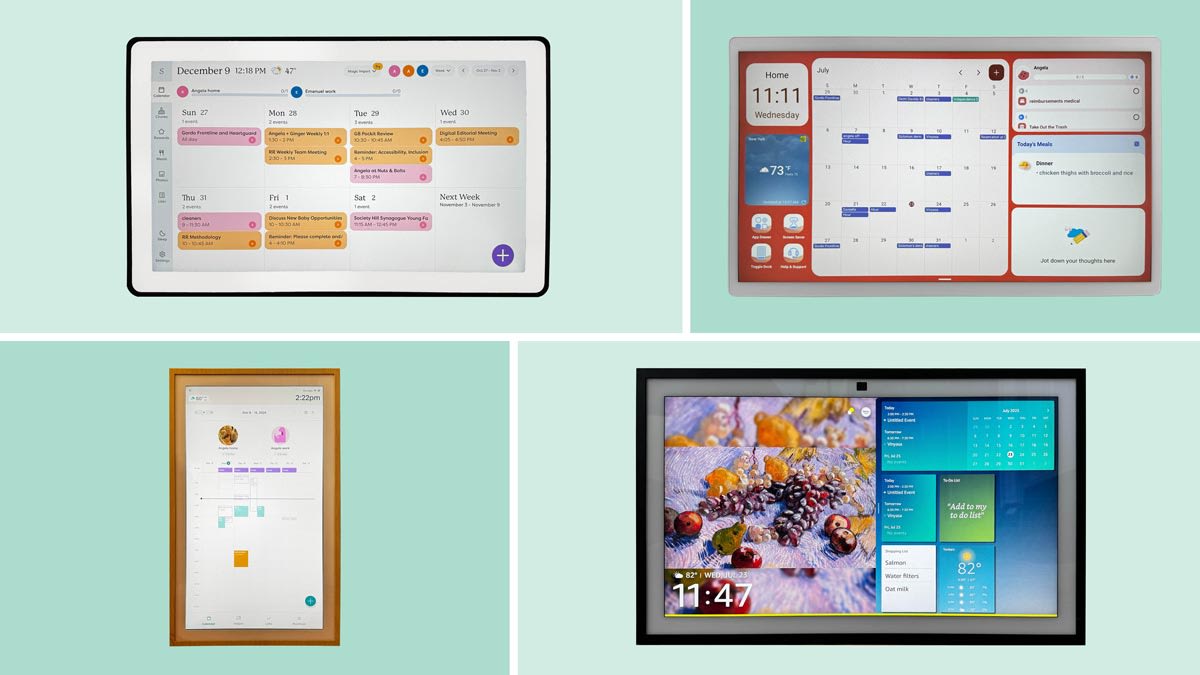

A family calendar fails when it lives in one person's phone. School pickups, appointments, chores, and dinner plans need a shared view that people can actually see and update. The Best digital calendar options put that information in a common room, then add reminders, task lists, meal planning, or rewards around it.
We compared nine touchscreen family planners, from compact 15.6-inch displays to the enormous 27-inch Skylight Calendar Max. The range includes polished systems with dedicated apps, Android-style dashboards, and subscription-free alternatives. Our top pick is the Skylight Calendar 2, with the original Skylight Calendar 15 close behind for households that want the established feature set.
Comparison table
| # | Product | Award | Screen | Key features | Best for |
|---|---|---|---|---|---|
| 1 | Skylight Calendar 2 | Best overall | 15-inch Full HD | 4GB RAM, magnetic frame, wall mount, stand | Families wanting a polished shared planner |
| 2 | Skylight Calendar 15 | Best for chore routines | 15.4-inch HD | Calendar sync, chores, meals, lists | Homes built around tasks and routines |
| 3 | Skylight Calendar Max | Best large-screen planner | 27-inch HD | Portrait or landscape, chores, app access | Large kitchens and command centers |
| 4 | Westsee 15.6-inch Calendar | Best for built-in storage | 15.6-inch touchscreen | 32GB memory, photos, meals, rewards | Families wanting photos and planning together |
| 5 | Yemsd 15.6-inch Calendar | Best for warranty coverage | 15.6-inch HD | 32GB expandable storage, chores, photo frame | Households prioritizing support coverage |
| 6 | OcePor 15.6-inch Calendar | Best for large households | 15.6-inch Full HD IPS | 20-member support, 350-nit peak brightness | Families coordinating many schedules |
| 7 | ApoloSign 15.6-inch Calendar | Best Android flexibility | 15.6-inch touchscreen | Android mode, widgets, Google Play, stand | Users wanting apps beyond calendar tools |
| 8 | ApoloSign 21.5-inch Calendar | Best mid-size dashboard | 21.5-inch touchscreen | Android mode, widgets, wall mount | Homes needing more room than 15.6 inches |
| 9 | Airzeen 15.6-inch Calendar | Best subscription-free display | 15.6-inch HD | Tasks, meals, photos, weather, widgets | Households avoiding recurring service features |
1. Skylight Calendar 2: Best Overall

Pros
- Bright 15-inch Full HD display
- Magnetic Snap Frame can be changed
- Includes wall mount and adjustable stand
- 4GB of RAM for responsive operation
Cons
- Some advanced tools require the optional Plus Plan
- Smaller viewing area than the Calendar Max
Best for: families that want a refined shared planner with flexible placement and fast everyday operation.
The Skylight Calendar 2 is the easiest model here to recommend when the goal is a shared family schedule rather than a general-purpose tablet mounted to a wall. Its 15-inch display is large enough for a kitchen or entryway, yet it does not dominate the room. The interface is focused on calendars, tasks, and lists, so a child or visiting relative can understand what is happening without navigating a collection of unrelated apps.
The 15-inch Full HD screen gives text and colored events a cleaner presentation than a basic HD panel. That matters when several family members share the display and the calendar is viewed from across a room. Skylight also includes a removable magnetic Snap Frame, a 180-degree adjustable stand, and a wall mount with a built-in level. You can use it on a counter, place it on a table, or mount it permanently without having to solve the hardware question separately.
The hardware is more capable than the original Skylight Calendar 15, too. The Calendar 2 has 4GB of RAM, which the product information positions as an upgrade for smoother syncing and responsiveness. It connects to Wi-Fi and can sync family schedules, while the companion app lets people make changes away from the display. For a household that wants the screen to remain dedicated to planning, this is cleaner than the more open Android approach used by the ApoloSign models.
Its main limitation is the division between the core calendar experience and the optional Plus Plan. The product includes calendars, tasks, lists, and app access, but features such as Sidekick magic import, photo screensavers, meal planning, and rewards are listed as Plus additions. The 15-inch screen also cannot show as much at once as the 27-inch Skylight Calendar Max. Choose the Calendar 2 if you want a carefully designed family hub. Skip it if you need a broad Android dashboard or a wall-sized display.
The right buyer is a family that values clarity over endless customization. If you are still deciding how much of the household should live on one screen, our guide to keeping family schedules visible without constant phone checking covers the same organizational problem from another angle.
2. Skylight Calendar 15: Best for Chore Routines

Pros
- Chores, meals, calendars, tasks, and lists in one system
- Syncs Google, iCloud, Outlook, Cozi, and Yahoo
- Works on a wall, counter, or desk
- Companion app supports updates away from home
Cons
- HD display is less detailed than the Calendar 2 Full HD panel
- Premium features require the optional Plus Plan
Best for: families that want chores and meal planning to sit alongside appointments in one focused interface.
The original Skylight Calendar 15 remains a strong choice because it understands that a family planner needs more than calendar squares. Its built-in chore chart, shared tasks, lists, and meal planning are the features that turn a wall display into a household routine. Parents can assign work, children can see what belongs to them, and the family can keep dinner planning near the schedule instead of scattering it across separate notes.
The display measures 15.4 inches and uses an HD smart screen. That is a useful size for a kitchen counter, hallway table, home office desk, or wall, with dimensions of 15.8 by 9.9 by 1.4 inches. It gives the planner a broad landscape shape without demanding the wall space of the Calendar Max. The screen is not as crisp on paper as the 15-inch Full HD panel in the Calendar 2, but the larger point is usability: this is a dedicated, readable family board rather than a phone interface enlarged onto a wall.
Setup centers on Wi-Fi syncing with Google, iCloud, Outlook, Cozi, and Yahoo. Events can be added on the device or through the Skylight app, which makes it practical for a parent who remembers an appointment while away from home. The calendar, tasks, and lists stay tied together, while the weekly meal view gives the display a useful role at dinner-planning time. That combination is more focused than the Android flexibility of the ApoloSign 15.6-inch Calendar.
The original model is not the most advanced Skylight hardware now. The Calendar 2 adds Full HD resolution, 4GB of RAM, a removable magnetic frame, and a 180-degree adjustable stand. The older model also places some attractive extras behind the optional Plus Plan, including Magic Import, photo screensavers, meal planning, and stars and rewards. That does not erase its core strengths, but shoppers should understand what is included in the base experience.
Pick the Skylight Calendar 15 when chores and routines are the center of the household system. It suits families that want a guided planner with fewer distractions, especially when the goal is to get children looking at the same responsibilities every day.
3. Skylight Calendar Max: Best Large-Screen Planner

Pros
- Huge 27-inch display
- Portrait or landscape orientation
- Syncs Google, Apple, Outlook, Yahoo, and Cozi
- Built-in chores and daily planning tools
Cons
- Takes substantially more wall space
- Heavy 22.66-pound construction limits casual repositioning
- Optional Plus Plan adds some headline features
Best for: large kitchens, entryways, and family command centers where visibility matters more than compact installation.
The Skylight Calendar Max solves the problem that smaller family planners cannot: several people can read it at the same time. A 27-inch display is not a minor size increase over the 15-inch models. It gives a kitchen or hallway command center enough room for schedules, chores, and routines to remain visible without reducing every event to a tiny label.
The display supports portrait and landscape orientation, so the installation can follow the wall rather than forcing the wall to follow the device. The product measures 29.6 inches long, 18.7 inches high, and 4.13 inches wide, with a listed weight of 22.6625 pounds. That combination makes planning the mounting location important. It is a permanent household fixture, not a screen you will casually move between the kitchen and office.
Syncing covers Google, Apple, Outlook, Yahoo, and Cozi. The Skylight mobile app allows calendar edits away from the display, while the screen itself combines shared events with chores and daily planning. The Max also supports swappable frame styles, which gives the large panel a more intentional place in a kitchen or entryway. Its ability to auto-adjust between portrait and landscape is a practical advantage over a fixed-format display.
The trade-off is obvious but meaningful. The Max is less discreet than the Skylight Calendar 2, and its scale is wasted if the calendar is viewed by one person from a nearby desk. It also shares the Skylight platform's optional Plus Plan structure, with Magic Import, photo screensavers, meal planning, and stars and rewards listed as premium features. Buyers should also take the 22.66-pound weight seriously and use a suitable mounting location.
This is the model for a busy home where the calendar must be legible from several feet away and multiple people need to gather around it. If your household has a broad wall and a crowded schedule, the Max is the clearest screen here. If the planner belongs in a small apartment kitchen, the Calendar 2 is the more sensible shape.
4. Westsee 15.6-inch Calendar: Best for Built-in Storage

Pros
- 32GB of built-in memory
- Core schedules and planning tools do not require a subscription
- Includes table stand and wall-mount kit
- Supports photos, videos, meals, chores, and grocery lists
Cons
- Advanced AI Assistant tools may require a future subscription
- Less established software ecosystem than Skylight
Best for: households that want a family planner and substantial local photo storage in one display.
The Westsee 15.6-inch Calendar takes a wider view of what belongs in a family hub. It is not only a schedule board. Its feature set also includes photo and video display, meal planning, grocery lists, weather updates, and a task reward system. That makes it appealing when the screen should remain useful during quiet periods rather than showing an empty calendar.
The standout specification is 32GB of built-in memory. Westsee says the display can store thousands of photos and videos, so it has a clearer role as a digital picture frame than the more calendar-focused Skylight models. The product includes both a table stand and a wall-mount display kit, allowing a household to test the best location before committing to one placement. Its listed weight is 3.22 pounds, much easier to handle than the large Skylight Calendar Max.
Calendar syncing works with Google, iCloud, Outlook, and other platforms through the Zical app. The display supports day, week, month, and custom views, while sound reminders can call attention to birthdays and notes. Color-coded tasks help identify who owns an item, and the product supports comments on tasks and meals. Those details make it more collaborative than a screen that merely mirrors one person's calendar.
The no-subscription claim applies to the core functions, including schedules, tasks and rewards, meal plans, photo display, and grocery lists. Westsee does say advanced tools such as an AI Assistant may require a subscription in the future. That caveat matters for anyone who wants a permanent guarantee around every software feature. The interface also does not have the same narrow, purpose-built feel as Skylight Calendar 15, which is a better fit for families that want fewer moving parts.
Choose Westsee when stored family photos and household planning deserve equal billing. It is a particularly interesting fit for a living room or entryway where the display can alternate between a practical planner and a family gallery.
5. Yemsd 15.6-inch Calendar: Best for Warranty Coverage

Pros
- 32GB expandable storage
- Glare-free HD touchscreen
- Supports Google, Outlook, iCloud, and other calendars
- Includes a two-year warranty and 24/7 support
Cons
- Product information lists unusual one-inch dimensions
- Batteries are not included
- Several headline features are described broadly rather than with detailed hardware specifications
Best for: households that want a photo-capable planner with explicit support and warranty coverage.
The Yemsd 15.6-inch Calendar is built around the familiar family command-center formula: schedules, meal planning, chores, rewards, and photos on one touchscreen. Its most distinctive practical promise is support. The listing specifies 24/7 customer support and a two-year warranty, which gives this lesser-known option a clearer after-sales position than many generic digital planners.
The 15.6-inch glare-free HD touchscreen is designed for wall or desk use, and the product includes mounting hardware. Yemsd also lists 32GB of expandable storage, giving the photo-frame function more room than a basic calendar display. The company describes AI photo restoration as part of the photo experience, but it does not provide detailed hardware information about how that enhancement works. Treat it as a software feature rather than a reason to expect a particular image-processing result.
Shared calendar syncing includes Google, Outlook, iCloud, and other platforms. Multiple family members can edit schedules in real time, while color-coded tasks and reward points add a child-friendly layer to the chore chart. The display can rotate through family photos when it is not being used for planning. That combination puts it in the same general lane as the Westsee 15.6-inch Calendar, though Westsee provides more explicit information about its 32GB memory and Zical app.
The specification sheet needs a little caution. The listing describes the screen as 15.6 inches and the body as a wall or desk display, but the supplied item dimensions are each listed at about one inch. Those measurements do not explain the physical size of a 15.6-inch screen, so they are not useful for planning a wall location. The listing also says batteries are not included, another reason to confirm the installation details before setting up a permanent household station.
Yemsd makes the most sense for buyers who place real weight on support coverage and a stated warranty. It is less compelling for someone who wants the most clearly documented software ecosystem, where Skylight has the stronger identity, or the most open dashboard, where ApoloSign has the advantage.
6. OcePor 15.6-inch Calendar: Best for Large Households
Pros
- Full HD IPS touchscreen
- Up to 350 nits peak brightness
- Supports up to 20 family members
- Syncs Google, Apple iCloud, and Outlook
Cons
- Product information gives no listed weight or dimensions
- Software support details are less extensive than Skylight's
- Wall and desk placement may require separate planning
Best for: large families that need color-coded schedules and many individual profiles on one screen.
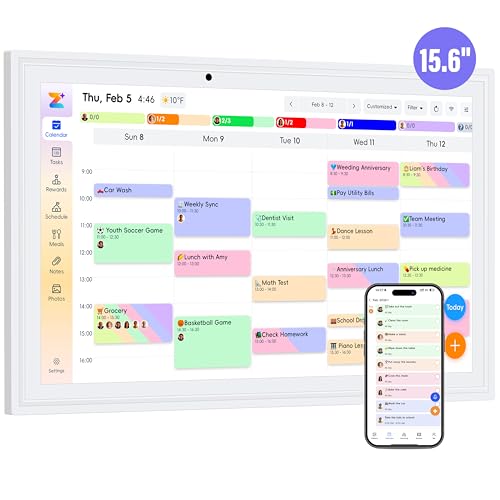
The OcePor 15.6-inch Calendar has one unusually clear target: a household with a lot of people to coordinate. It supports up to 20 members, with color-coded schedules for chores, childcare activities, appointments, and other events. That capacity is more significant than a generic “family sharing” label when several calendars need to coexist without becoming a visual tangle.
Its 15.6-inch Full HD IPS screen is paired with auto-brightness and a listed peak brightness of up to 350 nits. Full HD helps keep event text and colored blocks defined, while the brightness figure suggests more flexibility in a bright kitchen or room with strong daylight. The product describes an ultra-slim, plug-and-play design for continuous all-day use. It can function on a desk or as a wall calendar, though the supplied product information does not list body dimensions or weight.
The software covers Google Calendar, Apple iCloud, and Outlook, with automatic syncing after Wi-Fi setup. OcePor says the calendar can connect within one minute, supports recurring daily or weekly reminders, and marks holidays automatically. Meal plans, memos, voice reminders, a chore chart, and a star reward system round out the household tools. The screen can also become a digital picture frame when it is not showing schedules.
That feature list is broad, but the software story is not as detailed as Skylight's. The Skylight Calendar 2 explains its app and hardware upgrades more clearly, while the Airzeen 15.6-inch Calendar makes a more direct subscription-free claim around its core features. OcePor is the better fit when member capacity and screen brightness are the deciding factors, not when you want the most mature-looking platform description.
The missing physical measurements are a real consideration for wall mounting. You will need to confirm the available space and installation requirements rather than relying on a published weight or footprint. Choose OcePor for a large, multi-person household that wants a bright Full HD display and color-coded coordination. Smaller families may not use its strongest feature.
7. ApoloSign 15.6-inch Calendar: Best Android Flexibility

Pros
- Switches between Calendar Mode and Android Mode
- Supports apps and widgets through Google Play
- Includes chores, meals, lists, and rewards
- Has photo, weather, smart-home, and voice features
Cons
- Open Android features can make the experience less focused
- Physical dimensions in the listing do not clearly describe the full display
- App behavior may vary from a dedicated calendar system
Best for: technically confident households that want a planner with tablet-style customization.
The ApoloSign 15.6-inch Calendar is the most flexible option in this group. It has a dedicated Calendar Mode for schedules and family planning, but it can also switch to Android Mode. That second mode lets you add apps and widgets, turning the display into something closer to a wall-mounted family tablet than a fixed-purpose planner.
That distinction changes who should buy it. Calendar Mode keeps shared schedules, events, chores, reminders, grocery lists, shopping lists, wish lists, and weekly meal planning in one place. Android Mode opens the door to widgets for weather, clocks, music, smart-home controls, and meals, plus additional apps from Google Play. Users who want to shape the dashboard around their home will appreciate that freedom more than someone who wants a minimal interface that children can understand immediately.
The product also lists anti-glare HD touchscreen clarity, auto-brightness adjustment, sleep mode, and photo and video slideshow screensavers through Google Photos. A built-in Google Gemini voice assistant can check schedules, set reminders, show weather, manage tasks, and control compatible smart-home devices such as lights, cameras, and doorbells. Those abilities go well beyond the core feature set of the OcePor 15.6-inch Calendar or Skylight Calendar 15.
The same flexibility creates the main weakness. More apps and widgets mean more choices, more settings, and more opportunities for the clean family schedule to become a cluttered dashboard. ApoloSign's supplied product dimensions also appear to describe a small component rather than the complete 15.6-inch display, so they should not be used to plan the wall space. The included stand helps with placement, but buyers should verify the mounting arrangement they want.
Choose ApoloSign if your household already thinks of a wall display as a general smart-home control panel. If you only need a calendar, chores, and meals, the Skylight Calendar 2 is more restrained and easier to explain to the whole family.
8. ApoloSign 21.5-inch Calendar: Best Mid-Size Dashboard

Pros
- Larger 21.5-inch viewing area
- Calendar Mode and Android Mode
- Apps, widgets, photos, meals, and smart-home controls
- Wall mount included
Cons
- More demanding to place than a 15.6-inch model
- Android flexibility may be unnecessary for simple planning
- Listing does not provide a detailed hardware specification sheet
Best for: households that want an open dashboard with more viewing room than a compact family planner.
The ApoloSign 21.5-inch Calendar takes the same open Android idea as its smaller sibling and gives it more screen area. That makes the difference easy to understand. A 21.5-inch display can keep more family members, task lists, and widgets visible without compressing the layout into a dense grid. It is a better fit for a kitchen command center or broad hallway wall than a cramped counter.
The screen supports Calendar Mode and Android Mode, with a one-touch switch between the two. In Calendar Mode, it handles schedules, shared events, chores, reminders, grocery and shopping lists, wish lists, and meal planning. Android Mode supports widgets and apps from Google Play, including weather, clocks, music, smart-home controls, and other dashboard elements. The included wall mount suits a permanent installation, while the product also lists a teak finish.
Like the 15.6-inch ApoloSign, this model supports photo and video slideshows through Google Photos, anti-glare HD touchscreen viewing, auto-brightness, and sleep mode. It also lists Google Gemini voice assistance for schedules, reminders, weather, tasks, and compatible home devices. The larger screen is the reason to choose it over the ApoloSign 15.6-inch Calendar, not a fundamentally different planning system.
The compromise is physical and conceptual. This is still a wall dashboard, not a small tablet, and the 21.5-inch format needs a deliberate installation spot. The product information lists dimensions of 21.55905509612 inches high, 13.35433069504 inches long, and 13.35433069504 inches wide, but those values are difficult to reconcile with a conventional display footprint. Confirm the actual mounting requirements before drilling. The open Android platform can also distract from the schedule if too many widgets compete for attention.
Buy this model when you want the ApoloSign ecosystem and need a larger canvas than 15.6 inches. If your priority is a simple family calendar rather than a customizable home dashboard, the Calendar 2 remains the more coherent choice.
9. Airzeen 15.6-inch Calendar: Best Subscription-Free Display

Pros
- Core features are presented as subscription-free
- Syncs Google, iCloud, Outlook, Cozi, and Yahoo
- Includes tasks, rewards, meals, lists, photos, and weather
- 1080P HD touchscreen supports wall or desktop use
Cons
- Product information does not detail the internal hardware
- Less open than the ApoloSign Android systems
- Physical mounting details are limited
Best for: families wanting a straightforward shared planner with photo, meal, and task features without recurring service features.
The Airzeen 15.6-inch Calendar focuses on the features most families will use every day. It combines a shared schedule with tasks, rewards, meal planning, to-do lists, photos, weather, and widgets. The product's subscription-free positioning is especially clear around those core tools, which makes it a direct alternative to the Skylight models for households that do not want advanced features tied to an optional plan.
Its 15.6-inch display is described as a 1080P HD touchscreen with bright, clear viewing from any angle. Airzeen can sit on a desktop or mount on a wall, and its listed body dimensions are 15.94 inches long, 8.07 inches wide, and 0.87 inches high. That footprint is easier to visualize than the inconsistent dimension information supplied for some of the other generic displays. The screen can show family photos when it is not being used for schedules.
Syncing covers Google, iCloud, Outlook, Cozi, and Yahoo. Events can be added from a phone or directly on the display, while color-coded schedules, customizable avatars, and smart reminders help separate different members of the household. The task and reward system is aimed at building routines, and meal plans, shopping lists, and wish lists keep the display useful beyond appointment management.
Airzeen is less distinctive than ApoloSign 15.6-inch Calendar, which can install apps and widgets through Android Mode, and it does not offer the Skylight Calendar 2's magnetic frame and 4GB RAM detail. Its appeal is simpler: a focused set of family functions, photo display, and a clear no-monthly-fee message for the listed core features. Buyers should still remember that software support and future feature availability can change.
Choose Airzeen when you want a clean household planner with practical extras and no stated subscription for its main functions. It is a sensible final pick for families that do not need a huge screen or a full Android dashboard.

How to choose the best digital calendar
A useful family planner has to be readable from the room, easy to update, and simple enough that everyone actually uses it.
Screen size and visibility
A 15-inch class display is the practical middle ground for a counter, desk, or ordinary wall. It can show a family schedule without taking over the room, but a crowded household may need the 21.5-inch ApoloSign or 27-inch Skylight Max to keep names, chores, and appointments legible at once.
Resolution and brightness matter when small text is viewed from several feet away. Full HD panels such as those in the Skylight Calendar 2 and OcePor 15.6-inch Calendar should look more defined than a basic HD display. A listed peak brightness of 350 nits gives OcePor a specific advantage for bright rooms, while auto-brightness can help a screen remain comfortable throughout the day.
Calendar synchronization
A digital calendar is only useful if it reflects the calendars your household already uses. Google, Apple iCloud, Outlook, Cozi, and Yahoo support appears across different models, but the exact combination varies. Check every service your family relies on before buying, then consider whether events can be edited both on the display and through a mobile app.
The best shared calendar is the one that updates the moment somebody remembers an appointment.
Chores, meals, and lists
A display that only shows appointments may not change household behavior. Chore charts, rewards, grocery lists, meal plans, and recurring reminders give family members reasons to check the screen several times a day. Skylight emphasizes chores and routines, while Westsee, Airzeen, OcePor, and ApoloSign add broader lists and meal features.
Look for clear ownership controls if children or multiple adults will use the planner. Color coding, profiles, rewards, comments, and recurring tasks help turn a schedule into a working household system instead of a passive noticeboard.
Software model and subscriptions
Some products focus on a dedicated calendar interface, while others use Android to add apps and widgets. Skylight is more controlled and purpose-built. ApoloSign is more customizable, with Android Mode, Google Play apps, widgets, and smart-home tools. Westsee, Yemsd, OcePor, and Airzeen offer broader combinations of planning and photo features, but their software details vary.
Subscription language deserves close reading. Skylight lists optional Plus Plan features such as Magic Import, photo screensavers, meal planning, and rewards. Westsee says its main functions are free but notes that advanced AI Assistant tools may require a subscription in the future. Airzeen and several other models present their core functions as subscription-free.
Mounting and placement
Decide where the calendar will live before choosing a screen. A counter or table needs a stable stand, while a wall installation needs suitable hardware, power access, and enough clearance for viewing. The Skylight Calendar 2 includes a wall mount and adjustable stand, Westsee includes both a table stand and wall-mount kit, and the larger ApoloSign model includes a wall mount.
Large displays need special care. The 27-inch Skylight Calendar Max weighs 22.6625 pounds and occupies a substantial wall area. A smaller display can be easier to place, but it may not show enough information for a large household. Measure the viewing distance as well as the wall itself.

Frequently asked questions
Do digital calendars need Wi-Fi?
The products in this roundup use Wi-Fi for calendar syncing and app-connected updates. They are designed to connect to services such as Google, iCloud, Outlook, Cozi, or Yahoo rather than operate as isolated paper-style displays. Confirm the supported services for your chosen model before setup.
Can a digital calendar show chores and meal plans?
Yes. Chore charts and meal planning are central features across much of this group. Skylight, Westsee, Yemsd, OcePor, ApoloSign, and Airzeen all describe combinations of chores, tasks, rewards, meal plans, or lists.
Which digital calendar has the largest screen?
The Skylight Calendar Max has a 27-inch display, the largest in this roundup. It supports portrait or landscape orientation and is designed for a wall-mounted family command center. Its size and listed 22.6625-pound weight make installation more demanding than with the 15-inch class models.
Can these calendars be mounted on a wall?
Several can be wall-mounted, and some also support desk or countertop placement. The Skylight Calendar 2 includes a wall mount and adjustable stand, Westsee includes a table stand and wall-mount kit, and the ApoloSign 21.5-inch Calendar lists a wall mount. Check each product's installation details and plan for nearby power.
Do all digital calendars require a subscription?
No. Airzeen presents its core functions as subscription-free, and Westsee says its main schedules, tasks, meal plans, photo display, and grocery list tools are free. Skylight lists an optional Plus Plan for certain advanced features, while some future or advanced tools on other products may have separate requirements.
Can a digital calendar display photos?
Yes. Photo display is available on the Skylight models through listed features, and Westsee, Yemsd, OcePor, ApoloSign, and Airzeen also describe photo frame or slideshow functions. Westsee stands out with 32GB of built-in memory, while Yemsd lists 32GB of expandable storage.
Is Android mode useful on a family calendar?
Android Mode is useful when you want widgets, apps, weather, music, or smart-home controls alongside the calendar. The ApoloSign 15.6-inch Calendar and ApoloSign 21.5-inch Calendar support this approach. It is less useful if you want a tightly focused planner with minimal settings and distractions.

The bottom line
The Best digital calendar for most families is the Skylight Calendar 2. Its 15-inch Full HD display, 4GB of RAM, magnetic frame, adjustable stand, wall mount, and focused family-planning interface create the most balanced package. The Skylight Calendar 15 is the better fit if chores, meals, and household routines matter more than the newer hardware refinements.
Choose the Skylight Calendar Max when several people need to read the schedule across a large room. Choose the ApoloSign 15.6-inch Calendar or ApoloSign 21.5-inch Calendar when apps, widgets, and smart-home controls matter as much as calendar events. For a subscription-free approach, the Airzeen 15.6-inch Calendar is the clearest alternative, while the Westsee 15.6-inch Calendar is the stronger photo and storage pick.
If you are undecided, choose the smallest screen that everyone can read from the usual viewing distance, then prioritize the software features your household will use every day.
As an Amazon Associate we earn from qualifying purchases.