

A Mac can fill its internal storage surprisingly quickly once photos, video libraries and large project folders start accumulating. The right external drive should make backups simple, fit your ports, and match the way you actually move files. A small portable hard drive is fine for an archive, but an SSD feels dramatically better when you are working from the drive itself.
Our guide to the Best external hard drive for mac options includes straightforward USB hard drives, rugged portable models and fast external SSDs. The Samsung T7 Portable SSD is our top pick for most Mac owners, while the Seagate and WD drives make more sense when capacity matters more than transfer speed.
Comparison table
| # | Product | Award | Capacity | Interface | Best for |
|---|---|---|---|---|---|
| 1 | Samsung T7 Portable SSD | Best overall | 1TB | USB 3.2 Gen 2 | Everyday Mac work and fast backups |
| 2 | SanDisk Extreme Portable SSD | Best rugged SSD | 2TB | USB 3.2 Gen 2, USB-C | Travel and outdoor use |
| 3 | Samsung T9 Portable SSD | Best for heavy transfers | 1TB | USB 3.2 Gen 2x2 | Large active projects |
| 4 | LaCie Rugged USB-C | Best rugged hard drive | 4TB | USB-C | Mac users working on the move |
| 5 | Seagate Portable 5TB | Best high-capacity portable drive | 5TB | USB 3.0 | Large media libraries |
| 6 | WD Elements Portable 6TB | Best maximum capacity | 6TB | USB 3.2 Gen 1, USB 3.0 | Archiving large collections |
| 7 | Seagate Portable 4TB | Best simple 4TB drive | 4TB | USB 3.0 | General backups |
| 8 | Seagate Portable 2TB | Best compact backup drive | 2TB | USB 3.0 | Time Machine and documents |
| 9 | WD Elements Portable 2TB | Best small archive | 2TB | USB 3.2 Gen 1, USB 3.0 | Portable file storage |
| 10 | Seagate Portable 1TB | Best basic capacity | 1TB | USB 3.0 | Light personal backups |
1. Samsung T7 Portable SSD: Best Overall

Pros
- Fast NVMe-based performance
- Compact aluminum unibody design
- Shock resistance and fall protection up to 6 feet
- USB 3.2 Gen 2 connectivity
Cons
- 1TB capacity is less suited to very large archives
- Maximum speeds depend on the host device
Best for: Mac owners who want a fast, compact drive for active files and backups.
The Samsung T7 Portable SSD is the easiest drive here to recommend to most Mac owners because it feels quick without becoming fussy. It is small enough to leave beside a laptop or slip into a bag, yet it is built around PCIe NVMe storage rather than a conventional spinning disk. That distinction matters when opening a working library, copying a folder of photos or moving a video project. The drive does not make macOS faster by itself, but it spends far less time waiting than the portable hard drives in this roundup.
Samsung lists read speeds up to 1, 050 MB/s and write speeds up to 1, 000 MB/s. Those are maximum figures, not a promise that every Mac and cable will reach them, but USB 3.2 Gen 2 gives the T7 the connection it needs to operate in its fast class. The 1TB capacity is enough for a working set of documents, photos or creative files. For a full media archive, the Seagate Portable 5TB or WD Elements Portable 6TB is a better fit.
The physical design is one of the T7's strongest points. Its aluminum unibody construction keeps the enclosure compact, and Samsung specifies shock resistance and fall protection up to 6 feet. It also supports 4K 60fps video recording directly from compatible cameras or mobile devices, including iPhone 15 Pro Res 4K at 60fps. That makes it more than a desktop backup target. It can serve as a practical handoff drive for people who regularly move files between a Mac and other devices.
The limitation is straightforward: this is a 1TB SSD, not a large archive. Its speed is also most useful when the Mac, cable and workload can take advantage of it. If your drive will sit at home and hold years of infrequently accessed video, Seagate Portable 5TB gives you more room. For active work, though, the T7 is the more pleasant tool, and it is the one we would keep connected to a MacBook every day.
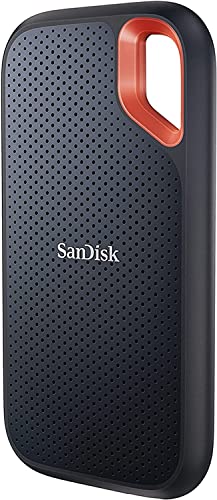
2. SanDisk Extreme Portable SSD: Best Rugged SSD
Pros
- Up to 1, 050 MB/s read speed
- Up to 1, 000 MB/s write speed
- IP65 water and dust resistance
- Up to 3-meter drop protection
- 256-bit AES hardware encryption
Cons
- Listed as an old model
- Maximum performance depends on the host device
Best for: travelers and creators who need fast storage with substantial physical protection.
The SanDisk Extreme Portable SSD is shaped around a different brief from the Samsung T7. It is the drive for a backpack, a camera bag or a desk that gets moved often. The carabiner loop is a small but useful detail because it gives the drive a clear place to live instead of letting it slide around with cables and adapters. At 3.97 inches long, 2.07 inches wide and 0.38 inches high, it remains easy to carry, and its listed weight is 0.11 pounds.
The performance is competitive with the T7. SanDisk rates it for read speeds up to 1, 050 MB/s and write speeds up to 1, 000 MB/s through USB 3.2 Gen 2. The drive uses USB-C, which suits newer Macs, though the actual result still depends on the connected computer and other equipment. For photo libraries, video files and large project folders, this class of SSD avoids the sluggish feel of a portable mechanical disk.
Protection is the reason to choose this model over the Samsung T7. The enclosure is rated for IP65 water and dust resistance, and SanDisk specifies up to 3-meter drop protection. Those claims do not make it invulnerable to careless handling, but they provide a more convincing margin for travel than an ordinary portable hard drive. The included password protection uses 256-bit AES hardware encryption, and the SanDisk Memory Zone app can help manage files and automatically free space.
The catch is that this listing is identified as an old model, so buyers should pay attention to firmware and compatibility details. It is also a 2TB drive, which gives it more working room than the T7 but less archive capacity than the 4TB and 5TB hard drives. If your Mac setup includes a compact USB-C workspace for a MacBook, this drive fits naturally into that mobile arrangement. Choose it when durability and portability matter as much as speed.
3. Samsung T9 Portable SSD: Best for Heavy Transfers

Pros
- Up to 2, 000 MB/s read and write speeds
- Dynamic thermal control
- Magician software for monitoring and firmware updates
- Supports computers, cameras and gaming consoles
Cons
- 1TB capacity limits its archive role
- Its top speed requires compatible USB hardware
Best for: creators who regularly move large files and can use USB 3.2 Gen 2x2.
The Samsung T9 Portable SSD is the specialist pick for people who are tired of waiting on large transfers. It is rated for sustained read and write speeds up to 2, 000 MB/s, which puts it ahead of the T7 and SanDisk Extreme on paper. That advantage is most meaningful with large video folders, project assets and repeated transfers. For ordinary documents, the difference will be much less dramatic.
The interface is USB 3.2 Gen 2x2, and that detail is crucial. A compatible Mac and cable are needed to approach the advertised ceiling, so this is not automatically the fastest choice for every Mac owner. If the host connection cannot use the extra bandwidth, the T9's headline specification becomes less useful. The T7 is the safer general recommendation because its performance is easier for more systems to exploit.
Samsung includes Dynamic Thermal Guard to manage heat during heavy use. The T9 also works with Magician Software for firmware updates, extra encryption and drive health monitoring. Those controls are useful for someone who treats an external SSD as a working volume rather than a box used once a month. Its compatibility extends beyond computers to cameras and gaming consoles, and the product information specifically mentions support for iPhone 15 Pro Res 4K at 60fps video with the recommended included SSD cable.
The T9's 1TB capacity is the obvious constraint. A fast drive fills quickly when it holds current video projects, and the larger mechanical drives are much better for long-term storage. Its physical dimensions are 3.46456 by 2.3622 by 0.55118 inches, with a listed weight of 0.27 pounds, so it is still portable but not as slight as the T7. Pick it when transfer time is the problem, not when you simply need a large place to park old files.
4. LaCie Rugged USB-C: Best Rugged Hard Drive

Pros
- 4TB capacity
- USB-C connectivity
- Drop, shock, dust and rain resistance
- Works with Mac and PC
- Portable enclosure
Cons
- Mechanical hard drive is slower than the SSD picks
- The enclosure is larger than a typical portable SSD
Best for: Mac users who carry a high-capacity archive through demanding environments.
The LaCie Rugged USB-C is the hard drive to choose when the drive will leave the desk regularly. Its orange rugged enclosure is not subtle, but that is part of the appeal. Drop, shock, dust and rain resistance give it a level of protection the basic Seagate and WD portable drives do not claim. A drive that travels with a photographer or field worker needs more than a compact shape.
Inside, this is still a conventional portable hard drive, so it cannot match the Samsung T7, Samsung T9 or SanDisk Extreme for responsiveness. It is better suited to storing a photo archive, project handoff or backup than to running an application library that needs quick random access. The 4TB capacity gives it a useful middle ground between the smaller SSDs and the biggest WD and Seagate options.
USB-C is the feature that makes the LaCie a natural match for newer Macs. It provides a direct modern connection, while the drive's broad Mac and PC compatibility helps if files need to move between systems. The product dimensions are listed as 5.31889763237 inches in height, 1.0236220462 inches in length and 3.3858267682 inches in width, with a listed weight of 0.55 pounds. Those measurements suggest a more substantial carry than the SSDs.
The weakness is speed, and no orange bumper changes that. If the drive will stay beside a Mac and hold active editing files, the T7 is a much nicer daily experience. If it will spend its life in a bag and its main job is protecting a larger collection from knocks and weather, the LaCie makes the stronger case. It is a practical choice for mobile storage where physical toughness matters more than peak transfer performance.
5. Seagate Portable 5TB: Best High-Capacity Portable Drive

Pros
- 5TB capacity
- Automatic recognition on connection
- Drag-and-drop backup workflow
- Included 18-inch USB 3.0 cable
- Works with Windows and Mac
Cons
- Mechanical hard drive is slower than an SSD
- Mac reformatting details should be checked before use
Best for: Mac owners storing large photo, video and document collections.
The Seagate Portable 5TB is the straightforward answer when a Mac needs a lot of extra space without turning storage into a project. Connect it, let the computer recognize it, and use it for backups or a media library. Seagate describes a drag-and-drop workflow and includes an 18-inch USB 3.0 cable, which keeps the setup uncomplicated.
The 5TB capacity is its defining advantage. It gives a photo or video collection room to grow and leaves more headroom than the 1TB and 2TB drives in this list. That capacity is more useful for an archive than for live editing, because a mechanical disk takes longer to open folders and transfer large batches than any of the SSDs. The WD Elements Portable 6TB goes a step further for capacity, while the Seagate is a more compact and familiar option.
The enclosure measures about 4.60629 inches long, 3.1496 inches wide and 0.7874 inches high, with a listed weight of 0.5732018812 pounds. It is portable, but it is not built as a rugged travel drive. Keep it in a sleeve or bag pocket if it is going on the road. For a stationary backup routine, those dimensions are easy enough to live with.
One detail deserves attention before a Mac backup begins: the product information says the drive is designed for Windows or Mac, while the included setup is presented as plug and play. The exact formatting and intended use still matter, especially if the drive needs to work across platforms. The right connection for a MacBook file setup can also matter when a desk uses adapters or a dock. Choose the Seagate 5TB when storage volume is the priority and SSD responsiveness is not.
6. WD Elements Portable 6TB: Best Maximum Capacity

Pros
- 6TB capacity
- Plug-and-play expandability
- USB 3.2 Gen 1 connectivity
- USB 3.0 compatibility
- Designed for Windows and Mac
Cons
- Mechanical hard drive is not suited to fast active work
- The larger capacity does not improve transfer speed
Best for: archiving a very large Mac photo, video or document collection.
The WD Elements Portable 6TB is the capacity leader in this group. Its job is simple: provide a large, portable place for photos, videos, music, documents and backups. WD calls it the world's first 6TB 2.5-inch portable hard drive, and the product is built around plug-and-play expandability rather than high-speed creative work.
The USB 3.2 Gen 1 interface, also identified as USB 3.0, gives it a familiar connection for PCs and Macs. That is enough for routine backups and moving a folder when patience is not a concern. It is not the right interface or storage type for matching an SSD's quick response. The Samsung T9 is in another performance class, while the Seagate Portable 5TB is a more natural rival if slightly less capacity is acceptable.
The useful distinction here is not a clever software feature. It is the extra room. Large video libraries can make a 2TB or 4TB drive feel temporary, especially when a separate backup copy is required. A 6TB archive lets the drive serve as a broader repository, though the available capacity may not equal the advertised figure after formatting and system overhead.
WD lists USB 3.2 Gen 1 at 5Gbps, but that is a connection standard rather than a guaranteed sustained transfer rate. Buyers should also note that the supplied product dimensions appear unusual, so we would not choose this model based on a particular bag fit. Pick it for its storage ceiling and straightforward operation. Skip it if the drive will hold active editing projects and you want every file operation to feel immediate.
7. Seagate Portable 4TB: Best Simple 4TB Drive
Pros
- 4TB capacity
- Automatic recognition
- Drag-and-drop file handling
- Included 18-inch USB 3.0 cable
- Compatible with Mac and Windows
Cons
- Mechanical drive is slower than portable SSDs
- No rugged protection is listed
Best for: general Mac backups that need more room than a small portable drive.
The Seagate Portable 4TB is the middle-of-the-road choice in the most useful sense. It does not add encryption, rugged armor or SSD-class speed. Instead, it gives a Mac user a familiar portable hard drive with enough space for a substantial backup library and very little setup friction.
Seagate says the drive is automatically recognized when connected and supports a drag-and-drop workflow. The included 18-inch USB 3.0 cable is long enough for a laptop desk without making the drive difficult to place. USB 3.0 is an older and slower connection than the USB 3.2 Gen 2 links used by the SSDs, but it remains suitable for routine backup jobs.
The enclosure is listed at approximately 4.6062992079 inches long, 3.149606296 inches wide and 0.58267716476 inches high. Its listed weight is 0.5732018812 pounds. That puts it close to the other Seagate portable drives in this lineup. The 4TB model is therefore a capacity decision, not a design decision. It is more spacious than the 2TB and 1TB versions, but it does not become faster or more rugged.
The Samsung T7 is a better drive for active work, and the LaCie Rugged USB-C is the more sensible pick for rough travel. The Seagate Portable 4TB sits between them as a plain backup disk. It suits someone who wants to plug in a drive, copy a library and put it away without paying attention to a long list of features. For a simple Mac archive, that restraint is the point.
8. Seagate Portable 2TB: Best Compact Backup Drive
Pros
- Compact enclosure
- Automatic recognition
- Included 18-inch USB 3.0 cable
- Drag-and-drop backup process
- Works with Mac and Windows
Cons
- 2TB capacity can fill quickly with video
- Mechanical drive is slower than an SSD
Best for: documents, photos and routine Mac backups in a small enclosure.
The Seagate Portable 2TB is a sensible size for a MacBook user who needs a backup target rather than a complete media vault. It is small, light and uncomplicated. The drive is automatically recognized when connected, and Seagate frames the workflow as drag and drop, which is exactly the kind of low-effort setup most people want for a backup device.
Its 2TB capacity leaves space for documents, personal photos and a useful selection of larger files. Video editors and photographers may outgrow it sooner than expected, particularly if they keep more than one copy of a project. The 4TB and 5TB Seagate drives are better suited to larger libraries, while an SSD such as the Samsung T7 is better when speed matters more than archive size.
The listed dimensions are 4.6 inches long, 3.15 inches wide and 0.58 inches high, with a listed weight of 0.4188782978 pounds. The included 18-inch USB 3.0 cable makes it easy to place beside a MacBook or desktop. It is not advertised with the water, dust or drop protection found on the SanDisk and LaCie models, so it should be treated as ordinary electronics when carried.
The main weakness is the mechanical drive's pace. A large folder will take longer to copy, and browsing a working library will feel less immediate than it does on an SSD. Still, for a Time Machine target, document archive or personal photo backup, the Seagate Portable 2TB keeps the job clear. It is the pick for someone who values a small footprint and simple setup over extra capacity or high performance.
9. WD Elements Portable 2TB: Best Small Archive

Pros
- 2TB capacity
- Small, lightweight design
- USB 3.2 Gen 1 and USB 3.0 support
- Plug-and-play expandability
- Works with Mac and Windows
Cons
- Mechanical drive is slower than SSD storage
- No rugged protection is listed
Best for: carrying a modest archive between a Mac and other computers.
The WD Elements Portable 2TB takes the same practical approach as the smaller Seagate, but its published connection specification is USB 3.2 Gen 1, also known as USB 3.0. The product is designed as plug-and-play expandable storage, so it makes sense for a Mac owner who wants a separate place for documents, photos, music or a second copy of important files.
WD lists the drive at 4.35 inches long, 3.23 inches wide and 0.59 inches high, with a listed weight of 0.29 pounds. That is a compact package, and the lighter listed weight makes it easy to carry between home, work and school. It does not have the protective claims of the SanDisk Extreme or LaCie Rugged, so a case or careful packing is sensible for regular travel.
The 2TB capacity is enough for a focused archive, but it is not a long-term answer for a large video collection. The Seagate Portable 2TB offers a similar capacity and a similarly simple role. The WD makes more sense if its slightly different shape and USB 3.2 Gen 1 labeling suit the way the drive will be connected. Neither should be mistaken for an SSD, even though the interface name sounds newer.
This is also a reminder that the USB standard alone does not determine the feel of a drive. The storage inside is still a portable hard disk, so the T7 and SanDisk Extreme remain much better for active project files. The WD Elements Portable 2TB is for keeping a manageable group of files available without relying on cloud access. Choose it when small, uncomplicated storage is all the Mac needs.
10. Seagate Portable 1TB: Best Basic Capacity
Pros
- Compact enclosure
- Automatic recognition
- Included 18-inch USB 3.0 cable
- Drag-and-drop workflow
- Compatible with Mac and Windows
Cons
- 1TB fills quickly with photos and video
- Reformatting may be required for Mac use
- Mechanical drive is slower than an SSD
Best for: light personal backups and a small document archive.
The Seagate Portable 1TB is the most limited drive here, but it is also easy to understand. It is a small USB 3.0 hard drive for someone who needs a separate copy of documents, a modest photo collection or other personal files. Connect it to a computer and the drive is designed to be recognized automatically, with no software required according to the product information.
The included 18-inch cable and drag-and-drop setup keep the process approachable. Its listed dimensions are about 4.6062992079 inches long, 3.149606296 inches wide and 0.58267716476 inches high. The listed weight is 0.4188782978 pounds, matching the compact character of the 2TB Seagate model.
The important Mac detail is that reformatting may be required for Mac use. That is not an unusual issue with external storage, but it should be addressed before the drive becomes the only copy of something important. A 1TB drive also has less room for growth than the Seagate Portable 2TB, WD Elements Portable 2TB or any of the larger models.
The Samsung T7 is a much better fit for active files, and even the Seagate Portable 2TB gives a Mac more breathing room. This 1TB model is best kept for a defined, relatively small backup task. If the need is simply to duplicate documents and a few folders, it remains a straightforward tool. If the library is already large, skip it and move up in capacity.
How to choose best external hard drive for mac
The Best external hard drive for mac depends less on the Mac logo than on the storage job, connection and amount of handling the drive will face.
Storage type
Portable hard drives use spinning disks and are designed mainly for capacity and backups. They are sensible for archives that are accessed occasionally, but they are slower when opening folders or working from a project directly. Portable SSDs such as the Samsung T7, Samsung T9 and SanDisk Extreme use flash storage, which makes them better for active files and frequent transfers.
Capacity
Capacity should match both the current library and the backup plan. A 1TB or 2TB drive can handle documents and a focused photo collection, while 4TB to 6TB models leave more room for video and larger archives. Remember that a backup drive should not be filled to its limit, and one copy of important data is not a complete backup strategy.
Connection standard
USB 3.0 and USB 3.2 Gen 1 are suitable for routine hard-drive backups. USB 3.2 Gen 2 can support much faster SSD transfers, while USB 3.2 Gen 2x2 is needed for the Samsung T9's advertised 2, 000 MB/s class performance. The Mac, cable and any dock in the chain must all support the relevant connection for the faster interface to matter.
Pick the storage type first, then check the port. A fast interface cannot make a spinning hard drive behave like an SSD.
Durability
A basic portable hard drive is not designed for drops, rain or dusty travel. The SanDisk Extreme adds IP65 water and dust resistance plus up to 3-meter drop protection, while the LaCie Rugged USB-C is built around drop, shock, dust and rain resistance. If a drive will stay on a desk, those protections matter less. If it will travel, they can matter more than a higher capacity.
Mac formatting and compatibility
Several drives in this roundup are described as working with both Windows and Mac, but the intended file system still matters. The Seagate Portable 1TB specifically notes that reformatting may be required for Mac use. Check the drive's formatting before copying files, especially if it needs to move between a Mac and a Windows computer. Newer MacBooks may also require a suitable USB-C cable or adapter.
Frequently asked questions
Do external hard drives work with a Mac?
Many of the drives here are designed to work with both Windows and Mac computers. Some may need to be reformatted for the Mac or for a particular cross-platform workflow. Always check the formatting before storing important files.
Is an SSD better than a hard drive for a Mac?
An SSD is better for active files, frequent transfers and applications that need quick access. A conventional hard drive is usually more appropriate for a large archive or routine backup where maximum responsiveness is not essential. The Samsung T7 is the most balanced SSD choice in this list.
What capacity should a Mac backup drive have?
Choose capacity based on the amount of data being backed up and how much room the library is expected to need later. The 1TB and 2TB models suit smaller personal collections, while the 4TB, 5TB and 6TB drives are more comfortable for extensive photos, videos and documents.
Can a Mac use a USB 3.0 external drive?
Yes. USB 3.0 drives can connect to a Mac with the appropriate port, cable or adapter. They will not reach the transfer class of the faster SSD models, but they are suitable for many backup and archive tasks.
Should an external drive stay connected to a Mac?
A drive can stay connected for scheduled backups, but it is wise to keep another copy of important files. Disconnecting a backup drive when it is not needed can also protect it from accidental deletion, theft or a problem affecting the Mac and connected storage at the same time.
Are portable SSDs more durable than portable hard drives?
Portable SSDs have no spinning disk, so they are generally better suited to movement and repeated handling. Protection still depends on the enclosure. The SanDisk Extreme adds specific water, dust and drop protection, while the Samsung T7 lists shock resistance and fall protection up to 6 feet.
The bottom line
The Samsung T7 Portable SSD is the Best external hard drive for mac for most people because it combines quick NVMe performance, a compact aluminum design and useful protection in a 1TB portable drive. Choose the SanDisk Extreme Portable SSD instead if travel protection, water and dust resistance, and 2TB capacity are more important than having the simplest everyday option.
For a large archive, the Seagate Portable 5TB and WD Elements Portable 6TB are the sensible alternatives. They are slower than the SSDs, but their larger capacities suit backups and media collections that do not need instant access.
If you are undecided, choose the Samsung T7 for active work and a larger Seagate or WD drive for storage that mostly sits still.
As an Amazon Associate we earn from qualifying purchases.