

Wet filament can turn a promising print into a stringy, brittle mess, and the trouble often starts before the spool ever reaches the printer. A good dryer needs to do more than warm a box. It should heat evenly, let moisture escape, and keep the spool protected while you print.
We compared ten filament dryers across single-spool, two-spool, and four-spool designs. The Best filament dryer for most serious users is the Creality Space Pi X4, while the SUNLU S2 is the easiest compact choice and the SUNLU S4 makes the most sense for several printers running at once.
Comparison table
| # | Product | Award | Capacity | Temperature range | Heating | Best for |
|---|---|---|---|---|---|---|
| 1 | Creality Space Pi X4 | Best overall | 4 standard 1 kg spools or 2 2 kg spools | 50 to 85°C | Dual 200W PTC | Multiple materials and printers |
| 2 | SUNLU S2 | Best interface | 1 spool | Up to 70°C | Dual heating sheets and fan | Simple, visible control |
| 3 | Creality Space Pi SE | Best compact Creality | 1 standard 1 kg spool | 45 to 65°C | PTC with circulating fan | Everyday PLA and PETG |
| 4 | Comgrow Dryer Box | Best sealed design | 2 1 kg spools | 40 to 50°C | Heated drying chamber | Printing from a covered box |
| 5 | SUNLU S1 Plus | Best simple dryer | 1 spool | 35 to 55°C | Heated chamber with fan | Basic moisture control |
| 6 | Creality Space Pi Plus | Best two-spool touchscreen | 2 1 kg spools | 45 to 70°C | Dual 160W PTC | Two printers or materials |
| 7 | Creality Space Pi X4 DB-05 | Best for engineering filament | 4 spools | Up to 85°C | Dual independent PTC | PA, PC, and PAHT |
| 8 | Creality Space Pi | Best timer | 1 spool | 45 to 70°C | 110W PTC with 360° circulation | Long unattended drying |
| 9 | SUNLU S4 | Best four-spool alternative | 4 1 kg spools | 35 to 70°C | 350W PTC and three fans | A multi-printer workspace |
| 10 | Polymaker Polydryer | Best drying and storage system | 1 kg spool | Not specified | Heated dock | Sealed storage between prints |
1. Creality Space Pi X4: Best Overall

Pros
- Holds four standard 1 kg spools or two 2 kg spools
- Independent chambers can run at different temperatures
- Dual 200W PTC heaters reach up to 85°C
- Supports printing from four outlets
Cons
- Large capacity takes more workspace
- Its higher-temperature modes need careful material selection
- The feature set is more than a casual user needs
Best for: multi-printer owners who regularly switch between everyday and engineering filaments.
The Creality Space Pi X4 is the dryer we would keep beside a busy 3D printing setup. Its main advantage is not simply the four-spool capacity. The two chambers are independent, so PLA can be treated separately from a more demanding material instead of forcing every spool into the same cycle. That makes the X4 much more practical than a large box with one shared temperature setting.
Each chamber uses a 200W PTC heater, and the dryer can reach 85°C. The lower 50 to 60°C range covers common PLA, PETG, and TPU routines, while the upper range is intended for materials such as ABS, PET, PC, ASA, PA, and PAHT. Those settings give the machine a wider role than a basic warm storage box, although the material manufacturer's drying guidance should still decide the actual temperature and time.
Creality includes eight filament holes and PTFE tubing, allowing four spools to stay connected to four printers. A sealed enclosure helps reduce moisture returning during pauses, and the illuminated window lets you check the spools without opening the chambers. Single-chamber operation is another sensible touch when only one side is occupied. The feature is claimed to save up to 40 percent of energy in that mode, but its more important benefit is avoiding unnecessary heating.
The Creality Space Pi X4 DB-05 also reaches 85°C and has four-spool capacity, so the two are close competitors. The X4 stands out here because its listing emphasizes the touch interface, 50 to 60°C scene settings, and storage-oriented sealed design. Skip it if you only print PLA from one printer. For a workshop with several active spools, this is the most flexible Best filament dryer in the group.
2. SUNLU S2: Best Interface

Pros
- 4.6-inch LCD touch screen
- Shows temperature, time, humidity, and filament type
- 360-degree heating with a fan
- Supports 1.75mm, 2.85mm, and 3.00mm filament
Cons
- Holds one spool
- Maximum temperature is lower than the Creality X4 models
- The large display adds little if you prefer simple controls
Best for: users who want clear control over one spool without guessing what the dryer is doing.
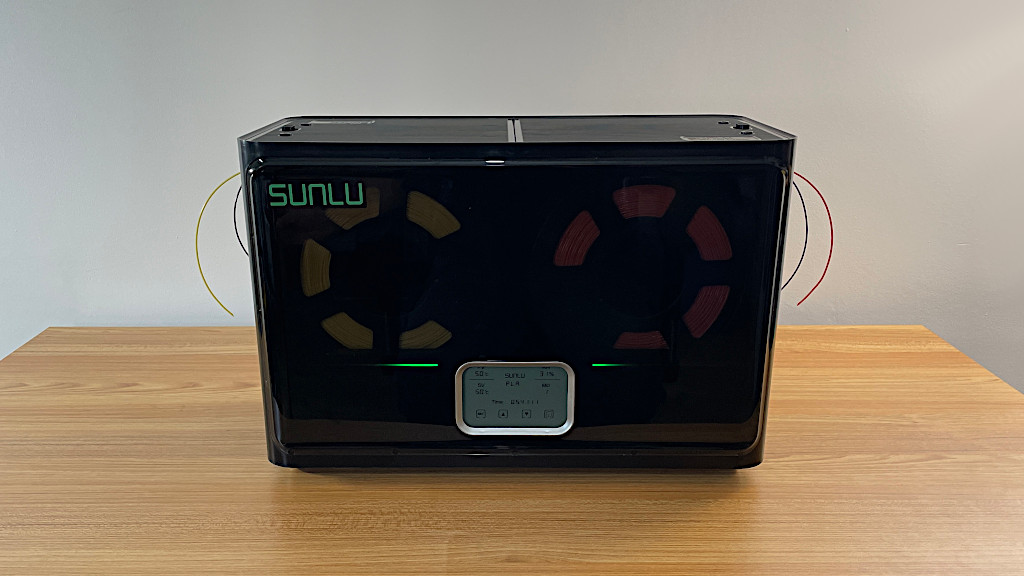
The SUNLU S2 is the friendliest dryer to operate in this group. Its 4.6-inch LCD touch screen puts the useful information in one place, including temperature, time, humidity, filament type, and the countdown. That matters when a drying cycle runs for several hours and you want to check progress without opening the lid or remembering which button changes which setting.
SUNLU uses dual heating sheets and a fan to circulate warm air through the chamber. The company describes this as 360-degree circular heating and claims a 30 percent increase in heating speed over its earlier approach. The practical point is even circulation around a single spool, rather than relying on heat rising from one small area. The adjustable maximum of 70°C gives it room for PLA, PETG, ABS, TPU, Nylon, PA, and PC routines listed by the manufacturer.
The holder accommodates a spool up to 210 by 85mm, and the dryer supports filament diameters of 1.75mm, 2.85mm, and 3.00mm. That broad diameter support is useful if your printer bench includes more than one type of machine. An LED indicator shows working status, while the one-click operation keeps the routine approachable for someone who does not want to tune every setting manually.
Compared with the SUNLU S1 Plus, the S2 has the more informative display, a higher temperature ceiling, and a more modern heating layout. The Creality Space Pi Plus is the better step up if you need two spools, but the S2 is less bulky and easier to understand. Its weakness is straightforward: one spool means it is not suited to a multi-printer workflow. Choose it when good visibility and uncomplicated control matter more than capacity.
3. Creality Space Pi SE: Best Compact Creality

Pros
- Reaches 65°C within 15 minutes according to the listing
- Adjustable 0 to 24 hour timer
- Real-time humidity and drying display
- Fits most standard 1 kg spools
Cons
- Temperature range stops at 65°C
- Only one spool fits
- The display and knob are less immediate than a touchscreen
Best for: everyday printing with one standard spool and a preference for physical controls.
The Creality Space Pi SE is a sensible middle ground for a home printer. It does not try to be a four-spool station, and it avoids the controls of a more elaborate touchscreen model. Put in one standard spool, choose the temperature and duration with the display and knob, and let the machine run. That simplicity is the reason it remains appealing among the more ambitious dryers here.
Its PTC heater and built-in fan circulate hot air through the chamber, and Creality says it can reach 65°C within 15 minutes. The adjustable 45 to 65°C range covers the familiar PLA, PLA+, PETG, TPU, ABS, and ASA territory, along with the broader list of PP, PC, and PA materials in the product details. The ceiling is enough for many routines, but not as versatile as the 70°C SUNLU models or the 85°C Space Pi X4.
A 0 to 24 hour timer gives more control than a fixed cycle. The dryer also displays humidity and drying hours, so the process is easier to monitor. Its insulation is designed to retain warmth and reduce the chance of touching a hot inner wall, while the standard 1 kg spool compatibility keeps loading uncomplicated. Creality also lists support for both 1.75mm and 2.85mm filament.
The SUNLU S2 offers a larger screen and a higher maximum temperature, while the Comgrow Dryer Box can hold two spools. The SE is the cleaner choice if you want a single-spool dryer with a conventional interface and no need for those extras. People working with high-temperature nylon or PC should look higher in the list, but it suits routine PLA and PETG work well.
When moisture is only one part of a print problem, material choice matters too. The filament characteristics that affect layer adhesion and surface finish can help determine whether a dryer is the right fix.
4. Comgrow Dryer Box: Best Sealed Design

Pros
- Holds two 1 kg spools
- Can dry and feed filament during printing
- Snap cover and silicone outlet help limit moisture exposure
- Shows temperature and humidity on a 2-inch LCD
Cons
- 40 to 50°C range is limited
- Drying time setting runs from 6 to 12 hours
- The sealing hole must be opened during drying and closed afterward
Best for: two-spool users who want to print directly from a covered enclosure.
The Comgrow Dryer Box takes a storage-first approach. Its inner chamber measures 9.29 by 6.49 by 9.13 inches and holds two 1 kg spools, giving it useful capacity without the footprint of the four-spool models. The important detail is that it is designed to keep feeding filament while the spools remain inside, rather than treating drying and printing as separate jobs.
The controls are basic but informative. A 2-inch LCD shows temperature and humidity, and touch buttons handle the settings. The dryer operates from 40 to 50°C, with a timer range of 6 to 12 hours. That is narrower than the SUNLU S2 or Creality Space Pi SE, so it is best matched with materials that do not need aggressive heat. It is not the model we would choose for a broad engineering-filament routine.
The enclosure has a snap-button upper cover, a silicone cable sheath, and an outlet that can accept a Teflon tube. During drying, the sealing hole needs to remain open so moisture can escape. Once the cycle ends, close it to help protect the consumables. That small bit of routine is important. The box cannot remove moisture effectively if its vent remains sealed throughout the drying cycle.
Compared with the SUNLU S1 Plus, Comgrow offers two-spool operation and a more storage-focused enclosure. The S1 Plus has a wider lower temperature range, while the Creality Space Pi Plus gives you more heat and a much larger screen. Choose Comgrow for direct feeding and sealed storage with ordinary materials. Skip it if you need a high-temperature dryer or a timer that can run beyond 12 hours.
5. SUNLU S1 Plus: Best Simple Dryer

Pros
- Fan helps discharge excess moisture
- 35 to 55°C adjustment
- Displays temperature, time, and humidity
- Supports several filament diameters
Cons
- One-spool capacity
- Lower maximum temperature than the S2
- The 2-inch display is relatively small
Best for: a first dryer for PLA, PETG, TPU, and similar everyday materials.
The SUNLU S1 Plus is the uncomplicated option. It holds one spool, has a small LCD, and does not burden the user with a menu system. That makes it a comfortable fit for a single-printer bench where the same few materials appear repeatedly. The built-in fan is the meaningful upgrade over a passive warm box because it helps move excess moisture out of the chamber.
Temperature can be adjusted from 35 to 55°C, and the screen shows temperature, time, and humidity. That lower starting point is useful for gentler drying routines, but the 55°C ceiling limits the range compared with the S2, Space Pi SE, and Space Pi Plus. SUNLU lists compatibility with PLA, PETG, ABS, TPU, Nylon, and PA, plus filament diameters of 1.75mm, 2.85mm, and 3.00mm.
The holder accepts filament up to 210 by 89mm. The enclosure is about 9.33 inches long, 3.94 inches wide, and 10.67 inches high, so it has a narrow footprint compared with the two-spool and four-spool designs. That can matter on a crowded printer shelf. Its physical shape makes it easier to place beside one printer, though it does not offer room for a second active spool.
The SUNLU S2 is the better choice when you want 70°C capability and a large touch display. The Creality Space Pi SE is more flexible for longer timed cycles and reaches 65°C. The S1 Plus should be skipped by users drying nylon or other materials that call for more heat. For one spool of common filament and a small workspace, it remains a clear, no-fuss pick.
6. Creality Space Pi Plus: Best Two-Spool Touchscreen

Pros
- Dries two 1 kg spools at once
- Dual 160W PTC heating with 360-degree hot air
- 4-inch LCD touch screen
- One-key settings for up to 12 filament types
Cons
- Taller and heavier than single-spool units
- Maximum temperature is 70°C
- Two spools share one drying environment
Best for: users who need two active spools and want guided settings.
The Creality Space Pi Plus earns its place by making two-spool drying feel manageable. It has room for two 1 kg rolls, four filament holes, and two PTFE pipes, which supports two printers or two connected feed paths. That is a meaningful improvement over the single-spool Space Pi SE when a print queue includes different materials.
Creality uses dual 160W PTC heating with fans that circulate hot air through the chamber. The result is intended to be more even than a flat heating pad. The adjustable range runs from 45 to 70°C, and one-key settings cover up to 12 filament types, including PLA, ABS, PETG, TPU, PP, PA, PC, ASA, PET, and carbon-fiber variants listed in the product details.
The 4-inch touch screen is the feature that separates it from the simpler Creality model. It shows drying conditions and lets you switch between Celsius and Fahrenheit. Guided settings reduce the chance of picking an obviously unsuitable starting point, while manual adjustment remains available when a material needs a more specific routine. The machine weighs about 4.19 pounds and stands 13.3 inches high, so allow more vertical clearance than you would for the compact dryers.
The SUNLU S2 is easier to place and has a 4.6-inch screen, but it only handles one spool. The Creality Space Pi X4 is more capable for four spools and independently controlled chambers, while the Space Pi Plus is less demanding for a two-printer setup. It is not ideal if the two spools need different temperatures, since the shared enclosure does not provide the X4's chamber separation.
If your printer is a Bambu Lab model, the dryer is only half of the material decision. Spool dimensions, feeding path, and material behavior still matter, which is why the filament traits that suit enclosed printer workflows are worth checking before choosing a routine.
7. Creality Space Pi X4 DB-05: Best for Engineering Filament

Pros
- Four-spool drying and printing
- Independent chamber temperature control
- Dual 200W PTC heaters reach 85°C
- Single-chamber mode can reduce unnecessary heating
Cons
- Requires heat-resistant spool trays from other brands
- Large capacity is excessive for one printer
- The listing provides limited physical dimensions
Best for: advanced users who need high-temperature drying across several engineering materials.
The Creality Space Pi X4 DB-05 is built around demanding materials and a high-throughput workspace. It can dry and print from four spools at once, with eight filament holes and PTFE tubing. More important, its two chambers have independent temperature controls. You can separate materials instead of putting four rolls through a compromise setting.
Two independent 200W PTC heaters bring the chambers up to 85°C. That ceiling is the reason this model belongs near the top of the list for PA, PAHT, PC, and other engineering filaments named by Creality. PTC heating is paired with insulated chambers, which should help the machine reach and maintain higher temperatures more consistently than a low-power single heater.
The dryer can run one or both chambers. That matters when only one material needs attention, since there is no reason to heat an empty side. Creality says single-chamber operation can save up to 40 percent of energy. The practical advantage is control: you can reserve the larger system for jobs that actually need its capacity and use just one side for a routine spool.
There is one caution that deserves attention. Creality says other brands' plastic trays should be heat resistant and recommends using its own RFID filament with plastic trays. That means owners should not assume every spool or tray is suitable for an 85°C chamber. The Creality Space Pi X4 is the close alternative, and its listing emphasizes a touch interface and sealed storage. Choose DB-05 when high-temperature, independent two-zone operation is the deciding factor. Casual PLA users should choose a smaller dryer.
8. Creality Space Pi: Best Timer

Pros
- 0 to 48 hour timer
- 3.7-inch touch screen
- 360-degree hot-air circulation
- Remembers settings after a power outage
Cons
- One-spool capacity
- 110W heater is less powerful than the dual-heater models
- No humidity figure is specified in the listing
Best for: users who want a long drying cycle and automatic recovery after interruptions.
The Creality Space Pi is the single-spool model to choose when drying time matters. Its timer runs from 0 to 48 hours, twice the maximum duration listed for the Space Pi SE. That makes it better suited to a spool that needs a long, unattended cycle, provided the material's drying instructions call for one.
A 110W PTC heater and built-in fan circulate hot air through the chamber. Creality describes the heating as 360-degree circulation, intended to warm the spool more evenly than a basic pad. Temperature runs from 45 to 70°C, and one-key settings cover 12 filament types, including PLA-CF, PA-CF, ASA, PLA, PETG, ABS, and TPU.
The 3.7-inch touch screen displays the drying conditions and supports Celsius or Fahrenheit. A power-off memory function is especially useful for a machine that may run for many hours. After an outage, it can remember the previous material and temperature settings rather than making you rebuild the cycle from scratch. The dryer also supports both 1.75mm and 2.85mm filament.
The Creality Space Pi SE is a better fit for someone who wants a physical knob and a shorter 24-hour timer. The Space Pi has the higher 70°C ceiling and a more convenient long-cycle setting, while the SUNLU S2 counters with a larger display and humidity information. It is still a one-spool appliance, so multi-printer households should look at the Space Pi Plus or a four-spool model.
9. SUNLU S4: Best Four-Spool Alternative

Pros
- Holds four 1 kg spools
- Three circulation fans
- 350W PTC heater
- Eight filament outlets
- 0 to 99 hour timer
Cons
- Very large footprint
- Weighs about 4 kg
- The chambers do not have independent temperature controls
Best for: print farms and hobby workspaces feeding several printers at once.
The SUNLU S4 is the most straightforward high-capacity dryer here. It holds four 1 kg spools, includes eight filament outlets, and gives each connected printer more than one possible loading angle. That layout is useful when several machines sit around the same bench and you want to avoid repeatedly moving a spool from a dryer to a printer.
Its 350W PTC heater is supported by three circulation fans. SUNLU says the heater is 50 percent higher in heating performance than the FilaDryer S2, though the more tangible benefit is the combination of capacity and airflow. Temperature can be set from 35 to 70°C, and the timer runs from 0 to 99 hours. The material list includes PLA, PLA Plus, PETG, ABS, TPU, PA, PC, and Nylon, with support for 1.75mm, 2.85mm, and 3.00mm filament.
This is a large appliance. The external dimensions are 460 by 220 by 310mm, the internal dimensions are 450 by 175 by 207mm, and the listed net weight is 4kg. Measure the shelf before buying. SUNLU also describes a modification for a 3kg roll and says the machine can be modified as a shoe dryer, but those are secondary possibilities rather than reasons to choose it as a filament tool.
The Creality Space Pi X4 DB-05 is the stronger choice when two different chamber temperatures are essential. The S4 is the better fit when four spools need one shared environment and the 0 to 99 hour timer is useful. It is too much machine for a single-printer setup, but a print farm or serious hobby bench can make good use of its outlets and airflow.
10. Polymaker Polydryer: Best Drying and Storage System

Pros
- Combines heated drying with sealed storage
- Built-in hygrometer
- Supports direct feeding without breaking the seal
- Includes desiccant-based moisture protection
Cons
- Holds one 1 kg spool
- Temperature specifications are not provided
- Less useful for users who need several spools at once
Best for: keeping one frequently used spool dry between print sessions.
The Polymaker Polydryer is different from the other entries because it treats storage as an equal part of the job. The system combines a dryer dock with a storage box, letting the spool move from drying to sealed storage and direct feeding without unnecessary exposure to room air. That is useful for materials that quickly absorb moisture after a drying cycle ends.
A built-in hygrometer provides a visible measure of the storage environment. The system also combines heated drying, a sealed box, and desiccant support. Instead of relying on heat alone, it gives the user several layers of moisture defense between print sessions. That is a more complete routine than placing a warm spool on an open shelf after drying.
Polymaker lists support for PA Nylon, PLA, PVB, PETG, ABS, ASA, and TPU, as well as 1.75mm, 2.85mm, and 3.00mm filament. The unit is designed around a 1 kg spool and measures approximately 9.25 inches long, 4.72 inches wide, and 11.42 inches high. Its narrow shape should be easier to fit beside a printer than the four-spool SUNLU S4.
The main limitation is missing temperature information in the product details. That makes it harder to compare the Polydryer directly with the 45 to 70°C Creality and SUNLU models, especially for advanced materials. The SUNLU S1 Plus is more transparent about its controls, while Polymaker is more compelling for sealed storage. Choose this model when keeping filament dry after the cycle is as important as drying it in the first place.

How to choose best filament dryer
The right dryer depends on the materials you print, the number of active spools, and how much moisture protection you need after drying.
Temperature range
Temperature determines which materials a dryer can realistically handle. A 35 to 55°C unit such as the SUNLU S1 Plus is aimed at gentler everyday routines, while the SUNLU S2 and Creality Space Pi models reach 70°C. The Creality Space Pi X4 models reach 85°C for more demanding materials such as PA, PC, and PAHT.
A higher maximum does not mean every spool should be dried at that setting. Use the filament maker's guidance, and pay attention to spool construction as well as the plastic itself.
A dryer is only useful when its temperature matches the filament, not when its maximum number looks impressive.
Heating and air circulation
PTC heaters, fans, and 360-degree circulation help spread heat around the spool. The Creality Space Pi SE, Space Pi, Space Pi Plus, and SUNLU S4 all use circulating airflow, while the larger X4 models combine PTC heating with insulated chambers. Even heating reduces the chance that one side of a spool receives much more heat than the other.
A fan also helps move moisture toward an outlet. A sealed chamber is useful during storage, but the dryer still needs a way to let moisture escape during the active cycle. Comgrow makes this especially clear with its open-while-drying sealing hole.
Capacity and spool layout
One-spool dryers are easier to place and make sense for a single printer. Two-spool models such as the Comgrow Dryer Box and Creality Space Pi Plus suit two active materials, while the SUNLU S4 and Creality X4 models are designed for several printers or a larger material library.
Capacity alone is not enough. The Creality X4 models offer independent chambers, so different materials can be handled separately. The SUNLU S4 has four-spool capacity but uses a shared drying environment. Choose independent zones when the materials need different settings.
Storage and direct feeding
Drying ends when the filament reaches a usable condition, but moisture can return while the spool sits out. Look for sealed covers, silicone outlets, PTFE tubes, hygrometers, and desiccant support if you do not print immediately after drying.
The Polymaker Polydryer is the most storage-focused option here. Comgrow also emphasizes feeding from inside the covered box, while the Creality X4 includes sealed chambers and multiple outlets. For guidance on matching material behavior to a printer, the practical differences between common spool materials are a useful place to start.
Controls and monitoring
A screen should make the dryer easier to use, not merely add decoration. The SUNLU S2 shows temperature, time, humidity, filament type, and countdown on its 4.6-inch display. Creality's Space Pi Plus uses one-key settings and a 4-inch touchscreen, while the Space Pi SE uses a display and knob.
Humidity monitoring is useful when you want evidence that the chamber is changing, but it does not replace a suitable drying cycle. A long timer, such as the Space Pi's 48 hours or the SUNLU S4's 99 hours, is useful for extended routines. Power-loss memory is another practical feature for unattended drying.

Frequently asked questions
Why does 3D printer filament need drying?
Many filament materials absorb moisture from the air. That moisture can contribute to stringing, bubbling, clogging, poor adhesion, and inconsistent layers during printing. Drying removes moisture before or during a print, although the correct temperature and duration depend on the material.
Is a filament dryer also a storage box?
Some are, but not all to the same degree. The Comgrow Dryer Box and Polymaker Polydryer are designed to keep filament enclosed while feeding it to a printer, while the Creality X4 models emphasize sealed storage alongside multi-spool drying. A dryer with no effective seal may still require a separate storage container after the cycle.
How many spools should a filament dryer hold?
Choose one spool for a single-printer setup or occasional material changes. Two spools make sense when you regularly run two printers or want a second material ready, while four-spool models are aimed at multi-printer benches and high-volume work. Independent chambers are more useful than raw capacity when different materials need different temperatures.
Can these dryers handle nylon?
Several models list Nylon or PA support. The Creality Space Pi X4 and Space Pi X4 DB-05 reach up to 85°C, while the SUNLU S2, Creality Space Pi, Creality Space Pi Plus, and SUNLU S4 reach 70°C. Check the material maker's instructions and the spool's heat resistance before selecting a setting.
Can filament print while it is inside the dryer?
Yes, several products are designed for direct feeding while drying or storing. The Comgrow Dryer Box uses outlets and a Teflon tube, the SUNLU S4 has eight filament outlets, and the Creality multi-spool models include multiple holes and PTFE tubing. The exact feeding path should be checked for smooth movement and correct spool direction.
Is a touch screen necessary?
No. A touch screen makes temperature and timer changes easier to see, especially on the SUNLU S2 and Creality Space Pi Plus. A display with a knob, as used by the Creality Space Pi SE, can be just as practical if you prefer physical controls.
Should filament stay in the dryer after drying?
Keeping filament enclosed after drying helps prevent it from absorbing moisture again. Sealed storage, a hygrometer, and desiccant support make that easier. If the dryer does not provide good ongoing protection, transfer the spool to a suitable sealed container and keep it ready for the next print.
The bottom line
The Best filament dryer for most advanced home users is the Creality Space Pi X4. Its four-spool capacity, dual independent chambers, 200W PTC heaters, and 85°C maximum give it the broadest combination of capacity and material control. The SUNLU S2 is the easier recommendation for one spool, thanks to its clear touch screen and straightforward controls.
Choose the SUNLU S4 when several printers need filament at the same time, or the Polymaker Polydryer when sealed storage between prints matters more than multi-spool capacity. If you are undecided, buy for the number of spools you actually run and the highest material temperature you genuinely need.
As an Amazon Associate we earn from qualifying purchases.