

A filing system usually fails at the same small point: the folders are there, but their tabs are inconsistent, hard to read, or still carry yesterday's label underneath. The best file folder label printer makes that correction quick, repeatable, and easy to live with.
This list includes two kinds of solutions. Brother's compact P-touch machines print durable tape labels without a computer, while Avery, Amazon Basics, and DYMO offer sheets or rolls for people who already have a printer. The right choice depends on how many folders you label, whether you need to cover old text, and how much control you want over the finished tab.
Our top pick is the Brother PT-D210, with the Avery TrueBlock 150 as the strongest sheet-label alternative. The rest of the range covers portable simplicity, color coding, bulk filing, and dedicated DYMO thermal printing.
Comparison table
| # | Product | Award | Format | Key capability | Best for |
|---|---|---|---|---|---|
| 1 | Brother PT-D210 | Best overall | TZe tape, 3.5 to 12 mm | 27 templates, 14 fonts, 600+ symbols | Flexible home and office labeling |
| 2 | Brother PT-D220 | Best for saved labels | TZe tape up to 12 mm | 30-label memory, QWERTY keyboard | Repeating office labels |
| 3 | Avery TrueBlock 150 | Best printable option | 2/3 x 3-7/16 inch sheets | TrueBlock and Sure Feed | Covering old folder text |
| 4 | Brother PT-M95 | Best compact bundle | M tape, 9 or 12 mm | One or two text lines | Occasional portable labeling |
| 5 | DYMO LW File Folder | Best for DYMO owners | 9/16 x 3-7/16 inch rolls | Direct thermal, two rolls | LabelWriter workflows |
| 6 | Avery Assorted Easy Peel | Best for color coding | 4 x 6 inch sheets | Assorted color bars | Small batches and categories |
| 7 | Amazon Basics 1500 | Best for bulk filing | Letter-size sheets | 30 labels per sheet | Large filing projects |
| 8 | Avery TrueBlock 750 | Best large TrueBlock pack | 2/3 x 3-7/16 inch sheets | Permanent adhesive, Sure Feed | Reusing many folders |
| 9 | Avery White Easy Peel | Best for handwriting | 4 x 6 inch sheets | Matte white, print or write | Small, mixed-use filing jobs |
1. Brother PT-D210: Best Overall

Pros
- Easy one-touch access to fonts, frames, symbols, and templates
- Supports four tape widths from 3.5 to 12 mm
- Laminated TZe tapes resist water and fading
- Includes one sample tape and three full-length tapes
Cons
- Requires six AAA batteries unless paired with an optional adapter
- Small display is less convenient for long folder names
- Does not print from a computer
Best for: home and office users who want flexible, durable labels without setting up a printer.
The Brother PT-D210 is the one we'd keep beside a filing cabinet. It feels purpose-built for the moment when a stack of folders needs sorting now, not after opening a design program, loading a sheet, and correcting a printer alignment. Its keyboard and one-touch controls make the basic process direct, while the preview display helps catch cramped or poorly arranged text before it reaches the folder.
There is more flexibility here than the compact shape suggests. The PT-D210 works with Brother TZe tapes in 3.5, 6, 9, and 12 mm widths, so a narrow strip can handle a small tab while the widest supported tape gives larger headings more breathing room. It offers 14 fonts, 10 styles, 98 frames, more than 600 symbols, and 27 templates. Those options matter when the same machine has to label folders, storage boxes, cables, or household supplies rather than only produce plain file names.
The laminated TZe tape is the bigger practical advantage. Brother says these tapes are water-resistant and fade-resistant, and the feature set includes specialty options for cables, photos, and iron-on fabric labeling. For ordinary file folders, that means a label that is less vulnerable to a damp office shelf or the general wear of being handled repeatedly. The machine itself measures 6.2 by 5.9 by 2.7 inches and weighs 1.1 pounds, which is compact enough to move between a desk and a storage area.
Compared with the Brother PT-D220, the PT-D210 gives up the newer model's built-in memory for saved labels, but it offers a broader selection of templates and frames. The Brother PT-M95 is lighter, yet its M tape system is less versatile. The real weakness is power: six AAA batteries are sold separately, and the AC adapter is optional. Someone who wants computer-designed sheets or a fully permanent folder archive should choose the Avery TrueBlock 150 instead. For everyone else, the PT-D210 is the most adaptable answer to everyday labeling.
2. Brother PT-D220: Best for Saved Labels

Pros
- Saves up to 30 frequently used labels
- Familiar QWERTY keyboard
- Prints one or two lines on laminated TZe tape
- Offers 25 preset templates and more than 600 symbols
Cons
- Limited to tape labels rather than full sheet layouts
- Needs six AAA batteries or an optional AC adapter
- Tape width tops out at approximately 12 mm
Best for: people who repeatedly print the same folder names, categories, or office labels.
The Brother PT-D220 is the practical pick when labeling is repetitive. It has the same basic appeal as the PT-D210, but its built-in memory changes the rhythm of ongoing office work. Save a frequently used label, retrieve it later, and print it again without rebuilding the wording or formatting from scratch. A memory bank for up to 30 labels is particularly useful for recurring client folders, school subjects, tax categories, or storage bins.
Its QWERTY keyboard is easier to approach than the unusual layouts found on some small labelers. The machine prints one or two lines on Brother genuine TZe tape, with labels approximately 1/2 inch wide at the largest supported size. That width suits most folder tabs, while two-line printing can separate a department from a year or a project from a status. The trade-off is that small text and narrow tabs require a little care during composition.
Personalization is generous for a machine in this class. There are 14 fonts, 11 font styles, 99 designer frames, and more than 600 symbols, along with 25 preset templates. The 2.7 by 6.2 by 5.9 inch body weighs about 1.078 pounds, so it is easy to keep near a home office or carry to a records room. Six AAA batteries make it mobile, while an optional AC adapter supports a permanent desk setup.
The Brother PT-D210 is the better choice if you want more tape-width flexibility and a larger template selection. The Brother PT-M95 is smaller and lighter, but the PT-D220 is more capable for repeat work. It is not the right tool for someone who wants to print a full page of labels at once or use existing document templates. If your folders change constantly, the saved-label memory is less important than the PT-D210's broader creative controls. For a stable filing system with recurring names, the PT-D220 is the smoother operator.
3. Avery TrueBlock 150: Best Printable Option

Pros
- TrueBlock technology hides writing beneath the label
- Compatible with laser and inkjet printers
- Sure Feed design helps produce a more reliable feed
- Permanent adhesive sticks to paper, cardboard, and envelopes
Cons
- Requires a separate printer
- Sheet alignment needs care
- Permanent adhesive is not suited to temporary filing
Best for: anyone replacing old folder labels while keeping the folders themselves.
The Avery TrueBlock 150 solves the most annoying sheet-label problem: a new white label can still reveal the old title underneath. TrueBlock technology is designed to cover what is below it, making this the strongest choice here for reorganizing an existing filing cabinet rather than labeling untouched folders. The white surface also keeps black text clear and easy to scan.
Each label measures 2/3 by 3-7/16 inches, a familiar size for standard folder tabs. The sheets are designed for laser or inkjet printing, so a computer can handle long lists, consistent typography, and batches of labels more neatly than a handheld tape maker. Avery's Sure Feed feature is intended to improve the sheet's movement through the printer and reduce misfeeds, though careful loading and using the appropriate printer settings still matter.
The permanent adhesive is rated for paper, cardboard, and envelopes. That broad surface compatibility makes it useful beyond file folders, but it also tells you to plan the layout before printing. The labels are not a good match for a temporary project in which names will change next week. Avery also provides templates and designs through its site, which can make a large labeling job easier to format than manually positioning each label in a document.
The Avery TrueBlock 750 uses the same key TrueBlock idea in a larger pack, making it the better fit for an extensive archive. The Amazon Basics 1500 provides far more labels, but it does not list TrueBlock coverage, so old writing may remain visible. The weakness is the need for a separate laser or inkjet printer and the alignment work that comes with sheet labels. If you already have a printer and need clean, opaque replacements, this is the best file folder label printer alternative when a handheld tape machine is not the right format. For broader office printing needs, it also helps to understand how a home office printer handles recurring document workloads.
4. Brother PT-M95: Best Compact Bundle
Pros
- Lightest handheld machine in this roundup
- QWERTY keyboard and easy-view display
- Prints one or two lines
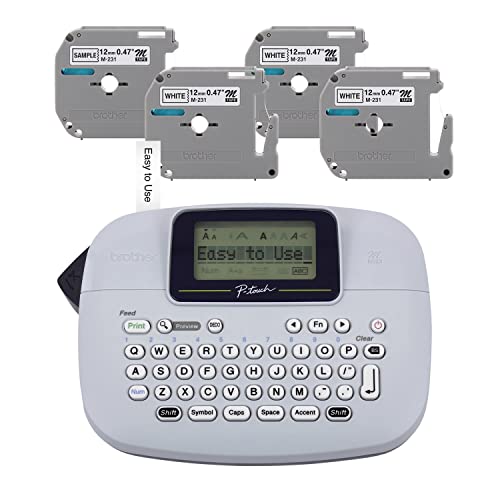
- Includes one sample tape and three full-length tapes
Cons
- M tape system offers fewer width options than TZe
- Feature set is less extensive than the PT-D210
- Requires batteries or an optional adapter
Best for: occasional labeling at home when portability matters more than advanced formatting.
The Brother PT-M95 is noticeably easier to pick up and move than the other Brother machines here. It measures 4.4 by 6.1 by 2.4 inches and weighs 0.57 pounds, which makes it a natural choice for a drawer, a classroom supply shelf, or a home office where a label maker is used only now and then. Its QWERTY keyboard and easy-view display keep the experience simple.
This is a monochrome label maker, but that does not mean every label has to look identical. The PT-M95 supports genuine Brother M tape in 9 mm, approximately 3/8 inch, and 12 mm, approximately 1/2 inch, widths, with several colors available in the tape family. It can print one or two lines and includes type styles, frames, symbols, and eight Deco Mode patterns. Those controls are enough for clear folder titles and modest color coding, without the deeper design range of the PT-D210.
The bundle includes a sample black-on-white tape and three full-length black-on-white tapes. That makes it ready for a meaningful first filing session rather than a machine that needs an immediate supply decision. The labels can cover files, folders, school projects, and gift bags, so the compact form has uses outside records management.
The PT-D210 is the better choice for users who expect to label often or need 3.5 and 6 mm tape options. The PT-D220 has a stronger case for repeated office names because it stores up to 30 labels. The PT-M95's weakness is its narrower feature set, and people who want extensive symbols, templates, or several tape widths should skip it. Choose this model when a light body and straightforward controls matter most.
5. DYMO LW File Folder: Best for DYMO Owners
Pros
- Direct thermal printing needs no ink or toner
- Roll format lets you print labels as needed
- Correct size for file folder tabs
- Works with a broad range of DYMO LabelWriter models
Cons
- Requires a compatible DYMO printer
- Not a standalone label maker
- Roll workflow is less convenient for users with only a standard printer
Best for: existing DYMO LabelWriter owners who want dedicated folder-label rolls.
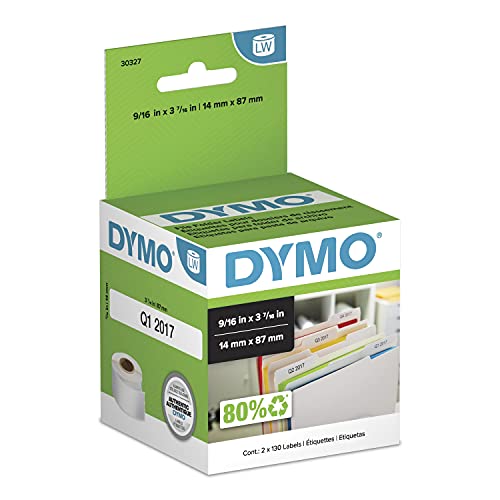
The DYMO LW File Folder is not a printer by itself, and that distinction matters. It is a roll of dedicated labels for DYMO LabelWriter machines, aimed at people who already have a thermal workflow on their desk. Once loaded, it avoids the sheet alignment and ink management associated with conventional printer labels.
Each label measures 9/16 by 3-7/16 inches. That narrower height gives folder tabs a clean, compact appearance, while the 3-7/16-inch length leaves room for a useful title. The direct thermal format needs no ink or toner, and the roll lets you print only as many labels as the job requires. That is convenient when a filing project happens in stages rather than all at once.
The package contains two rolls of 130 labels, for 260 labels in total. Compatibility is the key specification: the rolls are listed for the DYMO LabelWriter 5XL, 550, 550 Turbo, 4XL, 450, Wireless, 450 Duo, 450 Turbo, 450 Twin Turbo, and Desktop Mailing Solution. Owners of one of those machines can stay within the same software and hardware routine instead of switching to a handheld labeler.
The Avery TrueBlock 150 is more flexible for covering old text, and the Brother PT-D220 is the more self-contained option. The DYMO rolls win only when a compatible LabelWriter is already present. Someone starting from scratch should skip this product, since the rolls cannot replace the printer. For established DYMO users, however, it is the cleanest route to repeatable folder tabs. If your office also prints regular documents, choosing a printer around the jobs it must handle can prevent an awkward mix of devices.
6. Avery Assorted Easy Peel: Best for Color Coding

Pros
- Assorted color bars make categories easy to scan
- 4 x 6 inch sheets suit small labeling jobs
- Each sheet contains seven Easy Peel labels
- Supports handwriting and laser or inkjet printing
Cons
- Not recommended for color laser printers
- Small sheets are slower for a very large archive
- Permanent adhesive is not intended for temporary labels
Best for: home, school, or office filing systems that use color to separate categories.
The Avery Assorted Easy Peel labels are about visual organization as much as text. Each label has a colored bar over a white writing area, allowing tax, school, household, and work folders to be separated at a glance. That small cue can be more useful than decorative formatting when a drawer contains many similar tabs.
The labels measure 2/3 by 3-7/16 inches and arrive on 4 by 6 inch sheets. Each sheet contains seven labels, which is a sensible arrangement for a small batch. You can print the wording with a personal laser or inkjet printer, or write it by hand when only a few folders need attention. Avery's Easy Peel format is designed to make removal from the backing quicker and less fiddly.
The permanent adhesive is intended to stay on smooth surfaces including paper, cardboard, plastic, wood, glass, and metal. For folders, that means the label should remain attached through ordinary handling. The manufacturer does not recommend these sheets for color laser printers, so users with that particular printer type should choose a different product rather than assume every laser machine is supported.
The Avery White Easy Peel has the same small-sheet, print-or-write approach but removes the colored bar for a quieter look. The Amazon Basics 1500 is better for a large uniform archive, while the Brother PT-M95 makes more sense when you need labels away from a printer. The weakness here is throughput: seven labels per sheet is convenient for modest jobs but tedious for hundreds of folders. Pick this one when color categories help you find the right file faster.
7. Amazon Basics 1500: Best for Bulk Filing

Pros
- 1, 500 labels for large filing projects
- 30 labels per standard letter-size sheet
- Compatible with laser and inkjet printers
- Permanent adhesive and FSC-certified label material
Cons
- No listed opaque cover layer for old labels
- Requires careful sheet alignment
- Plain white format offers no built-in color coding
Best for: large archives that need a consistent white label across many folders.
The Amazon Basics 1500 is the straightforward choice for a filing project where quantity and consistency matter most. It uses standard letter-size sheets, so it fits the ordinary laser and inkjet printer workflow already found in many offices. The plain white surface keeps folder names readable and avoids the visual clutter that can come from mixing colors.
Each label measures 2/3 by 3-7/16 inches. There are 30 labels on each sheet and 50 sheets in the pack, producing 1, 500 labels in total. That layout is much more efficient for a large archive than the 4 by 6 inch Avery sheets, which hold seven labels each. It also matches the familiar 5366 template, giving users a starting point for document setup.
The adhesive is permanent, so labels should stay in place on folders and binders once applied. The label material is FSC-certified under code N004130 and is described as being made with materials from well-managed forests, recycled materials, and or other controlled wood sources. Those details will not change how the label feeds through a printer, but they may matter when an office is standardizing its stationery.
The main limitation is what the product does not claim. Unlike the Avery TrueBlock 150 and Avery TrueBlock 750, it does not list a technology intended to hide old writing beneath the label. For new folders, that is no issue. For reused folders, the TrueBlock models are safer. The Avery White Easy Peel is easier for a handful of handwritten labels, while the Amazon Basics sheets are the better fit for a large, uniform batch. Users who need an opaque cover layer should skip this one.
8. Avery TrueBlock 750: Best Large TrueBlock Pack

Pros
- TrueBlock technology hides previous folder markings
- 750 labels support a substantial archive
- Sure Feed design helps with printer feeding
- Permanent adhesive works on paper, cardboard, and envelopes
Cons
- Requires a laser or inkjet printer
- Permanent labels are difficult to reposition
- Letter-size sheets need careful setup
Best for: offices replacing old labels across a large, established filing system.
The Avery TrueBlock 750 is the scaled-up version of the TrueBlock idea. If a filing cabinet has years of crossed-out names, faded handwriting, or labels that no longer match the contents, covering that history cleanly is the priority. The opaque layer makes the new label look intentional rather than like a patch over an older system.
The labels measure 2/3 by 3-7/16 inches and are intended for laser or inkjet printers. That familiar size works with standard folder tabs, while computer printing gives you consistent spacing and typography across a large run. Avery's Sure Feed feature is designed to make the sheets pass through the printer more reliably. As with any adhesive sheet, select the correct media setting and keep the pages flat before loading them.
Permanent adhesive is guaranteed to stick to paper, cardboard, and envelopes. The pack contains 750 labels, enough for a sizable office reorganization without changing label systems midway through the project. Avery also offers templates and designs, useful when different departments need identical formatting rather than individually typed labels.
The Avery TrueBlock 150 is the same type of solution for a smaller job, while the Amazon Basics 1500 offers a higher label count but does not identify an opaque cover layer. The Brother PT-D210 is faster for a few custom labels and avoids printer setup altogether. This Avery's weakness is its dependence on a separate printer and its permanent commitment once a label is applied. Choose it for a serious archive refresh, especially when old folder text would otherwise show through.
9. Avery White Easy Peel: Best for Handwriting

Pros
- Matte white surface is easy to write on
- Supports laser and inkjet printing
- 4 x 6 inch sheets are manageable for small jobs
- Permanent adhesive works on several smooth surfaces
Cons
- Not recommended for color laser printers
- No TrueBlock layer for covering old text
- Seven labels per sheet is slow for large projects
Best for: people who need a few clean white folder labels and may handwrite them.
The Avery White Easy Peel is the least complicated option in this roundup. Its matte white surface leaves the decision to you: write a folder name with a pen, or run the sheet through a compatible personal laser or inkjet printer for a more polished result. That flexibility is useful in a home office where a full labeling run is unlikely.
The labels are listed at 2/3 by 3-7/16 inches and come on 4 by 6 inch sheets. Seven labels fit on each sheet, so the small format is easier to handle when only a few folders need attention. It also reduces the temptation to load a full letter-size sheet for a tiny job, though the remaining labels still need to be stored carefully.
A permanent adhesive is intended to keep the labels attached to smooth surfaces such as paper, cardboard, plastic, wood, glass, and metal. The matte finish avoids the glare that can make handwriting or printed text harder to read. These labels are not recommended for color laser printers, a limitation shared with the assorted Avery version.
The Avery Assorted Easy Peel is the better pick when color bars can organize categories at a glance. The Avery TrueBlock 150 is better when an old label must disappear, and the Brother PT-M95 is more convenient when you want to label without a printer. The White Easy Peel's weakness is its modest sheet capacity, so skip it for a large records conversion. For occasional handwritten updates, it remains refreshingly simple.

How to choose the best file folder label printer
The right choice comes down to the label format you already use, how many folders are involved, and whether the old label needs to disappear completely.
Tape, sheets, and rolls
Handheld Brother machines print onto tape and are self-contained, while Avery and Amazon Basics products use sheets in a laser or inkjet printer. DYMO LW labels use rolls and require a compatible LabelWriter. Tape is convenient for a few custom labels, sheets suit batch layouts, and rolls are efficient when a dedicated thermal printer is already part of the workflow.
Label dimensions
Most of the sheet labels here measure 2/3 by 3-7/16 inches, which is a standard, readable folder-tab format. DYMO's label is narrower at 9/16 by 3-7/16 inches. Brother's tape ranges from 3.5 to 12 mm on the PT-D210, so check the folder tab and the amount of text before choosing a width.
Printer compatibility
Avery sheet labels support laser and inkjet printers, but the assorted and white Easy Peel products are not recommended for color laser printers. DYMO rolls are restricted to listed LabelWriter models. A Brother handheld label maker avoids that compatibility question, though it requires the appropriate Brother tape family.
Adhesive and cover layers
Permanent adhesive is useful for folders that should remain identified through repeated handling. TrueBlock technology is the key feature when you are applying a new label over an old one. Plain labels work well on fresh folders, but they may allow previous writing to remain visible.
If you are relabeling used folders, choose the cover layer first and the label color second.
Batch size and workflow
A 4 x 6 inch sheet with seven labels is comfortable for a small job. Letter-size sheets with 30 labels are far more efficient for a large archive. A memory-equipped Brother PT-D220 is useful when the same names recur, while the PT-D210 is better when each label needs different formatting.

Frequently asked questions
Can a handheld label maker print file folder labels?
Yes. The Brother PT-D210, PT-D220, and PT-M95 print labels on Brother tape suitable for folders. They are useful when you need a few labels without opening a computer document or loading a printer sheet.
Are these products printers or replacement labels?
Both types appear in this roundup. The Brother products are handheld label makers, while the Avery and Amazon Basics products are printable sheets, and the DYMO product is a roll of labels for compatible LabelWriter printers.
Which labels cover old writing?
The Avery TrueBlock 150 and Avery TrueBlock 750 are specifically designed with TrueBlock technology to cover what is underneath. The Amazon Basics, Avery Easy Peel, and DYMO products do not list that type of opaque covering feature.
Can I write on printable file folder labels?
Yes. The Avery Assorted Easy Peel and Avery White Easy Peel products are designed for printing or handwriting. Their 4 x 6 inch sheets are especially practical when only a few labels need to be written by hand.
Which Brother label maker supports the most tape widths?
The Brother PT-D210 supports Brother TZe tape widths of 3.5, 6, 9, and 12 mm. The PT-M95 supports M tapes in 9 and 12 mm, while the PT-D220 prints TZe labels up to approximately 12 mm.
Are DYMO LW file folder labels compatible with every DYMO printer?
No. The DYMO roll is listed for specific LabelWriter models, including the LabelWriter 5XL, 550, 550 Turbo, 4XL, 450, Wireless, 450 Duo, 450 Turbo, and 450 Twin Turbo. Confirm your model before ordering.
What is the easiest way to print a large batch of folder labels?
Use letter-size sheets with a template that matches the label layout. The Amazon Basics sheets hold 30 labels per sheet, while Avery's TrueBlock products provide a better option when old folder text needs to be hidden.

The bottom line
The Brother PT-D210 is the best file folder label printer for most people because it combines a portable body, preview display, broad tape-width support, templates, symbols, and durable laminated tape. It is the pick for a home office or small workplace that labels folders alongside boxes, supplies, and other items.
For printer-based work, choose the Avery TrueBlock 150 for a smaller relabeling project or the Avery TrueBlock 750 for a larger archive. Their ability to cover old markings gives them a clear advantage over plain sheet labels. The Brother PT-D220 is the better handheld alternative when saved labels are more useful than broader formatting controls.
If you are undecided, choose the PT-D210 for occasional mixed labeling, or choose an Avery TrueBlock pack if the folders already have names that need hiding.
As an Amazon Associate we earn from qualifying purchases.