

A flight simulator can mean very different things. You might want a global aviation sandbox with thousands of airports, a console game built around missions, or a physical yoke that makes every landing feel more deliberate. Buying the wrong kind means ending up with software when you needed controls, or a detailed controller that your preferred platform cannot use.
The Best flight simulator picks below cover software, yokes, HOTAS systems, an RC aircraft trainer, and a complete cockpit frame. Microsoft Flight Simulator 2024 is the strongest choice for broad civilian aviation, while the Turtle Beach VelocityOne Flight is the control system we'd pair with it. The rest fill more specific roles, from Mac-compatible FlightGear editions to compact PC controls and RC helicopter practice.
Comparison table
| # | Product | Award | Platform or format | Key controls or content | Best for |
|---|---|---|---|---|---|
| 1 | Microsoft Flight Simulator 2024 | Best overall software | PlayStation 5, Blu-ray | Over 65 aircraft, 150 handcrafted airports | Console pilots wanting a complete world |
| 2 | Turtle Beach VelocityOne Flight | Best complete control system | Xbox and Windows | Yoke, throttle, trim, rudder and brake controls | Serious Xbox and PC setups |
| 3 | Logitech G X56 H.O.T.A.S. | Best for combat and space sims | Windows PC | Twin throttles, 16-bit axes, 189 programmable controls | Players who need extensive inputs |
| 4 | Logitech G PRO Flight Yoke | Best traditional yoke | Windows PC | Yoke, throttle quadrant and 54 programmable controls | Civil aviation enthusiasts |
| 5 | FlightGear 2025 X USB | Best aircraft variety | Windows and macOS, USB | Over 600 aircraft, 20, 000 airports | PC users who want breadth |
| 6 | REALFLIGHT Evolution With Controller | Best RC starter package | PC, VR headset compatible | InterLink DX controller, aircraft and fields | RC pilots learning with hardware |
| 7 | Thrustmaster T-Flight HOTAS X | Best simple HOTAS | PC, USB | 12 buttons, 5 axes, detachable throttle | New PC sim pilots |
| 8 | FlightGear 2025 X Deluxe | Best disc edition | Windows and macOS, DVD and CD | Over 600 aircraft, worldwide scenery | Users who prefer physical media |
| 9 | Marada Flight Racing Cockpit | Best adjustable cockpit | Flight and racing setups | Adjustable panels, seat, pedals and joystick position | Dedicated multi-sim rooms |
| 10 | REALFLIGHT Evolution Software Only | Best RC software option | PC, VR headset compatible | RC aircraft, helicopters and PhotoFields | Existing RC controller owners |
1. Microsoft Flight Simulator 2024: Best Overall

Pros
- Over 65 aircraft cover a broad range of flying
- 150 handcrafted airports add recognizable destinations
- Career missions give structure beyond free flight
- Real-time air and ship traffic make the world feel active
Cons
- PlayStation 5 support is the only platform listed
- The Standard Edition has a smaller aircraft list than some PC alternatives
- It is a game purchase, not a physical flight control system
Best for: console players who want a broad civilian flight experience with structured activities.
Microsoft Flight Simulator 2024 is the easiest recommendation for someone who wants the entire experience in one package. It combines aircraft, airports, scenery and activities rather than asking you to assemble a PC setup around separate software and controls. The PlayStation 5 format also makes it the clear pick for console owners who do not want to build around Windows.
The Standard Edition includes over 65 aircraft and 150 handcrafted airports. That is a substantial spread for learning different aircraft types, visiting familiar locations and keeping free-flight sessions varied. The appeal is not just the count. Microsoft describes the world as a detailed digital twin with real-time air and ship traffic, plus animals and changing activity that make the scenery feel less static.
Its career layer gives the simulator a useful sense of direction. Missions include Medevac, Search and Rescue, Aerial Firefighting and Passenger Transport, so you are not limited to taking off, circling and landing without a reason. The game also includes Reno and Red Bull Air Races for a sharper change of pace, while the flight planner and enhanced aircraft physics aim at a more involved simulation experience.
The limitation is platform and scope. This disc is for PlayStation 5, while the Logitech G PRO Flight Yoke and Turtle Beach VelocityOne Flight are aimed at Windows or Xbox setups. It also does not replace a dedicated yoke or HOTAS if physical controls are the main point of your setup. Pick it if you want a polished console simulator with career missions and a large world. Skip it if your priority is RC aircraft, combat HOTAS control or a highly configurable desk cockpit.
2. Turtle Beach VelocityOne Flight: Best Complete Control System
Pros
- Combines yoke, throttle, trim, rudder and brake controls
- 180-degree yoke rotation uses a non-contact Hall effect sensor
- Modular throttle quadrant supports customized lever handles
- Full-color flight management display and status panel
- Works with Xbox and Windows flight titles
Cons
- Its 10-pound body needs a stable mounting surface
- The wide set of controls takes more room than a basic HOTAS
- It is a controller system, so flight software is separate
Best for: Xbox or Windows pilots who want a central control unit instead of several separate peripherals.
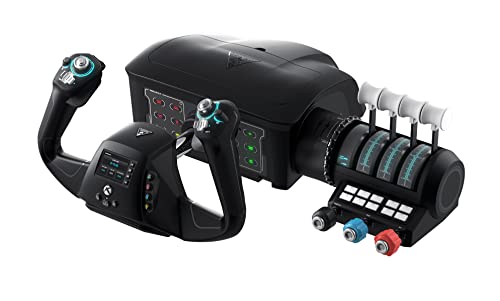
The Turtle Beach VelocityOne Flight is the most complete physical control system here. It makes sense for a pilot who wants the hand position of a yoke, the tactile separation of a throttle quadrant and access to trim, rudder and braking without buying each function separately. It is a much more convincing cockpit centerpiece than the simpler Thrustmaster T-Flight HOTAS X.
The yoke rotates through 180 degrees and uses a non-contact Hall effect sensor. That design is important because the yoke is the control you constantly return to during turns, climbs and approaches. The system also includes a dedicated pitch trim wheel, which is a small but meaningful upgrade over controllers that force trim onto a button or hat switch. Twelve analog axes, two POV switches and two four-way HAT switches give it a wide control vocabulary.
The throttle quadrant is modular, with customizable lever handles and buttons. A full-color flight management display helps with configuration and learning, while the integrated status indicator panel is intended for PC use. The listed compatibility includes Xbox Series X, Xbox Series S, Xbox One and Windows 10 and 11, with support for Microsoft Flight Simulator 2020 and Microsoft Flight Simulator 2024.
The trade-off is physical size. At 19.5 inches high, 19.01 inches long and 7.2 inches wide, it is not a casual accessory to slide beside a keyboard after each session. Its 10-pound weight helps it stay planted, but also reinforces that this is a semi-permanent setup component. Compared with the Logitech G PRO Flight Yoke, it provides more built-in functions. Compared with the X56, it is better suited to civilian aircraft than combat or space sims. Choose it when authentic civilian controls matter more than desk simplicity.
3. Logitech G X56 H.O.T.A.S.: Best for Combat and Space Sims

Pros
- Twin throttles include friction adjustment and a throttle lock
- Four spring options let users tune stick force
- 16-bit aileron and elevator axes use Hall effect sensors
- More than 189 programmable controls are listed
- RGB backlighting helps identify controls in a dark room
Cons
- Requires two USB 2.0 ports
- The large control map takes time to learn
- Windows is the only listed operating system
Best for: PC pilots who fly combat aircraft, spacecraft or any simulation that rewards extensive button mapping.
The Logitech G X56 H.O.T.A.S. is built for people who want more controls than a civil aviation yoke can provide. Its stick and throttle arrangement puts a large number of functions under your hands, which is particularly useful when changing views or activating systems with a mouse would break concentration. It is the most capable control set here for combat and space-oriented flying.
The central features are the twin throttles, adjustable friction and throttle lock. Separate throttle sections are useful when a simulation models engines independently, while the lock can keep both controls moving together. The stick has four spring options for changing resistance. That gives the X56 a more tunable feel than the fixed approach of the Thrustmaster T-Flight HOTAS X.
The technical foundation is strong on paper. The aileron and elevator axes are 16-bit and use Hall effect sensors, and a mini analog stick adds extra directional input for movement or gimballed weapons. The system lists more than 189 programmable controls, though that flexibility comes with a learning curve. RGB backlighting is not a flight characteristic, but it can help separate controls when the room is dark or the stick layout is unfamiliar.
There are practical constraints. The X56 needs two USB 2.0 ports and supports Windows 11, 10, 8.1 and 7. It is not the right shape for someone who primarily wants the broad turning motion of a yoke, and its number of inputs can feel excessive for a first flight controller. The Logitech G PRO Flight Yoke is more natural for airliners and light aircraft, while the X56 is the clear choice for pilots who need weapon, sensor and spacecraft controls close at hand.
4. Logitech G PRO Flight Yoke: Best Traditional Yoke

Pros
- Stainless steel yoke shaft feels designed for repeated use
- Includes a separate throttle quadrant
- At least 54 programmable controls
- Two-position desk clamps hold the unit securely
- Compatible with several major Windows simulators
Cons
- Requires optional software for listed simulator support
- Windows is the listed operating system
- The yoke setup is less suited to combat-style flying than the X56
Best for: Windows users who want a familiar yoke and throttle arrangement for civilian aircraft.
The Logitech G PRO Flight Yoke is the straightforward civil aviation control choice. It does not try to cover every possible aircraft system. Instead, it puts a yoke and throttle quadrant on the desk, which is the control arrangement many people expect when flying airliners, trainers and general aviation aircraft.
Its stainless steel yoke shaft is intended to provide smooth and accurate control. The yoke includes a POV hat, 14 buttons and a three-position mode switch, with at least 54 programmable controls available. That is enough to keep common cockpit functions close without the crowded button field of the X56.
Mounting is handled by two-position desk clamps. That matters because a yoke loses much of its usefulness if it slides or twists during an approach. The listed dimensions are 18.9 inches long, 15.8 inches wide and 9.1 inches high, and the unit weighs 6.17 pounds. It is a substantial desktop accessory, though still simpler than the larger VelocityOne system.
The main weakness is software and platform coverage. The product requires an optional software download for Microsoft Flight Simulator, FSX, X-Plane 10 and Prepar3D, and the listed compatibility is Windows 11, 10, 8.1 and 7. It is not the best fit for a console setup, and the X56 gives combat pilots more direct inputs. Choose the Logitech when the yoke itself is the priority and you want a stable, traditional control layout.
5. FlightGear 2025 X USB: Best Aircraft Variety

Pros
- Includes over 600 aircraft
- Covers 20, 000 real-world airports
- Supports Windows 11, Windows 10 and macOS 11 to the latest version
- Includes a 200-plus-page user manual
- USB format avoids a disc drive
Cons
- Requires reading and learning rather than arcade-style play
- Recommended hardware includes a quad-core CPU, 6GB RAM and 2048MB VRAM
- The listing contains a Windows-only caution despite also describing macOS compatibility
Best for: PC and Mac users who want an enormous range of aircraft and airports in a simulator-first package.
The FlightGear 2025 X USB is about breadth. It includes aircraft ranging from light planes and commercial jets to military aircraft, helicopters and airships, then places them across 20, 000 real-world airports. That makes it a strong fit for curious users who want to move between aircraft types rather than spend all their time with one model.
This is explicitly a professional simulator rather than an arcade game. The included USB package contains an installation guide, first flight guide and a 200-plus-page user manual, along with a PixelClassics installation menu and email support. Those extras point to a product that expects you to learn the controls and procedures instead of immediately treating flight as an action game.
The USB format is convenient for computers without optical drives. The listing describes compatibility with Windows 11, Windows 10 and macOS 11 to the latest version, while also warning that the computer must meet the recommended specification. That recommendation includes a quad-core CPU, 6GB of RAM, a GPU with 2048MB of VRAM and at least 5GB of hard drive space, with internet access required.
The platform wording deserves attention before buying. One note specifically says the USB is compatible with Windows PC only, even though other product details describe macOS support. That ambiguity makes the FlightGear Deluxe disc edition a potentially clearer choice for Mac owners who have an optical drive. Compared with Microsoft Flight Simulator 2024, FlightGear emphasizes aircraft and airport quantity rather than console career missions. Choose it for variety and learning, but skip it if you want a highly guided game or a plug-and-play controller bundle.
For readers interested in radio-controlled aircraft rather than full-size aviation, the skills that matter in an FPV practice simulator are a different starting point.
6. REALFLIGHT Evolution With Controller: Best RC Starter Package

Pros
- Includes the InterLink DX controller
- Covers airplanes and helicopters
- Adds more than 100 aircraft and dozens of 3D and PhotoFields
- Includes a newer user interface designed to reduce mouse and keyboard use
- Supports compatible VR headsets and online multiplayer options
Cons
- This is for RC aircraft, not full-size aviation simulation
- New quarterly content can involve separate purchases or passes
- The included aircraft focus is narrower than FlightGear's
Best for: new RC pilots who want dedicated controller hardware and a broad practice environment.
The REALFLIGHT Evolution With Controller belongs in this list because “flight simulator” is not limited to airliners and airport approaches. This package is aimed at RC aircraft, with airplanes and helicopters from E-flite, HobbyZone, Hangar 9 and Blade. The included InterLink DX controller makes it a more complete starting point than the software-only version below.
The interface is designed to reduce reliance on a mouse or keyboard. That is a sensible choice for RC practice, where the important habit is keeping attention on the aircraft and developing smooth stick movements. The package includes more than a dozen newer ultra-micro, sport, scale, EDF and trainer aircraft, plus multiple helicopters.
The content range goes beyond the initial models. REALFLIGHT lists more than 100 additional aircraft, along with dozens of 3D fields and PhotoFields that were previously sold separately as expansion packs. The Triple Tree Aerodrome PhotoField is included as a featured flying site. VR headset compatibility and online multiplayer options add ways to practice or share the experience, although the supplied data does not identify particular headset models.
The catch is category fit. Someone shopping for a civilian world simulator should choose Microsoft Flight Simulator 2024 or FlightGear instead. Someone who already owns suitable RC control hardware may prefer the REALFLIGHT Evolution Software Only, which avoids duplicating the InterLink DX. The controller bundle is the one to choose for a new RC pilot who wants the software and its dedicated input device together.
7. Thrustmaster T-Flight HOTAS X: Best Simple HOTAS

Pros
- Includes a joystick and detachable full-size throttle
- Offers 12 programmable buttons and 5 axes
- Adjustable stick resistance
- Plug-and-play setup with saved programming
- Weighted base improves desk stability
Cons
- PC only
- The control count is much lower than the Logitech X56
- It lacks the yoke feel preferred for civilian aircraft
Best for: first-time PC pilots who want a simple joystick and throttle without a complex setup.
The Thrustmaster T-Flight HOTAS X is the least intimidating physical controller in this group. It gives a new pilot the two pieces that matter most for a basic HOTAS setup, a joystick and a throttle, without the dense control layout of the X56 or the larger footprint of the VelocityOne.
It offers 12 programmable buttons and 5 axes. That is enough to map the core functions in many flight games, including view control, brakes, firing or other commonly used actions. The joystick has adjustable resistance, and the handle can provide rudder control through rotation or a progressive tilting lever. Those details give beginners room to find a comfortable setup before considering a more elaborate controller.
The throttle is full-size and detachable. Keeping it connected creates a compact desktop arrangement, while separating it allows more flexibility for a cockpit mount or a wider hand position. A weighted base helps keep the joystick in place, and the product includes an exclusive preset button, profile switching and built-in memory for saved programming.
Its limitation is capability, not basic usability. The X56 offers twin throttles, Hall effect sensors, four spring options and a far larger number of programmable controls. The Logitech G PRO Flight Yoke is a better match for yoke-based civilian flying. The Thrustmaster makes more sense for someone who wants a comfortable first controller, quick setup and enough inputs for ordinary PC flight sessions. It is also a useful starting point before deciding whether a full cockpit deserves the space.
8. FlightGear 2025 X Deluxe: Best Disc Edition

Pros
- Includes over 600 aircraft with downloads
- Provides full worldwide scenery
- Includes 500 aircraft on the disc content
- Works with Windows 11, Windows 10 and macOS 11 to the latest version
- Includes guides, a 200-plus-page manual and installation tools
Cons
- Requires a compatible optical drive
- Internet is required
- The software expects users to study the included manuals
Best for: users who want FlightGear's large aircraft library in a physical DVD and CD package.
The FlightGear 2025 X Deluxe is the physical-media alternative to the USB edition. Its main appeal is not a different style of flight model. It is the package format, the included scenery and the way the content is arranged across a four-disc DVD and CD set. That makes it worth considering for a desktop PC or Mac that still has an optical drive.
The disc content includes 500 aircraft, with more than 600 total available through downloads. The selection spans small aircraft, airliners, military planes, helicopters and airships, and the package includes full worldwide scenery. That is the same broad, explore-anywhere character that makes the USB edition interesting for aviation enthusiasts.
PixelClassics includes an installation menu for PC, an installation guide, a first flight guide and a 200-plus-page user manual. The listing also describes access to more than 1, 000 liveries and future updates. FlightGear is presented as a professional simulator, so the manuals are not decorative extras. They are part of the learning process.
The obvious drawback is the disc drive. The USB version is easier for a modern computer without optical hardware, while Microsoft Flight Simulator 2024 is the better fit for a PlayStation 5 owner. The product listing also says internet access is required and recommends a quad-core CPU, 6GB of RAM, 2048MB of VRAM and 5GB of storage. Choose the Deluxe edition when physical media and worldwide scenery matter more than installation convenience.
9. Marada Flight Racing Cockpit: Best Adjustable Cockpit

Pros
- Supports both flight and racing simulation
- Includes five interchangeable mounting panels
- Joystick panels, pedals, middle panel, seat and backrest adjust
- Thickened square tubes and right-angle welding are designed for stability
- Fits several Logitech, Thrustmaster, Honeycomb and Turtle Beach systems
Cons
- Electronic controls, pedals and steering equipment are not included
- Its 96.45-pound weight makes relocation difficult
- Assembly and adjustment require more commitment than a desktop controller
Best for: dedicated sim rooms that need one adjustable frame for flight and racing equipment.
The Marada Flight Racing Cockpit is furniture for a simulator, not a simulator by itself. That distinction matters. The red seat and frame create a fixed driving position, but the electronic controls, steering wheel, shift lever and pedals are not included. It is a foundation for equipment such as the Logitech X56, Thrustmaster HOTAS systems or Turtle Beach VelocityOne Flight.
Its strongest feature is flexibility. Five interchangeable mounting panels can accommodate flight or racing gear, as well as a mouse and keyboard. The side joystick panels move forward, backward, left, right, up and down. The pedal position and angle are adjustable, while the center support panel and seat back can also be positioned for different users.
The frame uses 40mm thickened square tubes, a column structure and right-angle welding. Multiple handle bolts secure the adjustable points, and anti-slip pads are intended to improve stability. That construction should appeal to anyone tired of a controller shifting on a desk, especially when the setup is shared by pilots of different heights or body types.
The trade-off is commitment. The cockpit measures 23.8 inches long, 22.9 inches wide and 5.1 inches high according to the supplied product information, and it weighs 96.45 pounds. It is not a casual accessory to store in a closet after each flight. The Marada is a better complement to the VelocityOne or X56 than a standalone purchase, and it should be skipped by anyone who still needs the actual controls.
A cockpit also changes the rest of the room, so how much space a dedicated simulator setup really needs is a useful question before committing to a permanent frame.
10. REALFLIGHT Evolution Software Only: Best RC Software Option

Pros
- Includes airplanes and helicopters for RC practice
- Adds more than 100 aircraft and dozens of fields
- Supports VR headsets and online multiplayer options
- Modern interface reduces mouse and keyboard dependence
- New models and fields are released quarterly
Cons
- Controller is not included
- It is designed for RC aircraft rather than full-size flight
- Extra content may require separate purchases, packs or season passes
Best for: RC pilots who already have compatible control hardware and want the REALFLIGHT Evolution software.
The REALFLIGHT Evolution Software Only version is the sensible pick for an existing RC setup. It contains the same general Evolution environment as the controller bundle, but the product does not include the InterLink DX. That makes it a focused software purchase for pilots who already own the necessary input hardware.
The aircraft selection covers ultra-micro, sport, scale, EDF and trainer planes, along with multiple Blade helicopters. More than a dozen newer models are included, and the software adds more than 100 additional aircraft plus dozens of 3D fields and PhotoFields. The Triple Tree Aerodrome PhotoField gives the simulator a recognizable place to practice rather than a generic background.
The updated interface is designed to make the controller more central and reduce the need for a mouse or keyboard. VR headset compatibility and online multiplayer options provide extra ways to use the simulator, although the listing does not specify which VR headsets are supported. Quarterly access to new models and fields is also listed, with content available through individual purchases, content packs or yearly season passes.
The product's identity is its limitation. It is not a substitute for FlightGear or Microsoft Flight Simulator 2024, and it is a poor first purchase for someone without an RC controller. The bundle with InterLink DX is more complete for beginners. Choose this version when you already have compatible hardware and want the broader RC aircraft and field library without buying another controller.

How to choose best flight simulator
The right flight simulator starts with the type of flying you want to practice, then narrows down by platform, control layout and the amount of space you can dedicate to it.
Simulation type
Full-size aviation and RC flying are different disciplines. Microsoft Flight Simulator 2024 and FlightGear focus on aircraft operating across airports and worldwide scenery, while REALFLIGHT Evolution focuses on radio-controlled airplanes and helicopters. A realistic RC trainer will not replace an airliner simulator, and a global aviation game will not teach the same stick habits as an RC environment.
Platform compatibility
Check the platform before comparing aircraft counts or controls. Microsoft Flight Simulator 2024 in this roundup is for PlayStation 5. Turtle Beach supports Xbox and Windows, while the Logitech yoke, X56 and Thrustmaster are listed for Windows PC. FlightGear describes Windows and macOS compatibility, but the USB listing also contains a Windows-only warning, so Mac users should read the platform notes carefully.
Control layout
A yoke suits civilian aircraft because it mirrors the main control movement of many trainers and airliners. A HOTAS puts a joystick and throttle under your hands and is more natural for combat or space simulations. The VelocityOne combines yoke, throttle, trim, rudder and brake controls, while the X56 favors extensive programmable inputs. A simple controller such as the T-Flight HOTAS X is easier to learn, but it leaves fewer functions immediately available.
Buy the control layout that matches the aircraft you fly most, not the one with the longest feature list.
Aircraft and scenery
A large aircraft count is only useful if the simulator also offers the airports, fields or activities you want. FlightGear lists over 600 aircraft and 20, 000 airports, while Microsoft Flight Simulator 2024 includes over 65 aircraft and 150 handcrafted airports plus career missions and races. REALFLIGHT's aircraft and PhotoFields are aimed at RC practice, so compare the type of content, not just the number.
Desk and room space
A desktop HOTAS or yoke needs a stable surface, but a cockpit frame needs dedicated floor space. The Marada supports adjustable seating and mounting positions, yet its 96.45-pound weight makes it a permanent-style setup. The VelocityOne is also a substantial control unit. If you need to pack everything away after each session, the Thrustmaster is easier to live with than a full cockpit.

Frequently asked questions
Is Microsoft Flight Simulator 2024 available for PlayStation 5?
The product in this roundup is the PlayStation 5 Standard Edition on Blu-ray. Its listed content includes over 65 aircraft, 150 handcrafted airports, career missions, air races and a detailed world with real-time traffic.
Should I choose a yoke or a HOTAS controller?
Choose a yoke for civilian aircraft when you want a control motion closer to a traditional cockpit. A HOTAS is more suitable for combat, spacecraft or simulations where many buttons and throttle inputs need to stay under your hands.
Does the Turtle Beach VelocityOne Flight include flight simulator software?
The listed product is a control system. Its features describe compatibility with Xbox and Windows titles such as Microsoft Flight Simulator 2020 and Microsoft Flight Simulator 2024, but it does not state that flight software is included.
What is the difference between the two REALFLIGHT Evolution products?
The controller bundle includes the InterLink DX controller, while the Software Only edition does not. Both listings describe RC aircraft, helicopters, PhotoFields, VR headset compatibility and online multiplayer options.
Can FlightGear run on a Mac?
The FlightGear listings describe compatibility with macOS 11 to the latest version and Windows 10 and 11. The USB edition also includes a warning that says Windows PC only, so Mac buyers should verify the exact compatibility notes before ordering.
Does the Marada cockpit include a joystick or pedals?
No. The listing specifically says the steering wheel, shift lever, pedals and other electronic devices are not included. The cockpit provides the frame, seat and adjustable mounting positions for compatible equipment.
Is the Thrustmaster T-Flight HOTAS X suitable for beginners?
It is a beginner-friendly PC controller because it has plug-and-play setup, a detachable throttle, adjustable resistance and saved programming. Its 12 buttons and 5 axes are enough for a straightforward setup, though advanced users may prefer the much larger control map of the Logitech X56.

The bottom line
The Best flight simulator overall is Microsoft Flight Simulator 2024 for PlayStation 5 because it combines a large aircraft selection, handcrafted airports, career missions and a living world in one package. For Windows or Xbox pilots who want physical controls, the Turtle Beach VelocityOne Flight is the stronger companion, with a yoke, throttle quadrant, trim wheel, rudder and brake controls in one system.
Choose FlightGear 2025 X USB or its Deluxe disc edition when aircraft variety and worldwide airports matter more than a console-focused presentation. For RC pilots, the REALFLIGHT Evolution With Controller is the complete starting package, while the Software Only version is better for anyone who already owns suitable hardware.
If you are undecided, choose the software first, then buy the controller that matches the aircraft and platform you will actually use.
As an Amazon Associate we earn from qualifying purchases.