

A gaming desktop has to get the important things right at the same time: a capable graphics card, enough memory for modern games, fast storage, and cooling that does not turn every session into a noisy chore. The wrong combination can leave a powerful processor waiting on a weaker GPU, or force you to replace the storage sooner than expected.
This guide compares ten prebuilt towers across several performance levels. The Best gaming computer for most players is the MSI Codex Z2, while the list also includes serious RTX 5080 hardware, compact mainstream systems, liquid cooled builds, and practical entry level options.
Comparison
| # | Product | Award | Graphics | Memory and storage | Cooling | Best for |
|---|---|---|---|---|---|---|
| 1 | MSI Codex Z2 | Best overall | GeForce RTX 5070 | 32GB DDR5, 2TB NVMe SSD | ARGB air cooler, four fans | Most serious PC gamers |
| 2 | CyberPowerPC Gamer Master | Best balanced midrange pick | GeForce RTX 5060 Ti 8GB | 16GB DDR5, 1TB PCIe 4.0 SSD | Not specified | 1080p and entry 1440p gaming |
| 3 | Alienware Aurora Ultra 7 | Best polished design | GeForce RTX 5070 | 32GB DDR5, 1TB SSD | Not specified | Players who want a refined branded tower |
| 4 | Skytech Azure 3 | Best liquid cooled RTX 5070 PC | RTX 5070 12GB | 32GB DDR5 6000, 1TB Gen4 NVMe SSD | 360mm ARGB AIO | Sustained gaming and creation |
| 5 | YAWYORE Ryzen 7 Gaming PC | Best flexible RTX 5060 build | RTX 5060 8GB | 32GB DDR4, 1TB NVMe SSD | Not specified | Wireless-ready general gaming |
| 6 | STGAubron Ryzen 7 Gaming PC | Best entry level tower | RTX 3050 6GB | 16GB DDR4, 1TB SSD | Four RGB fans | 1080p esports and everyday use |
| 7 | Thermaltake View i570 | Best CPU heavy build | RTX 5070 | 32GB DDR5 6000, 1TB NVMe M.2 | 240mm liquid cooler | Gaming with demanding multitasking |
| 8 | Alienware Aurora Ultra 9 | Best high end graphics | GeForce RTX 5080 | 32GB DDR5, 1TB SSD | Liquid cooled, 240mm heat exchanger | High resolution gaming |
| 9 | Skytech Crystal | Best 1080p Skytech build | RTX 5060 8GB | 32GB DDR4 3200, 1TB NVMe SSD | High performance air cooler | Full HD gaming |
| 10 | Horizon Autherium Dragon | Best storage capacity | RTX 5070 OC 12GB | 64GB RAM, 2TB NVMe SSD plus 8TB HDD | 360mm liquid cooler, 11 fans | Large game libraries and creative work |
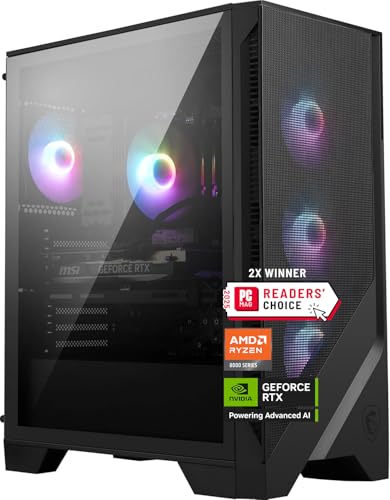
1. MSI Codex Z2: Best Overall
Pros
- RTX 5070 graphics and 32GB DDR5 memory
- Large 2TB NVMe solid state drive
- Four fan cooling layout
- USB Type-C and VR-ready design
Cons
- Air cooling is less elaborate than the liquid cooled alternatives
- The processor is not the fastest CPU in this group
- Windows 11 Home rather than Pro
Best for: players who want a strong, well-rounded tower without an obvious weak component.
The MSI Codex Z2 is the easiest tower here to recommend because its parts are sensibly matched. The Ryzen 7 8700F gives it eight cores and 16 threads, with boost speeds up to 5.0GHz, while the GeForce RTX 5070 handles the graphics workload. That pairing makes more sense for a gaming-first machine than a system that spends heavily on the processor while cutting back on the GPU.
The 32GB of DDR5 memory is a useful starting point for current games, streaming, browser tabs, and background applications. It also avoids the immediate memory upgrade question that comes with several 16GB systems in this roundup. Storage is another strong point. The 2TB M.2 NVMe SSD gives a game library more room before the owner has to start moving installations to another drive.
MSI uses an ARGB air cooler with four system fans, three at the front and one at the rear. That is a straightforward airflow arrangement rather than a premium liquid loop, but it gives the Codex Z2 a sensible thermal foundation. The case is 19 inches tall, 16 inches long, and 8.38 inches wide, so it is a conventional tower that still needs a proper amount of desk or floor space. RGB lighting can be adjusted through MSI Center, and a built-in LED button provides quick lighting changes.
The RTX 5070 places this ahead of the CyberPowerPC Gamer Master, whose RTX 5060 Ti is aimed at a lower performance tier. The Skytech Azure 3 adds a 360mm liquid cooler and faster DDR5 6000 memory, while the Alienware Aurora Ultra 7 counters with a more distinctive chassis and software ecosystem. The MSI answer is balance: it combines the RTX 5070 with more storage than most of the similarly equipped machines.
Its weakness is the absence of a liquid cooler and the lack of a stated power supply specification in the supplied details. Buyers who specifically want a showcase chassis, a liquid cooling loop, or a higher-end processor should look at Alienware, Skytech, or Thermaltake instead. For everyone else, this is the tower we'd keep for a mix of demanding games, multitasking, and long-term usefulness.
2. CyberPowerPC Gamer Master: Best Balanced Midrange Pick

Pros
- Ryzen 7 8700F with eight cores and 16 threads
- Wi-Fi 6 and Bluetooth 5.3
- Useful USB-C and USB-A selection
- One year parts and labor warranty
- Keyboard and mouse included
Cons
- 16GB of memory leaves less headroom than the top picks
- RTX 5060 Ti has less graphics capacity than the RTX 5070 systems
- Storage is limited to 1TB
Best for: mainstream players who want a current platform and easy connectivity.
The CyberPowerPC Gamer Master is a sensible middle ground. Its Ryzen 7 8700F is the same eight-core, 16-thread processor used in the MSI Codex Z2, but the GeForce RTX 5060 Ti 8GB puts this machine one step below the RTX 5070 towers. That makes the CyberPowerPC more naturally suited to 1080p gaming and a careful move into 1440p rather than a system built around maximum settings at higher resolutions.
The 16GB of DDR5 memory is adequate for gaming and ordinary desktop work, but it is the first specification to examine if you plan to stream, edit video, or keep a large number of applications open. The 1TB PCIe 4.0 NVMe SSD is quick storage, though large modern installations can consume that space quickly. MSI's 32GB and 2TB combination is more comfortable for a growing library.
Connectivity is one of this PC's better arguments. It includes two USB-C 3.2 ports, four USB-A 3.2 ports, two USB-A 2.0 ports, LAN, Wi-Fi 6, Bluetooth 5.3, and 7.1-channel audio. The graphics card has one HDMI connection and two DisplayPort connections. Those details matter if the desktop will drive several accessories, wireless peripherals, and more than one display without reaching for a hub.
The tempered side panel and custom RGB lighting make it less plain than a typical office tower, and the included keyboard and mouse let a new owner get started immediately. CyberPowerPC also lists a one year parts and labor warranty with lifetime technical support. That support is a practical advantage over less established options, even though it cannot compensate for the smaller memory and storage allotments.
The MSI Codex Z2 is the better choice for demanding games because its RTX 5070 and larger SSD give it more room to grow. The CyberPowerPC remains attractive for someone who values the newer wireless standards and a complete accessory bundle. Skip it if you already know you need 32GB of memory or a larger game library on the internal drive.
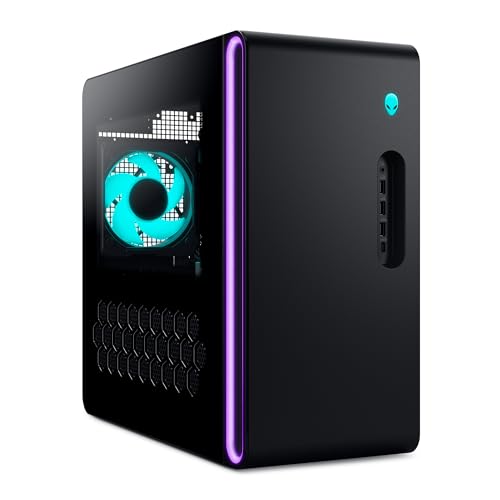
3. Alienware Aurora Ultra 7: Best Polished Design
Pros
- RTX 5070 graphics
- 32GB DDR5 memory
- Customizable AlienFX lighting
- Performance profiles through Alienware Command Center
- One year onsite service
Cons
- Only 1TB of stated SSD storage
- Larger and heavier than several conventional towers
- The supplied details do not specify the cooling arrangement
Best for: gamers who care as much about the chassis and software experience as the component list.
Alienware's Aurora Ultra 7 is not trying to look like a generic black box. The matte basalt black chassis, clear panel, stadium lighting, and customizable AlienFX zones give it a deliberate visual identity. That makes it a better fit for a visible desk setup than the more anonymous YAWYORE or STGAubron towers.
Under the styling, the hardware is well chosen for current gaming. Intel's Core Ultra 7 265F is paired with an RTX 5070 and 32GB of DDR5 memory. The combination should suit demanding game settings, streaming, and general creation work, though the supplied specifications do not state the processor's core count or clock speeds. The 1TB SSD is the limiting point for anyone who keeps many large games installed at once.
Alienware Command Center adds a layer of control that the lower-cost systems do not match. It can manage AlienFX lighting, performance modes, and game profiles, allowing the tower to behave differently across a library without manually adjusting every setting. The machine is 16.46 inches high, 18.05 inches long, and 7.76 inches wide, with a listed weight of about 33.9 pounds. It is not a small desktop, despite its relatively narrow width.
The Alienware's RTX 5070 puts it in the same broad graphics class as the MSI Codex Z2, Skytech Azure 3, and Thermaltake View i570. MSI offers twice the listed SSD capacity, while Skytech provides a 360mm AIO cooler. Alienware's case design, lighting controls, and one year of onsite service are the reasons to choose it instead.
The lack of a stated cooling specification makes it harder to assess for buyers who run heavily threaded workloads for hours. Its 1TB SSD also calls for more storage planning than the MSI system. Choose this Aurora if the ownership experience and visual design matter strongly. If raw component transparency matters more, the Skytech and Thermaltake entries are easier to evaluate.
4. Skytech Azure 3: Best Liquid Cooled RTX 5070 PC

Pros
- RTX 5070 with 12GB graphics memory
- Ryzen 7 7700X processor
- 32GB DDR5 6000 memory
- 360mm ARGB all-in-one liquid cooler
- 850W Gold ATX 3 power supply
Cons
- Graphics card brand may vary
- Only 1TB of NVMe storage
- Large 360mm cooler needs careful case placement
Best for: players who want a strong RTX 5070 platform with substantial thermal hardware.
The Skytech Azure 3 makes its cooling system part of the appeal. A 360mm ARGB all-in-one cooler is a serious piece of hardware for a gaming tower, and it gives the Ryzen 7 7700X a more robust thermal setup than the air-cooled MSI Codex Z2. The result is a build aimed at players who also create content, stream, or simply prefer more cooling capacity than the average prebuilt provides.
The Ryzen 7 7700X is listed with a 4.5GHz base clock and up to 5.4GHz boost. It is paired with an RTX 5070 carrying 12GB of graphics memory, 32GB of DDR5 6000 RGB memory, and a 1TB Gen4 NVMe M.2 SSD. The faster memory specification is a nice fit for the processor, while the 12GB graphics allocation gives the GPU more breathing room for demanding textures and higher resolution play than the RTX 5060 Ti systems.
Skytech lists an 850W Gold ATX 3 power supply, which is a useful sign for a modern graphics-focused build. Display output includes HDMI and DisplayPort, though the listing cautions that additional ports may vary. Wi-Fi, USB 2.0, USB 3.0, USB 3.2 Gen1, HD audio, and a bundled keyboard and mouse cover the practical basics.
The Azure 3 is physically substantial at 17.8 inches high, 17.2 inches long, and 9.1 inches wide. Its tempered glass case and white finish make the ARGB lighting prominent, but the size and clear panels mean it needs a considered location. Skytech also lists one year of parts and labor coverage, free technical support, and assembly in the United States.
Compared with the MSI Codex Z2, the Azure 3 trades twice the SSD capacity for a 360mm liquid cooler, a 12GB RTX 5070, and DDR5 6000 memory. The Thermaltake View i570 has an even stronger Core i9 processor and a 240mm liquid cooler, but the Azure's 360mm radiator is the more conspicuous cooling feature. Skip this PC if you want a compact, quiet-looking tower or fixed graphics card branding. It suits buyers who want cooling and visual impact to be central parts of the build.
5. YAWYORE Ryzen 7 Gaming PC: Best Flexible RTX 5060 Build

Pros
- RTX 5060 with 8GB GDDR7 graphics memory
- 32GB DDR4 memory
- Ryzen 7 5700X with eight cores and 16 threads
- Wi-Fi and Bluetooth built in
- MSI B550M-A PRO motherboard
Cons
- DDR4 platform is older than the DDR5 alternatives
- Power supply is listed as 650W Bronze
- Graphics card brand may vary
Best for: buyers who want a capable RTX 5060 tower with ample memory and wireless features.
The YAWYORE Gaming PC is built around a familiar and practical combination: Ryzen 7 5700X, GeForce RTX 5060, 32GB of memory, and a 1TB M.2 NVMe SSD. It does not have the newer DDR5 platform used by the MSI, CyberPowerPC, and Alienware systems, but it compensates with a full 32GB memory allocation rather than leaving the buyer at 16GB.
The Ryzen 7 5700X has eight cores and 16 threads, with boost speeds up to 4.6GHz. The RTX 5060 is listed with 8GB of GDDR7 graphics memory and support for DLSS 4, ray tracing, and Reflex 2 delay optimization. Those features make it a natural match for modern 1080p gaming and a reasonable starting point for 1440p with sensible settings.
The MSI B550M-A PRO motherboard gives the system a known platform rather than an unspecified board. Wireless connectivity is built in, with Wi-Fi and Bluetooth available for networking and peripherals. The 650W 80 Plus Bronze power supply is adequate as a stated part of the configuration, but it does not leave the same upgrade impression as the Skytech Azure 3's 850W Gold ATX 3 unit.
The tower weighs about 24.95 pounds, making it lighter than the large Alienware and Skytech systems. The supplied details do not state the case dimensions or a detailed cooling layout, so buyers should not assume the same thermal hardware found in the liquid cooled options. That missing information is the main reason to look closely at the listing before committing to a particular upgrade plan.
The YAWYORE has more memory than the CyberPowerPC Gamer Master, but CyberPowerPC offers DDR5, newer wireless standards, and a clearer port list. The Skytech Crystal uses the same RTX 5060 class of graphics but adds a more detailed case and cooling description. Choose YAWYORE for its balanced memory capacity and named motherboard. Skip it if a newer DDR5 foundation or a clearly specified cooling system is more important.
6. STGAubron Ryzen 7 Gaming PC: Best Entry Level Tower

Pros
- Ryzen 7 5700G processor
- Wi-Fi 6 and Bluetooth 5.2
- Four RGB fans
- HDMI, DisplayPort, and DVI outputs
- Keyboard, mouse, and lifetime technical support
Cons
- RTX 3050 6GB is the least capable GPU here
- 16GB DDR4 memory
- 1TB SSD and unspecified drive interface details
Best for: casual players, esports fans, and households that also need an everyday Windows desktop.
The STGAubron is the clear entry point in this group. Its Ryzen 7 5700G runs from 3.8GHz up to 4.6GHz, and the system includes an RTX 3050 with 6GB of GDDR6 graphics memory. That graphics card is well below the RTX 5060 and RTX 5070 models elsewhere in the roundup, so this desktop makes the most sense for 1080p games, esports titles, and players who do not need maximum visual settings.
The machine includes 16GB of DDR4 memory and a 1TB solid state drive. Those are usable baseline capacities for gaming and everyday work, though heavier multitasking will expose the smaller memory allotment sooner than it would on the 32GB systems. STGAubron says the desktop can run popular games at 60 or more frames per second, but the actual experience will depend on the title and selected settings.
Connectivity is unusually broad for a basic tower. There is an RJ-45 port, a serial connection, Wi-Fi 6, Bluetooth 5.2, HDMI, DisplayPort, and DVI. Four RGB fans provide the visible lighting and airflow setup. The included RGB gaming keyboard and mouse make this a convenient starting point for someone assembling a complete desk rather than replacing an existing tower.
The case is 17.5 inches high, 14.6 inches long, and 7.9 inches wide. It is not tiny, but its depth is more manageable than the larger liquid cooled towers. STGAubron also lists one year of parts and labor coverage plus free lifetime technical support. Those extras matter for a first desktop buyer who may not want to troubleshoot every setup question alone.
The YAWYORE is a much stronger choice for modern graphics because its RTX 5060 has newer features and more graphics memory. The Skytech Crystal also moves up to the RTX 5060 while retaining 32GB of memory. Choose STGAubron when the game library is centered on lighter competitive titles or when the broad display and wireless connections are especially useful. Skip it for high resolution gaming, ray tracing heavy workloads, or a system intended to remain cutting edge for many years.
7. Thermaltake View i570: Best CPU Heavy Build

Pros
- Intel Core i9-14900KF processor
- RTX 5070 graphics
- 32GB DDR5 6000 memory
- 240mm closed loop liquid cooler
- Filtered radiator support and ventilated power cover
Cons
- 1TB storage is modest for a high performance tower
- Port information is less complete than CyberPowerPC's
- The processor is more specialized than many gamers need
Best for: players who game, stream, render, and multitask heavily.
The Thermaltake View i570 is the processor specialist of this roundup. Its Intel Core i9-14900KF sits above the CPUs in most of the RTX 5070 systems here, and that distinction matters when the desktop will also handle video work, streaming, compilation, or other sustained CPU tasks. For a machine used only for gaming, the graphics card still has the larger influence on many experiences, but the i9 gives this tower a much higher multitasking ceiling.
Thermaltake pairs the processor with an RTX 5070, 32GB of DDR5 6000 RGB memory, and a 1TB NVMe M.2 SSD. The memory speed is well matched to a performance desktop, and the SSD provides the quick loading expected from a current gaming system. Storage capacity is less generous than the MSI Codex Z2 and the Horizon Autherium Dragon, so a large library may eventually call for another drive.
Cooling is handled by a 240mm closed loop liquid cooler. The case design includes a power supply cover with a filtered vent and vertical side mount radiator support, details that suggest more thought about airflow than a basic RGB enclosure. The supplied port details mention two USB 3.0 ports, a headphone connection, and a microphone connection, along with Wi-Fi and DisplayPort or HDMI graphics output.
The system is listed at about 25.85 pounds, but full external dimensions are not provided. That makes it harder to plan a tight installation than with the clearly dimensioned Alienware and MSI towers. Still, its design is aimed at an enthusiast who will appreciate cooling hardware, RGB memory, and a case built around component airflow.
The Thermaltake beats the MSI Codex Z2 on processor class and adds liquid cooling, but the MSI offers twice the SSD capacity and a more straightforward gaming balance. Skytech Azure 3 counters with a larger 360mm cooler, while Alienware Ultra 9 moves up to an RTX 5080. Choose Thermaltake when CPU-heavy workloads are part of the brief. Skip it if gaming is the only task and you would rather put the emphasis on more storage or a higher graphics tier.
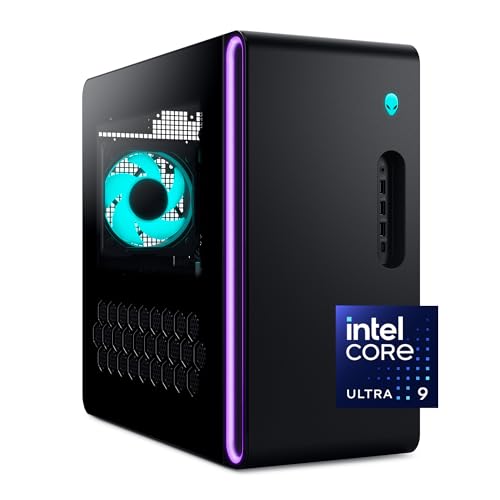
8. Alienware Aurora Ultra 9: Best High End Graphics
Pros
- GeForce RTX 5080 graphics
- Core Ultra 9 285 processor
- 32GB DDR5 memory
- Liquid cooling with a 240mm heat exchanger
- Customizable AlienFX lighting and performance profiles
Cons
- 1TB SSD is small beside the graphics hardware
- Heavy 33.89 pound chassis
- Liquid cooling is described as optional in the supplied details
Best for: players targeting demanding high resolution gaming and GPU accelerated creation.
The Alienware Aurora Ultra 9 is the performance outlier. It combines an Intel Core Ultra 9 285 processor with the GeForce RTX 5080, making it the most graphics-forward option in this list. That extra GPU headroom is the reason to consider it for demanding resolutions, ray tracing, and creative applications that can use accelerated graphics.
The system includes 32GB of DDR5 memory and a 1TB SSD. Memory capacity is appropriate for a high-end gaming tower, but the storage allocation feels less generous beside the graphics hardware. Large games and creative files can make that space disappear quickly, so this is a desktop for buyers who are comfortable adding storage or managing a smaller active library.
Alienware specifies a 1000W Platinum rated power supply, which is a substantial foundation for the RTX 5080. The listing also describes a 240mm heat exchanger available with optional CPU liquid cooling, so buyers should confirm the exact cooling configuration before ordering. That qualification is important. The Ultra 9's class of processor and GPU deserves a cooling setup suited to long, sustained workloads.
The Aurora chassis measures 16.46 inches high, 18.05 inches long, and 7.76 inches wide, with a listed weight of 33.89 pounds. AlienFX lighting zones, stadium lighting, and Alienware Command Center provide the same polished software and appearance found on the Ultra 7 model. One year of onsite service is also listed, which can be reassuring with a large and complex desktop.
The RTX 5080 places this above the RTX 5070 systems from MSI, Skytech, Thermaltake, and Alienware's Ultra 7. The Horizon Autherium Dragon has more memory and vastly more storage, but its RTX 5070 OC is a lower graphics tier. Choose the Aurora Ultra 9 when graphics performance is the priority. Skip it if you mainly play at 1080p, need a large internal game library immediately, or do not want to verify the liquid cooling configuration.
9. Skytech Crystal: Best 1080p Skytech Build

Pros
- RTX 5060 with 8GB GDDR7 memory
- 32GB DDR4 memory
- 1TB NVMe M.2 SSD
- 650W Gold power supply
- Triple tempered glass case and bundled accessories
Cons
- Ryzen 7 5700 is an older platform
- DDR4 3200 memory is slower than the Azure 3's DDR5 6000
- Graphics card brand may vary
Best for: gamers who want a complete Skytech setup centered on 1080p play.
The Skytech Crystal is designed around a clear target: full HD gaming with enough memory and storage to make the desktop comfortable from day one. Its Ryzen 7 5700 runs at 3.7GHz and boosts to 4.6GHz, while the RTX 5060 provides 8GB of GDDR7 graphics memory. This is a more capable gaming foundation than the STGAubron's RTX 3050, while remaining less ambitious than the RTX 5060 Ti and RTX 5070 systems.
The 32GB of DDR4 3200 memory is a strong practical choice for the category. It gives games, voice chat, browsers, and background programs more space than a 16GB configuration. The 1TB NVMe M.2 SSD provides quick loading, but the capacity is ordinary for a current library. Skytech's own description positions this machine for Ultra settings at 1080p with smooth 60-plus FPS play, though individual games will vary.
Cooling uses a high-performance air cooler with ARGB fans rather than the Azure 3's 360mm AIO. That makes the Crystal's thermal design simpler and easier to understand. It also uses a 650W Gold power supply, Wi-Fi, USB 2.0, USB 3.0, USB 3.2 Gen1, HDMI, DisplayPort, and HD audio. As with the Azure, Skytech notes that additional ports may vary.
The triple tempered glass Crystal case is 14.4 inches high, 16.6 inches long, and 11.3 inches wide. It is shorter but notably wider than the MSI Codex Z2, so measure the intended location rather than assuming a small footprint. The listing includes a keyboard and mouse, one year of parts and labor coverage, free technical support, and assembly in the United States.
The YAWYORE is the closer rival because it also uses an RTX 5060 and 32GB of memory. YAWYORE has a newer Ryzen 7 5700X description and a named MSI motherboard, while Skytech offers clearer cooling, power supply, case, and support details. The CyberPowerPC Gamer Master has DDR5 and a stronger processor platform but only 16GB of memory. Pick Skytech for a straightforward 1080p system. Look elsewhere for 1440p as the main goal or for a newer DDR5 platform.
10. Horizon Autherium Dragon: Best Storage Capacity

Pros
- 64GB of RAM
- 2TB NVMe SSD plus 8TB hard drive
- RTX 5070 OC with 12GB graphics memory
- 360mm liquid cooling and 11 fans
- Long stated parts and labor coverage
Cons
- Very large 18-inch square footprint
- Core i9 details are less specific than named processor models elsewhere
- RTX 5070 is below the Alienware Ultra 9's RTX 5080
Best for: users with huge game libraries, creative files, or demanding multitasking needs.
The Horizon Autherium Dragon is defined by excess storage and memory. It includes 64GB of RAM, a 2TB M.2 NVMe SSD, and an 8TB 7200RPM hard drive. That combination is unusually useful for a player who keeps a large game collection installed, works with video or photo files, or wants fast active storage alongside a much larger archive.
Its graphics card is an RTX 5070 OC with 12GB of graphics memory. The supplied description says it is factory overclocked and supports ray tracing, DLSS 4, multi-monitor use, VR, and AI workloads. Display output includes one HDMI and three DisplayPort connections. That makes it more flexible for a multi-display desk than many entries here, though the RTX 5070 still places it below the Alienware Aurora Ultra 9 and its RTX 5080.
Cooling is unusually elaborate. The Dragon uses a 360mm liquid cooler, ARGB lighting, and a total of 11 fans, with fan speed control described as intelligent. Connectivity includes USB-C 3.2, eight USB 3 ports, Ethernet up to 2.5Gbps, Wi-Fi up to 2.4Gbps, and Bluetooth. The listed 850W 80 Plus Gold power supply includes extra SATA connectors and additional drive mounting positions.
This is a large tower at 18 inches high, 17 inches long, and 18 inches wide, with a listed weight of 35 pounds. It needs more than a narrow desk shelf or cramped corner. Windows 11 Pro is preinstalled, and the support package lists a three year parts warranty, five year labor warranty, and access to specialists for hardware, software, and performance support.
The Horizon has more storage and memory than every other system here, but its processor is described only as an unlocked Core i9 with speeds up to 5.4GHz rather than by a specific model. Thermaltake gives a more precise Core i9-14900KF specification, while MSI gives a clearly named Ryzen 7 8700F. Choose the Dragon when capacity and cooling matter more than a compact chassis or the absolute strongest GPU. Skip it if you do not need its storage or if the 18-inch footprint is impractical.

How to choose best gaming computer
A gaming desktop is only as strong as the relationship between its graphics card, processor, memory, storage, and cooling. Start with the games and resolution you actually use, then judge the rest of the build around that target.
Graphics card
The GPU has the largest effect on visual quality and gaming performance in most demanding titles. The RTX 3050 in the STGAubron is aimed at entry level 1080p play, while the RTX 5060 and RTX 5060 Ti systems move into stronger mainstream territory. RTX 5070 machines such as the MSI Codex Z2, Skytech Azure 3, and Thermaltake View i570 are more suitable for demanding 1440p gaming, and the RTX 5080 in the Alienware Ultra 9 is the clear high-end option here.
Graphics memory matters when games use large textures or when you raise resolution. The listed RTX 5070 cards include either 12GB or, in the Horizon model, 12GB with an overclocked configuration. Do not choose a desktop solely because the processor name sounds impressive. The Thermaltake's Core i9 is powerful, but its RTX 5070 still determines how far it can push demanding graphics settings.
For gaming, choose the graphics tier first, then make sure the processor and power supply can support it.
Processor
The processor handles game logic, background applications, streaming, and many creative workloads. Eight-core chips such as the Ryzen 7 8700F, Ryzen 7 7700X, Ryzen 7 5700X, and Ryzen 7 5700G are well suited to general gaming and multitasking. Thermaltake's Core i9-14900KF and the Alienware Ultra 9's Core Ultra 9 285 are more compelling when rendering, streaming, or other CPU-heavy tasks are part of the routine.
A powerful CPU cannot make up for a weak graphics card in visually demanding games. The STGAubron's Ryzen 7 processor is useful for everyday multitasking, but its RTX 3050 sets the gaming ceiling. Conversely, the Alienware Ultra 9 is built around its RTX 5080, with the processor helping maintain a high-end overall platform.
Memory
Sixteen gigabytes remains a workable starting point, as shown by the CyberPowerPC Gamer Master and STGAubron. It leaves less room for a game, browser tabs, voice chat, streaming software, and other applications to run together. Thirty-two gigabytes is the more comfortable capacity for a new gaming desktop, and it appears in the MSI, Alienware, Skytech, Thermaltake, and YAWYORE systems.
The Horizon Autherium Dragon goes further with 64GB. That is most useful for heavy multitasking, creative applications, virtual machines, and large projects. Memory generation also matters. DDR5 appears in the newer platforms from MSI, CyberPowerPC, Alienware, Skytech Azure, and Thermaltake, while YAWYORE, STGAubron, Skytech Crystal, and Horizon use DDR4 configurations.
Storage
An NVMe SSD makes Windows, games, and applications feel responsive. A 1TB SSD is common in this roundup, but modern game installations can fill it quickly. The MSI Codex Z2's 2TB NVMe SSD is easier to live with than a 1TB drive, especially if the desktop will hold a broad library.
The Horizon takes a different approach with a 2TB NVMe SSD and an 8TB 7200RPM hard drive. The SSD is the right place for active games and applications, while the hard drive provides extensive archive space. Before choosing a tower, consider how much storage a growing game library really needs, including recordings, mods, and creative files.
Cooling and power
Cooling affects sustained performance, noise, and the long-term ownership experience. The MSI Codex Z2 uses an ARGB air cooler and four fans, while the Skytech Crystal uses a high-performance air cooler. The Skytech Azure 3 has a 360mm AIO, Thermaltake uses a 240mm closed loop cooler, and the Horizon combines a 360mm liquid cooler with 11 fans.
Power supply details are also worth checking. The Skytech Azure 3 lists an 850W Gold ATX 3 unit, the Horizon lists an 850W Gold unit, and both Alienware systems list 1000W Platinum rated power supplies. A clearly specified supply makes future planning easier, especially with a higher draw graphics card. For a broader look at complete tower configurations, the parts that matter most in a prebuilt desktop are worth reviewing before you order.
Connectivity and support
Count the ports you will use rather than assuming every tower has the same layout. CyberPowerPC gives a particularly clear list with USB-C, multiple USB-A ports, Wi-Fi 6, Bluetooth 5.3, LAN, and 7.1-channel audio. The STGAubron adds HDMI, DisplayPort, and DVI, while the Horizon includes USB-C, eight USB 3 ports, fast Ethernet, Wi-Fi, and Bluetooth.
Support can matter just as much for a first desktop. CyberPowerPC lists one year of parts and labor coverage with lifetime technical support. Skytech lists one year of parts and labor with free technical support, STGAubron lists one year plus lifetime technical support, and the Horizon lists three years of parts coverage with five years of labor. Alienware adds one year of onsite service.

Frequently asked questions
What is the best gaming computer in this roundup?
The MSI Codex Z2 is the strongest all-around recommendation. It combines an RTX 5070, 32GB of DDR5 memory, a Ryzen 7 8700F processor, and a 2TB NVMe SSD without making one part of the build look dramatically weaker than the others.
Is an RTX 5070 PC enough for modern gaming?
An RTX 5070 system is a strong choice for demanding gaming, particularly at 1440p. The MSI Codex Z2, Skytech Azure 3, Alienware Aurora Ultra 7, Thermaltake View i570, and Horizon Autherium Dragon all use an RTX 5070 configuration, though their processors, cooling, storage, and memory differ.
How much RAM should a gaming desktop have?
Sixteen gigabytes is usable for gaming, but 32GB is more comfortable for current multitasking, streaming, and browser use. The Horizon Autherium Dragon's 64GB is most useful for heavy creation work and large multitasking loads rather than ordinary game play alone.
Is liquid cooling necessary for a gaming computer?
No. A well-designed air-cooled system can handle gaming, as shown by the MSI Codex Z2 and Skytech Crystal. Liquid cooling becomes more appealing when a desktop uses a high-power processor, runs sustained workloads, or when the buyer specifically wants the appearance and thermal capacity of a larger radiator.
Is a 1TB SSD enough for PC games?
It can be enough if you rotate through a smaller group of games. Large installations, recordings, mods, and creative files make 1TB restrictive over time. The MSI Codex Z2 provides 2TB of NVMe space, while the Horizon Autherium Dragon adds an 8TB hard drive beside its 2TB SSD.
Which desktop is best for 1080p gaming?
The Skytech Crystal is a well-matched 1080p option with an RTX 5060, 32GB of DDR4 memory, a 1TB NVMe SSD, and a 650W Gold power supply. The STGAubron is more entry level with an RTX 3050, while the CyberPowerPC Gamer Master provides a stronger path toward 1440p with its RTX 5060 Ti.
Do these gaming computers include Wi-Fi?
Several do, but the exact standard varies. CyberPowerPC lists Wi-Fi 6, STGAubron lists Wi-Fi 6, and YAWYORE lists built-in Wi-Fi and Bluetooth. Skytech, Thermaltake, Alienware, and Horizon also list wireless connectivity, though buyers should verify the precise standard when that detail matters.

The bottom line
The Best gaming computer here is the MSI Codex Z2 for its RTX 5070, 32GB of DDR5 memory, Ryzen 7 8700F processor, and unusually useful 2TB SSD. The Skytech Azure 3 is the better specialist pick for buyers who want a 360mm liquid cooler, 12GB RTX 5070, and DDR5 6000 memory.
Choose the Alienware Aurora Ultra 9 when high-end graphics take priority, or the Horizon Autherium Dragon when 64GB of RAM and 10TB of total storage solve a specific need. For straightforward 1080p play, the Skytech Crystal is a more focused fit, while the STGAubron handles entry level gaming and everyday desktop work.
If you are undecided, buy the MSI Codex Z2 unless you specifically need the RTX 5080, a liquid cooler, or the Horizon's unusually large storage setup.
As an Amazon Associate we earn from qualifying purchases.