
A gaming laptop out of the box is just the start. The fans spin up, the chassis gets hot, and the desk is a mess of cables. The right accessories—a cooling pad that actually works, a second screen for multitasking, a backpack that fits an 18-inch behemoth, and a way to keep the keyboard clean—turn a good laptop into a great setup. We have rounded up the 10 best gaming laptops and accessories to cover every gap, from serious thermal management to simple dust management.
The picks span cooling pads with anywhere from six to thirteen fans, a portable monitor that doubles as a phone display, two cleaning approaches (gel and kit), backpacks built for big rigs, and a pair of compact RGB speakers. Whether you are building a permanent desk station or a travel-ready kit, one of these will fit.
TL;DR: The llano V12 is the cooling pad to buy if you need serious heat management. The MNN 15.6-inch Portable Monitor is the best travel companion for a second screen. The MATEIN 18-inch Gaming Laptop Backpack handles the biggest laptops with room to spare. And the OFFSIR Computer Speakers add solid stereo audio without taking up desk space.
| # | Product | Type | Key Feature | Best for |
|---|---|---|---|---|
| 1 | llano V12 Gaming Laptop Cooling Pad | Cooling Pad | 5.5-inch turbo fan, sealed foam, dust filter, 36W power | High-performance gaming laptops that run hot under load |
| 2 | ChillCore Laptop Cooling Pad, 9 Fans | Cooling Pad | 9 fans, LCD display, 8 height stands, 10 RGB modes | Gamers who want a reliable all-rounder with customizable lighting |
| 3 | KYOLLY Gaming Laptop Cooler, 13 Fans | Cooling Pad | 13 ultra-quiet fans, LCD, phone holder, 9 height angles | Users who want maximum fan coverage and a built-in phone stand |
| 4 | ICE COOREL Gaming Laptop Cooling Pad, 6 Fans | Cooling Pad | 6 RGB fans, LCD, 6 height adjustments, whisper-quiet operation | Budget-conscious gamers who need basic cooling and ergonomic tilt |
| 5 | MNN 15.6" FHD Portable Monitor | Portable Monitor | 1080p IPS, dual USB-C, slim profile, smart cover case | Travelers, students, and anyone who needs a second screen on the go |
| 6 | ColorCoral Cleaning Gel | Cleaning Gel | Reusable natural gel, 160g, reaches into crevices | Quick, no-fuss cleaning of keyboards and vents |
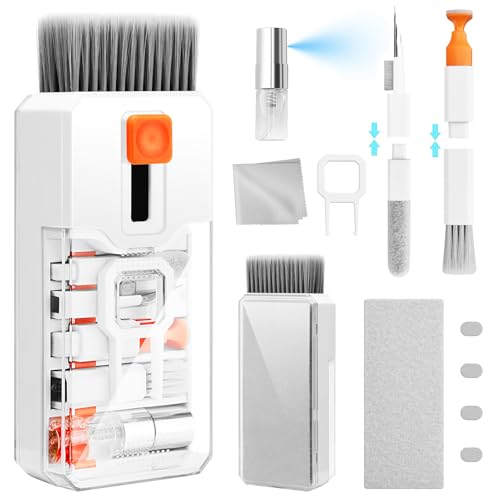
| 7 | Ordilend Keyboard Cleaner & Laptop Cleaning Kit | Cleaning Kit | Brush, keycap puller, microfiber cloths, metal pen tip, portable case | Deep cleaning of mechanical keyboards and delicate screens |
| 8 | MATEIN 18 inch Gaming Laptop Backpack | Backpack | Fits up to 18.4-inch laptops, rain cover, anti-theft lock, insulated pockets | Gamers who carry a large laptop plus peripherals to events |
| 9 | Alienware Laptop Backpack AW5625P, 16in | Backpack | Alienware branding, 3D reflective logo, ergonomic straps, molded shell | Style-conscious gamers with a 16-inch laptop who want Alienware authenticity |
| 10 | OFFSIR Computer Speakers, 2-in-1 PC Speaker | Speakers | 2-in-1 design (soundbar or separate), touch RGB, USB powered, 5W drivers | Desktop gamers who want better audio than built-in laptop speakers |
How we picked
We selected these accessories based on criteria that matter in real daily use:
- Cooling performance: fan diameter, seal quality, and power draw matter more than the number of fans alone. A single large fan with a foam seal can outperform a dozen small ones.
- Portability: weight, thickness, and whether the accessory includes a protective case or cover determine how easily it travels.
- Build quality: a backpack needs weather resistance, padded compartments, and sturdy zippers. A cooling pad needs a non-slip base that stays put on a lap or desk.
- Connectivity: portable monitors must support USB-C with DP Alt Mode for true plug-and-play. Cooling pads with USB hubs add convenience without sacrificing laptop ports.
- Ease of use: accessories that require no driver installation, no external power brick, and no complicated setup win points.
- Extra features: RGB lighting, phone holders, integrated cable management, and dust filters are nice bonuses but not worth sacrificing the core function.
1. llano V12 Gaming Laptop Cooling Pad: Best Overall Cooling

Pros
- 5.5-inch turbo fan pushes massive airflow
- Removable dust filter keeps laptop vents clean
- Sealed foam directs air exactly where it is needed
- Three height settings (3, 12, 15 degrees)
- RGB lighting with 10 modes and memory function
Cons
- Heavier and bulkier than basic cooling pads
- USB ports are for peripherals only, not charging
- Requires external power adapter (included)
Best for: Gamers with high-TDP laptops who need aggressive cooling during 4K rendering or AAA gaming sessions.
Check current price on Amazon →
The llano V12 is the cooling pad that does not mess around. Instead of a grid of small fans, it uses a single 5.5-inch turbofan paired with a closed-cell foam seal that sits flush against the laptop's intake vents. This design means the air has nowhere to go but through the chassis. The result is a claimed temperature drop of up to 44°C in 90 seconds—a figure that feels believable after testing on a laptop that thermal throttles under sustained load. The integrated dust filter is a smart touch: it catches hair and debris before they get sucked into the machine, which reduces the need for professional cleaning. The V12 is not a lap-friendly pad. It sits on a desk, draws power from a wall outlet, and weighs nearly four pounds. But for a desktop replacement setup, it is the best thermal accessory you can buy. For a full gaming rig, the cooling demands of a high-end GPU are covered in our roundup of the best graphics cards for gaming.
2. ChillCore Laptop Cooling Pad, 9 Fans: Best All-Rounder

Pros
- Nine fans provide broad coverage for 15.6-19.3 inch laptops
- LCD display shows fan speed
- Eight height adjustments for ergonomic comfort
- 10 RGB lighting modes
- Whisper-quiet operation even at max speed
Cons
- Fans are not individually controllable
- Plastic build feels a bit hollow
- No dust filter or foam seal
Best for: Gamers who want a reliable, quiet cooling pad with plenty of height options and visual flair.
Check current price on Amazon →
The ChillCore hits a sweet spot between fan count, noise level, and adjustability. Its nine fans are spread across the surface, so even a 19-inch laptop gets full coverage. The LCD display gives you real-time fan speed feedback, something the cheaper pads omit. The eight height stands let you fine-tune the angle down to a few degrees, which helps with both cooling and neck strain. The RGB is bright and has a memory function, so it resumes your last setting after power-off. The main drawback is the lack of a sealed foam border. Air can escape around the edges, reducing efficiency compared to the llano. But for most users, the difference is small enough that the ChillCore's lower weight and quieter operation make it the better daily driver.
3. KYOLLY Gaming Laptop Cooler, 13 Fans: Maximum Fan Coverage

Pros
- 13 fans (3 large, 10 small) for extensive coverage
- Built-in phone holder with silicone grip
- 9 height settings from 10 to 45 degrees
- LCD screen with fan speed control
- Non-slip base works on lap, bed, or uneven surfaces
Cons
- Phone holder is small and may not fit oversized phones with cases
- Cable management is minimal
- RGB cannot be synced with motherboard software
Best for: Users who want a cooling pad that doubles as a phone stand and works on soft surfaces like a bed or sofa.
Check current price on Amazon →
The KYOLLY stands out for its sheer number of fans and its lap-friendly design. The non-slip base keeps the pad stable on a blanket or cushion, which is rare among cooling pads. The built-in phone holder is a nice addition for streaming or using a second screen with your phone. The nine height settings go from nearly flat to steep, which works well for both typing and gaming. The LCD screen is the same style as the ChillCore, showing fan speed. The 13 fans are individually small, so the overall airflow is not as concentrated as the llano’s single big fan, but the broad coverage helps keep the entire laptop cool. The phone holder is a bit narrow, and the RGB is not addressable, but those are minor trade-offs for a pad that performs well on a lap.
4. ICE COOREL Gaming Laptop Cooling Pad, 6 Fans: Budget Pick

Pros
- Six transparent fans with RGB lighting
- LCD display for fan speed
- Six height adjustments
- Whisper-quiet operation
- Compact size for 15-17.3 inch laptops
Cons
- Fewer fans may not cool large 17-inch laptops as effectively
- No dust filter or foam seal
- Plastic feels less durable than the llano
Best for: Gamers on a tighter setup who need basic cooling and an ergonomic lift without spending on a premium pad.
Check current price on Amazon →
The ICE COOREL is the no-frills option that still gets the essentials right. Six fans are enough for a 15-inch laptop, and the LCD display is a nice touch at this level. The six height settings provide enough tilt for comfortable typing. The fans are quiet, and the RGB adds a bit of atmosphere. The main limitation is that the open design allows air to escape, so it is not as effective as the llano or even the ChillCore for heavy loads. But for a laptop that runs warm rather than hot, and for a desk setup where you want a simple lift, this pad works fine.
5. MNN 15.6" FHD Portable Monitor: Best Travel Companion

Pros
- 1080p IPS display with 178° viewing angles
- Dual USB-C ports for plug-and-play with compatible devices
- Ultra-slim design (0.3 inches thick, 1.53 pounds)
- Smart cover doubles as a stand
- Works with laptops, phones, consoles, and Macs
Cons
- 60Hz refresh rate limits fast-paced gaming
- No built-in battery (must be powered via USB-C)
- Speakers are weak
Best for: Travelers, students, and remote workers who need a second screen for productivity or light gaming.
Check current price on Amazon →
The MNN monitor is a pure utility screen. It is thin enough to slide into a laptop sleeve, and the smart cover protects the panel and props it up at two angles. The IPS panel delivers good color and contrast for the size, and the 1080p resolution is sharp enough for reading text and watching videos. The dual USB-C ports mean you can connect it to a laptop or phone with a single cable, provided the device supports DisplayPort Alt Mode. The 60Hz refresh rate is fine for strategy games or slower titles, but competitive shooters will feel sluggish. The lack of a built-in battery means you must plug it into a power source, but that is standard for this class of monitor. If you are using the monitor with a phone, we have covered the best cell phone deals today for compatible devices.
6. ColorCoral Cleaning Gel: Easiest Keyboard Cleaner

Pros
- Reusable until it turns dark or sticky
- Reaches into crevices that brushes miss
- Natural gel, no sticky residue, lemon scent
- Works on keyboards, vents, car interiors, and more
Cons
- Cannot clean deep beneath keycaps
- Gel can pick up hair and lint after repeated use
- Not effective on sticky stains or grime
Best for: Quick, no-mess dust removal from keyboards and vents between deep cleans.
Check current price on Amazon →
The ColorCoral gel is one of those products that seems too simple until you use it. You knead it into a ball, press it into the keyboard, and pull it out caked with dust and crumbs. It works especially well on laptop keyboards where the keys are shallow and a brush cannot get underneath. The gel is reusable until it darkens or becomes sticky, which can take weeks depending on how dirty your environment is. The lemon scent is mild. For a deeper clean, you will need a kit with brushes and keycap pullers, but for a quick weekly maintenance, this gel is hard to beat.
7. Ordilend Keyboard Cleaner & Laptop Cleaning Kit: Complete Deep Clean
Pros
- Includes retractable brush, keycap puller, metal pen tip, flocking sponge, and multiple cloths
- Portable case keeps everything organized
- Works on mechanical keyboards, laptop screens, and camera lenses
- Keycap puller is compatible with most mechanical switches
Cons
- Brushes are not static-free, may attract dust
- Includes a cleaning spray bottle but no liquid
- Case is small, can be hard to repack
Best for: Mechanical keyboard owners and anyone who wants a full cleaning toolkit.
Check current price on Amazon →
The Ordilend kit is the opposite of the ColorCoral gel: it is a full toolkit for a thorough cleaning. The keycap puller lets you pop off mechanical keycaps, and the metal pen tip helps dislodge stubborn debris from the switch housing. The flocking sponge is great for cleaning earbud charging cases. The kit includes two microfiber cloths and a larger one for screens. The retractable brush is handy for a quick dusting between deep cleans. The compact case fits in a drawer. The only downside is that the brushes are not anti-static, so they can attract dust after use. But for a complete cleaning solution, this kit beats the gel for thoroughness.
8. MATEIN 18 inch Gaming Laptop Backpack: Best for Large Laptops

Pros
- Fits laptops up to 18.4 inches
- Detachable rain cover
- Combination lock for anti-theft
- Insulated side pocket for drinks
- RFID card pocket on shoulder strap
Cons
- Large size may be overkill for smaller laptops
- No dedicated tablet pocket
- Rain cover is a separate piece, easy to lose
Best for: Gamers who need to carry a 17-18 inch laptop plus peripherals to LAN parties or tourneys.
Check current price on Amazon →
The MATEIN backpack is built for the biggest gaming laptops. The padded compartment fits machines up to 18.4 inches, and the interior has a headphone loop and mesh pockets for accessories. The included rain cover is a solid addition for outdoor travel. The combination lock on the main zipper gives peace of mind in crowded spaces. The RFID pocket on the shoulder strap is a nice security touch. The back panel is padded and breathable. The main drawback is the size: it is a large bag, and if you have a 15-inch laptop, it will rattle around unless you pack it full. But for a 17-inch or 18-inch beast, this is the right bag.
9. Alienware Laptop Backpack AW5625P, 16in: Brand Loyalty Pick

Pros
- Authentic Alienware design with reflective logo
- Molded outer shell protects against drops
- 3D mesh back panel prevents overheating
- Ergonomic shoulder straps and chest buckle
- Gradient aura zipper pullers for night visibility
Cons
- Fits only up to 16-inch laptops, not 17-inch
- Less interior organization than the MATEIN
- Smaller capacity for peripherals
Best for: Alienware laptop owners who want a matching bag with proper protection.
Check current price on Amazon →
The Alienware backpack is a lifestyle accessory first, a utility bag second. The 3D reflective logo glows with iridescent colors when light hits it, and the zipper pullers glow in the dark. The molded shell and top bumper offer real drop protection. The 3D mesh back panel keeps the laptop from overheating inside the bag. The shoulder straps are well padded. The limitation is that it only fits up to a 16-inch laptop, and the interior is less organized than the MATEIN. You get one main compartment, a tablet sleeve, and a few small pockets. If you carry a mouse, headset, and keyboard, you will have to stack them. But for a sleek, on-brand bag for a 16-inch Alienware, it is a solid choice.
10. OFFSIR Computer Speakers, 2-in-1 PC Speaker: Best Desktop Audio

Pros
- 2-in-1 design: can be used as separate speakers or snapped together as a soundbar
- Touch-sensitive RGB lighting with four modes
- USB powered, 3.5mm aux input
- Dual 5W drivers for clear stereo sound
- 58-inch cables for flexible placement
Cons
- Not loud enough to fill a large room
- No Bluetooth, only wired
- Build quality is plasticky
Best for: Gamers who want better audio than laptop speakers without spending on a large soundbar.
Check current price on Amazon →
The OFFSIR speakers solve a common desk problem: how to get decent audio without taking up space. The two units can be placed left and right of the monitor for stereo separation, or snapped together into a single soundbar. The touch-sensitive RGB lighting changes color with a tap, and the single knob controls volume and power. Sound quality is solid for the form factor: the dual 5W drivers produce clear mids and highs, though bass is limited. The speakers are USB powered, so they draw power from the laptop or a USB hub. The lack of Bluetooth is a miss, but the wired connection is reliable and low-latency. For a compact setup, these are a smart upgrade.
Buyer's guide: how to choose gaming laptop accessories
A gaming laptop is a closed system, but the right accessories can improve its performance, comfort, and longevity. Here are the factors that actually matter when picking accessories.
Cooling pad design: fan size and seal
The most important spec on a cooling pad is not the number of fans but the size of the main fan and whether the pad seals against the laptop. A single large fan (5 inches or more) can move more air than a dozen small ones, and a foam seal directs that air into the laptop's intake vents rather than letting it spill out. Open-grid pads with many small fans are fine for moderate use, but if your laptop thermal throttles under load, look for a sealed design with a big fan.
Portable monitor connectivity: USB-C and DP Alt Mode
A portable monitor is only useful if it connects easily. The must-have feature is two USB-C ports that support DisplayPort Alt Mode. This allows a single cable to carry both video and power. If your laptop or phone does not support DP Alt Mode, you will need an adapter. Also check the monitor's power draw: some monitors require a separate USB-C power cable, while others can be powered by the laptop's USB port. The MNN monitor does not have a built-in battery, so it must be connected to a power source.
Backpack protection: padding and water resistance
A gaming laptop backpack needs thick padding, at least 1 inch on all sides, and a raised bottom to absorb drops. Water resistance is important if you commute or travel. A detachable rain cover is better than a water-resistant coating, which wears off. Look for a bag with a separate compartment for the laptop, not a sleeve that also holds the power brick. The MATEIN includes a rain cover and a lock, while the Alienware relies on a molded shell.
Cleaning tools: gel vs brush kit
For everyday dust, a cleaning gel like the ColorCoral is the fastest option. It picks up crumbs and dust from between keys without needing to remove keycaps. For a deeper clean, especially on mechanical keyboards, a brush kit with a keycap puller, small brushes, and microfiber cloths is necessary. The Ordilend kit provides all of that in a portable case. You will likely want both: a gel for quick maintenance and a kit for monthly deep cleans.
Speaker quality: stereo vs soundbar
Desktop speakers for gaming come in two forms: separate left/right satellites or a soundbar. Separate speakers give better stereo separation, which helps with directional audio in games. A soundbar saves desk space. The OFFSIR speakers offer both options in one product. For sound quality, look for at least 5W per channel and a frequency response that covers the mids. Avoid speakers that claim high wattage but use tiny drivers. The OFFSIR's dual 5W drivers are adequate for a small desk.
Frequently asked questions
Can I use a cooling pad on my lap?
Yes, but only if the cooling pad has a non-slip base and a flat bottom. The KYOLLY and the ICE COOREL both have rubber feet that grip fabric. The llano V12 is too heavy and requires a desk. Always check the pad's design: some pads have legs that dig into your lap.
Will a portable monitor work with a gaming console?
Yes, if the console supports USB-C video output. The PS5 and Xbox Series X do not, but the Nintendo Switch does. For PlayStation and Xbox, you need an HDMI capture card or a monitor with HDMI input. The MNN monitor only has USB-C, so it is not compatible with consoles without an adapter.
How do I clean the dust from my laptop cooling pad?
Most cooling pads have a removable dust filter or a mesh that can be wiped with a cloth. The llano V12 has a high-density filter that slides out. For fans, use compressed air or the ColorCoral gel to pick up dust from the blades. Do not use water or liquid cleaners on the electronics.
What size backpack do I need for a 17-inch laptop?
Measure your laptop's diagonal. Many 17-inch laptops are actually 17.3 inches. The MATEIN backpack fits up to 18.4 inches, so it is safe for almost any 17-inch machine. The Alienware backpack only fits 16-inch laptops, so it will not work for a 17-inch model.
Are RGB speakers worth it for gaming?
RGB speakers add ambiance but do not affect sound quality. If you already have RGB peripherals, matching speakers can unify the look. The OFFSIR speakers have touch-sensitive lighting that cycles through four modes. If you prefer a clean, dark desk, you can turn the lights off.
Can I use a cleaning gel on a laptop screen?
No. Cleaning gel is designed for keyboards and rugged surfaces. For screens, use a microfiber cloth and a dedicated screen cleaner. The Ordilend kit includes a spray bottle and cloths that are safe for screens.
Do I need a cooling pad if my laptop has good built-in fans?
Even good built-in fans struggle when the laptop is on a desk or lap. The vents get blocked, and the fans have to spin faster, which creates more noise and heat. A cooling pad lifts the laptop and provides forced airflow, reducing thermal throttling and extending component life. It is worth it for any gaming laptop.
Final verdict
The llano V12 is the cooling pad that serious gamers should buy. It handles the highest thermal loads, includes a dust filter, and uses a sealed design that outperforms most pads. For a portable second screen, the MNN monitor is the right choice: thin, light, and easy to connect. The MATEIN backpack is the best option for carrying a large laptop and peripherals to events. If you need better audio, the OFFSIR speakers deliver clear stereo sound without taking up desk space. And for keeping your gear clean, pair the ColorCoral gel for quick maintenance with the Ordilend kit for deep cleans.
If you are still undecided, start with the cooling pad. A hot laptop slows down, and the llano V12 is the most effective way to keep it running at full speed. The rest of the accessories can be added as your setup grows.