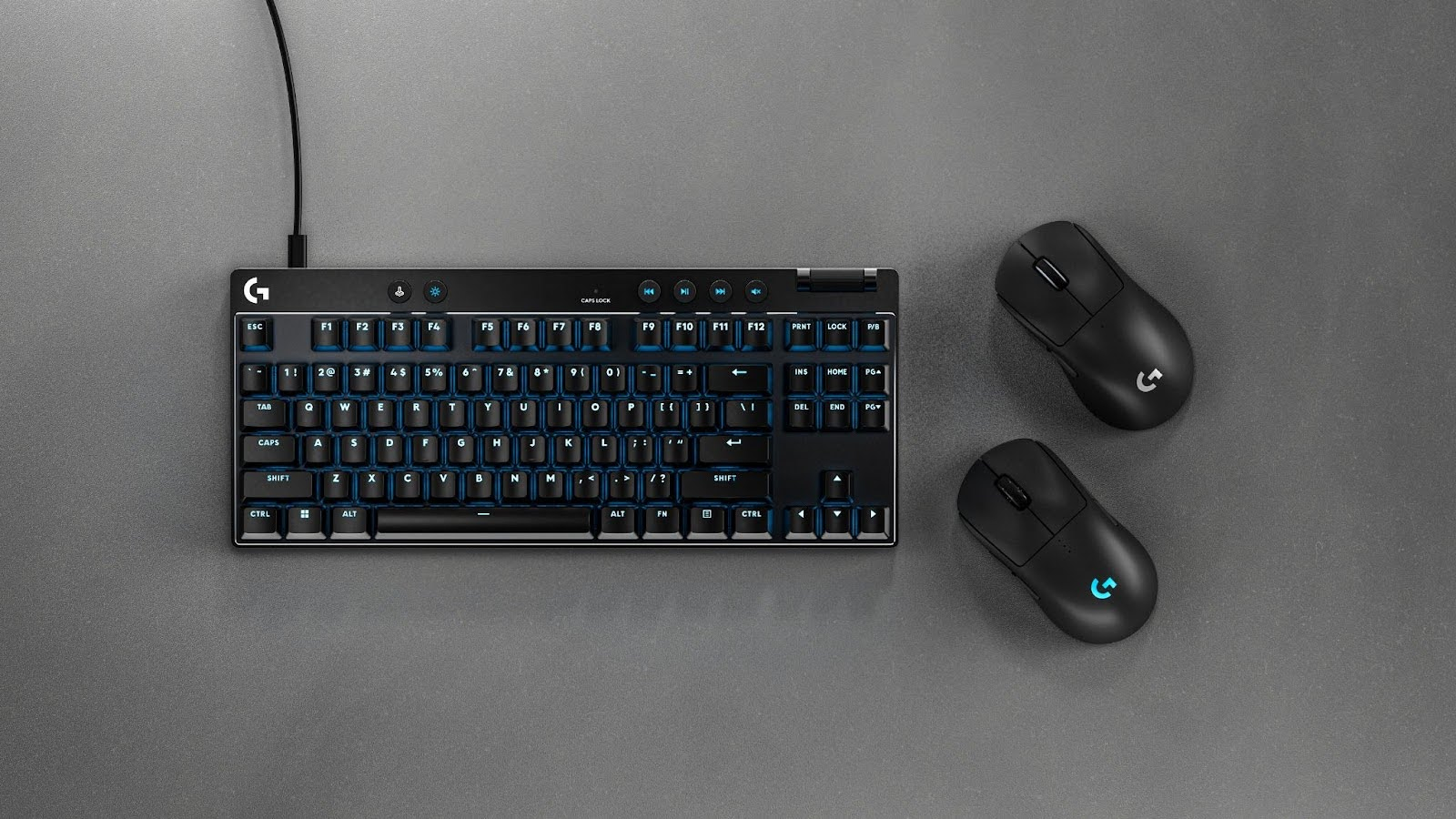

A mismatched keyboard and mouse can make a new gaming setup feel unfinished. One may have useful shortcut keys while the other offers little control, or a wireless connection may add convenience but force you to think about charging. The Best gaming mouse and keyboard choice depends on how much control you need, how much desk space you have, and whether you want a complete set or a stronger standalone mouse.
This list includes wired and wireless combos, full-size keyboards, macro controls, console-friendly bundles, and one mouse-only option for shoppers who already own a keyboard. The Logitech G413 SE and G502 HERO Bundle is our top pick, with the other options ranging from flexible wireless kits to complete starter setups.
Comparison table
| # | Product | Award | Connection | Keyboard and mouse details | Best for |
|---|---|---|---|---|---|
| 1 | Logitech G413 SE and G502 HERO | Best overall | Wired | Mechanical keyboard, 25, 600 DPI mouse, 11 buttons | Competitive PC gaming |
| 2 | Redragon S101-3 PRO | Best macro combo | Wired | Membrane keyboard, 5 macro keys, 800 to 7, 200 DPI mouse | Custom controls and shared spaces |
| 3 | Redragon S101M-KS Wireless | Best wireless flexibility | Tri-mode | 10 media keys, 4800 DPI mouse, 7 buttons | Flexible desk setups |
| 4 | RedThunder K10 Wired | Best wired comfort bundle | Wired | 104 keys, 26-key anti-ghosting, 7, 200 DPI mouse | Long sessions with wrist support |
| 5 | Razer Basilisk V3 | Best standalone mouse | Wired | No keyboard, 26, 000 DPI, 11 programmable buttons | Replacing a mouse only |
| 6 | Orzly Hornet RX250 | Best complete bundle | Wired | 104 keys, 19-key rollover, 3, 200 DPI mouse | New PC and console setups |
| 7 | RedThunder K10 Wireless | Best rechargeable set | 2.4G wireless | Rainbow backlight, 3, 200 DPI mouse | Cable-free desks |
| 8 | MSI Forge GK110 | Best simple controls | Wired | 26-key anti-ghosting, 12, 800 DPI mouse | Straightforward PC play |
| 9 | MageGee K1 | Best compact starter set | Wired | 104 keys, six mouse speed levels | Basic gaming and office use |
1. Logitech G413 SE and G502 HERO: Best Overall

Pros
- Mechanical keyboard with durable PBT keycaps
- HERO sensor tracks up to 25, 600 DPI
- 11 programmable mouse buttons
- Dual-mode scroll wheel
Cons
- Wired setup only
- Keyboard and mouse have different feature styles
- No dedicated macro keys on the keyboard
Best for: PC players who want the strongest keyboard and mouse pairing in this group.
The Logitech G413 SE and G502 HERO is the set we would keep for a serious PC gaming desk. The keyboard feels like the more deliberate half of the bundle, using tactile mechanical switches and PBT keycaps rather than a soft membrane surface. That matters in games with repeated movement inputs, but it also makes the keyboard a better everyday typing tool than most of the combo sets here.
The G502 HERO mouse is the real star. Its HERO sensor reaches 25, 600 DPI and is specified to track without smoothing, filtering, or acceleration. Most players will use a much lower setting, but the important point is control and consistency across sensitivity preferences. Eleven programmable buttons give it a clear advantage over the seven-button RedThunder mice and the simpler mice bundled with MageGee and MSI sets.
The dual-mode hyper-fast scroll wheel is useful beyond gaming. It can move quickly through long pages, then switch to a more tactile mode when precision matters. Logitech's LIGHTSYNC lighting is customizable through Logitech Gaming Software, so this is a better match for someone who wants to tune the mouse rather than simply turn on a lighting effect. Players deciding between this and a broader mechanical keyboard setup for demanding games should remember that this keyboard has tactile switches, but not a large set of dedicated macro buttons.
Its weakness is the lack of wireless freedom and the uneven personality of the bundle. The G502 HERO is feature-heavy, while the G413 SE keeps its keyboard controls restrained. The Redragon S101-3 PRO is the better pick for keyboard macros, and the Razer Basilisk V3 is more compelling if you need only a mouse. Choose the Logitech set when accurate tracking, programmable mouse control, and a mechanical keyboard matter more than wireless convenience.
2. Redragon S101-3 PRO: Best Macro Combo

Pros
- Five dedicated macro record keys
- Six keyboard lighting modes and 10 mouse effects
- Quiet membrane keys
- Adjustable mouse sensitivity from 800 to 7, 200 DPI
- Included wrist rest
Cons
- Wired connection
- Membrane keys lack mechanical switch feel
- Windows 10 and 11 are the stated compatibility focus
Best for: first-time PC gamers who want macros and a quieter full-size keyboard.
The Redragon S101-3 PRO is built around convenience rather than enthusiast hardware. It gives you a full-size keyboard, a gaming mouse, a wrist rest, and software-based customization in one wired setup. The membrane keys are quieter than the mechanical keyboard in the Logitech bundle, which makes this the more considerate choice for a bedroom, office, or shared room.
The keyboard's five dedicated macro keys are its strongest feature. They can record command sequences through the software, giving users a practical way to assign repeated actions without sacrificing the main key layout. The keyboard also has six backlight modes, while the mouse offers 10 lighting effects. These controls are more substantial than the preset lighting on the MSI Forge GK110.
The mouse covers 800 to 7, 200 DPI and has a dedicated button for switching sensitivity during play. That range is wide enough for ordinary desktop use, fast camera movement, and slower aiming without requiring a complicated setup. The anti-ghosting keyboard is intended to register simultaneous key presses, and the included wrist rest gives the full-size layout a more supported feel during extended sessions.
The S101-3 PRO cannot match the Logitech G502 HERO for sensor precision or button count, and its membrane keyboard does not have the crisp response of the G413 SE. The software is also centered on Windows 10 and 11, so Mac users should check their needs before choosing it. For anyone who wants quiet typing, a conventional full-size layout, and genuine keyboard macros, it is a more practical option than many flashy starter combos.
3. Redragon S101M-KS Wireless: Best Wireless Flexibility

Pros
- Wired, Bluetooth, and 2.4G wireless modes
- One receiver controls both devices
- Up to 300 hours of keyboard use with RGB off
- Ten independent multimedia keys
- Seven programmable mouse buttons
Cons
- Mouse sensitivity tops out below the Logitech and Razer options
- Limited Mac keyboard support
- More setup choices than a simple wired kit
Best for: players who switch between wired play, Bluetooth devices, and low-cable desks.
The Redragon S101M-KS Wireless is the most adaptable combo here. Its tri-mode connection supports a cable, Bluetooth, or a shared 2.4G receiver, so it can move between a gaming PC, a laptop, and a cleaner desk without requiring a different keyboard and mouse. The receiver handles both peripherals, which saves a USB port compared with two separate wireless devices.
Its keyboard is aimed at people who use media controls regularly. Ten independent multimedia keys sit alongside 12 combination media controls, and a Windows lock function helps prevent accidental interruptions during play. The detachable USB-C cable is useful when you want to charge or use the kit in wired mode. With RGB disabled, the keyboard is specified for up to 300 hours, although lighting will change the practical figure.
The matching mouse has five selectable DPI levels from 800 to 4, 800, and software can adjust the setting more freely. It has seven programmable buttons and a configurable polling rate from 125 to 1, 000Hz. Those controls are useful, though the 4, 800 DPI ceiling is less ambitious than the 7, 200 DPI Redragon S101-3 PRO and far below the 25, 600 DPI Logitech mouse. DPI alone does not determine accuracy, but it shows where this combo places its priorities.
The S101M-KS is a better wireless tool than the RedThunder K10 Wireless because it offers three connection modes rather than only 2.4G. The tradeoff is a more involved feature set and limited Mac keyboard support. It is the right choice for someone who values flexibility, media shortcuts, and a shared receiver more than the highest sensor specification.
4. RedThunder K10 Wired: Best Wired Comfort Bundle
Pros
- Full-size 104-key layout
- 26-key anti-ghosting
- Steel keyboard plate
- 7, 200 DPI mouse with 1, 000Hz detection rate
- Memory foam wrist rest
Cons
- Mechanical feel is not the same as mechanical switches
- Wired-only design
- Mouse features are less configurable than the top picks
Best for: players who want a full-size wired kit with physical support for the wrists.
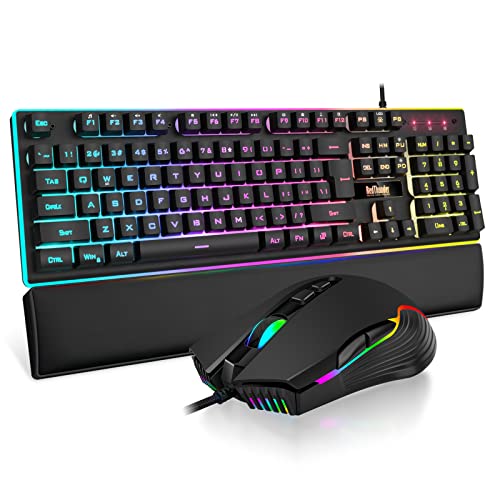
The RedThunder K10 Wired makes a sensible choice for a desk where the keyboard stays in one place. Its most noticeable extra is the soft faux-leather wrist rest, filled with memory foam and shaped to support the hands along the front edge of the full-size keyboard. That is more useful during long sessions than another decorative lighting preset.
The keyboard uses a standard 104-key layout with function keys and a number pad. Its 26-key anti-ghosting specification is relevant for games that combine movement, sprinting, crouching, and ability keys at once. The built-in steel plate is also a reassuring construction detail. The keys are described as having a mechanical feel, but this is not a mechanical-switch keyboard like the Logitech G413 SE.
The mouse reaches 7, 200 DPI and is specified with a 12, 000 frames-per-second scan rate, a 1, 000Hz detection rate, 40G acceleration, and 400 IPS tracking speed. Those figures suggest a mouse designed for quick movement, while the seven-button layout adds more control than a basic office mouse. The keyboard and mouse both use RGB lighting, including a light bar beneath the keyboard and side lighting on the mouse.
The wired K10 beats the wireless K10 on mouse sensitivity and avoids battery management, while the wireless model wins when the cable is the main annoyance. The Logitech set has a more convincing mechanical keyboard and a more sophisticated mouse. Pick the K10 Wired for its wrist support, full-size layout, and sturdy presentation, not for the phrase “mechanical feel” alone.
5. Razer Basilisk V3: Best Standalone Mouse

Pros
- Ergonomic shape with thumb rest
- Eleven programmable buttons
- 26, 000 DPI Focus Plus optical sensor
- Free-spin and tactile scroll modes
- Eleven Chroma RGB lighting zones
Cons
- Mouse only, with no keyboard included
- Requires Razer Synapse for deeper customization
- Wired connection
Best for: players who already own a keyboard and want a highly configurable mouse.
The Razer Basilisk V3 does not belong in a traditional keyboard and mouse bundle, but it earns a place here because it is the strongest standalone mouse in the group. Its ergonomic shape includes a thumb rest, and the button placement is designed around quick access. That makes it particularly attractive to right-handed players who find flatter ambidextrous mice tiring.
There are 11 programmable buttons, enough for push-to-talk, map functions, pings, weapon actions, or application shortcuts. Its Focus Plus optical sensor reaches 26, 000 DPI and is specified to track without smoothing. Again, most people will not need the maximum setting, but the sensor gives room for very different sensitivity preferences and high-resolution movement.
The Hyperscroll tilt wheel is more versatile than the standard wheels on the combo mice. It can free-spin through long documents, then switch to tactile mode for controlled weapon or skill selection. The mouse also has 11 Chroma RGB zones, support for more than 16.8 million colors, and lighting that can react with more than 150 integrated games. The optical switches are rated for a 0.2ms actuation speed and up to 70 million clicks.
The obvious limitation is that you must supply the keyboard. If you need both peripherals immediately, the Logitech G413 SE and G502 HERO is the cleaner choice. If your current keyboard is fine and your mouse is the weak link, the Basilisk V3 is more capable than every bundled mouse here, including the G502 HERO in some button and lighting respects. It is the focused upgrade for a player who knows the mouse matters most.
6. Orzly Hornet RX250: Best Complete Bundle

Pros
- Includes keyboard, mouse, headset, and mouse pad
- Console and PC compatibility
- 104-key membrane keyboard
- 19-key rollover and anti-ghosting
- Ambidextrous 90g mouse
Cons
- Mouse sensitivity stops at 3, 200 DPI
- Headset and keyboard add bulk to the package
- Wired connection throughout
Best for: new PC or console players who need a complete set of accessories.
The Orzly Hornet RX250 is less about refining one peripheral and more about filling an entire gaming station. The package includes a keyboard, mouse, headset, and mouse pad, which makes it the most complete setup in this roundup. It supports PC, PlayStation, Xbox, Steam Deck, and ROG Ally, so it has a broader platform brief than the PC-focused Redragon and MageGee sets.
The keyboard is a wired 104-key membrane model with 19-key rollover and anti-ghosting. It has multiple RGB modes, foldable anti-slip feet, spill-resistant drainage, and a stated eight-million-keystroke rating. Those details make it a more considered design than a generic membrane board, although it cannot provide the tactile feel of the Logitech G413 SE.
The 90g mouse is ambidextrous, which is a meaningful advantage for left-handed users and anyone who changes grip. It offers four DPI levels from 1, 200 to 3, 200, plus RGB lighting and a mouse pad with an anti-skid rubber base. The included stereo headset has cushioned ear cups, a suspended headband, a foldable microphone with 120-degree rotation, and inline volume controls.
The RX250 is not the right choice for high-sensitivity mouse enthusiasts. The Razer Basilisk V3 and Logitech G502 HERO offer far more buttons and much higher sensor ceilings. Its strength is breadth: one compatible wired package covers input, audio, and surface needs. Choose it when completeness and console support matter more than advanced PC controls.
7. RedThunder K10 Wireless: Best Rechargeable Set

Pros
- Shared 2.4G wireless receiver
- Rechargeable keyboard and mouse
- Automatic sleep after two minutes
- Rainbow keyboard lighting with several modes
- 10-million-keystroke keyboard specification
Cons
- Only 2.4G wireless
- Mouse sensitivity is limited to 3, 200 DPI
- Mac keyboard support is limited
Best for: users who want a wireless full-size keyboard and mouse without Bluetooth setup.
The RedThunder K10 Wireless is the simpler wireless alternative to the S101M-KS. It uses a single 2.4G receiver stored in the bottom of the mouse, so setup is close to plug and play: connect the receiver, switch on both devices, and begin. There is no Bluetooth mode, but that also means fewer connection decisions for a desk dedicated to one computer.
The keyboard uses three groups of rainbow backlight effects, two breathing modes, three static modes, and four brightness levels. The lettering uses a two-color injection molding process, which is intended to keep the characters visible over time. The keyboard also has a frosted metal cover and a stated 10-million-keystroke lifetime, giving it a more substantial construction story than the MageGee K1.
Battery information is split between the two devices. The keyboard has a 3, 000mAh battery and the mouse an 800mAh battery, with the manufacturer stating continuous use for eight hours with the lighting on. Both devices enter sleep mode after two minutes without activity, and they wake when you press a key or move back to work. The set should be charged for eight hours before first use, a detail worth planning around.
The 3, 200 DPI mouse is adequate for ordinary gaming and desktop work, but it trails the wired RedThunder K10's 7, 200 DPI and the more advanced mice here. The S101M-KS is a better choice if Bluetooth and software remapping matter. The K10 Wireless makes more sense for a single Windows gaming station where a shared receiver, rechargeable batteries, and a full-size keyboard are the priorities.
8. MSI Forge GK110: Best Simple Controls

Pros
- 26-key anti-ghosting keyboard
- Dedicated volume scroll wheel
- Mouse sensor reaches 12, 800 DPI
- Mouse switches rated beyond 20 million clicks
- Preset RGB effects
Cons
- Less customization than the Logitech and Razer options
- Wired-only design
- Feature details are comparatively limited
Best for: PC players who want essential gaming controls without a complex software ecosystem.
The MSI Forge GK110 takes a straightforward approach. It pairs a keyboard designed around responsive, quiet keystrokes with a mouse that offers a high sensitivity ceiling. There are no extravagant claims about multi-device connectivity or extensive macro control, which may appeal to players who want to plug in a set and get to work.
The keyboard's 26-key anti-ghosting capability helps when several inputs are held together during fast play. A dedicated volume scroll wheel is the most useful extra because it lets you change audio without leaving the game or reaching for a separate control. The keyboard and mouse use predefined RGB effects rather than the deeper per-zone customization found on the Razer Basilisk V3.
The optical mouse sensor reaches 12, 800 DPI, putting it ahead of the RedThunder K10 Wireless, Orzly Hornet RX250, and MageGee K1 on the stated sensitivity range. Its switches are rated for more than 20 million clicks. Those details point to a mouse that is more suitable for quick, controlled movement than the most basic combo mice, even though the set does not offer the G502 HERO's 11 programmable buttons.
The MSI is less flexible than the Redragon S101M-KS and less complete than the Orzly bundle. It also lacks the Logitech set's mechanical keyboard. Still, its anti-ghosting, volume wheel, and 12, 800 DPI mouse cover the fundamentals cleanly. Pick it when you prefer uncomplicated wired controls and do not need elaborate profiles.
9. MageGee K1: Best Compact Starter Set

Pros
- Full-size 104-key layout
- Eight backlight colors and five lighting modes
- Six mouse speed levels
- No software required
- Compatible with Windows, Mac, and Linux
Cons
- Basic wired mouse controls
- No stated anti-ghosting specification
- Membrane keyboard rather than mechanical switches
Best for: casual players who need a familiar full-size keyboard for gaming and general computer use.
The MageGee K1 is the least complicated set in this group. It uses a standard 104-key layout with function keys and a number pad, and it needs no driver or software installation. That makes it easy to share between gaming and office work, especially for someone who does not want to create profiles or manage a peripheral application.
The keyboard has eight backlight colors, five lighting modes, adjustable brightness and light speed, and floating keycaps that can be removed. Double-shot injection molding is used for the lettering, while non-slip pads help hold the board in place. The keys are membrane based, so the feel is softer and less defined than the Logitech G413 SE's tactile mechanical switches.
The mouse has six selectable speed levels from 600 to 3, 200 DPI. That is a useful range for a mix of desktop work and ordinary games, but it lacks the greater sensitivity and richer button mapping offered by the Redragon, Logitech, Razer, and MSI mice. A seven-color breathing light adds visual consistency with the keyboard, and the mouse speed can be changed without software.
The K1 works with Windows, Mac, Linux, and older Windows versions, giving it broader compatibility than several rivals. It is a weaker fit for players who need anti-ghosting, macros, or competitive mouse control. For a straightforward full-size keyboard and mouse that can serve a general computer, it remains the least demanding option.
How to choose the best gaming mouse and keyboard
The right set is defined by the controls you will actually use, not by the longest feature list. Focus on the keyboard switch type, rollover, mouse sensor and buttons, connection method, and the physical shape of the set.
Keyboard switch and layout
Mechanical switches provide a more distinct tactile response than membrane keys, as shown by the Logitech G413 SE. Membrane keyboards such as the Redragon S101-3 PRO, Orzly Hornet RX250, and MageGee K1 are generally quieter and familiar for everyday typing. A full-size 104-key layout gives you a number pad and function row, but it takes more desk space than a compact board.
Anti-ghosting and rollover
Anti-ghosting helps the keyboard recognize several simultaneous inputs instead of dropping one during a busy sequence. The RedThunder K10 Wired and MSI Forge GK110 specify 26-key anti-ghosting, while the Orzly keyboard specifies 19-key rollover. Look for a clear rollover figure when you play games that combine movement, modifiers, and ability keys.
A high DPI number cannot rescue a mouse that feels awkward in your hand.
Mouse sensor and buttons
DPI describes sensitivity, not a complete measure of tracking quality. A mouse with a broad range gives you more room to tune cursor movement, while programmable buttons are useful for abilities, communication, and shortcuts. The Razer Basilisk V3 and Logitech G502 HERO lead on button count, while the Orzly and MageGee mice keep their controls simpler.
Wired and wireless connections
Wired sets avoid charging and pairing, making them dependable for a fixed desktop. The Redragon S101M-KS is the most flexible wireless option because it supports wired, Bluetooth, and 2.4G modes. The RedThunder K10 Wireless is simpler, using a shared 2.4G receiver and rechargeable batteries.
Comfort and desk fit
A full-size keyboard can occupy a substantial portion of a smaller desk, especially beside a mouse that needs room for broad movements. Wrist support can improve the feel of a large layout, which is why the RedThunder K10 Wired stands out with its memory foam rest. Shape matters on the mouse too, with the Razer Basilisk V3 offering a thumb rest and the Orzly Hornet RX250 using an ambidextrous design.
Software and customization
Software can unlock macros, remapping, DPI adjustment, polling control, and lighting profiles. The Redragon S101-3 PRO, Redragon S101M-KS, Logitech G502 HERO, and Razer Basilisk V3 benefit most from software control. If you want a set that works immediately without downloads, the MageGee K1 has the clearest advantage.
Frequently asked questions
Do gaming mouse and keyboard combos work with consoles?
Some do, but compatibility varies by platform and game. The Orzly Hornet RX250 specifically lists PS5, PlayStation 4, Xbox Series X/S, Xbox One, Steam Deck, and ROG Ally support, while most other sets are described primarily for Windows PCs. Check the individual game and console support before buying.
Is a mechanical keyboard necessary for gaming?
No. Mechanical switches provide a more distinct tactile feel, but membrane keyboards can still handle gaming inputs. Choose mechanical if you care about key feedback and typing feel, or choose membrane if quiet operation is more important.
What DPI should a gaming mouse have?
There is no single correct setting. A mouse with several adjustable levels lets you tune sensitivity to your game, screen, and playing style. The maximum DPI listed for a mouse is less important than consistent tracking and a shape you can control.
Are wireless gaming keyboards and mice reliable?
A 2.4G receiver can provide a stable connection for a desktop gaming setup. The Redragon S101M-KS adds Bluetooth and wired modes, while the RedThunder K10 Wireless focuses on 2.4G simplicity. Wireless models need charging and may require occasional pairing or receiver troubleshooting.
What does anti-ghosting do on a gaming keyboard?
Anti-ghosting helps register multiple keys pressed at the same time. It is useful when a game requires movement, sprinting, crouching, and abilities together. A larger stated rollover figure indicates support for more simultaneous inputs, but it does not describe switch feel or general build quality.
Can I buy a mouse-only option instead of a combo?
Yes, if your existing keyboard is still comfortable and responsive. The Razer Basilisk V3 is the mouse-only pick here, with 11 programmable buttons, a thumb rest, and a 26, 000 DPI optical sensor. A complete combo makes more sense when both peripherals need replacing.
The bottom line
The Best gaming mouse and keyboard choice for most PC players is the Logitech G413 SE and G502 HERO. Its tactile mechanical keyboard, accurate HERO sensor, 11 programmable mouse buttons, and dual-mode scroll wheel give it the most capable pairing in this group. The Redragon S101-3 PRO is the better alternative when quiet membrane keys, dedicated keyboard macros, and an included wrist rest matter more.
For wireless desks, choose the Redragon S101M-KS Wireless because its wired, Bluetooth, and 2.4G modes are more flexible than the RedThunder K10 Wireless. If you already have a keyboard, the Razer Basilisk V3 is the clear mouse upgrade.
If you are undecided, buy the Logitech set for PC gaming, the S101M-KS for connection flexibility, or the Orzly Hornet RX250 when a complete console and PC accessory bundle matters most.
As an Amazon Associate we earn from qualifying purchases.