

Shaky walking footage, awkward selfie angles, and a subject that drifts out of frame can make an otherwise good iPhone video feel amateur. A phone gimbal fixes the first problem mechanically, but the better models also add tracking, tripods, extension rods, lighting, and controls that make solo filming much easier.
The Best Gimbal for iPhone depends on how much help you want from the hardware. DJI leads with polished tracking and useful accessories, while hohem and AOCHUAN offer compelling alternatives for travel, family videos, and creator work.
Our top pick is the DJI Osmo Mobile 7. The ten options below cover lightweight travel gimbals, creator bundles, remote controlled models, and kits designed for recording yourself.
Comparison table
| # | Product | Award | Stabilization | Battery | Tracking | Best for |
|---|---|---|---|---|---|---|
| 1 | DJI Osmo Mobile 7 | Best overall | 3-axis | Up to 10 hours | ActiveTrack 7.0 | Everyday iPhone filming |
| 2 | DJI Osmo Mobile 8 | Best advanced model | 3-axis | Up to 10 hours | Native tracking | Vlogging with light and audio |
| 3 | DJI Osmo Mobile 7P | Best creator setup | 3-axis | Up to 10 hours | Dual lens tracking | Solo creators |
| 4 | hohem iSteady X3 SE | Best compact alternative | 3-axis | Up to 11 hours | AI tracking | Travel and family videos |
| 5 | DJI Osmo Mobile 8 Standard Combo | Best standard kit | 3-axis | Up to 10 hours | Native tracking | Phone video beginners |
| 6 | Insta360 Flow 2 Pro | Best creator bundle | 3-axis | Up to 10 hours | Multi-person tracking | Travel and social video |
| 7 | AOCHUAN Smart XE | Best control layout | 3-axis | Up to 10 hours | AI Face Track 4.0 | Manual camera control |
| 8 | hohem iSteady V3 Ultra | Best remote control | 3-axis | Up to 9 hours | AI tracking | Solo filming from a distance |
| 9 | hohem iSteady X3 SE Plus | Best extension rod | 3-axis | Up to 11 hours | AI tracking | High and low angle shots |
| 10 | DJI Osmo Mobile 8 Mic Mini Kit | Best audio bundle | 3-axis | Up to 10 hours | Native tracking | Vlogging with a microphone |
1. DJI Osmo Mobile 7: Best Overall

Pros
- 3-axis stabilization for smooth walking footage
- ActiveTrack 7.0 subject tracking
- Built-in tripod and foldable design
- Up to 10 hours of operation
- Can charge an iPhone through USB-C
Cons
- The tracking module is sold separately
- DJI Mimo is not available through Google Play
- Fewer creator accessories than the 7P
Best for: iPhone owners who want a capable, light, straightforward gimbal for everyday video.
The DJI Osmo Mobile 7 is the one we would hand to most iPhone owners. It folds down for storage, has an anti-slip grip, and includes a built-in tripod, so recording yourself does not require a separate support. At 300 grams, it is light enough for travel and long handheld sessions without feeling like a small camera rig.
Its 3-axis stabilization is the reason to buy it. The motors counter movement as you walk, pan, or reframe, making phone footage look controlled rather than handheld. DJI's ActiveTrack 7.0 is the more important convenience feature for solo creators. It can keep a subject in frame in more situations, and the dual-lens tracking approach is intended to help with close or fast-moving subjects.
The gimbal runs for up to 10 hours and can send power to the phone through USB-C. That combination suits a full day of sightseeing, an event, or a long livestream. DJI Mimo adds ShotGuides and one-tap editing, although the listing says Android users need to download the app from DJI's website because it has been removed from Google Play.
The weakness is the separation between the basic gimbal and DJI's more advanced tracking accessories. The DJI Osmo Mobile 7P includes a multifunctional module with tracking, lighting, and microphone reception, so serious creators should look at that model first. The Osmo Mobile 7 remains the cleaner choice for people who want stable movement, a tripod, and minimal equipment.
If your filming kit also needs a fixed support, consider how a dedicated phone tripod handles stable shots when the gimbal is not the right tool.
2. DJI Osmo Mobile 8: Best Advanced Model

Pros
- Native tracking with audio and lighting support
- 360-degree horizontal pan rotation
- Built-in extension rod and tripod
- Up to 10 hours of battery life
- Direct phone connection for tracking
Cons
- Heavier than the Osmo Mobile 7
- The full feature set depends on the multifunctional module
- DJI Mimo requires a website download on Android
Best for: vloggers who want tracking, lighting, audio reception, and flexible shooting angles in one system.
The DJI Osmo Mobile 8 is a more ambitious phone filming tool than the Osmo Mobile 7. Its built-in tripod and extension rod make it easy to switch from handheld walking footage to a wider selfie or low-angle shot. The 360-degree horizontal rotation also gives it more freedom for moving subjects and continuous camera moves.
The defining feature is native tracking combined with audio and lighting capability. Instead of treating tracking as something that only works inside a particular shooting mode, this model is built around direct phone connection and a multifunctional module. That makes it better suited to a person who records vlogs, live sessions, or tutorials and needs to remain framed while speaking.
The 3-axis stabilization smooths movement during daily filming, while the up to 10-hour battery supports long recording days. Phone charging through the gimbal is useful when the iPhone is handling video, wireless communication, and a bright display for hours. Tutorials and one-tap editing also make the setup less intimidating for first-time users.
Compared with the DJI Osmo Mobile 8 Standard Combo, this version is the more complete route because the standard set does not include the multifunctional module. The DJI Osmo Mobile 8 Mic Mini Kit goes further for spoken content by adding a transmitter, but the regular Osmo Mobile 8 is the better choice when lighting and general creator flexibility matter more than a bundled microphone.
It is not the lightest model here, and buyers who only want stabilized walking footage will get much of the same core benefit from the Osmo Mobile 7. Choose this one when the extra creative controls will be used regularly.
3. DJI Osmo Mobile 7P: Best Creator Setup

Pros
- Multifunctional module for tracking, lighting, and audio reception
- Built-in extension rod and tripod
- Automatic startup after unfolding
- Up to 10 hours of operation
- Supports DJI Mic 2 and Mic Mini reception
Cons
- Heavier than the basic Osmo Mobile 7
- The app setup is less convenient on Android
- More equipment than casual users need
Best for: creators who want a ready-to-use setup for talking-head video, livestreams, and moving subjects.
The DJI Osmo Mobile 7P makes the most sense when a phone gimbal is part of a broader content setup. Its multifunctional module combines intelligent tracking, lighting, and reception for DJI Mic 2 or Mic Mini transmitters. That removes several small pieces of equipment from a solo creator's workflow.
Setup is particularly well considered. Unfold the gimbal, attach a paired phone with the magnetic clamp, and the Mimo app can appear automatically. The built-in extension rod helps create wider framing without holding the gimbal at arm's length, while the integrated tripod lets the phone stand on its own for presentations or livestreams.
The 3-axis stabilization is the foundation, but the dual-lens tracking design is what separates it from simpler phone stabilizers. A subject can move more freely, including during close-up action, while the gimbal works to keep that subject framed. Its battery lasts up to 10 hours, and the multifunctional module can provide extra power to the phone when it is acting as a microphone receiver.
The standard DJI Osmo Mobile 7 is lighter and easier to justify for casual filming, while the DJI Osmo Mobile 8 adds native tracking plus integrated audio and lighting in a newer design. The 7P sits between those approaches, offering a particularly coherent creator kit without requiring the user to assemble every accessory separately.
The main drawback is weight and complexity. Someone who records occasional vacation clips may find the basic Osmo Mobile 7 more comfortable. For a creator who regularly films alone, the 7P's bundled controls and mounting options are much more useful than a lighter handle.
4. hohem iSteady X3 SE: Best Compact Alternative

Pros
- Detachable remote controller
- Up to 11 hours of operation
- Foldable 0.79-pound design
- 32.81-foot remote range
- Supports phones up to 0.66 pounds
Cons
- App features depend on Hohem Joy
- No integrated lighting module
- Extension rod is not included
Best for: travelers and first-time gimbal owners who want remote shooting and a compact folded design.
The hohem iSteady X3 SE is a practical alternative to the DJI models. Its detachable magnetic remote controller is the feature that changes how it is used. Place the gimbal on a surface, step back, and control selfies or videos from up to 32.81 feet away without returning to the phone.
The 3-axis system uses iSteady 8.0 stabilization and is designed for movement that includes jogging or jumping. That does not turn the gimbal into an action camera stabilizer, but it gives the handle a useful role for travel clips, family activities, and energetic vlogging. The foldable body weighs 0.79 pounds and is easy to carry in a small bag.
Battery life is a strong point at up to 11 hours from a two-hour charge. The 0.66-pound payload rating also gives it room for many larger smartphones, including heavier iPhone combinations. One-hand switching between horizontal and vertical orientation is convenient for moving between standard video and short-form social content.
The hohem iSteady X3 SE Plus adds an 8-inch extension rod, making it more flexible for high and low angles. The DJI Osmo Mobile 7 has more polished tracking tools and a more developed creator ecosystem, but the X3 SE has the stronger remote-shooting story for simple setups.
Its limitation is that the Hohem Joy app carries much of the smart functionality, including AI tracking, gestures, and templates. Buyers who prefer to stay mainly in the iPhone's native camera app should check compatibility before choosing it. For travel and family filming, its remote and long runtime make it easy to recommend.
5. DJI Osmo Mobile 8 Standard Combo: Best Standard Kit

Pros
- Native tracking capability
- Built-in tripod and extension rod
- 360-degree horizontal rotation
- Up to 10 hours of battery life
- One-tap editing and guided tutorials
Cons
- Multifunctional module is not included
- Less suitable for audio-focused creators
- Heavier than the Osmo Mobile 7
Best for: beginners who want the Osmo Mobile 8 platform without a creator accessory bundle.
The DJI Osmo Mobile 8 Standard Combo is the straightforward version of DJI's newer design. It gives beginners the core 3-axis gimbal, a magnetic phone clamp, a built-in tripod, and an extension rod. That makes it useful for walking footage, group selfies, low-angle clips, and hands-free recording without adding a separate stand.
Its native tracking and direct phone connection make setup quick. The 360-degree pan rotation helps when the subject moves around the camera, while the gimbal's stabilization keeps ordinary walking and panning footage controlled. DJI also includes tutorials and one-tap editing features for people who want guidance rather than a manual camera workflow.
The up to 10-hour battery supports extended filming, and the gimbal can charge a phone during use. The body weighs about 0.78 pounds, which is manageable for handheld work but noticeably more substantial than a minimalist phone holder. It is a capable middle ground for users who want more than stabilization but do not need every bundled accessory.
The important distinction is what is absent. The multifunctional module is sold separately, so the DJI Osmo Mobile 8 and DJI Osmo Mobile 8 Mic Mini Kit are better fits for built-in lighting or microphone reception. The DJI Osmo Mobile 7P also makes a stronger case for creators who want tracking and audio tools in the box.
This standard combo is best for a beginner who values a clean starting point. It is not the most complete creator package, but it gives the core shooting positions and stabilization without forcing a more elaborate setup.
6. Insta360 Flow 2 Pro: Best Creator Bundle

Pros
- Native tracking across more than 200 iOS apps
- Active zoom tracking up to 15x
- Multi-person tracking
- Built-in tripod, selfie stick, and lighting
- Includes a teleprompter and selfie mirror
Cons
- Android tracking uses the AI Tracker
- The large accessory bundle adds bulk
- Full compatibility depends on the phone model and app
Best for: creators who want an all-in-one travel and social video kit.
The Insta360 Flow 2 Pro takes a different approach from DJI. Rather than focusing mainly on the handle and stabilizing motors, this Ultimate Creator Bundle builds a small production kit around the gimbal. It includes a built-in tripod, selfie stick, selfie mirror, teleprompter, battery, protective carry bag, and integrated lighting.
Tracking is the standout feature. On iPhone, native camera tracking works across more than 200 iOS apps, while Android compatibility uses the AI Tracker. Active Zoom Tracking can follow fast-moving action at up to 15x zoom, and multi-person tracking is useful for family events, dance videos, and group travel clips where one-person framing is not enough.
The 3-axis stabilization handles the basic job of smoothing movement, while 360-degree infinite pan tracking allows continuous rotation around a subject. Free Tilt Mode adds another creative option by maintaining a consistent angle as the phone moves vertically. The battery runs for up to 10 hours and can also act as a power bank.
The bundle is more versatile than the DJI Osmo Mobile 7, but the DJI is simpler to carry and easier to understand for ordinary phone video. The DJI Osmo Mobile 8 has a more focused audio and lighting system, while the Insta360 is the stronger pick for teleprompter work, group tracking, and travel content that benefits from many shooting modes.
The weakness is bulk and compatibility checking. With so many features, there are more pieces to pack and more app behavior to understand. It is the right tool for a creator who will use those extras, not someone seeking the smallest possible stabilizer.
7. AOCHUAN Smart XE: Best Control Layout

Pros
- Focus wheel and zoom slider
- 250-gram payload capacity
- AI Face Track 4.0
- 2, 600mAh battery
- Includes a tripod
Cons
- Smart features rely on the AOCHUAN app
- Heavier than the DJI Osmo Mobile 7
- The listing focuses on iPhone compatibility
Best for: users who want physical focus and zoom controls rather than only app-based shooting.
The AOCHUAN Smart XE is aimed at people who want a little more camera control from a phone gimbal. Its focus wheel and zoom slider are more interesting than a basic shutter button because they let the user adjust the shot without reaching for the touchscreen. That is useful for deliberate framing, product videos, and gradual changes during a take.
The foldable 3-axis design uses three brushless motors and an anti-shake algorithm identified as Smart 7.0. It supports a 250-gram payload, which gives it a reasonable margin for a larger iPhone setup. The body weighs about 0.78 pounds and includes a tripod, so it can move from handheld shooting to a stationary setup without another accessory.
A 2, 600mAh battery supports up to 10 hours of continuous shooting. The one-click video control switches between horizontal and vertical orientation, which fits short-form video and longer landscape clips alike. The AOCHUAN app adds AI Face Track 4.0, gesture control, panorama, wide-angle, cinematic, time-lapse, and motion-lapse modes.
Compared with the hohem iSteady X3 SE, the Smart XE offers more direct camera controls but lacks the Hohem's detachable remote. The DJI Osmo Mobile 7 has a more recognizable tracking system and app workflow, while the AOCHUAN is appealing to someone who thinks in terms of focus, zoom, and shooting modes.
The app is the main caveat. If you only use Apple's native camera and do not want to learn another control layer, the physical controls will not unlock their full potential. For hands-on phone filmmaking, however, this is one of the more distinctive designs in the group.
If your phone rig also needs more grip and carry protection, the small accessories that make phone filming easier are worth considering before you build out the kit.
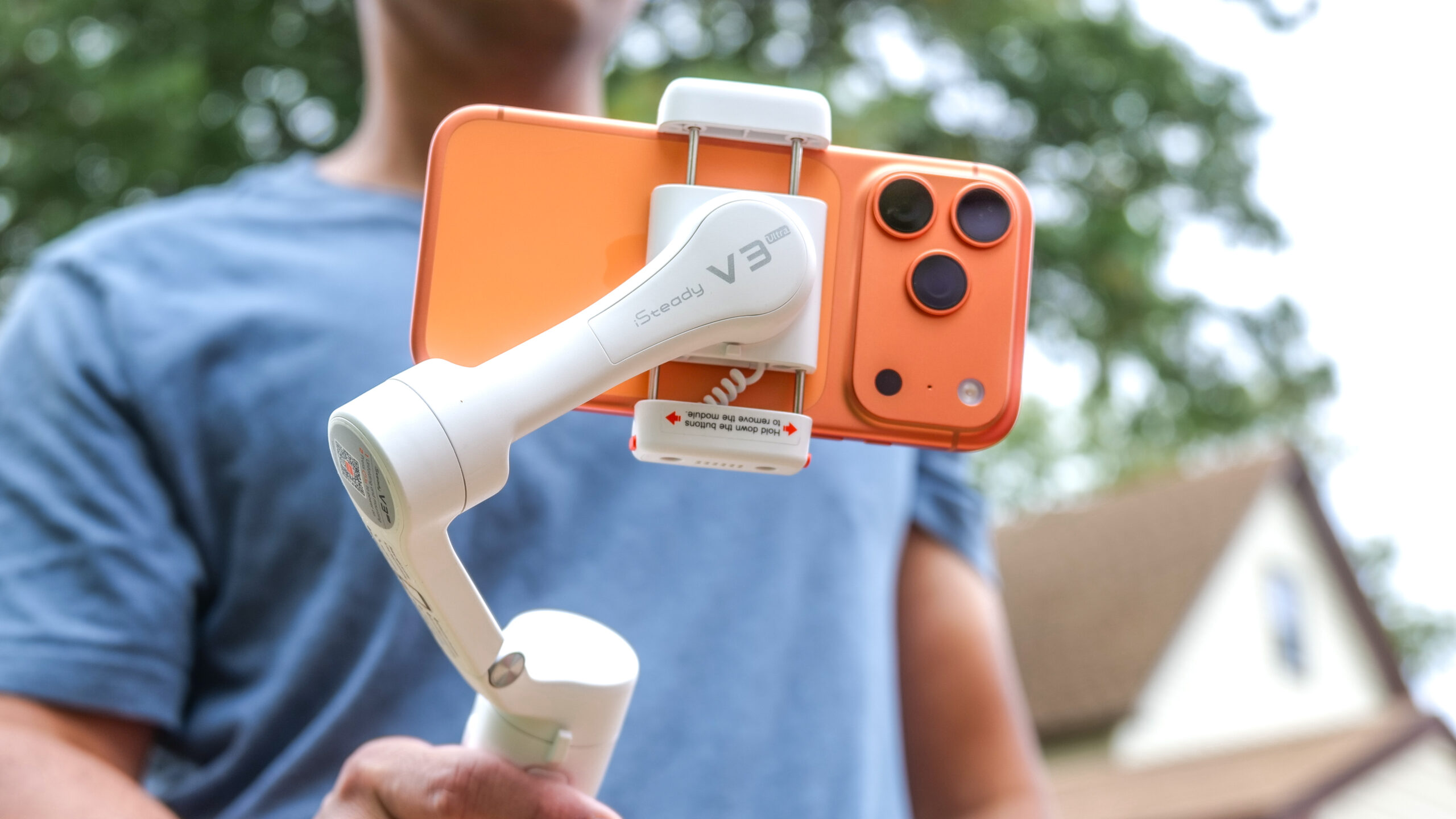
8. hohem iSteady V3 Ultra: Best Remote Control

Pros
- Detachable 1.22-inch touchscreen remote
- Remote tracking and preview controls
- Built-in fill light
- 8-inch extension rod and tripod
- Supports phones up to 14.11 ounces
Cons
- Heavier at 15.1 ounces
- Battery runtime is up to 9 hours
- More complicated than a basic handheld gimbal
Best for: solo creators who need to monitor and control framing from across a room or set.
The hohem iSteady V3 Ultra is built around its detachable remote. The 1.22-inch touchscreen can control tracking, preview shots, and adjust settings from up to 33 feet away. That is a meaningful advantage for fitness instructors, presenters, parents, and anyone who regularly records without a second person behind the phone.
Hohem's iSteady 9.0 system provides 3-axis stabilization for walking and running footage. The gimbal also includes an 8-inch extension rod and a built-in tripod, opening up high-angle, low-angle, and hands-free positions. Its AI tracking can follow faces, pets, and objects with 360-degree panning, so it is not limited to a person standing still in the center of the frame.
The integrated fill light has remote brightness and color temperature control. That is useful for beauty videos, livestreams, and evening clips where the phone needs help with the subject's face. The gimbal supports phones up to 14.11 ounces, folds to 6.3 inches, and weighs 15.1 ounces. Battery life reaches up to 9 hours.
The hohem iSteady X3 SE Plus is lighter and lasts up to 11 hours, but its detachable controller is less ambitious and its extension rod is the main attraction. The DJI Osmo Mobile 8 is a better fit for users who prioritize integrated audio and polished phone connection, while the V3 Ultra wins for remote preview and control.
The V3 Ultra is not the model to choose for the lightest travel bag. It carries more hardware and asks the user to learn more controls. Those who film themselves from a fixed position will appreciate exactly why that extra equipment exists.
9. hohem iSteady X3 SE Plus: Best Extension Rod

Pros
- Built-in 8-inch extension rod
- Detachable remote controller
- Up to 11 hours of battery life
- AI tracking and gesture control
- Supports a 0.66-pound payload
Cons
- The extension rod should be retracted after use
- Heavier than the X3 SE
- No integrated fill light
Best for: creators who want high, low, and wide angles from a compact phone gimbal.
The hohem iSteady X3 SE Plus is the more flexible member of Hohem's compact X3 line. Its built-in 8-inch extension rod changes the camera height and distance without requiring a separate selfie stick. That helps with pet footage, group selfies, overhead perspectives, and low-angle movement.
It retains the detachable remote controller, which can operate the phone from up to 32 feet away with automatic Bluetooth connection. The 3-axis stabilization uses iSteady 8.0 and is intended for walking, action footage, and livestreaming. Switching between landscape and portrait orientation can be done with one hand.
The gimbal weighs 0.85 pounds and supports phones up to 0.66 pounds. Its battery lasts up to 11 hours and takes about two hours to fully charge. The Hohem Joy app adds AI tracking and gesture control, giving solo users ways to start recording or stay framed without touching the phone.
The hohem iSteady X3 SE is lighter and more compact, but it does not include this model's extension rod. The hohem iSteady V3 Ultra offers a more capable touchscreen remote and fill light, while the DJI Osmo Mobile 7 has a more refined tracking experience. The X3 SE Plus sits between them for people who care most about framing variety.
There is one unusual care instruction in the listing: retract the extension rod after use because prolonged stretching may cause deformation. That makes the rod a useful creative feature rather than something to leave extended in a bag. Choose this model when changing camera height matters more than having lighting built into the handle.
10. DJI Osmo Mobile 8 Mic Mini Kit: Best Audio Bundle

Pros
- Includes a Mic Mini transmitter
- Native tracking with lighting support
- 360-degree horizontal rotation
- Built-in extension rod and tripod
- Up to 10 hours of battery life
Cons
- The audio bundle adds equipment to carry
- Heavier than the basic Osmo Mobile 7
- DJI Mimo requires a website download on Android
Best for: vloggers who want stabilized footage and a bundled wireless microphone transmitter.
The DJI Osmo Mobile 8 Mic Mini Kit is the clearest choice for someone who cares about spoken audio as much as smooth motion. It includes the Osmo Mobile 8 gimbal, a Mic Mini transmitter, the multifunctional module, and the magnetic phone clamp. That gives a vlogger a more complete starting point than the standard Osmo Mobile 8.
The gimbal itself has robust 3-axis stabilization, native tracking, and 360-degree horizontal rotation. Its built-in extension rod and tripod support wide group shots, low angles, and stationary recordings. The integrated lighting feature helps keep the subject visible, while the microphone transmitter addresses the other half of a talking video.
Battery life reaches up to 10 hours, and the gimbal can charge the phone during filming. Direct phone connection is intended to make tracking quick, while DJI's tutorials and one-tap editing lower the barrier for a new creator. The body is about 11.3 inches long by 4.2 inches wide and 3.8 inches high according to the product information, so it is portable but not a tiny pocket accessory.
The DJI Osmo Mobile 8 is the better match if you already have audio equipment or mainly record silent travel footage. The DJI Osmo Mobile 7P supports reception for DJI Mic 2 and Mic Mini transmitters, but this kit is the more direct choice for someone who specifically wants a transmitter included. The Insta360 Flow 2 Pro offers a wider creator bundle, including a teleprompter, but its audio setup is not the focus here.
The trade-off is simple: this is more equipment than a casual user needs. For interviews, vlogs, tutorials, and livestreams, the bundled transmitter makes the added kit worthwhile. For ordinary family clips, the Osmo Mobile 7 is easier to carry.

How to choose best gimbal for iphone
The Best Gimbal for iPhone should match the way you shoot, not simply have the longest feature list. Focus on stabilization, tracking, battery life, controls, and the accessories that solve your particular filming problems.
Stabilization and payload
All ten picks use 3-axis stabilization, but motor strength and payload still matter. A gimbal must hold the phone securely while balancing its weight, especially when the iPhone has a substantial case or an attached accessory. The hohem iSteady X3 SE and X3 SE Plus list a 0.66-pound payload, while AOCHUAN lists 250 grams.
A weak match can lead to motor strain, poor balance, or limited movement. Check the phone and case combination against the manufacturer's compatibility guidance before buying.
Tracking method
Tracking determines how much attention you must give the camera. DJI's ActiveTrack and native tracking systems are useful for walking, vlogging, and moving subjects. Insta360 emphasizes native tracking across more than 200 iOS apps, while Hohem uses the Hohem Joy app for AI tracking.
Native camera compatibility is especially important if you prefer Apple's Camera app. App-based tracking can offer more creative modes, but it may require changing your shooting workflow.
The most useful tracking system is the one that works in the camera app and filming mode you already use.
Battery runtime
Battery claims range from up to 9 hours on the hohem iSteady V3 Ultra to up to 11 hours on the hohem iSteady X3 SE and X3 SE Plus. Longer runtime helps on travel days and extended events, but phone charging from the gimbal also matters because the iPhone may run down first.
Think about whether you record short clips or long continuous sessions. A gimbal with a built-in tripod can remain ready on a table, but it still needs enough battery for the whole recording day.
Tripod, extension rod, and portability
A built-in tripod changes a gimbal from a handheld stabilizer into a stationary camera stand. An extension rod adds wider selfies and high or low angles. DJI's Osmo Mobile models include a tripod, while the Osmo Mobile 8 and 7P include an extension rod. The Hohem X3 SE Plus also adds an 8-inch rod.
More moving parts increase creative options and folded size. Pick a compact model for walking tours and a rod-equipped model for solo videos where camera placement matters.
Controls, lighting, and audio
Physical controls can be more useful than another app mode. AOCHUAN includes a focus wheel and zoom slider, while the hohem iSteady V3 Ultra has a detachable touchscreen remote. DJI's Osmo Mobile 8 models combine tracking with lighting and audio reception, and the Mic Mini Kit includes a transmitter.
For spoken content, audio should be planned alongside stabilization. If the video is mostly silent travel footage, lighting and a simple shutter control may matter more than a microphone bundle.

Frequently asked questions
Does a phone gimbal work with every iPhone?
The products in this roundup are designed for iPhone use, but compatibility can vary by phone model, case, and app. Check the manufacturer's supported-device list before buying, especially if you use a large case or additional lens accessory.
Is 3-axis stabilization enough for walking video?
Three-axis stabilization is the standard arrangement for smoothing rotation and movement in phone video. It can make walking footage much steadier, but your walking technique, phone balance, and the gimbal's tracking behavior still affect the final result.
Can these gimbals track a person without another operator?
Yes, the models listed here include tracking features through native phone connection or their companion apps. The DJI Osmo Mobile 7 uses ActiveTrack 7.0, while the Hohem models and Insta360 Flow 2 Pro provide their own AI tracking systems.
Can a gimbal hold an iPhone with a case?
That depends on the clamp and the combined weight of the phone and case. The hohem iSteady X3 SE and X3 SE Plus list support for up to 0.66 pounds, while the AOCHUAN Smart XE lists a 250-gram payload. Verify the dimensions and payload before using a thick case.
Do phone gimbals work with the iPhone Camera app?
Some tracking features work natively, while other creative modes require a companion app. DJI Osmo Mobile 8 models and Insta360 Flow 2 Pro emphasize native tracking, but exact behavior varies by app and phone model.
Can a phone gimbal charge an iPhone?
The DJI Osmo Mobile 7, Osmo Mobile 8, Osmo Mobile 7P, and related DJI models list phone charging during use. That can extend a recording session, though it also uses the gimbal's own battery more quickly.
Do I need a separate tripod with a phone gimbal?
Not necessarily. Every DJI model in this roundup lists a built-in tripod, as do the Insta360 Flow 2 Pro and hohem iSteady V3 Ultra. A separate tripod can still be useful when you need a different height, a more stable base, or a dedicated fixed setup.
The bottom line
The Best Gimbal for iPhone for most people is the DJI Osmo Mobile 7. It combines 3-axis stabilization, ActiveTrack 7.0, a built-in tripod, a foldable body, and up to 10 hours of operation without making the setup unnecessarily complicated.
Creators should step up to the DJI Osmo Mobile 7P for its multifunctional module, or choose the DJI Osmo Mobile 8 Mic Mini Kit when a bundled transmitter is central to the workflow. The Insta360 Flow 2 Pro is the more expansive choice for teleprompter use, multi-person tracking, and travel production.
If you are undecided, choose DJI Osmo Mobile 7 for simple handheld filming and DJI Osmo Mobile 7P for regular solo content creation.
As an Amazon Associate we earn from qualifying purchases.