

A home golf simulator can mean two very different things. One setup measures the ball and club, while another gives you a net, screen, or swing trainer and leaves the launch monitor, projector, and software to you. Choosing the wrong kind is an easy way to end up with a large frame that cannot show a course, or a clever sensor that cannot capture the shot data you actually want.
Our Best best golf simulator picks cover the full range, from the detailed Rapsodo MLM2PRO and Garmin Approach R10 to simple no-ball practice systems and complete projection enclosures. The right choice depends on your available room, appetite for setup, and whether you want structured practice, virtual rounds, or both.
The Rapsodo MLM2PRO Mobile Launch Monitor is our top pick for golfers who want serious shot data without committing to a complete studio. The rest of the lineup spans portable practice nets, motion-based training, and fully equipped home bays.
| # | Product | Award | Tracking or enclosure | Included setup | Best for |
|---|---|---|---|---|---|
| 1 | Rapsodo MLM2PRO | Best overall | Doppler radar and dual cameras, 15 metrics | Mobile app, 3 Pro V1 balls | Detailed shot analysis and simulator play |
| 2 | Zensouds Golf Net | Best portable net | 10 by 7 feet, target pockets | Mat, 5 balls, tee, stakes, carry bag | Basic indoor or outdoor practice |
| 3 | Anything Sports 11-Foot Enclosure | Best compact enclosure | 4K-ready impact screen, blackout cage | Frame poles and projector mount | A dedicated garage bay |
| 4 | PHIGOLF Home Simulator | Best for casual play | 9-axis motion sensor | Swing stick and mobile app access | Social practice and virtual rounds |
| 5 | GoSports 10 by 8 Enclosure | Best screen enclosure | HD impact screen, blackout panels | Frame and enclosure system | Projector-based home simulation |
| 6 | Garmin Approach R10 | Best portable launch monitor | Radar tracking with app metrics | Phone mount | Range sessions and portable data |
| 7 | Haokelball Simulator Cage | Best protective cage | 10 by 8 by 6 feet, 5-ply netting | Impact screen and steel frame | Full swings in a contained space |
| 8 | SkyTrak ST MAX Studio | Best complete studio | Dual radar and photometric monitor | Screen, projector, mat, enclosure | A nearly complete golf room |
| 9 | Golf Daddy Home Simulator | Best no-ball trainer | AI swing analysis | 6 by 3-foot mat and phone tripod | Quiet daily practice |
| 10 | Anything Sports 12-Foot Enclosure | Best for more width | 4K-ready impact screen, blackout cage | Frame poles and projector mount | Wider garages and dedicated rooms |
1. Rapsodo MLM2PRO: Best Overall

Pros
- Combines Doppler radar with dual-camera capture
- Tracks 15 useful ball and club metrics
- Works with iPhone, iPad, and Android devices
- Includes swing video and slow-motion review
- Supports simulator courses and practice modes
Cons
- Requires a compatible mobile device
- Its full simulator experience depends on the Rapsodo Premium system
- It is a launch monitor, not a complete screen and enclosure
Best for: golfers who want detailed shot feedback and room to build a simulator around it.
The Rapsodo MLM2PRO is the most convincing starting point here because it gives a serious golfer something useful before the rest of the room is finished. Put it beside a net, connect it to an iPhone, iPad, or Android device over Bluetooth, and the session becomes more informative than simply watching the ball disappear into a sheet of nylon. It is also the product in this group that most clearly bridges practice and simulation.
Its hardware combines Doppler radar with dual-camera capture and tracks 15 metrics. Those include spin rate, spin axis, ball speed, club speed, club path, launch angle, and carry distance. That mix matters because carry distance alone tells you what happened, while club path and launch data begin to explain why. Spin information is especially useful when you are trying to understand whether a shot is launching correctly or losing distance through unwanted movement.
The software side is unusually broad. The included 45-day Premium trial covers simulator courses, Target Range, Impact Vision, Rapsodo Combine, and access to more than 30, 000 simulator courses. You can also record your swing from any angle and inspect club and ball contact in slow motion. Garmin's Approach R10 offers a similarly portable data-first approach, but the MLM2PRO's dual-camera capture and explicit swing-video tools make it the more engaging choice for golfers who like to review the motion as well as the result.
The main limitation is that this is not a room in a box. You still need a safe hitting area, a net or impact screen, a display, and whatever software arrangement suits your setup. The 45-day Premium trial is useful for exploring the experience, but anyone planning to use the full course library should pay attention to what continues after the trial. This is also too much hardware for someone who only wants occasional swings with no interest in data.
For the golfer who wants a foundation that can grow, the MLM2PRO is the one we'd keep. It works at home or at the range, gives feedback that can shape practice, and leaves the enclosure decision open instead of forcing a particular room layout.
2. Zensouds Golf Net: Best Portable Net

Pros
- 10 by 7-foot hitting net
- Multiple target pockets and a central bullseye
- Includes a three-in-one turf mat
- Comes with balls, rubber tee, stakes, and carry bag
- Designed for indoor and outdoor use
Cons
- Does not include a launch monitor or projector
- Smaller than the dedicated enclosure systems
- Setup depends on securing the ground stakes outdoors
Best for: beginners who need a portable hitting target rather than a complete simulator bay.
The Zensouds Golf Net is a practice net first, and that is exactly how you should approach it. Its 10 by 7-foot format is small enough to move between a basement, living room, garden, or garage, yet large enough to give a new golfer a clear target. The central bullseye and four target pockets make it less monotonous than a plain blank net.
The construction uses 600D Oxford cloth, a 270g high-density nylon net, and a reinforced fiberglass structure described as 0.45 inches thick. Those details point to a more substantial practice target than a lightweight pop-up sheet. The net is intended to absorb normal ball impact, but safe placement still matters. Indoors, leave plenty of clearance and inspect the frame and net before every session.
This set is more ready to use than the enclosure-only products. It includes a three-in-one turf golf mat, five golf balls, a rubber tee, a carry bag, and four ground stakes. The portability is a real advantage over the 85-pound Anything Sports enclosures or the 79-pound GoSports system. You can put the net away instead of dedicating a room to it.
It does not create a simulator by itself. There is no launch monitor, impact projection surface, or course software, so it cannot compete with the Rapsodo MLM2PRO or PHIGOLF for digital feedback. The mat is also a practice accessory rather than the kind of full hitting surface found in the SkyTrak studio. For readers comparing portable options, the practical differences between a net and a home simulator setup are worth understanding before choosing a permanent installation.
Choose the Zensouds when the goal is to hit more often with minimal commitment. It is particularly sensible for a beginner, a family that wants a shared practice target, or a golfer who needs something that can move outside when the weather cooperates.
3. Anything Sports 11-Foot Enclosure: Best Compact Enclosure

Pros
- 4K-ready impact screen
- Blackout cage helps limit light bleed
- Includes projector mount and frame poles
- Side shank nets add containment
- 12-month warranty and U.S.-based support
Cons
- Projector and turf are not included
- Heavy at about 86 pounds
- The listed enclosure dimensions require careful room planning
Best for: golfers building a compact garage or basement projection bay.
The Anything Sports 11-Foot Enclosure is aimed at the golfer who has already decided to build a real simulator space. It is not a sensor, and it is not a simple practice net. The package gives you the cage, impact screen, side shank nets, frame poles, and a projector mount, creating the physical boundary around a future simulator.
Its impact screen is described as 4K-ready and positioned one inch inside the frame for near-full coverage. That close fit is useful for a cleaner projected image and less stray light around the screen. The blackout cage also has a practical purpose: it keeps outside light from washing out the picture. Those features matter more in a garage with overhead lighting than in a dark dedicated room.
The listed size is 11 feet wide, 8 feet 4 inches high, and 5 feet deep, with a product weight of about 86 pounds. That is a meaningful footprint, but it is still more compact than a full studio arrangement. The included projector mount removes one installation decision, and the manufacturer says the frame can be assembled without special tools.
The catch is the list of things the package does not include. Turf and projector shown in the product presentation are not included, so this is a shell for a simulator rather than a complete simulator. You will also need a launch monitor, and the room must leave enough space for a full golf swing in front of the five-foot enclosure depth. The GoSports system supplies a similar screen-oriented foundation, while the SkyTrak ST MAX includes the electronics and hitting surfaces this package leaves out.
The 12-month no-questions-asked warranty and U.S.-based phone and email support are reassuring for a frame that needs to become a regular fixture. Pick it for a compact, screen-first build, not for a plug-and-play afternoon of virtual golf.
4. PHIGOLF Home Simulator: Best for Casual Play

Pros
- 9-axis motion sensor tracks the swing
- Includes a golf swing stick
- Supports iOS and Android devices
- Offers virtual courses, practice, and game modes
- Supports solo, local, and online play
Cons
- Motion tracking is not the same as ball measurement
- Needs a compatible device and app
- It does not include a net, screen, or projector
Best for: households that want interactive golf practice and game-style play in a small space.
The PHIGOLF Home Simulator takes a different route from the Rapsodo and Garmin units. Instead of watching a real ball and estimating its flight, you swing the included golf stick and let a 9-axis motion sensor translate the movement into the app. That makes it a much easier fit for a family room, office, or any space where hitting real balls is impractical.
The experience is built around play. PHIGOLF supports more than 38, 000 courses through PHIGOLF and E6 Connect, along with full rounds, practice sessions, and multiple game modes. Solo play is only part of the appeal. The system supports local play with family and friends and supported online matches, so it has a social character that the data-heavy launch monitors do not emphasize.
There is also a more serious practice layer. The product information describes virtual driving ranges, swing feedback, and AI coaching with body pose tracking, swing metrics, visual annotations, and corrective feedback through the phases of the swing. You can use the included stick indoors or attach the sensor to a compatible real club for outdoor practice. That flexibility gives PHIGOLF more room to grow than a toy-like swing game.
Still, the distinction between motion tracking and ball tracking matters. PHIGOLF does not provide the Rapsodo's spin rate, spin axis, ball speed, or club path from an actual struck shot. It also does not give you the impact feedback of a net and real ball. Readers considering virtual training should also know that the difference between motion-based practice and ball-based feedback can change what kind of improvement they see, even when both systems feel interactive.
PHIGOLF is the better choice for engagement, convenience, and shared play. It is not the right pick for a golfer who wants to build a precision-focused launch-monitor bay, but it is unusually approachable for regular indoor practice.
5. GoSports 10 by 8 Enclosure: Best Screen Enclosure

Pros
- 10 by 8-foot enclosure format
- Multi-layer HD impact screen
- Blackout panels improve projector visibility
- Foam padding and screen design reduce rebound
- Includes frame and installation hardware
Cons
- Does not include a launch monitor or projector
- Weighs about 79 pounds
- Takes more permanent space than a portable practice net
Best for: golfers who want a sturdy projection enclosure and plan to choose the electronics separately.
The GoSports 10 by 8 Enclosure is the most polished screen-and-frame option for a golfer who wants to assemble the simulator in stages. It supplies the physical enclosure, a frame, an HD impact screen, and installation hardware. Add a launch monitor, projector, and hitting mat, and the room begins to resemble a dedicated home bay rather than a practice net in front of a wall.
The screen uses a multi-layer construction intended to withstand high-speed golf ball impacts while reducing rebound. That is important for both safety and image quality. A screen that snaps back aggressively makes the room less comfortable, while a surface that wrinkles heavily makes projected course graphics harder to enjoy. GoSports also uses blackout enclosure panels to block outside light and improve projector brightness.
The stated dimensions are 10 by 8 feet, with product dimensions of approximately 127.2 inches long, 72 inches wide, and 96 inches high. The odd-looking product measurements are a reminder to measure the actual room rather than relying only on the product name. At about 79 pounds, it is also a serious assembly that you will probably want to position carefully before installing the rest of the equipment.
Compared with the Anything Sports 11-Foot Enclosure, the GoSports package has a similar role but puts more emphasis on the multi-layer screen, foam padding, and blackout construction. Anything Sports includes a projector mount and a 12-month warranty, while GoSports gives you a frame and HD screen kit without the launch monitor or projector. The choice comes down to which part of the physical build matters most to your room.
This is not the choice for someone who wants to open a box and start playing. It is a good foundation for a deliberate build, particularly if you already have a preferred monitor and projector. Plan the hitting position, ceiling clearance, and cable paths before assembly.
6. Garmin Approach R10: Best Portable Launch Monitor

Pros
- Compact portable design
- Tracks club and ball metrics through the Garmin Golf app
- Waterproof IPX7 construction
- Includes a phone mount
- Up to 10 hours of battery life
Cons
- Full virtual rounds require an active subscription
- Some features require a compatible smartphone
- It is not a screen, net, or complete simulator enclosure
Best for: golfers who move between home practice, indoor sessions, and the driving range.
The Garmin Approach R10 remains one of the easiest launch monitors to understand. It is a small, portable device that can move from a driving range to a home net without demanding a permanent installation. Its dimensions are about 3.5 inches long, 2.8 inches wide, and 1 inch high, and the weight is about three-quarters of a pound. That is genuinely travel-friendly.
Paired with a compatible smartphone and the Garmin Golf app, it tracks club head speed, ball speed, swing tempo, ball spin, launch angle, and more. Garmin lists accuracy figures of plus or minus 3 mph for club head speed, plus or minus 1 mph for ball speed, and plus or minus 1 degree for launch angle and launch direction. Those published tolerances give the numbers context. They are useful for spotting patterns and comparing sessions, not a promise that every shot will match a professional fitting bay.
Training mode records stats by club and shows a shot dispersion chart based on estimated ball flight. Automatically recorded video clips can include the metrics from that swing, which makes it easier to connect a visible movement with a result. The included phone mount attaches to a golf bag, a small but thoughtful touch when you are practicing outside and do not want to build a separate stand.
The R10 also supports virtual rounds on more than 42, 000 courses with an active subscription and the Garmin Golf app. That makes it a stronger simulator component than a basic range monitor, but the subscription requirement should be part of the decision. Compared with the Rapsodo MLM2PRO, the Garmin is the more established grab-and-go option, while Rapsodo adds dual-camera capture and more explicit contact review.
Its IPX7 water resistance and up to 10 hours of battery life suit outdoor use particularly well. The weakness is not portability but completeness. You still need a safe hitting arrangement and a display, and golfers who want a fully assembled room should look at the SkyTrak studio instead.
7. Haokelball Simulator Cage: Best Protective Cage

Pros
- Full side and overhead protection
- 10 by 8 by 6-foot enclosure
- Reinforced impact screen with tension points
- Five-ply netting and steel frame
- Supports indoor and outdoor practice
Cons
- Projector, launch monitor, software, and mat are not included
- Requires a large dedicated footprint
- The screen and frame still need careful setup for a flat projection surface
Best for: golfers who need full-swing containment before adding simulator electronics.
The Haokelball Simulator Cage is built around a practical problem: a golf ball does not care where you intended it to go. Its side netting and overhead protection are designed to contain slices, shanks, and high shots, giving a garage or backyard more protection than a simple forward-facing net. That makes it useful even before you add a projector or launch monitor.
The enclosure measures 10 by 8 by 6 feet. The product dimensions list a height of 96 inches, a length of 120 inches, and a width of 71.76 inches. That is enough room for drivers, irons, wedges, and chip shots according to the product description, but the six-foot depth is not the same as the space needed for the golfer's stance and backswing. Measure from the golfer's position to the screen and behind the golfer, not just the frame dimensions.
The impact screen uses an anti-sag design with a reinforced top support rod and multiple tension points. A flatter screen is easier to project onto and less distracting during practice. The cage uses a reinforced steel frame and five-ply netting, with components intended for quick assembly indoors or outdoors.
The package stops short of being a complete simulator. The projector, launch monitor, simulator software, and hitting mat are specifically not included. That makes it less immediately useful than the SkyTrak ST MAX Studio, but more flexible for a golfer who already owns some equipment. It also offers a more protective structure than the Zensouds Golf Net, which is portable but not a full side-and-overhead cage.
Pick Haokelball when safety and containment lead the decision. It is a sensible shell for a growing home bay, provided you are prepared to select the monitor, projection equipment, and hitting surface separately.
8. SkyTrak ST MAX Studio: Best Complete Studio

Pros
- Includes launch monitor, enclosure, screen, projector, and hitting mat
- Combines dual Doppler radar with photometric cameras
- Includes GOLFTEC Speed Training
- Full HD projector rated at 3, 500 lumens
- Includes putting turf and ball tray
Cons
- Requires careful ceiling and swing-clearance planning
- Studio 10 needs an 8-foot 6-inch ceiling minimum
- The complete package is large and difficult to relocate
Best for: serious golfers who want one coordinated home studio package.
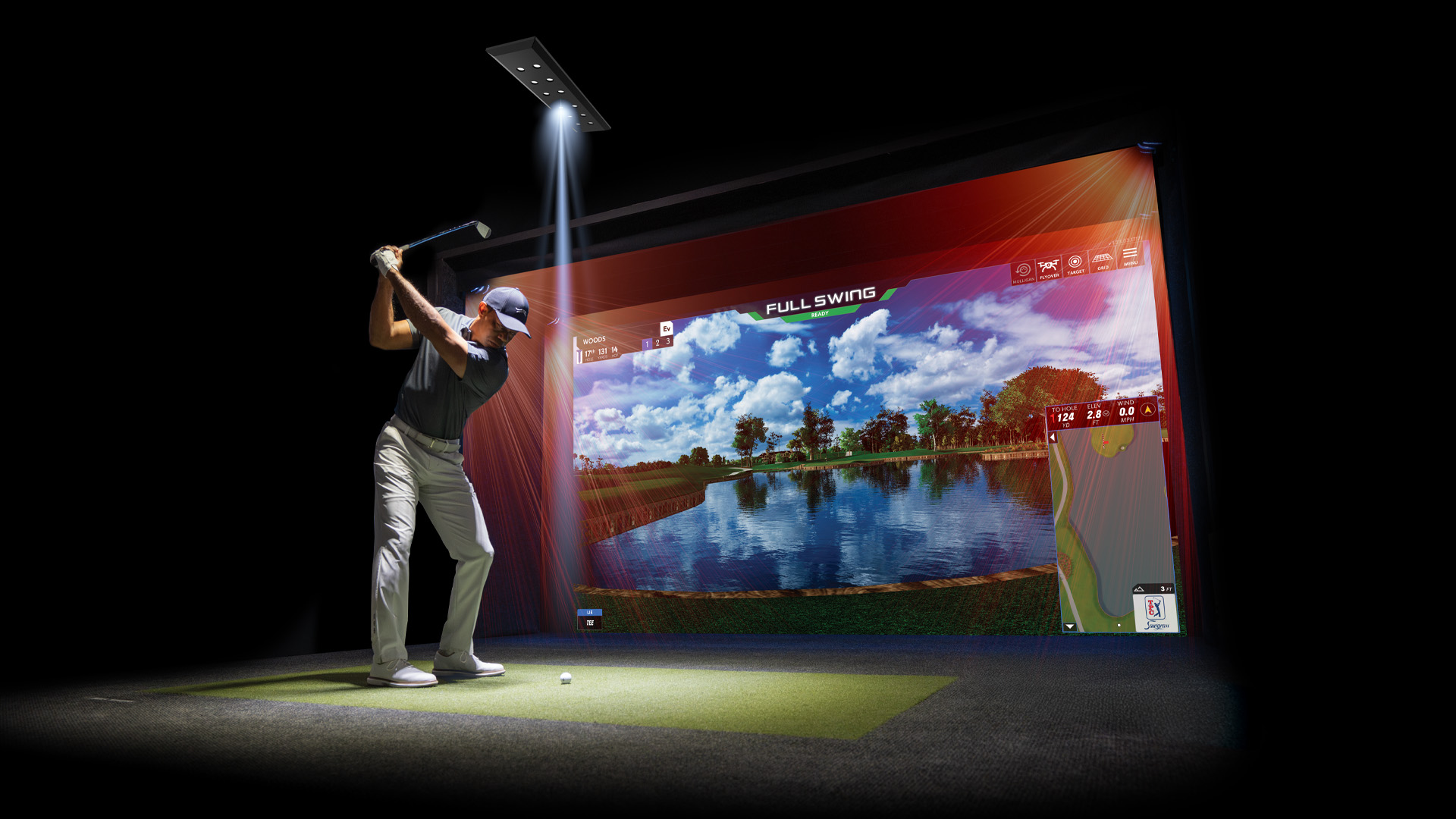
The SkyTrak ST MAX Studio is the closest thing in this group to a complete room-in-a-box. Instead of buying an enclosure now and deciding on electronics later, the package brings together the ST MAX launch monitor, impact screen, frame, HD projector, hitting mat, putting turf, and ball tray. That coherence is its biggest advantage. You can plan the room around one defined system rather than reconcile parts from several manufacturers.
The launch monitor combines dual Doppler radar with photometric cameras and includes GOLFTEC Speed Training. That combination is aimed at more than virtual scenery. It is designed to supply shot information and speed-focused practice in a single system. The package also includes dual ports so you can charge and play without interruption, a useful detail during long indoor sessions.
Room planning is not optional. The Studio 10 fits a space listed as 10 feet wide, 8 feet 6 inches high, and 5 feet 4 inches deep. The Studio 12 needs 12 feet of width at the same 8-foot 6-inch ceiling minimum, while the Studio 13 Deep needs 13 feet of width, 10 feet of height, and 10 feet of depth. Swing a club in the intended space before ordering. A simulator bay that looks fine on paper can feel cramped once the golfer, mat, monitor, and projector are all in place.
The GT2000HDR projector supplies Full HD clarity, 3, 500 lumens, and a short-throw laser design with low latency. The 5 by 5-foot hitting mat is intended to balance turf feel and durability, and the package adds putting turf plus a ball tray that holds up to 100 balls and includes a phone holder. These inclusions make it much more complete than the GoSports or Anything Sports enclosures, which are physical shells without a monitor or projector.
The weakness is commitment. This is a substantial installation, not a portable monitor you can take to the range, and the ceiling requirements eliminate many spare rooms. It is also more equipment than casual players need. For a golfer with suitable space who wants a coordinated, dedicated practice room, though, the ST MAX Studio is the most finished option in the roundup.
9. Golf Daddy Home Simulator: Best No-Ball Trainer

Pros
- No-ball practice works in small indoor spaces
- AI-powered swing analysis and real-time feedback
- Includes a 6 by 3-foot practice mat
- Uses a phone and tripod for quick setup
- Designed for indoor and outdoor use
Cons
- Does not measure real ball impact
- Requires a phone and app
- Not a substitute for a launch monitor and hitting net
Best for: golfers who want a quiet, repeatable swing routine without hitting real balls.
The Golf Daddy Home Simulator solves a different problem from every real-ball product here. You do not need a net, impact screen, or ball flight because the system is designed for no-ball practice. Put the phone on the tripod, open the app, and begin swinging on the included mat. For an apartment, office, or garage where a full strike is not realistic, that simplicity is the point.
The system uses AI-powered tracking to analyze the swing and predict ball flight, with real-time feedback intended to expose mistakes and build consistency. It is a useful concept for daily practice because it removes the friction of collecting balls, checking a net, or setting up a launch monitor. The product also supports indoor and outdoor use, so the same routine can follow you to a backyard or a larger practice space.
The mat measures 6 feet by 3 feet. That gives enough room for a focused stance and repeated movement, while remaining easier to store than a 5 by 5-foot hitting mat or full enclosure. The product description does not list the specific swing metrics, so it is better to view this as guided feedback rather than assume it provides the same club and ball measurements as Garmin or Rapsodo.
That distinction is the real weakness. A predicted ball flight is not a struck ball, and AI swing analysis cannot replace the information from actual spin, launch, or impact data. It also depends on correct phone placement and app operation. Golfers who want to connect a change in swing to a real shot should choose the Rapsodo MLM2PRO or Garmin Approach R10 instead.
Golf Daddy makes sense for a busy golfer who values frequency over a complete simulation room. It is the easiest system here to use for a short daily routine, and the quiet no-ball format makes it suitable for spaces where a traditional golf setup would be impossible.
10. Anything Sports 12-Foot Enclosure: Best for More Width

Pros
- Wider 12-foot enclosure option
- 4K-ready impact screen
- Blackout cage and side shank nets
- Includes projector mount and frame poles
- 12-month warranty and U.S.-based support
Cons
- Projector and turf are not included
- About 86 pounds
- Needs more horizontal room than the smaller version
Best for: golfers who want extra width for a dedicated simulator room or larger garage.
The Anything Sports 12-Foot Enclosure is the wider sibling to the compact Anything Sports package. Its value is not a different type of screen or a different mounting system. It is the extra room. The listed size is 12 feet wide, 9 feet 4 inches high, and 5 feet deep, making it the more comfortable fit for golfers who want a broad projection area or need to accommodate different players.
Like the smaller package, it includes a 4K-ready impact screen, blackout cage, side shank nets, frame poles, and projector mount. The screen is designed to sit one inch inside the frame, which helps limit gaps and light bleed. A blackout enclosure is especially useful when the room cannot be fully darkened, though projector performance will still depend on the separate projector you choose.
The product weight is about 86 pounds, so this is not something to casually shift between rooms. The manufacturer says the components fit together without special tools and that setup can take under an hour. The 12-month warranty and U.S.-based support add some reassurance for a large structure that will take repeated ball impacts.
The extra width is also the main compromise. A wider cage does not automatically mean the golfer has more room behind the ball, because the listed depth remains five feet. You still need enough clearance for a full swing, a hitting mat, and safe movement around the frame. The smaller Anything Sports enclosure is a better match for a tighter room, while the SkyTrak studio is the more complete answer if you want the monitor and projector included.
Choose this version when the room can accommodate it and multiple golfers will use the space. It gives a clean physical foundation for a custom setup, but remember that the enclosure is only one part of the simulator.
How to choose best golf simulator
A simulator should be chosen as a system, not just as a gadget. Start with the kind of feedback you want, then work backward through the room, screen, mat, and software requirements.
Shot measurement
A launch monitor that sees real shots is the right choice when you want to understand carry, speed, launch, or spin. The Rapsodo MLM2PRO tracks 15 metrics through Doppler radar and dual cameras, while the Garmin Approach R10 tracks key club and ball information through its app. These systems need a safe hitting area and enough ball flight or impact-screen space for the monitor to work properly.
Motion sensors such as PHIGOLF are better suited to interactive practice without a struck ball. Golf Daddy goes further into quiet no-ball training with AI swing feedback. They can help establish a repeatable movement, but they should not be judged by the same standard as a real-ball launch monitor.
Room dimensions
Measure ceiling height, width, depth, and the golfer's actual swing clearance. The SkyTrak Studio 10 lists an 8-foot 6-inch ceiling minimum, while its Studio 13 Deep requires 10 feet. Enclosures can also have product dimensions that differ from their headline size, so allow room for the golfer, mat, monitor, and projector position.
A narrow room may suit a portable monitor and net better than a permanent screen. A dedicated garage can support the Anything Sports or GoSports systems, provided the frame does not interfere with the backswing.
The right simulator begins with a comfortable swing, not the largest screen that fits on paper.
Impact screen and containment
The screen must do two jobs: stop the ball safely and display the image clearly. Multi-layer screens, blackout panels, tension points, and foam padding can reduce rebound and improve the projection surface. The GoSports and Anything Sports packages emphasize these physical features, while the Haokelball cage adds side and overhead protection for errant shots.
A plain practice net is enough for a launch monitor session if it is properly positioned, but it cannot display a course. The Zensouds net is portable and target-focused, while a dedicated enclosure is a better choice when virtual rounds are central to the plan.
Projector and display
A projector-based simulator needs an impact screen and a room layout that keeps the projector out of the swing path. The SkyTrak package includes a Full HD GT2000HDR projector rated at 3, 500 lumens, while the enclosure-only packages include projector mounts but leave the projector selection to you.
Blackout panels help when ambient light is difficult to control. Brightness, throw distance, latency, and screen size all affect how natural the course looks. Do not buy an enclosure based only on the screen resolution it can support, since the actual projector determines the image you see.
Portability and setup
The Garmin Approach R10 and Rapsodo MLM2PRO are the most flexible choices for golfers who practice in multiple places. A portable net such as Zensouds can follow the same routine. Full enclosures are better for repeatable access, but their frames and mats require a dedicated location.
Consider how often you will practice. A compact no-ball trainer may be used more consistently than a large studio if every session requires an hour of setup. Conversely, a permanent bay makes sense when the room is available and several golfers will use it.

Frequently asked questions
What is the best golf simulator for real shot data?
The Rapsodo MLM2PRO is the strongest choice in this group for broad real-shot analysis. It combines Doppler radar and dual-camera capture and tracks 15 metrics, including spin, speed, club path, launch angle, and carry distance. The Garmin Approach R10 is a more portable alternative with useful app-based club and ball metrics.
Can a golf net work with a launch monitor?
Yes. A launch monitor such as the Rapsodo MLM2PRO or Garmin Approach R10 can be used with a properly positioned net, provided the device has the room and ball impact information it needs. A net will contain the ball but will not provide a projected course unless you add a projector and compatible impact screen.
Do these golf simulators include a projector?
Only the SkyTrak ST MAX Studio package in this group includes a projector. The Anything Sports and GoSports products are enclosure systems with impact screens and frames, so you must supply the projector and launch monitor separately. The portable launch monitors and motion trainers do not include a projection enclosure.
How much ceiling height does a home golf simulator need?
The required height depends on the golfer, club, swing, and enclosure. SkyTrak lists a minimum ceiling height of 8 feet 6 inches for its Studio 10 and Studio 12 configurations, and 10 feet for Studio 13 Deep. Measure a full swing in the intended room rather than relying on a general rule.
What is the difference between PHIGOLF and a launch monitor?
PHIGOLF uses a 9-axis motion sensor and a swing stick to turn movement into interactive golf play and practice. A launch monitor such as the Rapsodo MLM2PRO or Garmin Approach R10 analyzes a real struck shot and reports ball or club information. PHIGOLF is more game-oriented, while a launch monitor is more useful for examining actual ball flight.
Can Golf Daddy be used without golf balls?
Yes. Golf Daddy is designed as a no-ball practice trainer, using a phone, app, mat, and AI-powered swing analysis. That makes it suitable for quieter indoor practice. It does not replace the impact and shot data of a real-ball launch monitor.
Is an enclosure enough to make a complete simulator?
No. An enclosure provides containment and, if it includes an impact screen, a surface for projection. You still need a launch monitor, simulator software or app, display equipment, and a suitable hitting mat unless those pieces are included in the package. The SkyTrak ST MAX Studio is the most complete package here because it includes those major components.
The bottom line
The Best best golf simulator for most golfers is the Rapsodo MLM2PRO. It offers the most useful mix of detailed shot metrics, swing video, mobile compatibility, and simulator features, while allowing you to begin with a net and expand into a more permanent room later. The Garmin Approach R10 is the better alternative for golfers who prioritize portability and range sessions.
For a complete dedicated room, choose the SkyTrak ST MAX Studio if your ceiling and swing clearance meet its requirements. If you already own or plan to select the electronics separately, the Anything Sports 11-Foot Enclosure and GoSports 10 by 8 Enclosure provide more focused screen-and-frame foundations.
If you are undecided, start by measuring the room and deciding whether you need real ball data or simply a consistent way to practice.
As an Amazon Associate we earn from qualifying purchases.